Ride Sharing App for Women: Safety Features to Build
The safety features a women-first cab app needs: driver preference, trusted contacts, SOS, live trip sharing and a safe-arrival check. We build it under your brand.

Written by Babita Kumari, Business Developer
Reviewed by the PRS India software & mobile app development team
13 min read
Written from production. Our articles draw on products we run live and the client work behind them, and are revised as the systems they describe evolve.
A woman decides to take a cab in about ten seconds. She looks at the driver's name, the car, and whether the app lets someone know where she is. If any of these feels weak, she walks to the auto stand instead. A ride sharing app for women has to earn that trust in the app itself, before the first trip.
This guide lists the safety features to build, screen by screen. It is for founders who plan a women-first cab service, and for existing taxi owners who want a women mode. PRS India builds your own taxi and ride sharing app: a rider app, a driver app and a safety desk on the web, under your brand, with your data and your source code.
Key takeaways
- Women ask three things about a cab: who is the driver, who knows where I am, and who helps if something goes wrong.
- Five features cover most of it: driver preference, emergency contacts, SOS, live trip sharing and a safe-arrival check.
- Women drivers need protection too. Make joining the women group their choice.
- Every alert must land on a person at a safety desk who can act. A button that sends nothing is worse than no button.
- Safety data is private. Collect only what you need and say why.
What is a ride sharing app for women?
It is a taxi or ride sharing app that is set up around the safety of women riders. Some are fully women-only, with women drivers and women riders. Others are normal apps with a women mode. Both need the same base: a booking app, a driver app and an admin panel. The safety features sit on top.
If you want to see the base first, read our guide on the must-have features of a taxi booking app. This guide covers only what is added for women.
Women-only or women mode?
Women-only means women drivers for women riders. Your driver pool starts small, so your first cities need careful planning.
Women mode means any driver can sign up, but riders can ask for women drivers first. This is quicker to launch. The app must be honest when no woman driver is free.
The problem
Where women riders lose trust in a cab app
Most worries come from the same six gaps.
- No choice of driver. The rider cannot say she prefers a woman driver, even when one is nearby.
- Nobody knows where she is. Sharing the trip means copying a link by hand while the cab is moving.
- SOS goes nowhere. The button only calls a number. No one at the company sees the trip.
- Wrong turn, no alert. The cab leaves the route and the app says nothing.
- No end-of-trip check. The trip ends and the app forgets her, even at midnight.
- Drivers feel unsafe too. Women drivers need a way to decline a rider and to call for help.
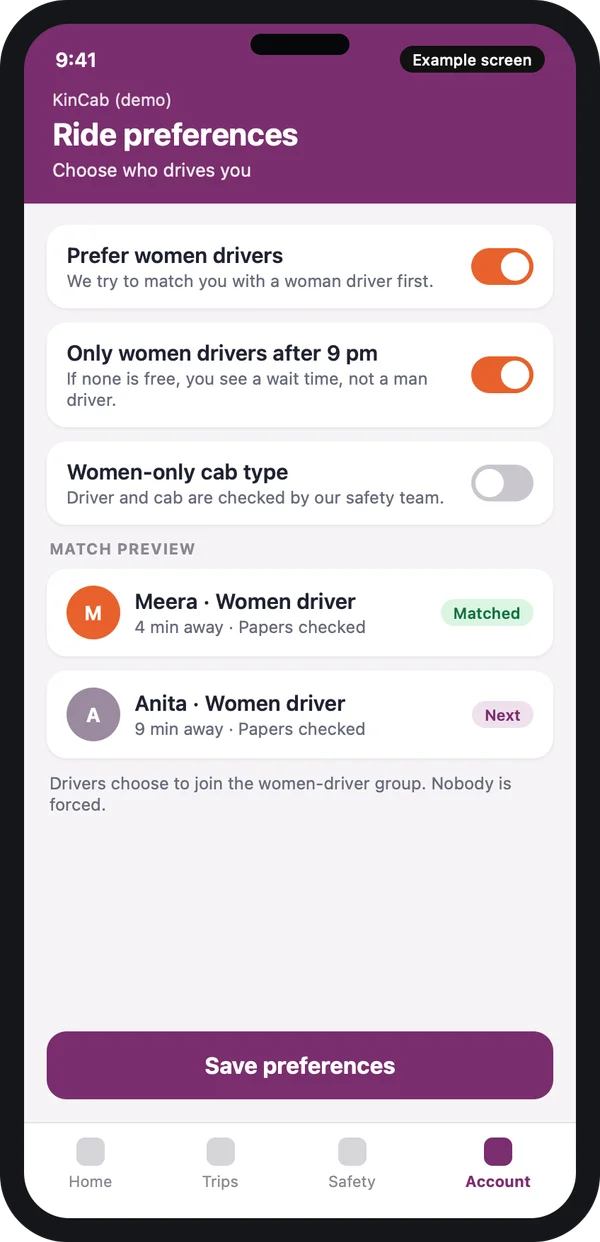
Women driver preference and matching
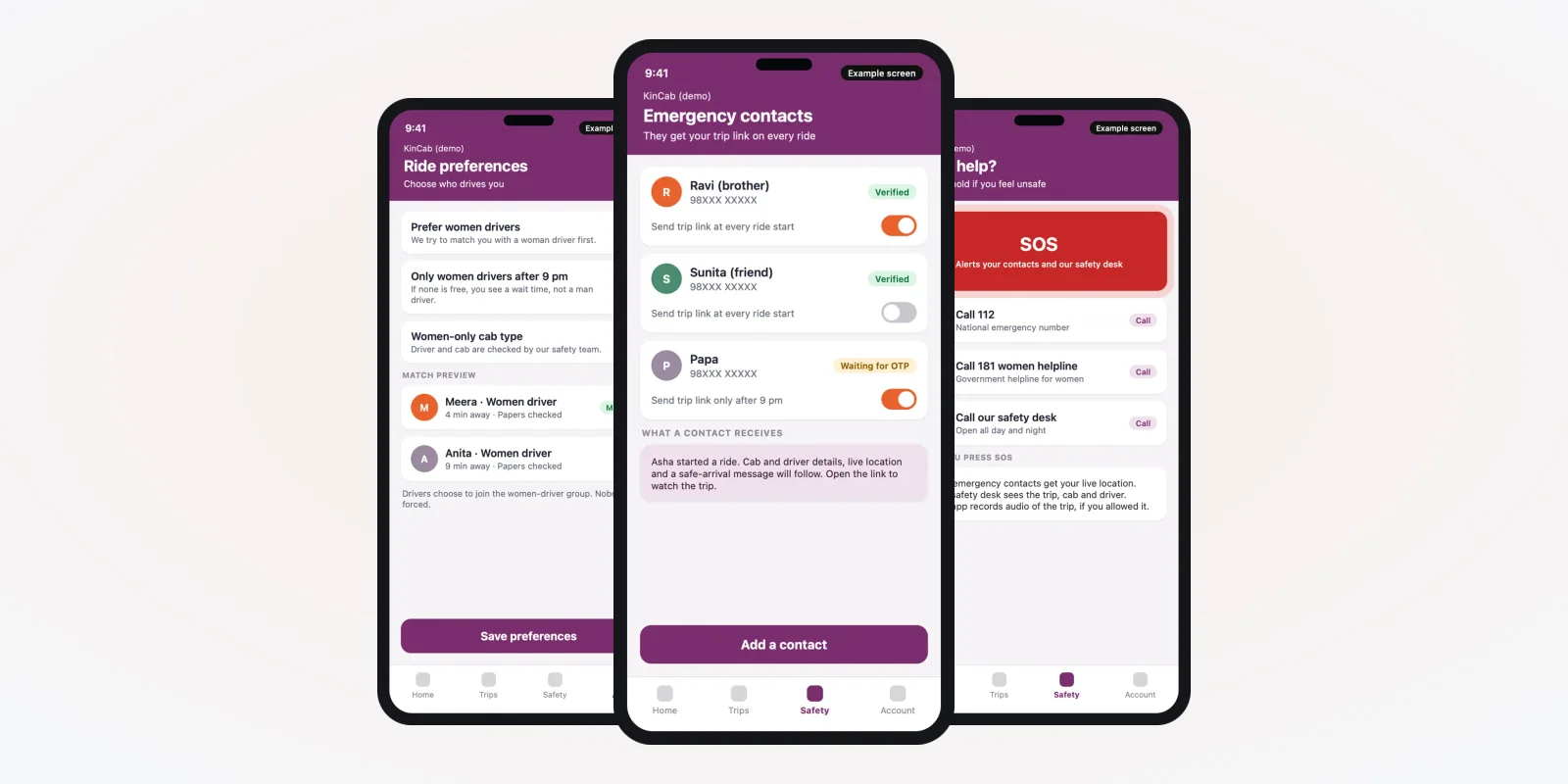
This is the feature riders look for first. In the rider app, she turns on "Prefer women drivers". You can add a second rule, such as women drivers only after a set hour. The matching engine then offers the trip to nearby women drivers before anyone else.
Decide early what happens when nobody is free. There are three honest choices: show a longer wait, offer a normal cab with a clear warning, or offer nothing. Pick one and show it in the app. Never silently send a different driver. Our guide to building an app like Ola explains the base matching steps.
The driver card should show a photo, a first name, the car and a "papers checked" tag. It should not show a full phone number. The call goes through the app.
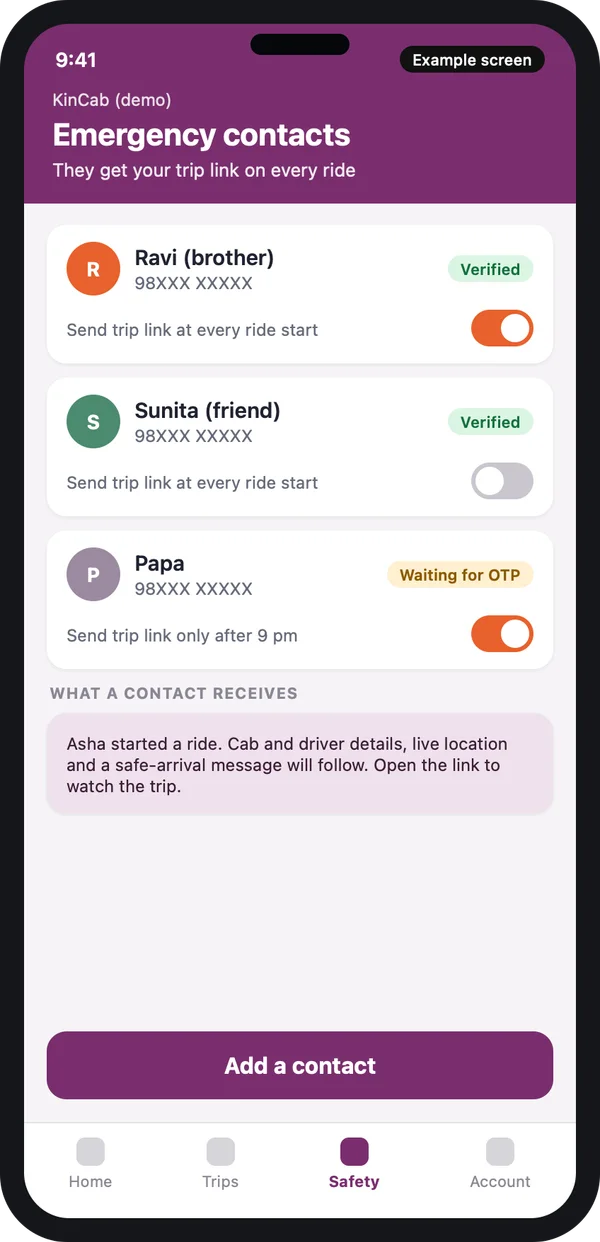
Emergency contacts
An emergency contact is a person who gets the trip link without the rider doing anything. She adds up to a few people once. Each contact confirms with an OTP, so nobody is added without knowing. After that, the app sends the link at the start of every ride, or only for night rides, as she chooses.
What we build here
A contact list with OTP check, a switch for each contact, and a clear sample of the message a contact will get. The contact opens a link in the phone browser. No app install is needed.
We also add a way to remove a contact in one tap, and a note that tells her what is shared.
SOS and helpline calls
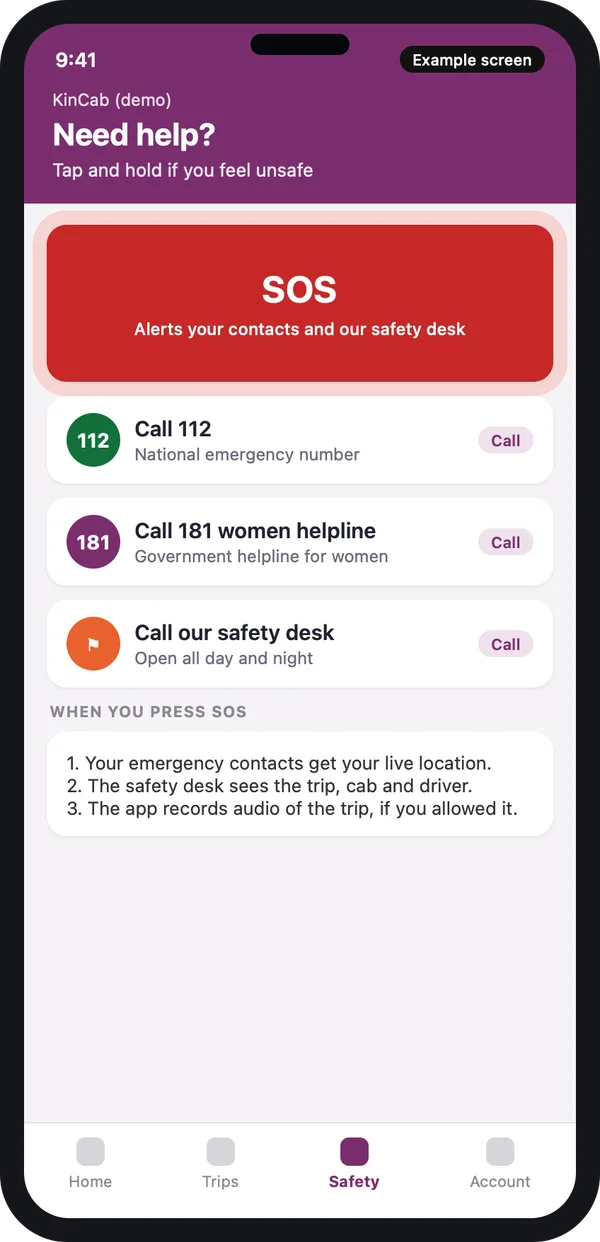
An SOS screen has one job: get help fast. Keep it big and plain. The rider should not need to think or read.
India has two numbers worth placing on this screen. The Ministry of Home Affairs lists Dial 112, the Emergency Response Support System, under its women safety work. The Ministry of Women and Child Development lists the Women Helpline, 181. Source: both pages are the ministry sites. Your app can start a call to either with one tap.
Press SOS: what should happen
- Contacts get her live location by SMS and WhatsApp-style message.
- Your safety desk sees an alert with the trip, the cab and the driver.
- The app can record trip audio, only if she allowed it earlier.
- She can still call 112 or 181 from the same screen.
Say clearly in your terms what your company does after an SOS. Do not promise a police response that you do not control.
Live trip sharing and route alerts
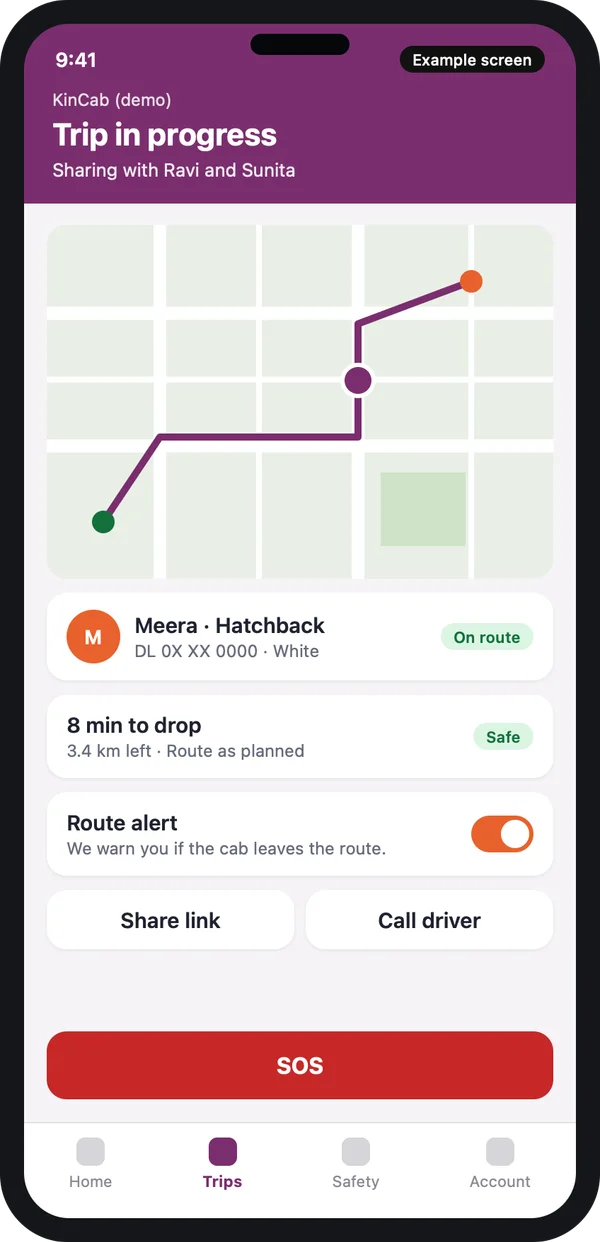
Live sharing shows the cab on a map to the people she picked. A standard Uber-like app has a share button. In a women-safety app, sharing starts by itself, and the app also watches the route.
Route alert
The app knows the planned route. If the cab stops for long, or leaves the route by a set distance, the rider gets a message: "Are you okay?" If she does not reply, the safety desk is alerted.
Set the distance and time limits in the admin panel. Different cities may need different limits.
Safe-arrival check at the end of the trip
Most apps stop caring when the meter stops. A safe-arrival check asks one question after the drop: "Did you reach safely?" She taps yes, or taps "I need help". Her emergency contacts can get the same "reached safely" message.
For night trips, add a follow-up. If she does not reply in a set time, the safety desk calls her. If she still does not answer, they call her contact. You choose the time limits.
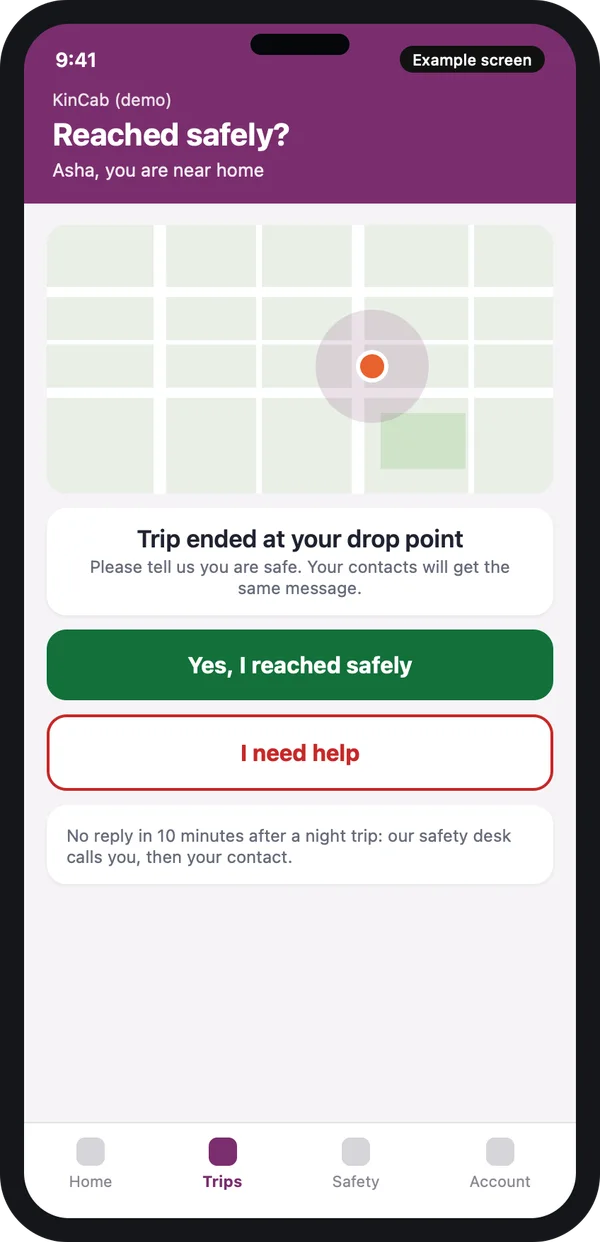
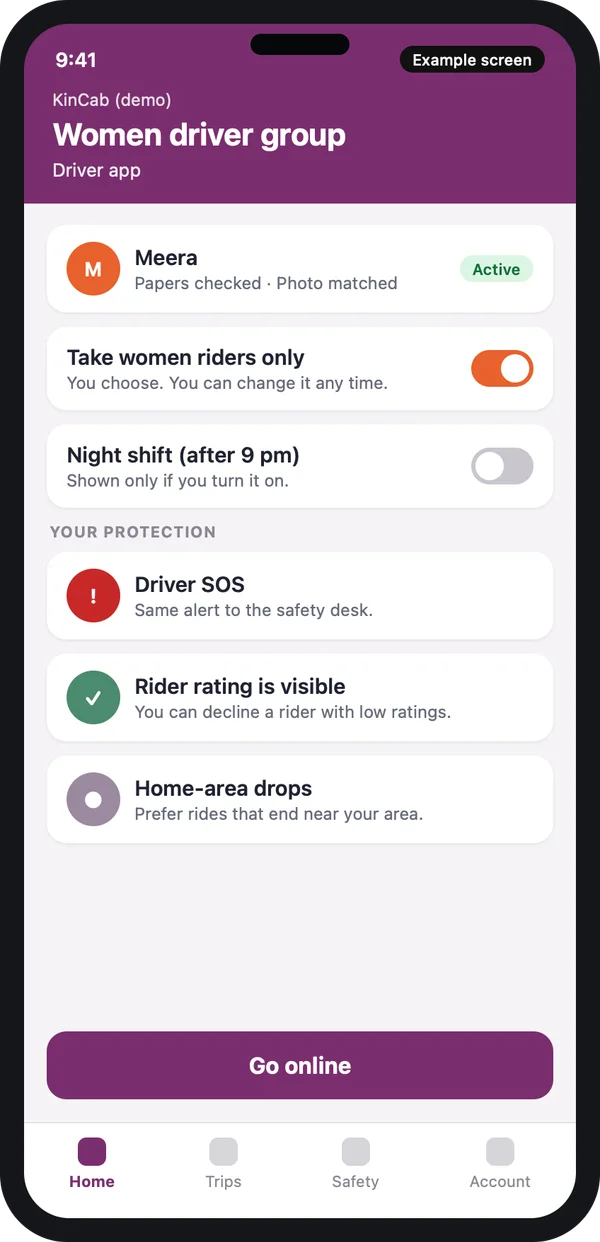
Example design with demo data.
Safety for women drivers
A women-first service needs women drivers, and they need to feel safe to stay. Build these into the driver app:
- A switch to take women riders only, which the driver can change any time.
- A night-shift switch, off by default.
- Driver SOS that raises the same alert as the rider SOS.
- Rider rating visible before accepting, with a way to decline.
- A preference for trips that end near her home area.
Sign-up for women drivers needs the same checks as any driver: licence, vehicle papers and police verification as your state asks. Our white-label taxi booking app guide covers the full sign-up flow. Check the rules for your state with the transport department.
The safety desk in your admin panel
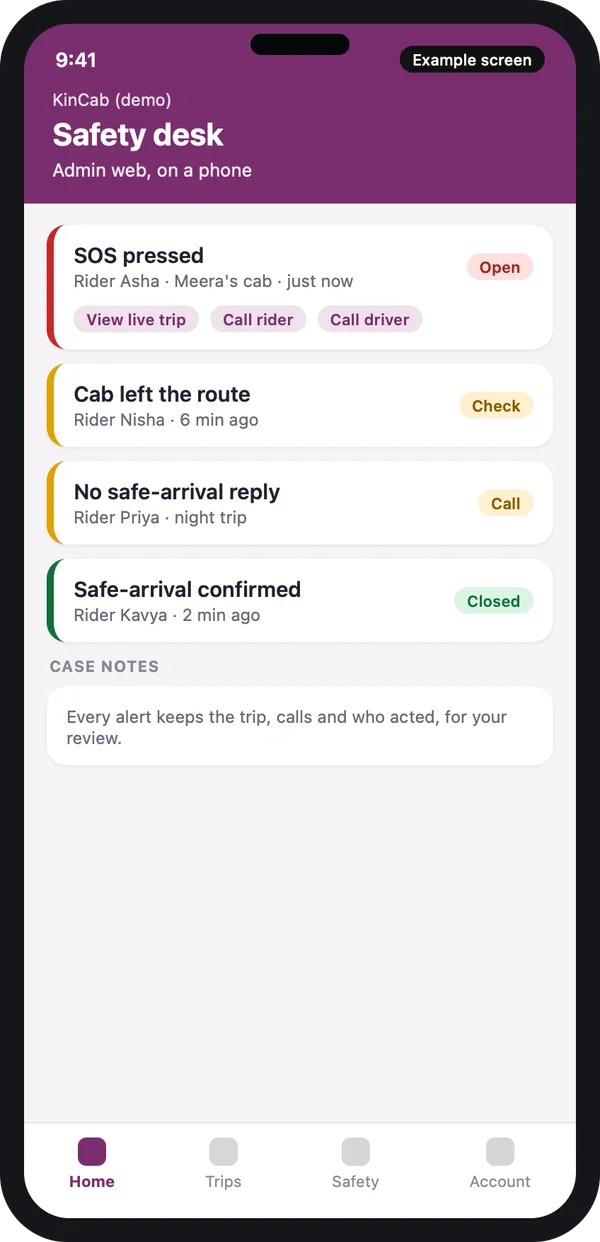
Every alert needs an owner. The safety desk is a page in your web admin where staff see SOS alerts, route alerts and missed safe-arrival replies in one list. A staff member opens the live trip, calls the rider or the driver, and closes the case with a note.
What the desk shows
Open alerts in red, items to check in amber and closed cases in green. Each case keeps the trip, the calls and who acted. You can review it later and improve your rules.
Plan staff for night hours, not only office hours. The app is only as safe as the person who answers.
Privacy of safety data
Live location, contacts and trip audio are personal data. India's Digital Personal Data Protection Act, 2023 applies. Source: MeitY. In simple words: ask consent, collect only what you need, tell the user why, and let her delete her data.
We build consent screens, a clear privacy note, limited staff access to trips and a delete option. Ask a lawyer to review your final policy.
Basic taxi app vs a taxi app built for women
| Feature | Basic taxi app | Built for women riders |
|---|---|---|
| Driver choice | Nearest driver | Women drivers first, set by the rider |
| Trip sharing | Share button, by hand | Starts by itself to emergency contacts |
| SOS | Calls one number | Alerts contacts and a safety desk, with 112 and 181 on the screen |
| Route problem | No alert | Alert if the cab stops or leaves the route |
| End of trip | Rating screen | Safe-arrival check, with night follow-up |
| Driver safety | Little | Women group, night switch, driver SOS |
Worked example: one night trip
- Asha books at 10 pm. Her settings say women drivers only after 9 pm.
- Meera accepts. Asha sees her photo, car and "papers checked".
- The trip starts. Ravi and Sunita get the trip link by themselves.
- The cab stops for a long time. The app asks Asha if she is okay. She taps yes.
- The trip ends. The app asks "Did you reach safely?" Asha taps yes. Ravi gets the message.
- The desk closes the check. No call is needed.
Our service
How we build your own ride sharing app for women
- We learn your plan. Women-only or women mode, your cities, your night hours, your safety staff.
- We design clickable screens. Our UI and UX design team shows you every safety screen before we write code.
- We build the apps. One Flutter code base gives you Android and iPhone, with a web admin and safety desk.
- We test with your team. You and your safety staff run real test trips and false alarms.
- We launch under your brand. Your name, your logo, your store accounts. See our process.
- We support you. We fix issues and add rules as your city grows.
Ride sharing app for women: what decides the cost
We do not publish a fixed price. The cost depends on four things: women-only or women mode, how many apps you need, how deep the safety desk goes, and how and where you host it. SMS, call and map services you connect also change the budget.
| Ready-made taxi script | Custom app built for you | |
|---|---|---|
| Women driver matching | Usually missing | Built to your rules |
| Safety desk | Basic or none | Alerts, cases and notes |
| Brand | Often the vendor's | Yours |
| Source code and data | With the vendor | Yours |
Compare the two paths in our guide on Uber clone scripts vs custom development. Share your plan, and we send a written quote after one call.
Whoever builds your app, make sure it can:
- Match women drivers first and handle the "none free" case honestly
- Add emergency contacts with an OTP check
- Send an SOS to contacts and a safety desk, and call 112 or 181
- Share the trip by itself and alert on a route problem
- Ask for a safe-arrival reply and follow up at night
- Protect women drivers with choice, night switch and SOS
- Keep case notes you can review
- Collect consent and let users delete their data
FAQ
What is a ride sharing app for women?
It is a taxi or ride sharing app built around women's safety. It can be women-only, with women drivers and riders, or a normal app with a women mode. Features include women driver preference, emergency contacts, SOS, live trip sharing and a safe-arrival check.
How long does it take to build one?
It depends on your plan and how many apps you need. After one call, we share a plan with dates, starting with clickable screens you can test.
Will I own the app and the source code?
Yes. We build it under your brand and hand over the source code. Your data stays on your server.
Which platforms do you build for?
Android and iPhone apps for riders and drivers, and a web admin with the safety desk.
Can the app work with only women drivers?
Yes. You can set the app to accept only women drivers, or use a women mode where riders ask for women drivers first. Check the rules for your state with the transport department.
Does the SOS button call the police?
The app can start a call to 112 with one tap, and alert your safety desk and the rider's contacts. What response follows depends on the authorities and on your own team. Do not promise more than you control.
Is rider location and contact data safe?
It should be. The Digital Personal Data Protection Act, 2023 applies to this data. We build consent screens, limited staff access and a delete option. Ask a lawyer to review your policy.
What happens if no woman driver is free?
You choose the rule. The app can show a longer wait, offer a normal cab with a clear warning, or offer nothing. It never switches the driver without telling the rider.
Can PRS India build a ride sharing app for women?
Yes. We build your own rider app, driver app and safety desk. Book a consultation and we will show you screens for your plan.
Related guides
Written by
Babita Kumari · Business Developer
Business Developer at PRS India. Talks with business owners about the app or software they want, and helps them work out the scope, cost and launch steps before any code is written.