Auto Rickshaw Booking App Development: Driver and Rider
We build your own auto rickshaw booking app: rider app, driver app and admin with meter rate cards, shared seats, cash payment and pickup codes.

Written by Prabhjot Kaur, Product Manager
Reviewed by the PRS India software & mobile app development team
13 min read
Written from production. Our articles draw on products we run live and the client work behind them, and are revised as the systems they describe evolve.
In many Indian towns the auto rickshaw is the real taxi. Riders wave at it in the street, argue about the meter, and share seats with strangers. Drivers wait at stands and lose hours without a trip. An auto rickshaw booking app puts both sides on one phone screen, without taking away how autos really work.
That last part matters. A car taxi app, copied for autos, fails fast. Auto riders pay by meter or by a fixed city rate, many pay in cash, and many want one seat, not the whole vehicle. This guide shows what the rider app and the driver app must do, and how PRS India builds them as part of our taxi app development work: your brand, your data, your source code.
Key takeaways
- An auto app must handle meter-rate fares, cash payment and shared seats. A car taxi app does none of this by default.
- The driver screen must be quick to read in sunlight, in the local language, with big buttons.
- Stands and busy places matter. Show drivers where demand is, so they stop circling.
- A pickup code and a plate number on the rider screen build trust on a street where anyone can stop.
- Fare rules differ by city. Keep them as settings that you can edit, not fixed in the code.
What is an auto rickshaw booking app?
It is a booking app where the rider asks for an auto and the nearest driver accepts. It sounds like a cab app, but the working day is different. An auto driver often owns the vehicle, has no office, and uses a basic phone. The rider is often going a short way, and may want to share.
So the app is judged on small things. How fast does the request reach the driver? Is the fare the same as the meter? Can the rider pay cash? Can three people share one auto? These details decide if drivers keep the app open. For the common parts of any ride app, read our guide on must-have taxi booking app features.
The problem
Where auto rides and earnings get lost
Both sides lose time in the same six places.
- The fare argument. The driver says the meter is broken. The rider says it is too much. The ride is lost before it starts.
- Empty circling. Drivers drive around looking for riders. Fuel and time are wasted while a crowd waits two streets away.
- Refused short trips. A short ride in traffic is not worth the effort, so drivers say no. Riders keep walking.
- Wrong pickup point. The rider stands at one gate, the driver goes to another. Both wait and call each other.
- Safety worries. At night, riders do not know who the driver is. Families cannot see the trip.
- Seats left empty. A shared auto runs with one rider while others on the same road wait for a bus.
The rider app: pick an auto, an e-rickshaw or a seat
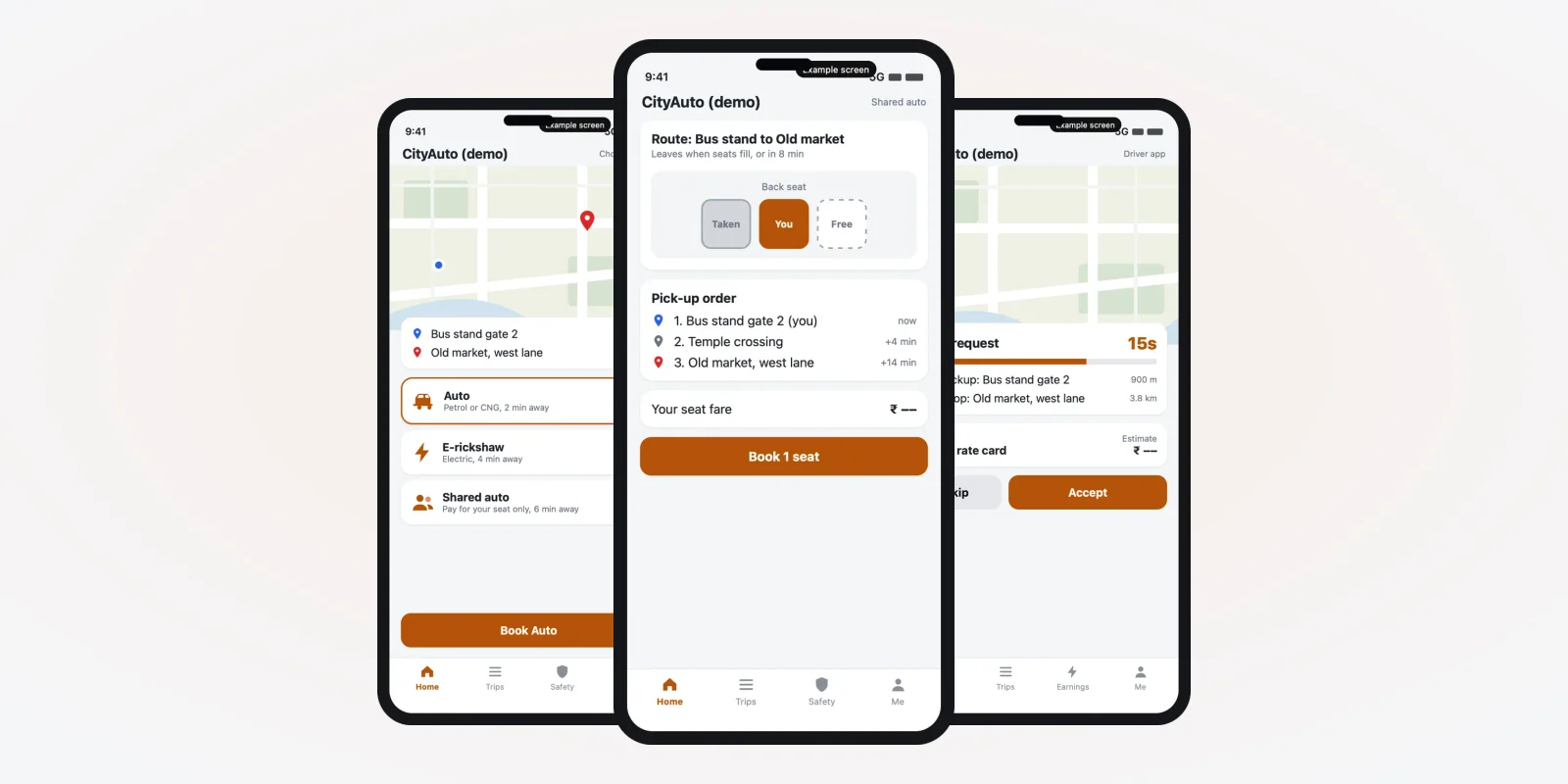
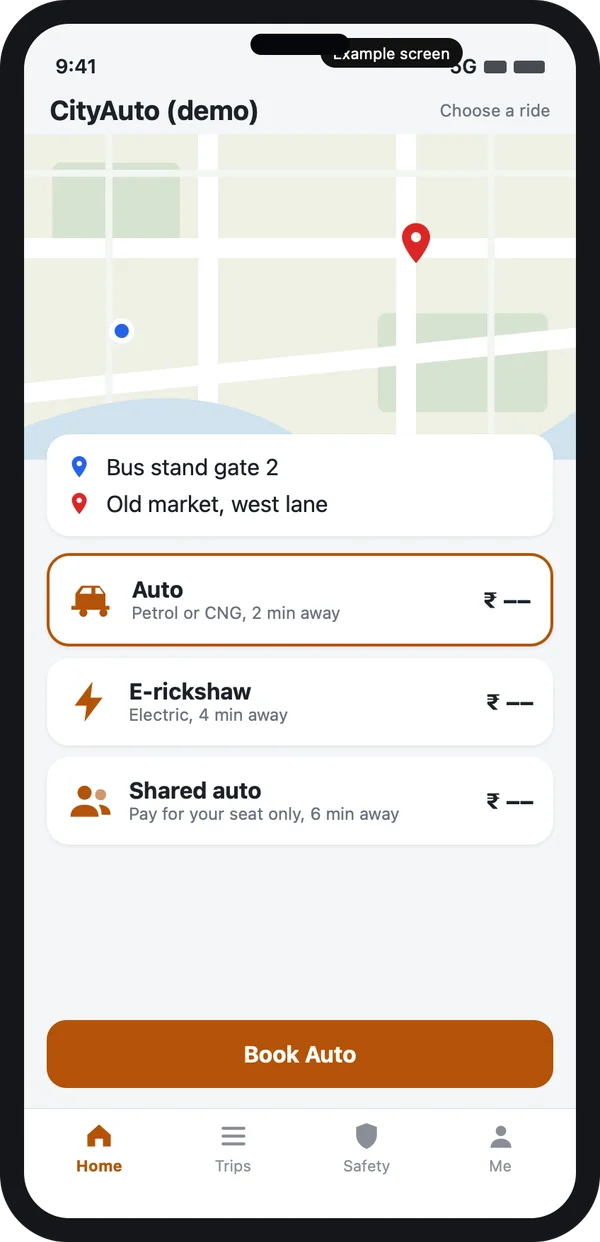
The first screen should let the rider choose the right vehicle. In many cities there are three choices, each with its own price rule and waiting time. The screens in this guide are example designs we made for the topic, with demo data.
Vehicle picker
Auto, e-rickshaw and shared auto sit in one list. Each card shows the waiting time. The fare shows before booking, worked out from the city rate card you set in the admin.
Pickup and drop can use well-known places such as a bus stand gate or a market lane, not only street names. A rider who says "Old market" knows where it is, even if the map name differs.
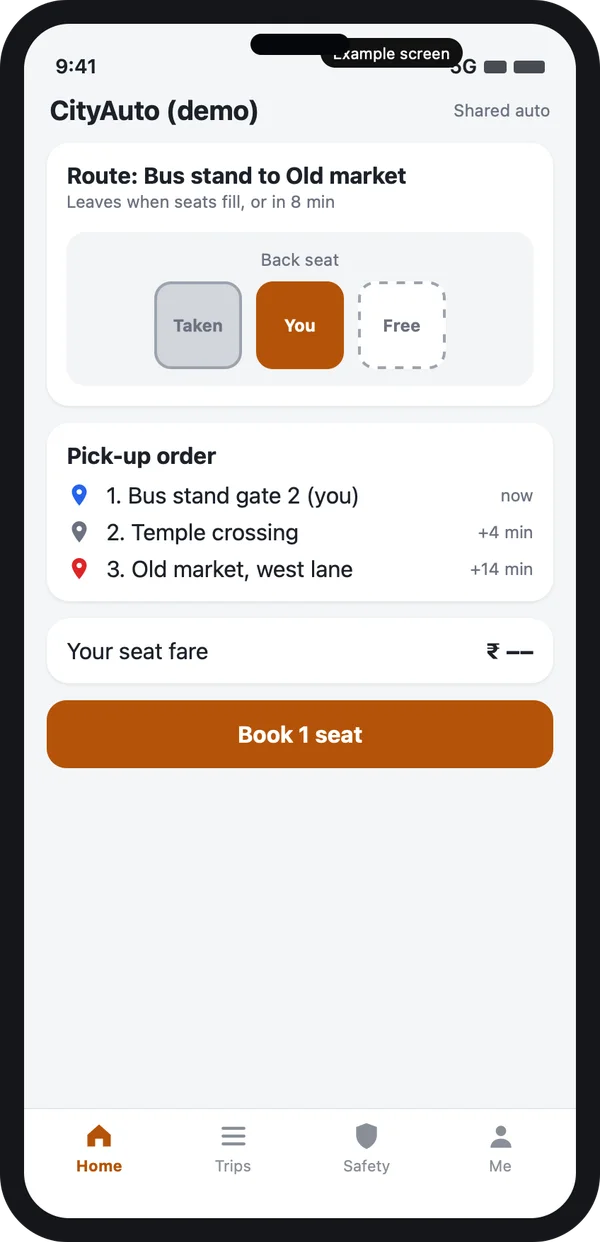
Book one seat, not the whole auto
Shared autos run on fixed routes. The rider picks a seat, sees who boards before and after, and pays for that seat only. The auto leaves when the seats fill or when a timer ends, whichever comes first.
The driver sees the stops in order, so the route stays short. This is also how you can serve a campus or a market road where one vehicle on a loop beats ten separate trips. Our guide to building an app like Ola explains the single-rider flow this builds on.
The auto driver app: offer, stands and fare rule
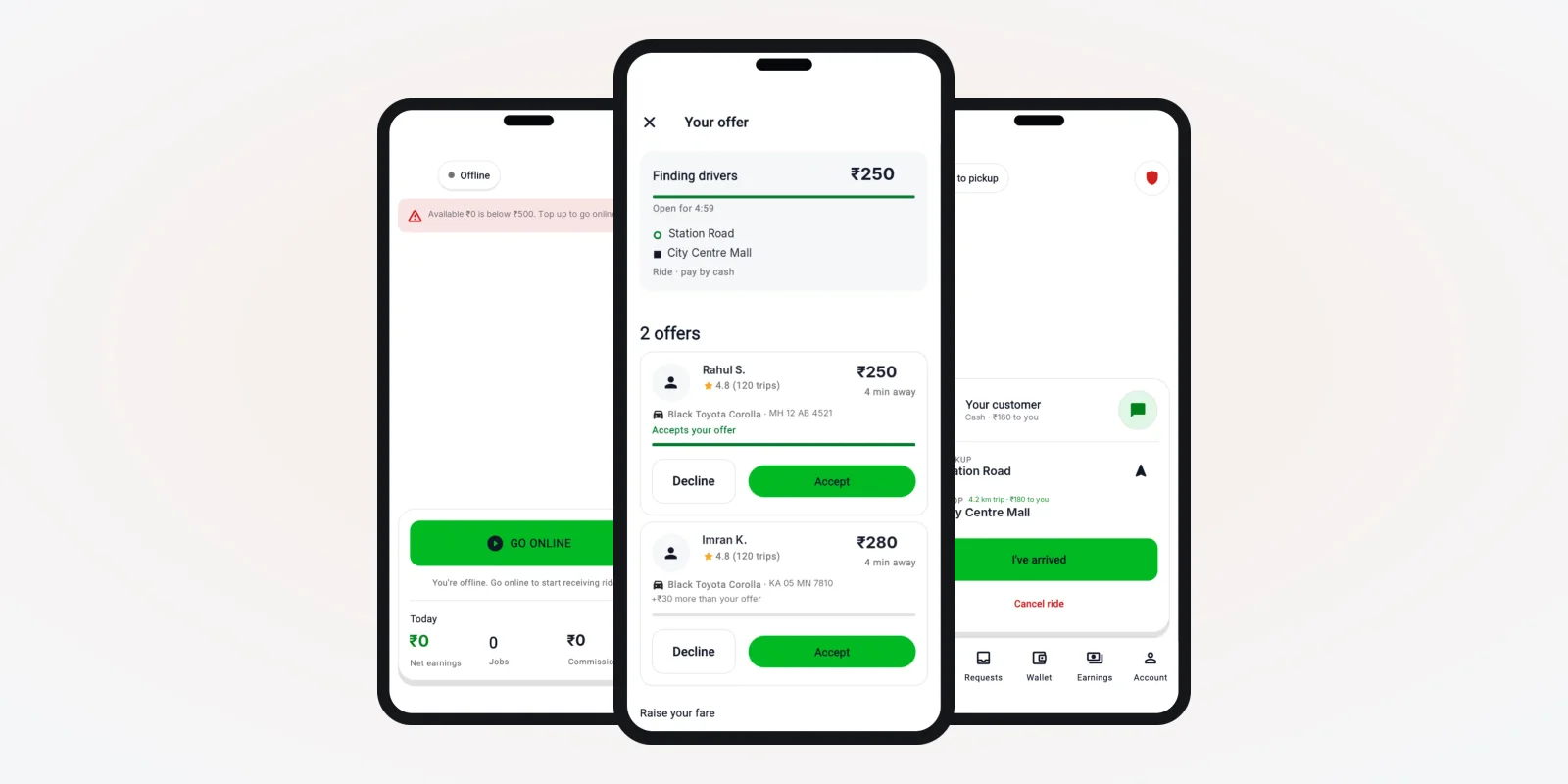
An auto driver glances at the phone for a second while parked in traffic. So the offer screen has few words and large buttons: pickup distance, drop, fare rule, a short timer, Accept and Skip.
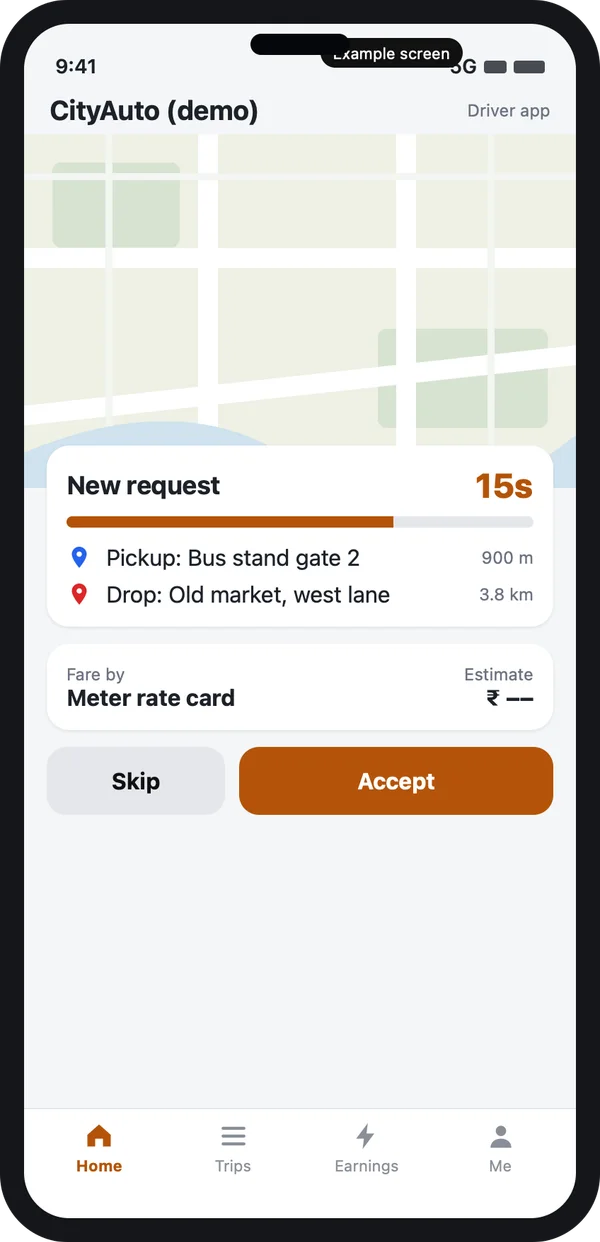
The offer screen
Pickup distance, drop and fare rule on one card, with a timer.
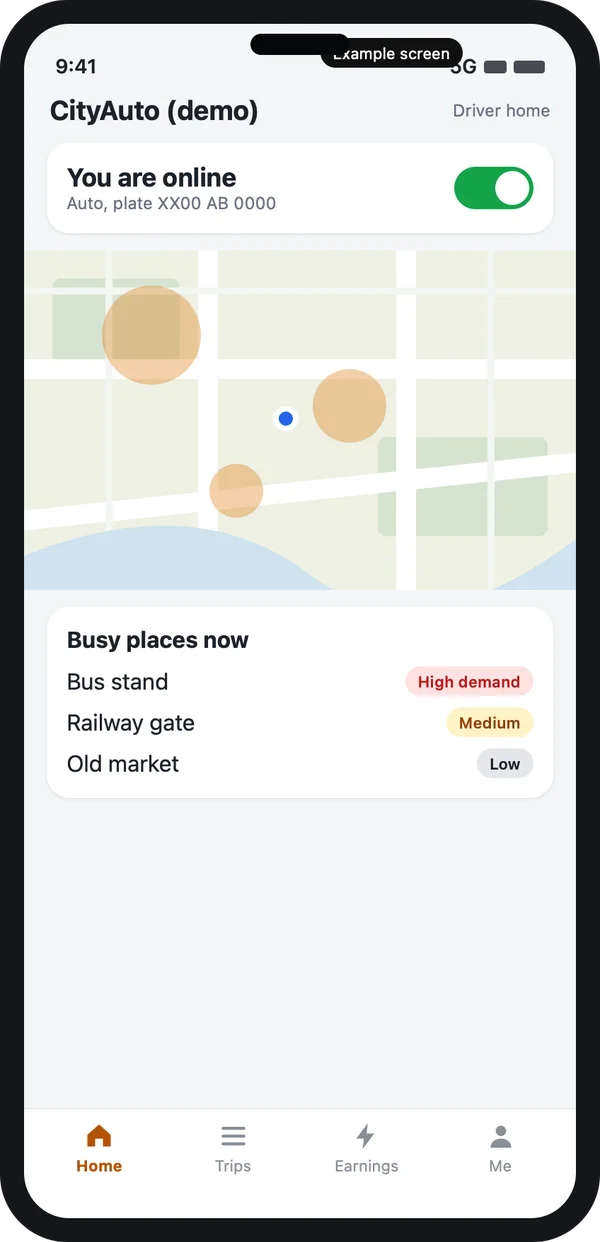
Online and busy places
A map shows where demand is now, so the driver goes there instead of circling.
Language matters here. The driver app should open in the driver's own language, such as Hindi, Marathi, Tamil or Kannada, and the offer text must be short enough to read at a glance. A voice call to the rider is one tap away, since many pickups need a few spoken words.
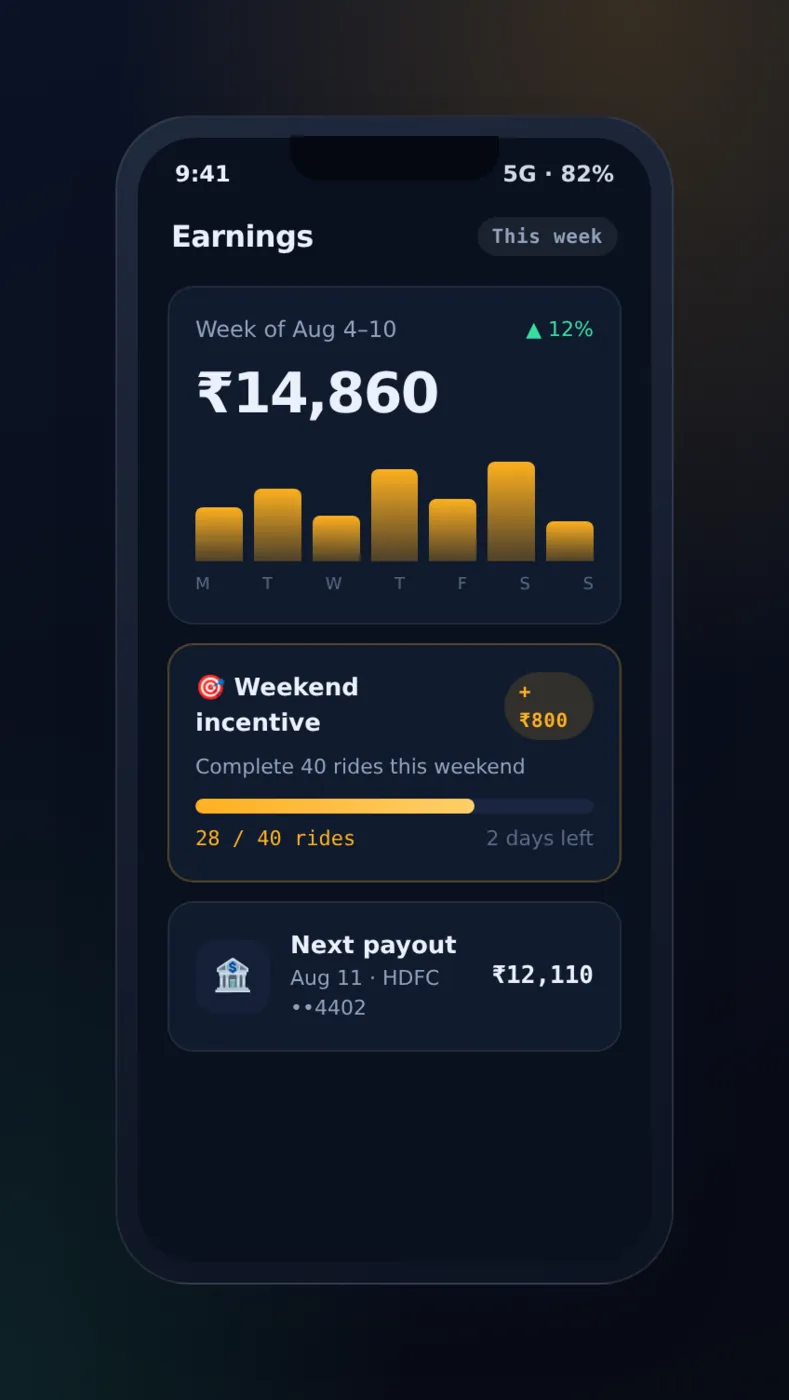
Drivers also see their day on a plain page: trips done, time online and earnings. The page below is from a taxi app we built, with demo data. An auto driver would see a simpler version of it.
Fare rules, meter and cash
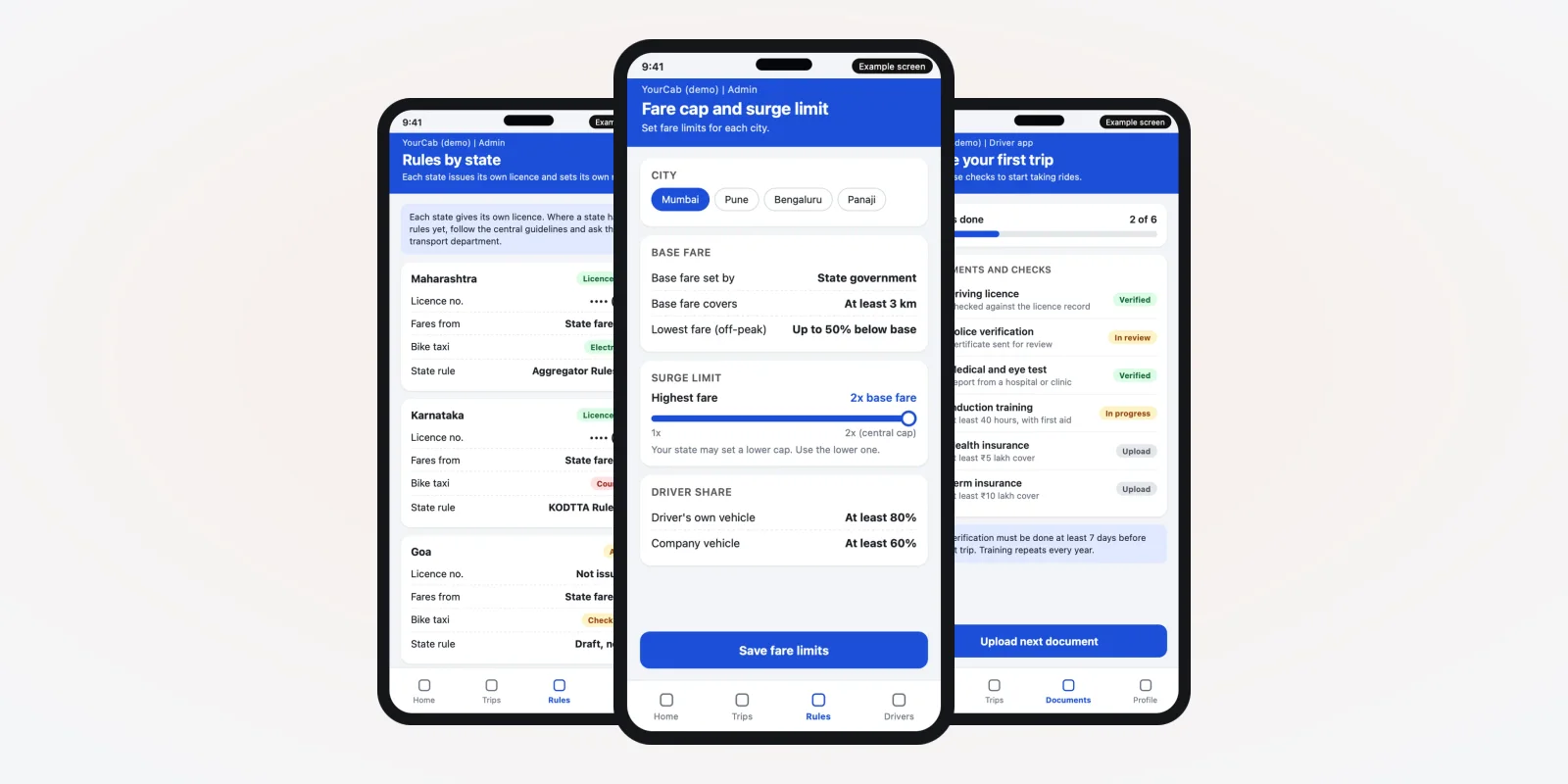
In India, taxi and auto fares are set by the state or city transport authority. The details differ by place, and they change. So the app must not hard-code a fare. It should hold a rate card in the admin: base rate, distance rate, waiting rate and night rule, and show the same numbers to both sides.
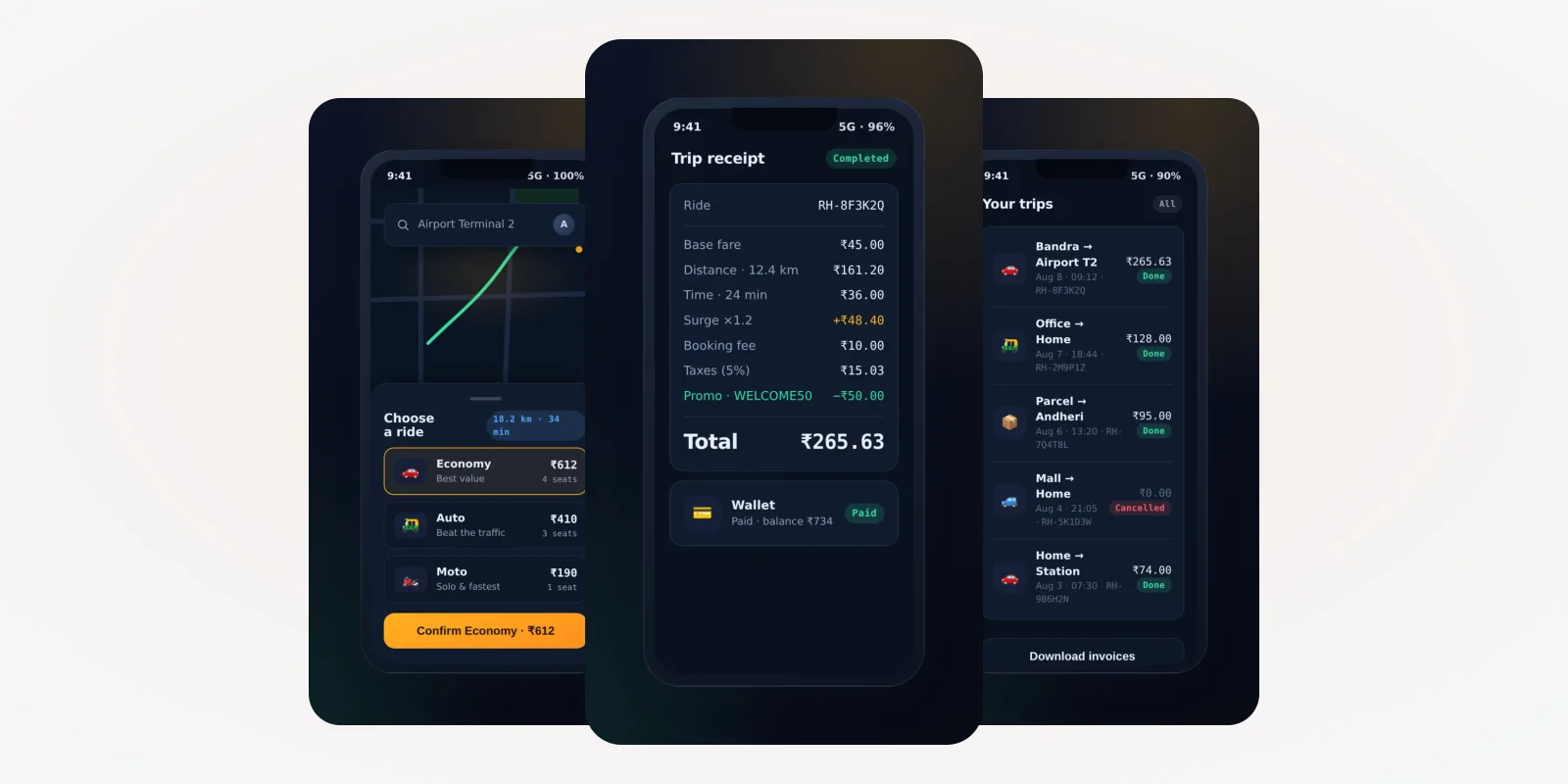
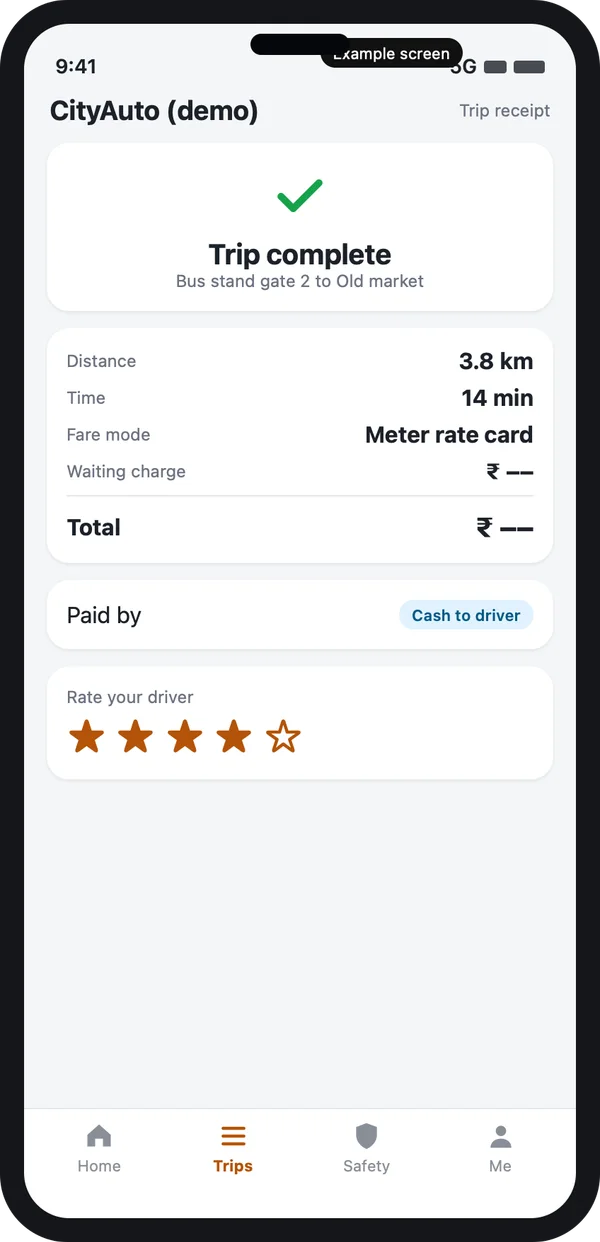
Many auto riders still pay cash. The app should record the payment mode, show the total to the driver, and let the rider pay by UPI when they want to. The receipt below shows distance, time, fare mode and the payment type.
A receipt both sides can read
The trip ends with a receipt: distance, time, fare mode, waiting charge and total. If the driver and rider disagree later, the office can open the same record and settle it.
Check the current fare orders with your transport authority. The Ministry of Road Transport and Highways lists central rules, and each state adds its own. Rules for permits and vehicle details are on the Parivahan portal. Always confirm with your state department before launch.
Trust on the street: pickup code, plate and share
Pickup code and vehicle plate
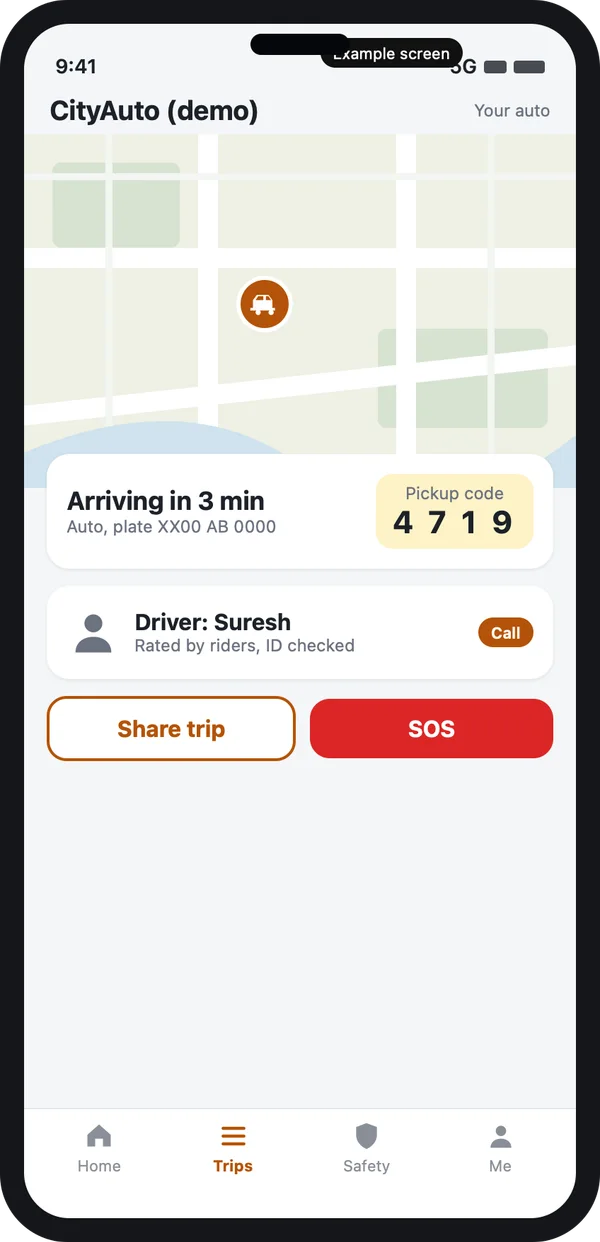
On the street, anyone can pull up and say "I am your auto". A four-digit pickup code, the plate number and the driver's first name fix that. The driver starts the trip only after the rider reads out the code.
Share trip and SOS
The rider can share the trip with family. A red button calls your control room. At night, the app can ask the driver to confirm the route. Our guide to Ola alternatives in India shows how other apps handle these basics.
E-rickshaws and government support
More towns now use electric rickshaws for short, last-mile trips. The app treats them as another vehicle type with its own rate card. It can also track battery use and charging. The booking flow itself follows our guide to the Uber-like app.
The central PM E-DRIVE scheme lists registered e-rickshaws and e-carts among the vehicles it supports, with a period that runs to March 2028 at the time of writing. The scheme is for purchase support. Your app does not apply for it, but your records of vehicles and trips may help you answer questions later.
Source: PM E-DRIVE scheme portal, Ministry of Heavy Industries. Check the portal for the current groups and dates.
Car taxi app vs an auto rickshaw app
| What you need | Car taxi app | Auto rickshaw app |
|---|---|---|
| Vehicle choices | Hatchback, sedan, SUV | Auto, e-rickshaw, shared auto |
| Fare | Distance and time by app rule | City meter rate card, same on both screens |
| Payment | Mostly in-app | Cash, UPI and wallet |
| Seats | Whole car | One seat on a shared route |
| Driver screen | Full details | Large buttons, local language |
| Pickup | Map pin | Landmark names and a pickup code |
| Demand help | Surge areas | Stands and busy places |
Worked example: one shared auto from a bus stand
Here is how one shared ride works in an auto app. The names and times are examples.
- Open. A rider at the bus stand opens the app and picks "Shared auto" for the market route.
- Seat. The app shows which seats are taken. She books one seat and sees her fare.
- Match. Two other riders on the route book too. The app sets the pick-up order.
- Offer. The nearest driver gets the route as one offer with a short timer. He accepts.
- Code. The driver reaches the gate. The rider reads out her four-digit code and the trip starts.
- Stops. The auto picks up the others at the temple crossing and drops everyone near the market.
- After. Each rider gets a receipt, pays by cash or UPI and rates the driver. The office report shows the route, the time and the payment mode.
Our service
How we build your own auto rickshaw booking app
An auto app made for your streets, your drivers and your rules.
- Understand your service. We learn your vehicles, routes, stands and fare rules in a short call or two.
- Design the screens. You click through the rider and driver screens in your language before code starts.
- Build the apps. Android and iPhone apps for riders and drivers, and a web admin for the office.
- Set the rules. Rate cards, night rules, shared routes and stands are saved as settings you can change.
- Test with your drivers. A few real drivers use it on real streets. We fix what they find.
- Launch under your brand. Your name and logo on the stores, your data on your own server.
Auto rickshaw booking app development cost: what decides it
We do not publish a fixed price, because every city and fleet is different. The cost depends on four things: how many apps you need, whether you offer shared routes, how many languages the apps must speak, and which extras you add, such as UPI payment, a call masking service or a driver union dashboard.
| Monthly taxi software plan | Custom auto app (built for you) | |
|---|---|---|
| Start | Quick, low first payment | Takes weeks to build |
| Cost over years | Pay every month for each driver | One build cost, then optional support |
| Meter rate card and shared seats | Usually not included | Built in, your way |
| Local language driver app | Limited | Your languages |
| Data and source code | Stay with the vendor | Yours |
Tell us your city, vehicles and routes, and we send a written quote after one call. To compare build options, read Uber clone script vs custom development.
Whoever builds your auto rickshaw booking app, make sure it can:
- Show auto, e-rickshaw and shared seats as separate choices
- Keep a city rate card that you can edit in the admin
- Record cash, UPI and wallet payments on every trip
- Run a driver app in your local languages with large buttons
- Show busy places and stands to drivers
- Use a pickup code and show the plate number to the rider
- Share a trip and call your control room in an emergency
- Let you export your data whenever you want
FAQ
What is an auto rickshaw booking app?
It is an app where a rider books an auto or an e-rickshaw and the nearest driver accepts. It follows how autos work: meter-rate fares, cash payment and shared seats.
How long does it take to build an auto rickshaw booking app?
It depends on how many apps and languages you need. After one call about your service, we share a plan with dates, starting with screens you can click through.
Will I own the app and the source code?
Yes. We build it under your brand and hand over the source code. Your data stays on your server.
Can the app follow the city meter rate?
Yes. You enter the rate card in the admin: base, distance, waiting and night rules. Both screens show the same fare. Check the current order with your transport authority.
Can riders pay cash?
Yes. The driver app records the payment mode on each trip. Riders can also pay by UPI or wallet if you switch those on.
Can the app handle shared autos?
Yes. The rider books a seat on a set route, and the driver sees the stops in order. The auto leaves when seats fill or a timer ends.
Which phones will it run on?
Android and iPhone for riders and drivers, and a web admin for the office. We build the phone apps with one shared code base.
Is rider and driver data safe?
It should be. The Digital Personal Data Protection Act, 2023 applies to personal data. We hide phone numbers behind masked calls and limit who can see trip history.
Can I add electric rickshaws later?
Yes. Each vehicle has a type and its own rate card. We can add battery and charging features later.
Can PRS India build an auto rickshaw booking app for my city?
Yes. We build taxi apps around your own routes and rules: a rider app, a driver app and a web admin. Book a consultation and we will show you screens for your service.
Related guides
- Motor Vehicle Aggregator Guidelines 2025 India: State-Wise Rules
- Car Rental App Development: Self Drive Business Guide
- How to Start Taxi Business: Build Your Own Taxi App
- ONDC Taxi App: How to Build and Launch Yours
- How to Start a Taxi Business in Nigeria With Your Own App
- Electric Cab Booking App: EV Taxi Business Guide
- Mobile app development
- Flutter app development
- Logistics platform development
Written by
Prabhjot Kaur · Product Manager
Product Manager at PRS India. Turns what a client needs into a screen-by-screen plan for the app, and checks every release against that plan before it goes out.