Car Rental App Development: Self Drive Business Guide
We build your own self-drive rental app: car list, licence check, deposit hold, pickup photos and return checklist. Android, iPhone and web, under your brand.

Written from production. Our articles draw on products we run live and the client work behind them, and are revised as the systems they describe evolve.
A self-drive rental business does not lose money when a car sits in the yard. It loses money in the handover. A scratch that nobody noted. A deposit that the customer disputes. A licence that was never checked. A car that came back late with an empty tank. Car rental app development puts each of these steps on a phone, with photos and a time stamp, so both sides agree on what happened.
Many rental owners now build their own booking app, under their own name, instead of listing cars on someone else's site. This guide shows what such an app does and how PRS India builds it. We already do the same kind of work for taxi and ride booking apps, and a rental app uses many of the same parts: customer app, owner panel, maps, payments and trip records.
Key takeaways
- Self drive is a different business from a taxi. The customer drives, so the app must check the licence and hold a deposit.
- Most fights happen at pickup and return. Photos taken in the app, on both sides, settle them.
- The owner needs one list that shows which car is out, which is back, and which is late.
- The customer app can be small. Browse, book, upload papers, pick up, return.
- A custom-built rental app is yours: your name, your rules, your customer data and the source code.
What is a self-drive car rental app?
A self-drive rental app lets a person rent a car for hours or days and drive it alone. There is no driver from your side. The customer picks a car, shows a driving licence, pays a rent and a deposit, collects the car from your hub and brings it back.
A taxi app moves a person from A to B. A rental app moves a car from you to the customer and back. That one difference changes the screens. A taxi app watches a trip. A rental app watches a booking, a deposit, a car's condition and a return time.
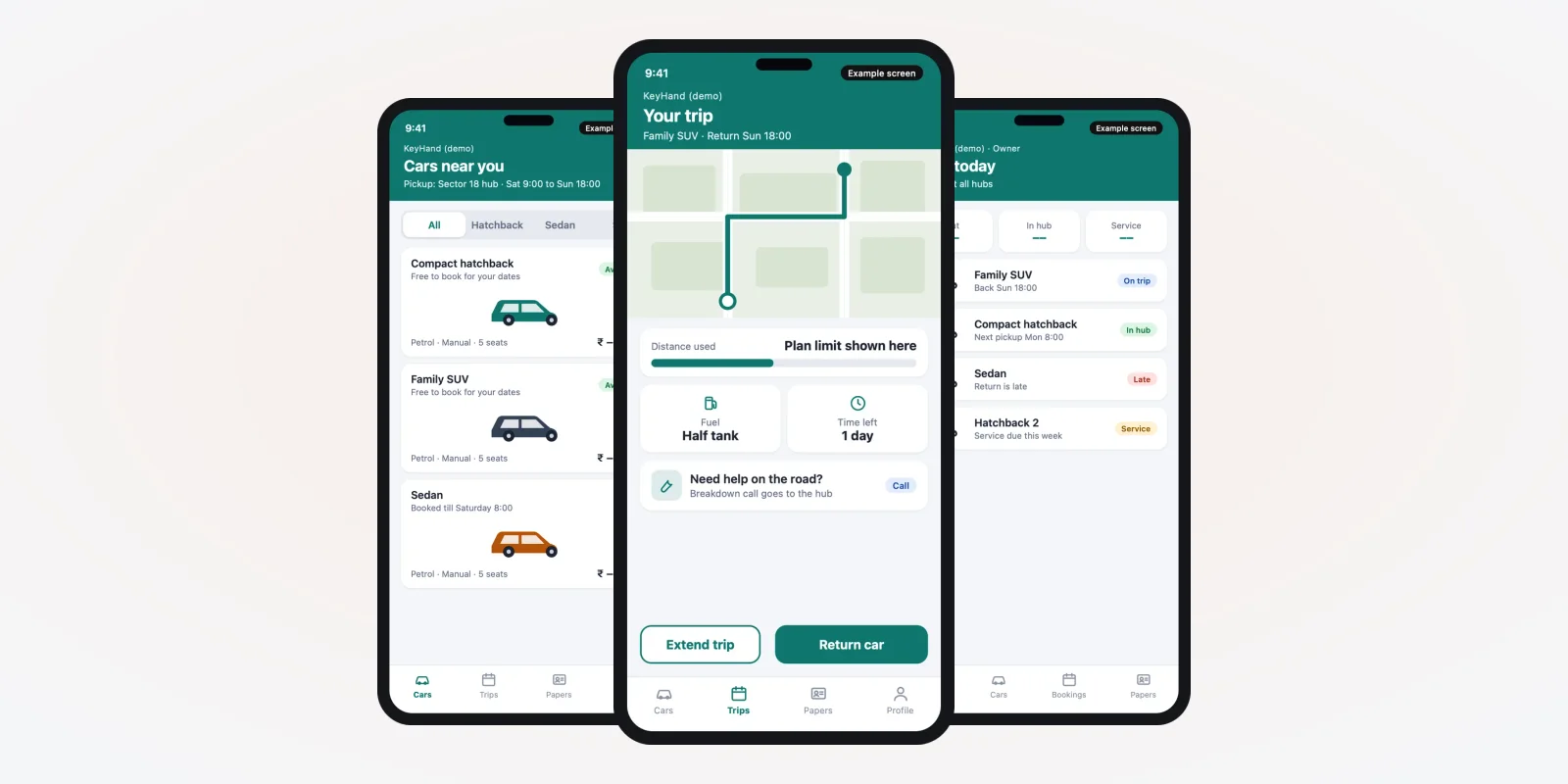
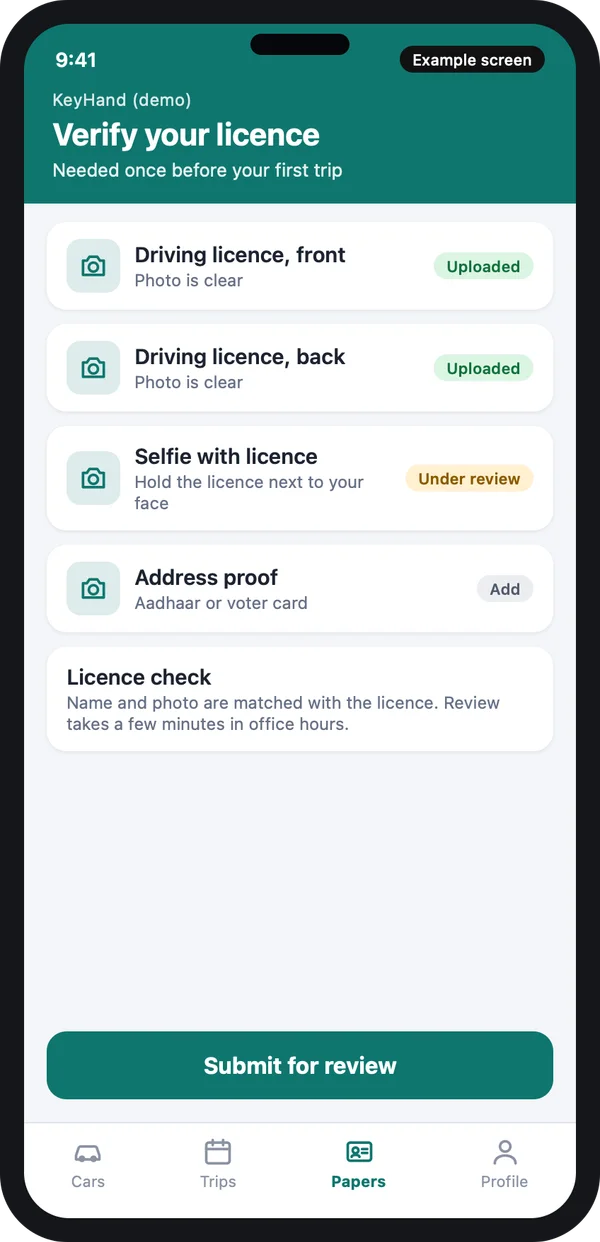
The screens in this guide are example designs with demo data. They show the type of app we can build for you. They are not a live product.
The problem
Where car rental owners lose money
The same few problems come up in almost every rental yard.
- Damage disputes. The customer says the scratch was there before. You have no photo. You lose the argument or the customer.
- Papers not checked. A licence copy on WhatsApp is blurry or expired. Nobody notices until there is an accident.
- Deposit fights. Cash deposits are hard to track. Customers ask for it back the same day, and staff are unsure what to cut.
- Double booking. Two staff promise the same car for the same weekend. One customer arrives and finds no car.
- Late returns. The next customer waits while the car is still on the road. Nobody knew it would be late.
- Service missed. A car goes out with an oil change overdue, or with papers that ended last week.
Who uses the rental app
Three groups use the system every day. Each one needs a different screen. A mobile app for the customer and the hub staff and a web panel for the owner cover all three.
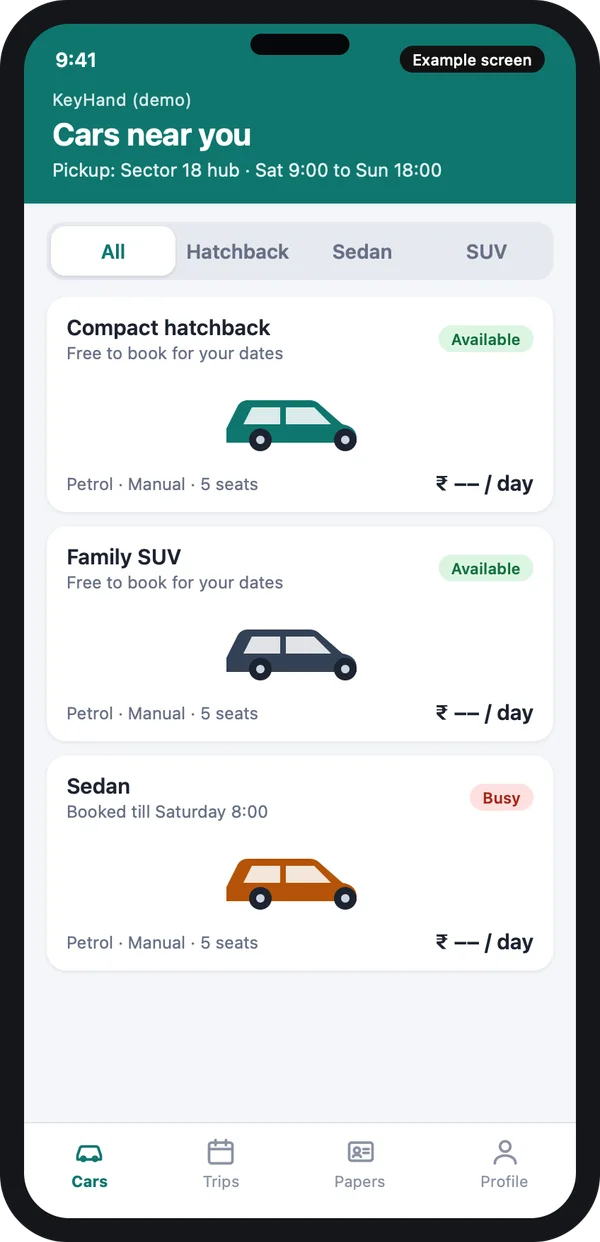
Customer
Sees which cars are free for the chosen dates, books, and uploads papers.
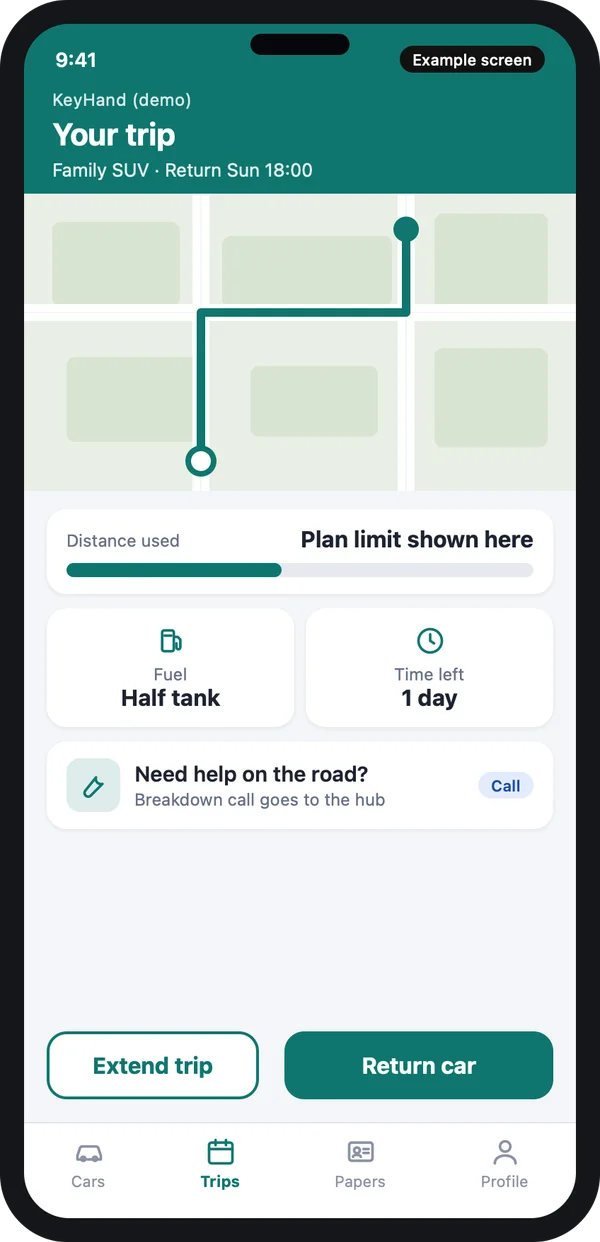
Hub staff
Hand over, receive and check cars. Staff also see who is due back next.
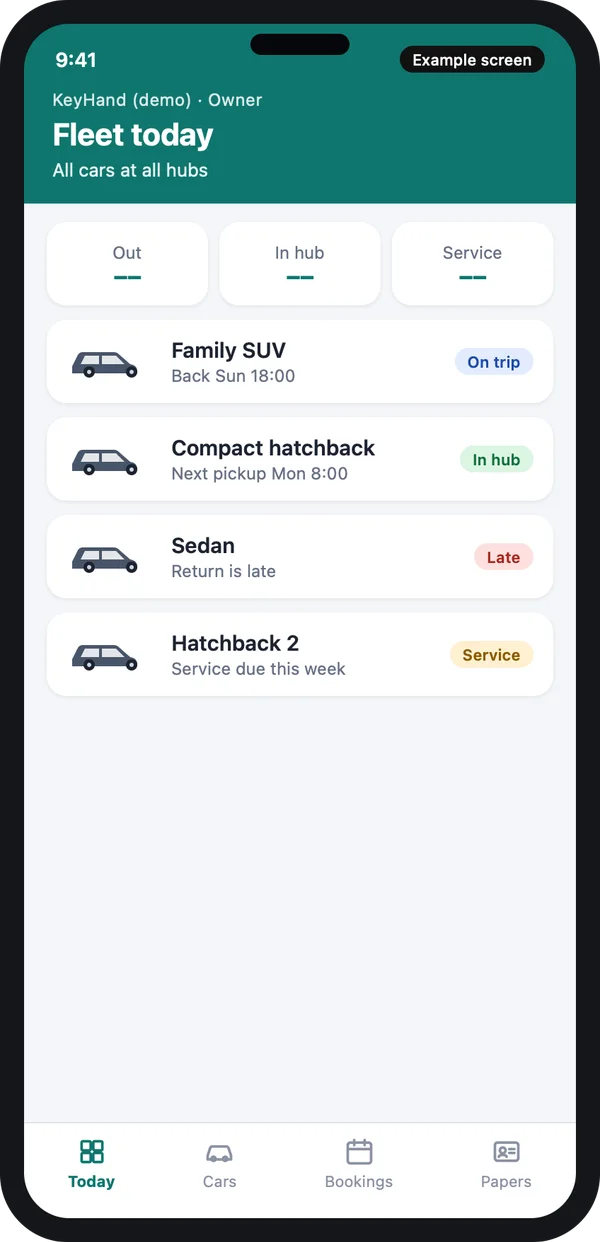
Owner
Sees every car, late returns, service dates and bookings in one list.
Example design with demo data.
Licence check and deposit hold
1. Check the licence before the trip
The customer uploads the front and back of the driving licence and a selfie. Your staff, or a check you set up, match the name and the photo. Only then can the booking go ahead.
The app saves the licence end date. If the licence ends before the trip, the booking stops and the customer is told why.
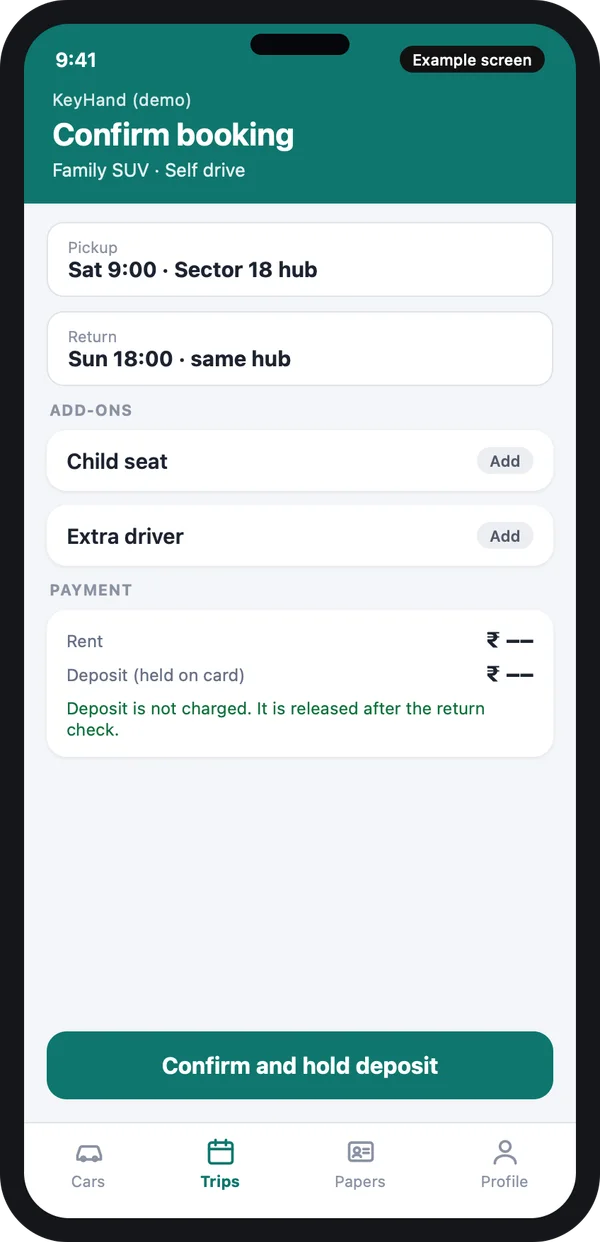
2. Hold the deposit, do not take it
A deposit is held on the customer's card or wallet and released after the return check. The screen says this in plain words, so the customer knows the money is not spent. Your payment partner decides which hold types are allowed.
Licences and ID photos are personal data. India's Digital Personal Data Protection Act, 2023 applies to them. Source: the data protection page of the Ministry of Electronics and IT. We build in consent, limited access for staff and a rule for how long papers are kept. Many people also keep their licence in DigiLocker, the government document service, so a photo upload is not the only option to plan for.
Pickup inspection and return checklist
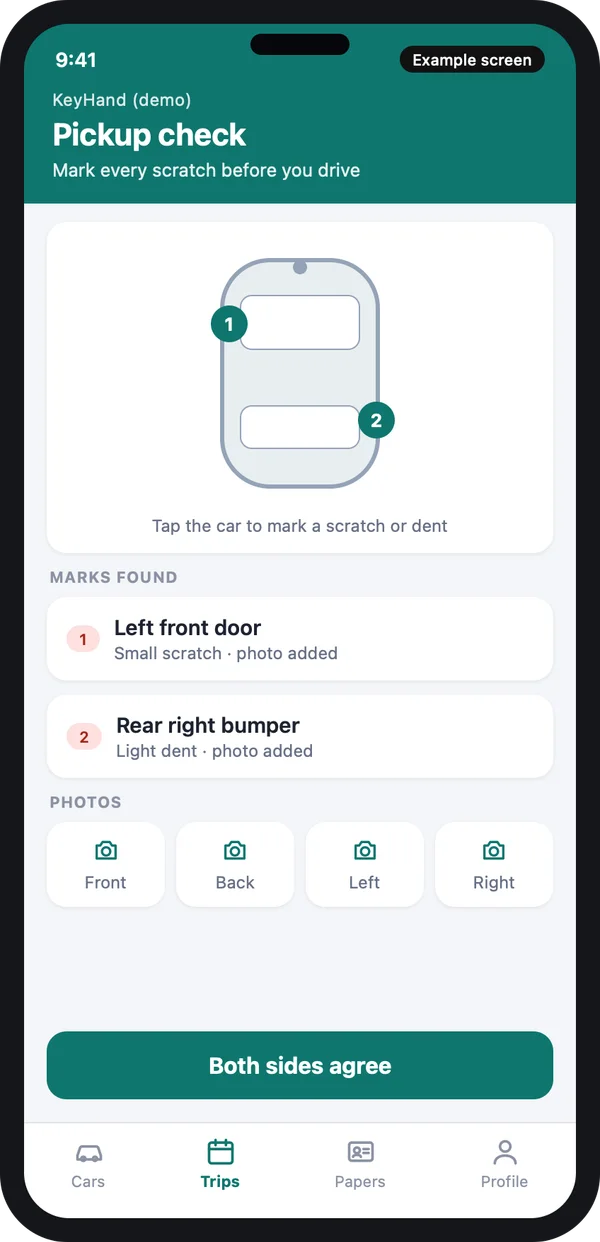
This is the part that saves the most money. At pickup, staff and customer walk around the car with the phone. They mark each scratch on a drawing of the car and take a photo of each side, the dashboard and the fuel gauge. Both sides tap to agree.
At pickup
Marks are saved with a time and a photo. The customer gets a copy on the phone. Nobody needs to argue later about what the car looked like.
At return
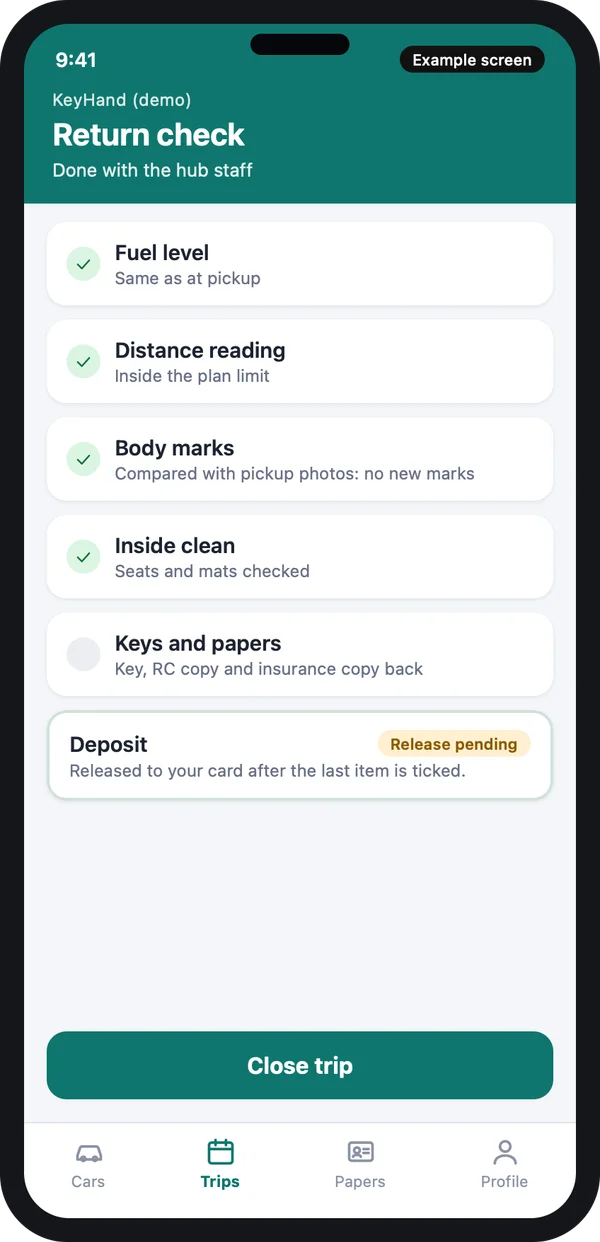
The return screen shows the same list: fuel, distance, body marks, inside of the car, keys and papers. The app puts the pickup photos next to the return photos. Staff tick each item. When the last item is ticked, the deposit is released.
You decide the rules in settings: the included distance, the fee for each extra kilometre, the fuel rule, the late fee. The app applies them the same way for every customer.
Other features a rental app needs
- Calendar for each car. A car cannot be booked twice for the same hours. Cars in service are blocked on the calendar.
- Hubs and pickup places. Each hub has its own cars, staff and opening hours. The customer picks the nearest one.
- Trip tracking. A phone or a GPS device in the car shows where it is. Like a ride app, it can warn you when a car leaves an area you set. See our guide to taxi booking app features for how live tracking works.
- Extend a trip. The customer taps once to ask for more time. The app checks that the next booking is not affected.
- Papers and service dates. Insurance, pollution check and fitness papers have end dates. The app warns you before they pass.
- Fines and tolls. You can add a charge to a booking later with a reason, and the customer sees it.
- Reports. Cars out, cars idle, late returns, damage by car, and money by hub.
If you let other car owners add their cars to your app, it becomes a marketplace. That adds owner payouts and owner approvals. We can build it in a second stage.
What the rules say, and what to check
Self-drive rental needs the right permit in many states, and the rules differ by state. The transport department of your state decides. Check the latest rules with them before you start, and use the national Parivahan portal to find your state office. Source: Ministry of Road Transport and Highways, Parivahan Sewa.
Check with your transport office. Permit type, insurance cover and who pays a fine are set by law and by your insurer. We do not give legal advice. We build the app so the settings (permit number, insurance end date, fine rules) can be changed by you without new code.
A licence can also be checked against the government records through Sarathi, which is the licence service of the same ministry. Whether an automatic check is open to a private business is a point to confirm; until then, staff can look the licence up by hand and the app records the result.
Excel, a ready-made rental tool and a custom app
| What you need | Excel and WhatsApp | Ready-made rental tool | Custom rental app |
|---|---|---|---|
| No double booking of a car | Hard | Yes | Yes |
| Licence upload and check step | Photos in chat | Sometimes | Built to your steps |
| Pickup and return photos side by side | No | Sometimes | Yes |
| Deposit hold and release rules | Cash notes | Fixed rules | Your rules |
| Your name on the app in the store | No | Usually no | Yes |
| Customer data and source code | Yours, but messy | With the vendor | Yours |
If you want to compare building with renting a script, read our guide on script versus custom development for ride apps. The same trade-offs apply to rental.
Worked example: one weekend booking
This is how one booking moves through the app. The names are examples.
- Thursday, search. Asha opens the app, picks Saturday 9:00 to Sunday 18:00, and sees only the cars free for those hours.
- Thursday, papers. She uploads her licence and a selfie. The hub staff approve them the same evening. The app saves the licence end date.
- Thursday, booking. She picks a family SUV, adds a child seat and confirms. The deposit is held on her card.
- Saturday, pickup. At the hub, staff and Asha mark two small scratches and take photos. Both tap to agree. The key is handed over.
- Sunday, extension. Asha needs two more hours. The app checks the next booking and accepts.
- Sunday, return. Staff tick fuel, distance, body marks and keys. The app shows no new marks. The deposit hold is released.
Our service
How we build your own car rental app
An app made around your yard, your cars and your rules.
- Understand your process. We list your cars, hubs, papers, rules and reports in a short call or two.
- Design the screens. You see clickable screens first, like the ones above, and change them before we write code.
- Build the apps. A customer app, a hub staff app and an owner panel, built with Flutter for Android and iPhone and a web panel for the office.
- Test with your team. Your hub staff run real handovers and returns. We fix what they find.
- Launch under your brand. Your name and logo in the stores, with your data on your own server.
- Support and grow. Add a new city, bikes, delivery to the door or a loyalty plan when you are ready.
Car rental app development cost: what decides it
Every rental business is different, so we do not publish a fixed price. Four things decide the budget. They are how many apps you need, how many hubs and rules, which payment and ID partners you connect, and whether other owners can add cars. A rental platform for many companies costs more than an app for one yard.
| Monthly rental software plan | Custom rental app (built for you) | |
|---|---|---|
| Start | Quick set-up | Takes some weeks to build |
| Cost over years | Pay every month | One build cost, then optional support |
| Your inspection and deposit steps | Fixed by the vendor | Built your way |
| Your brand on the apps | Rarely | Yes |
| Data and source code | With the vendor | Yours |
Share your cars, hubs and rules. We send a written quote after one call. Our taxi work, such as the white label taxi app and the travel software we build, shows how we scope this kind of project.
Whoever builds your rental app, make sure it can:
- Block a car on the calendar so it cannot be booked twice
- Store the licence photos and the licence end date
- Hold the deposit and release it only after the return check
- Take pickup and return photos and show them side by side
- Apply your distance, fuel and late rules the same way every time
- Warn you when insurance or service dates are near
- Let you change rules and fees in settings
- Export your data whenever you want
Frequently asked questions
How long does it take to build a car rental app?
It depends on the number of apps and rules. A customer app with an owner panel takes fewer weeks than a full platform with many hubs and owner payouts. We give a time plan with the quote.
Do I own the app and the source code?
Yes. The app is built under your name. Your customer data and the source code are yours.
Which platforms do you build for?
Android, iPhone and a web panel for the office. We usually build the phone apps with Flutter, so both phones share most of the work.
Can the app hold a deposit instead of taking cash?
It can ask your payment partner for a hold on the card or wallet and release it after the return check. Which hold types work depends on the partner you choose.
How is customer data kept safe?
Licence photos and IDs are stored on your server with limited staff access, and a record of who opened them. The data protection law of India applies, so we build in consent and a keep-for rule.
Can the app work for bikes or scooters too?
Yes. The steps are the same: papers, deposit, pickup photos and return check. Only the car drawing and the checklist items change.
Do I need a permit to rent cars for self drive?
The rules differ by state. Check the latest rules with your state transport department. We build the app so permit and insurance dates are kept in settings.
Can PRS India build a car rental app for my business?
Yes. We build custom rental apps with a customer app, a hub staff app and an owner panel. Book a consultation and we will show screens for your own process.
Related guides
- Motor Vehicle Aggregator Guidelines 2025 India: State-Wise Rules
- How to Start Taxi Business: Build Your Own Taxi App
- ONDC Taxi App: How to Build and Launch Yours
- How to Start a Taxi Business in Nigeria With Your Own App
- Electric Cab Booking App: EV Taxi Business Guide
- Employee Transport Management Software: Office Cab App
- Mobile app development
- Marketplace development
- Web application development
Written by
Aditi
Building software at PRS India.