Employee Transport Management Software: Office Cab App
Build your own employee transport software: shift roster, route plan, boarding code, night safety rules and HR reports. Web, Android and iPhone, your brand.

Written by Prabhjot Kaur, Product Manager
Reviewed by the PRS India software & mobile app development team
Updated on 11 min read
Written from production. Our articles draw on products we run live and the client work behind them, and are revised as the systems they describe evolve.
Every morning an office asks the same thing: who is coming, from where, and in which cab? Many companies still answer it with a sheet, a few phone calls and a WhatsApp group. It works for ten people. It breaks at a hundred. Employee transport management software puts the roster, the routes, the cab and the safety checks in one place.
A ready-made tool will not fit every office. That is why many firms build their own office cab app: your shifts, your rules, your logo, with an Android and iPhone app for staff and drivers. This guide explains what such software does and how PRS India builds it for you.
Key takeaways
- Employee transport is not a taxi booking. Staff do not book a cab. The office plans the trip from the shift roster.
- The core of the software is the route plan: which employees ride together, in which order, in which cab.
- Safety rules for night shifts, such as the drop order for women, must be built in as settings the admin can change.
- HR and the finance team need a monthly report by cab, route and office. They should not build it by hand.
- A custom-built office cab app is yours: your brand, your rules, your data and the source code.
What is employee transport management software?
It is software that plans and runs the cab or bus service a company gives its staff. The office decides who rides, when and where. The software then makes the routes, tells each driver whom to pick up, and tells each employee when the cab will arrive.
Compare it with a taxi app. In a taxi app, a rider books one trip and pays for it. In an office cab app, HR loads a shift roster and the system makes many trips at once. The rider does not pay at the end of each trip. The company pays the vendor, so the report matters more than the receipt. If you want to see the rider-booking side, read our guide to white-label taxi app development.
The problem
Where office cab services go wrong
Most offices lose time in the same six places.
- Roster in a sheet. Shifts change every week. Someone copies names into a sheet at night, and mistakes follow.
- Routes made by hand. A coordinator guesses the order of stops. Cabs run long and staff reach late.
- No proof of pickup. If an employee says "the cab never came", nobody can show what happened.
- Night rules forgotten. A woman gets dropped last because the order was not checked.
- Last-minute changes. Leave, shift swaps and new joiners reach the driver by phone call, often too late.
- Billing disputes. The vendor bills for trips that did not run, and finance cannot check.
Who uses an office cab app
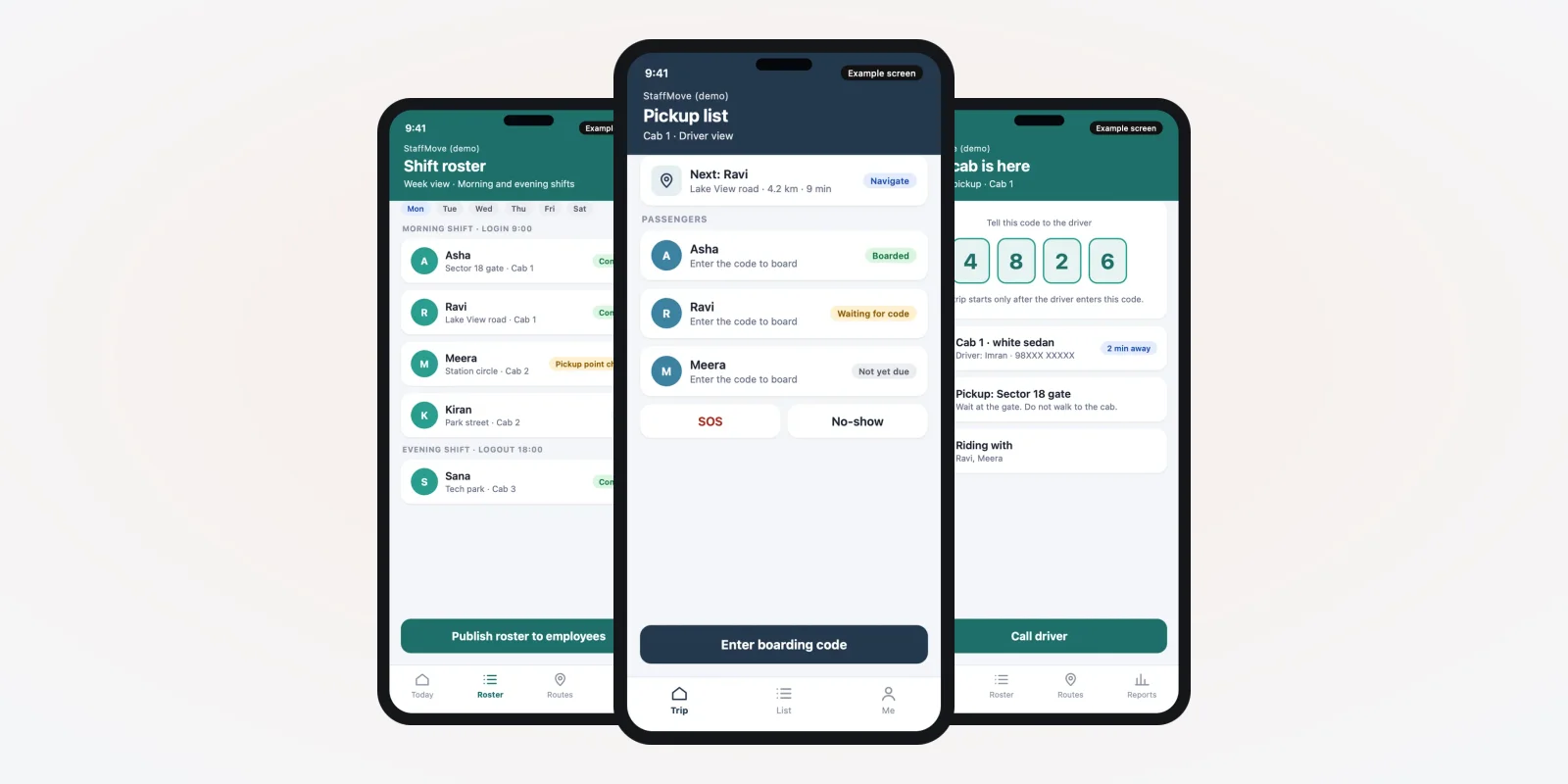
These groups use it every day. The screens below are example designs with demo data, made for this guide. They are not a live product.
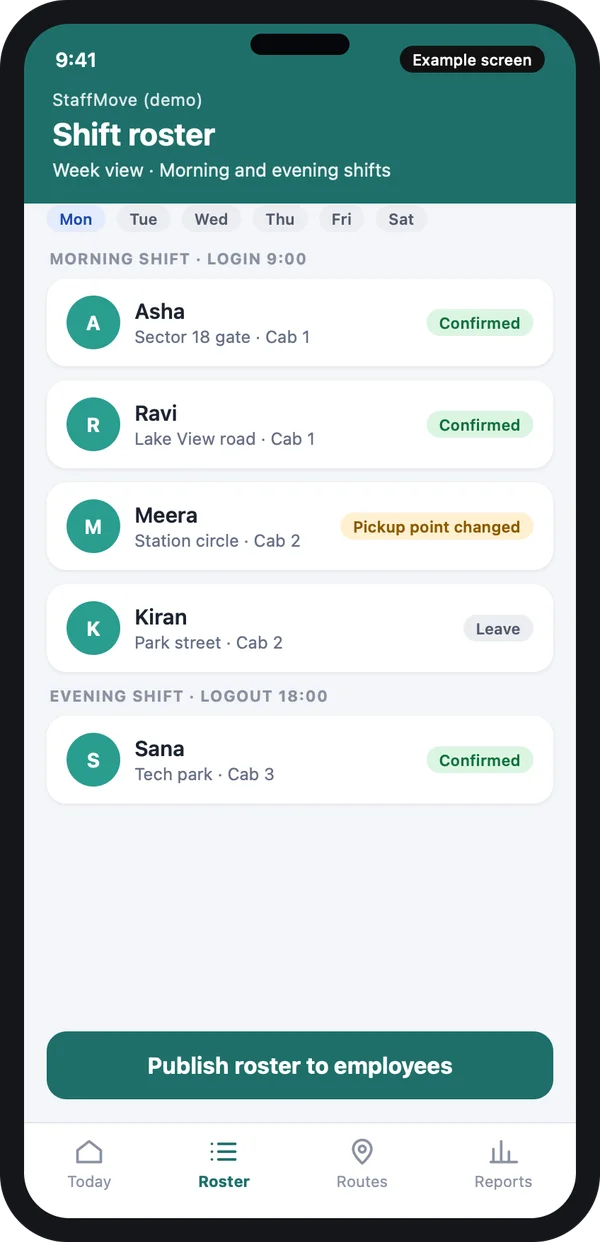
HR and admin
Load the roster, change pickup points, publish the plan to staff.
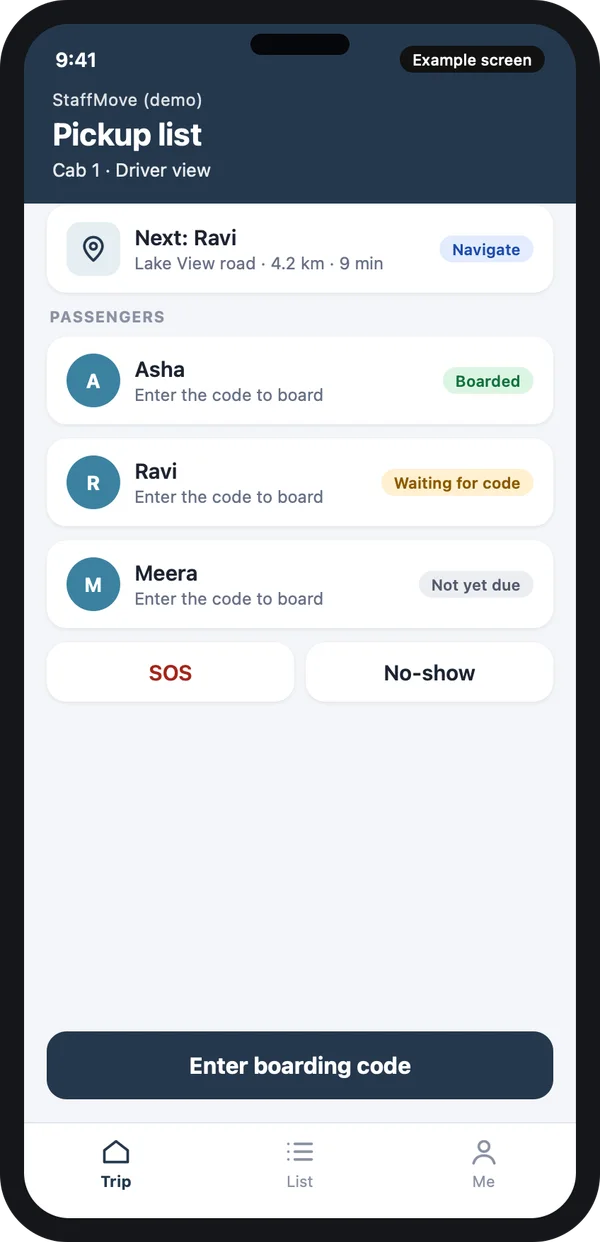
Driver
See the stops in order, check in each rider with a code, report a no-show.
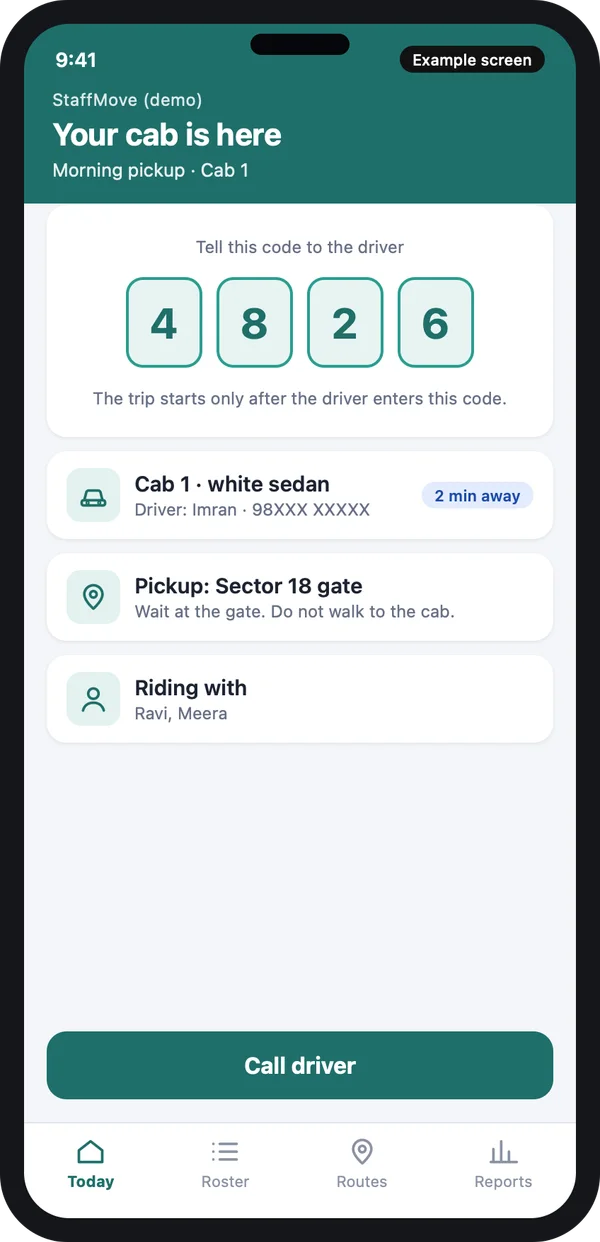
Employee
See the pickup time, the cab and the boarding code. Call the driver.
The transport vendor uses the same web admin to see its own cabs and bills. Example design with demo data.
Must-have features in an office cab app
1. Shift roster and pickup points
HR uploads the roster by sheet or adds it in the app. Each employee has a home pickup point and a shift. When a person goes on leave, the stop drops off the route by itself.
Staff can confirm or cancel a trip from their phone before a cut-off time you set. A change after the cut-off goes to the coordinator as a request.
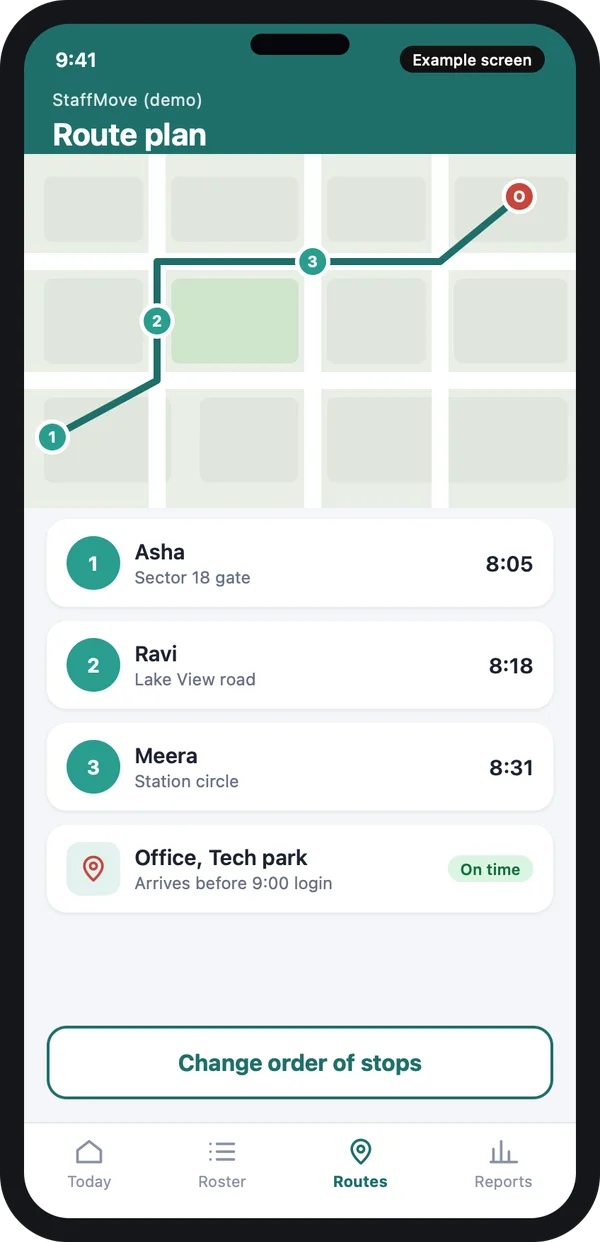
2. Route plan for each cab
The system groups employees by area and shift, then sets the order of stops. It checks that the cab reaches the office before login time. The coordinator can drag a stop to a different place in the order.
This is where a web admin for the transport desk earns its place. A big screen with all cabs and routes is easier to read than a phone.
3. Boarding code at pickup
The employee sees a short code. The driver enters it when the person gets in. This gives HR proof that the person boarded, with time and place. It also stops one rider using another person's seat.
4. Night safety rules
Many companies have rules for women on night shifts. Common features include drop order, a guard on the cab, and a live trip link. Rules differ by state and by company. So we build them as switches in the admin, not as fixed code. Read the labour rules for your state on the Ministry of Labour and Employment website and check them with a lawyer.
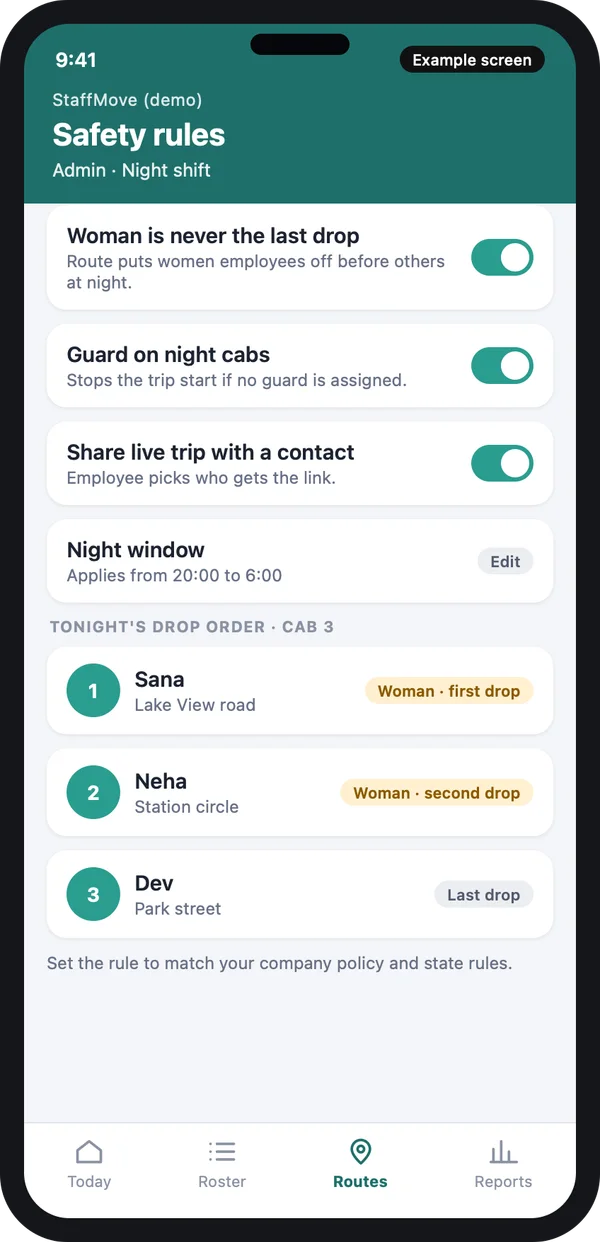
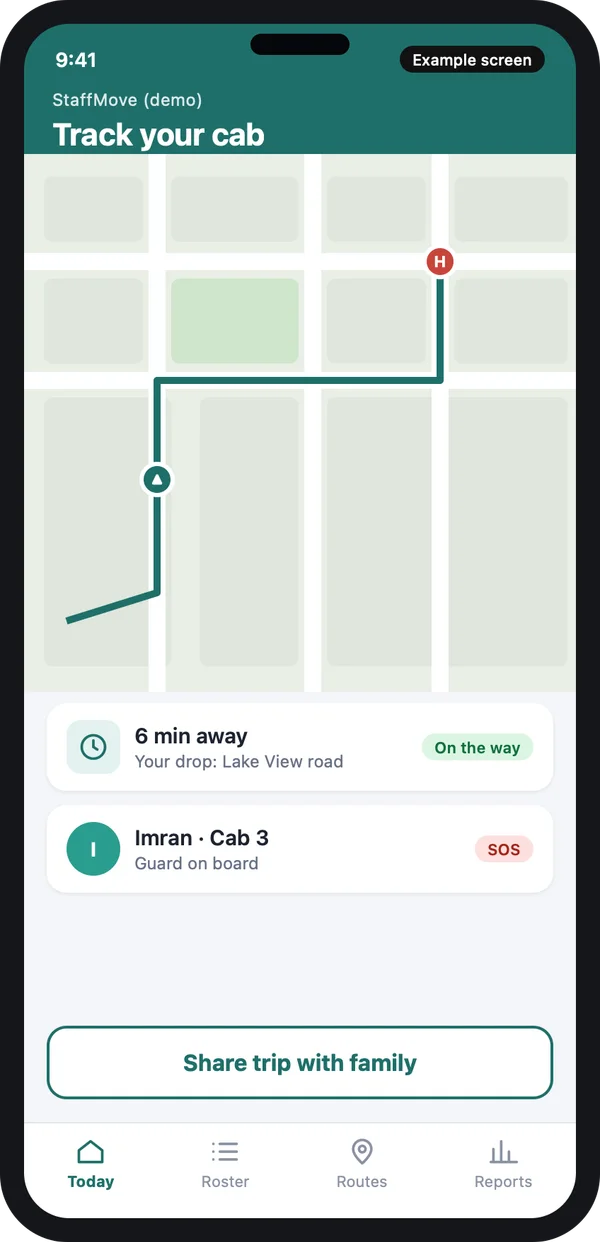
For general safety tools such as the SOS button and trip sharing, see our list of taxi booking app features. The same ideas apply here, with the company watching instead of a family member.
5. HR and finance reports
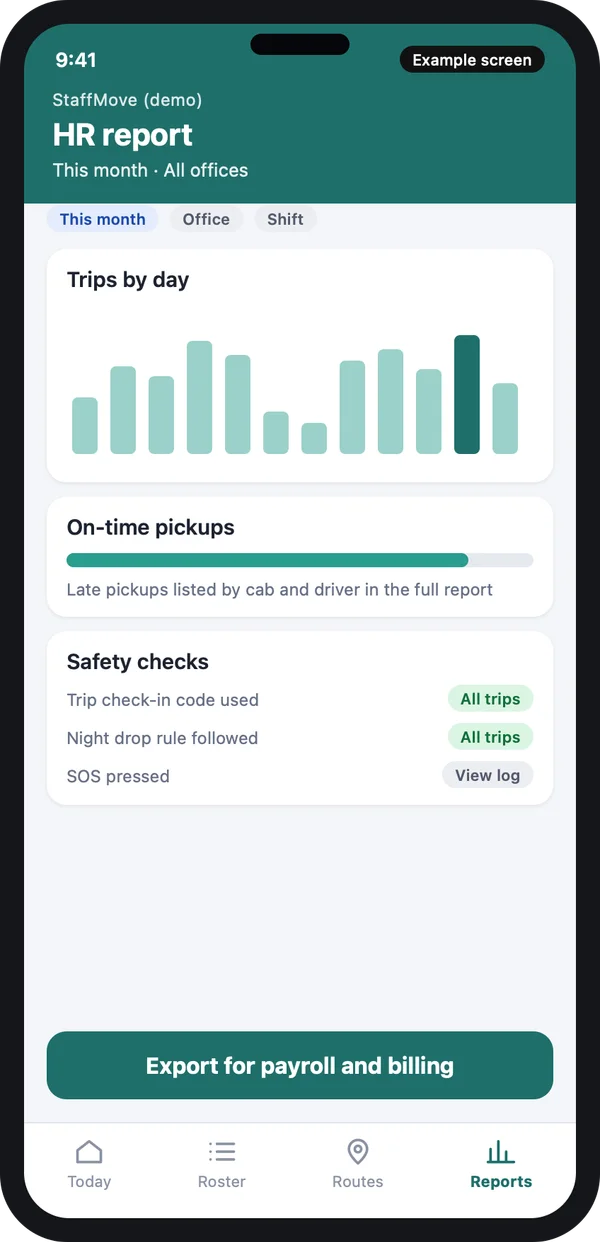
The admin sees trips by day, on-time pickups and safety checks. Finance gets a file by cab, route and office, to match the vendor bill. If a trip has no boarding code and no driver check-in, the report flags it.
The report also lists late pickups by cab and driver, so HR can talk to the vendor with facts.
Office cab app vs sheet vs ready-made tool
| Sheet and calls | Ready-made tool | Custom office cab app | |
|---|---|---|---|
| Route making | By hand | Set rules only | Follows your offices and shifts |
| Safety rules | Remembered by people | A few fixed ones | Built as your own switches |
| Proof of pickup | None | Sometimes | Boarding code with time and place |
| Your HR system link | Copy and paste | Limited | Built to match |
| Your brand on the apps | Not applicable | No | Yes |
| Data and source code | Scattered | With the vendor | Yours |
If you only need a place for staff to share rides, a carpool app may be enough. If you plan to buy a ready script first, read script versus custom build. If the company runs the cabs and pays for them, you need the system in this guide.
Worked example: one night shift in a call centre
- 5 pm. HR publishes the roster for the night shift. Staff confirm on the app. People on leave mark it, and their stops leave the plan.
- 7 pm. The system makes the routes. The coordinator moves one stop to a nearer cab and approves.
- 8 pm. Drivers see their pickup list. Each employee gets the cab details and a boarding code.
- During pickup. Every employee gives the code. The app records time and place. A person does not show up, and the driver marks a no-show.
- After the shift. The drop order puts women employees off before the others. The system checks the order and flags any change.
- Next day. HR opens the report. Finance sees the trips that really ran, matched to the vendor bill.
Our service
How we build your own employee transport software
An app made around your offices, not the other way round.
- Understand your process. We map your shifts, offices, vendors and rules in one or two calls.
- Design the screens. You see clickable screens first, like the ones in this guide, and change them before any code is written.
- Build the apps. A web admin for HR, an Android and iPhone app for staff and drivers, and links to your HR system.
- Test with your team. A few routes run for real. We fix what drivers and staff find.
- Launch under your brand. Your name and logo on the apps and stores, your data on your own server.
- Support and grow. We add offices, shifts and reports as you grow.
Employee transport software development cost: what decides it
Every company is different, so we do not publish a fixed price. The cost depends on how many apps you need, how many offices and shifts, and which links you want, such as your HR or payroll system. It also depends on how many companies or vendors will use the same system, which is a question of multi-company design.
| Monthly tool | Custom build | |
|---|---|---|
| Start | Quick set-up | Takes a few weeks to build |
| Cost over years | Pay every month, per employee | One build cost, then optional support |
| Your shifts and rules | Fit the tool | Built in, the way you work |
| Data and source code | Stay with the vendor | Yours |
Share your offices, shifts and vendors. We send a clear written quote after one call.
Whoever builds your office cab app, make sure it can:
- Take a roster by sheet and by hand, and drop stops on leave
- Make routes by shift and area, and show them to the coordinator
- Record boarding with a code, time and place
- Apply night drop rules that the admin can change
- Let staff share the live trip with a contact
- Give HR and finance a report by cab, route and office
- Keep location data only as long as you set
- Export your data whenever you want
Location data of staff is personal data. The Digital Personal Data Protection Act, 2023 applies to it. Ask for consent screens and a clear rule on how long you keep trip records. Vehicle and driver rules come from your state and the Ministry of Road Transport and Highways. Check them with a lawyer.
FAQ
What is employee transport management software?
It plans and runs the cab or bus service a company gives its staff. It takes a shift roster, makes routes, tells drivers whom to pick up and gives HR a report.
How is it different from a taxi booking app?
In a taxi app the rider books one trip. In an office cab app, HR loads a roster and the system makes many trips together. The company, not the rider, pays.
How long does it take to build?
It depends on offices, shifts and links to other systems. A first version for one office is quicker. We give a clear timeline in the written quote.
Who owns the app and the data?
You do. The app carries your name and logo. Your data stays on your own server, and you receive the source code.
Can the app handle women safety rules for night shifts?
We can build the drop order, guard check and live trip link as admin switches. Rules differ by state, so check yours with a lawyer or the labour department.
Which platforms do you build for?
Android and iPhone apps for staff and drivers, and a web admin for HR and the transport desk.
Is employee location data safe?
It can be. We build consent screens, limit who sees trip data, and delete records after the period you set. The data protection law applies to this data.
Can PRS India build employee transport software for my company?
Yes. We build custom apps around your roster, routes and rules. Book a consultation and we will show you screens for your process.
Related guides
Written by
Prabhjot Kaur · Product Manager
Product Manager at PRS India. Turns what a client needs into a screen-by-screen plan for the app, and checks every release against that plan before it goes out.