Roadside Assistance App Development: Tow Truck Booking
We build your own roadside assistance app: breakdown reasons, mechanic and tow truck dispatch, live arrival and job photos. Android, iPhone and web.

Written from production. Our articles draw on products we run live and the client work behind them, and are revised as the systems they describe evolve.
A car stops on a highway at night. The driver does not know a mechanic nearby. He calls a friend, who calls another friend. An hour later a tow truck arrives, and nobody agreed on the price. Roadside assistance app development fixes this: one app that sends the right helper to the exact spot.
This guide is for fleet owners, garage chains, insurance partners and new founders. It shows what such an app does, who uses it, and how PRS India builds it as your own app. It uses the same dispatch ideas as our taxi booking app development, but the job is different: a helper goes to the customer, not the other way round.
Key takeaways
- A breakdown call has a reason. The app must ask what went wrong, because a flat tyre and a tow need different helpers.
- The customer cannot always say where they are. The app must read the location and let them fix the pin.
- There are different helpers: a mechanic who comes to the car, and a tow truck that takes the car away. One app can dispatch both.
- Photos before and after the work protect both sides when someone argues about the job.
- You can build it as your own app: your brand, your helper network, your data and your source code.
What is a roadside assistance app?
It is an app that connects a driver in trouble with a helper nearby. The driver says what went wrong. The app finds a mechanic or a tow truck. The driver watches the helper arrive on a map, like a taxi.
The difference from a taxi is the job itself. A taxi trip is the same every time. A breakdown is not. The app must collect the right facts first, and then record the work at the end. If you want to see how the taxi side works, read how to create an app like Ola first.
Step one: say what went wrong
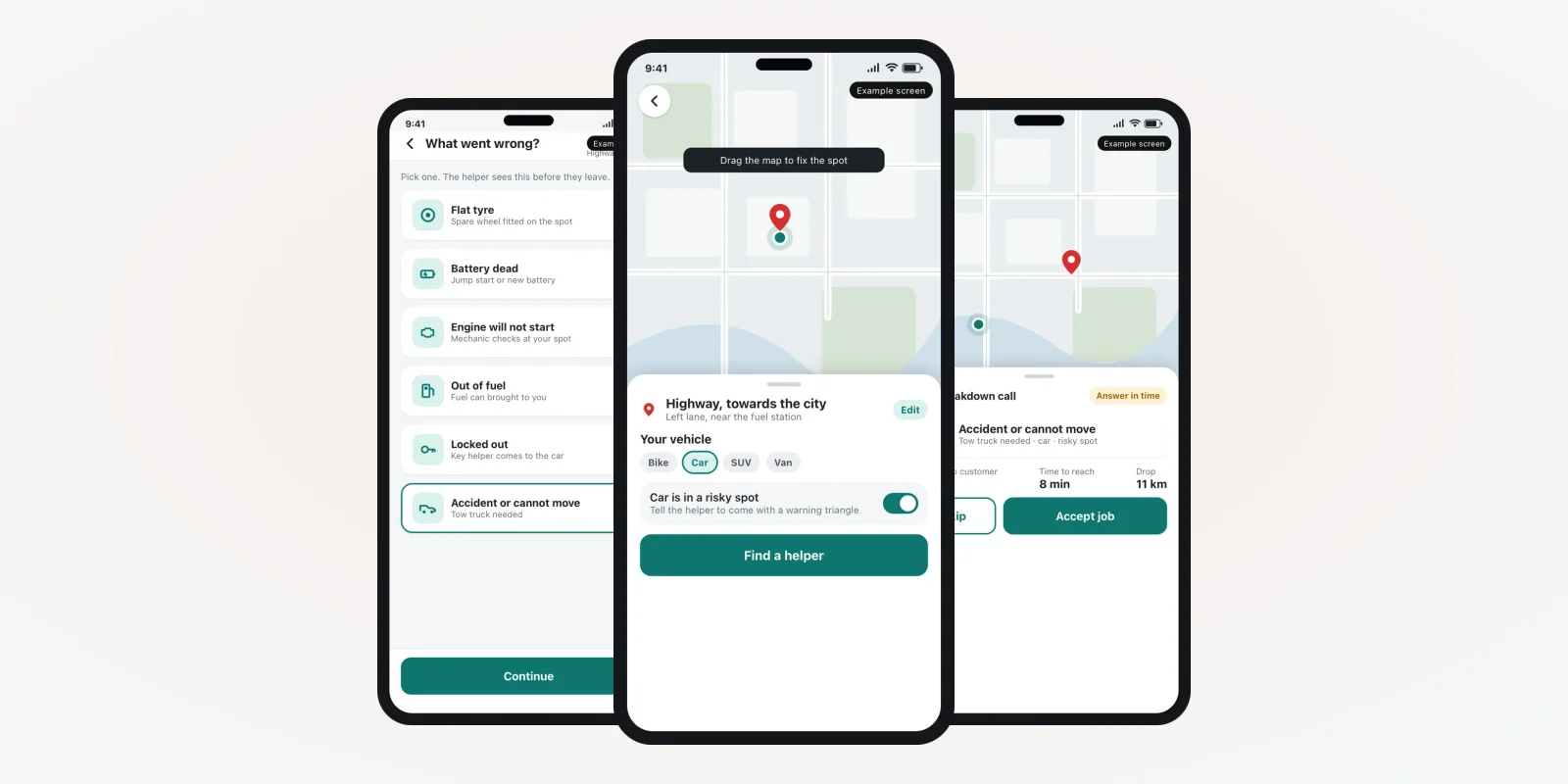
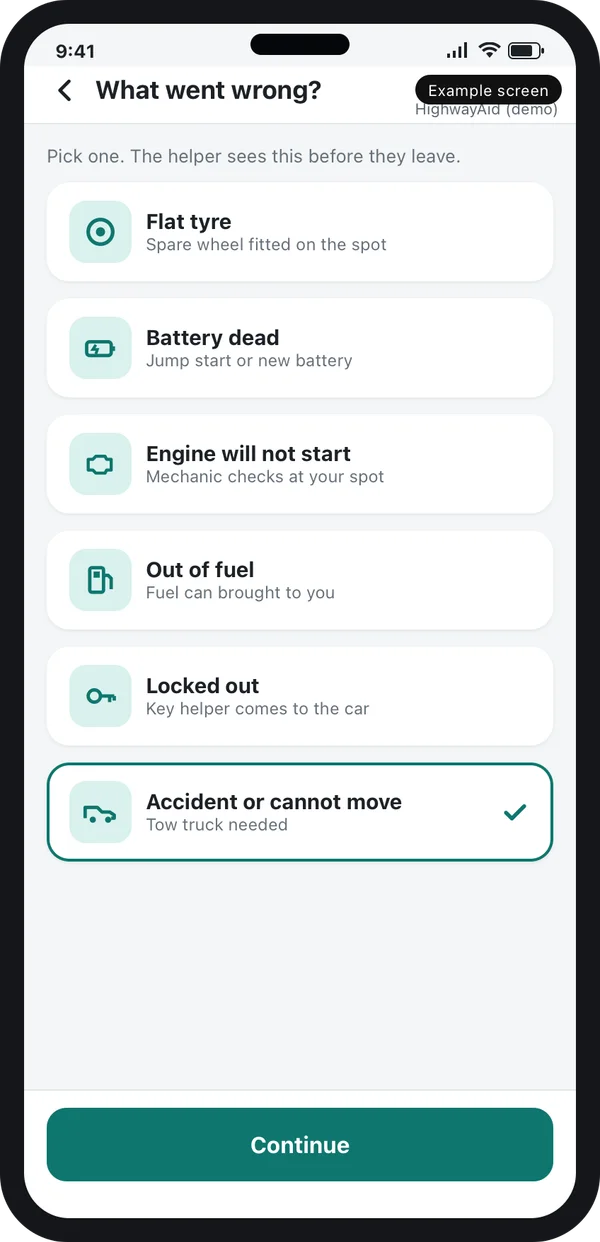
The customer picks a reason from a short list: flat tyre, dead battery, engine will not start, out of fuel, locked out, or accident. Each reason is a card with a plain icon and one line of help.
This choice decides who gets the call. A flat tyre goes to a mobile mechanic. An accident goes to a tow truck. You set these rules in the web admin, so your own business logic runs the dispatch.
The problem
Where breakdown calls go wrong
Most roadside businesses run on phone calls. These are the places where time and trust are lost.
- Wrong place. The customer says "near the toll". The helper drives to the wrong side of the highway.
- Wrong helper. A mechanic arrives, but the car needs a tow. The customer waits twice.
- No ETA. The customer calls again and again to ask when the helper will come.
- Price talk at the roadside. The helper and the customer argue after the work is done.
- No record. Nobody can show what was done. Insurance and warranty claims get stuck.
- Helpers go off the radar. The owner does not know who is available, who is busy and who is far away.
Who uses the app
Each group that uses a roadside assistance app needs its own screen, built for what they do in that moment. The screens in this guide are example designs we made for this topic, with demo data.
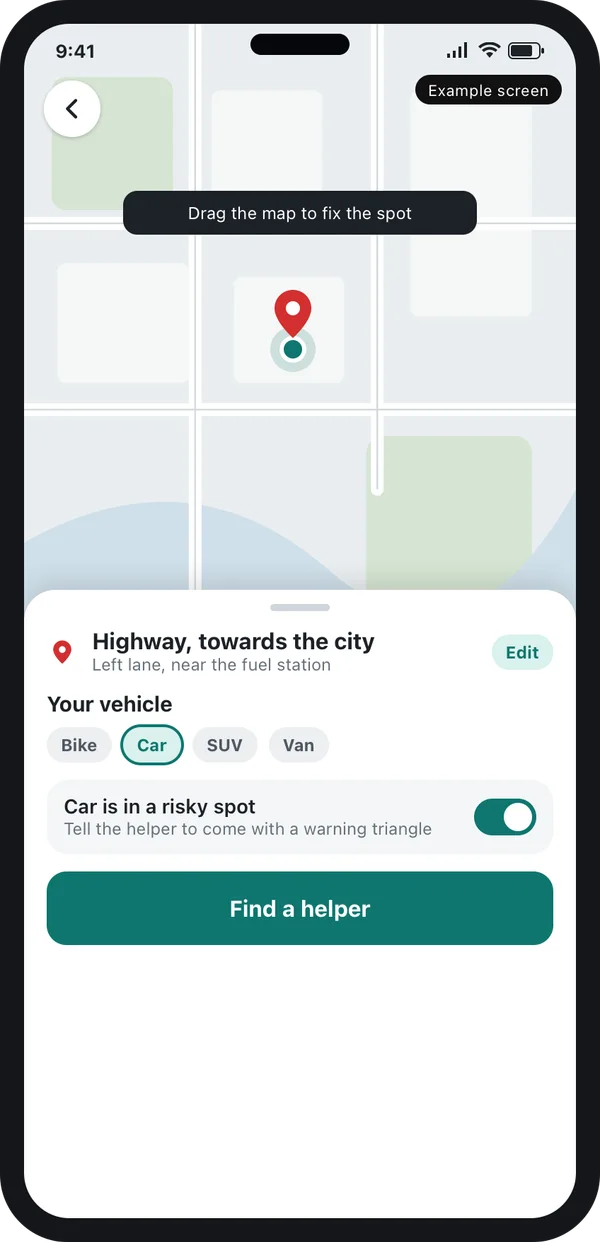
The driver in trouble
Fixes the pin, picks the vehicle and says if the spot is risky.
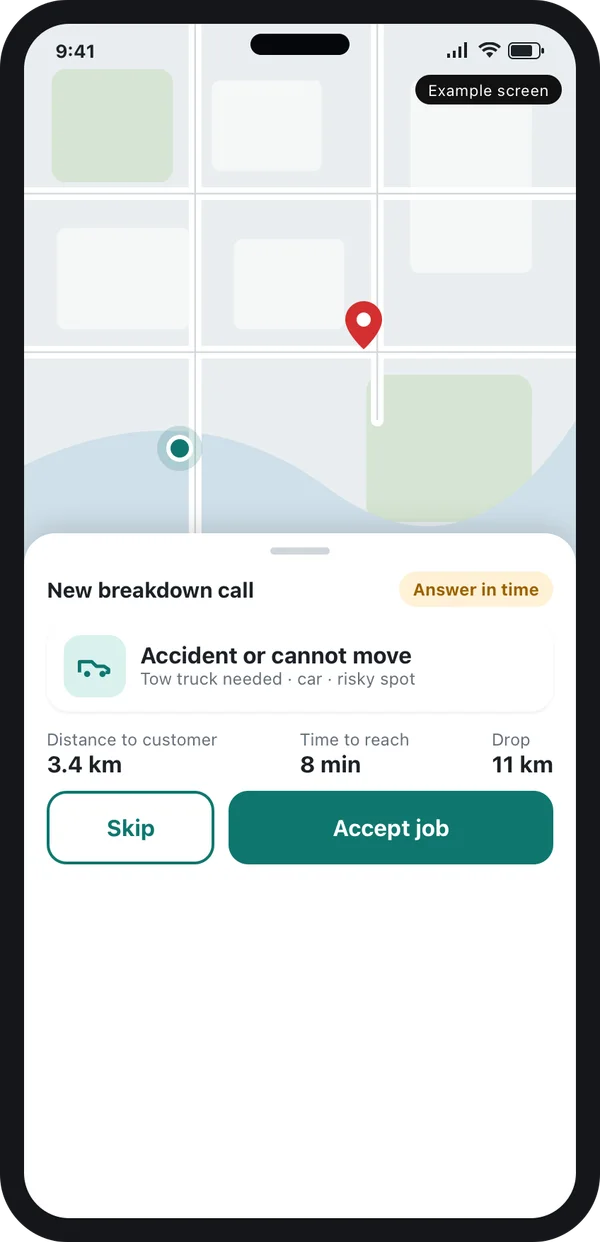
The mechanic or tow driver
Sees the reason, the distance and the drop point before saying yes.
You, the owner
Watch every request, every helper and every job on the web admin.
How a roadside job runs in the app
Finding the nearest helper
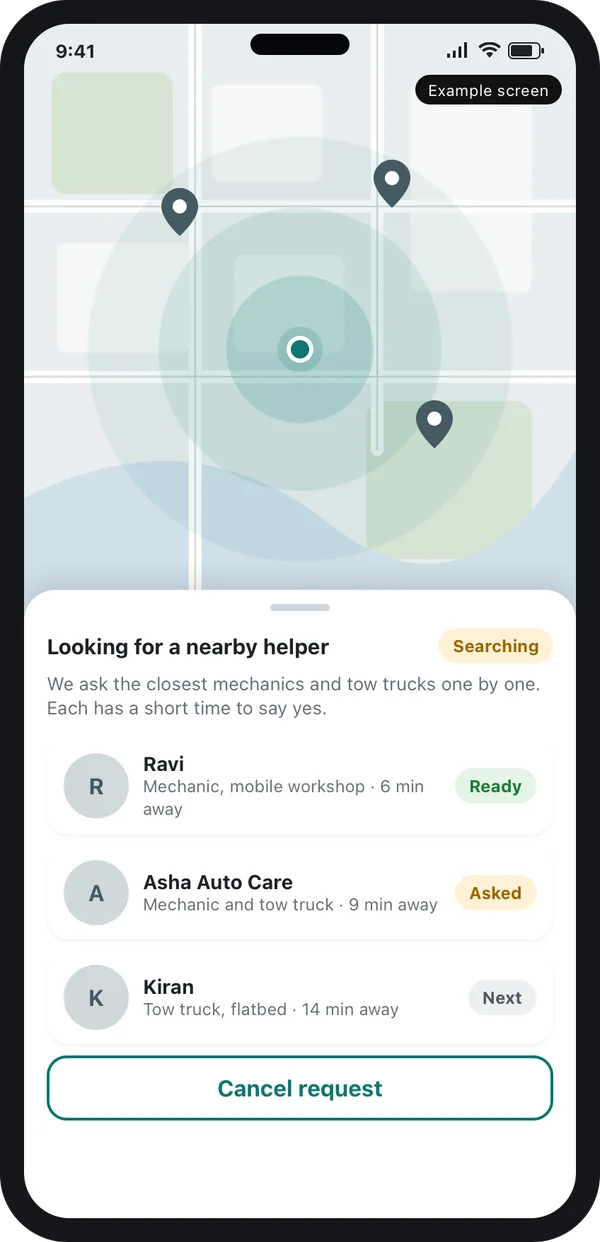
After the customer confirms the spot, the app asks helpers close to that point. It can ask one at a time, or a small group at once. A helper who does not reply in time is skipped. You choose the rule.
The customer sees a clear search screen with the helpers being asked. This is the same dispatch idea you see in a step-by-step Uber-like app build, with extra fields for the breakdown.
Watching the helper arrive
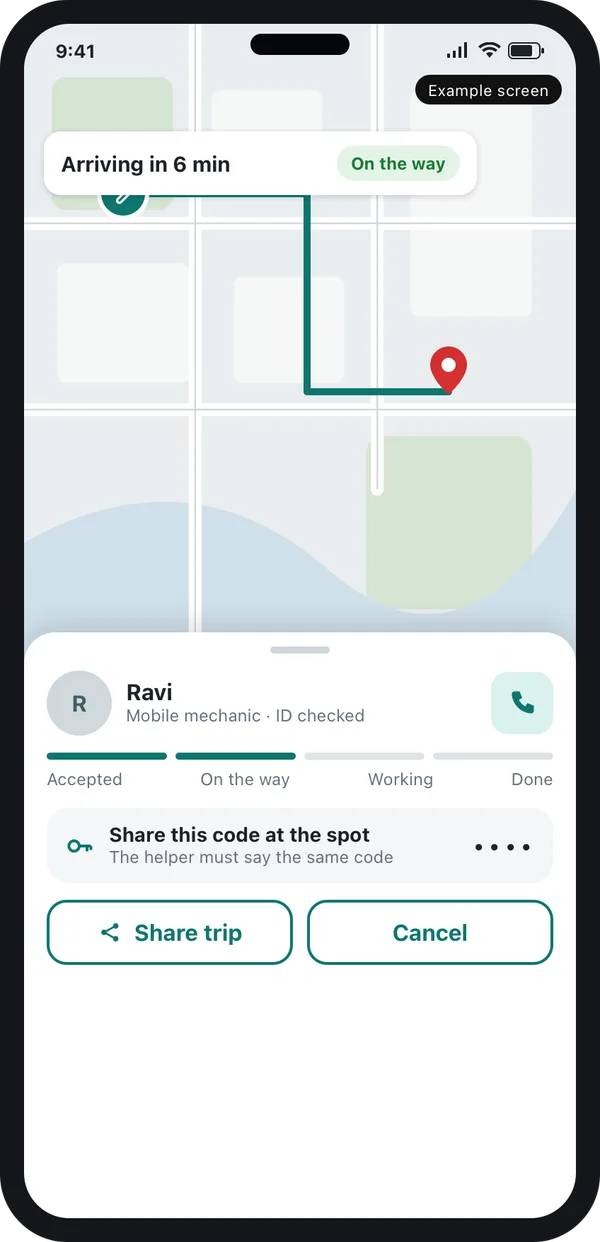
Once a helper accepts, the customer sees a live map with the arrival time. A progress bar shows the steps: accepted, on the way, working and done.
The screen also shows a short code. The helper must say the same code at the spot. This stops a wrong person from taking the job. The customer can share the trip with a family member in one tap.
What the helper must record
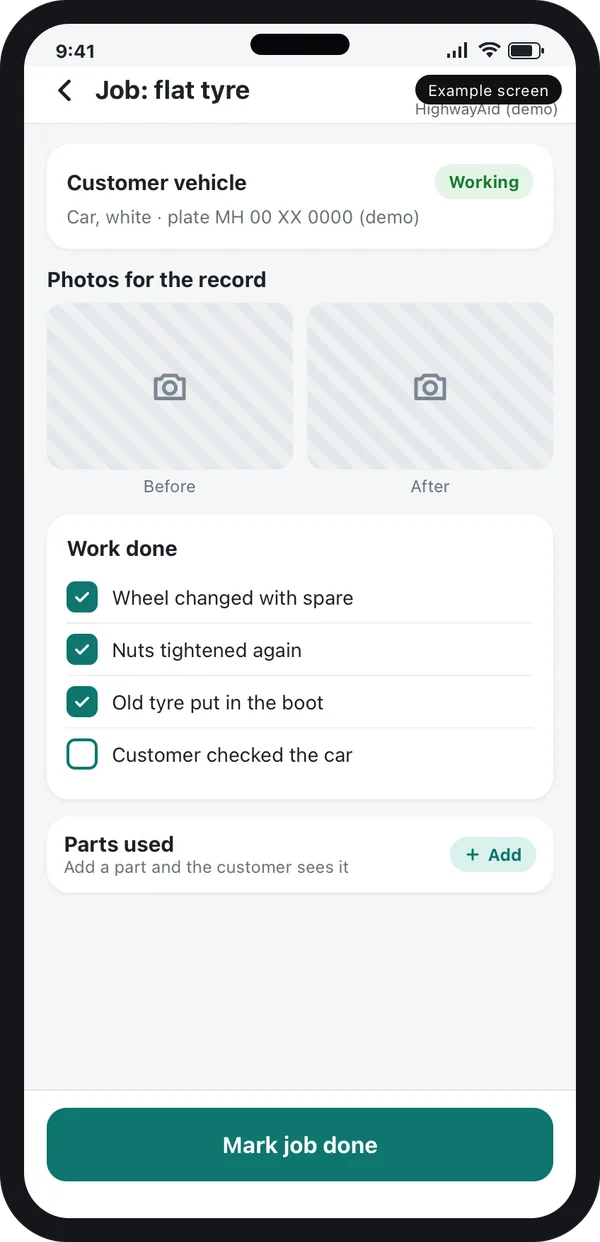
When the helper reaches the car, the helper app opens a job card. It asks for a photo before the work, a checklist of what was done, any parts used, and a photo after. This is the part that most ready-made dispatch apps skip.
The customer sees the same checklist and can accept the work. If an insurance company or a leasing firm pays for the call, they can read the same record. That record is the proof of service.
You can add rules too. For example: the job cannot close without an after photo.
Tow truck booking inside the same app
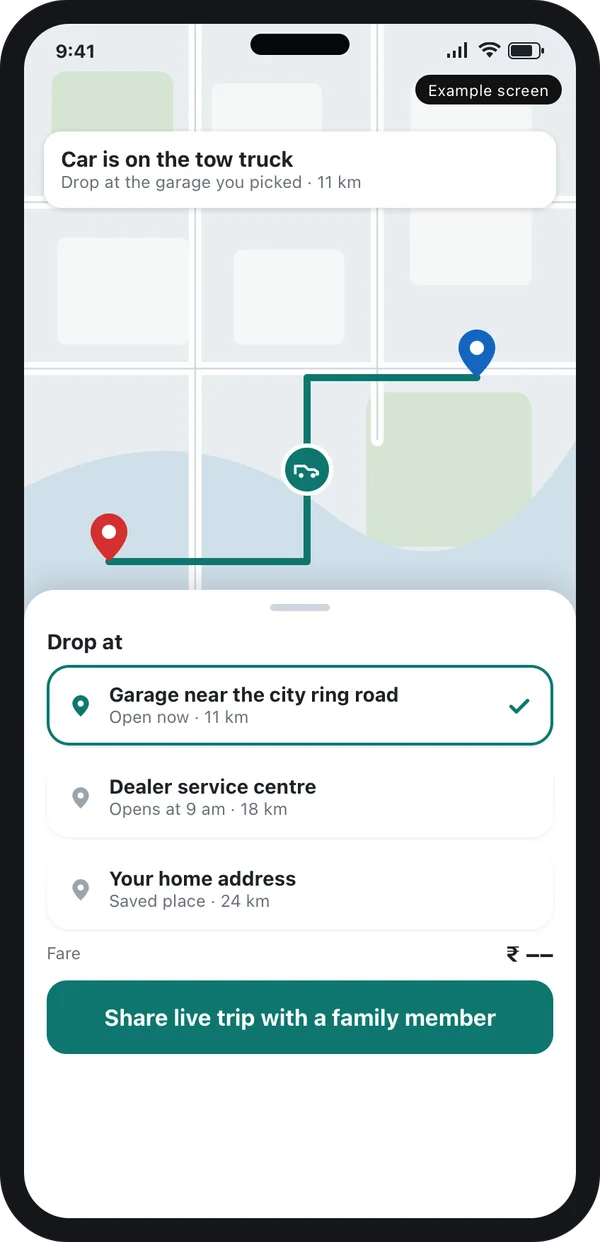
A tow call has one more step than a repair call: where should the car go? The customer picks a drop point, such as a garage, a dealer service centre or home. The app draws the route and shows the distance.
The tow driver sees the same route. The customer can follow the truck, so there is no worry about where the car went. Some founders also add a flatbed or hook choice, because a locked wheel or an electric car needs a flatbed.
A tow trip can have its own fare rule: a base charge, a rate per kilometre, and a night charge. You set these in the admin. Nothing is fixed in code.
Features to build in the web admin
The admin is where you run the business. It is a web panel built with web application development, and it reads the same data as the phone apps. Plan these parts:
- Live request board. Every open call, its reason, its helper and its waiting time on one screen.
- Helper onboarding. Papers, vehicle details, service area and the skills each helper has: tyre, battery, tow, lock.
- Dispatch rules. Which reason goes to which helper type, and how far to search.
- Price rules. Base charge, distance, night, waiting and parts, set by you.
- Job records. Photos, checklists and parts for every job, searchable by plate number.
- Partner access. A login for an insurer, a leasing company or a fleet manager who sends you calls.
If your helpers are drivers who already carry other work, our guide to taxi booking app features shows which driver-side parts you can reuse.
Safety and rules to plan for
Roadside work happens in risky places. Build safety into the flow, not as an extra.
- Risky spot flag. If the car is on a fast road, the helper is told to bring a warning triangle and stay alert.
- Helper identity. Show the helper's name, photo and a checked-ID badge before they arrive.
- Trip sharing. The customer can send the live link to family.
- Location data. You collect location and phone numbers. India has a data protection law for personal data. Read the act summary on the MeitY data protection page and ask a lawyer how it applies to you.
Source: Ministry of Electronics and IT: data protection framework.
Highway stretches have their own operator. The National Highways Authority of India publishes information about national highways, so check with it before you promise service on a particular stretch. Vehicle registration and permit services for tow trucks sit on the Parivahan portal. Rules differ by state, so check the latest with the transport department.
Source: Parivahan Sewa, Ministry of Road Transport and Highways (registration, permit and licence services).
Roadside assistance app vs a taxi app
Many founders ask if they can use a ready taxi script. A taxi script moves a person from A to B. A roadside app sends a worker to a car and records the work. Here is the difference.
| What you need | Phone calls and chat | Taxi app script | Roadside app built for you |
|---|---|---|---|
| Ask what went wrong before dispatch | Staff asks, may forget | No | Yes, by reason card |
| Send mechanic or tow by reason | By hand | No | Yes, by your rules |
| Customer fixes the pin | Describes in words | Yes | Yes, with a risky spot flag |
| Photos and checklist for the job | On a phone gallery | No | Yes, on the job record |
| Drop point for a tow | By call | Basic | Yes, with route |
| Partner login for insurers | No | No | Yes |
If you still want a ready base, read Uber clone script vs custom development to see where a script helps and where it limits you.
Worked example: a garage with a tow truck and mobile mechanics
A garage owner has a flatbed tow truck, some mobile mechanics and a loyal group of fleet customers. Today every call lands on his personal phone. Here is a night with the app.
- The call. A cab driver picks "Engine will not start" and fixes the pin on a flyover.
- Dispatch. The app asks the nearest mechanic. He accepts and the driver sees his face and arrival time.
- The diagnosis. The mechanic takes a photo and finds the car needs a tow. He changes the job to "tow needed".
- The tow. The flatbed gets the call. The driver picks the owner's garage as the drop point.
- The record. Both jobs sit on one record with photos. The fleet manager reads it in the morning.
Our service
How we build your own roadside assistance app
- Understand your business. We list your helpers, your reasons for calls, your areas and who pays. See our build process.
- Clickable screens. You tap through the customer app, helper app and admin before any code is written. Our UI and UX design team makes them.
- Build. We build the apps with Flutter for Android and iPhone, and the admin and server with Laravel or Node.js.
- Test with your team. Your mechanics and tow drivers try real calls on real roads.
- Launch under your brand. Your name, logo and store listing. We help with hosting and releases.
- Support. We fix issues and add features after launch.
Roadside assistance app development cost: what decides it
Every roadside business is different, so we do not publish a fixed price. The budget depends on a few things you can control:
- How many apps you need: customer, helper, admin, partner login.
- How many breakdown reasons and job checklists you want.
- Whether you need Android and iPhone apps or a web booking page too.
- Payment, SMS and call masking connections.
- How many cities or service areas on day one.
| Monthly dispatch plan | Custom app built for you | |
|---|---|---|
| Start | Quick setup | Takes weeks to build |
| Cost over years | Pay every month, for every helper | One build cost, then optional support |
| Breakdown reasons and job records | Fixed or limited | Built your way |
| Brand and store listing | Shared or limited | Your own name and logo |
| Data and source code | Held by the vendor | You own both |
Whoever builds your roadside app, make sure it can:
- Ask for the breakdown reason before it dispatches anyone
- Let the customer move the pin and flag a risky spot
- Send a mechanic or a tow truck by your own rules
- Show the helper's arrival time and a job code
- Save before and after photos with a checklist on the job
- Give you the source code and your data at handover
FAQ
What is a roadside assistance app?
It is an app that sends a mechanic or a tow truck to a driver who has broken down. The driver picks the problem, fixes the pin on the map and follows the helper to the spot.
How long does it take to build a roadside assistance app?
It depends on how many apps and features you need. A customer app, helper app and admin take weeks, not days. We give a time plan with the written quote.
Can the same app book both a mechanic and a tow truck?
Yes. The reason the customer picks decides which helper gets the call. A mechanic can also change a job to a tow if the car cannot be fixed at the spot.
Do I own the app and the source code?
Yes. The app is built under your brand. You own the data and the source code at handover.
Which platforms can you build for?
We build Android and iPhone apps, plus a web admin. A web booking page for customers is also possible.
Is customer location data safe?
We store data on servers you control and limit who can see it. India has a law on personal data, so ask a lawyer how it applies to your business.
Can I start with one city?
Yes. Many owners start with one area and add more later. The admin lets you add service areas without new code.
Can PRS India build a roadside assistance app for me?
Yes. We build customer apps, helper apps and web admins for service businesses. Book a consultation and we will show you screens for your process.
Related guides
- Auto Rickshaw Booking App Development: Driver and Rider
- Motor Vehicle Aggregator Guidelines 2025 India: State-Wise Rules
- Car Rental App Development: Self Drive Business Guide
- How to Start Taxi Business: Build Your Own Taxi App
- ONDC Taxi App: How to Build and Launch Yours
- How to Start a Taxi Business in Nigeria With Your Own App
- Mobile app development
- Logistics platform development
- Web application development
Written by
Aditi
Building software at PRS India.