How to Start Online Clothing Business: Build Your Store
The steps to start an online clothing business from your own store and app: GST, size charts, photos, COD rules, returns and one stock count.

Written by Babita Kumari, Business Developer
Reviewed by the PRS India software & mobile app development team
12 min read
Written from production. Our articles draw on products we run live and the client work behind them, and are revised as the systems they describe evolve.
Many clothing brands, boutiques and fashion startups begin on Instagram, WhatsApp or a marketplace. Orders come in, but the buyer list, the prices and the brand belong to someone else. Sizes get mixed up in chats. Cash on delivery parcels come back unpaid. Stock in the shop and stock online never match.
The way out is to build your own clothing store under your brand. That means a web store, an app and one admin panel. This guide shows how to start online clothing business work in the right order. It covers what your store needs on day one. It also shows how PRS India builds your own ecommerce store.
Key takeaways
- Start with a niche, GST, size charts and photos. The store comes after these are ready.
- Size charts and return rules decide how many parcels come back. Set them before launch.
- Marketplaces bring new buyers. Your own store keeps the buyer, the data and the margin.
- A custom-built store is yours: your brand, your data and the source code.
Steps to start an online clothing business
Most new clothing sellers open a store first and fix the basics later. That order costs money in returns. Here is the order we follow with new clothing brands.
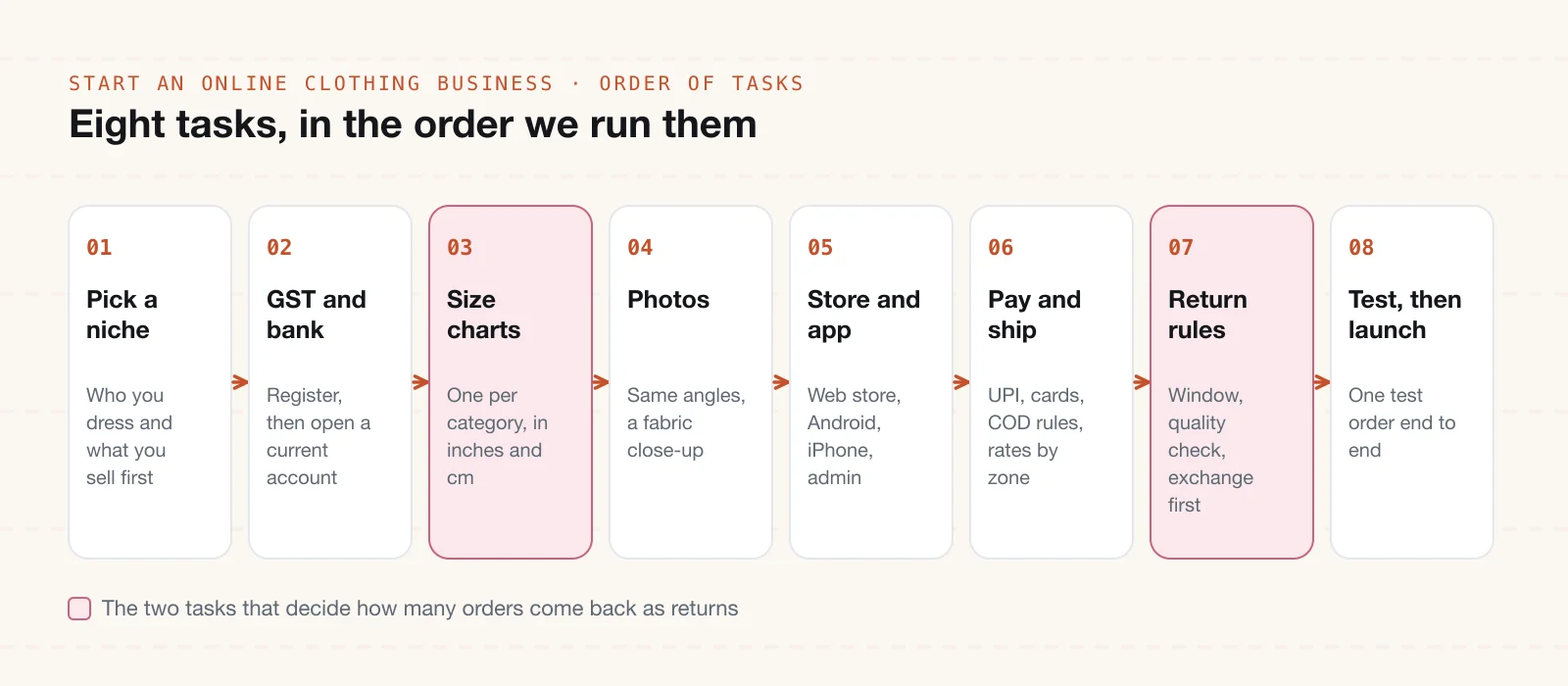
- Pick your niche. Decide who you dress and what you sell first: cotton kurtas, office shirts, kids wear or festive sets. A narrow start is simpler to photograph and stock.
- Register the business and GST. Get your business papers, a current account and a GST number. The GST portal handles registration and e-invoices.
- Make size charts. Make one chart per category, in inches and centimetres. Measure your own samples. Do not copy another brand's chart.
- Shoot photos the same way. Use the same angles for every style: front, back, a fabric close-up and the colour options.
- Build the store and app. Get a web store, an Android and iPhone app, and an admin panel that holds products, sizes and stock.
- Set payments and shipping. Turn on UPI and cards. Set cash on delivery rules and shipping rates by zone.
- Write return and exchange rules. Set the window, the quality check and whether you offer an exchange first.
- Place a test order. Pay, pack, ship and return one order yourself. Then launch.
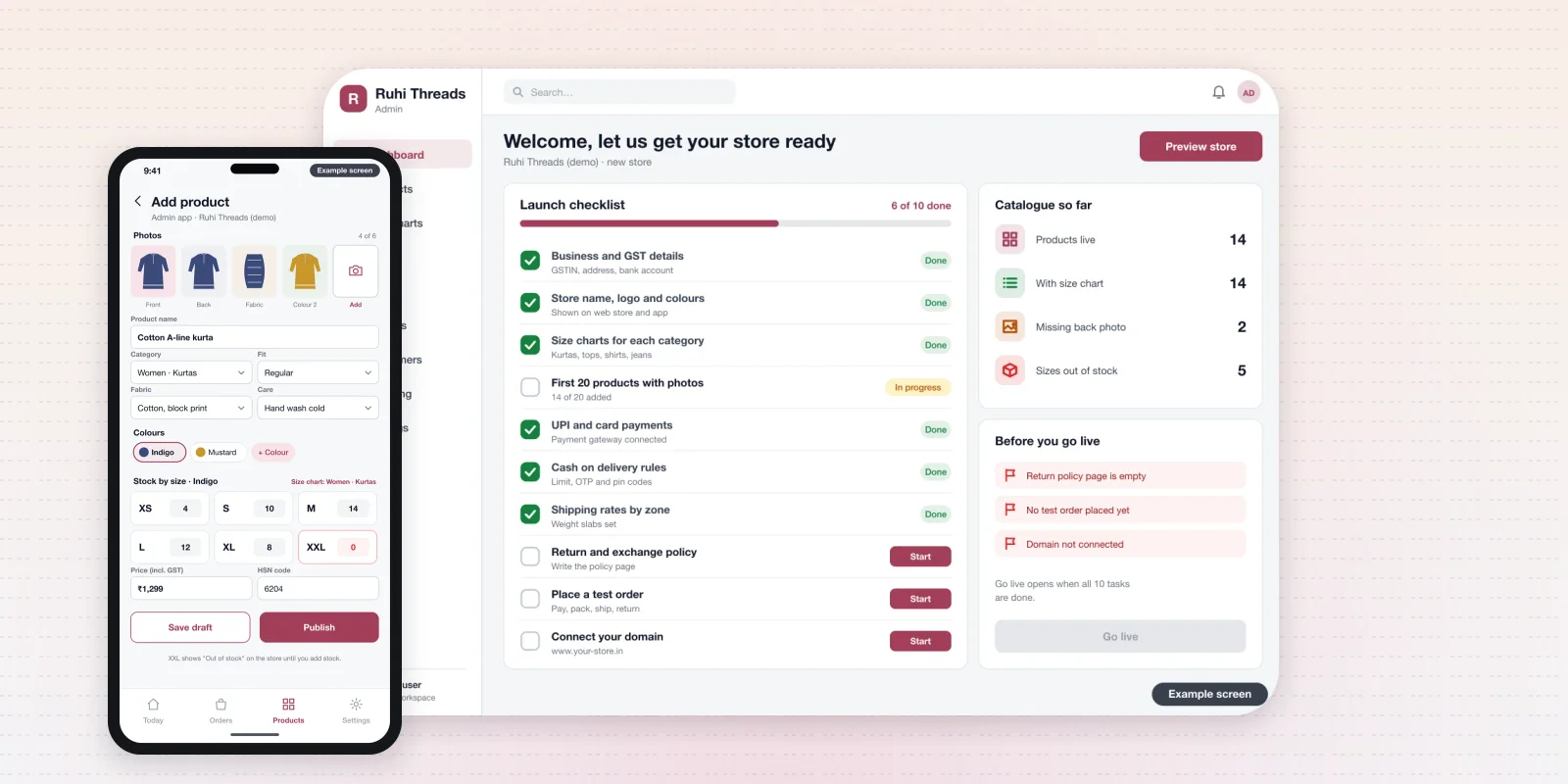
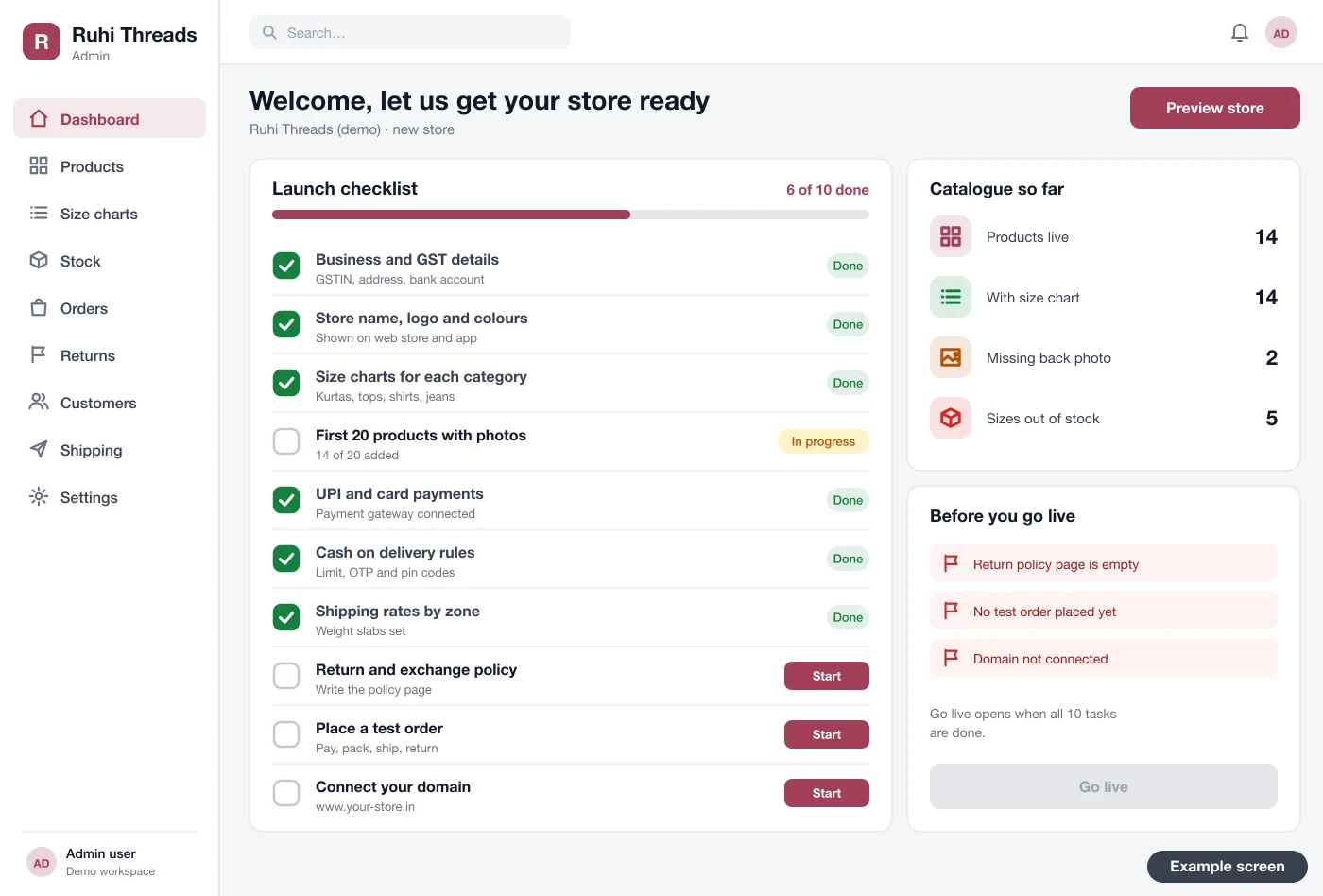
We put these tasks into a launch checklist in your admin panel. Go live stays locked until every task is done.
Your own store vs selling on marketplaces
A marketplace puts your kurtas in front of buyers who have never heard of you. That is useful in the first months. But the marketplace sets the rules. It decides the commission, the return window and how your listing looks. You often do not get the buyer's phone or email, so you cannot sell to them again.
Your own store works the other way. You set the price, the offers and the return rules. Every buyer joins your list. You can send a new drop to past buyers by app push, email or WhatsApp. The catch is that you must bring visitors yourself, through Instagram, search and ads.
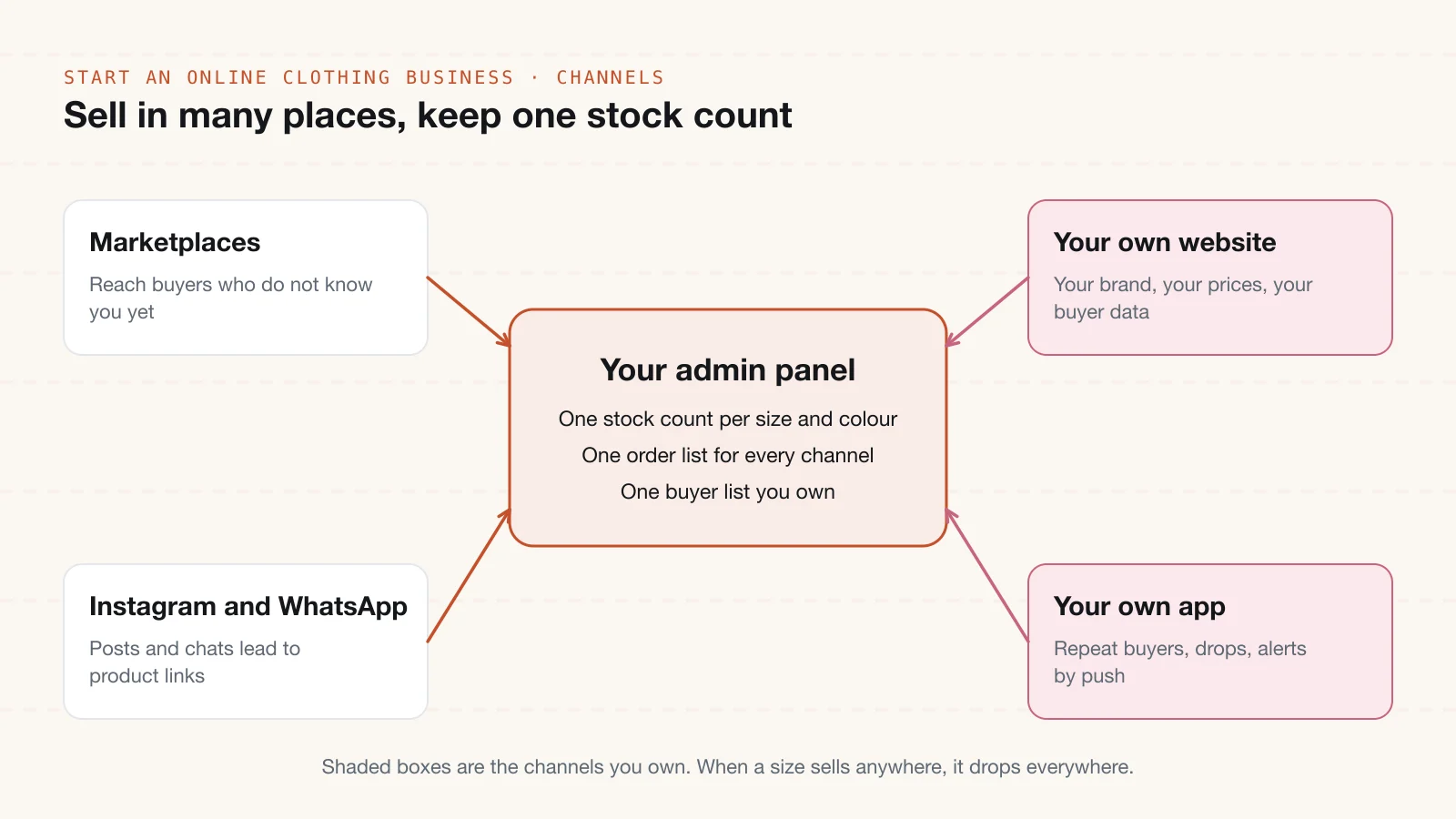
Most clothing brands do both. They sell on one or two marketplaces and run their own store and app. The key is one stock count across all of them. If you plan to let other sellers list on your site later, read about multi-vendor marketplace development.
Marketplaces vs your own clothing store vs both
| What matters | Marketplace only | Your own store only | Both, with one stock |
|---|---|---|---|
| New buyers who do not know you | Yes | Only through your own ads and posts | Yes |
| Buyer phone and email | Usually not shared | Yours | Yours for store orders |
| Price and offers | Within marketplace rules | You decide | You decide on your store |
| Return and exchange rules | Marketplace rules | Your rules | Your rules on your store |
| Your brand on the app | No | Yes | Yes |
| Stock count | Separate per marketplace | One | One, synced to each channel |
| Work to run it | Listings and orders | Store, visitors and orders | One admin for all of it |
What your own clothing store needs on day one
A clothing store is not a general store with clothes in it. Each style has many sizes and colours. Buyers worry about fit. They want to know the fabric and how to wash it. These are the screens we build first.
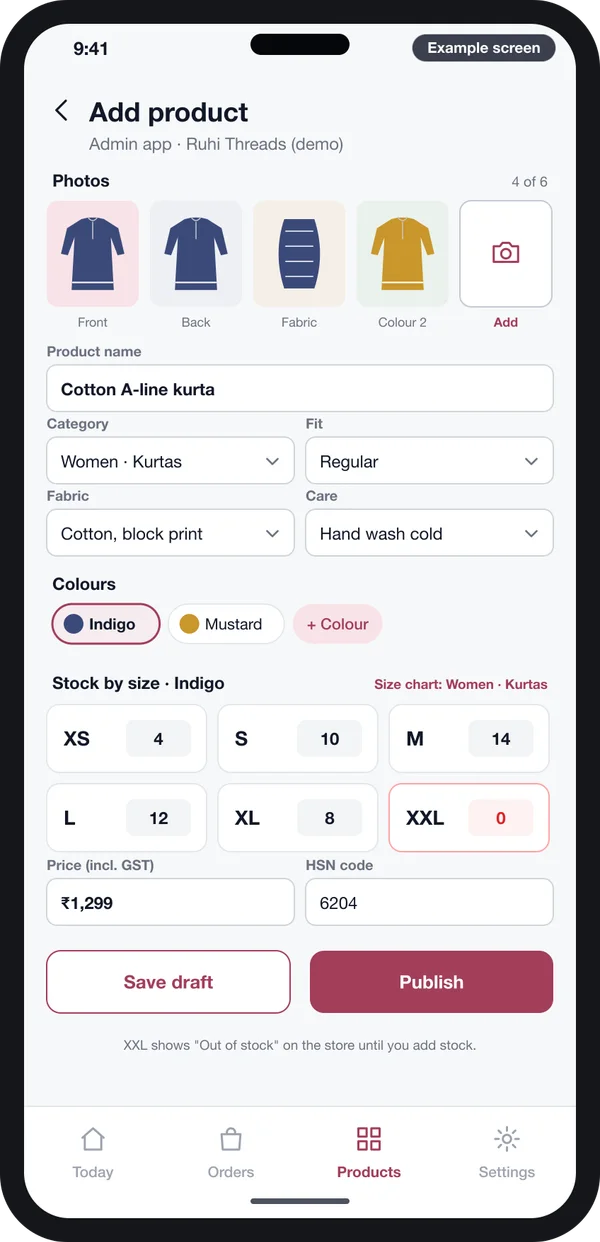
Add a product with sizes
Photos, fabric, fit, care, colours and stock for each size, from your phone.
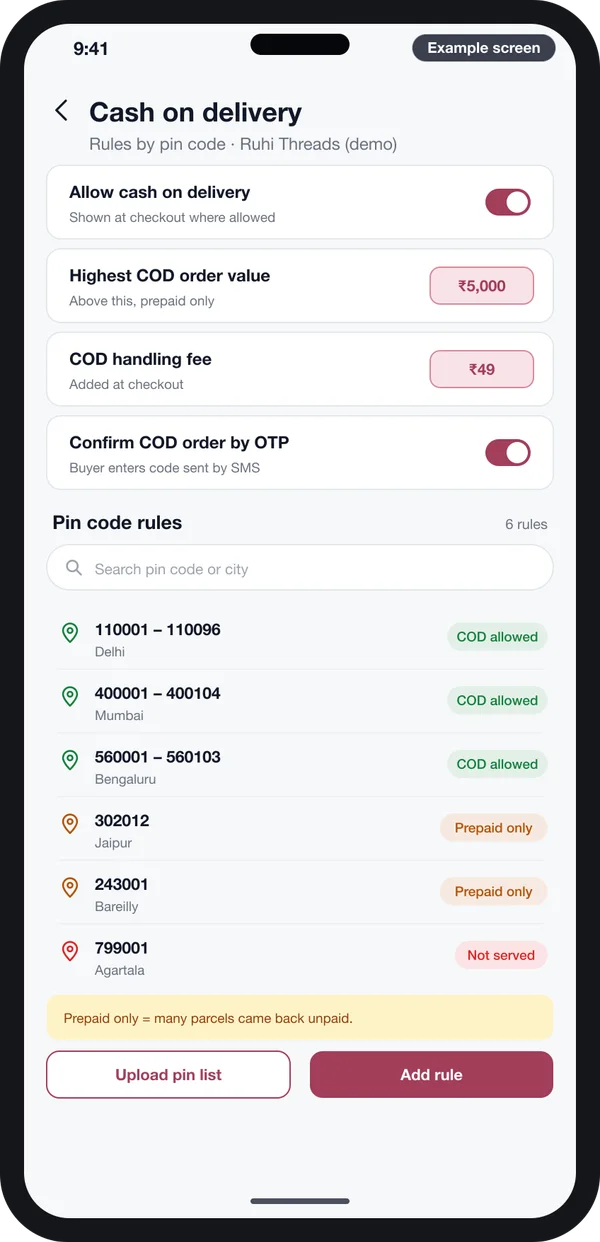
Cash on delivery rules
A COD limit, an OTP check and rules for each pin code.
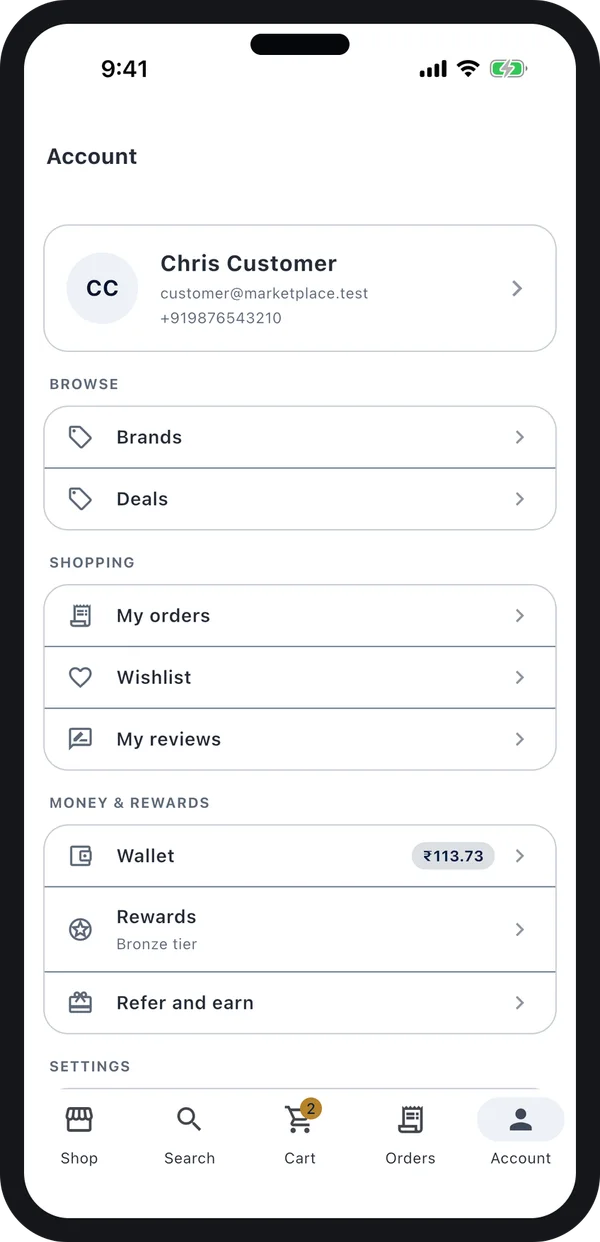
Buyer account
Orders, wishlist, wallet and rewards, so buyers come back.
Example screens we designed, demo data. Behind these screens sit a few more must-haves:
- Size chart per category. Linked to every product page, in inches and centimetres.
- Filters by size, colour and fabric. A buyer who wears M should see only styles in M.
- Product data search engines can read. Price, stock and size in the format of Google's product structured data.
- Pages everyone can use. Alt text on photos and readable colours, as the W3C WCAG guidelines describe.
- Shipping rates by weight and zone. A kurta and a pair of jeans cost different amounts to ship.
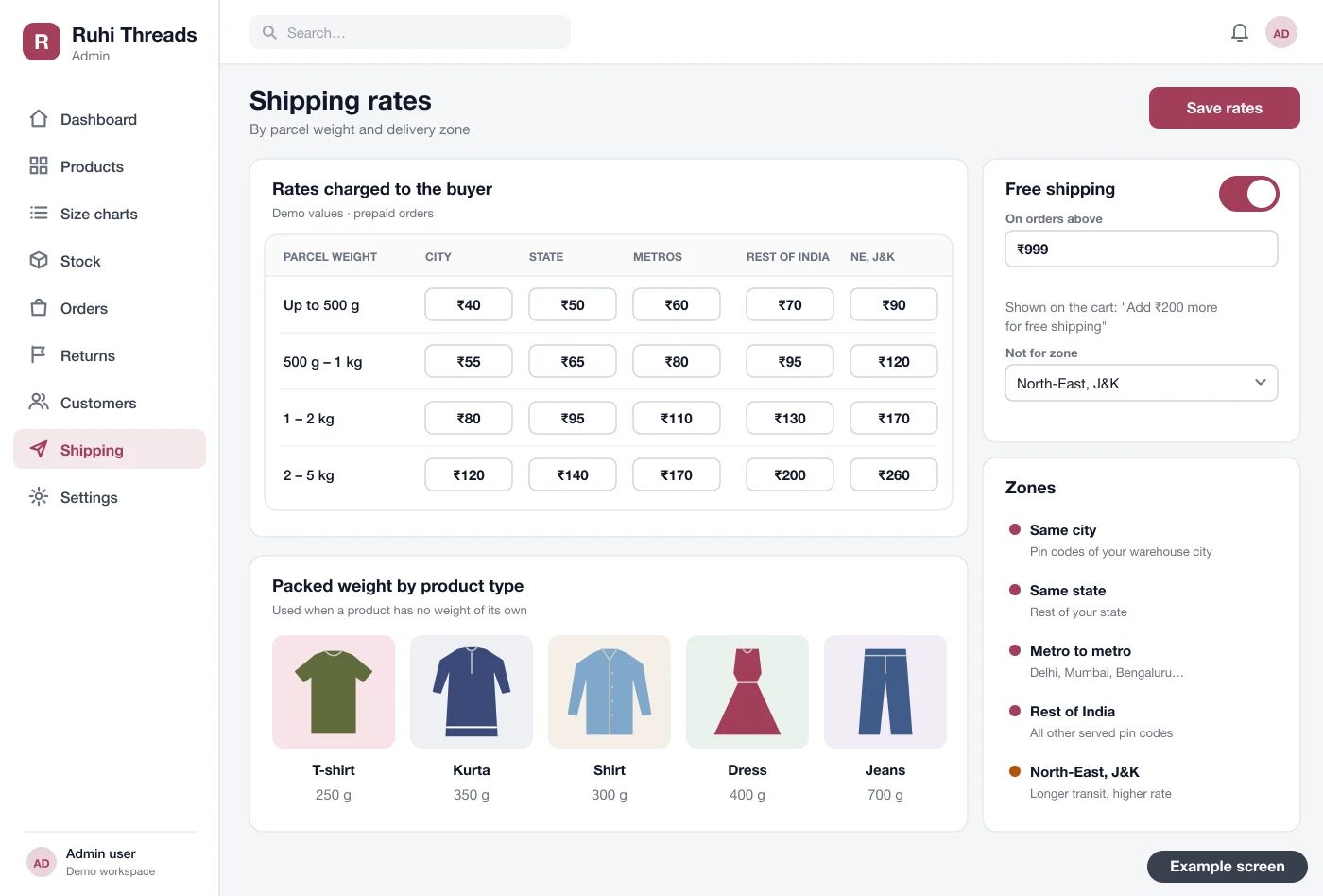
We build the shopper app for Android and iPhone from one code base, with our mobile app development team. The web store, app and admin share one set of products and stock.
Cash on delivery and fake orders
Many Indian buyers still pick cash on delivery for clothing. It brings orders from people who do not trust a new brand yet. It also brings orders that are never paid. The parcel goes out, the buyer refuses it, and you pay shipping both ways.
You cannot stop this fully, but you can cut it. These are the rules we build into the store:
- A COD limit. Above a set order value, the buyer must pay online.
- OTP check. The buyer confirms the COD order with a code sent by SMS.
- Pin code rules. Each pin code is set to COD allowed, prepaid only or not served.
- A COD fee. A small handling charge, shown before the buyer places the order.
- Buyer history. A buyer who refused two parcels sees prepaid only next time.
- Prepaid offers. A small discount for UPI or card payment moves buyers off COD.
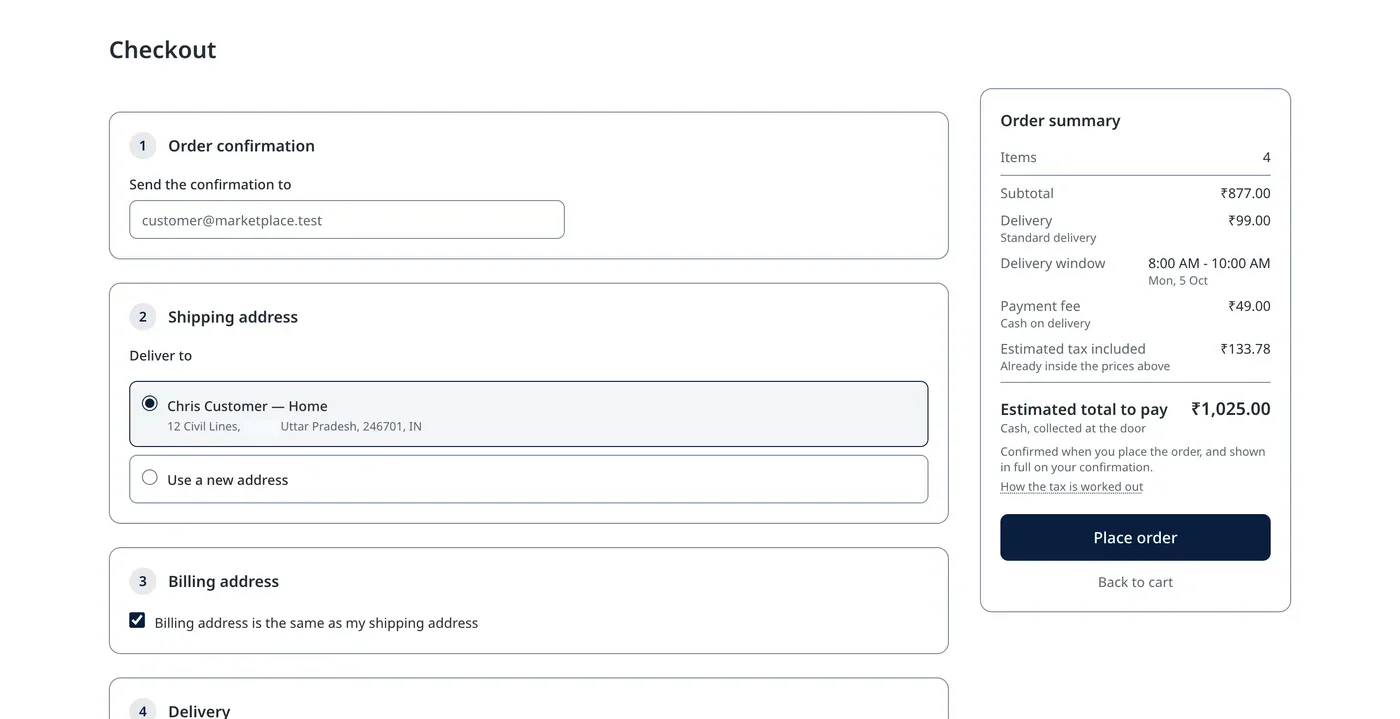
You set the limit, the fee and the pin code list. The store applies them on every order. You can change them any day from the admin app.
Worked example: a clothing brand going online, week by week
This is an example, not a client story. A Jaipur brand sells hand block printed cotton kurtas from one shop and Instagram. It has 40 styles in 6 sizes and 2 colours each.
- Week 1: Brief. We list the styles, sizes, channels and return rules. The owner shares the shop billing data in Excel.
- Week 2: Screens. The owner clicks through example screens for the store, the app and the admin. We change what does not fit.
- Week 3: Size charts and photos. The team measures samples and fills one chart for kurtas and one for tops. Photos follow one angle list.
- Week 4 onward: Build. We set up the store, app and admin from our ready base and add the clothing parts.
- Catalogue load. We import the Excel sheet. Each kurta becomes one style with 12 SKUs: 6 sizes times 2 colours.
- Rules. COD up to a set value, prepaid only for three pin codes, 7 days to return and 15 days to exchange.
- Test order. The owner orders a kurta, exchanges the size and checks the stock count moves both ways.
- Launch. The store goes live. Instagram posts link to product pages. The shop billing uses the same stock.
The real time depends on your catalogue, your rules and how fast photos and charts are ready. We give a plan with dates after one call.
Our service
How we build your own clothing store and app
We build in India for clothing brands, boutiques and fashion startups. You get the web store, the shopper app and the admin panel under your brand.
- Understand your business. We map how you work: your range, sizes, channels, payment and return rules.
- Design the screens. You click through example screens and change them before any code is written.
- Build the store and apps. We start from our ready store base and add size charts, variants, COD rules and exchanges. The apps are built in Flutter for Android and iPhone.
- Test with your team. Your staff place, pack, ship and return real test orders. We fix what they find.
- Launch under your brand. Your name and logo on the store and apps. We publish the apps and host it on your server or ours.
- Support and grow. Daily backups come with the setup, and an optional AMC covers support. We add features as you grow.
We have built clothing and fashion stores before. See an ethnic-wear Shopify store we built and a watch store we built on Shopify. More of our work is on the products we have built.
Cost to build a clothing store: what decides it
Every clothing business is different, so we do not publish a fixed price. The cost depends on these things:
- How many styles, sizes and colours you sell.
- Whether you need the web store only, or the app too.
- How many channels must share one stock: shop, marketplaces and your store.
- How detailed your COD, shipping and return rules are.
- Whether you sell wholesale to shops as well as to buyers.
- How much old data we must import, and from where.
- Extra features such as a fit finder, lookbooks or product videos.
- Where it is hosted: your server or ours.
| Monthly store plan | Custom clothing store (built for you) | |
|---|---|---|
| Start | Quick, low first payment | Takes a few weeks to build |
| Cost over years | Monthly fee, plus add-on apps | One build cost, then optional support |
| Size, COD and exchange rules | Through add-ons, where they exist | Built the way you work |
| Your own app | Often an extra service | Part of the build |
| Data and source code | Stay with the platform | Yours |
Comparing hosted platforms? Read our guide on Shopify alternatives in India and our comparison of ecommerce CMS options for 2026. For a store you can resell to other brands, see white-label ecommerce platform development. Share your range and channels and we will send a written quote after one call.
Mistakes to avoid when you start selling clothing online
Copying another brand's size chart. Your patterns are not theirs. Measure your own samples, or returns will follow.
One photo per style. Buyers want the back, the fabric and the fit. Missing photos mean more returns.
COD with no rules. Open COD for every pin code and every order value invites unpaid parcels.
Separate stock for each channel. A size sells in the shop and is still live online. The online buyer gets a cancel.
No exchange option. If the only choice is a refund, you lose a sale you could have kept.
Selling abroad without checking labels. The US asks for fibre content and country of origin under 16 CFR Part 303. Check the rules of each country with your adviser.
For the wider picture of the sector in India, see the retail and e-commerce sector page by Invest India. Our retail and ecommerce software page lists the other systems we build for this trade.
FAQs
How long does it take to build?
It depends on your catalogue, your rules and the features you pick. We start from a ready store base, which saves time. You get a plan with dates after one call.
Do I own the source code, data and brand?
Yes. Your name and logo are on the store and apps. We hand over the source code. Your data sits on your server or ours, and you can export it at any time.
Can you move my products from Shopify/WooCommerce or Excel?
Yes. We import products, sizes, colours, photos, stock and buyers from an export file or an Excel sheet. We check the counts with you before launch.
Can it work on Android, iPhone and web?
Yes. We build a web store, an Android app and an iPhone app. All three share one set of products, stock and orders.
How is customer and payment data kept safe?
Payments go through a licensed payment gateway, so card details do not sit on your server. Staff get role-based access, and every change is logged. Daily backups protect the data.
Do I need GST to sell clothing online?
Sellers on marketplaces usually need GST registration. For your own store, it depends on your turnover and where you sell. Check the current rules on the GST portal and with your CA.
Can I sell on marketplaces and my own store together?
Yes. We connect your store to one stock count. When a size sells on one channel, it drops on the others. Orders from every channel come into one admin list.
Related guides
Written by
Babita Kumari · Business Developer
Business Developer at PRS India. Talks with business owners about the app or software they want, and helps them work out the scope, cost and launch steps before any code is written.