Cosmetics Website Design: Beauty Brand Store Development
We build your own cosmetics store: skin concern pages, shade finder, ingredients tab and kit builder. Web, Android and iPhone, under your brand.

Written by Prabhjot Kaur, Product Manager
Reviewed by the PRS India software & mobile app development team
12 min read
Written from production. Our articles draw on products we run live and the client work behind them, and are revised as the systems they describe evolve.
A buyer cannot touch a lipstick or test a serum through a screen. So a cosmetics website must do the job of the shop counter. It must show the true shade and list every ingredient. It must also help the buyer pick a product for their skin. Most theme stores were made for clothes or gadgets. They show one photo and one price, and the buyer leaves with questions.
That is why many cosmetics brands, skincare startups and beauty retailers now take a different path. They build their own cosmetics store under their own brand. Good cosmetics website design starts with the buyer's questions, then turns each answer into a page or a feature. This guide covers the pages, design rules, features and SEO basics. It also shows how PRS India builds yours through our ecommerce development services.
Key takeaways
- Plan the pages around skin concerns, shades and ingredients, not only around categories.
- Design for the phone first. Most beauty buyers browse and pay on a phone.
- A shade finder, an ingredients tab and a kit builder answer the questions buyers ask at a counter.
- A custom-built cosmetics website is yours: your brand, your data and the source code.
Pages a cosmetics website needs
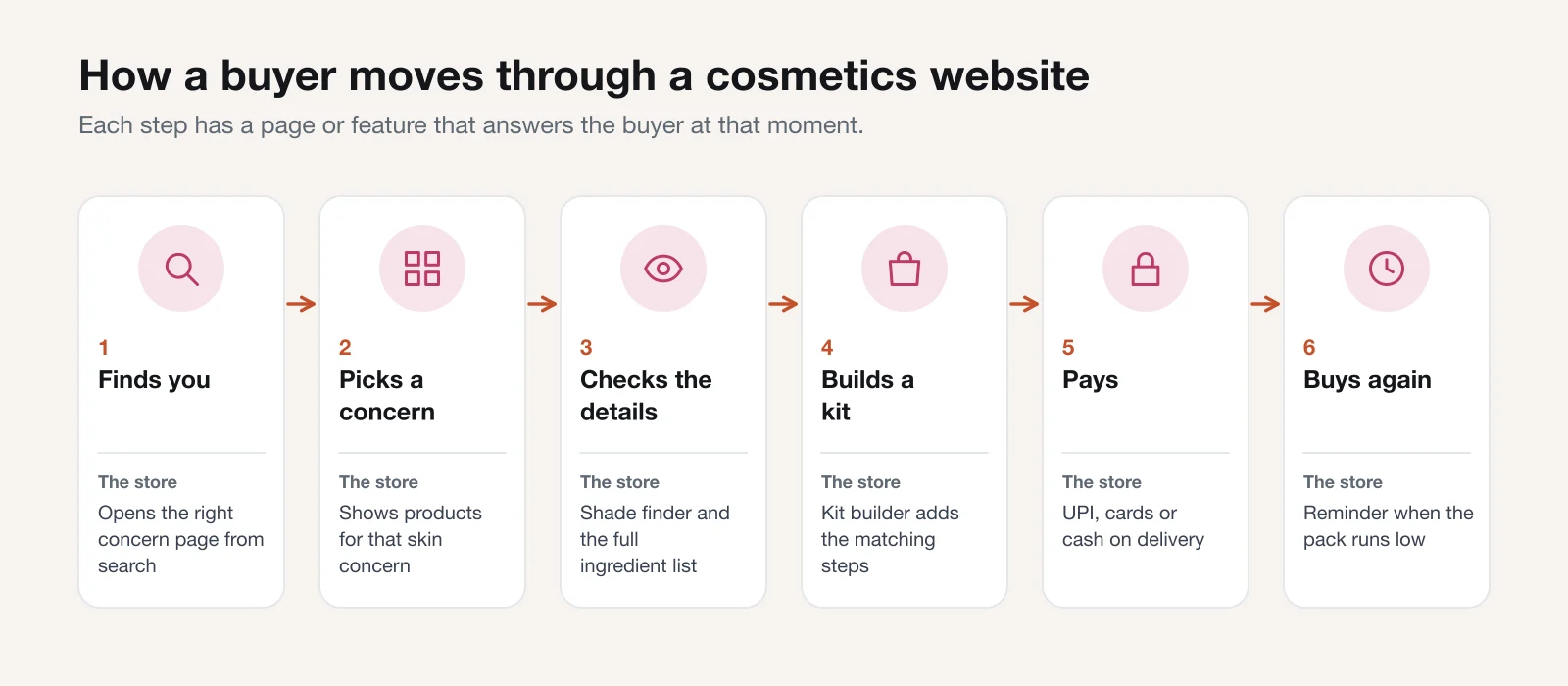
Start with a page map before you think about colours. A beauty website design that skips this step ends up with menus that only list categories. Buyers of skincare do not think in categories. They think "my skin is oily" or "I need a shade for warm skin".
So a cosmetics website needs four groups of pages. Each group answers one stage of the visit.
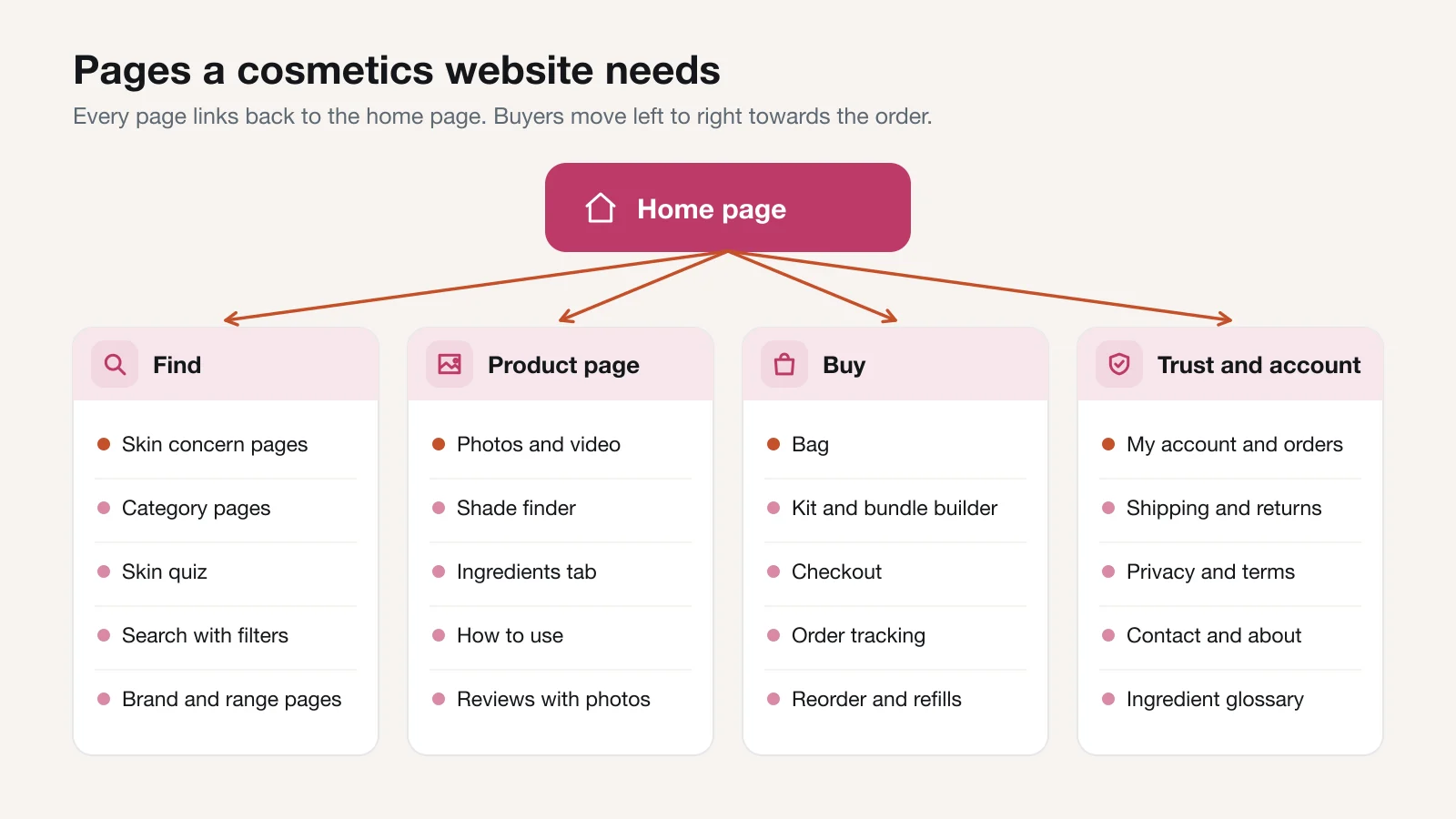
- Find pages. Skin concern pages, category pages, a skin quiz, search with filters, and brand or range pages.
- The product page. Photos and video, the shade finder, the ingredients tab, how to use, and reviews with photos.
- Buy pages. The bag, a kit and bundle builder, checkout, order tracking, and reorder.
- Trust and account pages. My orders, shipping and returns, privacy and terms, contact and about, and an ingredient glossary.
The trust pages are short, but buyers open them before a first order. Write the shipping time, the return rule for opened products and the contact number in plain words.
Design rules for a cosmetics website: photos, filters, mobile first
Design is where a beauty brand shows its look. But the rules below come first, because they decide whether a buyer finds and trusts a product. Our UI and UX design work starts with these rules, then adds your colours and fonts.
Photos that show the real product
Show the pack, the texture and the colour on skin. Use the same light and the same background for every product. Add a photo of each shade on two or three skin tones. A buyer trusts a photo that looks like what arrives at the door.
Filters that match how buyers search
Let buyers filter by skin type, skin concern, shade family, finish, size and price. Add "free from" filters only for claims you can support, such as fragrance-free. Keep the filter names in plain words, not in lab terms.
Mobile first
Design every page for a phone screen first, then widen it for a laptop. Keep the "Add to bag" button within reach of the thumb. Keep product names short enough to fit on two lines.
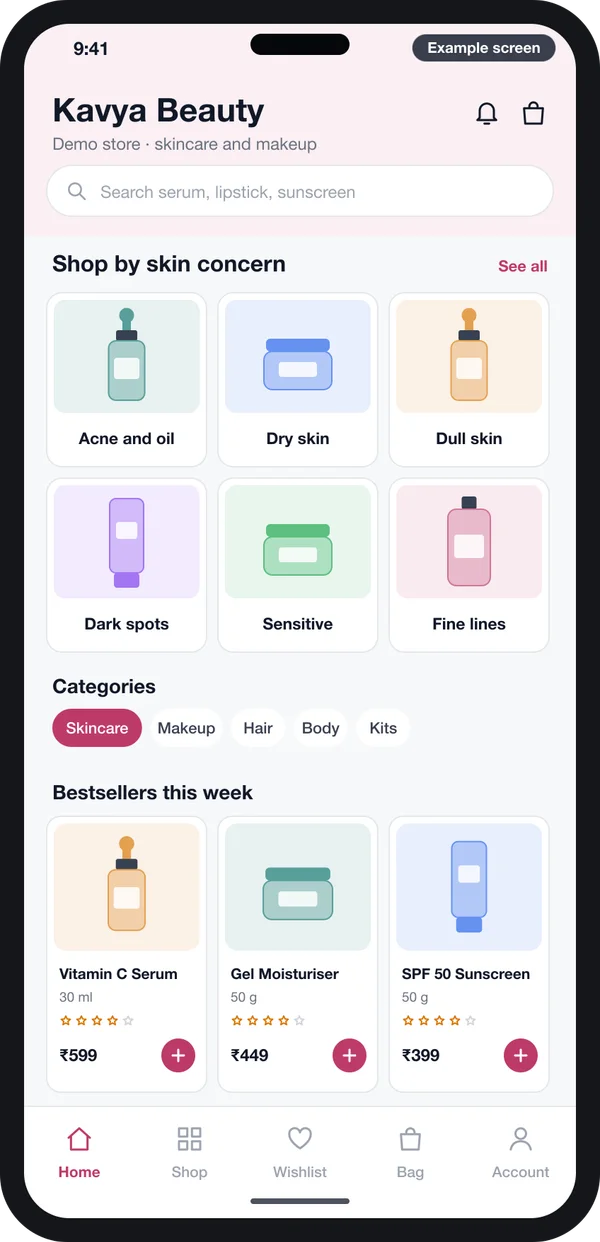
Also check that the text can be read by everyone. Light pink text on a white page looks soft, but many people cannot read it. The W3C accessibility guidelines (WCAG) set the rules for text contrast, button size and image alt text. We design to them from the first screen.
Shade finders and skin quizzes
The wrong shade is a common reason for a beauty return. A shade finder asks a few questions and points the buyer to one shade. It does not need a camera or special software to be useful.
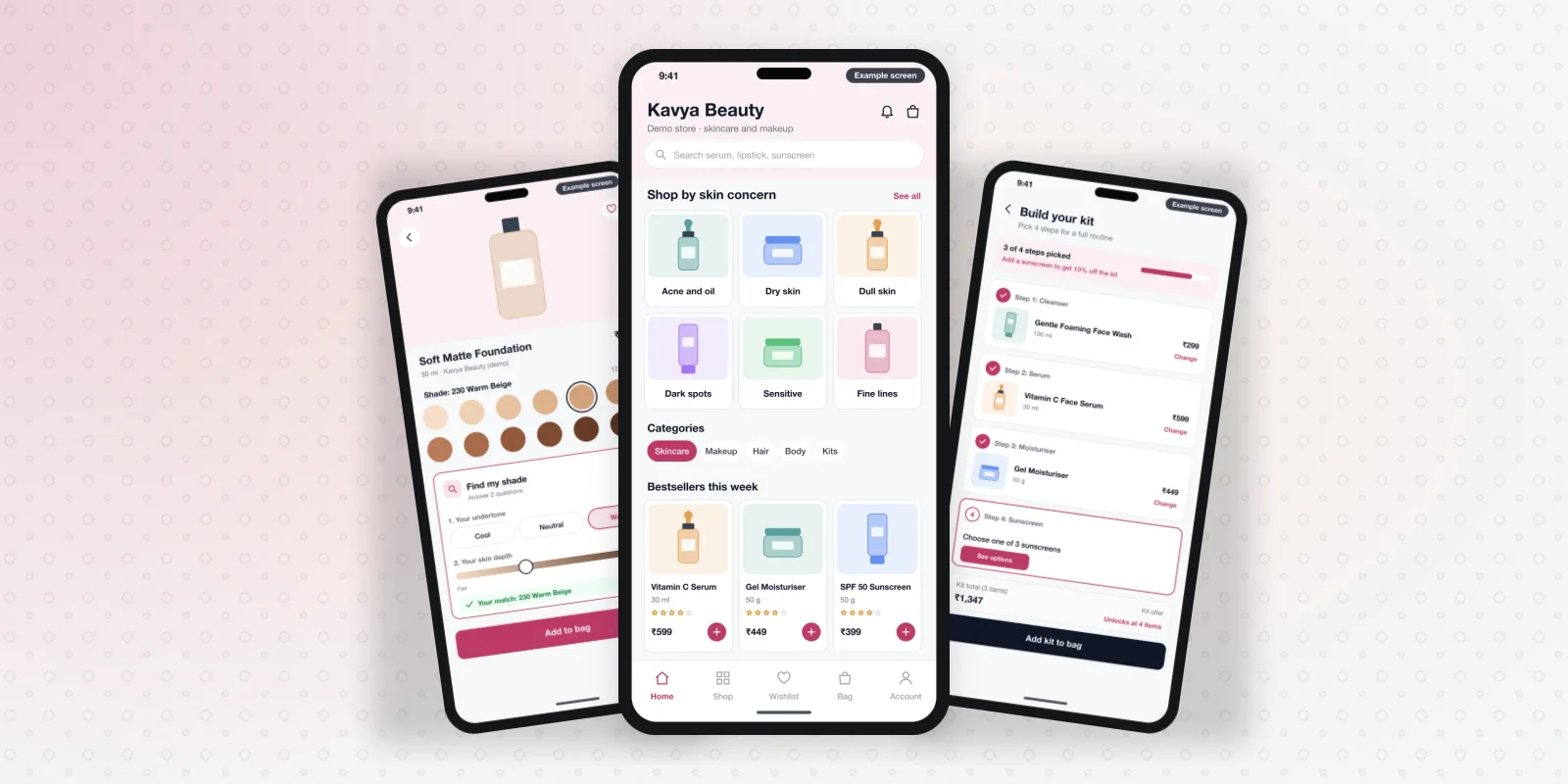
On a foundation page, the buyer picks their undertone: cool, neutral or warm. They then move a slider to their skin depth. The page shows the matching shade and selects it for them. You set the match rules in the admin panel, for each product and each shade.
A skin quiz works the same way for skincare. It asks about skin type, main concern and current routine. It then shows three or four products. The answers can be saved to the buyer's account, so the next visit opens with the right products.
Both features collect useful data. You can see which concerns your buyers have most and which shades run out first.
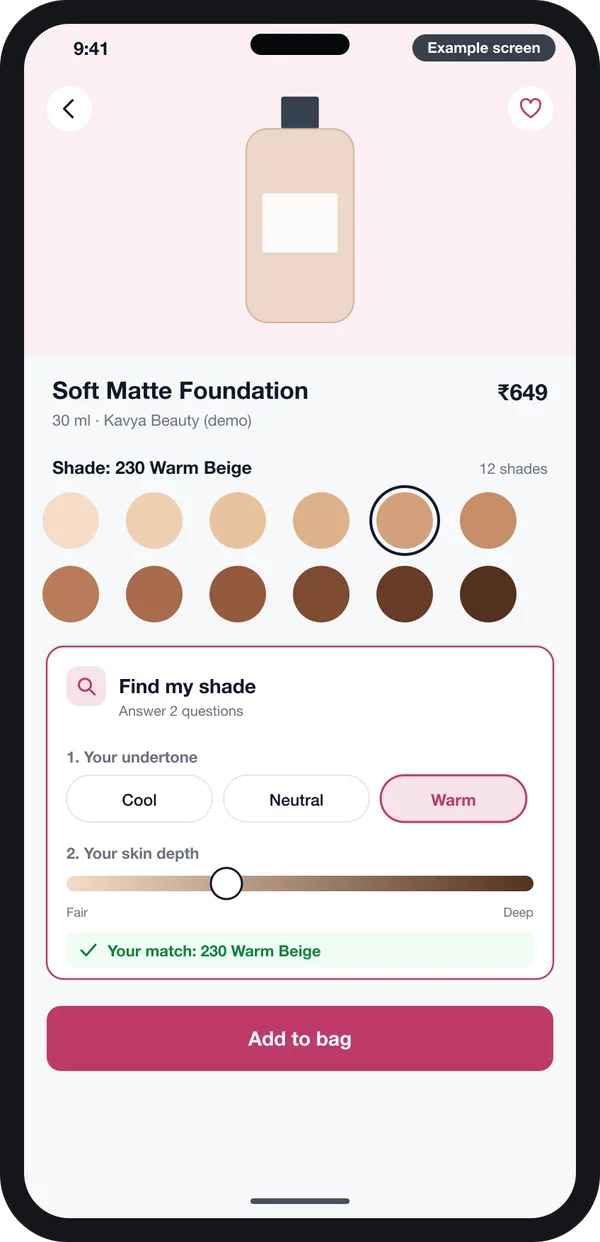
If you want a camera try-on later, plan for it in the design now. Keep a space on the product page for it. Then it can be added without a full redesign.
Features we build into cosmetics websites
These are the features we build into a cosmetics store. We start from our ready-made store base, so the catalogue, bag, checkout and admin already exist. You can see what it has been used for on our products we have built page.
Kit and bundle builder
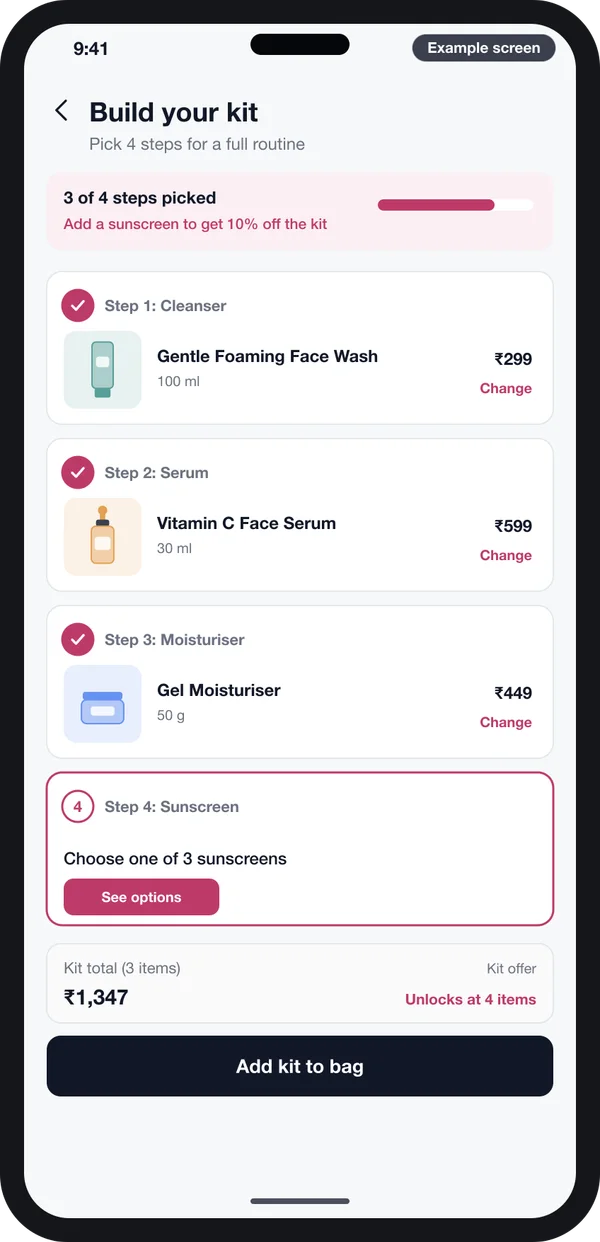
A buyer picks one product for each step of a routine: cleanser, serum, moisturiser and sunscreen. The page shows how many steps are picked and what the kit offer is. You set the steps, the products allowed in each step and the offer.
Variants by shade and size
Each shade and each pack size has its own stock, photo and code. When one shade runs out, only that shade shows "out of stock".
Reviews with photos
Buyers can add photos and their skin type to a review. Other buyers can filter reviews by skin type. You approve reviews before they go live.
Offers and messages on WhatsApp
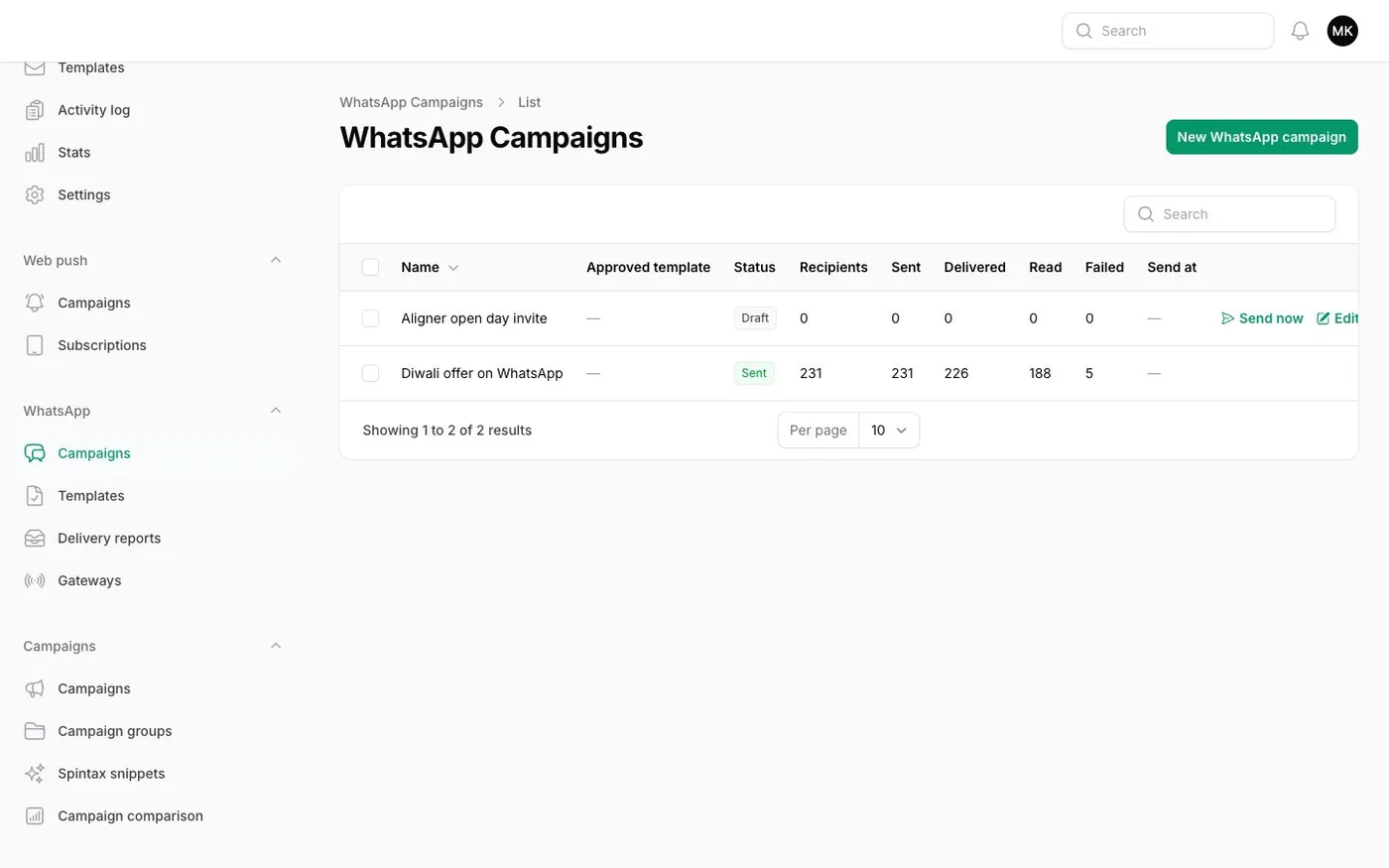
Many beauty buyers in India answer a WhatsApp message faster than an email. We connect the store to the WhatsApp Business API. You can then send order updates, back-in-stock alerts and festival offers to buyers who agreed to receive them.
Batch numbers and expiry dates
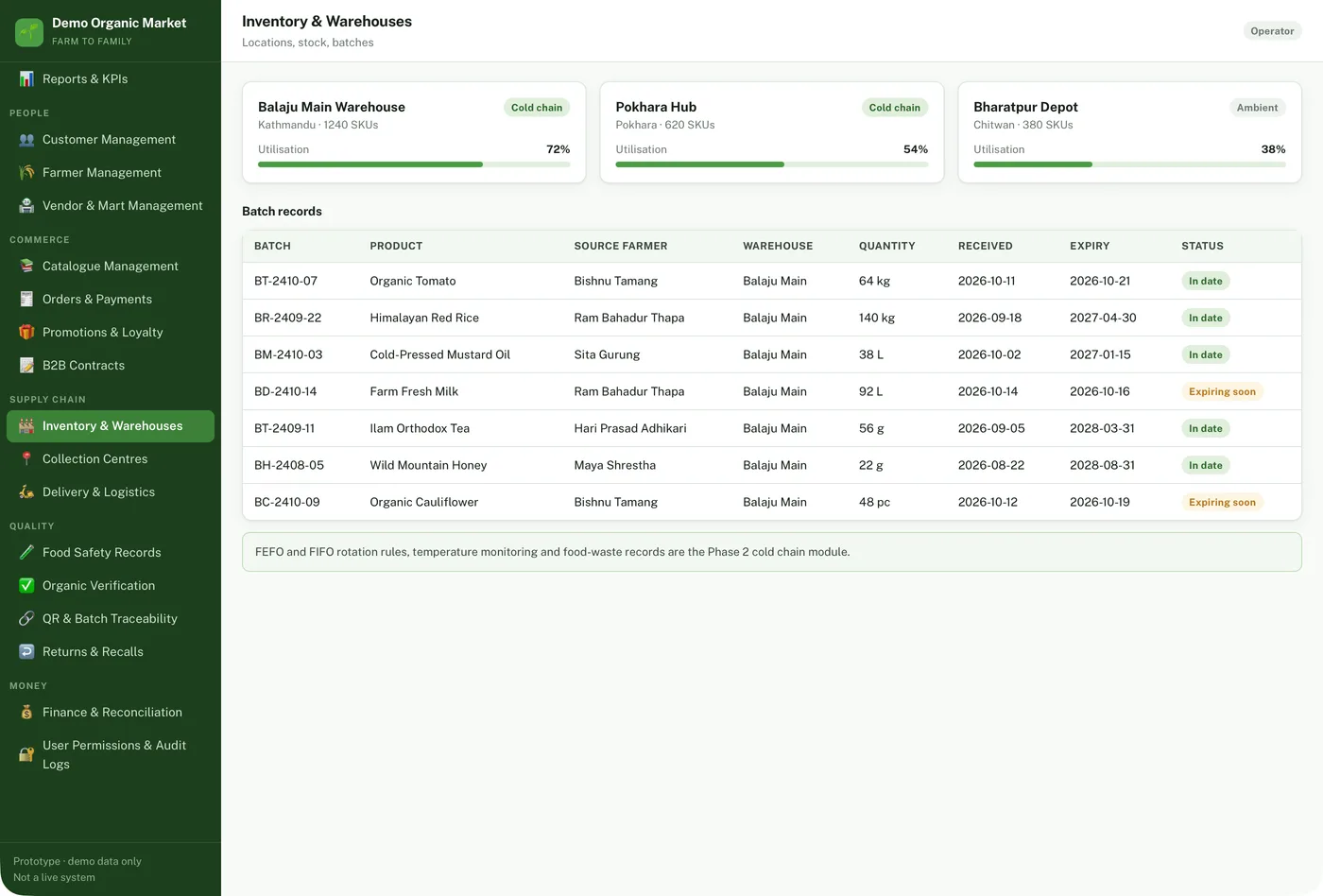
Cosmetics have a shelf life. The admin panel keeps the batch number and the expiry date of each lot. Stock close to expiry is flagged. You can sell it first or take it off the shelf.
Mobile apps and wholesale
The same store can have Android and iPhone apps through our mobile app development work. Do you also sell to salons or shops? The B2B part of the base gives them their own price list and bulk order page.
Ingredient pages that answer buyer questions
Skincare buyers now read the back of the pack before they buy. Your website should show the same facts, in a place they can find on a phone.
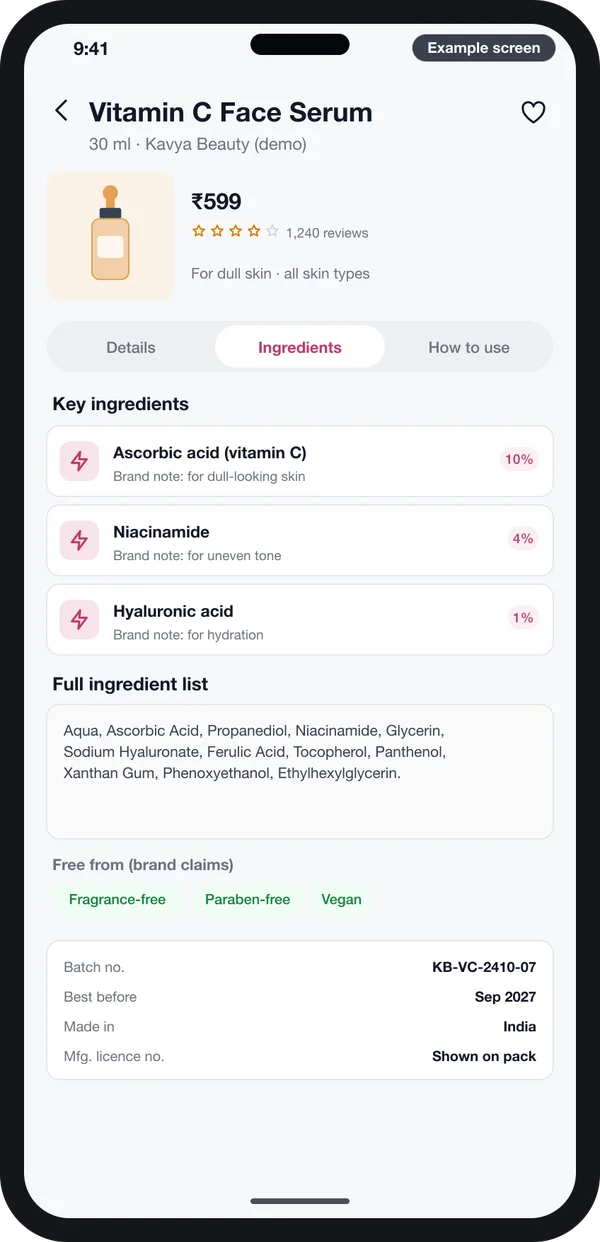
We put an ingredients tab on every product page. It shows the key ingredients with a short note from the brand. It shows the full ingredient list, word for word as on the pack. It also shows the claims you make, such as fragrance-free or vegan, and the batch number and expiry date.
Each key ingredient can link to a glossary page. That page says what the ingredient is and lists every product that has it. Buyers who search for an ingredient by name can land on that page.
Your team enters all of this once, in the admin panel. The same data then feeds the product page, the filters and the search.
Label rules come from the regulator, not from the website. In India, the CDSCO cosmetics section covers import registration and the rules for cosmetics. If you sell to Europe, the European Commission cosmetics rules apply. We build fields for every label detail you need to show. Check current rules with your lawyer or licensing office.
SEO basics for a cosmetics store: product data, speed, structured data
SEO decides whether buyers find your store on Google. For a cosmetics store, three things matter most. If you are still picking the system, read our guide on choosing a CMS for SEO.
Product data
Give every product a unique name and its own written description. Add a page for each shade if buyers search by shade. Do not copy the supplier's text. Fill the ingredients, the size and the skin type for each product. Pages for each skin concern also bring search visits, because people search that way.
Speed
Beauty pages carry many photos, so speed needs care. We compress images, load them only when they come into view and keep scripts light. We often build the storefront with Next.js development, so pages open fast on mobile data.
Structured data
Structured data is hidden code that tells Google the price, stock and reviews of a product. Google explains the format in its Product structured data guide. We add it to every product page from the admin data, so it stays correct when prices change. We never add ratings that are not real.
Template vs design agency vs development company
There are three common ways to get a cosmetics website. Each one suits a different stage of a business. The table compares them on what you get, not on price.
| What you need | Ready template | Design agency | Development company |
|---|---|---|---|
| Suits | A first store with few products | A brand look and launch campaign | A store with its own features and apps |
| Look and feel | Chosen from the theme | Made for your brand | Made for your brand |
| Shade finder and skin quiz | Through add-ons, if one fits | Designed, built by a partner | Designed and built |
| Ingredients and batch data | Custom fields or add-ons | Depends on the platform used | Built into the admin |
| Android and iPhone apps | Through app add-ons | Usually a separate project | Built on the same data |
| Wholesale for salons and shops | Through add-ons | Usually not | Built in |
| Source code | Theme licence | Depends on the contract | Handed over to you |
Platforms like Shopify and WooCommerce work well for many beauty stores. Comparing them with a custom build? Our guide to Shopify alternatives in India lays out the options.
Our cosmetics website design and development process
This is how we work on a cosmetics store, from the first call to launch.
- Understand your range. We list your products, shades, sizes, skin concerns and sales channels.
- Map the pages. We agree the page map and the filters with you.
- Design the screens. You click through example screens and change them before any code is written.
- Build the store. We change our ready-made store base into your cosmetics store, with Laravel development for the admin and back end.
- Load and test. We import your products and test the shade finder, checkout and payments with your team.
- Launch and support. We put it live under your brand and domain. Support continues after launch.
We have built this kind of store before. Read our case study of a headless D2C store with ONDC.
Cosmetics website development cost: what decides it
Every beauty brand is different, so we do not publish a fixed price. The cost of a cosmetics website depends on these things:
- How many products, shades and pack sizes you sell.
- Whether you want a shade finder, a skin quiz or both.
- Whether you need Android and iPhone apps as well as the website.
- Whether you also sell wholesale to salons and shops.
- Which payment, delivery and WhatsApp services we connect.
- How much product data we must move from an old store or Excel.
- How many languages the store needs.
- Where it is hosted: your server or ours.
Share your range and your plans, and we will send a written quote after one call. Get a quote to start.
Whoever builds it, make sure it can:
- Keep a separate stock, photo and code for each shade and size
- Show the full ingredient list, word for word as on the pack
- Filter by skin type, skin concern and shade family
- Store the batch number and expiry date of each lot
- Add Product structured data to every product page
- Load fast on a phone over mobile data
- Let your team edit products and banners without a developer
- Let you export your products, orders and buyers at any time
These checks apply to any build, including our white-label ecommerce platform. Our retail and ecommerce software page lists the other store types we build.
FAQs
How long does it take to build?
It depends on your range, the features and whether you want apps. We start from a ready-made store base, so the core parts already exist. We give you a plan with dates after one call.
Do I own the source code, data and brand?
Yes. Your name and logo are on the website and the apps. We hand over the full source code. Your product, order and buyer data is yours, and you can export it at any time.
Can you move my products from Shopify/WooCommerce or Excel?
Yes. We import products, shades, photos, buyers and past orders from Shopify, WooCommerce or an Excel sheet. We check the import with your team before launch.
Can it work on Android, iPhone and web?
Yes. The website works on every phone browser. We can also build Android and iPhone apps on the same data. Stock and orders then match everywhere.
How is customer and payment data kept safe?
Payments go through a licensed payment gateway, so card details do not sit on your server. We use HTTPS, role-based admin access, a history of changes and daily backups.
Can I edit products and banners myself?
Yes. Your team adds products, shades, ingredients, banners and offers from the admin panel. No code is needed for daily changes.
Related guides
Written by
Prabhjot Kaur · Product Manager
Product Manager at PRS India. Turns what a client needs into a screen-by-screen plan for the app, and checks every release against that plan before it goes out.