Live Shopping App Development Company: Step Guide
A step guide to building your own live shopping platform: buyer app, seller live console, checkout during the live, and admin.

Written by Prabhjot Kaur, Product Manager
Reviewed by the PRS India software & mobile app development team
11 min read
Written from production. Our articles draw on products we run live and the client work behind them, and are revised as the systems they describe evolve.
A seller goes live on a phone. Viewers watch her show a product, ask questions in chat, and buy it without leaving the video. That is live shopping. It works like a TV shopping channel, but on a phone. There is a chat box and an "Add" button under the video.
Brands, marketplaces and even restaurants now ask a live shopping app development company to build this for them. They do not want to depend on a social app's rules. They want their own live shopping app, with their own sellers, their own orders and their own buyer list. This step guide walks through the whole build, from first plan to launch. It also shows how PRS India does it.
Key takeaways
- A live shopping platform has three parts: a buyer app, a seller app and a web admin. Plan all three from day one.
- The buyer must be able to pick options, pay and track the order while the live video keeps playing.
- Sellers need a go-live setup, a live console and an orders list on the phone.
- The video layer needs care: delay, recording, camera choice and how many people can watch at once.
- When we build it, the app, the buyer data and the source code are yours.
What a live shopping platform includes
A live shopping platform is a shop and a video channel joined together. Each live is linked to a set of products. Each order knows which live it came from. That link is what lets you measure what lives sell.
| Part | Who uses it | Main jobs |
|---|---|---|
| Buyer app | Shoppers | Find lives, watch, chat, add items, pay, track |
| Seller app | Sellers and hosts | Set up a live, run it, show products, accept orders |
| Seller dashboard | Seller owners | Sales, orders and live results on the web |
| Admin panel | Your team | See every live, stop a live, manage sellers and payments |
If you plan to host many sellers, the platform is also a marketplace. That brings seller sign-up, payouts and commission settings, which we cover in our marketplace development work.
The problem
Why selling live on social apps falls short
Sellers who start live on social media hit the same walls. We hear them often in our retail and ecommerce software projects.
- Orders in the comments. Buyers type "I want 2" in chat. Staff copy each one into a sheet by hand.
- Pay by link, later. The buyer must leave the live to pay. Many never come back.
- No link to the product. Viewers cannot see price, size or stock while the host talks.
- Followers you do not own. The social app decides who sees your live, and keeps the viewer data.
- No numbers. You cannot tell which live, host or product brought in the sales.
Step 1: Plan the buyer journey
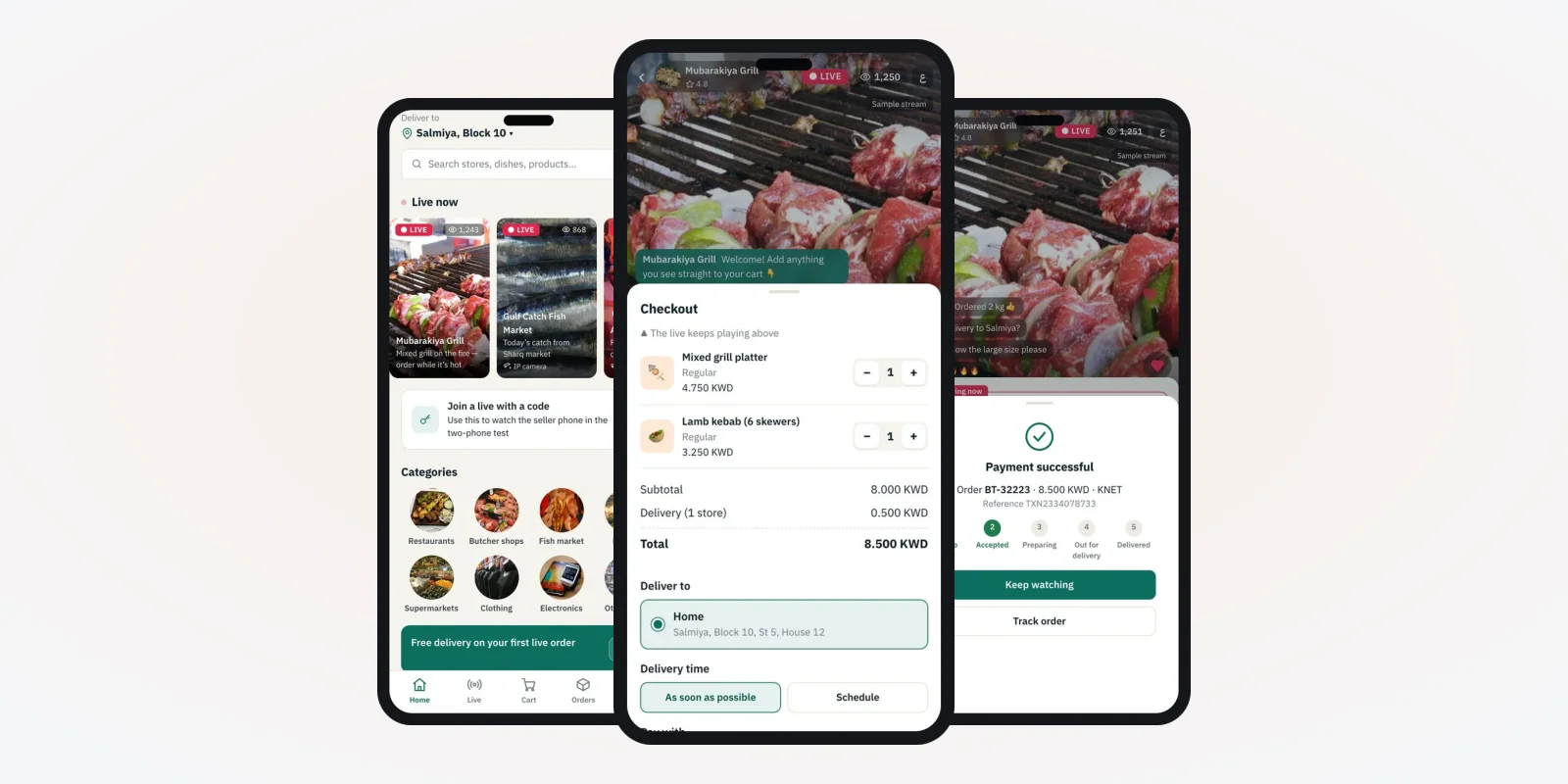
Start with the buyer. Draw each screen from "open the app" to "order delivered". The screens in this guide are from a live shopping app we built, with demo data. The demo seller is a food outlet, but the same flow fits fashion, beauty or electronics.
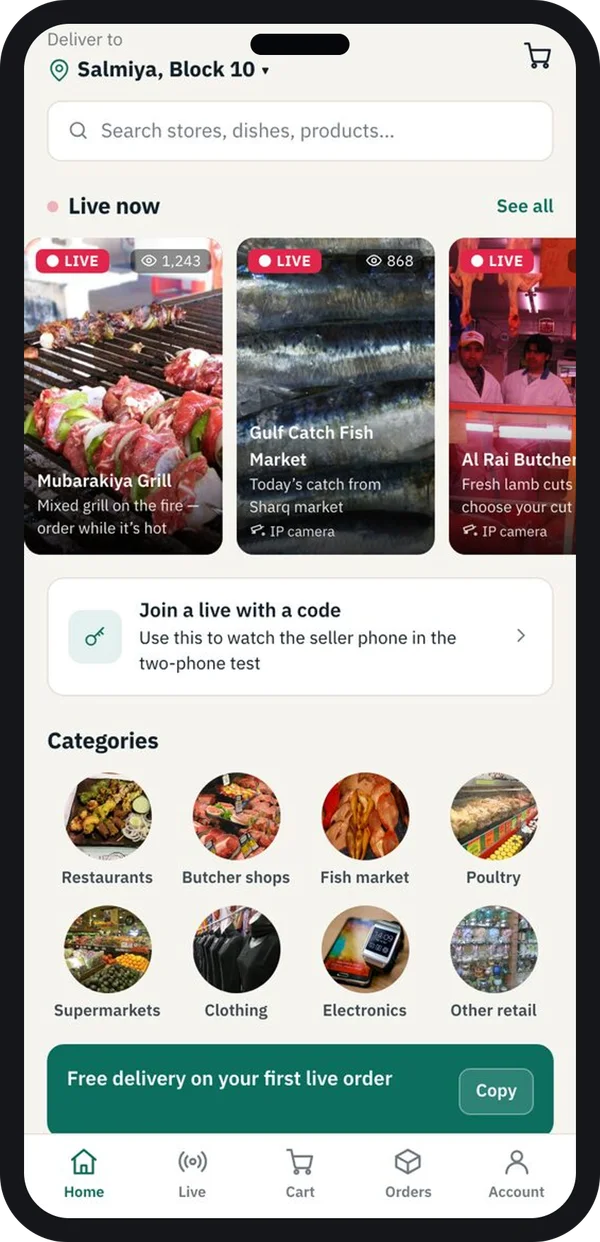
Find a live
"Live now" cards with viewer counts. Buyers can also join a live with a code.
Step 2: Let buyers pay while the live plays
This is the step that sells. The buyer should never leave the video to buy. Options, checkout and the payment result all open as sheets over the live.
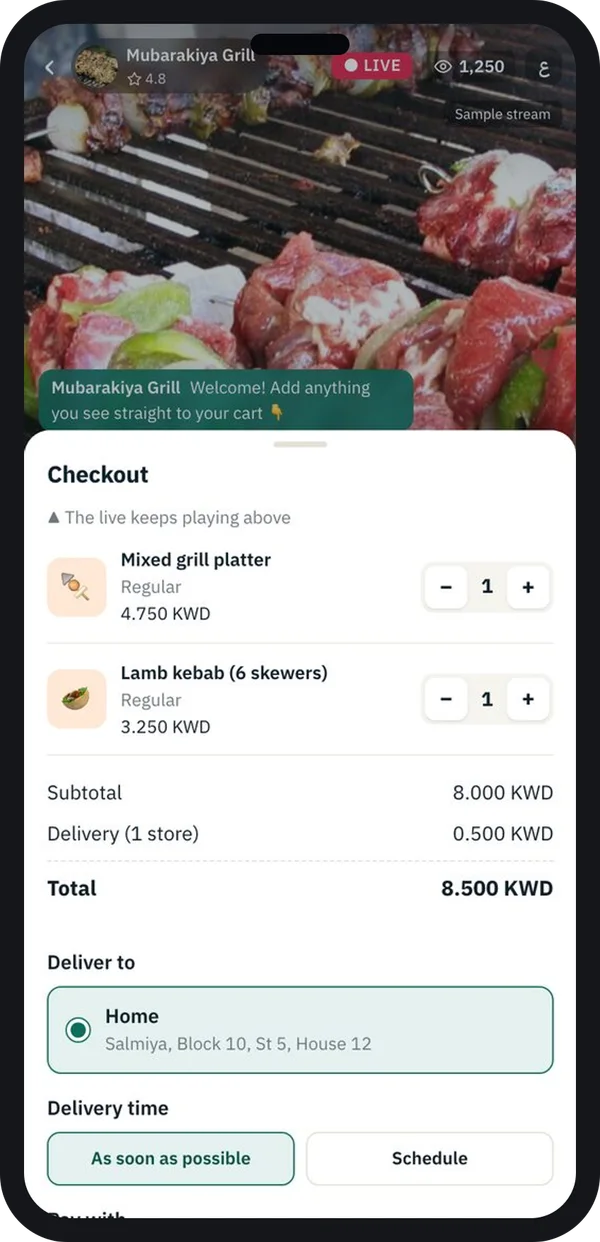
Checkout
Items, address and delivery time. The live keeps playing above.
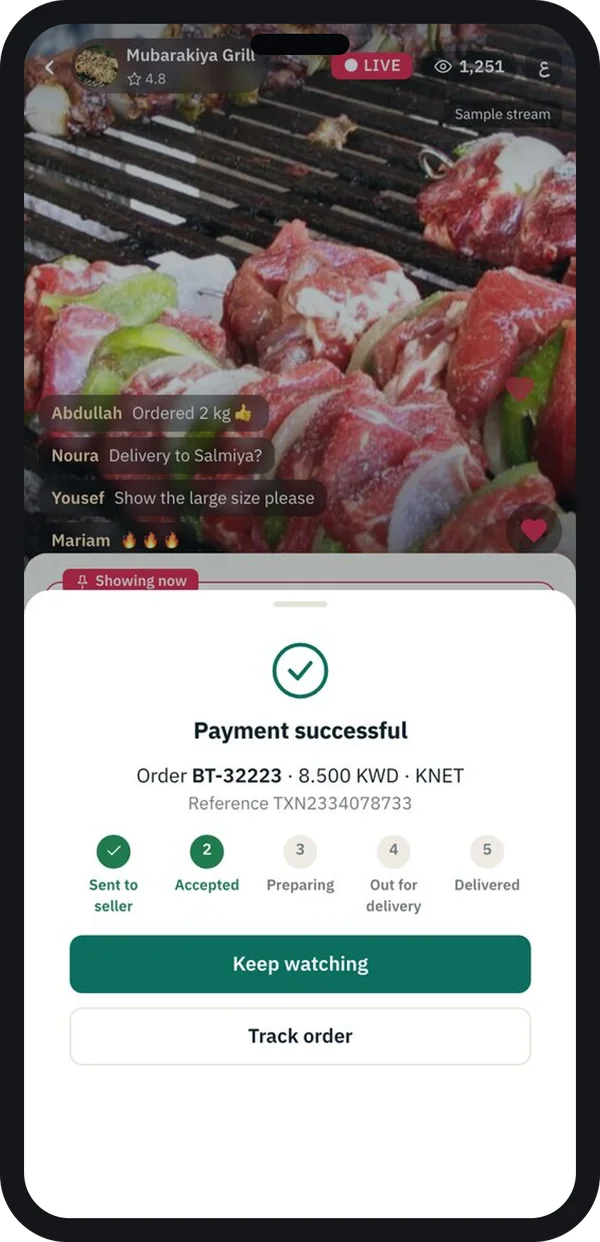
Paid
Order steps show at once, from "sent to seller" to "delivered".
Payments run through a licensed payment gateway. Under RBI rules on card tokenisation, the app should not store card numbers itself. We use the gateway's own secure flow for cards and UPI.
Step 3: Give sellers a live console
Sellers are not video experts. Their app must make going live a short form and a single button. Many brands also bring in creators as hosts. Our guide to influencer platforms covers how to manage them.
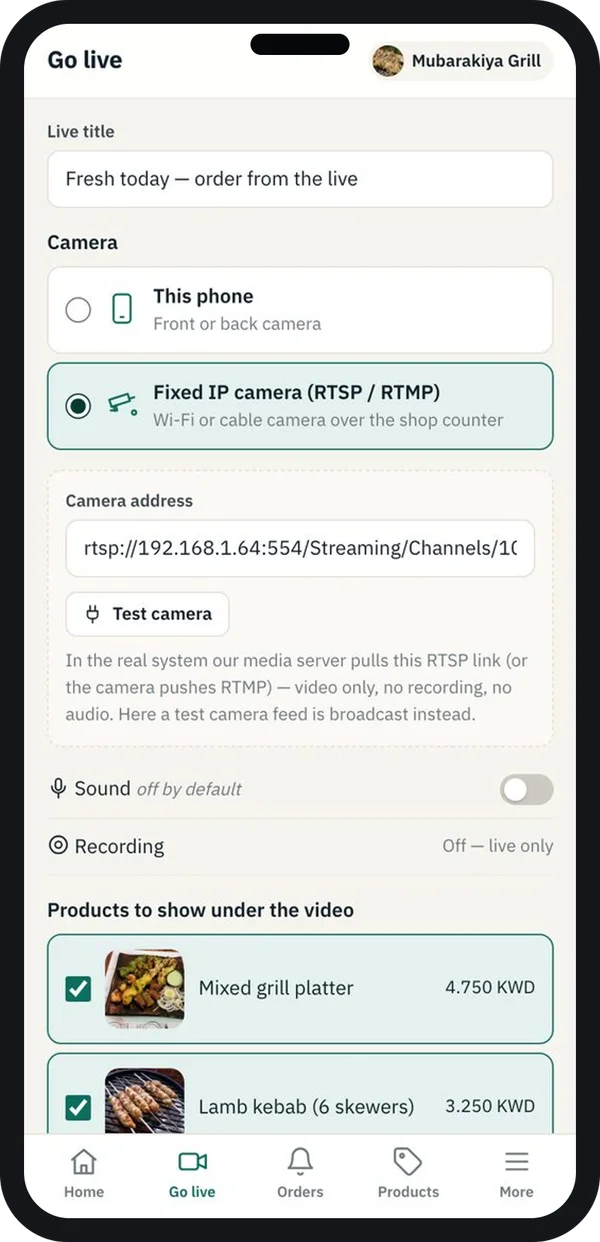
Go-live setup
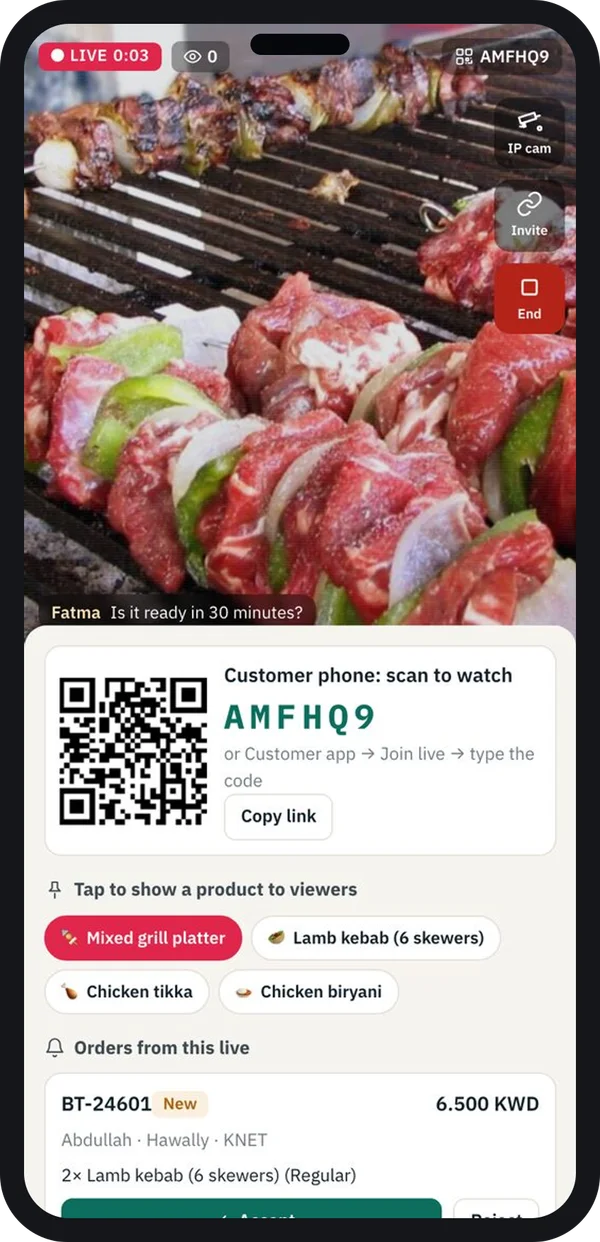
The seller types a title and picks the camera. It can be the phone itself or a fixed IP camera in the shop or kitchen. Then they choose sound, recording, and the products to show under the video.
During the live
The console shows the camera feed with flip, sound, invite and end controls. A QR code lets people in the shop join the live. One tap puts a product on the buyers' screens. New orders from this live appear on the same screen.
Accept orders fast
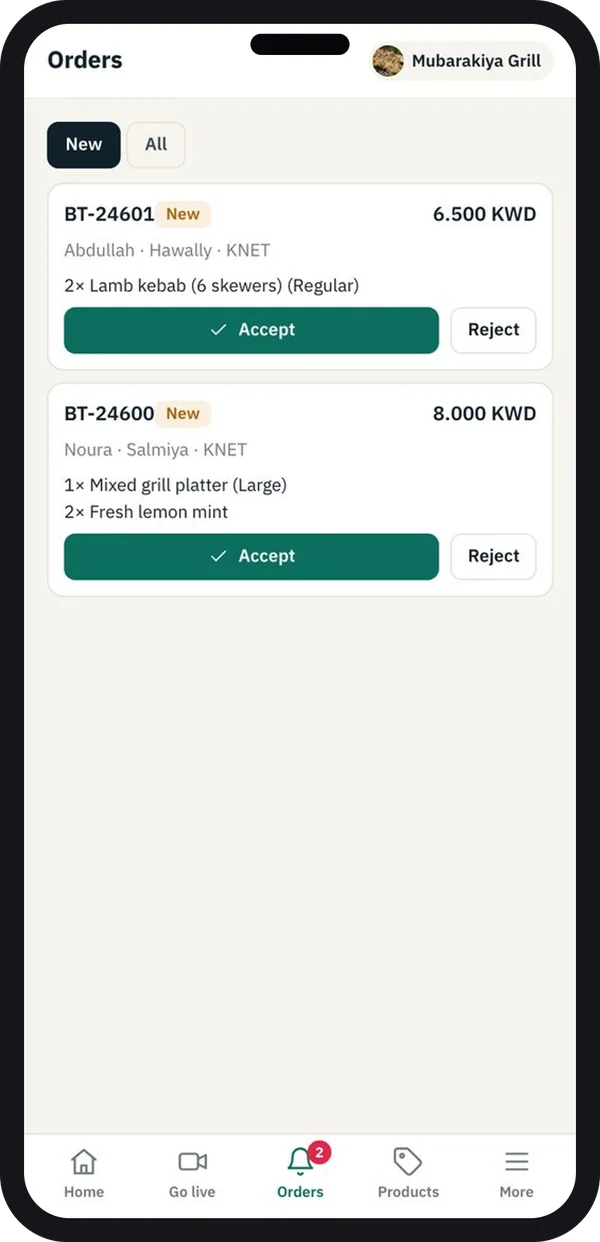
Each new order shows items, payment method and two buttons: Accept and Reject. Once accepted, the buyer's order steps move forward on their phone.
For a food seller, this list doubles as the kitchen screen. For a fashion seller, it feeds packing and dispatch.
Step 4: Build the video layer
The video part is where most of the technical work sits. Decide these points early, because they shape the build.
- Delay. How many seconds between the host speaking and the buyer seeing it. Chat feels broken if the delay is long.
- Viewers at once. A local shop and a national brand need very different server plans.
- Recording. Save each live so buyers can watch it later and still shop from it.
- Cameras. Phone camera only, or also fixed IP cameras in a store or kitchen.
- Short clips. Cut highlights into short videos. Our short video and reels platform shows that side of the work.
We build the video and chat services with Node.js. We host them with a cloud and DevOps setup that can add servers during a big live.
Step 5: Set up the seller dashboard and admin
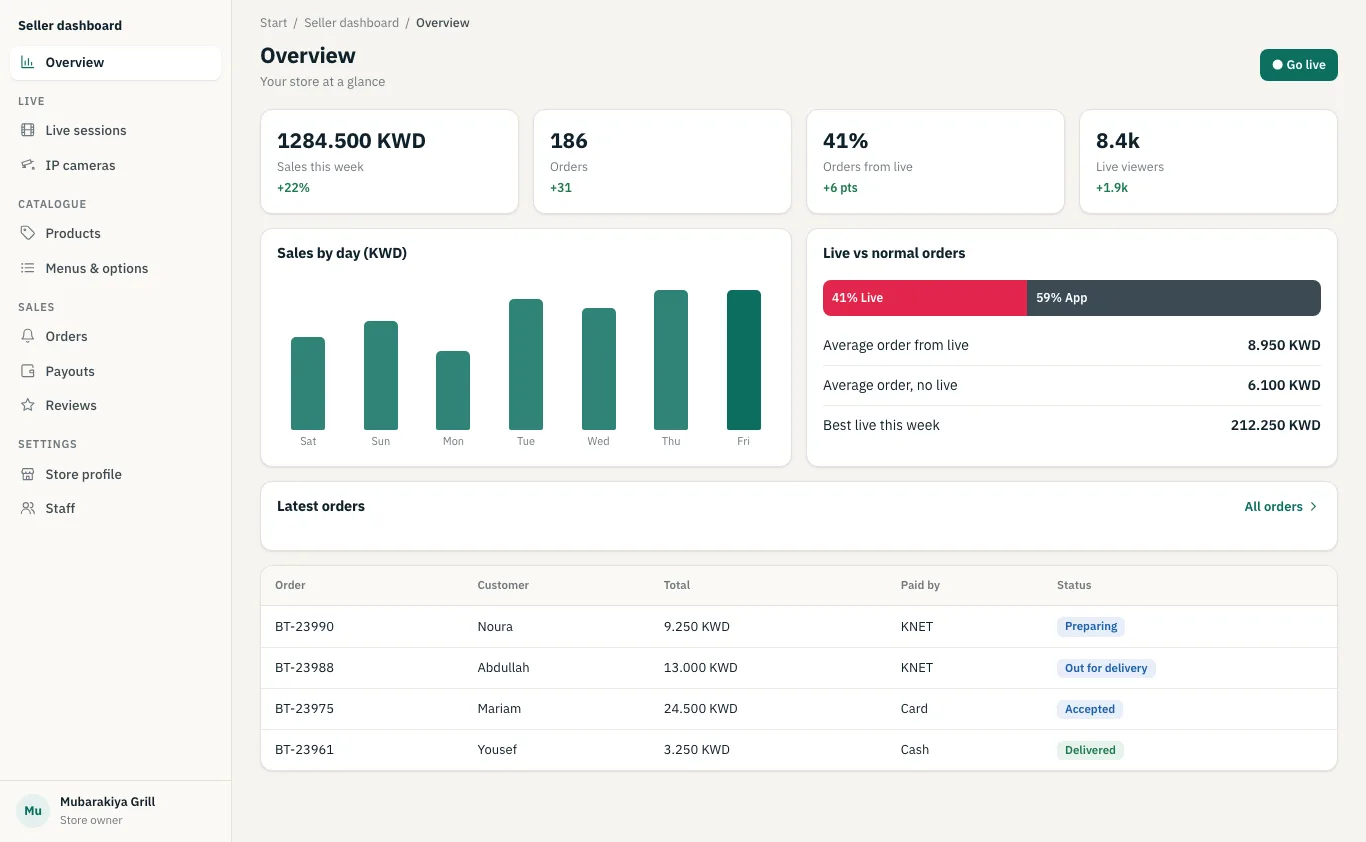
Owners want to know if live selling pays. The seller dashboard shows weekly sales, orders, the share of orders that came from lives, live viewers and a sales-by-day chart.
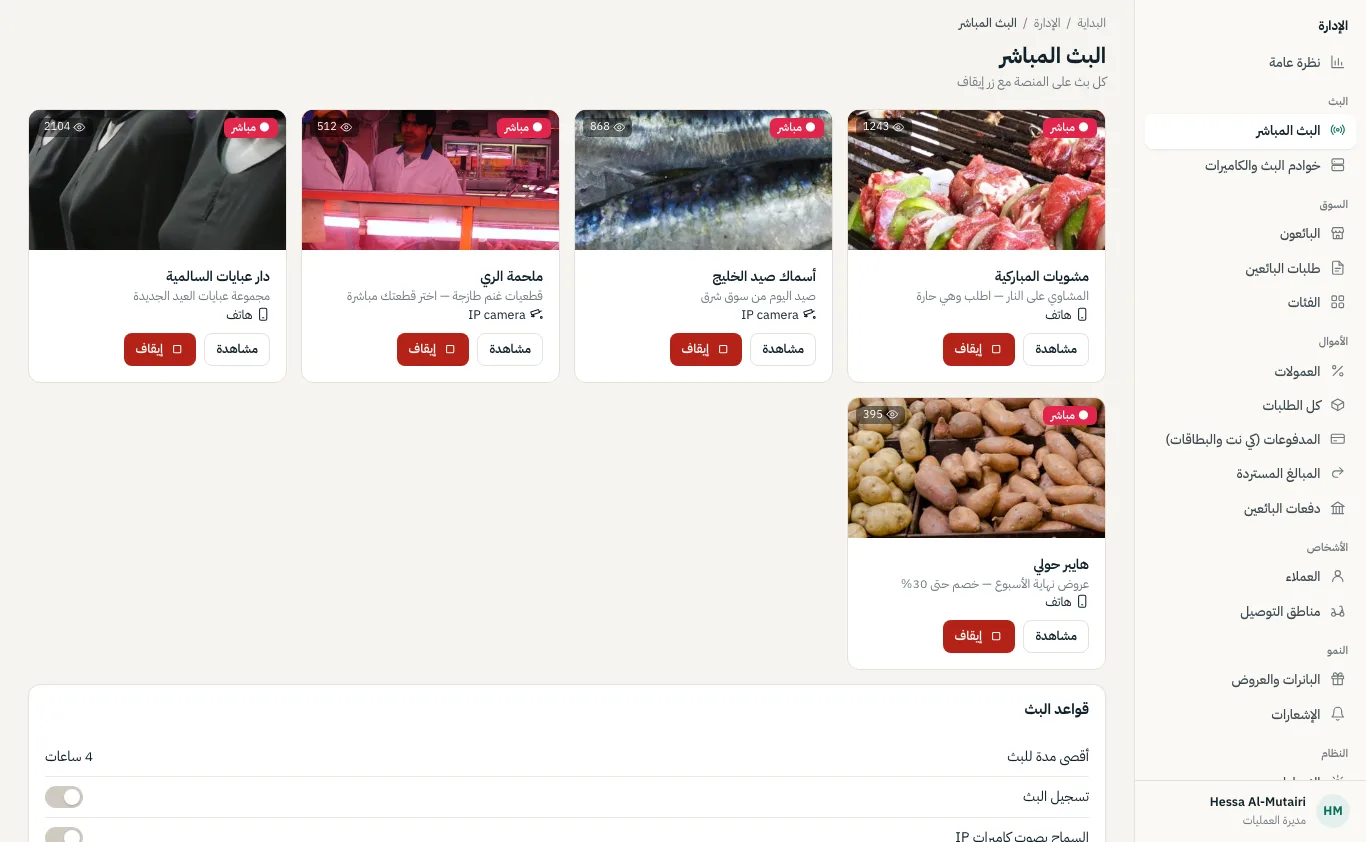
Your own team needs a view of every live that is running. The admin panel lists each live with viewer count and camera type. Staff can watch any live and stop it if it breaks your rules.
The panel can run in any language. The screen here is in Arabic, laid out right to left, for a market that reads that way.
Selling live online has rules in India. The Consumer Protection (E-Commerce) Rules, 2020 ask platforms to show seller details, returns and a grievance contact. Platforms that host user content should also read the IT Rules, 2021 on the Ministry of Electronics and IT website. Buyer data falls under the Digital Personal Data Protection Act, 2023. Check the current rules with a lawyer before launch.
Step 6: Test with a real live, then launch
Lab tests do not show how a live behaves on a busy evening. So we run test lives with your real sellers and a group of buyers on different phones and networks. We check video delay, chat speed, payment success and how fast orders reach the seller. Then we fix what we find, and only then go to the stores.
Social media live vs your own live shopping app
| What you need | Live on a social app | Your own live shopping app |
|---|---|---|
| Buy without leaving the video | Limited, depends on the app | Yes |
| Product options and stock under the video | No | Yes |
| Orders sent straight to the seller | No, copied from comments | Yes, with Accept and Reject |
| Fixed IP camera in a store or kitchen | No | Yes |
| Sales per live and per host | No | Yes |
| Viewer and buyer data | With the social app | Yours |
Worked example: a grill restaurant goes live
Here is how one evening could run in the app. The outlet and times are examples.
- 7:00 pm, setup. The outlet manager opens the seller app, names the live "Tonight's grill" and picks the fixed kitchen camera.
- 7:05 pm, live. The live shows on the buyer home under "Live now". A QR on the counter brings in walk-in guests too.
- 7:12 pm, product shown. The chef holds up a platter. The manager taps it, and it appears under the video for every viewer.
- 7:13 pm, order. A buyer picks the size and an add-on, checks out and pays, while the live keeps playing.
- 7:14 pm, accept. The order appears in the console. The manager taps Accept, and the buyer sees "Preparing".
- Next morning, results. The owner opens the dashboard and compares live orders with normal orders for the week.
Our service
How we build your live shopping app
One team for the buyer app, seller app, video layer and admin.
- Map your selling model. We list your sellers, products, delivery and payment rules with you.
- Design the screens. You click through buyer and seller screens before we write code.
- Build the apps. Flutter apps for Android and iPhone, plus a web dashboard and admin panel.
- Build the video layer. Streaming, chat, recording and camera support, sized for your audience.
- Test with real lives. Your sellers go live with test buyers. We fix what breaks.
- Launch and support. We publish under your brand and scale servers for big events.
Live shopping app development cost: what decides it
We do not publish a fixed price. The cost depends on one seller or many, how many viewers you expect at once, and phone camera only or IP cameras too. Recording, short clips and the number of languages add to it. Linking to an existing store, such as a Shopify store, also changes the scope.
| Monthly live commerce plan | Your own platform (built for you) | |
|---|---|---|
| Start | Quick, as a plug-in | A few weeks to design and build |
| Cost over years | Monthly fee, often by viewer minutes or sales | One build cost, then hosting and optional support |
| Buyer and seller apps | The vendor's design | Your brand, your screens |
| Cameras and order flow | Fixed by the vendor | Made for how you sell |
| Data and source code | Stay with the vendor | Yours |
Tell us how you sell and how many people you expect per live. We send a clear, written quote after one call.
Whoever builds your live shopping app, make sure it can:
- Let buyers pick options, pay and track while the live keeps playing
- Let sellers go live from a phone or a fixed IP camera
- Put a product on every viewer's screen with one tap
- Send orders straight to the seller with Accept and Reject
- Show live orders and normal orders apart in reports
- Let your team watch and stop any live from the admin panel
- Record lives and keep products shoppable after the live ends
- Handle more viewers by adding servers during big events
FAQ
What is a live shopping app?
It is an app where sellers stream live video and buyers shop while they watch. Products, options, checkout and payment all work without leaving the video.
How long does it take to build a live shopping app?
It depends on the number of apps, sellers and features like recording. After one call we share a plan with dates, starting with screens you can click through.
Will I own the live shopping app and its source code?
Yes. We build it under your brand and hand over the source code. Buyer, seller and order data stay on your servers.
Which platforms will the app run on?
The buyer and seller apps run on Android and iPhone. The seller dashboard and the admin panel run in a web browser.
Can sellers use a shop camera instead of a phone?
Yes. In the app we built, the seller picks either the phone camera or a fixed IP camera during go-live setup. We can add the same option to your app.
Is buyer data and payment safe?
It should be. Card and UPI payments run through a licensed gateway, so the app does not store card numbers. We also limit staff access to buyer data by role.
Can many sellers go live on one platform?
Yes. A multi-seller version adds seller sign-up, payouts and an admin view of every live that is running.
Can PRS India build a live shopping platform for my business?
Yes. Talk to our team about your products and sellers. We will show you buyer and seller screens for your model.
Related guides
Written by
Prabhjot Kaur · Product Manager
Product Manager at PRS India. Turns what a client needs into a screen-by-screen plan for the app, and checks every release against that plan before it goes out.