Shopify App Development Company in India
What a Shopify app development company builds, what Indian buyers expect in a store app, and how to choose the right team.

Written by Babita Kumari, Business Developer
Reviewed by the PRS India software & mobile app development team
11 min read
Written from production. Our articles draw on products we run live and the client work behind them, and are revised as the systems they describe evolve.
Your Shopify store works well on a laptop. But most of your buyers in India shop on a phone. They open the site from an Instagram link, add one item, and leave when the page loads slowly. They never come back, because nothing on their phone reminds them that your store exists.
That is why store owners search for a Shopify app development company. They want their own app on the Play Store and the App Store. It should carry their logo, products and offers. This guide explains what such a company builds and what Indian stores need in the app. It also covers how to pick a team. It also shows how PRS India handles custom Shopify mobile app development in India.
Key takeaways
- A Shopify app development company builds three things: a store mobile app, an app inside your Shopify admin, or a custom storefront.
- Your store app reads products, prices and stock from Shopify, so you keep running the store from one admin.
- Indian buyers expect cash on delivery, UPI, pincode checks and GST invoices. Ask how the team handles each one.
- Ask to see screens before you sign, and ask who owns the app store accounts and the source code.
- When PRS India builds it, the app carries your brand and you own the code.
What a Shopify app development company builds
The words "Shopify app" mean different things to different people. Before you call any company, decide which of these three you need.
| Type | Who uses it | What it does |
|---|---|---|
| Mobile app for your store | Your buyers | Browse, add to bag, pay and track orders, under your brand |
| Custom app in Shopify admin | Your staff | Adds a task Shopify lacks, such as a pincode rule or a bulk price tool |
| Custom storefront | Your buyers on the web | A faster website that still uses Shopify for orders and stock |
Most Indian store owners start with the first one. A store app is the topic of most of this guide. The other two often come later, as part of wider ecommerce development work.
The problem
Why Shopify stores in India want their own app
Owners tell us about the same five gaps when they run only a mobile website.
- No reminder on the phone. A website has no icon on the home screen. Buyers forget it after one visit.
- Ads to win back the same buyer. You pay again to reach people who already bought from you once.
- Slow pages on mobile data. Heavy theme pages load slowly on a weak signal, and buyers drop off.
- Checkout that does not fit India. Buyers want cash on delivery or UPI, and want to know if you deliver to their pincode.
- Every change needs a developer. Changing a banner for a sale should take minutes, not a new release.
What your Shopify store app shows buyers
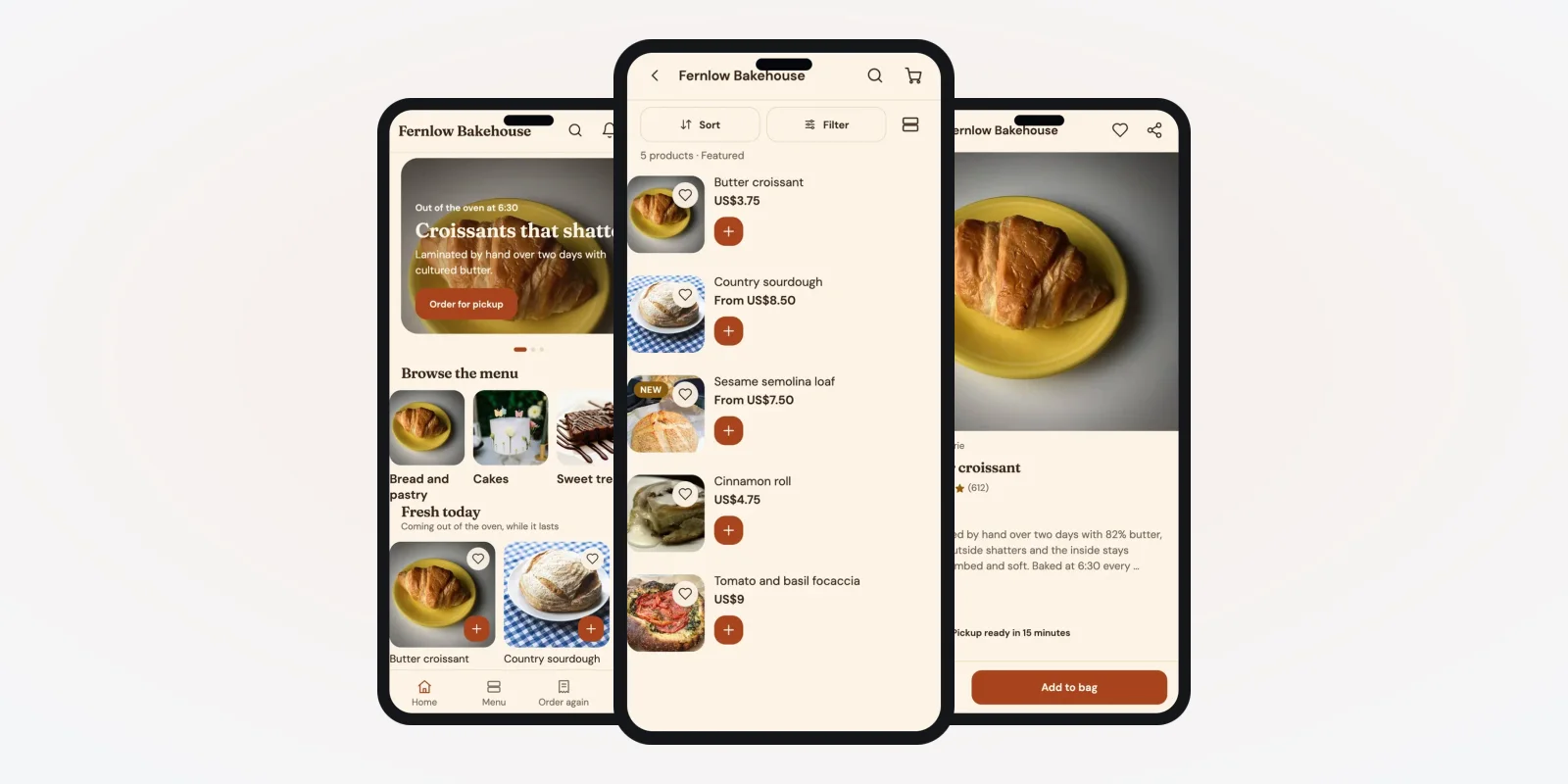
A store app reads your Shopify catalogue. You add a product in Shopify, and it shows in the app. Stock and prices stay in step. The screens below are from store apps we built for a demo bakery and a demo grocery shop, with demo data.
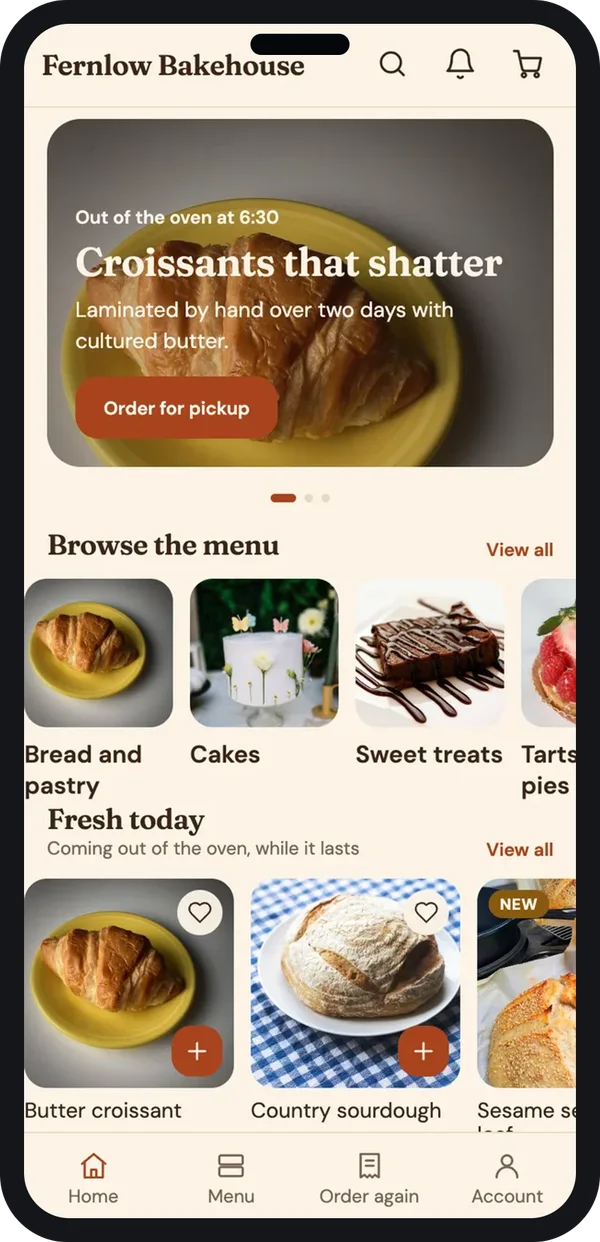
Home
Banner, categories and the items you want to push today.
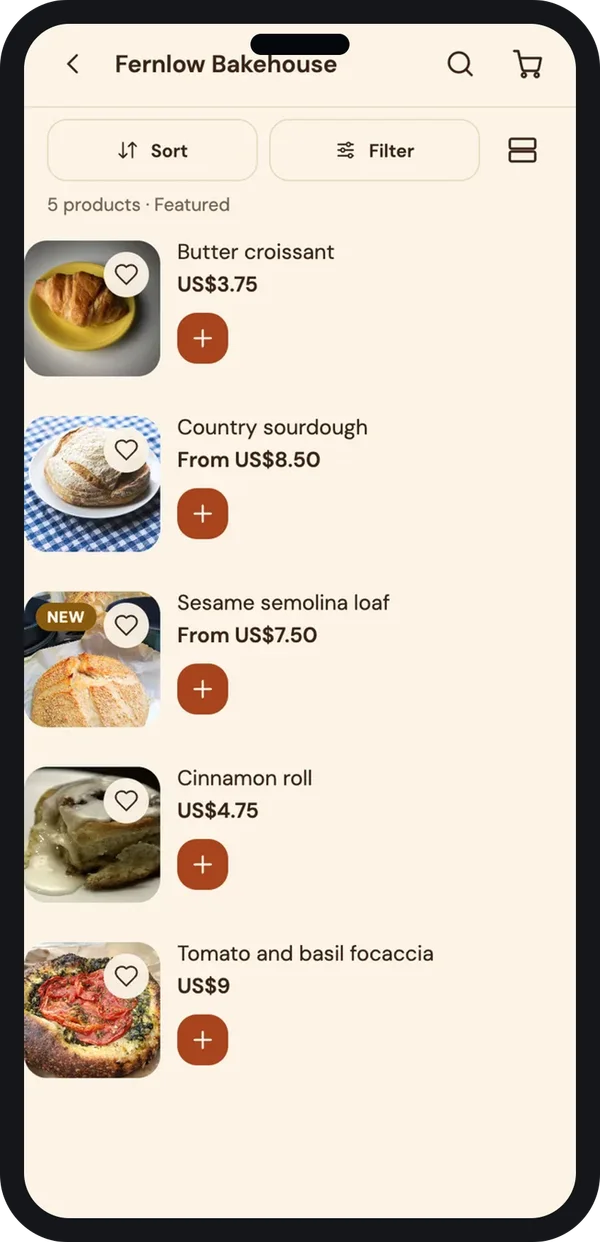
Collection
Your Shopify collections, with sort, filter, wishlist and quick add.
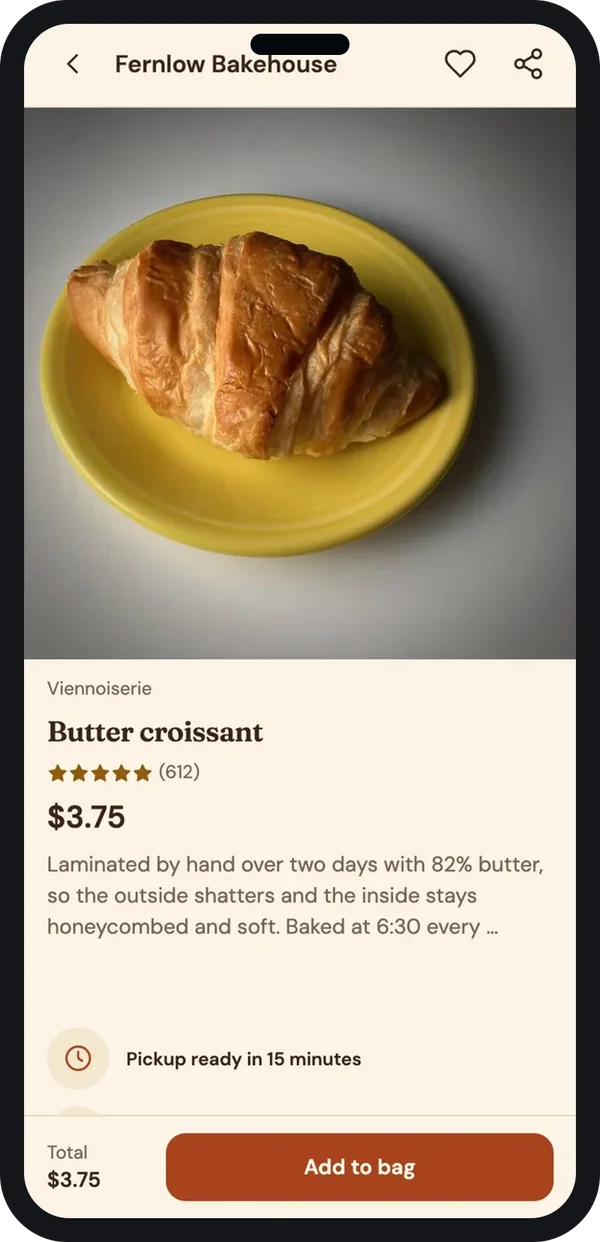
Product
Photos, reviews, details and a pickup or delivery time.
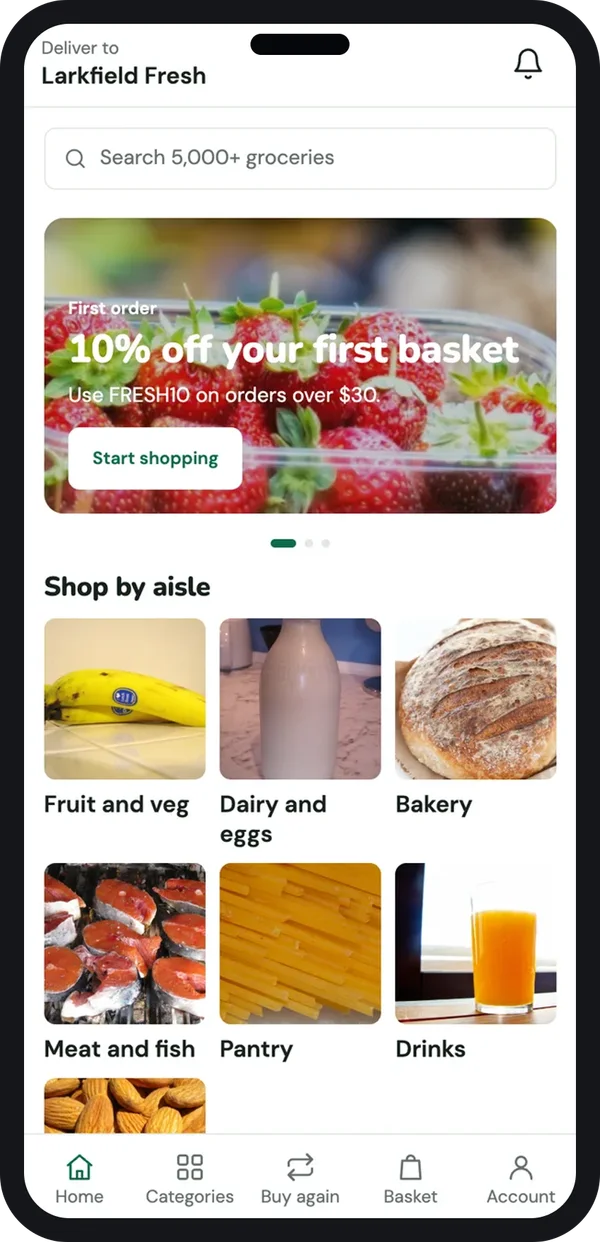
The same app can look very different for another kind of store. A grocery shop needs the delivery address first, aisles instead of a menu, and weight options on each item.
Built around how your buyers shop
For a grocery store we set the home screen around aisles and a first-order offer. The product page lets the buyer choose 500 g, 1 kg or 2 kg. These options come from the variants you already set in Shopify.
A clothing brand would get size charts instead. A gift shop would get a message box for the card. This is why a custom build fits better than one template for every store.
Change app screens without a new release
A sale starts on Friday. You want a new banner and a countdown on the app home. With a normal app, that means a new build and a store review. So for store apps we also build a screen editor that your team uses in the browser.
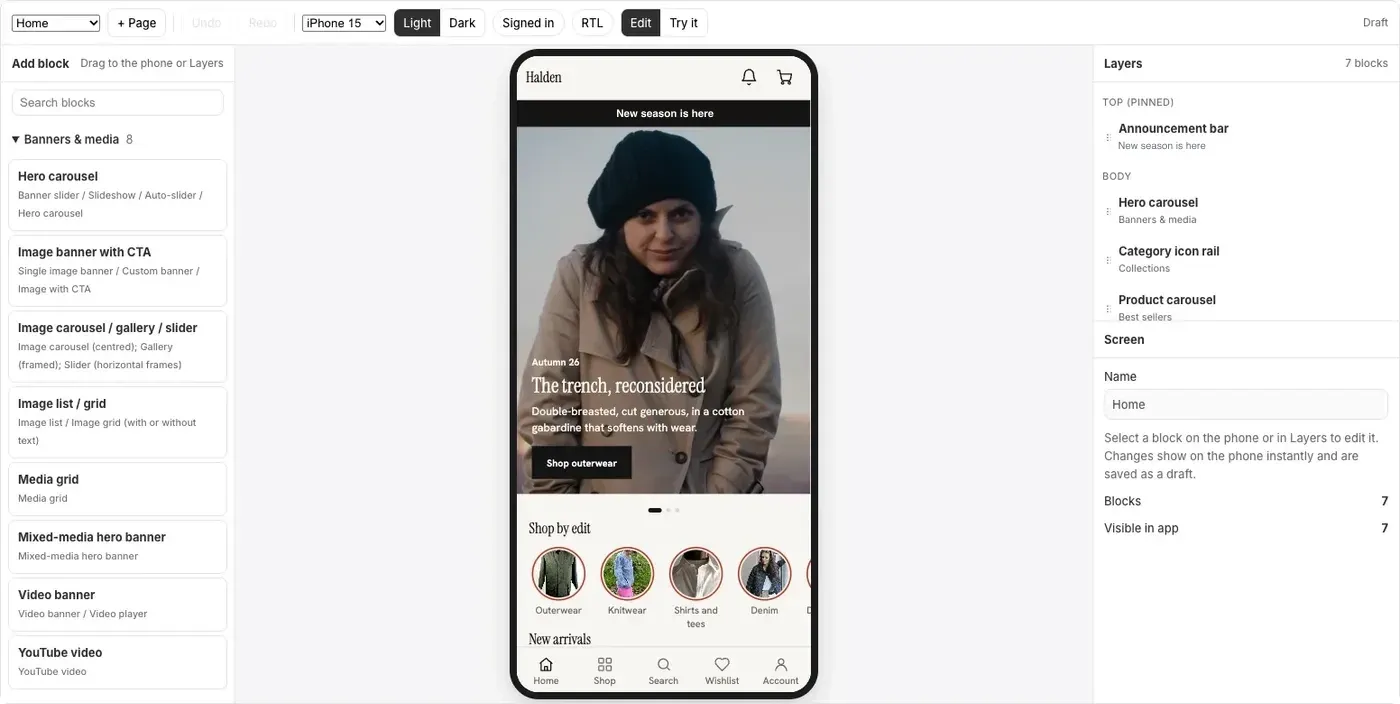
Each block can be edited in place. Your team changes a heading, adds a deal countdown or a signup box, and publishes. The app picks up the new layout the next time it opens.
The editor also has dark mode and right-to-left layout. That matters if you sell in Arabic or Urdu as well as English.
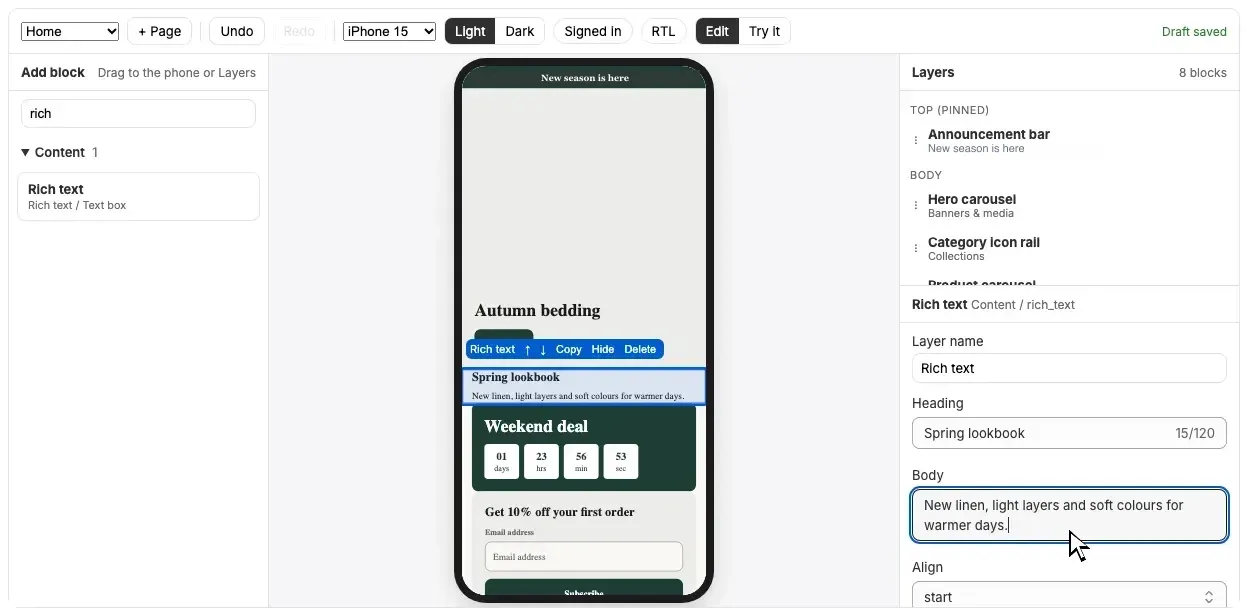
We build this kind of editor with Next.js for the web side. The layout data stays on your own server, so you are never locked to a builder service.
What Indian Shopify apps need
A store app made for the US often misses the basics of selling in India. Ask any company how it handles these points.
- Cash on delivery and UPI. Many buyers still choose cash on delivery. UPI apps should open straight from checkout.
- Pincode check. Show if you deliver to a pincode, and the expected date, before the buyer adds to bag.
- GST invoice. Buyers with a business want an invoice with their GSTIN. The GST portal has the rules on invoices and on tax collected by ecommerce operators.
- Language. A Hindi or regional language option helps buyers outside metro cities.
- Order updates on WhatsApp. Most buyers read WhatsApp before email.
Payments and selling online have rules. Under RBI rules on card tokenisation, merchants should not store card numbers. Your app should use the payment gateway's own secure screens. The Consumer Protection (E-Commerce) Rules, 2020 ask sellers to show return, refund and grievance details. Check the current rules with your CA or lawyer.
How to choose a Shopify app development company in India
Many companies say they build Shopify apps. These questions separate a real build from a reskinned template.
- Can I see working apps? Ask for apps on the stores or screens from real builds, not only design mockups.
- Which framework do you use? A team using Flutter or React Native can ship Android and iPhone from one codebase.
- Whose developer account publishes the app? It should be yours, in your company name.
- Do I get the source code? Get this in writing before work starts.
- How do sale banners change? If every change needs their developer, you will wait and pay each time.
- Who fixes it when Shopify changes? Ask about support after launch and how fast they respond.
Freelancer vs template app vs development company
| What you need | Single freelancer | Template app service | Development company |
|---|---|---|---|
| Your own brand on the stores | Yes | Often, with limits | Yes |
| Screens made for your products | Depends on skill | Fixed blocks | Yes |
| COD, UPI, pincode and GST invoice | Depends | Partly | Built to your rules |
| Design, build, testing and hosting in one team | No | Yes, but shared | Yes |
| Source code | Usually yours | Stays with the service | Yours |
| Support when one person is away | Risky | Ticket queue | Team cover |
Worked example: a bakery chain in Pune
Here is how one store app project could run. The bakery and the steps are examples.
- Week 1, call. The owner shares the Shopify store. Three outlets, same-day pickup, cake orders a day ahead.
- Week 1, screens. We show home, menu, product and pickup screens. The owner asks for an "order again" tab for regulars.
- Week 2 to 5, build. The app reads products and stock from Shopify. Pickup slots are set per outlet.
- Week 5, payments. UPI, cards and pay at pickup are tested with the payment gateway in test mode.
- Week 6, staff test. Outlet staff place real orders. We fix the slot timing they report.
- Launch. The app goes live on both stores under the bakery's own developer accounts.
- Diwali. The marketing team adds a festive banner and countdown in the screen editor. No new release is needed.
Our service
How we build your Shopify mobile app
One team for screens, app, Shopify connection and launch.
- Study your store. We go through your products, variants, offers and delivery rules with you.
- Design the screens. You click through the app screens first and change them before code is written.
- Build the apps. Android and iPhone apps that read your Shopify catalogue, plus the screen editor if you want one.
- Connect India-specific steps. A small backend handles pincode rules, WhatsApp updates and GST invoice details.
- Test with your team. Staff and a few buyers order for real. We fix what they find.
- Launch and support. We publish under your developer accounts and host the backend on your cloud.
Shopify app development cost in India: what decides it
We do not publish a fixed price. The cost depends on how many screens and custom flows you need. The screen editor adds to it. So do the payment and delivery partners you use. It also depends on whether you later want a custom headless storefront on the web.
| Monthly app builder plan | Custom Shopify app (built for you) | |
|---|---|---|
| Start | Quick, with set blocks | A few weeks to design and build |
| Cost over years | Pay every month, sometimes by order count | One build cost, then optional support |
| Screens and flows | The builder's blocks only | Made for your products and buyers |
| India checkout rules | Whatever the builder offers | Your COD, UPI and pincode rules |
| Source code | Stays with the builder | Yours |
Share your store link and what you want the app to do. We send a clear, written quote after one call.
Whoever builds your Shopify app, make sure it can:
- Read products, variants, prices and stock from your Shopify store
- Offer cash on delivery and UPI at checkout
- Check delivery by pincode before the buyer adds to bag
- Send order updates by push and WhatsApp
- Let your team change banners and blocks without a new release
- Publish under your own Play Store and App Store accounts
- Come with the full source code in your name
FAQ
What does a Shopify app development company do?
It builds apps that work with your Shopify store. That can be a mobile app for buyers, a custom app inside your Shopify admin for staff, or a custom storefront on the web.
How long does it take to build a Shopify mobile app?
It depends on the number of screens and custom flows. After one call we share a plan with dates, starting with screens you can click through.
Will the app update when I change products in Shopify?
Yes. The app reads your catalogue from Shopify. New products, prices and stock changes show in the app without a new release.
Will I own the app and the source code?
Yes. We publish the app under your own store accounts and hand over the source code in your name.
Does the app work on Android and iPhone?
Yes. We build one codebase that runs on both. We can also add a web version if you need one.
Can the app offer cash on delivery and UPI?
Yes. We set up the payment options you use today, including cash on delivery and UPI, through your payment gateway.
Is my customer data safe in the app?
It should be. The Digital Personal Data Protection Act, 2023 applies to buyer data. We keep card details with the payment gateway and limit staff access by role.
Do you work with stores outside India?
Yes. We build for Shopify stores in other countries too, with the language, currency and payment options of that market.
Can PRS India build a custom app for my Shopify store?
Yes. Talk to our team with your store link, and we will show you screens made for your products. Our guide to ecommerce platforms may also help if you are still choosing a store platform.
Related guides
Written by
Babita Kumari · Business Developer
Business Developer at PRS India. Talks with business owners about the app or software they want, and helps them work out the scope, cost and launch steps before any code is written.