Does Shopify Provide a Mobile App? Build Your Own
Shopify has an admin app and a shared shopping app, but no app under your brand. Here are your choices, and how we build your own.

Written by Babita Kumari, Business Developer
Reviewed by the PRS India software & mobile app development team
10 min read
Written from production. Our articles draw on products we run live and the client work behind them, and are revised as the systems they describe evolve.
Store owners ask us this all the time: does Shopify provide a mobile app for my store? The short answer is yes and no. Shopify has apps of its own. But none of them gives your buyers an app with your name, your icon and only your products.
If you want that, you need to build your own app that works with your Shopify store. This guide explains what Shopify gives you today, what it does not, and what your choices are. It also shows how PRS India builds a branded app. Shopify stays the place where you run the store.
Key takeaways
- Shopify's own apps help you run the store or list you next to many other brands. They are not your branded app.
- A branded app needs its own build, published under your own Play Store and App Store accounts.
- You have three paths: a mobile website, a monthly app builder plan, or a custom app built for you.
- Your products, stock and orders can stay in Shopify. The app only reads and writes to it.
- With a custom build, the app, the buyer list and the source code are yours.
What mobile apps Shopify gives you
At the time of writing, Shopify offers a few apps of its own. Each one has a clear job. None of them is a store app under your brand.
| Shopify's app | Who it is for | What it does | Your brand on the stores? |
|---|---|---|---|
| Shopify admin app | You and your staff | Manage orders, products and reports from the phone | No |
| Shopify POS app | Your shop counter | Take payments and sell in person | No |
| Shop app | Buyers | Track orders and browse many brands in one app | No, your store sits among others |
So Shopify helps you run the store from a phone. It does not give your buyers an icon on their home screen that opens only your store. For that, your store needs its own app, made through mobile app development or an app builder.
The problem
What you miss without your own app
These are the gaps store owners notice once they have repeat buyers. We see them often in our retail and ecommerce software work.
- No push to your own buyers. You cannot send a message to a buyer's lock screen without an app.
- Other brands on the same screen. In a shared shopping app, your buyer sees other sellers next to you.
- Login again and again. On the mobile site, buyers often get logged out and drop off at checkout.
- No "order again" in one tap. Repeat buyers must search for the same items every time.
- Ad spend for loyal buyers. You pay for ads to bring back people who already know you.
Your three choices for a Shopify mobile app
Once you know Shopify will not make a branded app for you, there are three ways forward.
1. Keep a mobile website
Your theme already works on phones. Our guide on choosing a CMS for SEO covers the website side. You can add an "add to home screen" option with a progressive web app. This costs least, but push messages and store listing are limited, more so on iPhone.
2. Use a monthly app builder plan
Builder services connect to your store and give you an app from set blocks. You start quickly. But you pay every month, the design has limits, and the code stays with the service.
3. Get a custom app built
A development team builds an app for your store. It reads your Shopify catalogue and follows your own checkout, delivery and offer rules. You own the app and the code.
What your own Shopify app looks like
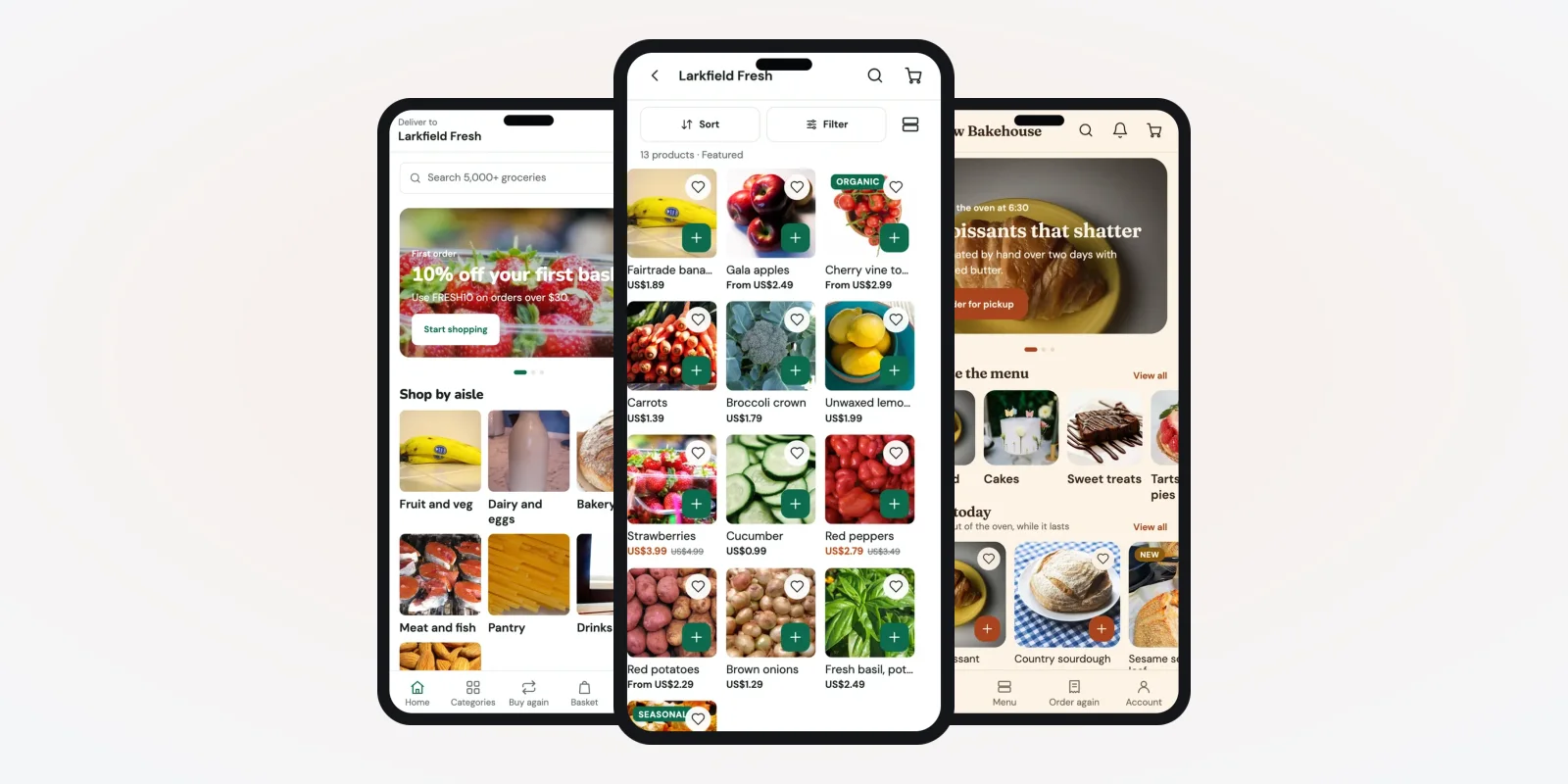
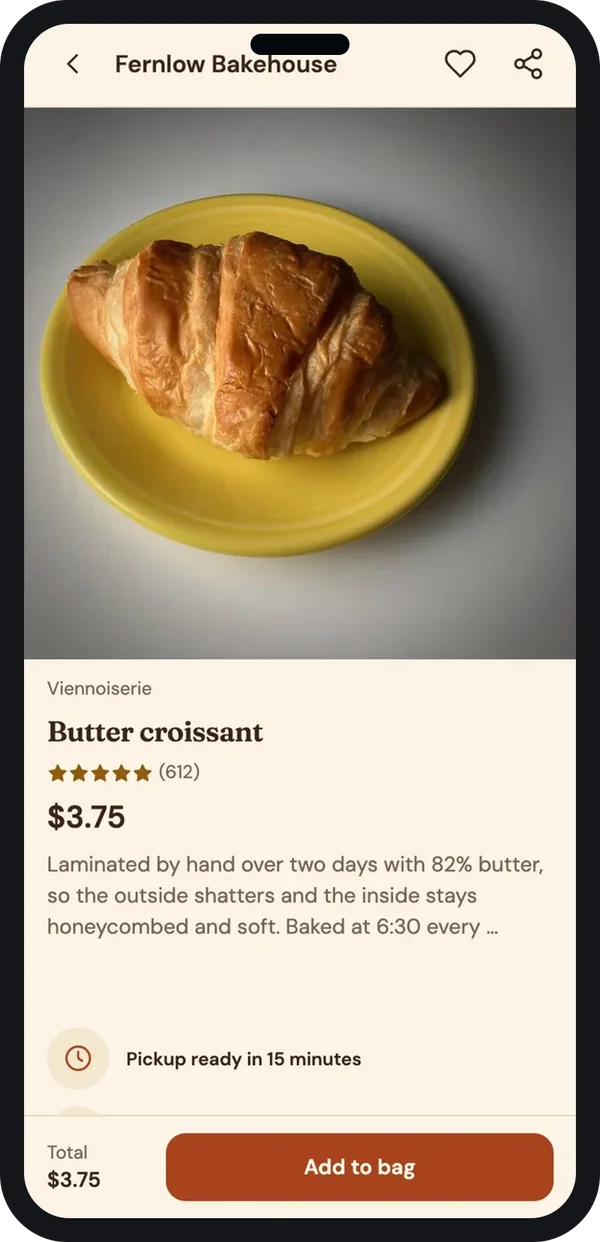
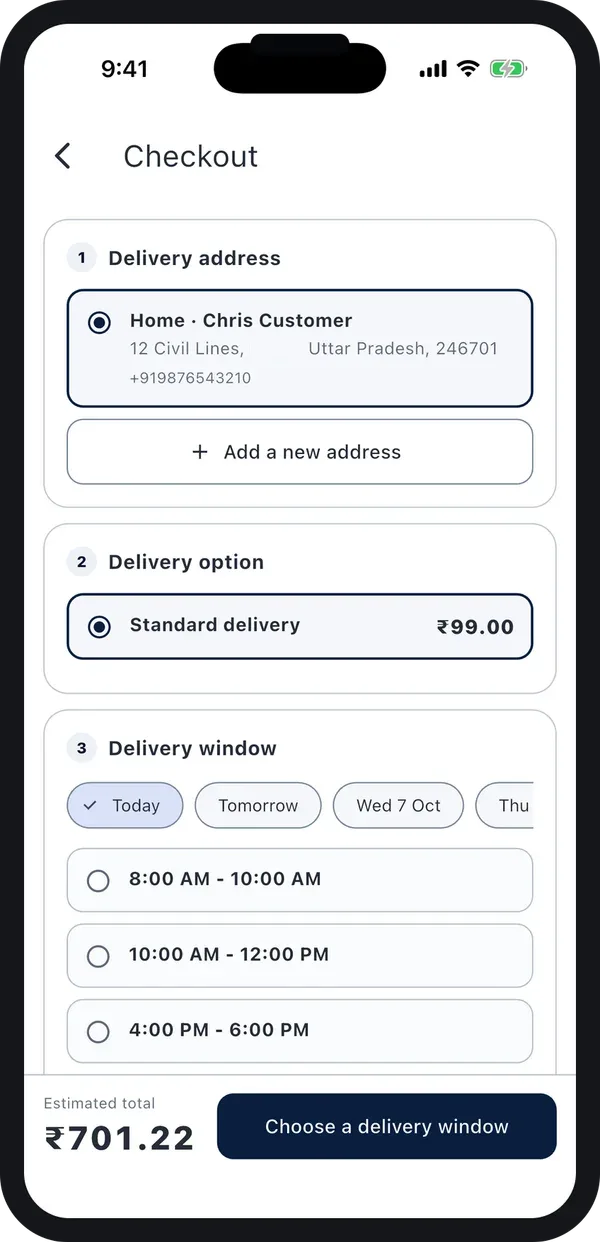
A custom app does not copy your website. It is made for thumbs and small screens. The screens below are from store apps we built for a demo grocery shop and a demo bakery, with demo data.
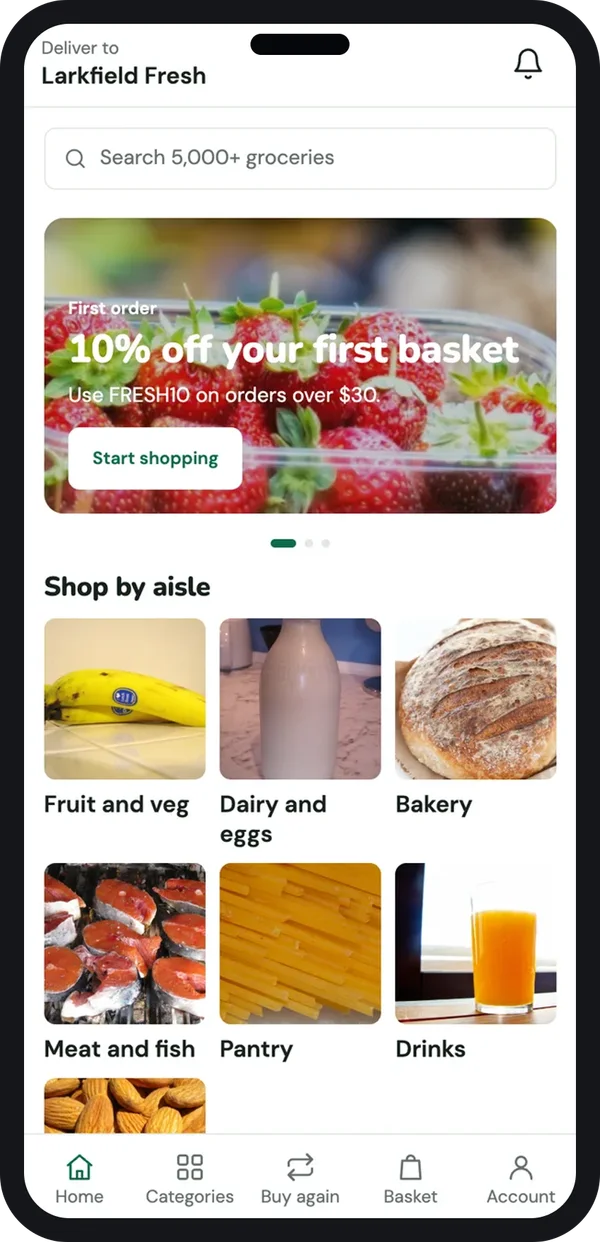
Your home screen
Your offer banner and your aisles. No other brand in sight.
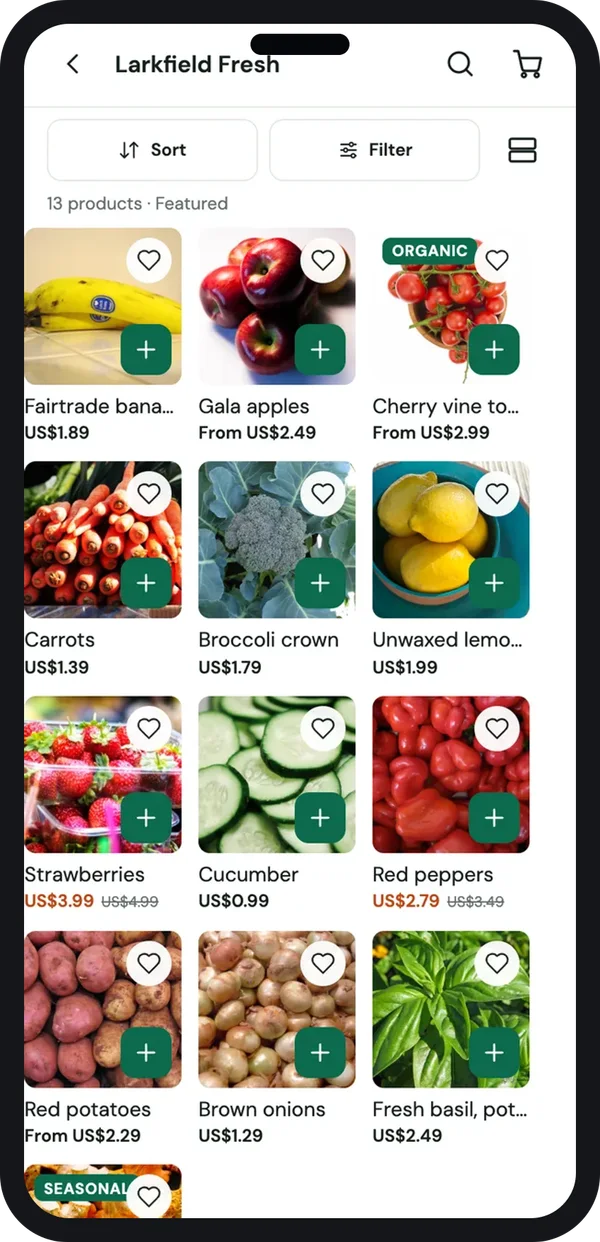
Your products
Shopify collections shown as a grid, with badges you set as tags.
An "order again" tab for regulars
For stores with daily or weekly buyers, we add an "order again" tab. The buyer sees what they bought last time and adds it back in one tap. A bakery, a pet food shop or a milk brand gains most from this.
Wishlist and quick add
Buyers save items with a heart and add them later. Quick add on the list saves a trip to each product page.
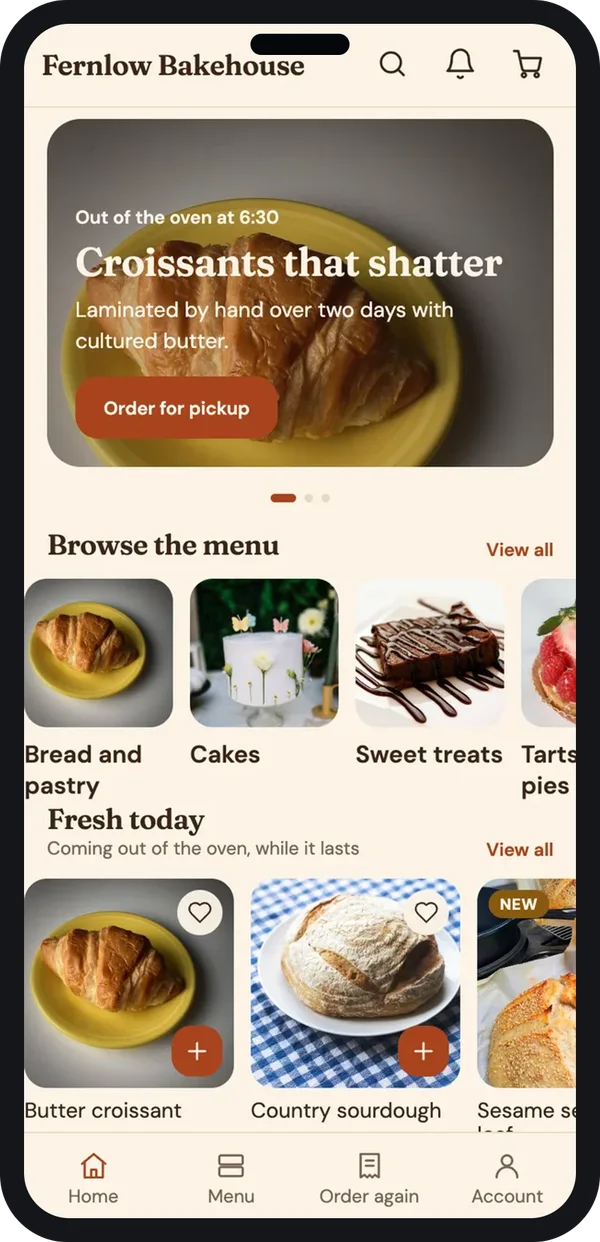
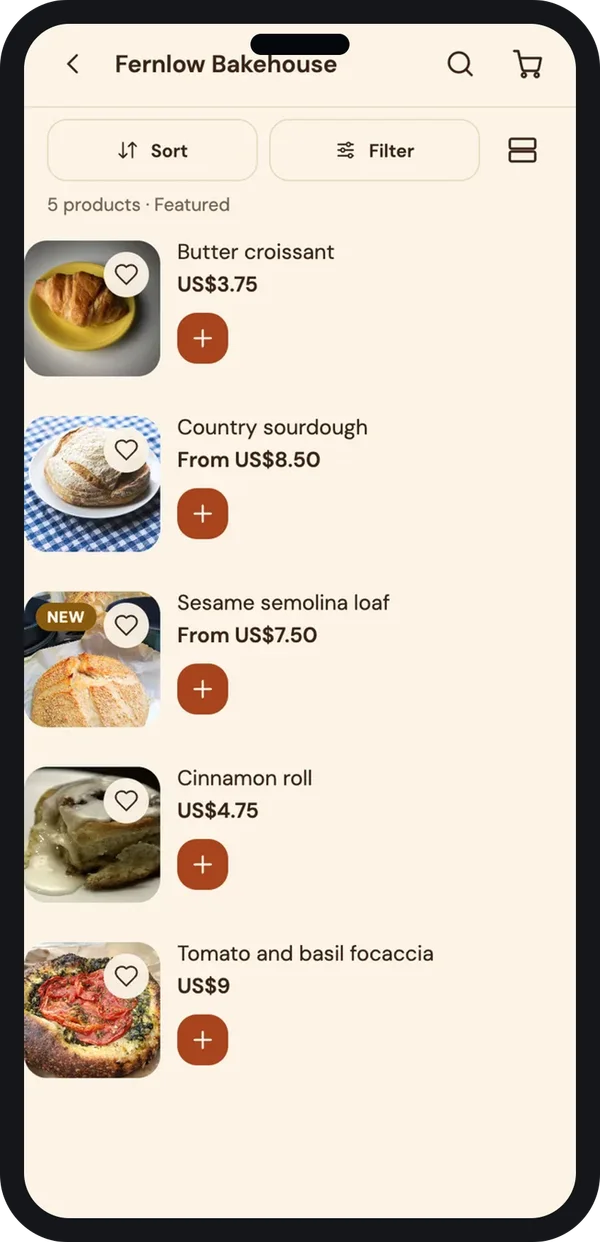
Keep control of the app home screen
One worry owners have is: "Will I need a developer every time I change a banner?" Not if the app comes with a screen editor. Your team drags blocks such as a carousel, a banner or a video onto the home screen. A phone preview shows the result before you publish.
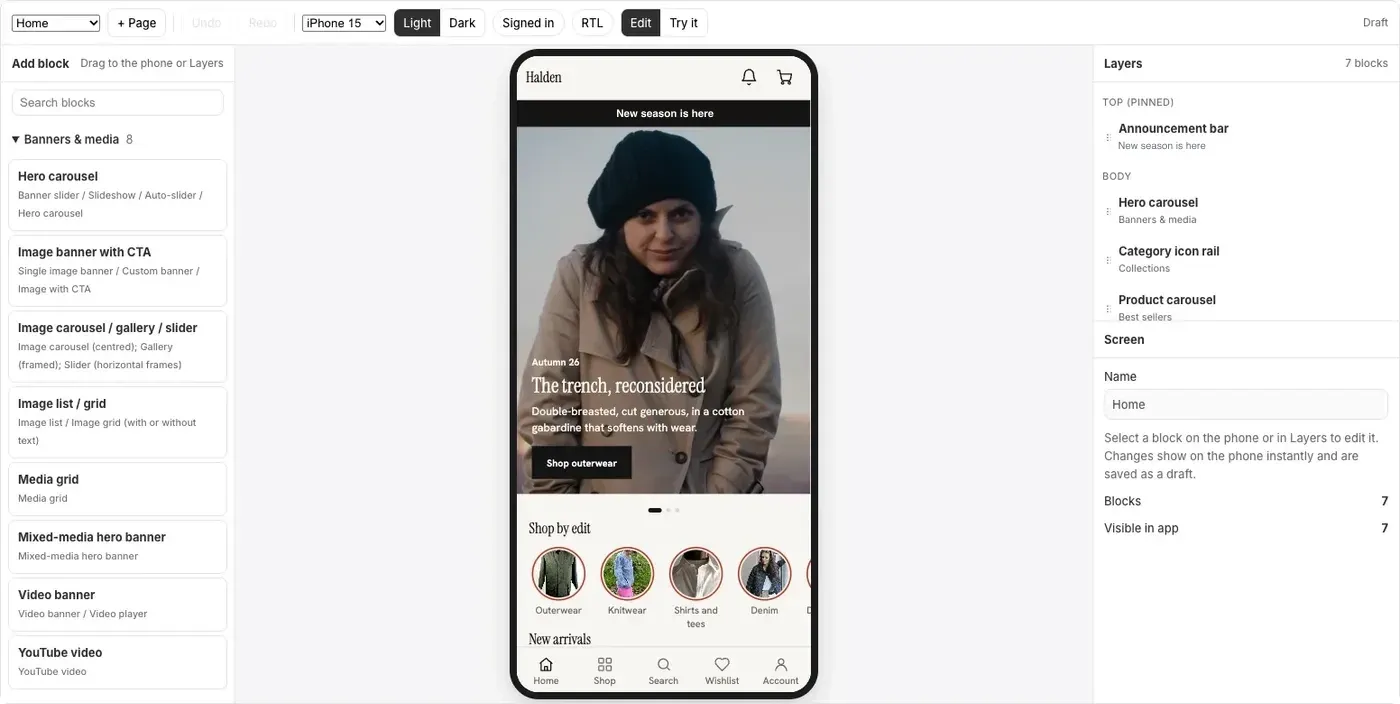
We build the editor and the app's small backend with Laravel or Node.js, hosted on your own server. The app reads the layout from there, so changes show without a store review.
Rules to check before your app goes live
An app collects names, phone numbers and addresses. It also takes orders. So a few Indian rules apply, whoever builds it.
- Personal data. The Digital Personal Data Protection Act, 2023 covers buyer data. The app needs a clear consent screen and a way to delete an account.
- Seller details. The Consumer Protection (E-Commerce) Rules, 2020 ask online sellers to show return, refund and grievance details.
- Security incidents. CERT-In directions of April 2022 ask many service providers to report certain cyber incidents within six hours and keep logs. Ask your developer how the app logs events.
Thinking beyond Shopify? Some Indian sellers also list on ONDC, the government-backed open network for digital commerce. A custom app and backend can later share stock with such channels. Check the network's current seller rules first.
Shopify's apps vs builder plan vs your own app
| What you want | Shopify's own apps | Monthly builder plan | Your own custom app |
|---|---|---|---|
| Your icon and name on the stores | No | Yes | Yes |
| Only your products on screen | No | Yes | Yes |
| Push messages to your buyers | Limited | Yes | Yes, with your own rules |
| Screens made for your products | No | Set blocks | Yes |
| Delivery and checkout rules for your market | Shopify defaults | Builder defaults | Yours |
| Source code | No | No | Yours |
Worked example: an organic grocery store in Bengaluru
Here is how one store could move from a mobile site to its own app. The store and dates are examples.
- Before. The store runs on Shopify. Most orders come from the same few hundred families every week, through the mobile site.
- The question. The owner asks if Shopify can give them an app. They find only the admin app and the shared Shop app.
- The plan. We agree on a branded app with aisles, weight options and an "order again" tab.
- The build. Products, prices and stock stay in Shopify. The app reads them. A small backend stores the home layout.
- The launch. The app goes live under the store's own developer accounts. Buyers get a link on their next order slip.
- Each week. The team puts the seasonal fruit banner on the app home from the screen editor.
- Each Saturday. A push message reminds regular buyers to refill their weekly basket.
Our service
How we build your own Shopify store app
Shopify stays your store admin. We add the app your buyers carry.
- Look at your store. We study your products, variants, delivery areas and repeat buyers with you.
- Design the screens. You see and click through every screen before we write code.
- Build once for both phones. We use Flutter to ship Android and iPhone from one codebase.
- Connect to Shopify. Products, stock, carts and orders flow through Shopify, so your admin stays the same.
- Test with real buyers. A small group orders for a week. We fix what they report.
- Launch and support. We publish under your accounts and run the backend on your cloud.
Shopify mobile app development cost: what decides it
We do not publish a fixed price. The cost depends on how many screens you need and on custom steps like "order again", pickup slots or subscriptions. A screen editor adds to it, and so does a web version of the same app. Stores with many sellers may need marketplace features, which change the scope.
| Monthly builder plan | Your own app (built for you) | |
|---|---|---|
| Time to start | Days | A few weeks |
| Payments over the years | Every month, for as long as the app is live | One build cost, then optional support |
| If you stop paying | The app can go offline | The app keeps running |
| Design freedom | Within the builder's blocks | Any screen you need |
| Source code | Stays with the service | Yours |
Send us your store link and three things you want the app to do. We send a clear, written quote after one call.
Whoever builds your Shopify app, make sure it can:
- Show only your products, under your name and icon
- Keep products, stock and orders in your Shopify admin
- Send push messages to your buyers with your own rules
- Offer "order again" and a wishlist for repeat buyers
- Let your team change the home screen without a new release
- Ask for consent and let buyers delete their account
- Be published under your own developer accounts
FAQ
Does Shopify provide a mobile app for my store?
Shopify gives you an admin app to run the store and a shared shopping app where your store sits among others. It does not give you a separate app under your own brand. For that, you build your own app.
Can I turn my Shopify store into an app?
Yes. A development team can build an Android and iPhone app that reads your Shopify products, stock and orders. You keep running the store from the Shopify admin.
How long does it take to build my own Shopify app?
It depends on the screens and custom steps you need. After one call we share a plan with dates, starting with screens you can click through.
Will I own the app and the source code?
Yes. We publish it under your own store accounts and hand over the source code. The buyer data stays with you.
Do I still need my Shopify plan?
Yes. Your products, payments and orders still run through Shopify. The app is a new front for buyers, not a new store system.
Will it work on Android and iPhone?
Yes. We build one codebase for both. A web version can be added if you need one.
Is buyer data safe in the app?
It should be. We add a consent screen and limit staff access by role. Card details stay with the payment gateway, and buyers can delete their account.
Can PRS India build an app for my Shopify store?
Yes. Talk to our team with your store link. We will show you screens made for your products and buyers.
Related guides
Written by
Babita Kumari · Business Developer
Business Developer at PRS India. Talks with business owners about the app or software they want, and helps them work out the scope, cost and launch steps before any code is written.