WhatsApp CRM Software Development Company in India
One customer record for every WhatsApp chat, so no lead is lost in a staff phone.
Written by Babita Kumari, Business Developer
Reviewed by the PRS India software & mobile app development team
13 min read
Written from production. Our articles draw on products we run live and the client work behind them, and are revised as the systems they describe evolve.
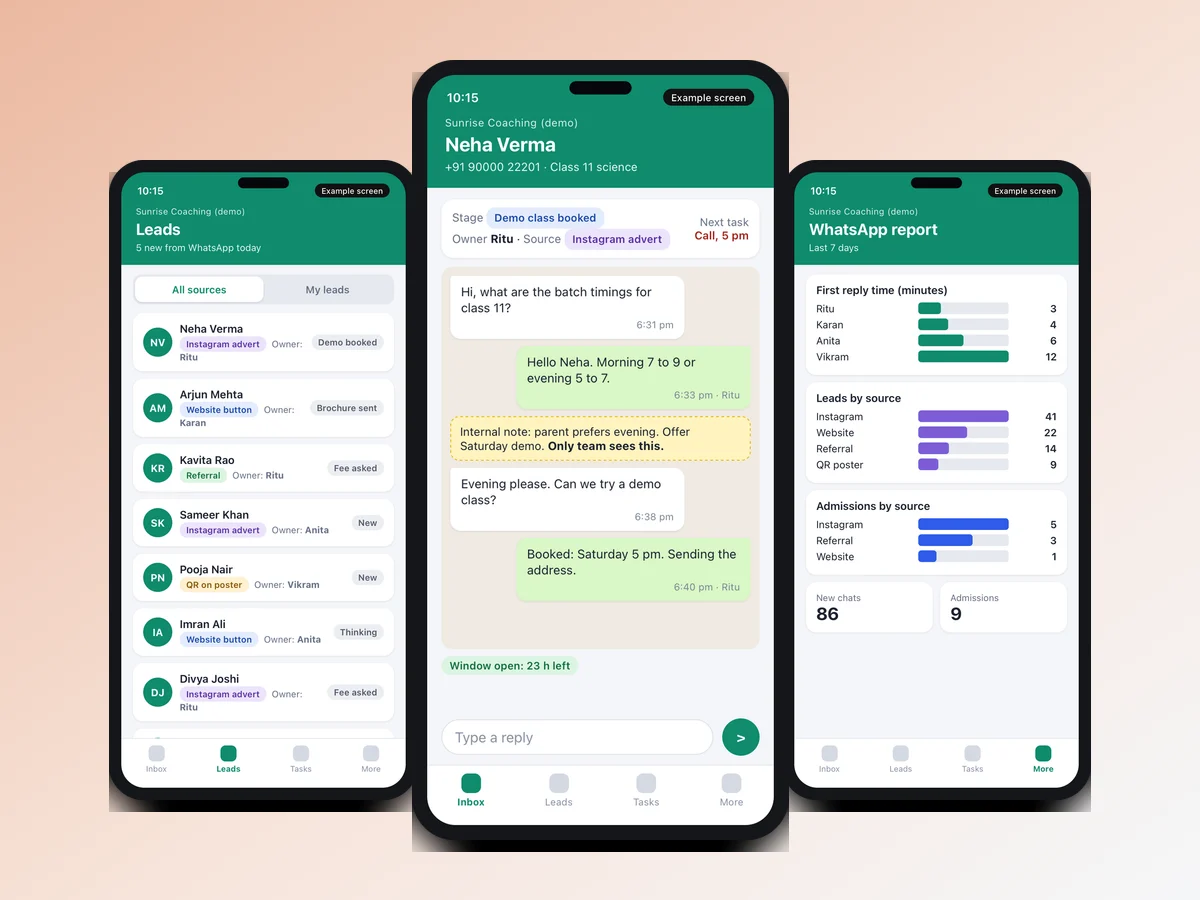
A customer writes to your sales number on WhatsApp. The staff member who owns that phone replies, and the chat stays there. Nobody else sees it. When that person goes on leave, or leaves the company, the lead goes with the phone. A WhatsApp CRM fixes this: every chat is saved on a customer record, with an owner, a next step and a date.
This guide explains what WhatsApp CRM software does, which features it needs, and the WhatsApp rules it must follow. It also shows how PRS India builds your own WhatsApp CRM. It connects to your own business number. The code and the data are handed over to you.
Key takeaways
- A WhatsApp CRM saves each chat on a lead record, so the chat stays with the company and not with one phone.
- The core features are chat-to-lead, auto-assign, a shared inbox beside the lead, templates per stage, follow-up reminders and reports tied to deals.
- WhatsApp has its own rules: permission before you message, a 24-hour reply window and approved templates. The CRM should enforce them for your team.
- A ready tool suits a small team with a standard flow. Your own CRM suits a team with its own stages, fields and data needs.
- With a custom build, the code, the data and the WhatsApp number stay with you.
What is a WhatsApp CRM?
CRM means customer relationship management. It is one list of your leads and customers, with the full history of each. A WhatsApp CRM is a CRM where the WhatsApp chat is part of that history. The chat is saved on the record. Your team replies from inside the CRM, and the lead card is open beside the chat.
It is different from the WhatsApp Business app. The Business app lives on one phone, with a few linked devices. A WhatsApp based CRM connects to the WhatsApp Business Platform. So many staff can work on one number. Every message is linked to a person in your database. For what the platform itself is, read our guide to WhatsApp Business API integration. This guide is about the CRM side.
The problem
Why a phone full of chats loses leads
Teams that sell on WhatsApp without a CRM lose leads in the same five places.
- The lead lives on one phone. The chat, the price you quoted and the promise you made are all on a staff phone. If the phone is lost or the person leaves, the history is gone.
- Nobody owns the lead. A message arrives at a shared number and three people see it. Each thinks another will reply.
- Nobody knows who replied. The manager cannot tell whether a customer waited ten minutes or ten hours.
- Old lists get messages with no filter. The same text goes to people who bought last year and people who never replied.
- No view of what works. You cannot say which ad, QR code or page brought the chats that became sales.
How a WhatsApp CRM works, from chat to closed deal
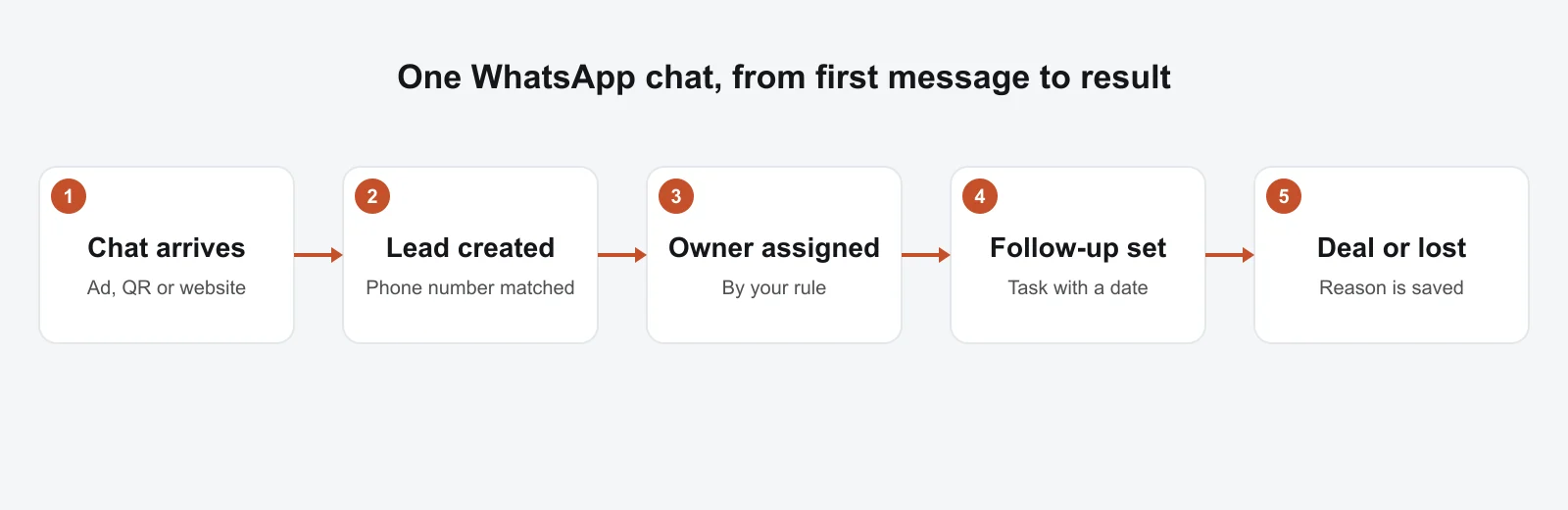
Here is the path of one chat through the CRM. The CRM receives each new message from WhatsApp as it arrives, so the steps below happen on their own.
- The customer writes. They tap a WhatsApp button on your website, scan a QR code on a hoarding, or reply to an ad.
- The CRM matches the phone number. If the number is new, it creates a lead. If it is already in the database, it opens the old record with its history.
- The lead gets an owner. Your assignment rule picks the person, and that person gets an alert.
- The team replies from the shared inbox. The chat and the lead card sit on the same screen.
- A follow-up is set. After the reply, the agent picks a next step and a date. The CRM reminds them when it is due.
- The stage moves. The lead moves through your pipeline until it ends as a deal won, or as a lost lead with a reason.
This is what CRM WhatsApp integration means in practice. It is not a button that opens a chat. It is a link between each message and a record.
Features a WhatsApp CRM needs
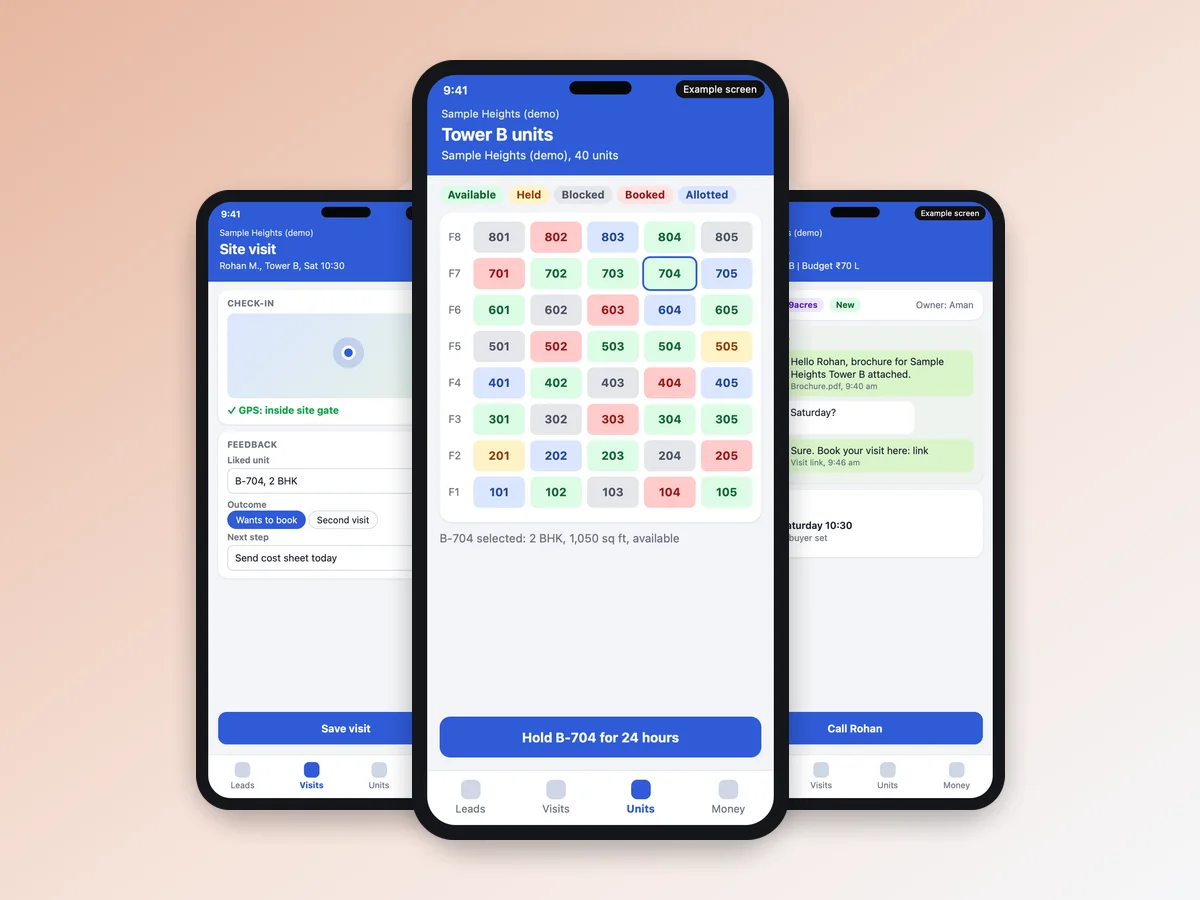
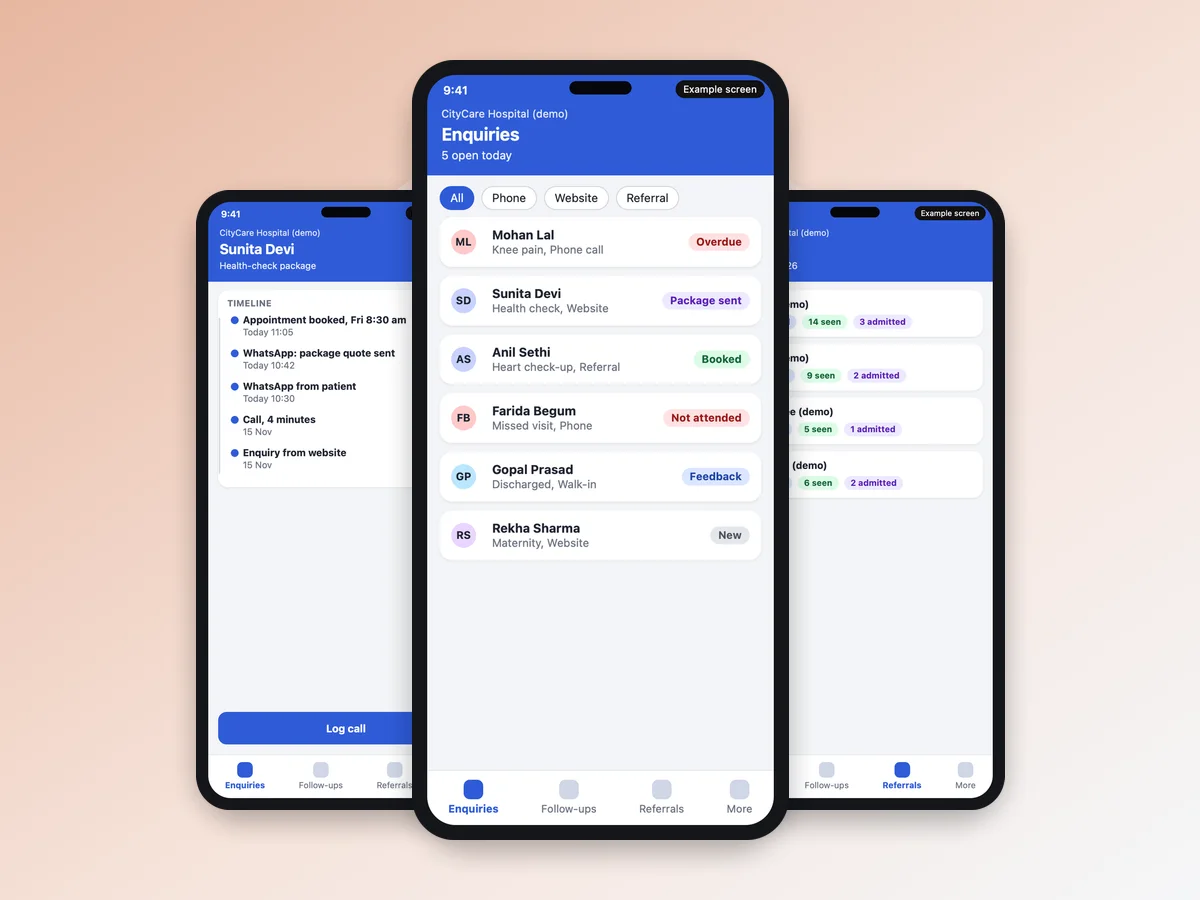
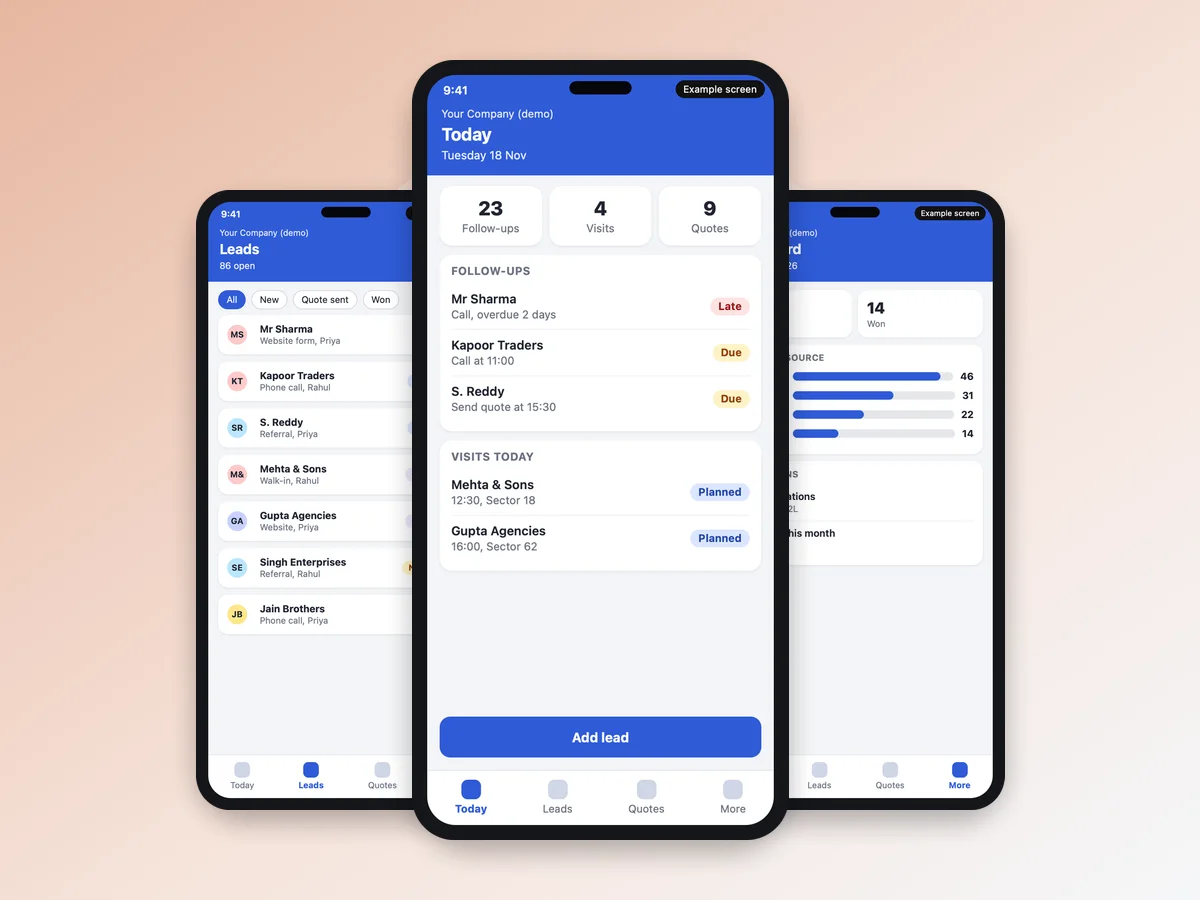
Below is what your WhatsApp CRM needs, and what we build into it for you. Screens shown are examples of the design, with demo data.
Chat to lead
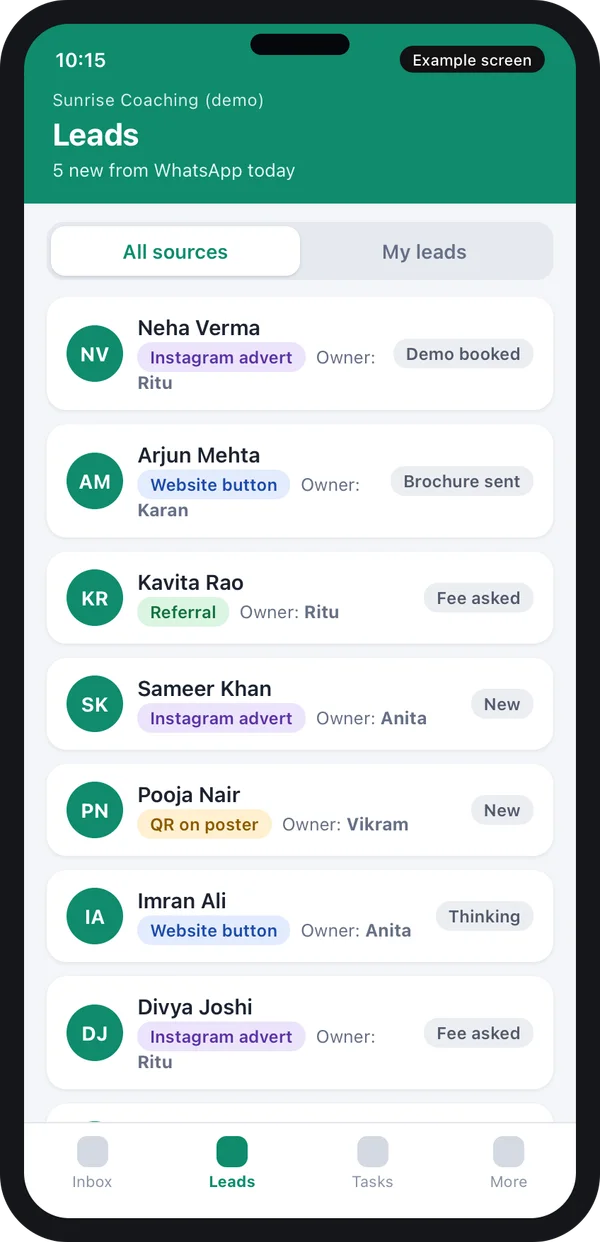
The first message from a new number creates a lead. The CRM saves the phone number, the name on the profile and the first message. It also stores the source, such as a website button, a QR code or an ad. This shows you where each chat came from.
If the same number writes again later, the CRM finds the old record and does not make a duplicate.
Auto-assign
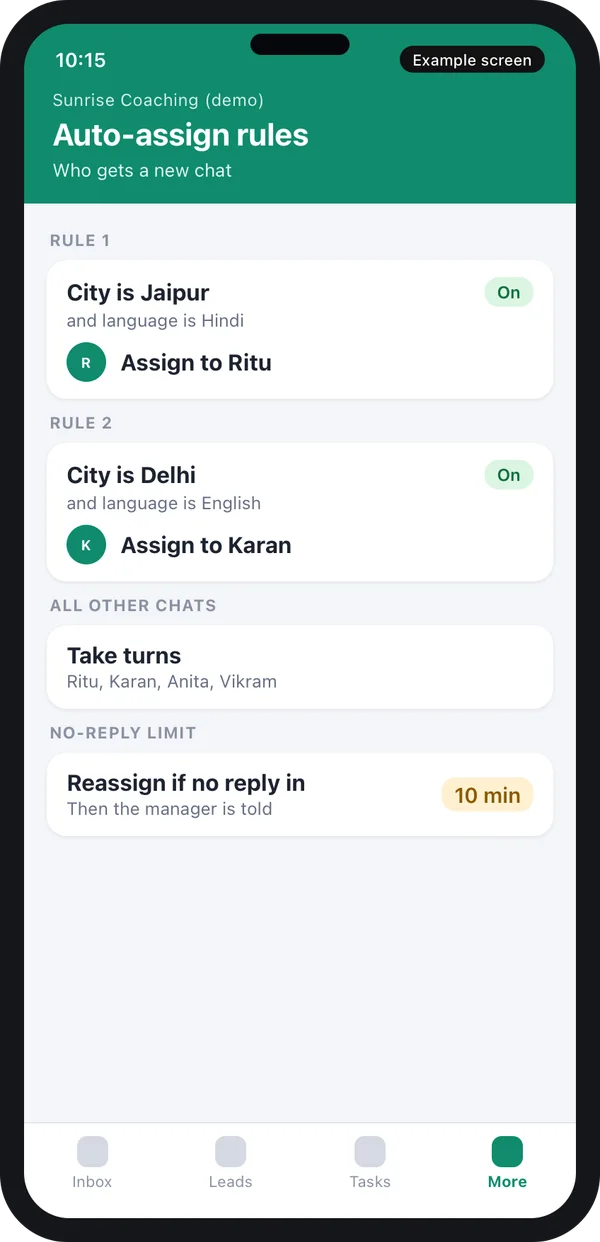
A new chat should not wait for someone to pick it up. You set the rule, and the CRM follows it:
- round robin, so leads are shared evenly;
- by language, city or product;
- only to people who are on duty at that hour;
- re-assign to another person if the first one does not reply within the minutes you set.
Shared inbox tied to the lead
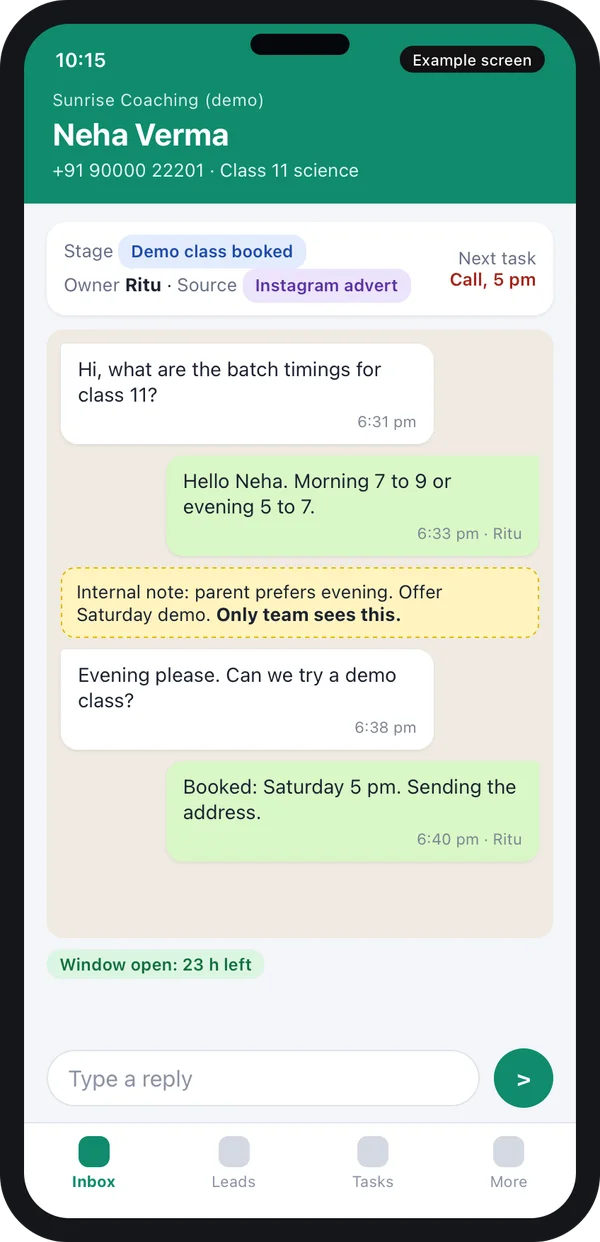
Any teammate can open a chat and read the full history. The lead card sits beside it: stage, owner, source, last quote and next task. Staff can leave internal notes that the customer never sees, and the screen shows who is handling the chat now.
This is the difference from a plain inbox. The agent does not switch between a chat app and a sheet.
Message templates for each pipeline stage
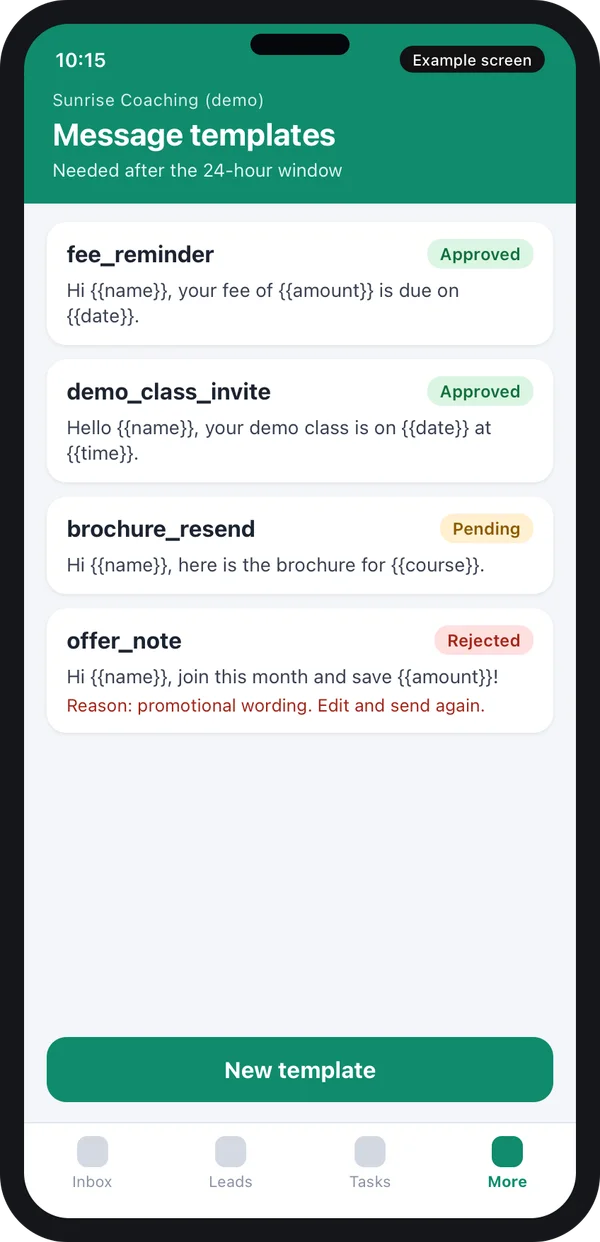
A template is a message you write once and submit to WhatsApp for approval. In the CRM, you keep one set for each stage: price sent, demo reminder, payment due. Fields fill in from the record, such as the customer name or the amount.
The template list shows the approval status of each one: approved, pending or rejected. Staff can only pick approved ones.
Follow-up reminders and tasks
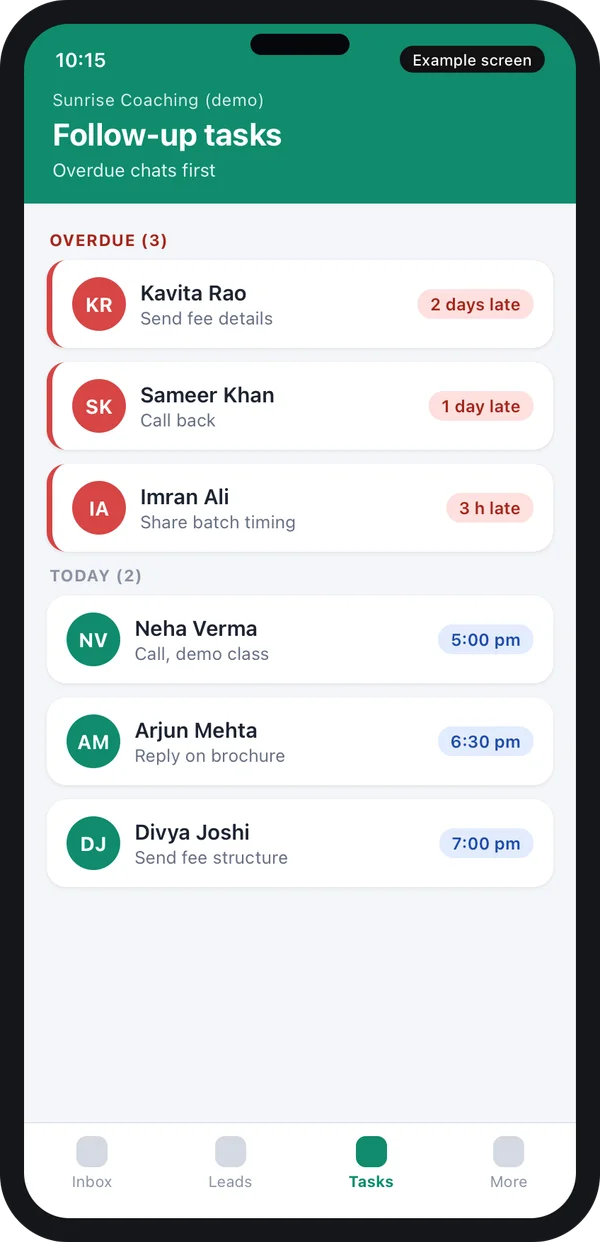
Most sales are lost after the first reply, not before it. After each chat, the agent sets the next step and the date. The CRM shows an overdue list each morning. It raises a nudge when a lead has not replied for the number of days you choose.
Our field sales CRM mobile app follows the same idea for visits and calls.
Broadcast to a segment
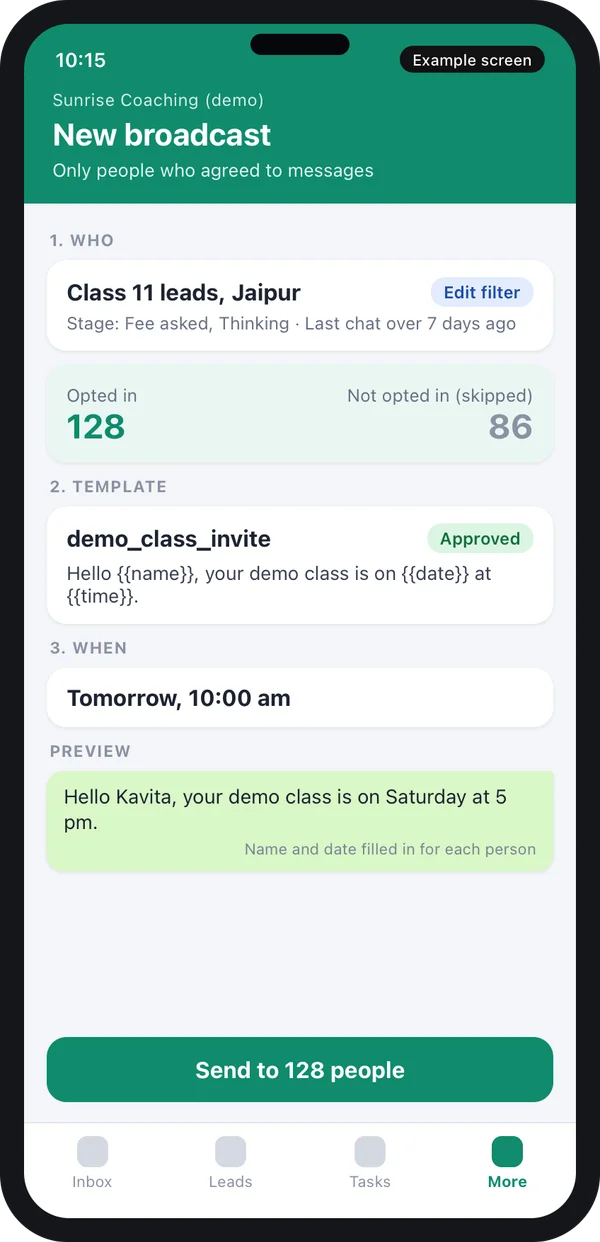
You pick a filter, such as stage, city or last contact date. The CRM shows how many of those people have given permission to receive messages. You choose an approved template, send it, and keep a log of what went to whom. People who have not opted in, or who have asked to stop, are left out.
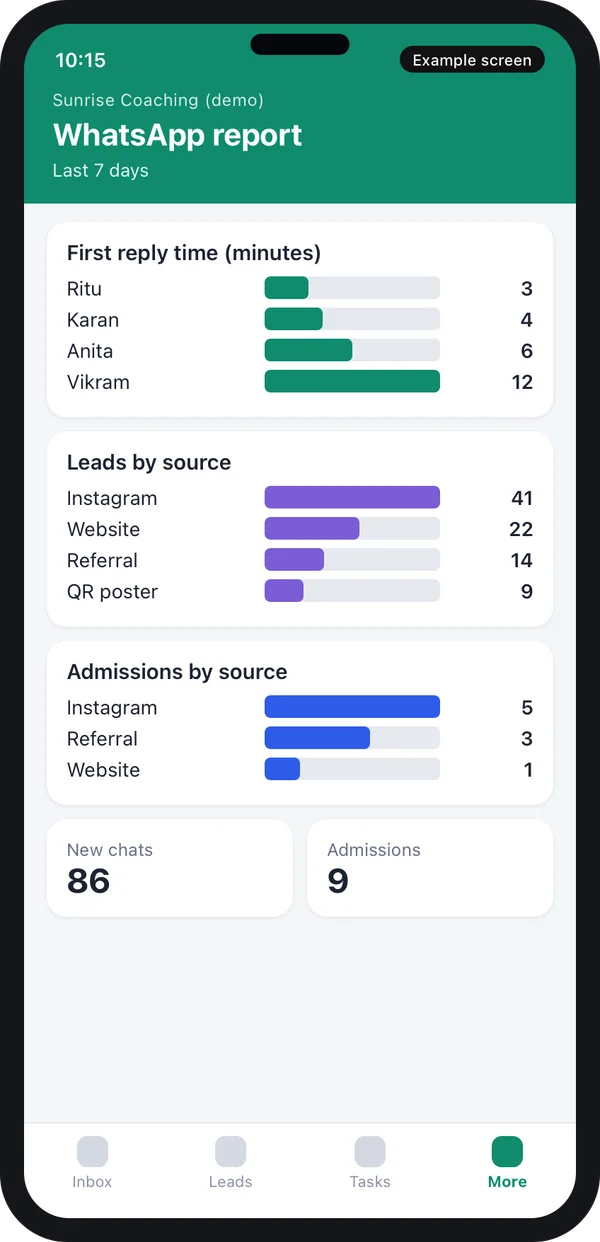
Reports tied to deals
A count of chats says little. The reports a sales head needs are:
- time to first reply, by agent;
- chats and leads handled by each agent;
- leads by source;
- deals won from WhatsApp leads;
- reasons for lost leads.
Our ready CRM base comes with 30 ready reports. We add the WhatsApp ones to match.
Roles and privacy
An agent sees only the leads assigned to them. A manager sees all of them. You can hide the customer's phone number from agents, so a person who leaves cannot take the contact list. Every export is logged. In India, customer data is covered by the Digital Personal Data Protection Act, 2023, so check the current rules with your adviser.
WhatsApp rules we build into your CRM
WhatsApp sets rules for business messaging. A good CRM follows them for your team, so staff do not have to remember them.
- Permission. Business messages need the person's opt-in (WhatsApp Business Messaging Policy). The CRM keeps the opt-in on the record and blocks sends to anyone who opted out.
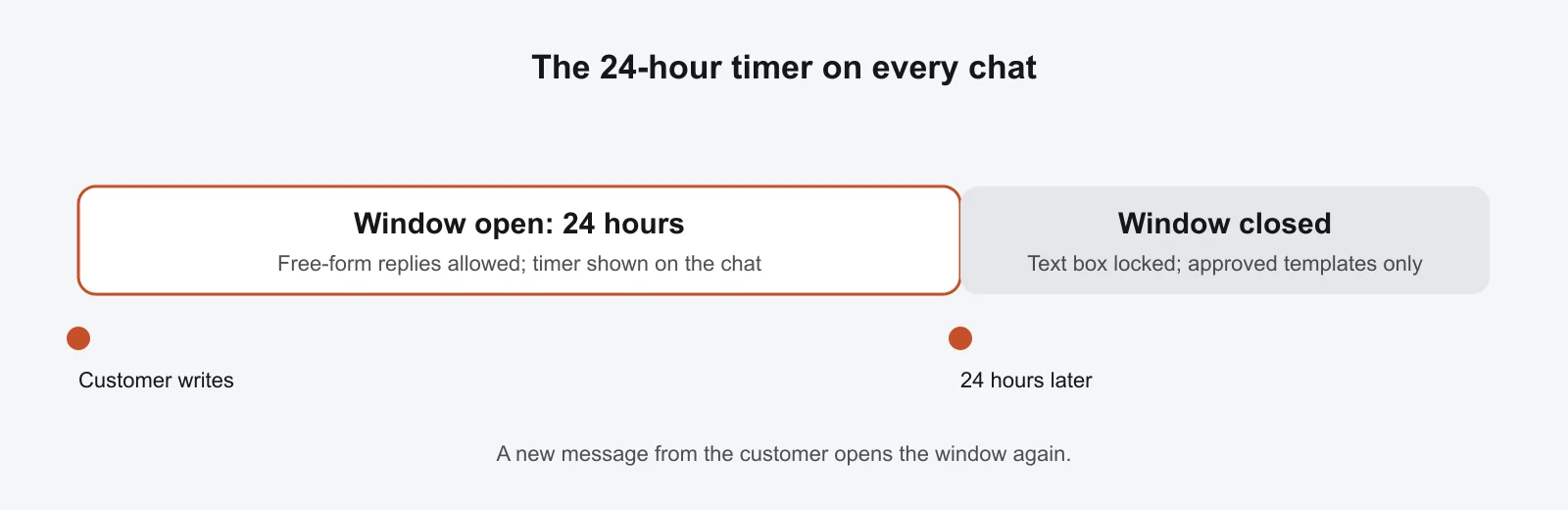
- 24-hour window. After a customer writes, you can send free-form replies for 24 hours (Meta pricing page, customer service window). The CRM shows a timer on each chat. When it ends, the text box locks and offers templates.
- Templates. Each one must be approved before you can send it, and each has a category (message templates). The CRM shows the status.
- Charges. Meta charges for template messages by category. Check the rates on Meta's pricing page.
The full explanation is in our WhatsApp API guide.
Ready WhatsApp CRM tool or your own?
A ready tool is a fair choice for a team of up to about five people with a standard sales flow. You start in days. It starts to pinch when you need your own stages or fields. It also pinches when you need links to your accounts, or full control of the data. Here is how the two compare.
| What matters | Ready tool | Custom or white-label CRM |
|---|---|---|
| Fee per user | Usually charged every month, for each user | One build cost, no per-user fee to us |
| Your own sales stages | Fixed or limited | Built to your stages |
| Your own fields | Limited | As many as you need |
| Data ownership | Stays with the vendor | Yours, on your server |
| GST, quotes and Tally links | Depends on the vendor | Built if you ask for them |
| WhatsApp number | Often tied to the vendor's account | Your own business account |
| Switching later | Export what the vendor allows | You hold the code and the data |
More on this choice is in our posts on build or buy.
Worked example: an admissions team for a coaching institute
This is an example, not a client story. A coaching institute gets student enquiries from ads and its website. Its admissions team of four counsellors works in the CRM.
| Stage | WhatsApp message | Task in the CRM |
|---|---|---|
| Enquiry from an ad | The student writes. A lead is created. | Assigned to a counsellor by city and language |
| Counselling | Template with the brochure and course list | Call within the hour |
| Demo class booked | Template with date and link | Reminder the day before |
| Demo attended | Template with fee details | Follow up in two days |
| Fee due | Template with the due date and amount | Task on the due date |
| Admission done | Welcome template | Lead closed as won |
If a student does not reply for two days, the CRM nudges the counsellor. If the counsellor does not answer a new chat within the minutes set, it goes to the next one. The head of admissions sees leads by source, so the next month's ad budget follows the sources that gave admissions.
A CRM can run the same flow for any sales team. For a lead-to-follow-up setup in another field, see our real estate CRM case study.
Our service
How we build your WhatsApp CRM
A CRM made around your business, with your own WhatsApp number.
- Map your stages. We note your sales stages, your fields, who owns which lead and what you want to see in reports.
- Connect your number. We connect your own WhatsApp business account through Meta's Cloud API, so the number stays yours.
- Build the CRM. We build the lead record, the inbox, templates, reminders and reports. You get a web admin for the office and a phone app for your agents.
- Test with real chats. A pilot team uses it on real leads. We fix what they find.
- Train, launch and hand over. We train your team. We set it up on your own AWS or server, or host it for you. We hand over the full source code. Daily backups are included, and an annual support plan is optional.
The back end is built in Laravel or Node.js, and the phone app in Flutter. You can see other CRM projects on our products page.
What decides the cost of a WhatsApp CRM
Every team is different, so we do not publish a fixed price. These are the things that decide it:
- The number of users and roles
- The number of stages, fields and reports
- The number of templates and automations
- Meta's message charges, which you pay to Meta and not to us
- Links to your website, Tally, payment gateway or telephony
- Web only, or web plus an Android and iPhone app
Share your process and we will send a written quote after one call.
FAQ
What is a WhatsApp CRM?
It is a CRM that saves each WhatsApp chat on a customer record. It gives your team one shared inbox, tasks and reports, so chats are not lost on staff phones.
Is a WhatsApp CRM the same as the WhatsApp Business app?
No. The Business app runs on one phone, with a few linked devices. A WhatsApp CRM uses the WhatsApp Business Platform. So many staff can work on one number. Every chat is tied to a record.
How do I integrate WhatsApp with my CRM?
You connect your business number to Meta's Cloud API, directly or through a provider. The CRM then receives each message, creates or updates the lead, and sends replies and templates. Our WhatsApp API integration guide covers the steps.
Is a free CRM with WhatsApp integration enough, or should I build my own?
Free plans have limits on users, templates and data export, and Meta's message charges still apply. Build your own when you outgrow those limits or need your own stages and data.
Can I use my existing WhatsApp number?
Often yes. Meta's current steps say if a number on the Business app can stay as it is or must be moved. Check them before you plan, as they change.
Does your WhatsApp CRM follow the 24-hour window and opt-in rules?
Yes. We build a 24-hour timer on each chat and a template-only lock after it ends. We also block sends to people who opted out.
Can PRS India build a WhatsApp CRM for my business in India?
Yes. We build the CRM, connect your own WhatsApp business number, and hand over the code and the data. The apps carry your brand. Book a consultation to discuss your process.
Custom WhatsApp CRM or a ready tool?
A ready tool suits a small team with a standard flow. Your own CRM suits a team that needs its own stages and fields, links to accounting, or ownership of the data.
See our work: an affiliate partner CRM and a field service CRM and ERP.
Related guides
- Real Estate CRM Software Development in India
- Hospital CRM Development Company in India: Build Your Own
- What Is CRM? Meaning, Full Form and Examples in India
- Cloud Based CRM Platforms: Build Your Own or Rent a Seat
- Recruitment CRM Software Development for Agencies
- Solar CRM Software Development: Build Your Own Solar CRM
Written by
Babita Kumari · Business Developer
Business Developer at PRS India. Talks with business owners about the app or software they want, and helps them work out the scope, cost and launch steps before any code is written.