WhatsApp Business API Integration Development: Guide
We connect your own WhatsApp Business account to your store, billing or CRM through Meta's Cloud API, with a shared inbox and staff app.

Written from production. Our articles draw on products we run live and the client work behind them, and are revised as the systems they describe evolve.
Your customers already chat with you on WhatsApp. But the chats sit on one staff phone. Order updates are typed by hand. Your website, your billing system and your WhatsApp do not talk to each other. WhatsApp Business API integration fixes this. It joins WhatsApp to the software you already run.
We build that link for you. We connect your own WhatsApp Business account to your own systems, through Meta's official Cloud API. You get a web panel built for your team, and a phone app if you want one. This guide explains what the API is, what you can connect, and how PRS India builds it.
Key takeaways
- The WhatsApp Business API is Meta's way for software to send and receive WhatsApp messages. There is no phone in the middle.
- Integration lets your order or billing system send WhatsApp messages on its own. Replies come back into one shared inbox.
- Messages you start must use templates that Meta reviews. Open text replies work only inside the 24-hour window after a customer writes.
- People must agree to get your messages first. Meta can limit numbers that get many complaints.
- A custom integration runs on your own account and your own server. You keep the data and the source code.
What is WhatsApp Business API?
There are two ways a business can use WhatsApp. The first is the WhatsApp Business app on a phone. One person types and reads. The second is the WhatsApp Business Platform, which most people call the API. Here, your software sends and receives the messages.
Meta runs the API in its own cloud. It is called the Cloud API. Your software sends a request to Meta, and Meta delivers the message. When a customer replies, Meta sends that reply to your server. This is explained on Meta's page about the WhatsApp Business Platform.
So the API is not an app you open. It is a pipe. On its own, it has no screens. Someone has to build the screens, the rules and the links to your other systems. That build is what we call integration.
What you can connect to WhatsApp
Most businesses start with one system and add more later. These are the links we are asked for most often.
| Your system | What goes out on WhatsApp | What comes back |
|---|---|---|
| Online store or shop app | Order placed, packed, shipped, delivered | "Where is my order?" and return requests |
| Billing or accounts software | Invoice copy, payment due reminder | Payment proof, invoice questions |
| Booking or appointment system | Booking confirmed, reminder, reschedule link | Confirm or cancel buttons |
| CRM | Follow-up message after an enquiry | Lead replies saved on the lead record |
| Website or ad forms | Welcome message to a new enquiry | First chat with the sales team |
| Login or signup screen | One-time code for sign-in | Nothing, the code is typed in the app |
If you sell online, the store link matters most. We often add it while we build or extend an online store. Then order events reach WhatsApp without typing.
The problem
What goes wrong without integration
These are the gaps we hear about from businesses that run WhatsApp from one phone.
- One phone, many staff. Only one person can use the phone at a time. Chats wait when that person is busy or on leave.
- Copy and paste updates. Staff copy the order number from the system and paste it into WhatsApp. Mistakes creep in.
- No history on the record. The chat is on the phone, not on the customer record. A new staff member starts from zero.
- Lost replies. A customer replies to an old message. Nobody sees it for two days.
- No proof of delivery. You cannot tell which updates reached the customer and which did not.
- Risky broadcasts. Staff forward offers to saved contacts who never agreed. People report the number.
How WhatsApp Business API integration works
Every integration has the same four parts. Knowing them helps you ask the right questions.
- Your account and number. You create a WhatsApp Business account under your own Meta business. You add a phone number that is not used on the normal WhatsApp app.
- Sending. Your system calls the Cloud API with the customer number and a template name. Meta delivers the message.
- Receiving. Meta sends each reply and each delivery status to a web address on your server. This is called a webhook. It must answer fast and never lose a message.
- Your screens. The webhook saves each reply into your database. Your team sees it in a shared inbox, linked to the right customer.
The server side is often built with Laravel or Node.js. Both handle webhooks and queues well. We pick the one that fits your current systems.
The screens your team uses
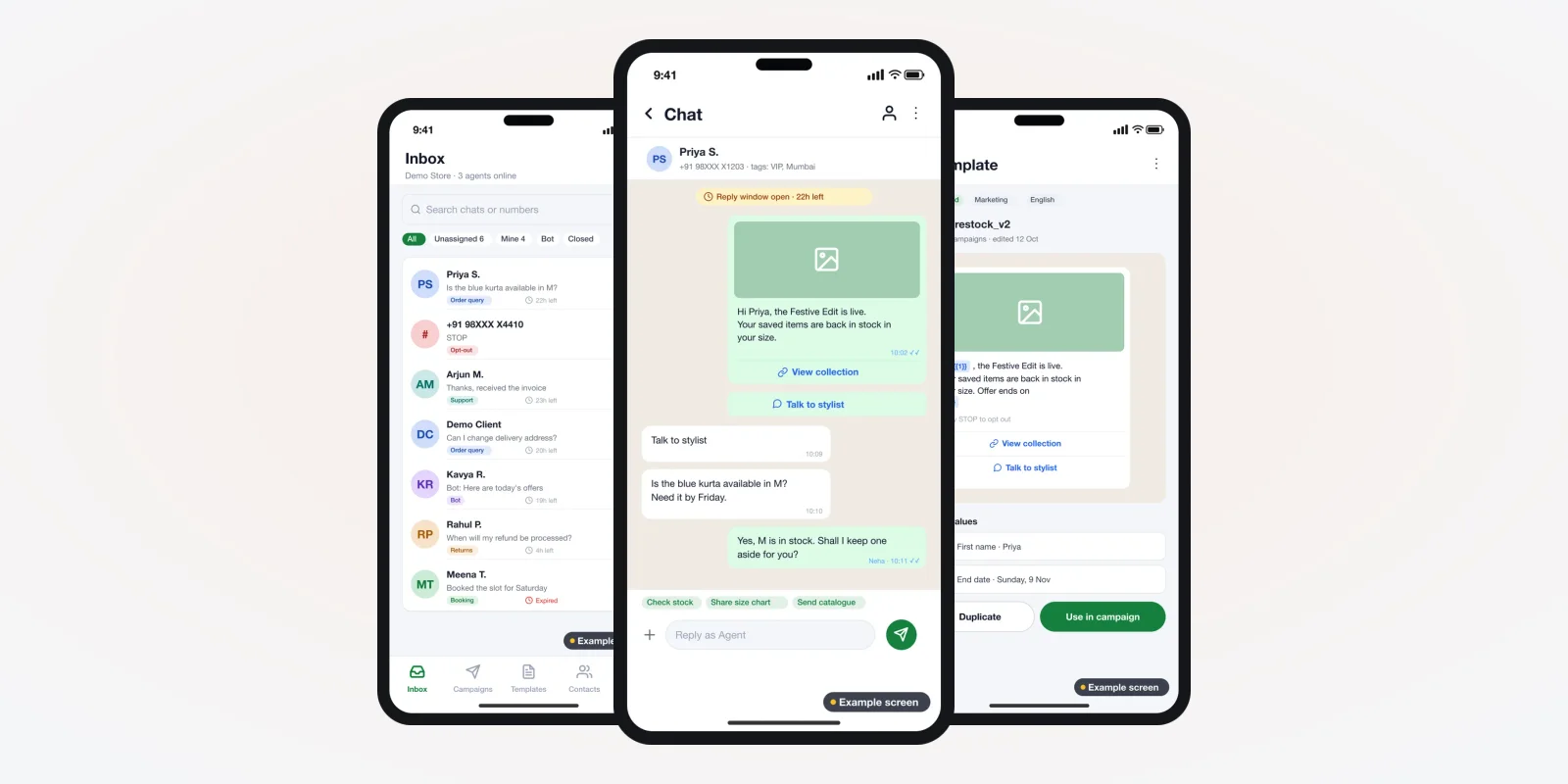
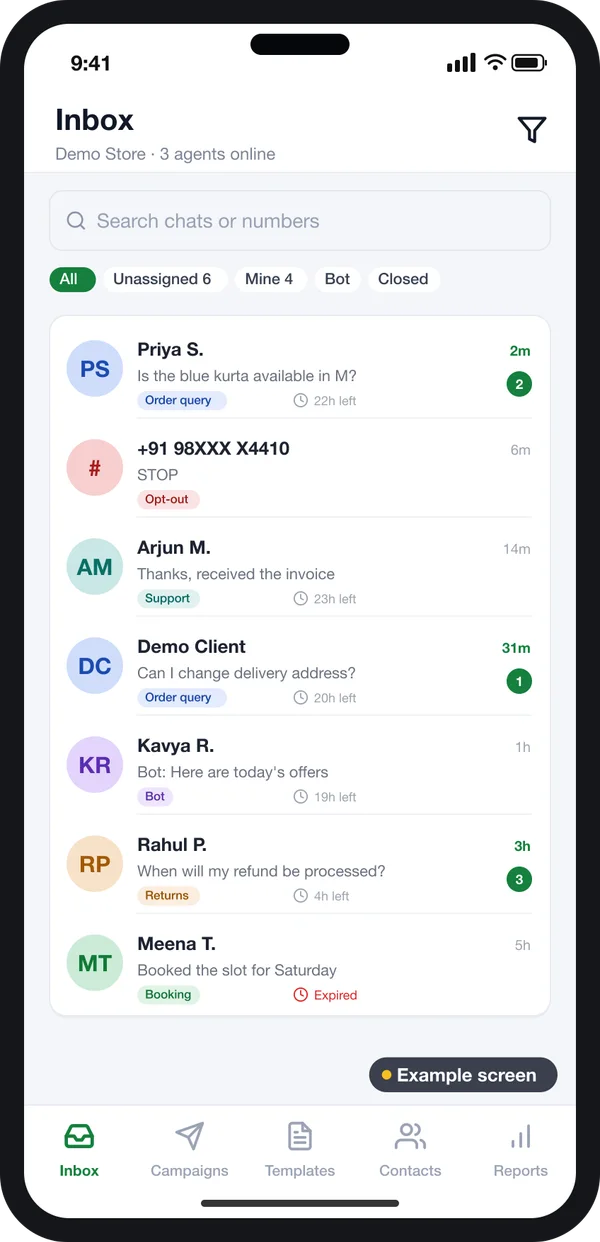
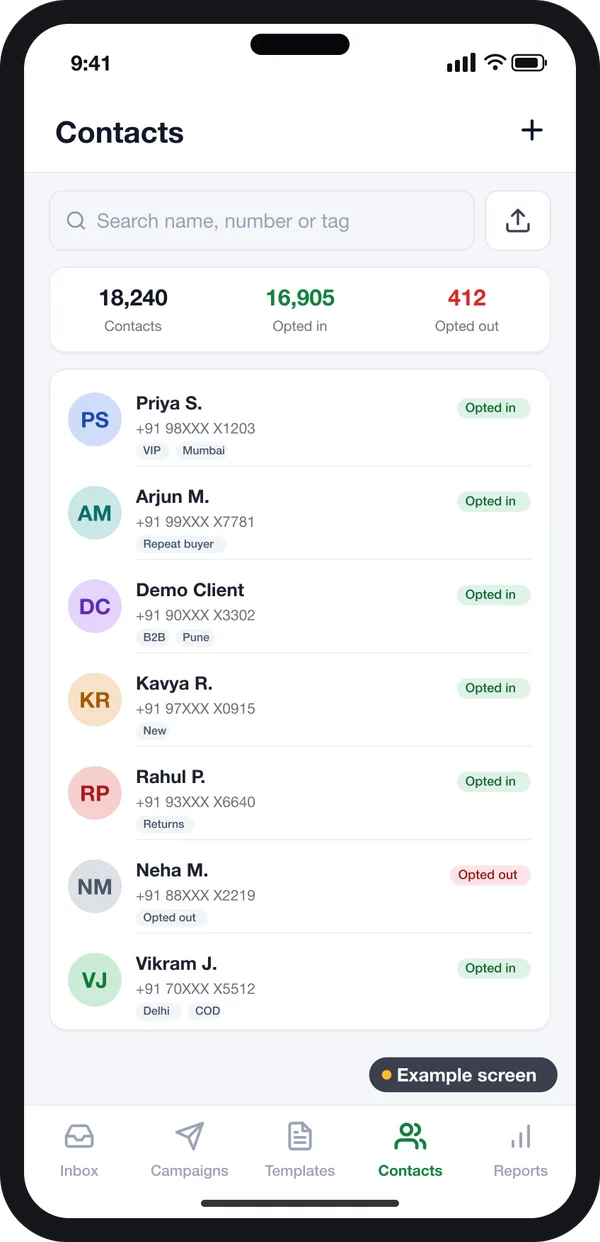
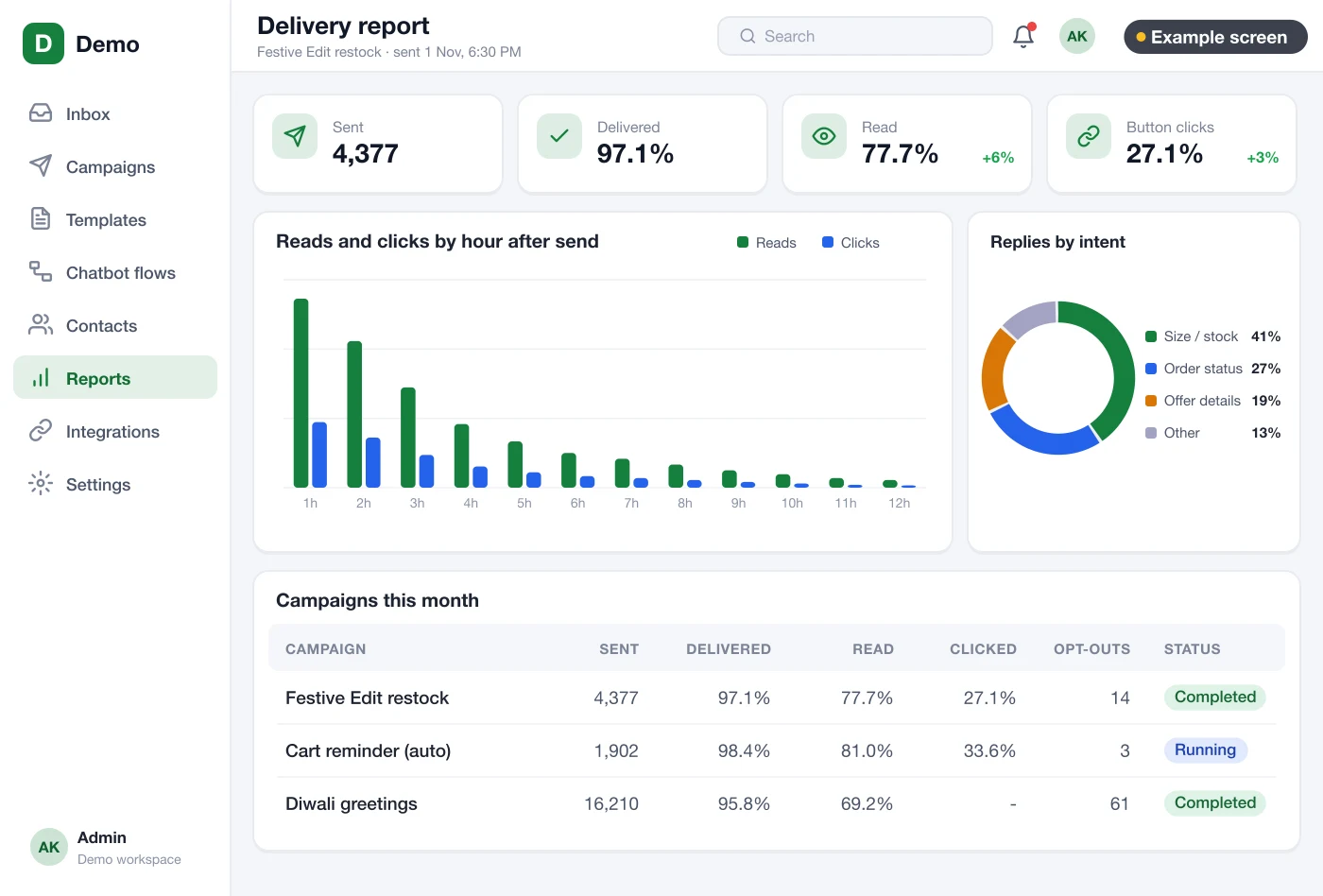
An API link alone does not help your staff. They need screens to read chats, reply and check what went out. The screens in this guide are example designs we drew for a WhatsApp platform, with demo data. They are not a live product. They show what we can build for you.
Shared inbox for the whole team
All chats from your one number land in one list. Each chat has a tag, such as "Order query" or "Returns". Staff filter by unassigned, mine or bot.
A small timer shows how much of the 24-hour reply window is left. When it runs out, the chat is marked so staff know a template is needed.
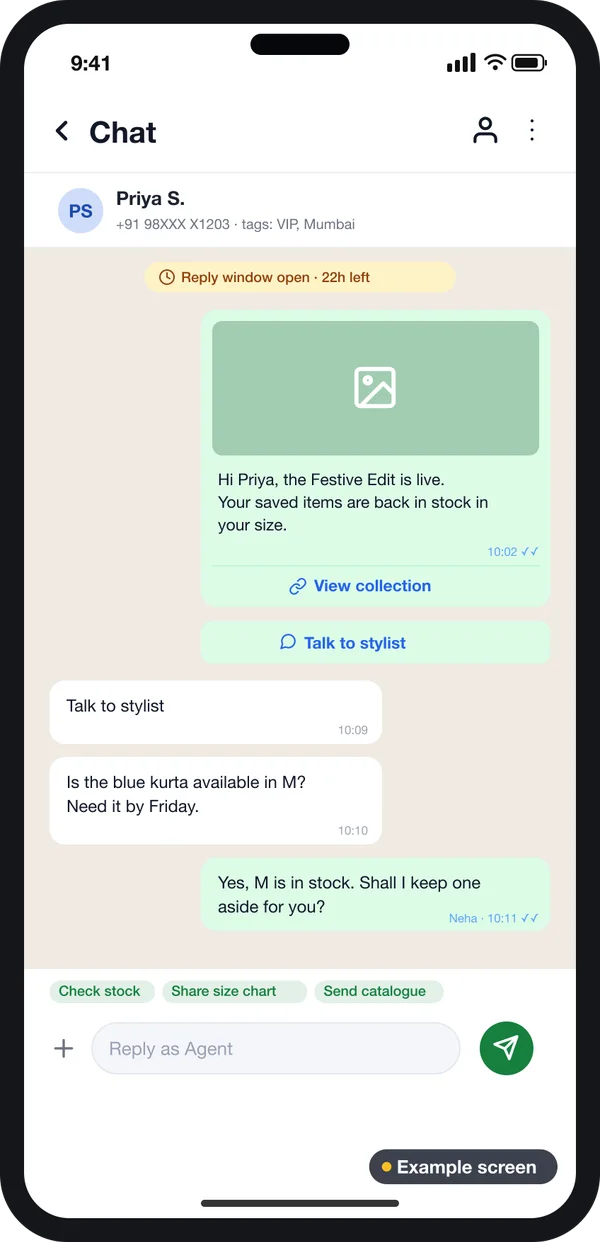
Chat screen with order details
When an agent opens a chat, the screen can show the customer's last order from your store. Quick replies fill common answers. Buttons in a template let the customer tap instead of type.
This is where the integration pays off. The agent does not switch to another system to look up the order.
Templates, opt-in and the 24-hour window
Three Meta rules shape every integration. Your software should follow them by design.
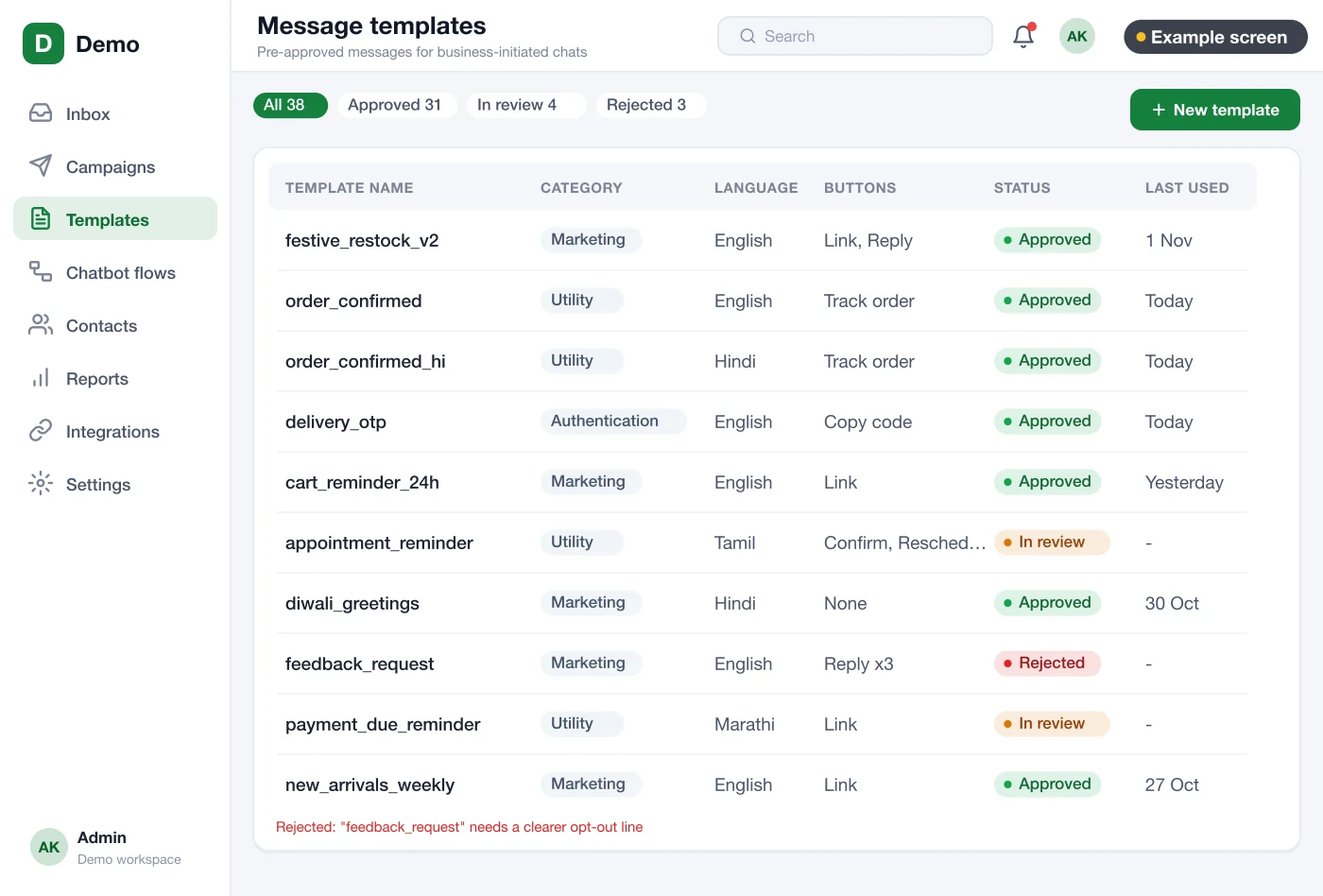
Templates for messages you start
If the customer has not written to you in the last 24 hours, you can only send a template. A template is a fixed message with blanks, like the order number. Meta reviews each template. It is put in one of three groups: marketing, utility or authentication. See Meta's template fundamentals page for the current rules.
Opt-in before the first message
Meta asks businesses to get permission before messaging people. The person must know your business name and agree to hear from you. Meta lists ways to collect it, such as a website form or a signed paper. Read Meta's opt-in guide before you plan any sending.
The 24-hour customer service window
When a customer writes to you, a 24-hour window opens. Inside it, your staff can reply in normal text, photos or files. After it closes, only templates can go out. Your inbox should show this clearly.
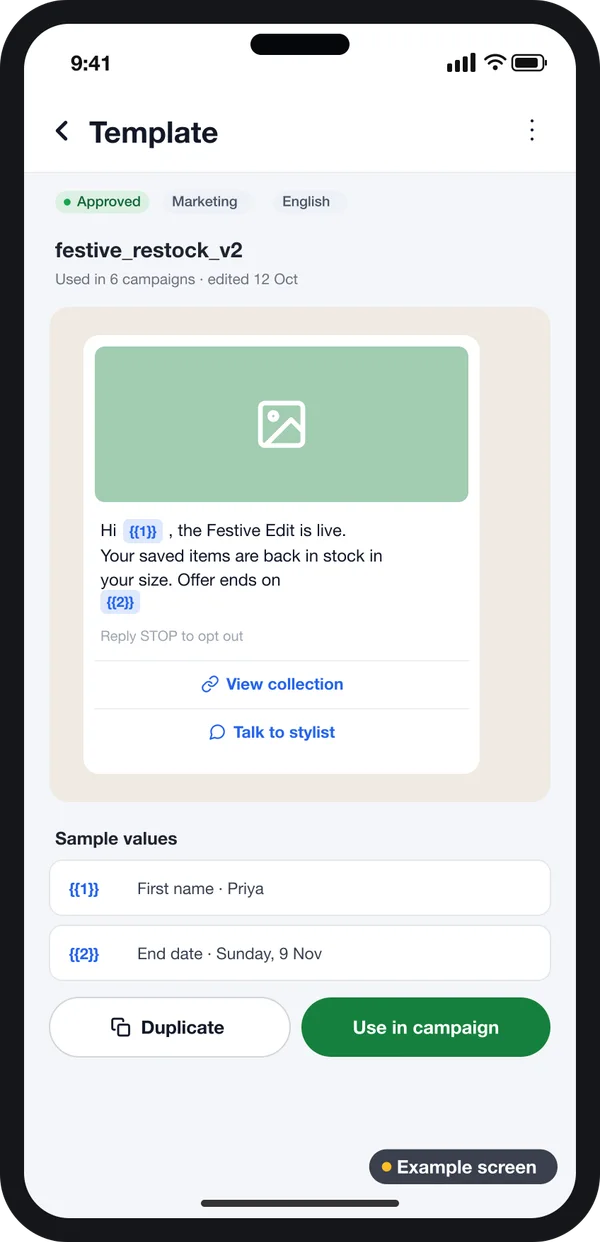
One approved template
Image header, blanks for name and date, and buttons the customer can tap.
Opt-in on every contact
Each contact shows whether they agreed, and when. Opted-out people are kept out of sends.
Rules change. Meta updates template groups, limits and charges from time to time. Check Meta's own pages before you plan a launch. A good integration keeps these as settings your team can change.
Must-have features in a WhatsApp integration
- Event triggers. Your system fires a message when an order ships or a bill is due. No staff action is needed.
- Delivery status. Each message is marked sent, delivered, read or failed. Failed ones show a reason.
- Two-way link. Replies are saved on the customer record in your CRM or customer database.
- Opt-out handling. When someone types STOP, the system marks them and stops all marketing sends.
- Roles. Agents see their chats. Managers see all chats and reports.
- Chatbot for common questions. A menu answers "track my order" by looking up the order, then hands over to a person.
Ready-made tool vs custom integration
| What you need | Business app on a phone | Rented WhatsApp tool | Custom integration |
|---|---|---|---|
| Many staff on one number | Limited | Yes | Yes |
| Messages fired by your own system | No | Only with their plug-ins | Yes, any system |
| Replies saved on your customer record | No | In their system | In your database |
| Screens that match your process | No | Their layout | Built for you |
| Your brand on the staff app | No | No | Yes |
| Source code | No | No | Yours |
Worked example: an online clothing store
Here is how one order moves through an integrated setup. The store and names are examples.
- Checkout. A shopper ticks "Send me order updates on WhatsApp". The store saves the opt-in with the date.
- Order placed. The store fires an event. The integration sends an approved utility template with the order number.
- Shipped. The courier status changes. A second template goes out with the tracking link.
- Customer asks. The shopper writes "Can I change the size?". The reply lands in the shared inbox, tagged "Order query".
- Agent replies. The window is open, so the agent replies in plain text. The order details sit beside the chat.
- Report. At the end of the week, the manager checks how many updates were delivered and read.
Our service
How we build your WhatsApp integration
Your account, your systems, your screens.
- Map your messages. We list every message your business sends, which system triggers it, and who answers replies.
- Design the screens. You click through the inbox and report screens before we write code.
- Set up your account. We help you set up your own WhatsApp Business account and number. We write the templates for Meta's review.
- Build the link. We connect your store, billing or CRM to the Cloud API. We add an Android and iPhone staff app if your team works on the move.
- Test with real messages. Your staff test with a few real customers who agreed. We fix what they find.
- Launch and support. We host it on your own server, watch the webhooks and add new messages when you need them.
WhatsApp API integration cost: what decides it
We do not publish a fixed price, because each setup is different. The build cost depends on four things. How many systems you connect. How many message types you send. Whether you need a staff app. Whether you want a chatbot. If you want AI replies added to a menu bot, that adds work too.
Meta also charges for messages. That charge is separate from the build and is paid to Meta. Check Meta's pricing page for the current rules.
| Rented WhatsApp tool | Custom integration (built for you) | |
|---|---|---|
| Start | Quick sign-up | A few weeks to build |
| Ongoing cost | Monthly plan, often per user | One build cost, then optional support |
| Link to your own systems | Only the plug-ins they offer | Any system you run |
| Data and chat history | On their servers | On your server |
Tell us your systems and your message list. We send a written quote after one call.
Whoever builds your WhatsApp integration, make sure it can:
- Run on your own WhatsApp Business account, not the builder's
- Store opt-in proof and stop sends to people who opt out
- Show delivered, read and failed status for every message
- Save replies on the right customer record
- Mark chats where the 24-hour window has closed
- Let you add templates without new code
- Export your chats and contacts whenever you want
FAQ
What is WhatsApp Business API in simple words?
It is Meta's service that lets software send and receive WhatsApp messages for a business. Your systems talk to Meta, and Meta delivers the messages. There is no phone in the middle.
How long does a WhatsApp Business API integration take?
It depends on how many systems and message types you need. After one call, we share a plan with dates, starting with screens you can click through.
Can I keep using my current WhatsApp number?
Often yes. Meta has rules for moving or sharing a number between the Business app and the platform. These rules change, so we check them with you before we start.
Will the WhatsApp account and the code be mine?
Yes. The WhatsApp Business account is set up under your own Meta business. We hand over the source code, and your data stays on your server.
Can WhatsApp connect to my billing or store software?
Yes, if that software can share events or data. We link it so that bills, orders and bookings send WhatsApp messages on their own.
Is customer chat data safe?
It should be. Chats contain personal data, so the system must limit who can see them and keep a log. The Digital Personal Data Protection Act, 2023 applies in India. Check your duties with a lawyer.
Can I send offers to all my saved contacts?
Only to people who agreed to get messages from you. Sending to people who did not agree breaks Meta's rules and can get your number limited.
Do I need a mobile app for my staff?
Not always. A web panel works for office teams. A phone app helps if your sales or delivery staff answer chats on the move.
Can PRS India build a WhatsApp Business API integration for my business?
Yes. We connect your own WhatsApp Business account to your systems. Then we build the web panel and staff app around it. Book a consultation to talk about your setup.
Related guides
Written by
Aditi
Building software at PRS India.