Password Manager Development for Business: Features and Cost
We build your own business password manager: a locked vault, team sharing, a generator, health checks and logs. Web, phone and desktop, under your brand.

Written from production. Our articles draw on products we run live and the client work behind them, and are revised as the systems they describe evolve.
Every business runs on logins. The GST portal, the bank, the payment gateway, the website host, the ad accounts, the courier panel. In most offices, these passwords sit in a notebook, an Excel file or a WhatsApp chat. When one staff member leaves, nobody knows which passwords they still have.
A password manager for business fixes this. It keeps every login locked in one place and lets you decide who can see what. Many companies now choose password manager development. They get their own vault built, with a web admin for the office, under their own brand. This guide lists the features to ask for and explains what decides the cost.
Key takeaways
- A business password manager stores logins in locked form and shares them by folder and by role.
- Five features matter most: the vault, sharing rules, a password generator, a health check and an activity log.
- When staff leave, the owner should remove their access in one step and see which logins to change.
- Your own build means your brand, your server and your source code, with no charge per user each month.
- Cost depends on platforms, features, hosting and how many old passwords you need to move in.
What a password manager for business does
A password manager is a locked list of logins. Each entry holds a website, a user name, a password and notes. The list is scrambled before it is saved, so a stolen copy cannot be read.
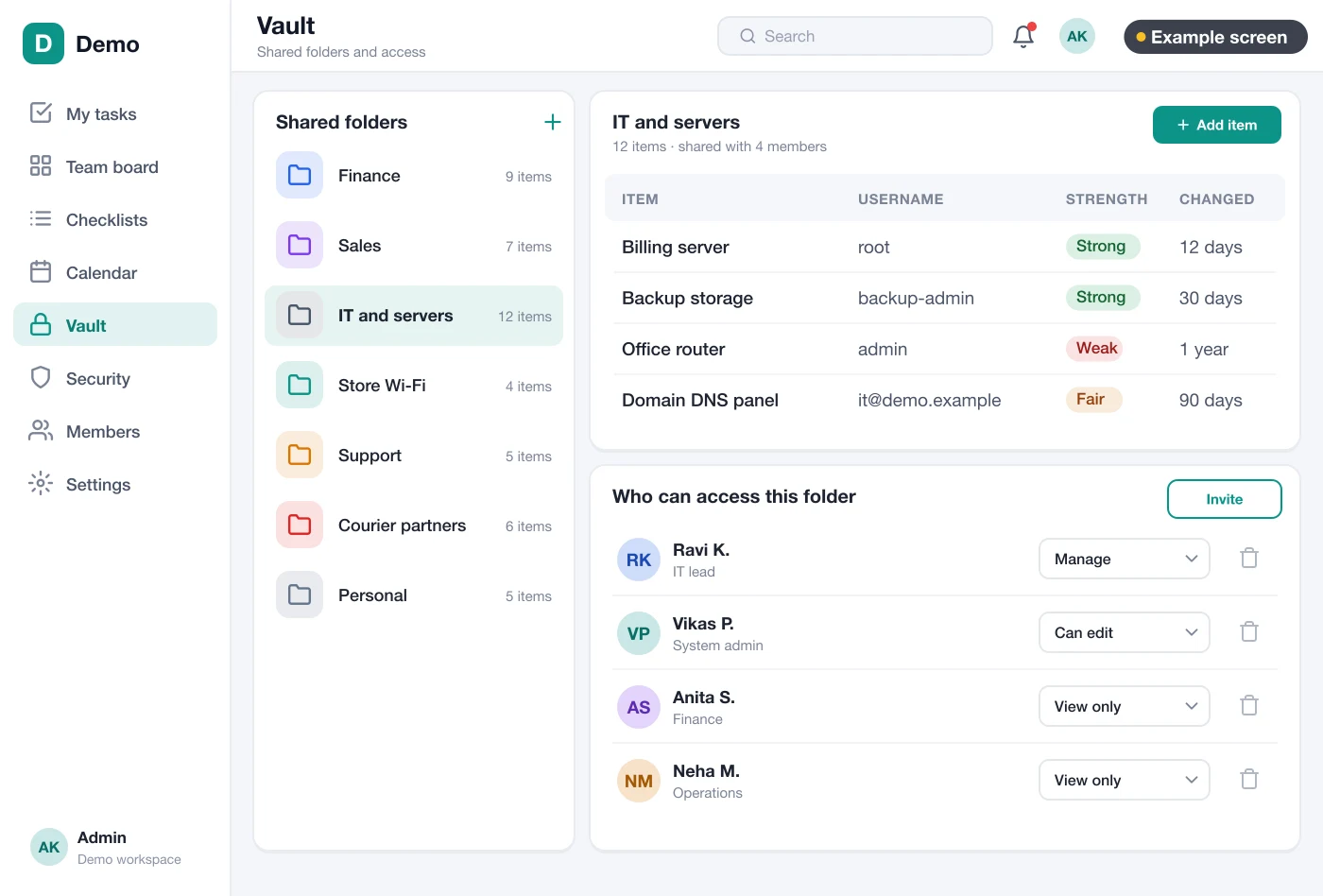
A business version adds people. The owner makes folders such as "Bank", "Marketing" and "Website". Then the owner gives each person or team access to only the folders they need. The accounts team sees bank logins. The marketing team sees ad logins. Nobody sees everything by default.
Do you run many branches, or want to rent the vault to clients? Then it can be built as a multi-company SaaS, with one admin per company.
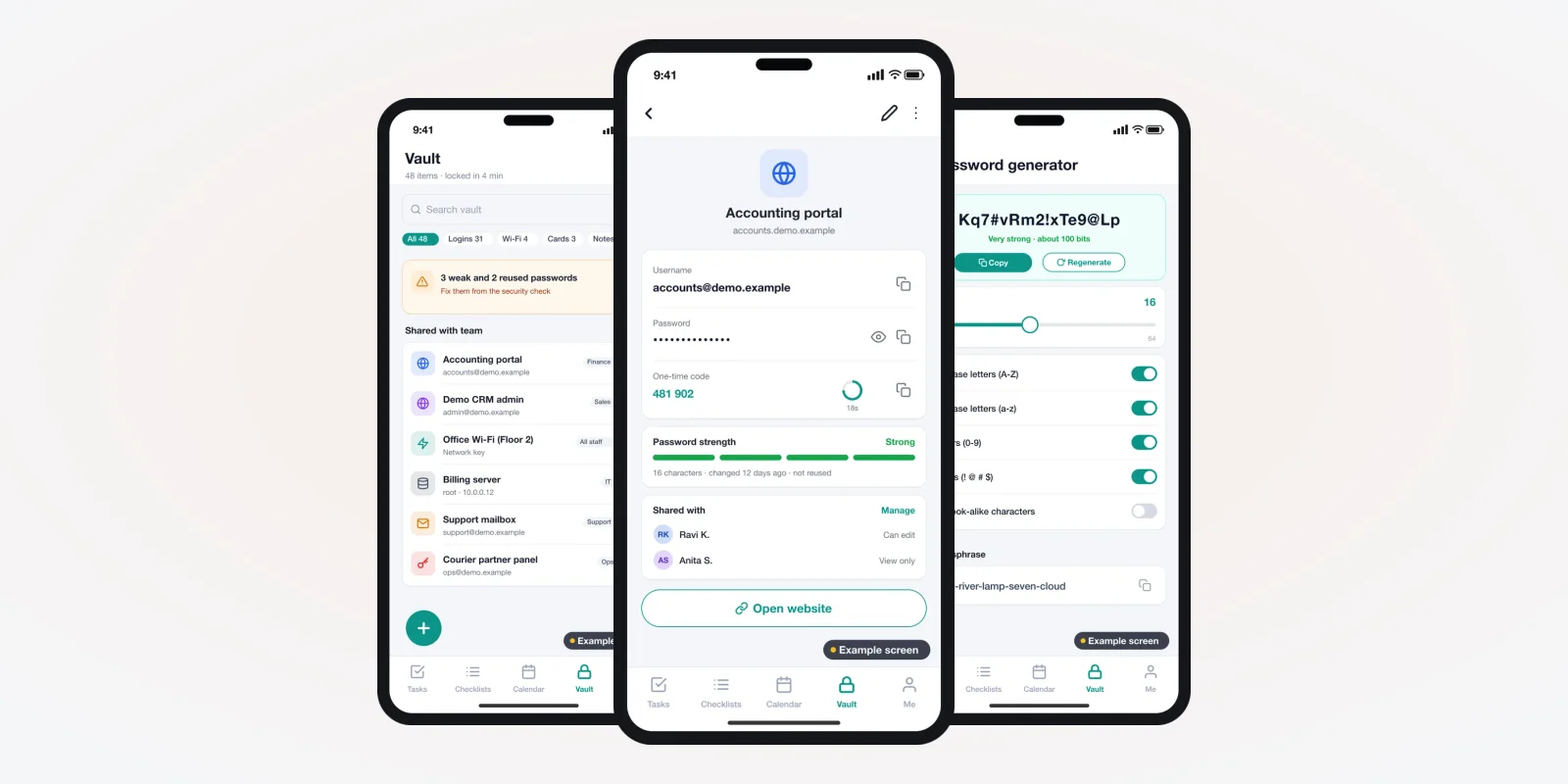
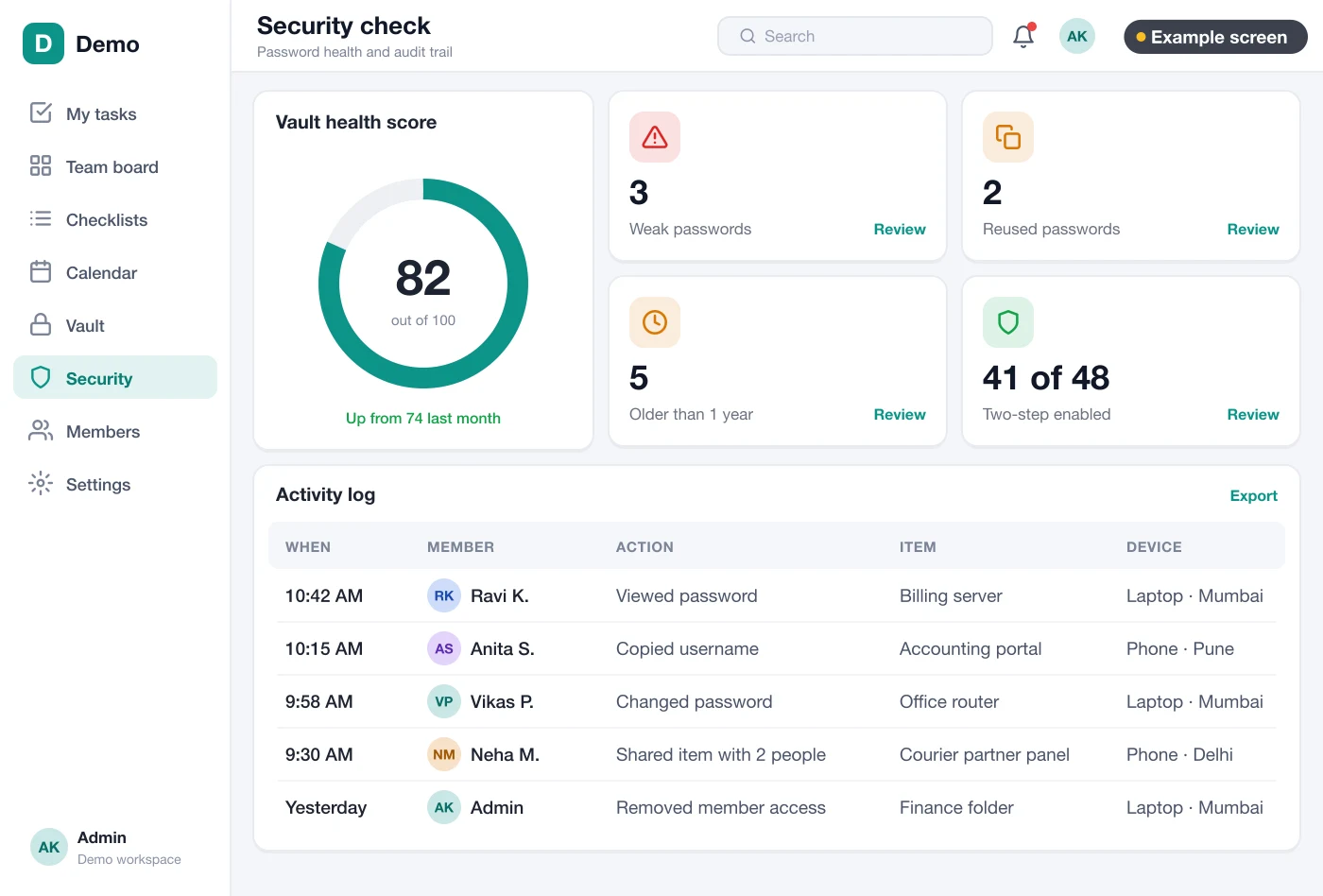
The screens in this guide are example designs we drew for a team vault app, filled with demo data. They show the kind of screens we design and build for clients. See the software products we have built for other kinds of business.
The problem
Where business passwords go wrong
We see the same six problems in most small and mid-size offices.
- One sheet for everything. All logins sit in one Excel file. Anyone who opens it sees the bank password too.
- Passwords in chat. Staff send logins on WhatsApp. The message stays on many phones for years.
- Same password everywhere. One weak password is used for email, the host and the ad account.
- Staff leave with access. A person leaves, but nobody changes the passwords they knew.
- No record of use. When something changes in an account, nobody can tell who logged in.
- One-time codes on one phone. The code for a key account comes to the owner's phone only, so work stops when they travel.
Must-have features in a business password manager
1. The vault list
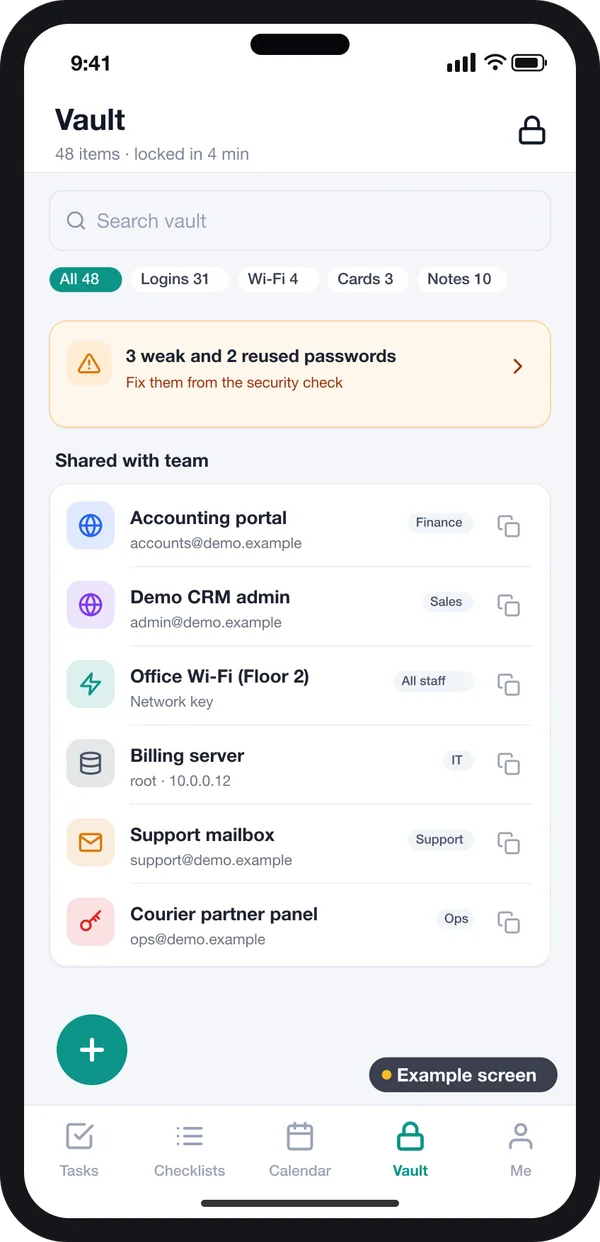
Staff see only the logins shared with them. Each item shows the site name, the folder and who shared it. A search box finds a login in a second.
The list also flags weak or old passwords, so staff can fix them before they become a risk.
2. One login, all details
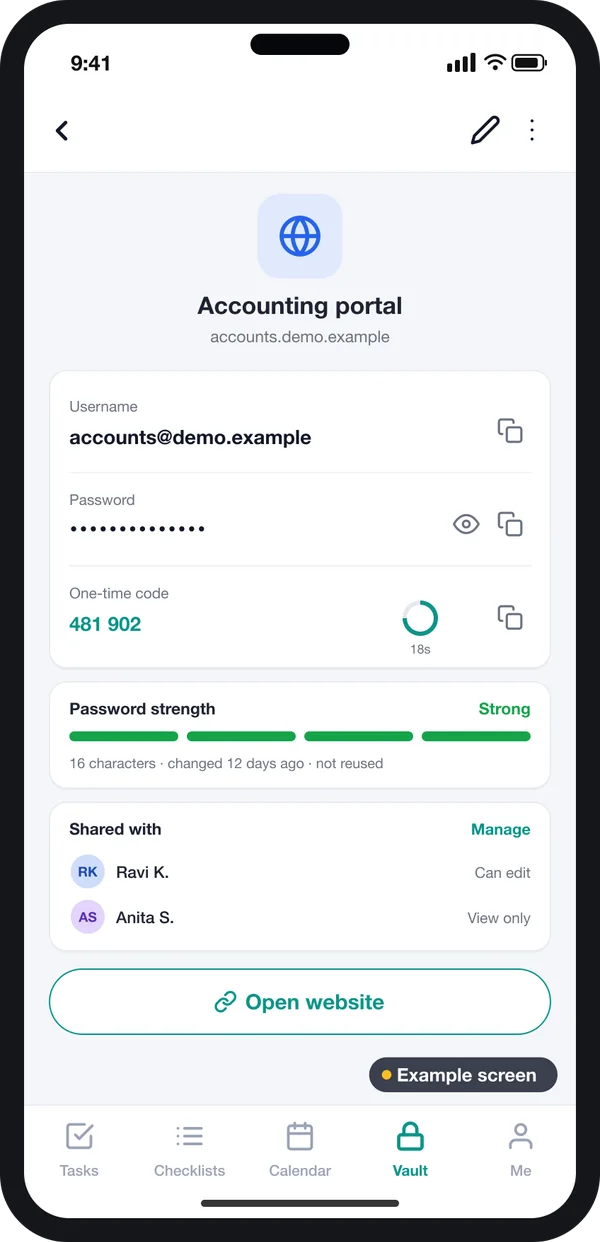
Open an item and the password stays hidden until you tap to show or copy it. The copy clears from the clipboard after a short time.
The same screen can hold the account's one-time code, a strength meter and the sharing list. So a team can use a login without one person's phone.
3. Password generator
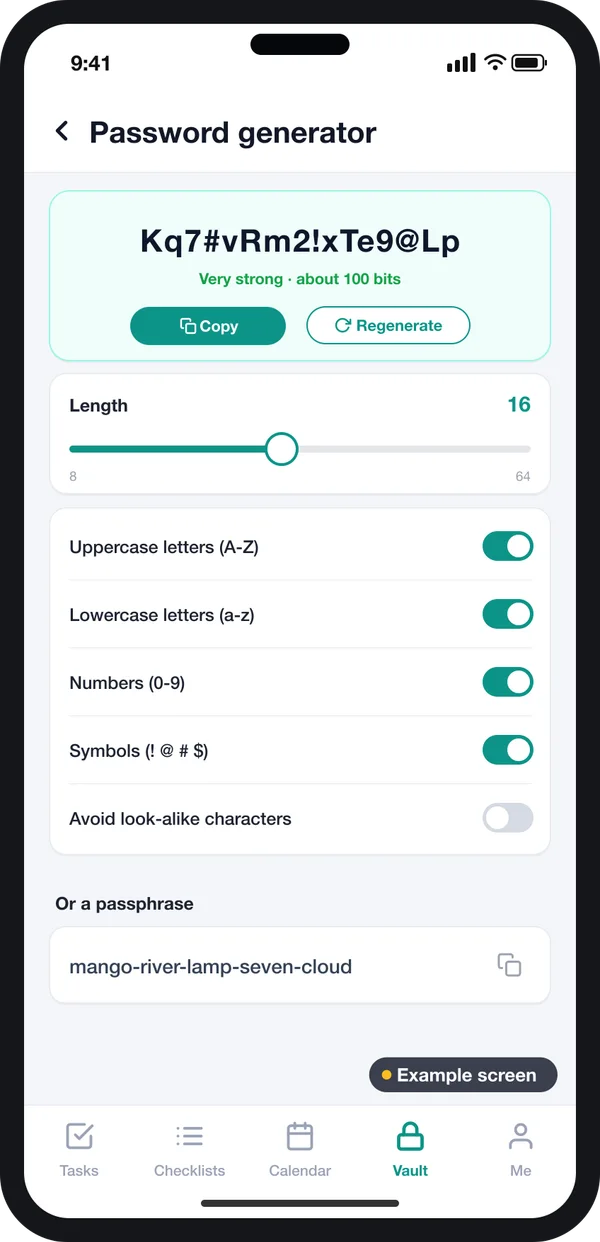
Staff should not invent passwords. A generator makes long random ones. It can also make a passphrase of plain words. That suits a TV or card machine, where typing symbols is slow.
NIST guidance says systems should allow passwords of at least 64 characters. It also says to check new ones against lists of leaked passwords. Source: NIST SP 800-63B, Digital Identity Guidelines.
4. Health check and activity log
The owner needs one screen that shows the risk. How many passwords are weak? How many are used twice? Who opened the bank login last week? The health check answers all three.
5. Sharing by folder and role
Give access by team, not by person, where you can. When a new accountant joins, add them to "Accounts" and they get every login they need. When they leave, remove them once.
The same idea works in any trade. A clinic can keep lab and insurance portal logins away from front-desk staff.
Add-on features you can choose
These are not needed on day one. We can add them when you are ready, and each one changes the build plan.
- Browser add-on. Fills the login on the website, so staff never see or copy the password.
- Mac and Windows app. For office desks, with the vault locked when the computer sleeps. One Flutter code base can serve phone and desktop.
- Login with your office email. Staff sign in with the company account you already manage.
- Emergency access. A second owner can open the vault after a waiting time, if the main owner is away.
- Password change tasks. The app creates a task to change a login, with a due date and an owner.
Tasks that keep passwords fresh
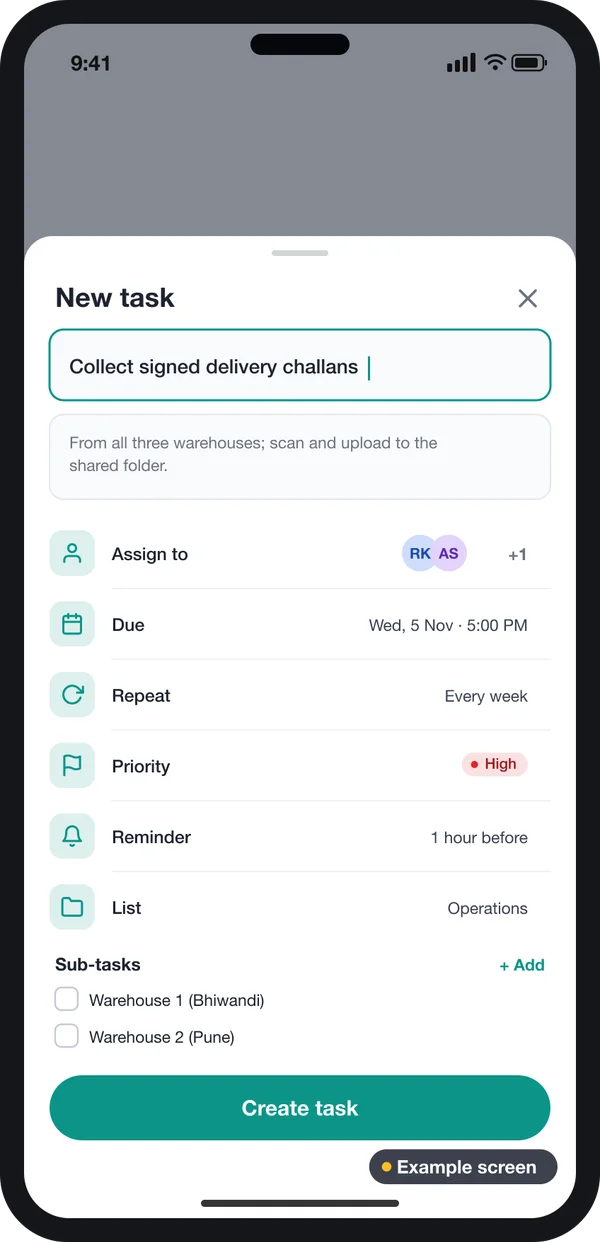
When someone leaves, the vault knows which logins they could open. It can turn that list into tasks, one per login, each with a person and a date.
The task sheet in the example has assignees, a due date, a repeat rule and a reminder. A repeat rule suits logins you choose to change on a set plan, such as a shared card-machine PIN.
Security rules to know in India
A vault holds the keys to your business, so it must meet the rules that apply to you. Two are worth knowing.
CERT-In directions, April 2022. Covered entities must report listed cyber incidents to CERT-In within 6 hours of noticing them. They must also keep system logs for a rolling 180 days. Source: CERT-In directions under section 70B(6), 28 April 2022.
DPDP Act, 2023. Does the vault hold personal data? Then the Digital Personal Data Protection Act, 2023 asks you to protect it with fit security steps. Check with a lawyer what applies to your business.
Source: CERT-In and MeitY pages linked above. Rules change, so check the current text before you plan your log policy.
For the lock itself, ask the builder which method they use. AES is a NIST standard for scrambling data. Source: NIST FIPS 197, Advanced Encryption Standard.
Sheet vs monthly plan vs your own password manager
| What you need | Excel or notebook | Monthly-plan app | Your own build |
|---|---|---|---|
| Passwords stored in locked form | No | Yes | Yes |
| Access by folder and team | No | Yes | Yes, your own roles |
| Data on your own server | Yes, but open | No | Yes |
| Your brand on the apps | No | No | Yes |
| Links to your HR exit steps | No | Rarely | Yes, if you want |
| Charge per user each month | None | Yes | None |
| Source code | Not relevant | Stays with vendor | Yours |
Worked example: a 30-person digital agency
Here is how one agency might use its own vault. The names and numbers are examples.
- Week 1, move in. The owner imports 400 logins from the old sheet. The vault flags 90 weak and 60 reused ones.
- Week 1, folders. Logins go into folders by client. Each account manager gets only their client folders.
- Week 2, clean up. The vault creates change tasks for the weak logins. Staff use the generator to replace them.
- Month 2, new hire. A designer joins. The owner adds her to the "Design" team, and she sees 25 logins.
- Month 4, exit. An account manager leaves. The owner removes him in one step and gets a list of 40 logins to change. HR software with an exit checklist can start this step for you.
- Every month. The owner checks the health score and the log. Odd access, such as a bank login at midnight, stands out.
Our service
How we build your own password manager
A vault set up around your teams, your folders and your rules.
- Understand your teams. We list your teams, folders, roles and exit steps in one or two calls.
- Design the screens. You click through screens first, like the examples here, and change them before code.
- Build the apps. A web admin on Laravel, then Android and iPhone apps for staff, plus desktop if needed.
- Security review. We test the lock, the sharing rules and the log before your team uses it.
- Launch under your brand. Your name on the apps, the vault on a server you control.
- Support and grow. We add features such as a browser add-on or office email login later. Our case studies show how we support live software.
Password manager development cost: what decides it
We do not publish a fixed price, because each office needs a different mix. These are the things that change the budget most.
- Platforms. Web only, or web plus Android, iPhone, Mac and Windows apps.
- Sharing rules. A few folders, or many teams with view-only, edit and admin levels.
- Add-ons. Browser add-on, one-time codes, emergency access, office email login.
- Hosting. Your own server, a cloud account in India, or both for backup.
- Moving in. How many old sheets and files need to be cleaned and imported.
- Links to other software. For example, your HR or ERP system, so an exit there removes vault access too.
| Monthly-plan password app | Your own password manager | |
|---|---|---|
| Start | Same day | A few weeks to design and build |
| Cost over years | Pay every month, for every user | One build cost, then optional support |
| Folders and roles | Fixed by the vendor | Set to your teams |
| Where the vault lives | Vendor's servers | Your server or cloud account |
| Your brand | No | Yes |
| Source code | Stays with the vendor | Yours |
Share your teams, platforms and add-ons with us, and we will send a written quote after one call. Whoever you ask, ask to see screens with your own folders before you sign.
Whoever builds your password manager, make sure it can:
- Scramble each password on the device before it is saved or sent
- Never store the master password on the server
- Share by folder and team, with view-only and edit levels
- Remove a leaving staff member in one step and list the logins to change
- Show weak and reused passwords on one screen
- Keep an activity log you can export
- Run on your own server if you choose
- Export all your data in a standard file
FAQ
What is a password manager for business?
It is software that stores company logins in locked form and shares them by team. The owner decides who can see each folder, and a log shows who opened what.
How long does it take to build a password manager?
It depends on the platforms and add-ons. After one call, we share a plan with dates for each part, starting with screens you can click through.
Will I own the password manager and its source code?
Yes. We build it under your brand and hand over the source code. The vault runs on a server you control.
Can your team read the passwords in my vault?
Not if it is built the right way. Each password is scrambled on the user's device with a key made from their master password. The server only stores the scrambled copy.
Which platforms can you build it for?
A web admin, Android and iPhone apps, and Mac and Windows apps. A browser add-on for autofill can be added too.
What happens if a staff member forgets the master password?
We can build a recovery step that an admin approves. Without it, a lost master password means a lost vault, so plan this early.
Does a password manager help with CERT-In rules?
It can help with logs, because it records who opened which login. Whether you are covered by the CERT-In directions is a legal question, so check with a lawyer.
Can PRS India build a password manager for my business?
Yes. We build your own vault with a web admin, staff apps and desktop apps, under your brand. Book a consultation and we will show you screens for your teams.
Related guides
- #Mobile App Development
- #Cost Comparison
- #Build vs Buy
- #Web Application Development
- #Password Manager
Written by
Aditi
Building software at PRS India.