Mobile-App
Best HRMS Software for Small and Medium Businesses in India
Simplify HR Management with Smart, Scalable & Affordable HRMS Software for Growing Businesses

Written from production. Our articles draw on products we run live and the client work behind them, and are revised as the systems they describe evolve.
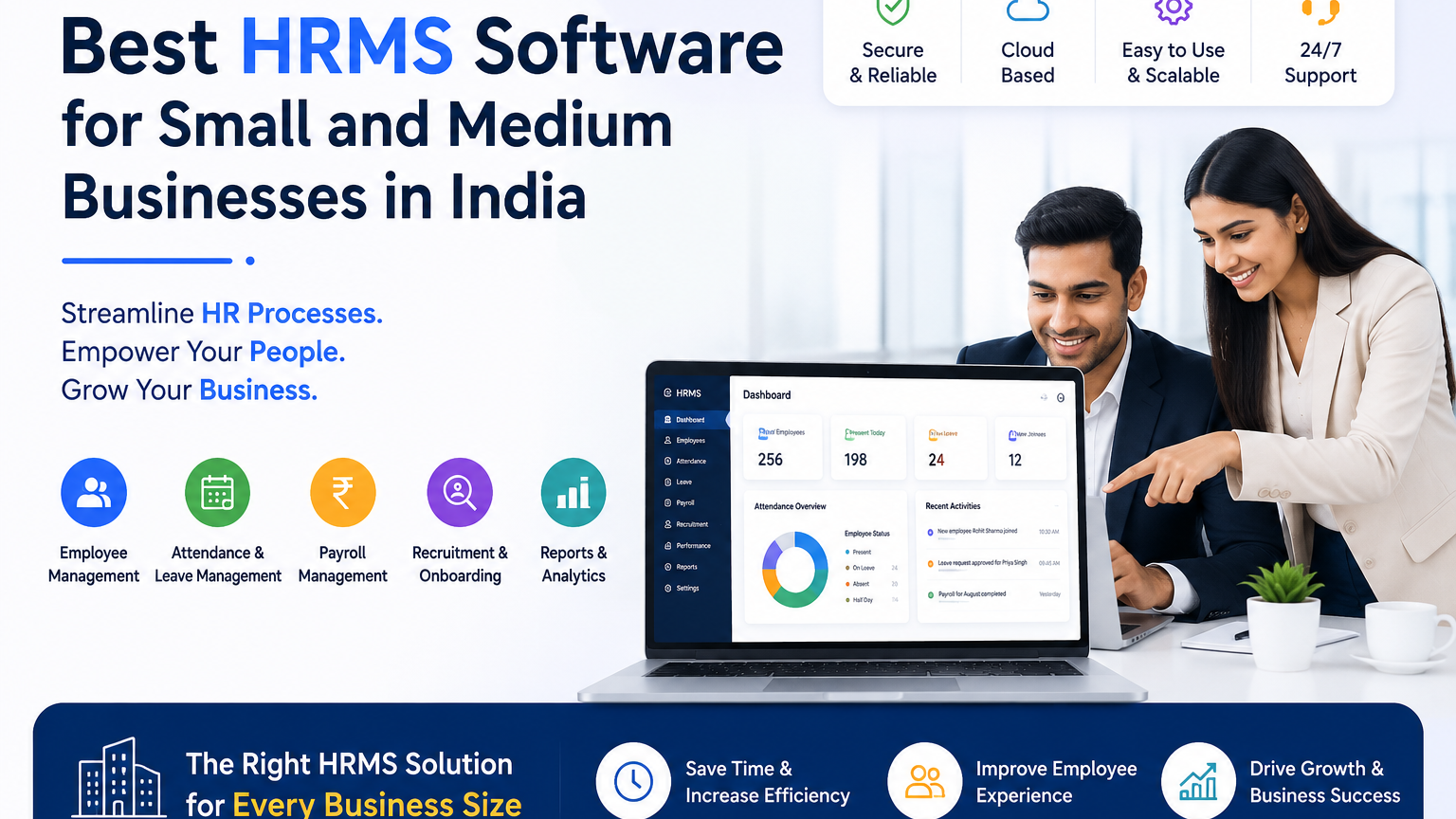
Manage your staff with digital HRMS tools for attendance, leave, payroll, employee records, reporting and HR operations.
Managing staff well is one of the biggest challenges for small and medium-sized businesses. As a company grows, tracking attendance, leave, payroll, records, hiring and performance in Excel sheets gets slow, and mistakes creep in.
This is where HRMS software can make a big difference. For businesses looking for the best HRMS software for small and medium businesses in India, PRS India builds software that helps organizations make HR work simpler and manage staff from one platform.
What Is HRMS Software?
HRMS stands for Human Resource Management System. It is a software solution that helps businesses handle the full employee journey, from joining to leaving, on one platform.
A modern HRMS can bring multiple HR activities together, including:
- Employee Management
- Attendance Management
- Leave Management
- Payroll Processing
- Employee Onboarding
- Recruitment Management
- Performance Management
- Employee Document Management
- Reports & Analytics
- Employee Self-Service
- HR Workflow Automation
Instead of keeping many Excel files and tracking staff by hand, businesses can run their HR work digitally from one HRMS platform.
Why Small and Medium Businesses Need HRMS Software
For a small business, HR responsibilities are often handled by one HR executive, an accounts team, or even the business owner. As the number of staff grows, manual HR work gets harder to manage.
The pressure point is usually duplication rather than volume. A joining date, a salary revision or a leave balance gets typed into an attendance sheet, a payroll sheet and a personnel file, and once those three disagree, someone has to find out which one is right before salaries can go out.
An HRMS helps businesses automate routine tasks and keep staff information in one organized system.
1. Centralized Employee Database
HR teams can keep full employee information in one system.
- Employee name and contact details
- Joining date
- Department and designation
- Salary information
- Employee documents
- Attendance and leave records
- Employment history
2. Automated Attendance Management
Instead of paper registers or Excel sheets, an HRMS can digitally track check-in and check-out, working hours, shifts, late arrivals, early departures, overtime and attendance reports.
For businesses with multiple locations or field employees, mobile and location-based attendance can also be valuable features.
3. Simplified Leave Management
With an HRMS, employees can submit leave requests digitally while managers can review and approve requests through a set process.
- Leave balances
- Leave history
- Pending requests
- Approved and rejected leaves
- Leave policies
4. Payroll Management
HRMS software can help businesses organize salary information and payroll processes while cutting repeated data entry.
- Salary calculations
- Salary structures
- Deductions
- Payslips
- Attendance-based salary calculations
- Leave Without Pay (LOP)
- Payroll reports
- Statutory payroll information
Key Features of the Best HRMS Software for SMEs
Employee Management
Keep full staff profiles and job details in one system.
Attendance & Time Tracking
Monitor attendance, working hours, shifts, late arrivals, early departures and overtime.
Leave Management
Automate leave applications, approvals, balances, policies and reports.
Payroll Management
Manage salary structures, deductions, payslips and payroll reports.
Recruitment & Onboarding
Organize candidates and make joining new staff easier.
Employee Self-Service
Allow employees to access attendance, leave, payslips and other HR services.
Performance Management
Set goals, monitor performance, conduct reviews and maintain performance records.
Reports & Analytics
Use dashboards and reports to see the workforce clearly and decide better.
Document Management
Store important employee documents in an organized digital place.
HRMS Software vs Excel for HR Management
Many small businesses initially manage HR through Excel. Excel can be useful for basic record keeping, but keeping many spreadsheets gets harder as the company grows.
| HR Activity | Excel | HRMS Software |
|---|---|---|
| Employee Records | Manual | Centralized |
| Attendance | Manual Entry | Digital Tracking |
| Leave Management | Spreadsheet / Email | Automated Workflow |
| Payroll | Manual Calculation | Automated Process |
| Employee Self-Service | No | Yes |
| HR Reports | Manual | Automated |
| Data Access | File-Based | Centralized |
| Employee Scalability | Limited | Scalable |
| Document Management | Manual | Digital |
| HR Workflow | Manual | Automated |
Benefits of HRMS Software for Small Businesses
Save Time
Automating repeated HR tasks can cut the time spent on manual data entry and routine admin work.
Reduce Human Errors
Centralized employee information and automated workflows can help reduce mistakes caused by repeated or wrong manual entries.
Improve Employee Experience
Employees can access HR services such as leave applications, attendance information and payslips without asking HR for every request.
Better HR Visibility
Managers get a clearer view of staff attendance, workforce information, leave, payroll and other HR work.
Improve Data Organization
Businesses can organize HR information through a centralized HRMS instead of multiple spreadsheets, emails and physical files.
Support Business Growth
An HRMS that can grow with you helps manage more staff and more HR work as your team gets bigger.
Reduce Administrative Work
Automating routine HR work lets HR teams spend less time on repeated office tasks and more time on staff engagement and business support.
What Should You Check Before Choosing an HRMS?
1. Ease of Use
The software should be simple enough for HR administrators, managers and employees to use without lots of training.
2. Mobile Accessibility
If staff work remotely, from different branches or in the field, mobile access can be an important requirement.
3. Payroll & Compliance
Indian businesses should ask exactly which statutory calculations, deductions and returns the software does itself. Then ask which ones an accountant will still do by hand each month. Vendors call both payroll support, so settle this before you buy.
4. Scalability
Choose a platform that can support your organization as the number of employees and business locations increases.
5. Security
Employee data is sensitive business information. Check who can see what, how users log in, backups, data protection and security practices.
6. Reports & Analytics
A good HRMS should provide useful reports and dashboards and not just store employee information.
7. Customer Support
Reliable technical and customer support is important during payroll runs, setup and system settings.
8. Customization
Every business has different HR rules and daily steps. Look for an HRMS that can be configured according to your organization's requirements.
Why Choose PRS India for HRMS Software?
PRS India focuses on providing technology solutions that help businesses simplify their digital operations and improve productivity.
For small and medium-sized organizations, an effective HRMS should be more than an employee database. It should connect important HR work and cut unnecessary manual work.
- Better employee management
- Faster HR processes
- Digital attendance
- Streamlined leave management
- Organized payroll operations
- Centralized employee records
- Improved HR reporting
- Better employee self-service
- Reduced administrative workload
- Scalable HR operations
HRMS Software for Different Types of Businesses
HRMS solutions can be useful across a wide range of industries, including:
- IT Companies
- Startups
- Schools and Educational Institutions
- Manufacturing Companies
- Logistics Companies
- Retail Businesses
- Healthcare Organizations
- Hospitality Businesses
- Consulting Companies
- Marketing Agencies
- Service Businesses
- Small and Medium Enterprises
Whether you have 10 employees or a growing workforce across multiple locations, choosing an HRMS that fits your business can help create a more organized and efficient HR setup.
How HRMS Can Help Your Business Grow
HRMS software is not only about keeping staff records. When attendance, leave, payroll, documents and self-service all use the same staff record, a fix made once is right everywhere. Work that used to pass between people as spreadsheets and emails now runs through the system.
Frequently Asked Questions
What is the best HRMS software for small businesses?
The best HRMS depends on your company's size, budget, workforce structure, payroll requirements and desired features. Ease of use, attendance, leave, payroll, employee self-service, reporting and scalability are particularly important.
Is HRMS suitable for SMEs?
Yes. HRMS software can help SMEs automate employee management, attendance, leave, payroll, reporting and other HR processes while reducing manual administrative work.
Can HRMS replace Excel for HR management?
An HRMS can significantly reduce dependence on Excel by centralizing employee records and automating many HR workflows. Excel can still be used for specific exports, analysis or reporting where required.
Does HRMS include payroll?
Many HRMS platforms include payroll or provide payroll integration. Businesses should verify the exact payroll and statutory features included in their selected solution.
Can employees access HRMS from mobile devices?
Many modern HRMS platforms provide mobile access or employee applications. Businesses with remote or field teams should check mobile attendance, leave applications, notifications and employee self-service capabilities.
Is HRMS suitable for companies with multiple locations?
Yes. A suitable HRMS can help businesses manage employees across multiple branches, departments and locations from a centralized platform.
Ready to Simplify Your HR Management?
Move away from manual HR work to a smarter digital way to manage staff, attendance, leave, payroll and reports.
Visit PRS IndiaDisclaimer: This is general informational content prepared by PRS India to help businesses shortlist HRMS software. It is not a benchmark, audit or ranking: it contains no customer ratings, scores, market-share figures or pricing. Product names, brands and trademarks referred to here — including Microsoft Excel — belong to their respective owners and are named only for comparison and identification. HRMS features vary by platform, plan and version, so verify current capabilities, and in particular payroll and statutory coverage, with the provider before purchasing.
Written by
Aditi
Building software at PRS India.