Business of Software
Solar CRM Software Development: Build Your Own Solar CRM
We build your own solar CRM: leads, site surveys, quotes, portal and DISCOM steps, net metering, subsidy and AMC. Web, Android and iPhone, under your brand.

Written from production. Our articles draw on products we run live and the client work behind them, and are revised as the systems they describe evolve.
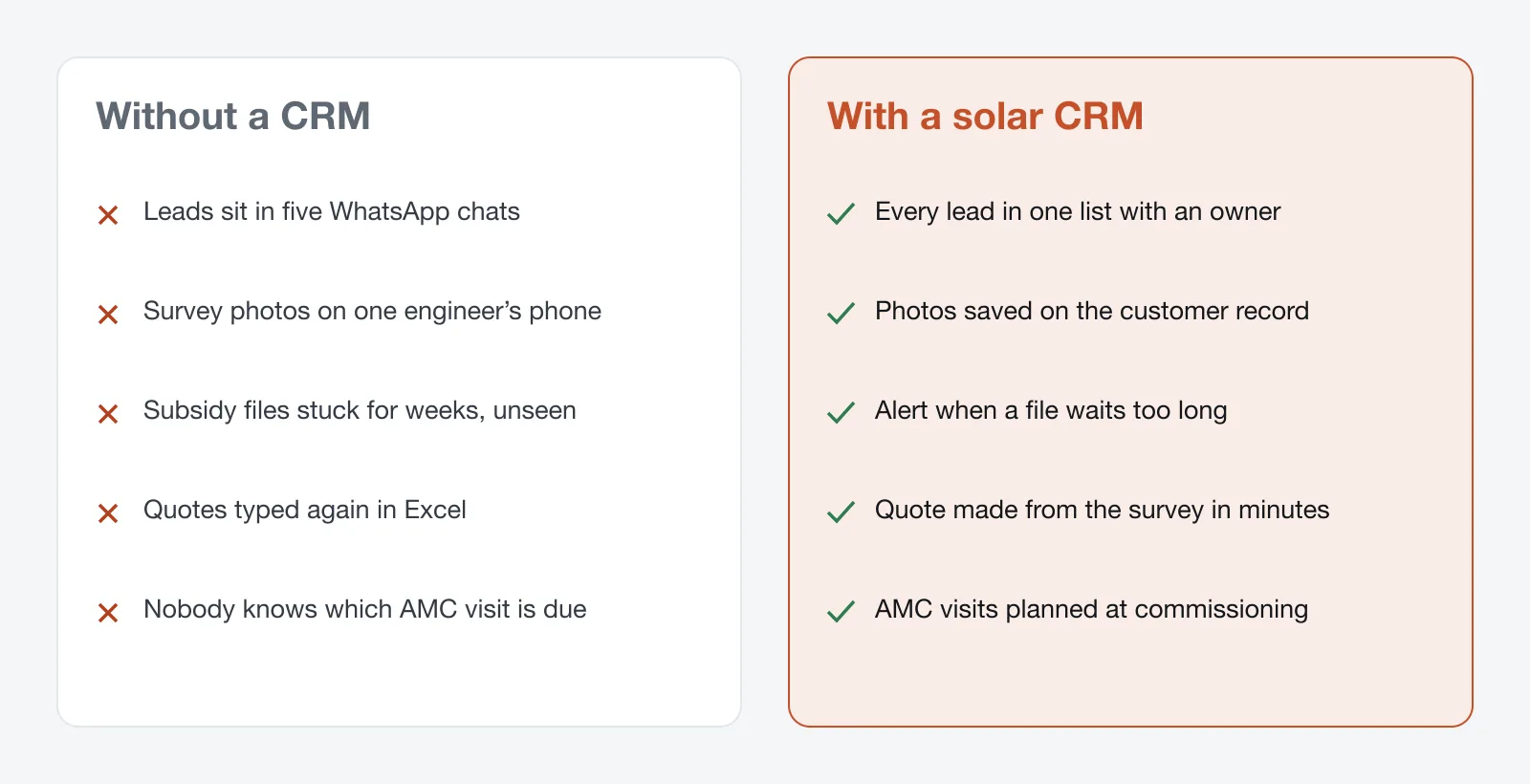
A solar company does not lose money on panels. It loses money on follow-ups. A lead that nobody called back. A subsidy file that sat at the DISCOM for six weeks. An AMC visit that was promised and forgotten. A solar CRM keeps all of this in one place, from the first phone call to the last service visit.
Ready-made CRMs are built for general sales. They stop at "deal won". That is why many solar companies now build their own solar CRM: one that follows their own stages, under their own brand, with a phone app for the site team. This guide shows what such a CRM should do, and how PRS India builds it for you.
Key takeaways
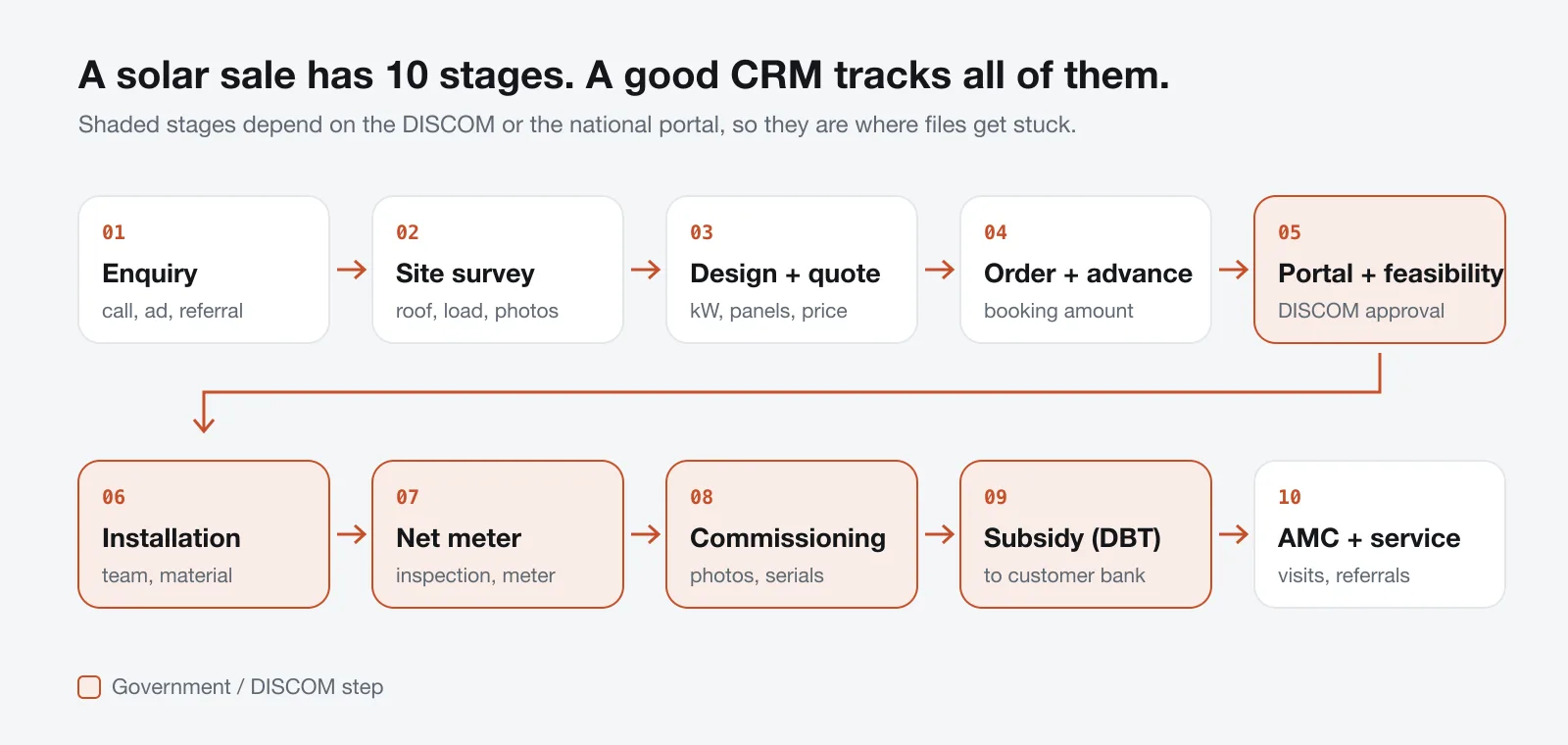
- A solar sale has about 10 stages. Five of them depend on the DISCOM or the national portal, and that is where files get stuck.
- A normal sales CRM stops at "deal won". A solar CRM keeps going: feasibility, net meter, commissioning, subsidy and AMC.
- The most useful feature is simple: an alert when a file waits longer than it should.
- Look for a phone app for your site team, so survey and install photos land on the customer record, not in WhatsApp.
- A custom-built solar CRM is yours: your brand, your stages, your data, and the source code.
What is a solar CRM?
CRM means customer relationship management. In simple words, it is one list of all your customers and leads, with the full history of each one. A CRM for solar business is the same idea, set up for how solar is sold in India.
A home rooftop sale is not one sale. It is a chain of small jobs. You call the lead. You visit the roof. You make a quote. You file on the national portal. You wait for the DISCOM. You install. You wait again for the net meter. Then the subsidy goes to the customer, and you owe them five years of service. A solar CRM tracks that whole chain.
The problem
Where solar companies lose leads and money
Most small solar businesses lose money in the same six places.
- Slow first call. Leads come from ads, walk-ins and referrals. If nobody owns the lead, nobody calls back the same day.
- Files stuck at the DISCOM. Feasibility or net-meter files wait for weeks. Nobody notices until the customer complains.
- Paper mismatches. The name on the electricity bill, Aadhaar and bank account do not match. The subsidy gets held up.
- Photos lost on phones. Survey and commissioning photos stay on one engineer's phone. When he leaves, they leave too.
- Forgotten service. Free maintenance visits are promised at sale and then nobody plans them.
- Money mixed up. The customer's share and the subsidy share get mixed in one sheet, so dues are missed.
Who uses a solar CRM
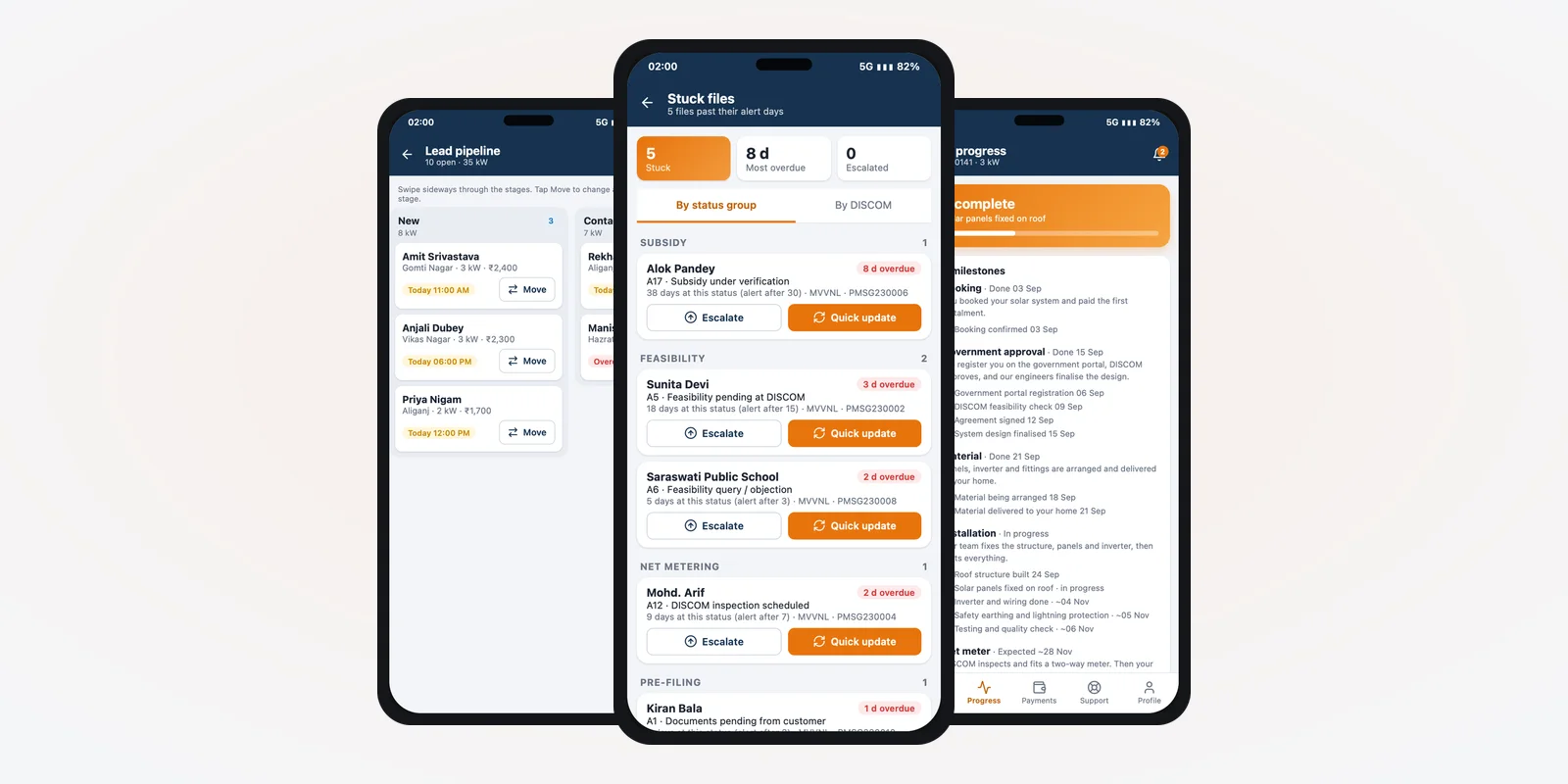
A solar CRM is not only for the sales team. Three groups use it every day, each in their own way. The screens in this guide are from a solar CRM app we designed, filled with demo data.
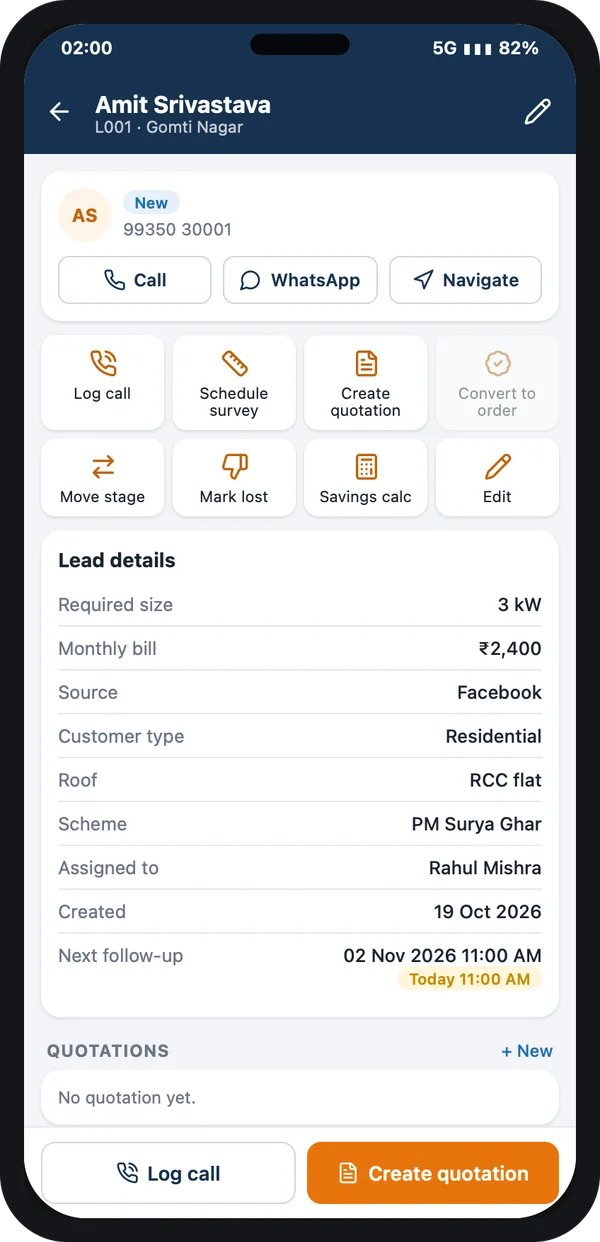
Office and sales
Take calls, book surveys, make quotes, record payments and update portal status.
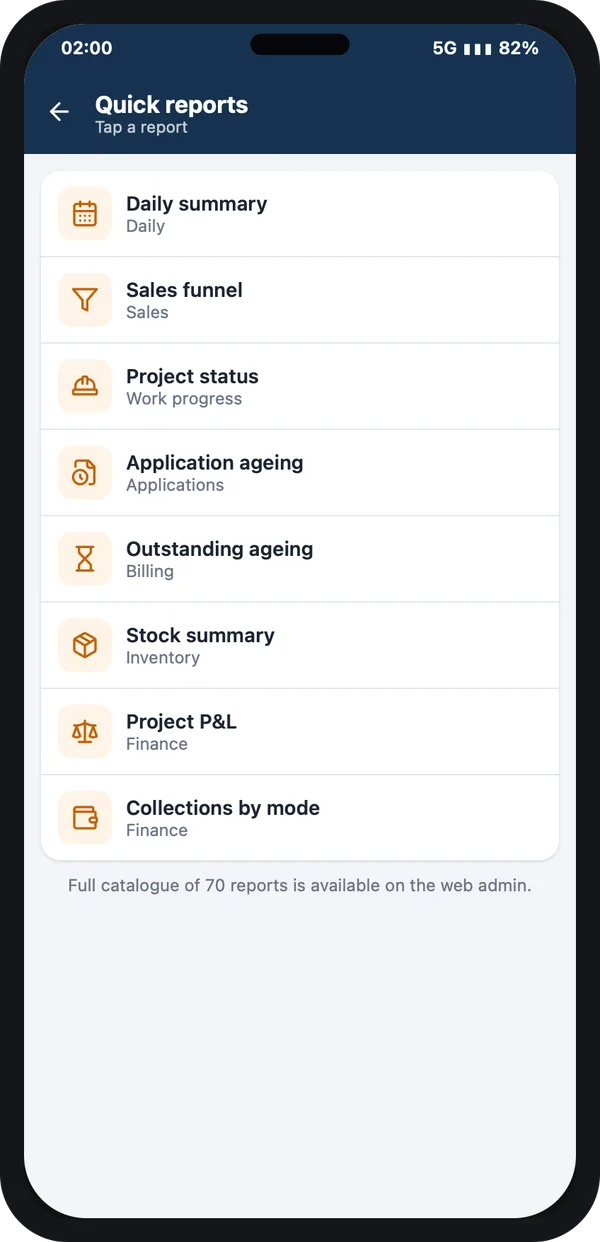
Owner and managers
See sales, projects, stuck files and money due without calling anyone.
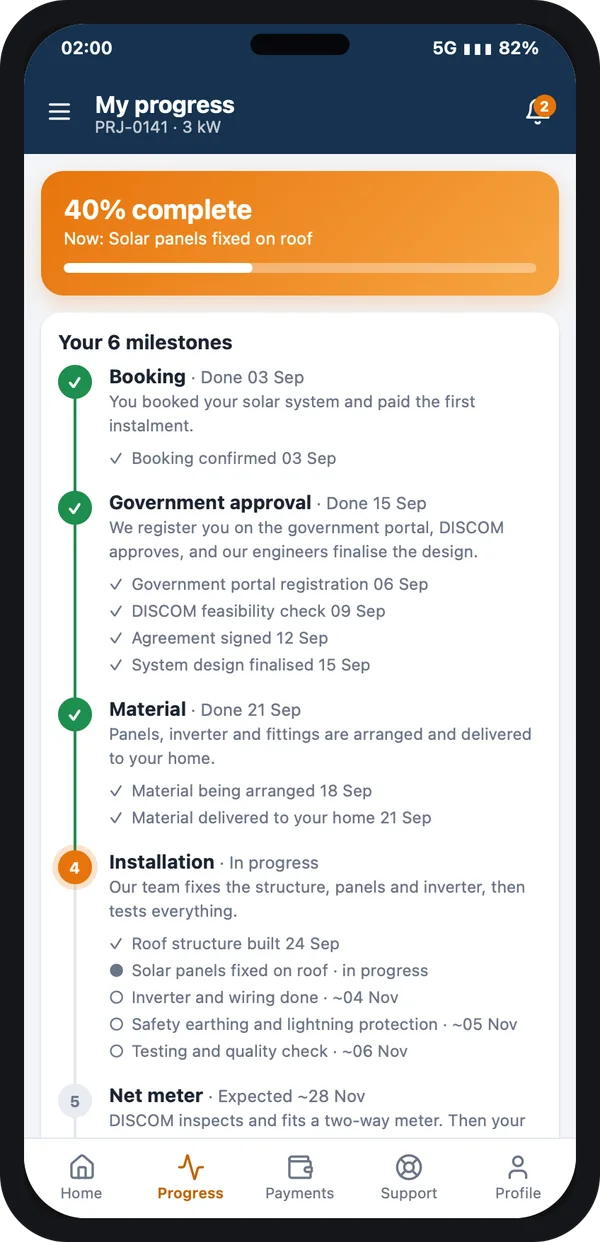
Customer
Sees each step of the installation and raises service requests after handover.
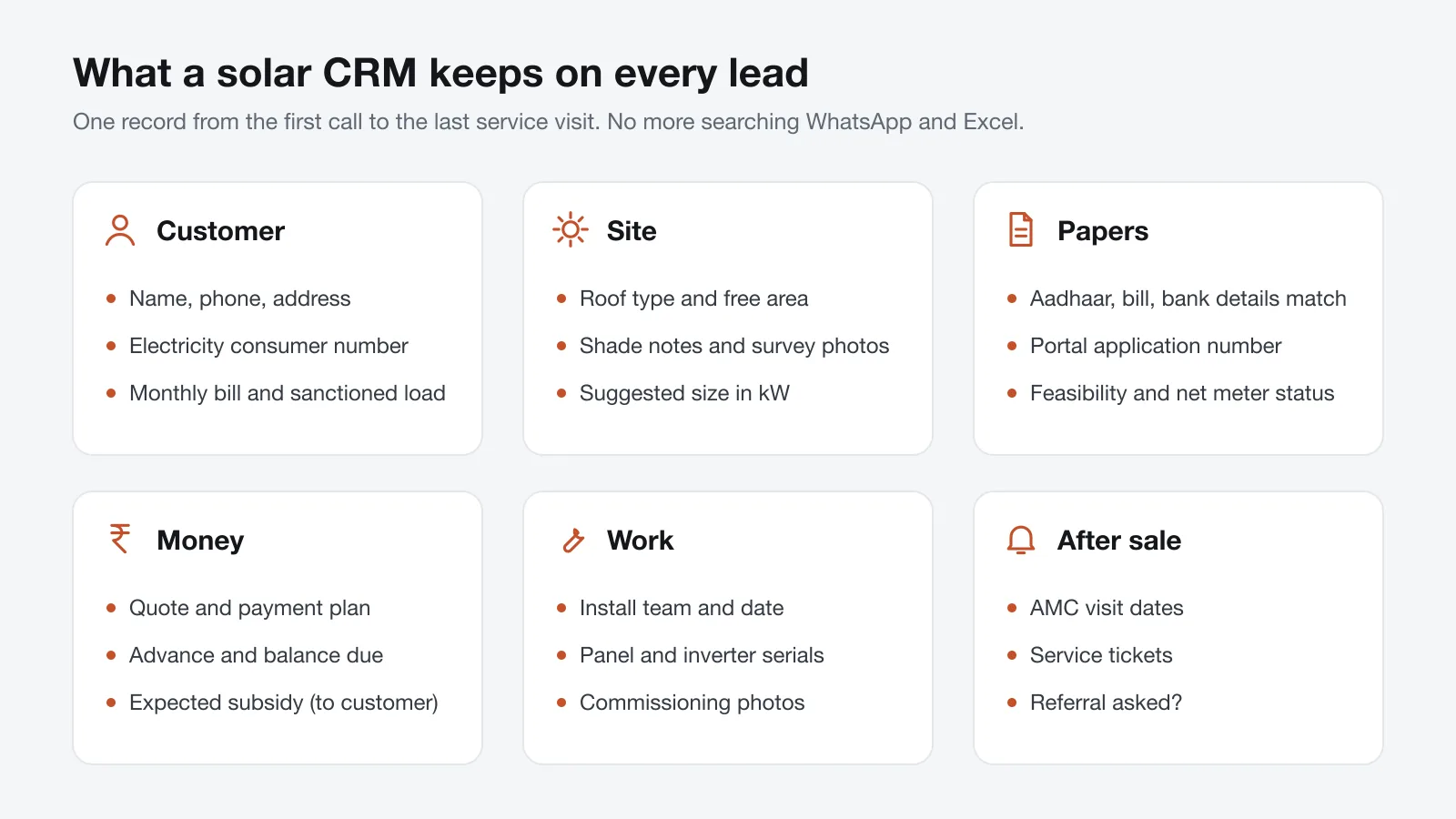
What a solar CRM keeps on every lead
A normal CRM stores a name, a phone number and a deal value. That is not enough for solar. Your team needs the roof, the electricity connection, the papers and the install details on the same record.
Must-have features in solar CRM software
1. Lead capture and quick follow-up
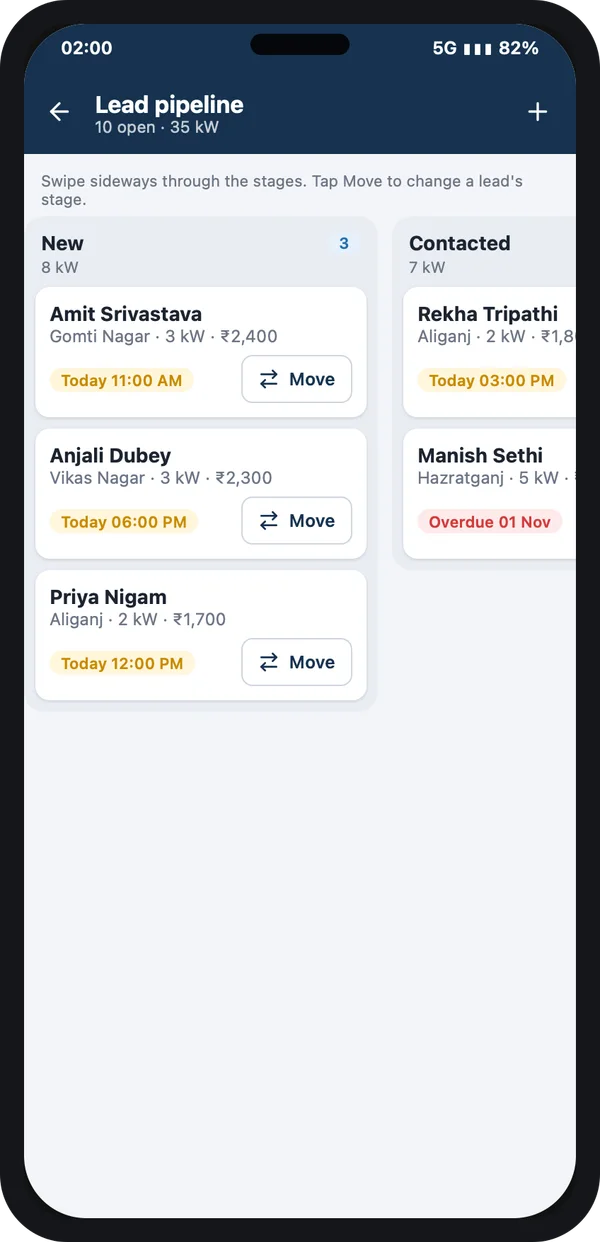
Every enquiry from your website, ads, calls and walk-ins goes into one list. Each lead gets an owner and a next follow-up date. Leads not called on time turn red.
Sales staff see their leads stage by stage on the phone, and move a lead with one tap.
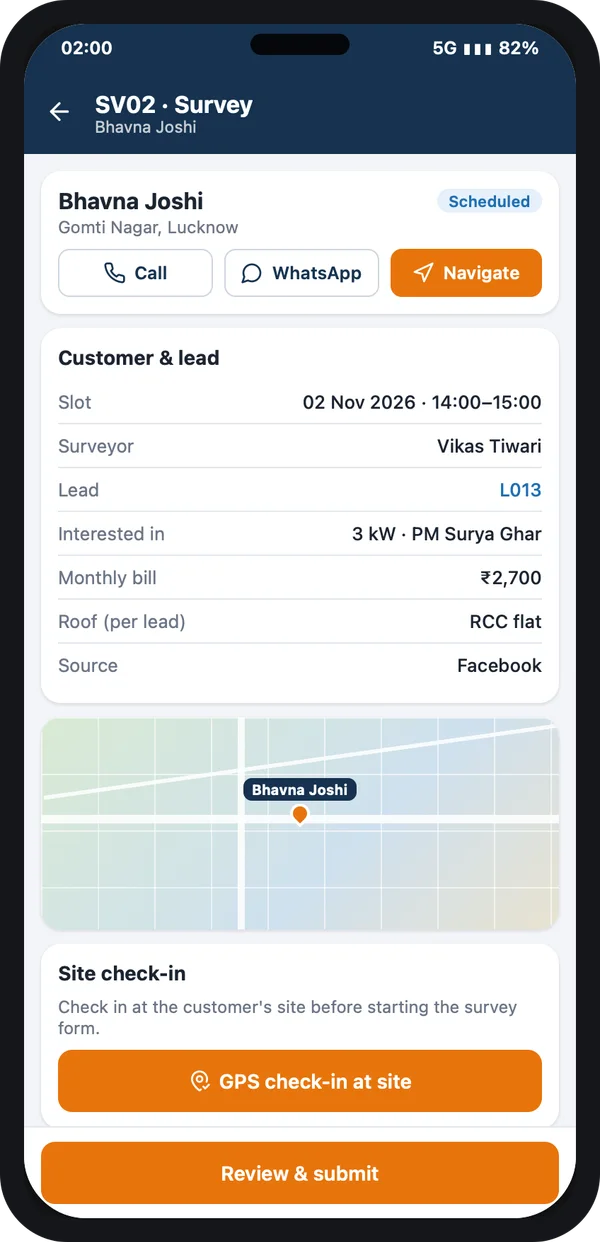
2. Site survey on the phone
The surveyor checks in at the site with GPS, then fills a short form: roof type, free area, shade, load and photos. The office can make the quote from it the same day.
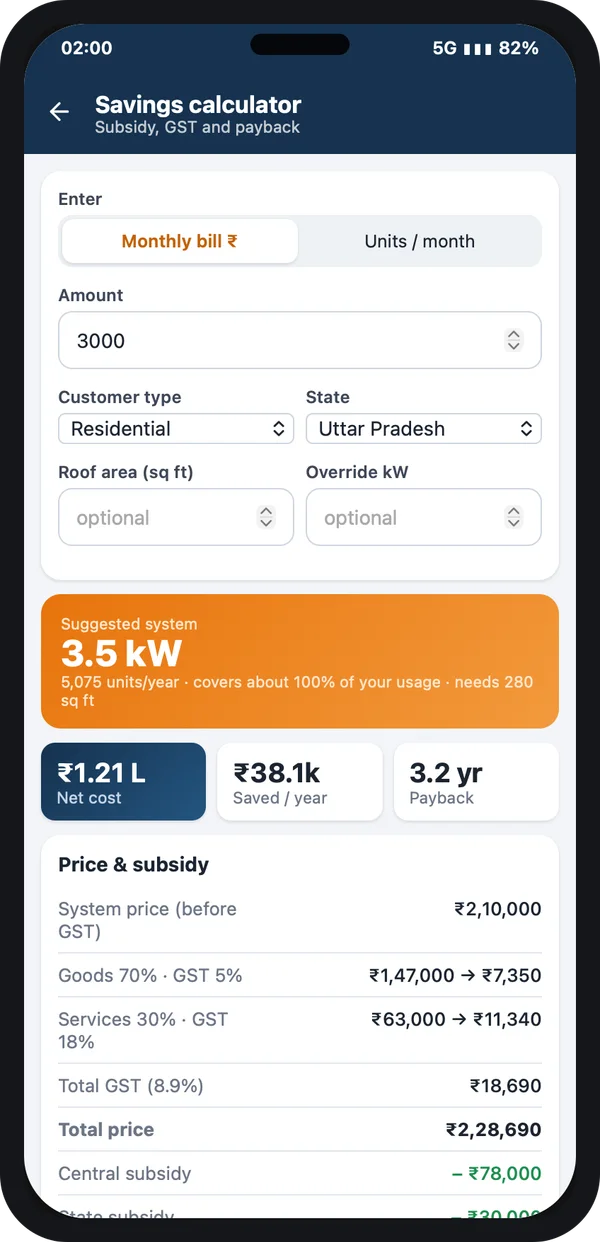
3. Quote with the subsidy shown
The quote should show the system size, the price and the expected subsidy clearly. A savings calculator helps the customer see what they pay, what comes back from the government and how soon it pays back.
4. Government and DISCOM status tracking
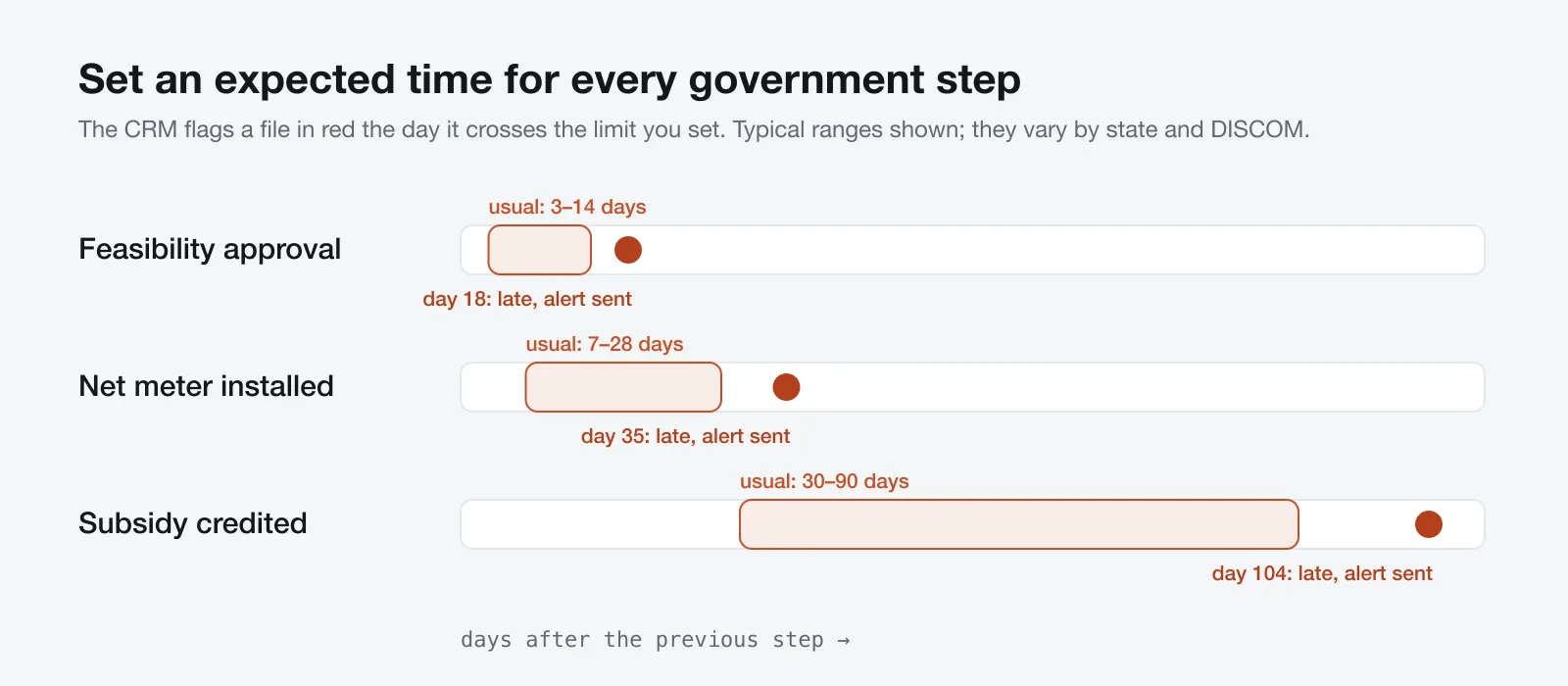
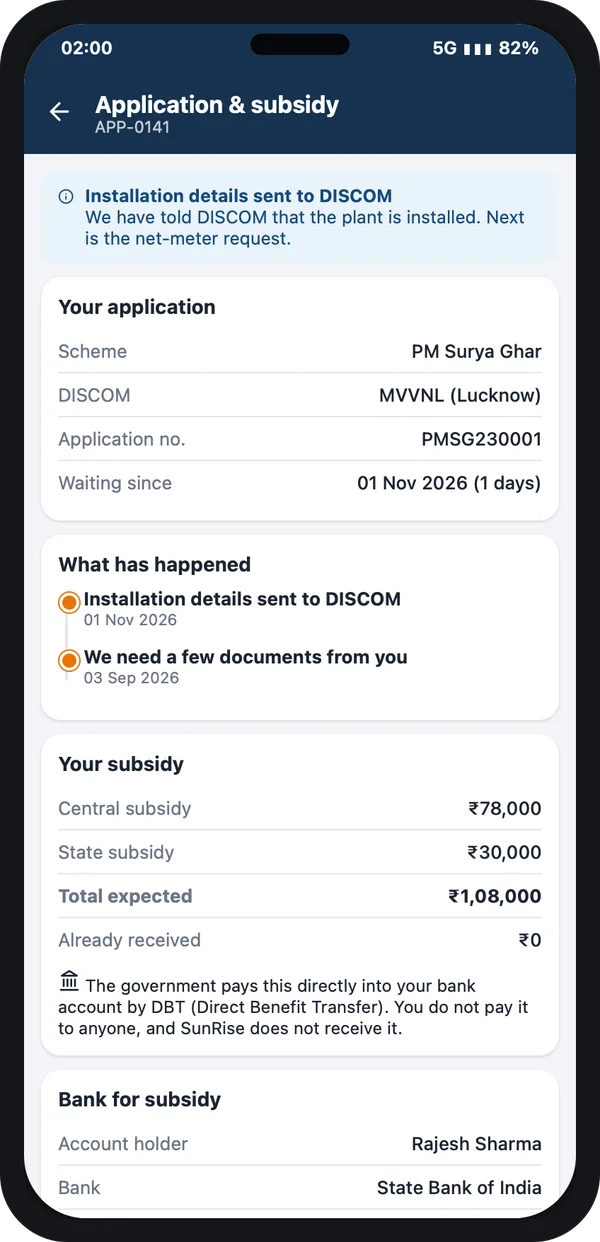
This is the feature that matters most. The national portal does not send your CRM updates. So your team updates each step by hand: application filed, feasibility approved, net meter installed, commissioning done, subsidy credited. The CRM stores the date and a screenshot of each step.
Then you set an expected number of days for each step. When a file crosses it, the CRM alerts the person in charge and the owner.
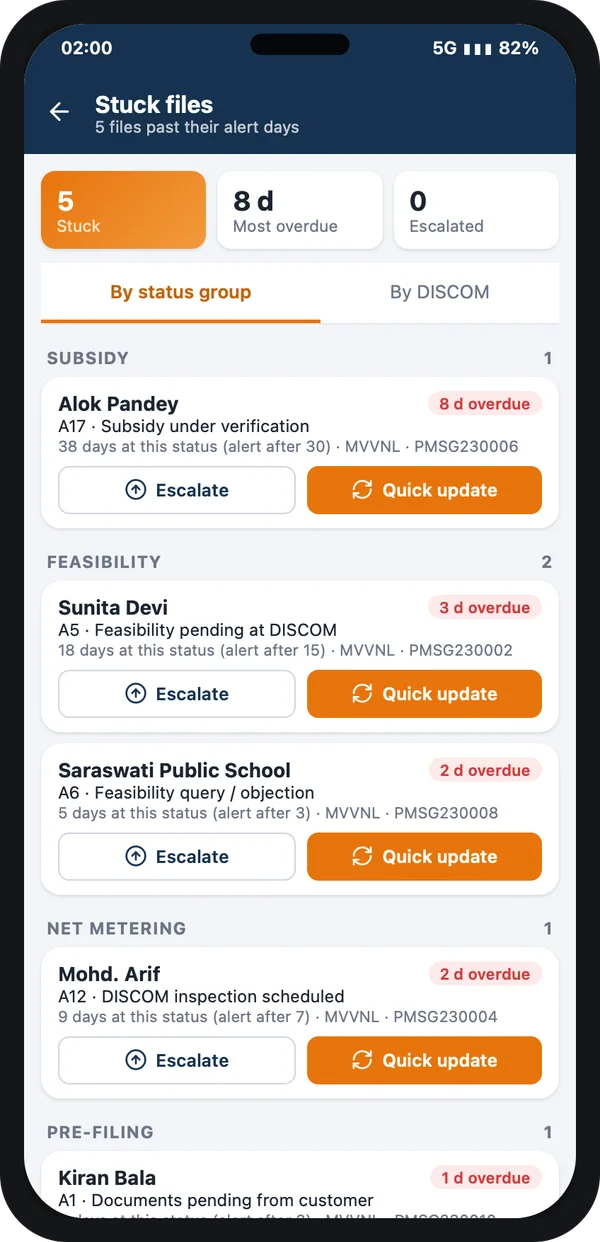
Stuck files list
Every file past its limit, grouped by step, with Escalate and Quick update buttons.
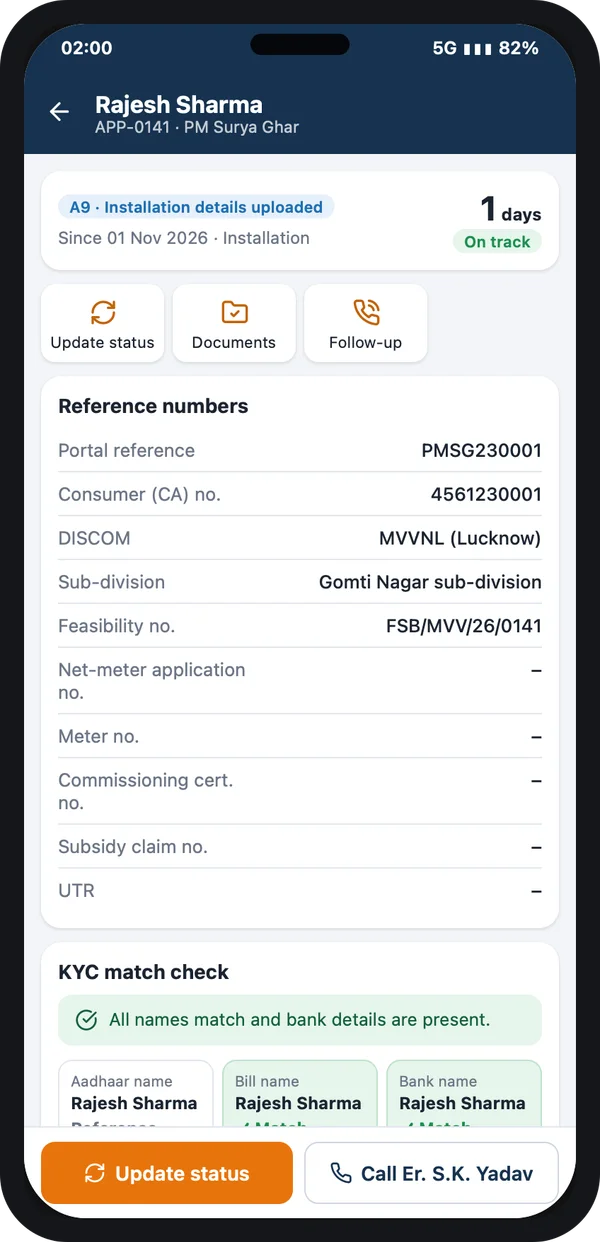
One application, all numbers
Portal reference, consumer number, DISCOM and a check that Aadhaar, bill and bank names match.
5. Install team, material and photos
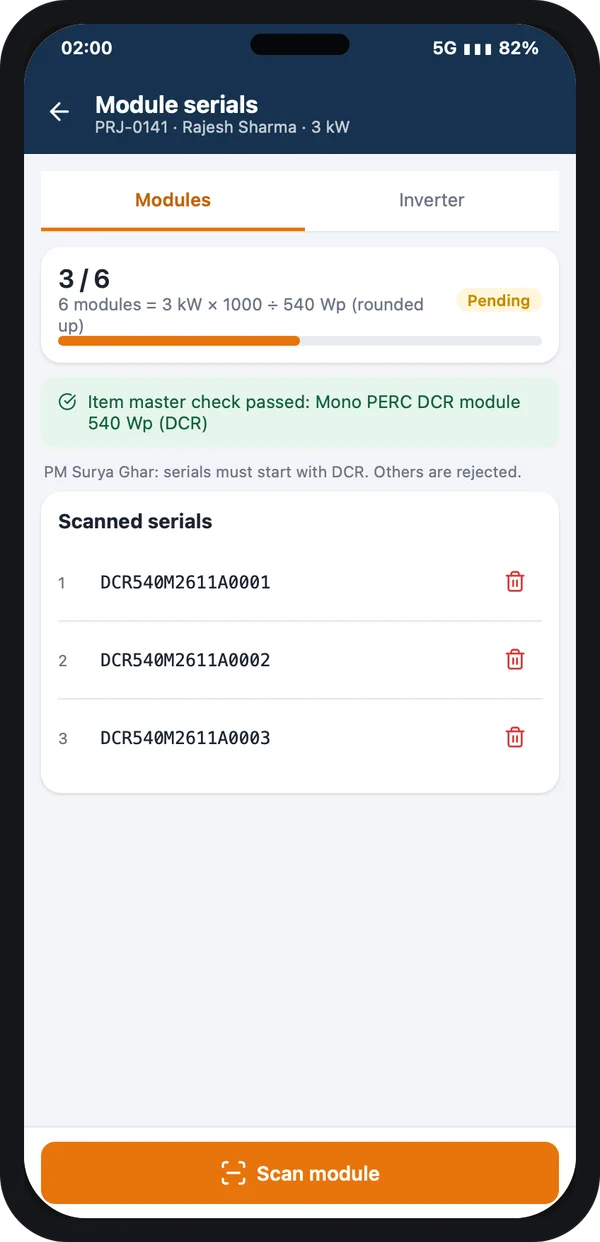
Assign the install team and date from the CRM. The team checks in at the site from the app and uploads geo-tagged photos. Panel and inverter serial numbers are scanned into the customer record. You need these for commissioning and for any warranty claim later.
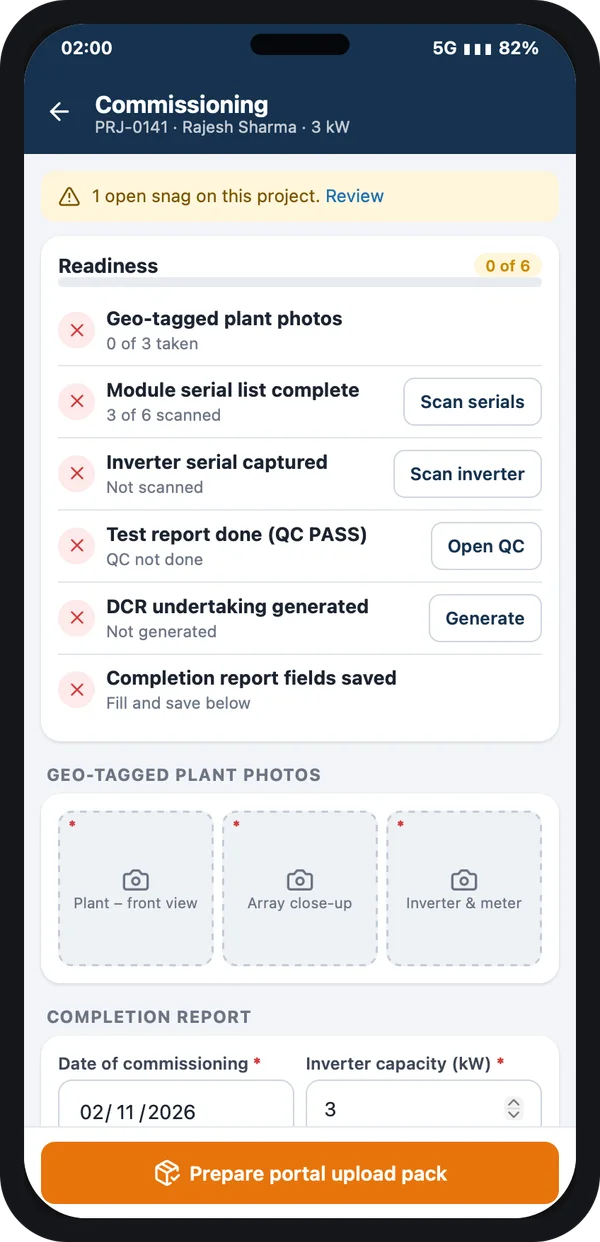
6. Payments and dues
Keep the customer's payments and the expected subsidy on separate lines. The subsidy goes to the customer's bank, not to you. So you must track your own balance due separately and remind the customer on time.
7. AMC and service visits
At commissioning, the CRM should plan the maintenance visits for the years you promised. Service requests from the customer become tickets with a due date, so nothing waits for a complaint.
8. Reports the owner checks every morning
Leads, surveys, quotes, installs in progress, money due, pending subsidy files and stuck files, on one screen. Today, this week or this month, for each branch.
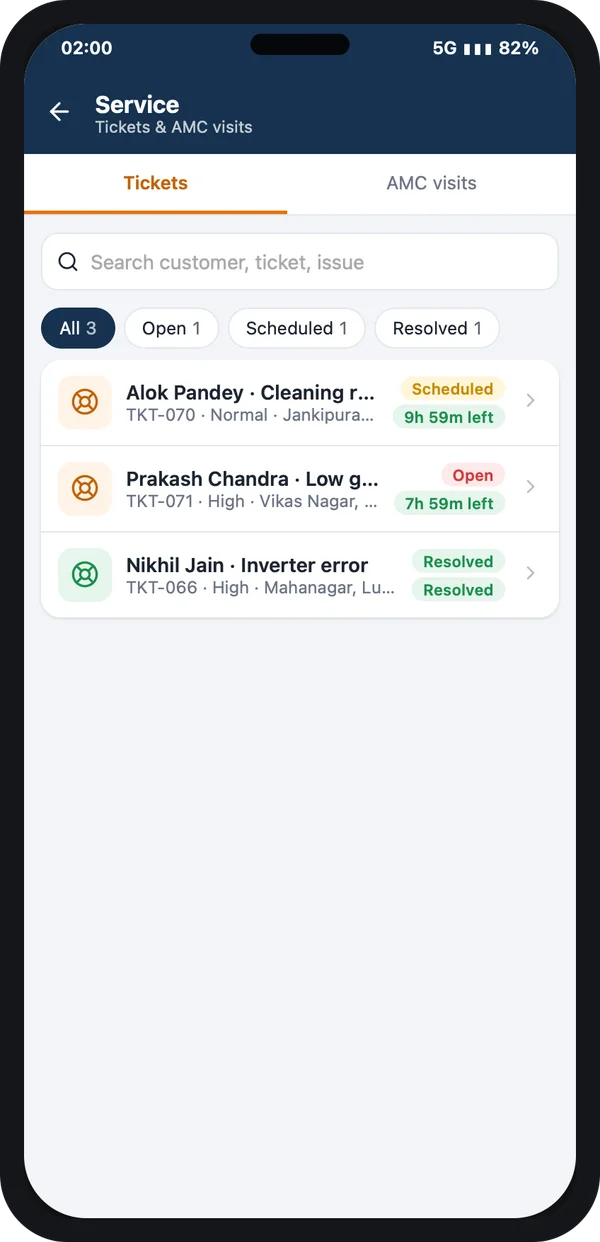
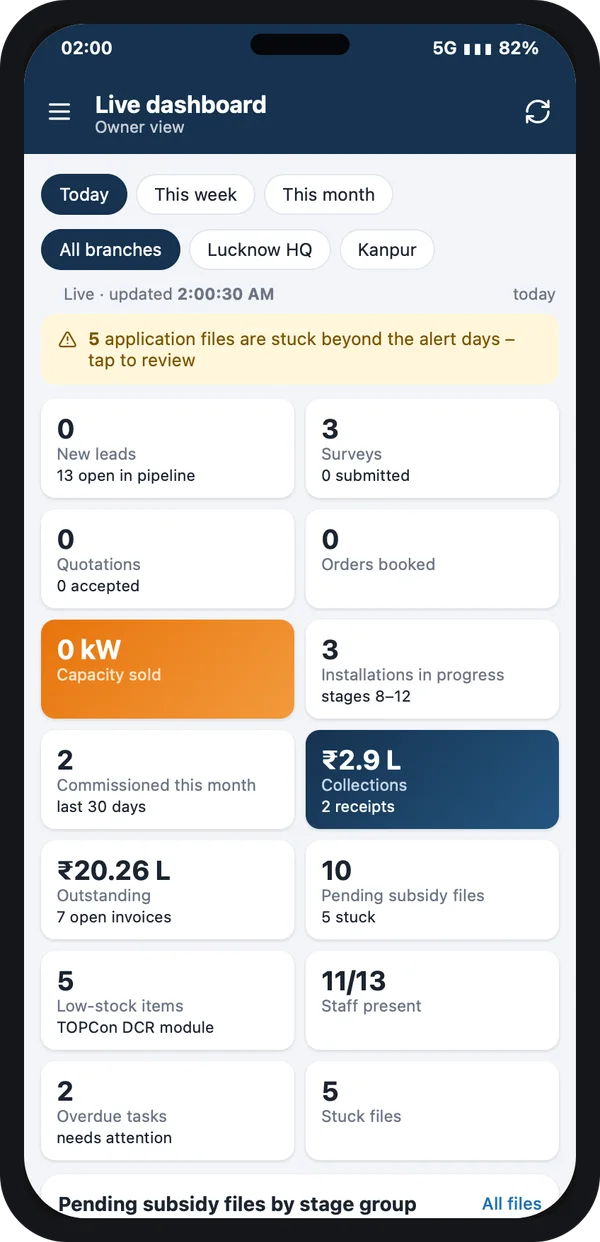
Check the current rules before you quote. Subsidy amounts, DCR panel rules and GST on solar systems are set by the government and do change. Always confirm the latest figures on the PM Surya Ghar national portal and with your DISCOM. A good CRM keeps these numbers as settings you can edit, not fixed in the software.
PM Surya Ghar subsidy in numbers
For home rooftop systems, the central subsidy under PM Surya Ghar: Muft Bijli Yojana is paid to the customer's bank account after commissioning. These were the published central rates when we wrote this guide.
Source: PM Surya Ghar: Muft Bijli Yojana national portal (central financial assistance for residential rooftop solar). Check the portal for the current rates before quoting.
The scheme, its rules and the latest rates are on the official PM Surya Ghar portal. Some states add their own top-up. Your quote and your CRM should show the central and state amounts separately, so the customer understands the final cost.
A customer app can show the same thing to the customer: where the application is, what the expected subsidy is, and that it goes to their own bank account. That alone saves many "what is the status?" calls.
Solar CRM vs Excel vs a normal CRM
| What you need | Excel and WhatsApp | Normal sales CRM | Solar CRM |
|---|---|---|---|
| All leads in one list with an owner | Hard | Yes | Yes |
| Site survey form and photos on the phone | No | Sometimes | Yes |
| Portal, feasibility and net-meter status | Manual sheet | No | Yes |
| Alert when a file is late | No | No | Yes |
| Subsidy shown separately from your dues | Error-prone | No | Yes |
| Panel and inverter serials per customer | Hard | No | Yes |
| AMC visits planned after commissioning | No | No | Yes |
Worked example: one 3 kW home rooftop
Here is how one customer moves through a solar CRM. The names and dates are examples.
- Day 1, enquiry. A lead comes from a Facebook ad. The CRM assigns it to a sales person, who calls within the hour and books a site visit.
- Day 3, site survey. The surveyor uploads roof photos and the load details from the app. The office makes a 3 kW quote showing the expected central subsidy.
- Day 5, order. The customer pays the advance. The CRM records it and moves the lead to "Order booked".
- Day 6, portal. The team files on the national portal and saves the application number. The feasibility timer starts.
- Day 20, alert. Feasibility is still pending past your limit. The CRM alerts the owner, who follows up with the DISCOM.
- Day 24 to 40, install and net meter. The install team uploads photos and serial numbers. The net-meter timer runs, and the step is closed when the meter is fitted.
- After commissioning. The subsidy step is tracked until it is credited. AMC visits are planned for the coming years, and the customer is asked for a referral.
Our service
How we build your own solar CRM
A CRM made around your business, not the other way round.
- Understand your process. We map your stages, documents, team roles and reports in a short call or two.
- Design the screens. You see clickable screens first, like the ones in this guide, and change them before any code is written.
- Build the apps. A web admin for the office, an Android and iPhone app for sales and site teams, and an optional customer app.
- Test with your team. Your staff use it on real leads and files. We fix what they find.
- Launch under your brand. Your name and logo on the apps and stores, your data on your own server.
- Support and grow. We add features as your business grows: new states, new schemes, new branches.
Solar CRM development cost: what decides it
Every solar business is different, so we do not publish a fixed price. The cost to build a solar CRM depends on four things: how many apps you need (web, staff app, customer app), how many stages and reports, which integrations (SMS, WhatsApp, payment, accounting), and how many branches or companies will use it.
| Monthly CRM plan | Custom solar CRM (built for you) | |
|---|---|---|
| Start | Quick, low first payment | Takes a few weeks to build |
| Cost over years | Pay every month, for every user | One build cost, then optional support |
| Solar stages, portal and DISCOM steps | Usually not, or with heavy changes | Built in, the way you work |
| Your brand on the apps | No | Yes |
| Data and source code | Stay with the vendor | Yours |
Tell us your stages, teams and branches, and we will send a clear, written quote after one call. Ask any developer, us included, to show you screens with your stages before you sign.
Whoever builds your solar CRM, make sure it can:
- Show your own 10 stages, not a generic "won / lost" pipeline
- Store portal and DISCOM status with dates and screenshots
- Alert you when a file waits too long
- Let the site team upload photos and serial numbers from a phone
- Keep the customer's dues separate from the subsidy
- Plan AMC visits and service tickets after handover
- Let you change subsidy and tax figures in settings yourself
- Export your data whenever you want
FAQ
What is the best CRM for a solar business in India?
Pick the CRM that follows your real stages: survey, quote, portal, feasibility, installation, net meter, commissioning, subsidy and AMC. A general sales CRM stores leads but does not track DISCOM and subsidy steps. That is why many solar companies get a CRM built for them.
How long does it take to build a solar CRM?
It depends on how many apps and reports you need. After one call about your process, we share a plan with dates for each part, starting with screens you can click through.
Will I own the solar CRM and its source code?
Yes. We build it under your brand and hand over the source code. Your data stays on your server.
Is customer Aadhaar and bank data safe in a solar CRM?
It should be. The Digital Personal Data Protection Act, 2023 applies to this data, so the CRM must mask Aadhaar numbers, record consent and limit who can see bank details. We build these controls in.
Can a solar CRM connect to the PM Surya Ghar portal?
The national portal does not offer a public connection for vendors at present. Your team updates each portal step in the CRM by hand, with the date and a screenshot. The CRM then tracks the time and alerts you when a step is late.
Does the subsidy come to the installer or the customer?
Under PM Surya Ghar, the central subsidy for homes is paid to the customer's bank account after commissioning. That is why your CRM should track your own balance separately from the subsidy.
Do I need a mobile app for my site team?
Yes, if you want survey and install photos, check-ins and serial numbers saved on the customer record. Without an app, these stay in phones and WhatsApp groups.
Can I use Excel instead of a solar CRM?
You can for a few customers a month. Once you have many files waiting at the DISCOM at the same time, Excel cannot alert you, and files start to slip.
Can a solar CRM handle commercial and society projects too?
Yes, if it lets you set different stages for each type. Housing societies and commercial projects follow different approval and payment steps from home rooftops.
Can PRS India build a CRM for my solar company?
Yes. We build custom CRM software around your own stages, fields and reports: a web admin, an Android and iPhone app for your site team, and a customer app if you want one. Book a consultation and we will show you screens for your process.
Related guides
Written by
Aditi
Building software at PRS India.