Recruitment CRM Software Development for Agencies
We build your own recruitment CRM: candidates, client jobs, interviews, submissions, placements and invoices. Web admin and recruiter app, under your brand.

Written by Prabhjot Kaur, Product Manager
Reviewed by the PRS India software & mobile app development team
13 min read
Written from production. Our articles draw on products we run live and the client work behind them, and are revised as the systems they describe evolve.
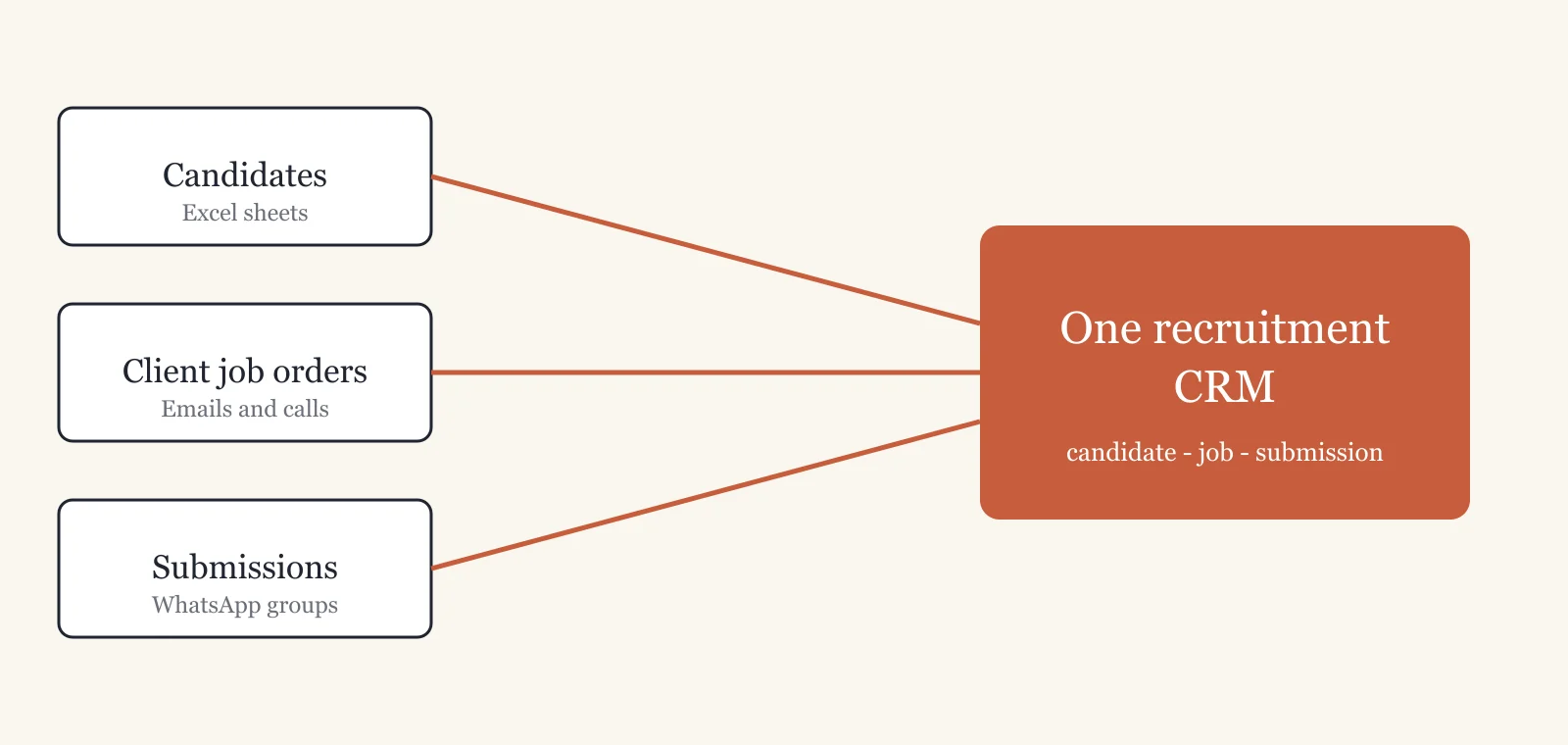
A staffing agency lives on three lists: the candidates it has, the jobs its clients gave, and who was sent where. Most agencies keep all three in Excel sheets and WhatsApp groups. Placements slip through the gaps. A recruitment CRM puts the three lists in one place. This is the staffing CRM many agencies now ask us to build.
This guide shows what such a CRM must track and how PRS India builds it. We build your own recruitment CRM around your hiring process, under your brand, with a phone app for your recruiters.
Key takeaways
- A recruitment agency tracks two sides, people and companies. A normal sales CRM tracks only buyers.
- The core records are the candidate, the client job order, the submission, the interview, the placement and the invoice.
- The most useful checks are small. Warn on a duplicate candidate. Block a second send of the same CV to the same client.
- Candidate data is personal data. Take consent and limit who sees phone numbers.
- A CRM built for you is yours: your brand, your data and the source code.
What is a recruitment CRM?
CRM means customer relationship management. A recruitment CRM is software that keeps candidates, client companies and job orders in one place. It moves each candidate through stages, from first call to joining.
A sales CRM tracks one side: the buyer. Recruitment CRM software tracks two sides at once. You deal with people who want a job and with companies that want to hire. Each job order needs candidates, and each candidate may fit several jobs. The CRM keeps these links straight.
The problem
Where recruitment agencies lose placements and money
Most agencies lose money in the same six places.
- Same CV sent twice. Two recruiters send the same candidate to the same client. The client sees a messy agency.
- Recruiter leaves, list leaves. The candidate list sat in his phone and his own sheet. It goes out of the door with him.
- Nobody knows who submitted whom. A client asks about a profile sent last week. No one can say who sent it or what the client replied.
- Missed interviews. The interview time was in a WhatsApp message. The candidate did not see it, and the client lost a slot.
- Invoice forgotten. The candidate joined, but nobody raised the invoice, or it went out weeks late.
- Owner dispute. A candidate is placed through two agencies, and each says he was theirs first.
Who uses a recruitment CRM
A CRM for recruitment agencies has four kinds of users. Each one sees different screens.
Recruiters
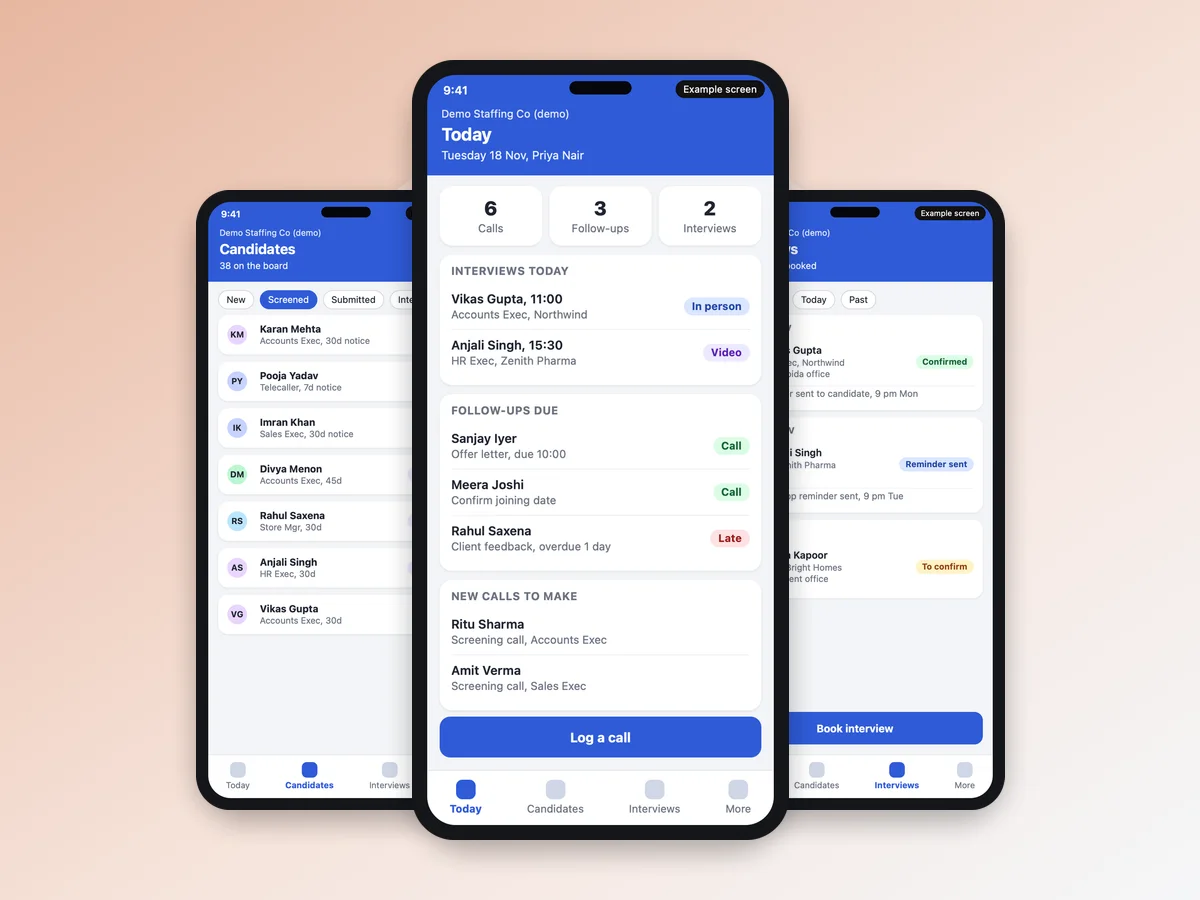
They add candidates, call them, note the reply and submit profiles to clients. A phone app lets them do this between calls. Our staff app on the phone already has a today screen with calls and follow-ups.
Account managers and business development
They talk to client companies and record each job order: the role, the number of openings and the deadline.
The agency owner
The owner wants placements and revenue by client and by recruiter. The owner also wants jobs open too long, and money not yet received.
Candidates and clients
A recruitment CRM can give them a simple link. A candidate uploads a CV or picks an interview slot. A client approves or rejects a profile. We build these links when you want them.
What our recruitment CRM covers that an ATS or HR CRM does not
People use three names for tools that sound alike. They solve different problems.
| Tool | Who uses it | What it tracks |
|---|---|---|
| Recruitment CRM | An agency hiring for many clients | Candidates, client jobs, submissions, placements, invoices |
| ATS (applicant tracking) | One company hiring for itself | Applicants for its own open posts |
| HR CRM or HRMS | A company managing staff after joining | Employee records, attendance, leave, payroll |
We build the first one: the CRM for an agency, with clients, submissions and billing. If you search for ATS CRM software, note the difference. We keep the applicant stages. We also add the client side, submissions and billing.
The candidate pipeline: stages a recruitment CRM tracks
Every candidate sits in one stage at a time. Your CRM shows each job as a board, and you drag the candidate card from one stage to the next. Our CRM base already has a pipeline board with several pipelines. Keep one for permanent hiring and another for contract staff.
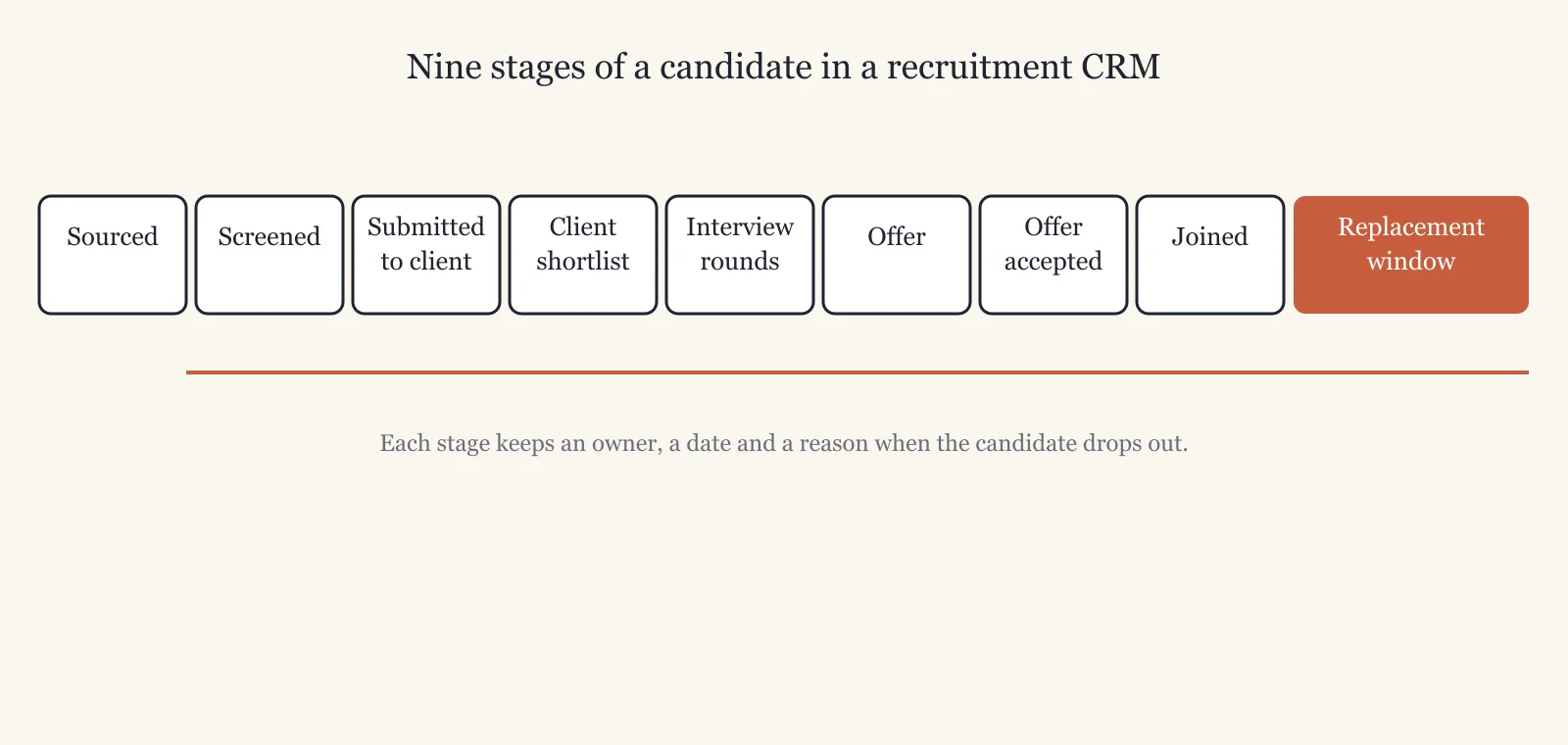
A common set of stages: sourced, screened, submitted to client, client shortlist, interview rounds, offer, offer accepted, joined, and the replacement window. The replacement window is the guarantee period in which you must find another person if the hire leaves. Each stage records the owner and the date. When a candidate drops out, the CRM asks for the reason, so you can see later why you lose candidates.
Must-have features in recruitment CRM software
These are the eight things your recruitment CRM needs. We build each one into the CRM we make for you.
1. Candidate database with duplicate check
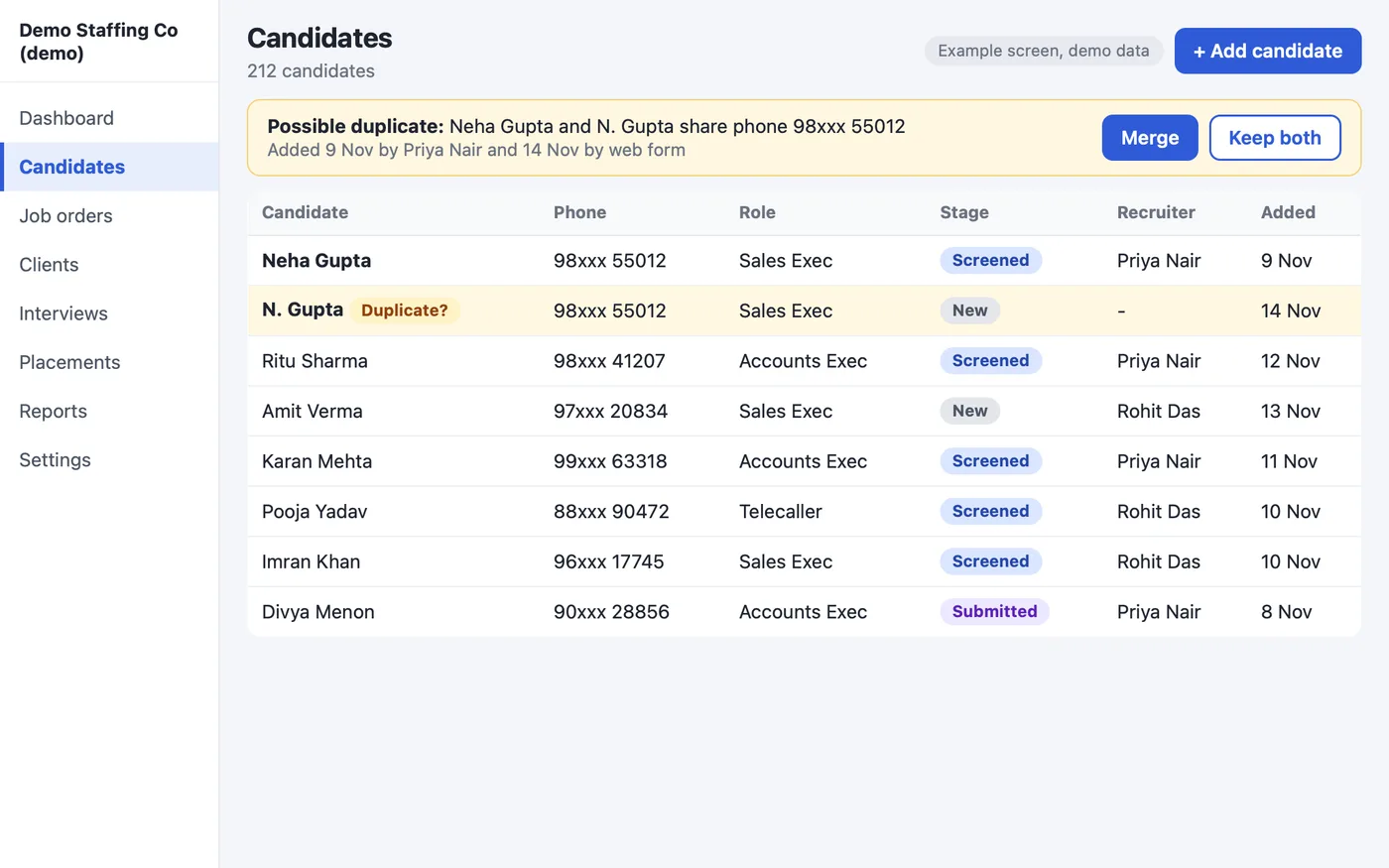
Each candidate has a record: CV file, skills, current and expected pay, notice period, location, source and tags. If someone enters a phone number or email that already exists, the CRM warns the recruiter. It offers to merge the two records. Search finds people by skill, city or notice period.
2. Client job orders
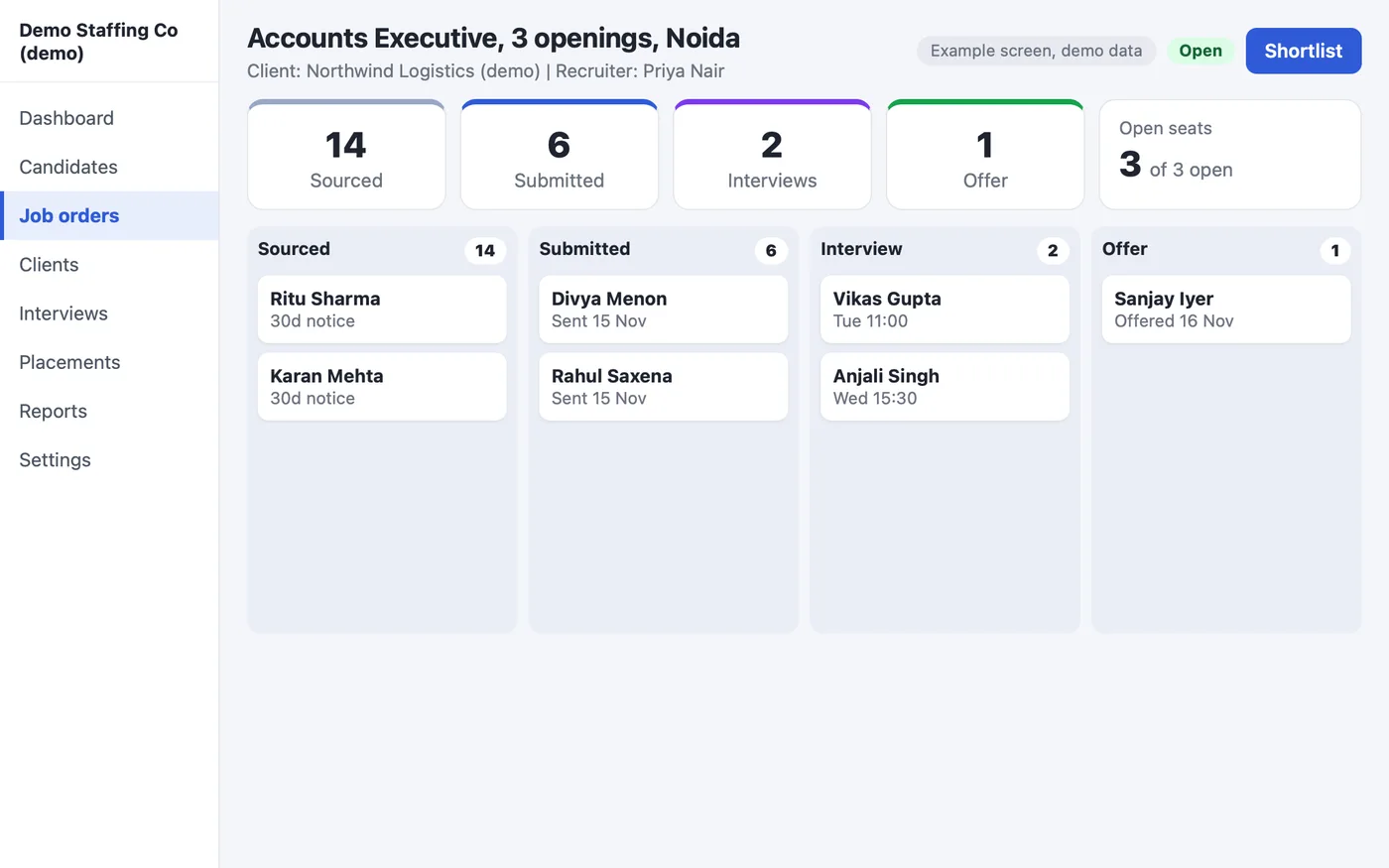
A job order holds the client company, the role, the number of openings. It also holds the pay range, the deadline and the recruiter who owns it. Each opening shows the candidates attached to it, so you see at a glance which job is short of profiles.
3. Submissions: who was sent to which client, and when
A submission links one candidate to one job at one client. It stores the date, the recruiter and the client's feedback. The CRM blocks sending the same candidate to the same client twice. When the client asks, you open the record and answer in seconds.
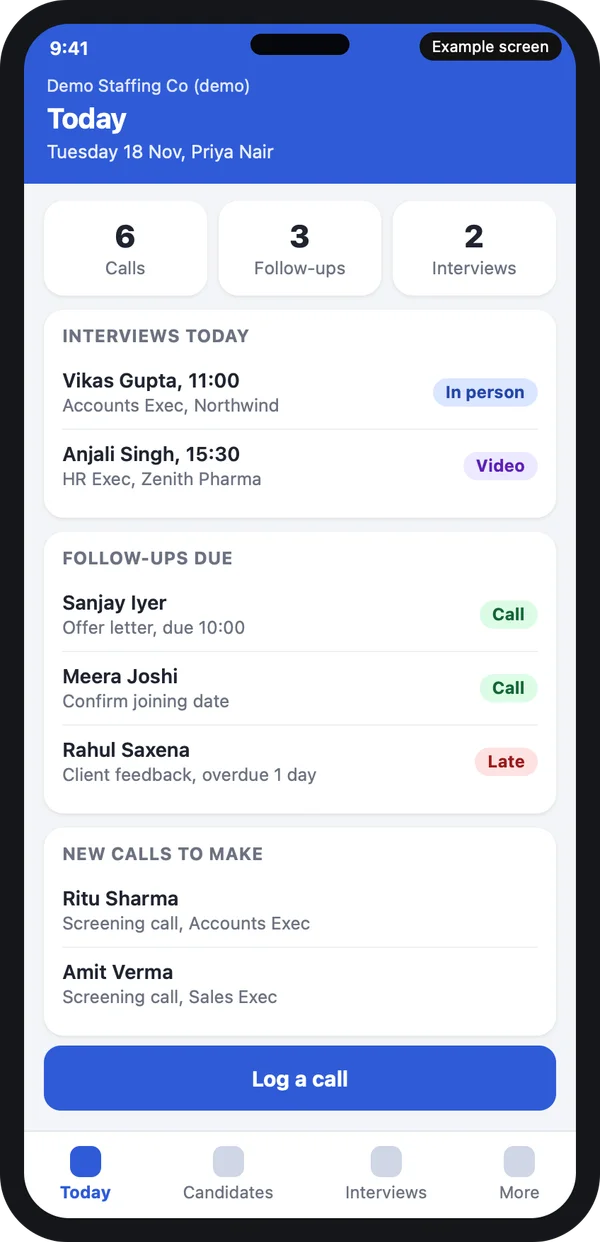
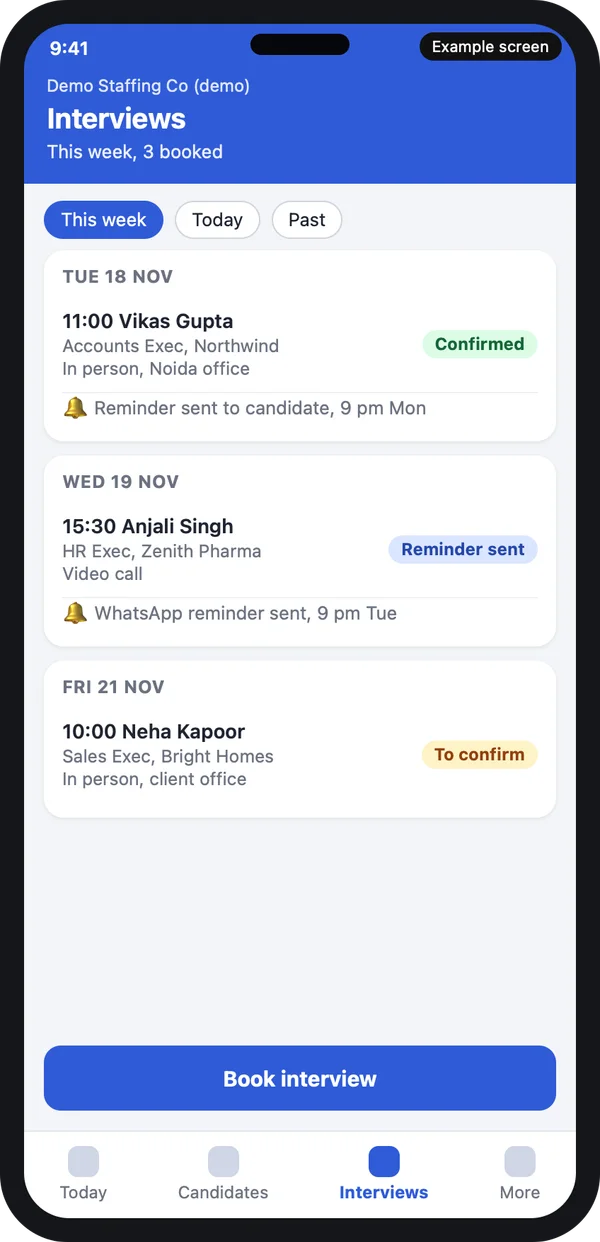
4. Interview scheduling
Set each round with a date, a time and a mode: phone, video or in person. The CRM sends a reminder to the candidate and to the client contact. Reminders go by SMS or email, and by WhatsApp Business API once your account is added. The interview also lands on the recruiter's Google or Microsoft calendar.
5. Placement and offer tracking
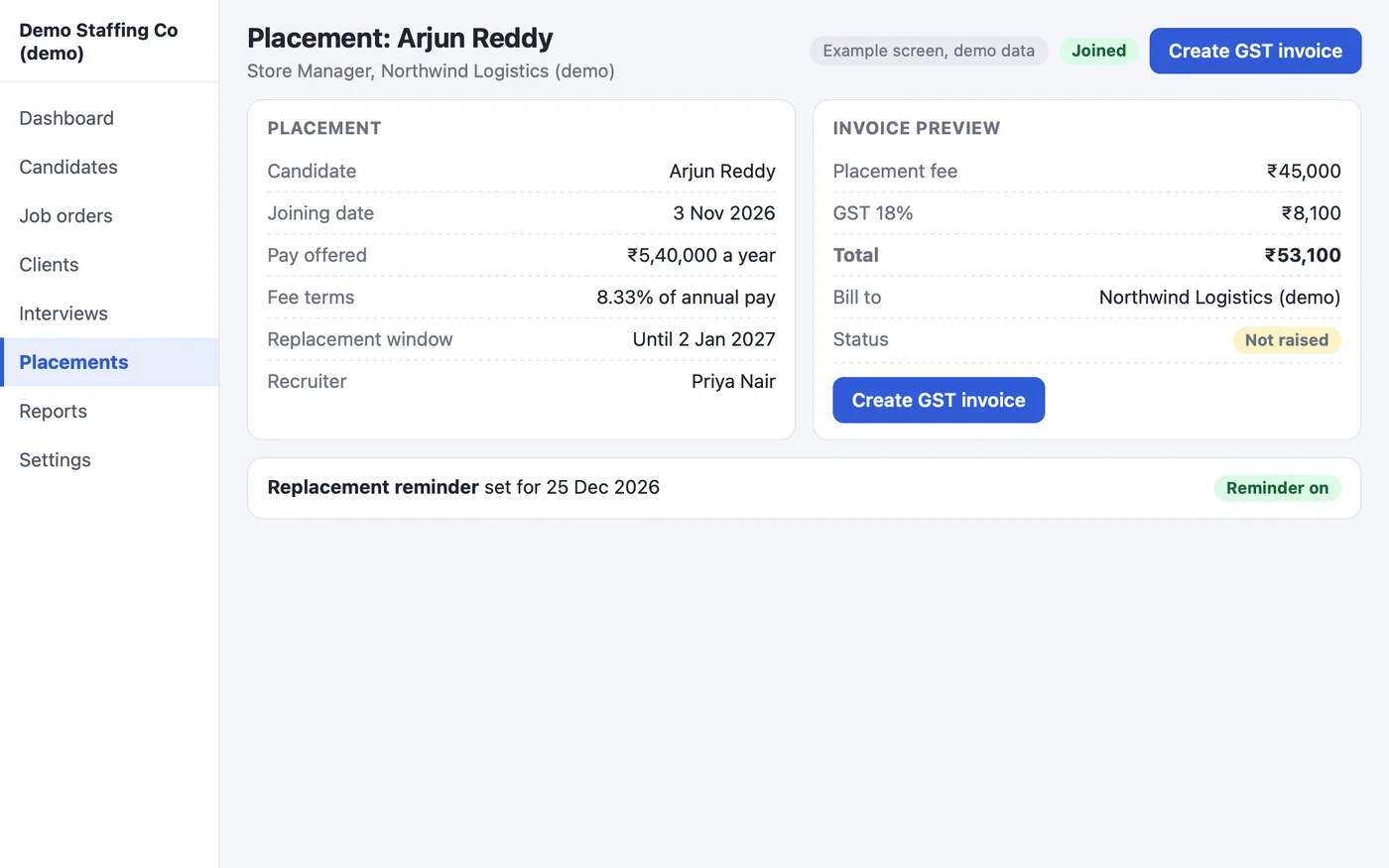
When a candidate gets an offer, the CRM records the offer, the joining date and the yearly pay (CTC). It also stores the guarantee period. A reminder fires before the period ends, so you know when the placement is safe.
6. Invoice on placement
Raise the invoice from the placement record. The fee can be a percent of CTC or a fixed amount. The invoice carries GST (CGST and SGST, or IGST), the SAC code and a numbered series. The CRM tracks the payment and reminds you of dues. You can export the data to Tally. Check the current GST rules on the GST portal for the rate and SAC code on manpower supply.
7. Lead import from job boards, Naukri and websites
Candidates and client leads arrive from many places: your website form, Excel or CSV files, an email inbox and WhatsApp. Job-board resume downloads are imported from CSV or from the forwarded email. A direct feed depends on what the board allows, and we confirm this with you at the start.
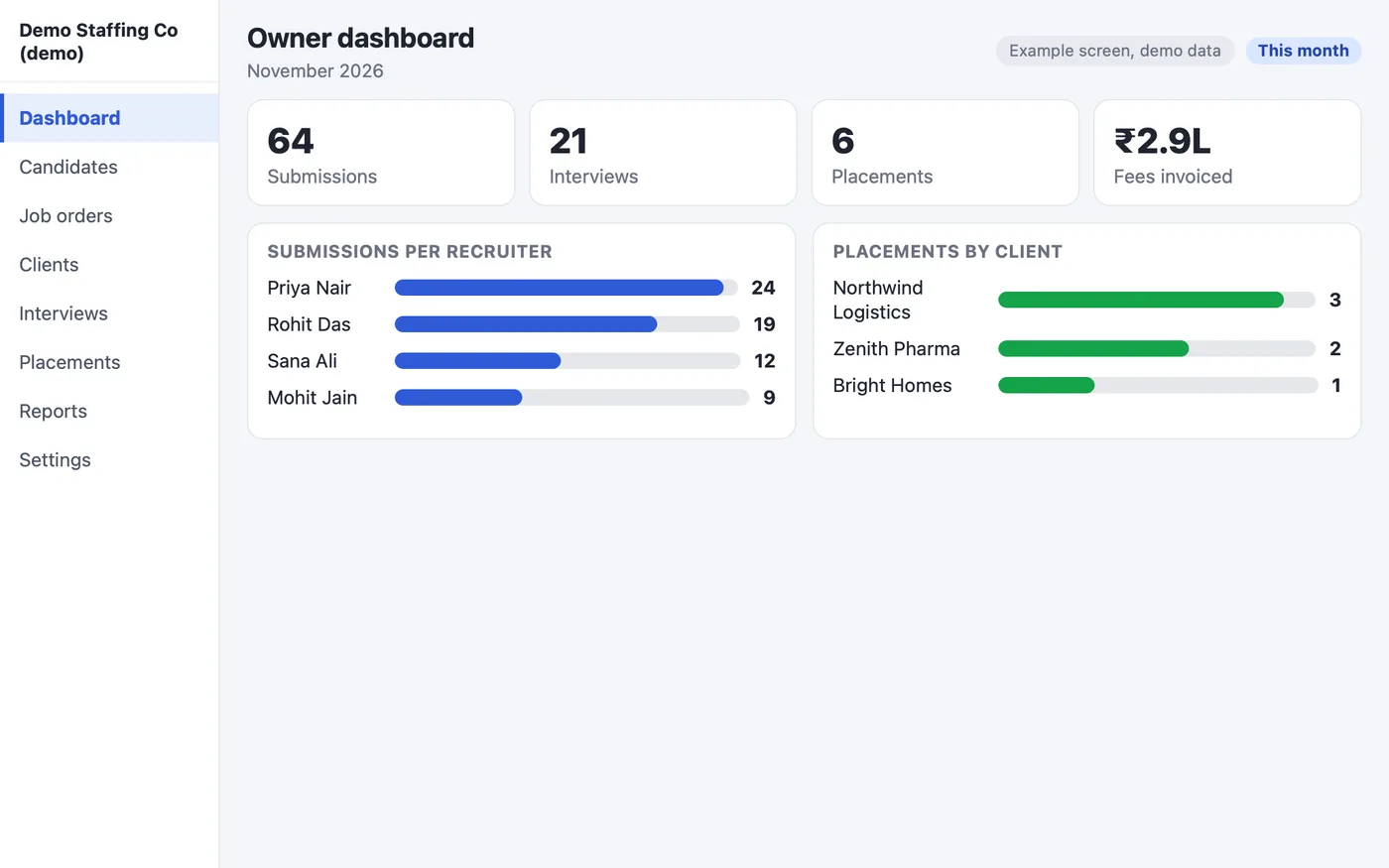
8. Reports the agency owner checks every morning
Submissions per recruiter, interview-to-offer ratio, open jobs by age, placements and revenue by client, and money due. Our CRM base ships with 30 ready reports, and we add the recruitment ones for you.
What a recruitment CRM keeps on every candidate
One candidate record holds:
- Contact details and the CV file
- Where the candidate came from
- The current stage and the owner
- Every call and message, with date
- Which clients have seen the profile
- Interview notes and client feedback
- The consent record for storing the data
Candidate data, consent and the law in India
A CV holds a name, a phone number, an address and pay history. That is personal data. The Digital Personal Data Protection Act, 2023 sets rules for how you collect, use and delete it. In general: take consent, use the data only for the stated purpose, and delete it when the person asks.
We build the controls into your CRM. Roles decide who sees what, an audit log records who opened a record, and a consent field records the candidate's approval. We can also hide phone numbers from some roles.
Agencies that send people to work abroad need a licence under the Emigration Act. Your CRM can keep the licence number as a field on your records. Read the rules on the official emigration portal. This is general information, not legal advice. Ask your lawyer about your own case.
Build your own recruitment CRM vs Excel vs a ready-made subscription
You have three choices. Excel costs nothing to start. A ready-made subscription starts fast. Your own CRM fits your process. Pick on what your agency does every day.
| What you need | Excel and WhatsApp | Ready-made subscription | Your own CRM |
|---|---|---|---|
| Duplicate candidate check | Manual search | Usually yes | Yes |
| Client-wise submissions | Hard | Depends on the plan | Yes |
| Interview reminders | By hand | Depends on the plan | Yes |
| Invoice on placement with GST | Separate tool | Often separate | Yes, in the same record |
| When a recruiter leaves | Data leaves too | Data stays in the tool | Data stays with you |
| Your brand and your data | Yours, but scattered | Vendor's | Yours |
| Monthly fee per user | None | Yes | None for the software |
| Fit to your own process | Whatever you type | Fixed screens | Built around your stages |
Whoever you choose, check three things before you sign. Can it import your Excel? Can you export all your data? Who owns the data?
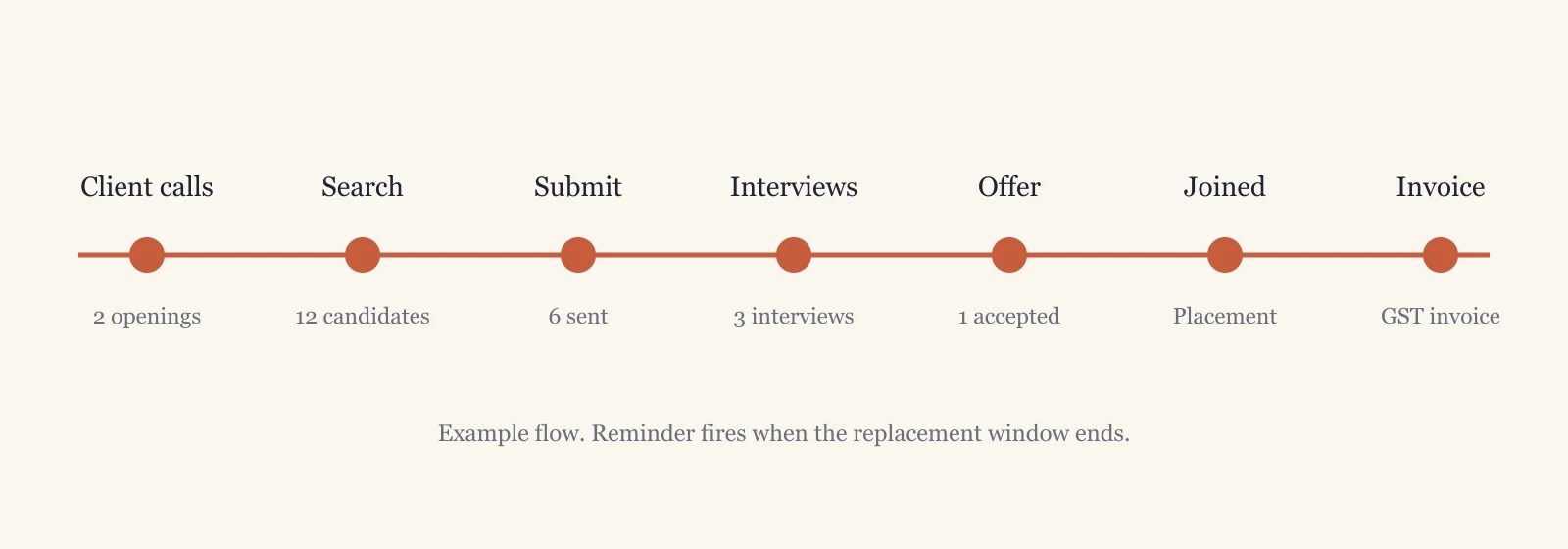
Worked example: one job order from call to invoice
This is an example, not a real client. It shows how one job moves through a recruitment CRM.
- The client calls. A company needs two Java developers. The account manager saves a job order with two openings and a deadline.
- Search. The recruiter searches the database and finds 12 matching candidates. She calls them and notes each reply.
- Submit. Six profiles go to the client. The CRM records each submission and blocks a repeat send.
- Interviews. The client picks three. The CRM sets the rounds and sends reminders to both sides.
- Offer. One candidate gets an offer and accepts. The record shows the joining date and CTC.
- Joined and invoiced. The candidate joins. The invoice is raised from the placement with GST.
- Replacement window. A reminder fires when the guarantee period ends.
Our service
How we build your own recruitment CRM
A CRM made around how your agency hires.
- We learn your hiring process. Permanent, contract or bulk hiring: we ask how each one runs. See our process.
- You sign off clickable screens. Our UI/UX design team draws the screens first, so you see your CRM before we build it.
- We build on our CRM base. A web application for the office, on Laravel, and a recruiter app for Android and iPhone made with Flutter. Read about our mobile app development.
- Your recruiters test it. We load your Excel of candidates and try real CVs and real jobs.
- We launch under your brand. Your name, your logo, your domain. We set it up on your own AWS account or server, or we host it for you.
- We support it. You get daily backups and an optional AMC. You also get the full source code.
We have built partner-facing CRMs before. See the real-estate CRM with a channel partner portal for the way we work.
See our work: a recruitment intelligence platform and our CRM development services.
Recruitment CRM development cost: what decides it
We send a written quote after one call. These points change the size of the job:
- How many recruiters and which roles use it
- Bulk hiring or senior hiring, since the screens differ
- Whether the CRM should read a CV and fill the fields
- Job-board feeds you want connected
- Candidate and client portals
- WhatsApp reminders
- How much old data to import from your sheets
- Where it is hosted: your server or ours
Whoever builds your recruitment CRM, make sure it can:
- Import your candidate Excel on day one
- Block the same candidate going to the same client twice
- Export all your data whenever you want
- Raise a GST invoice from a placement
- Show reports by recruiter and by client
- Give you the source code
FAQ
What is a recruitment CRM?
It is software that keeps candidates, client companies, job orders, interviews and placements in one place for a staffing agency.
Should a recruitment agency build its own CRM or buy a ready-made one?
Ready-made tools fit standard flows. If you run contract staffing, GST invoicing or local rules, build your own. Whichever you pick, check import, export and who owns the data. Reviews of ready-made tools help you compare, but they cannot tell you how your own process runs.
Which CRM fits a staffing agency?
The one that tracks clients, submissions and billing as well as candidates. A sales CRM does not do this. A staffing CRM built for you does it the way your agency works.
Can I start with a free recruitment CRM or Excel and move to my own CRM later?
Yes. Free plans limit users, records or export. When you outgrow them, we import your candidate Excel into the CRM we build.
Does my own recruitment CRM replace an ATS?
For an agency, yes, on the candidate and client side. It also tracks clients, submissions and billing. An ATS is built for one company hiring for itself.
Can a recruitment CRM import resumes from Naukri and other job boards?
Bulk CSV or Excel files and forwarded emails: yes. A direct feed depends on each site's rules, and we confirm this at the start.
How long does it take to build a recruitment CRM?
It depends on the scope. After one call we share a plan with dates for each part, starting with clickable screens.
Will I own the CRM and its source code?
Yes. It runs under your brand, your data stays with you, and we hand over the full source code.
Can recruiters use it on the phone?
Yes. We build an Android and iPhone app with calls, follow-ups and interview reminders.
Related guides
Written by
Prabhjot Kaur · Product Manager
Product Manager at PRS India. Turns what a client needs into a screen-by-screen plan for the app, and checks every release against that plan before it goes out.