Sell Furniture Online: Build Your Own Store and App
How to sell furniture online from your own store and app: sizes and boxes, freight, fitter visits, damage claims and one stock count.

Written by Babita Kumari, Business Developer
Reviewed by the PRS India software & mobile app development team
13 min read
Written from production. Our articles draw on products we run live and the client work behind them, and are revised as the systems they describe evolve.
Furniture is bulky, heavy and often made to order. A sofa does not fit in a courier bag. A bed comes in three boxes and needs a fitter. A dining table may take three weeks to make. Many furniture makers, showrooms and home decor brands start on marketplaces. Then they find that the delivery rules, damage claims and buyer list belong to someone else.
This guide answers how to sell furniture online from a store under your own brand. It covers the order of work, delivery and fitting, and damage claims. It also lists what the store needs on day one. We build ecommerce stores and apps for businesses in India. Here we show how we build your own furniture and home decor store and app.
Key takeaways
- Every item needs its size, weight and box count before you list it. Delivery cost and damage both depend on them.
- Delivery and fitting are part of the sale. The buyer should see the truck window and the fitter visit in one place.
- A damage claim with photos, sent within a set time, settles most disputes quickly.
- Your showroom, website, app and any marketplace should share one stock count and one order list.
Steps to sell furniture online, in the right order
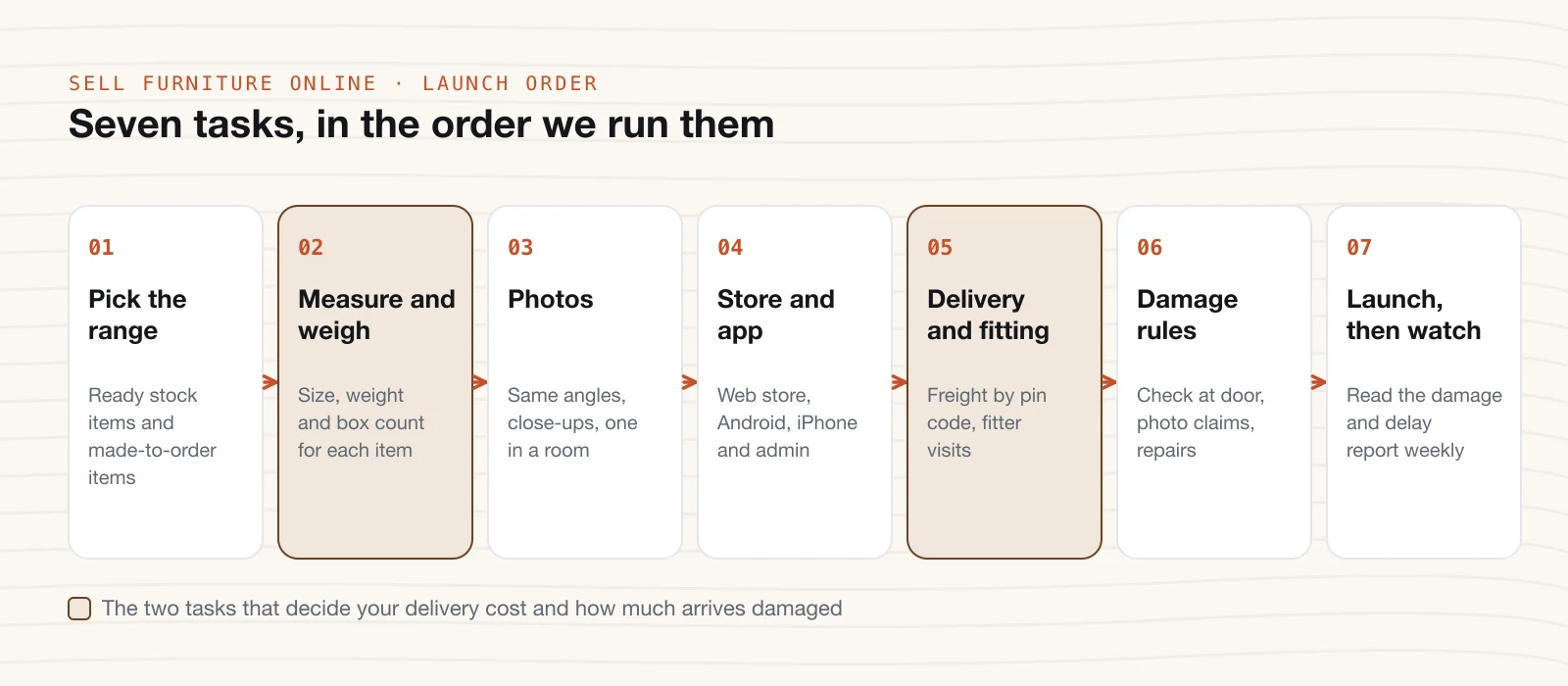
Many owners start with the website. In furniture, the website is task four. The first three tasks decide what each delivery costs and how often items arrive damaged. This is the order we follow with furniture businesses.
- Pick the range. Split it into ready stock and made-to-order items. Write down the time each made-to-order item takes in your workshop.
- Measure and weigh every item. Note width, depth, height, packed weight and the number of boxes. Check that each box fits through a normal door and lift.
- Shoot photos the same way. Front, side, back and close-ups of wood grain, joints and fabric. Add one photo of the item inside a real room.
- Build the store and app. A web store, an Android and iPhone app, and an admin panel for your team. We cover this below.
- Set up delivery and fitting. Freight charges by pin code and item size, delivery slots and fitter visits.
- Write your damage and return rules. The check at the door, the photo claim window, and when you repair, replace or refund.
- Launch, then watch. Each week, read the report of damage claims and late deliveries. Fix the packing or the partner behind each one.
Tax comes into step 5 as well. Most furniture falls under HSN chapter 94 for GST, and the code must print on your invoice. The GST portal covers registration and e-invoice rules. Ask your CA for the rate on each type of item.
Delivery, assembly and damage claims
For a furniture buyer, the order is not done when they pay. It is done when the bed stands in the room and nothing is scratched. So your store has to run three things after checkout: the truck, the fitter and the claim.
The truck
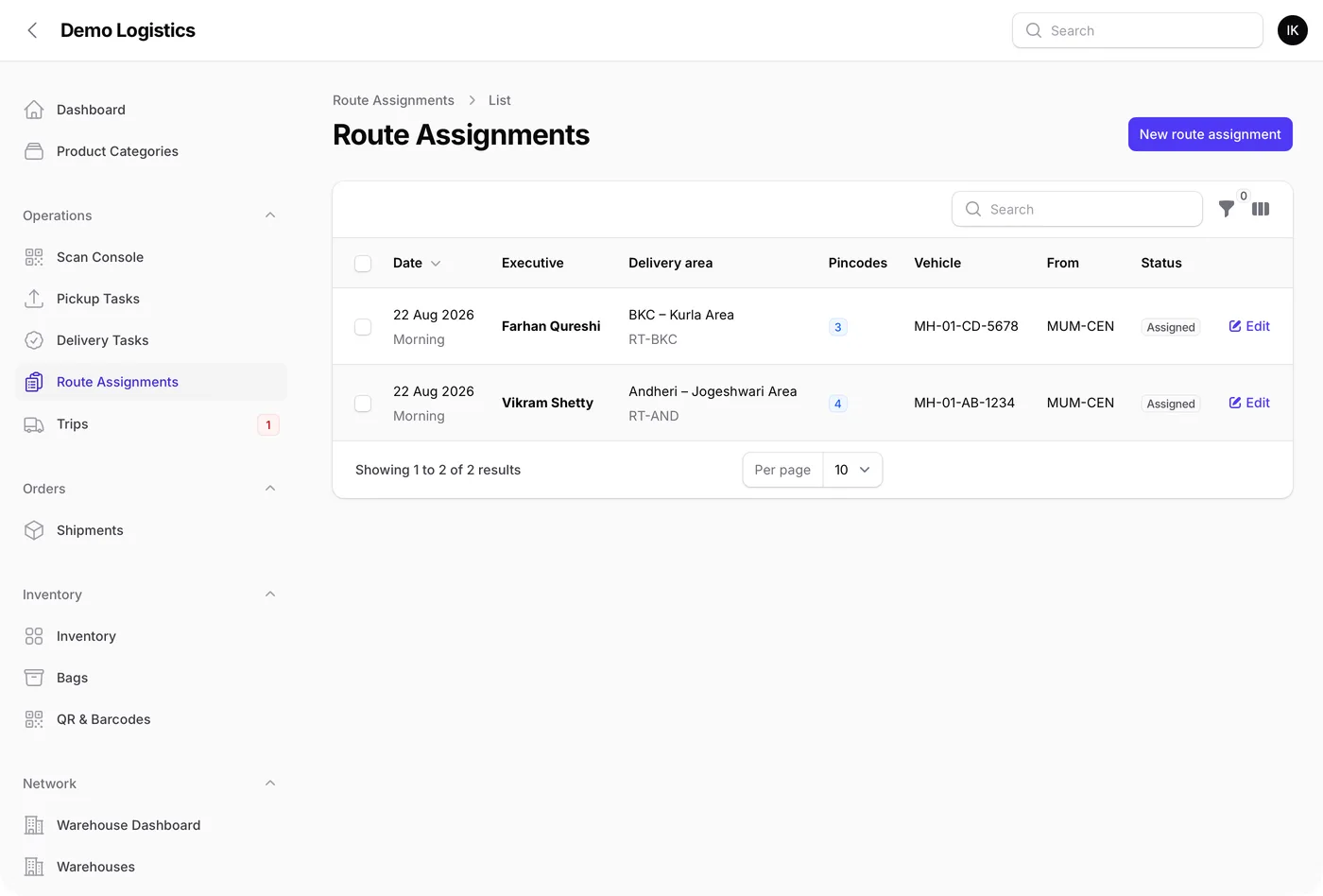
Large items move by truck or tempo, not by a parcel courier. Your store needs a list of delivery tasks per day, per truck and per area. The driver needs the address, the floor, whether there is a lift, and a phone number. When goods above a set value move by road, GST law asks for an e-way bill. The e-way bill system explains when you need one. We can link your store to it so the bill details come from the order.
The fitter
Beds, wardrobes and modular units need a fitter. The buyer should book the fitting slot when they order, or soon after. Your team should see each fitter's jobs for the day. When a wardrobe needs two people, the store blocks two fitters, not one.
The damage claim
Some items will arrive with a scratch or a broken leg. A clear claim flow keeps this calm. The buyer opens the order and picks the item and the damage type. They add photos and choose repair, replace or refund. A time limit, such as 48 hours from delivery, stops claims weeks later. Your team sees the photos, the delivery driver and the packing used. Over time, the claims report shows which item, box, or truck partner causes the most damage.
Marketplaces vs your own furniture and home decor store vs both
Marketplaces bring buyers who do not know your name yet. Your own store keeps the buyers who come back for the next room. Many furniture brands use both. We also build multi-vendor marketplaces, if you want other makers to sell on your site.
| What you care about | Marketplaces only | Your own store and app only | Both |
|---|---|---|---|
| First buyers | Buyers already search there | You bring them through search, ads and your showroom | Marketplaces bring them; your store keeps them |
| Delivery and fitting | Their partners and their rules, where offered | Your trucks, partners and fitters | Theirs on their orders, yours on yours |
| Damage claims | Settled under their policy | Settled under your policy | Two policies to follow |
| Made-to-order items | Depends on what the listing allows | Your lead times, shown on each page | Both |
| Buyer name and phone | Kept by the marketplace | Yours | Yours for store orders |
| Cost pattern | Fee on each sale, plus delivery charges | Build once, then hosting and support | Both patterns |
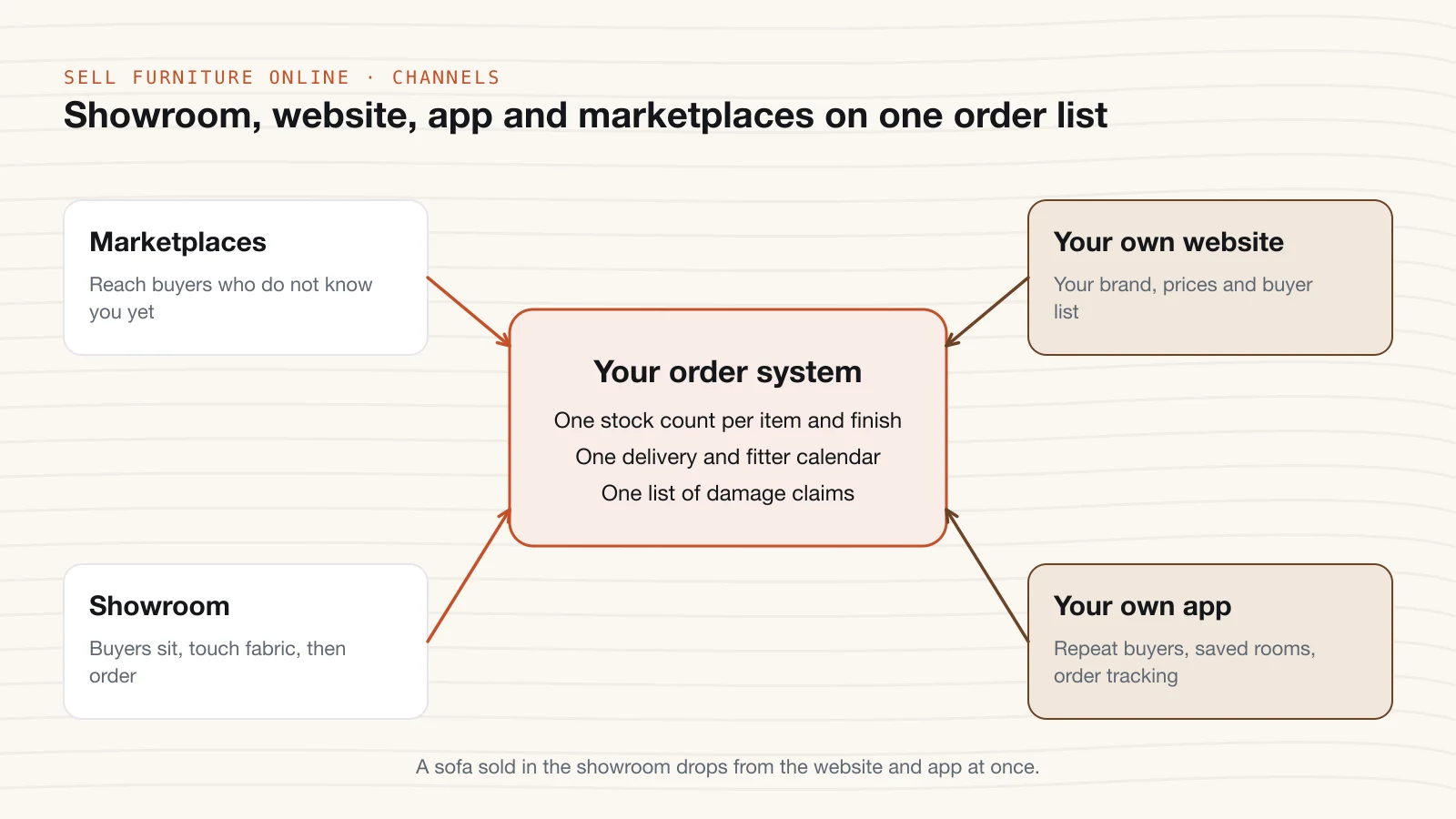
The weak point in the "both" route is stock. A sofa sells in your showroom, but the website still shows it. We build inventory management software that keeps one count across every place you sell.
What your own furniture and home decor store needs on day one
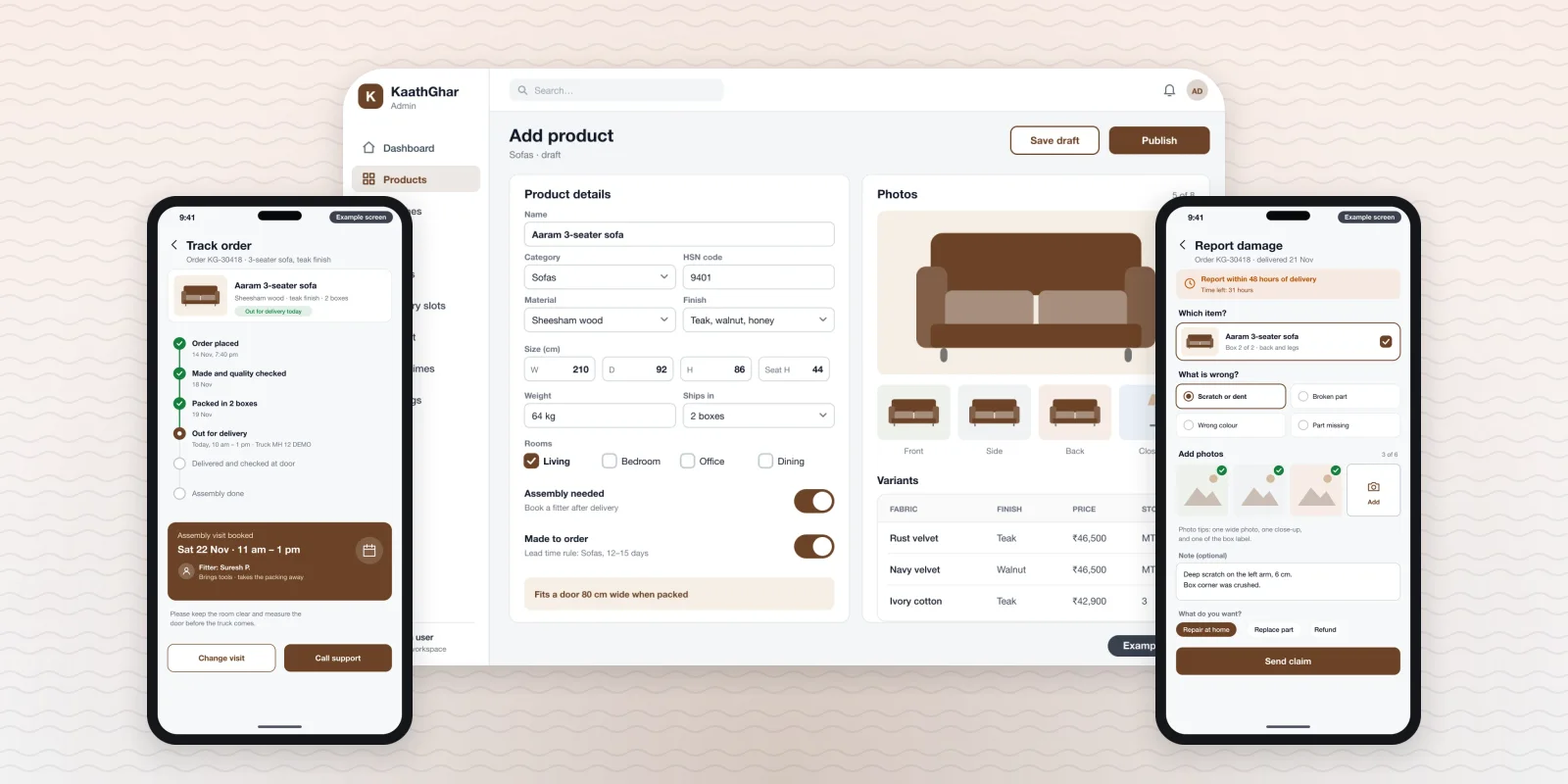
A general store template treats a sofa like a T-shirt. A furniture store needs screens for slow, bulky, high-value orders. These are the ones we build in before launch, on the web and in the Android and iPhone apps.
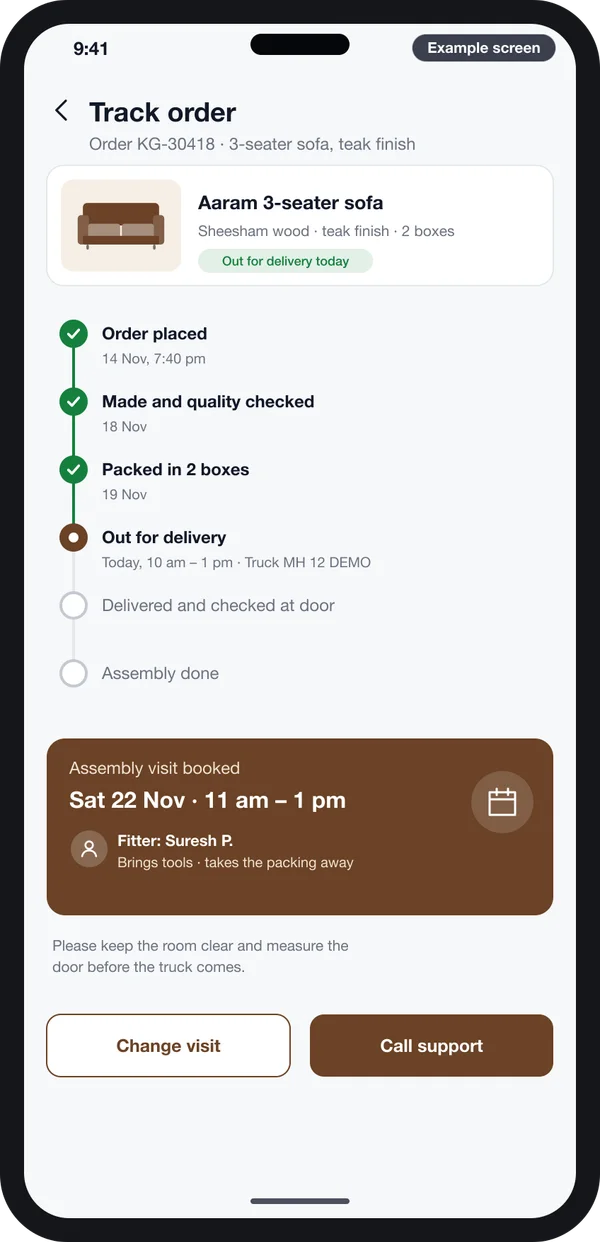
Order and fitting
The buyer sees each step, from the workshop to the truck, and the fitter visit time.
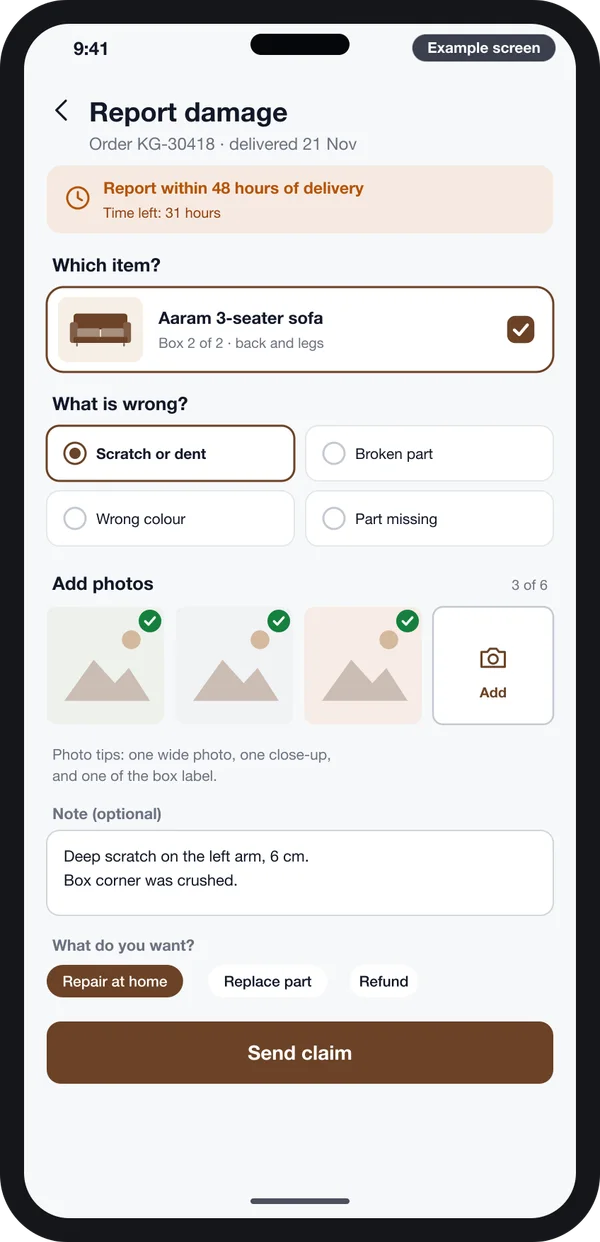
Damage claim
Item, damage type, photos and the fix the buyer wants, inside a 48-hour window.
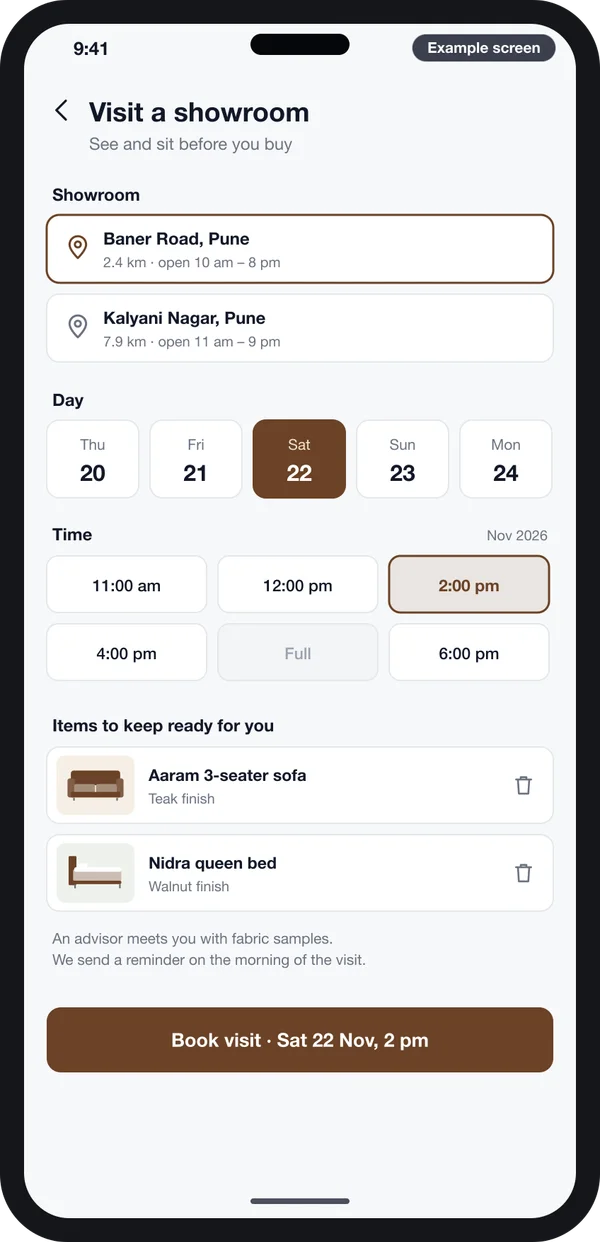
Showroom visit
The buyer picks a showroom, a day and a time, and lists the items to sit on.
Example screens we designed, demo data.
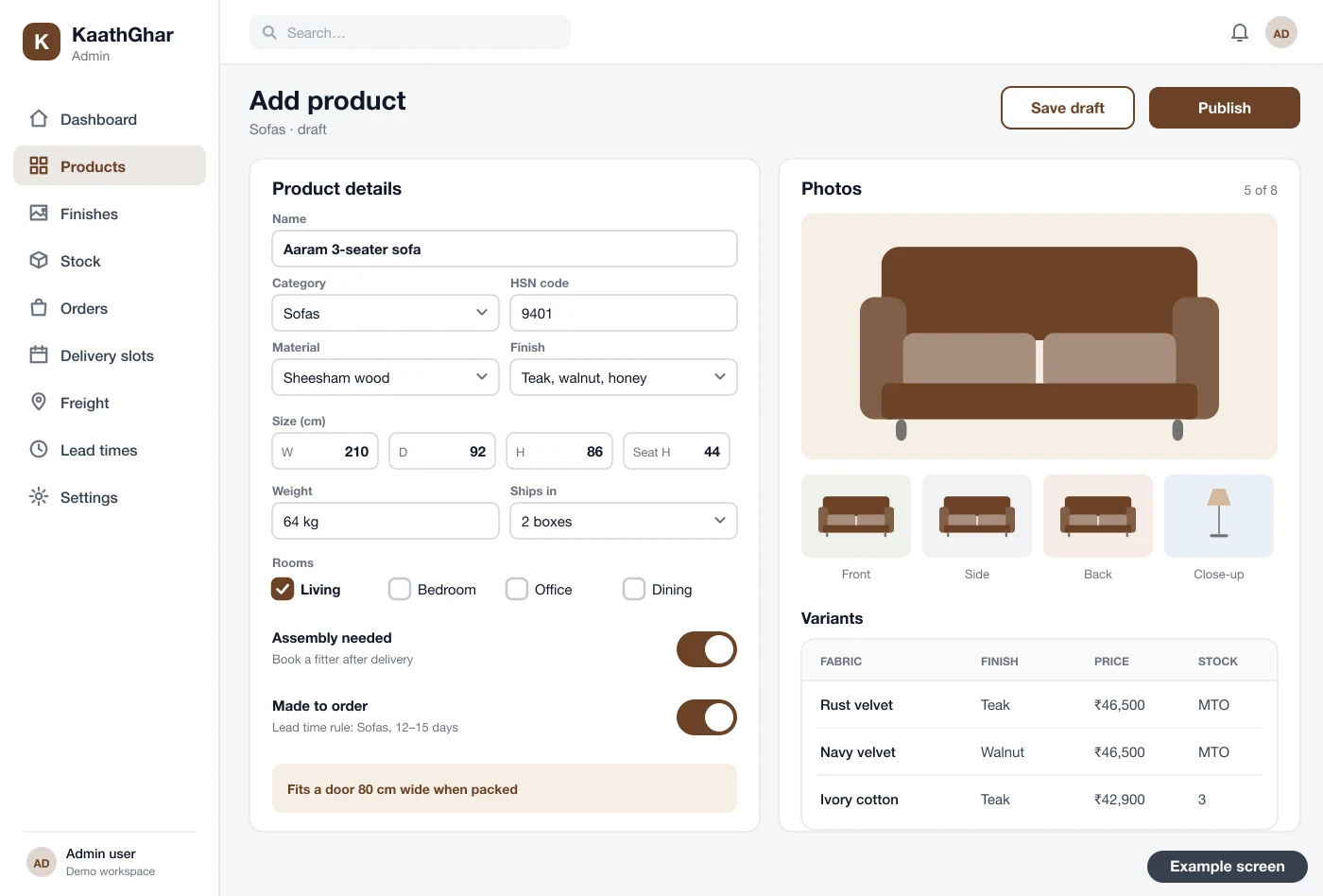
Behind these sits the admin panel. Your team adds each item once, with its size in centimetres, packed weight, box count and rooms. Two switches mark whether it needs assembly and whether it is made to order. The variants table then holds each fabric and finish with its own price and stock.
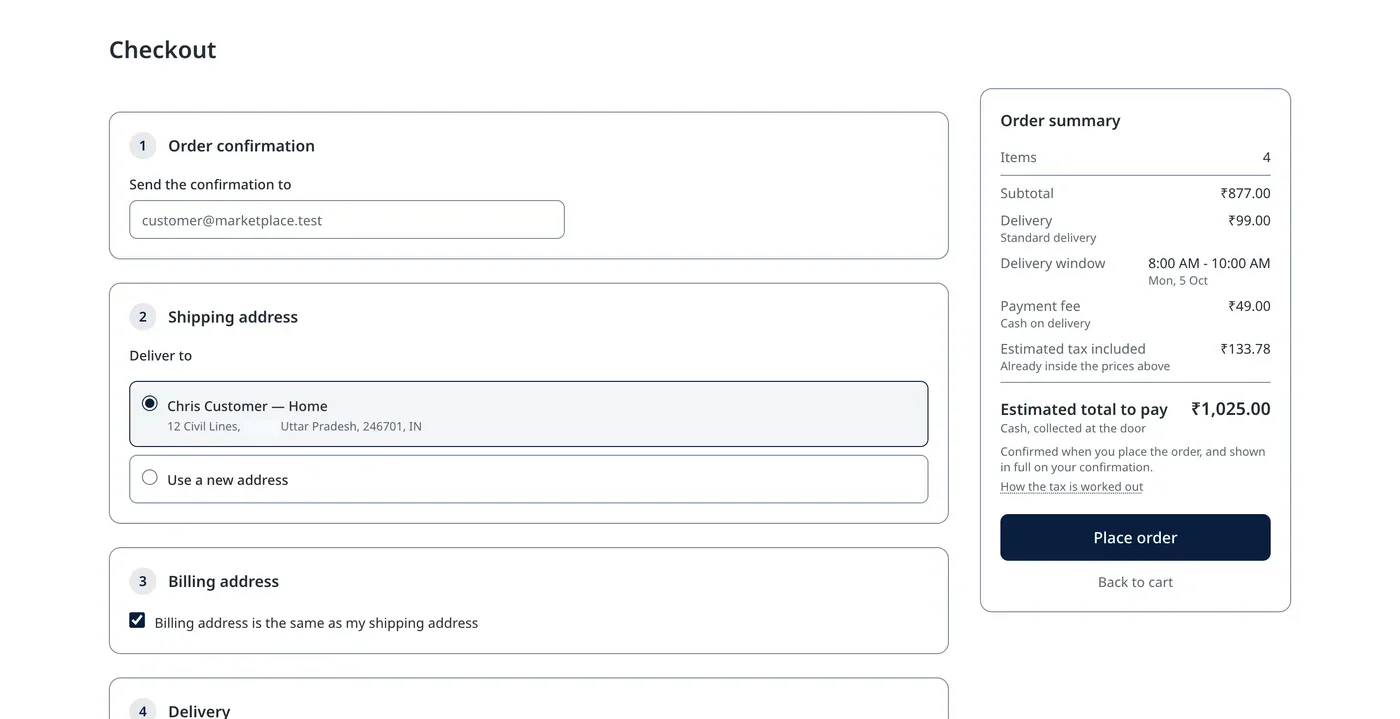
Checkout also changes for furniture. Before paying, the buyer should see the delivery charge for their pin code. They should also see the delivery window and payment choices. This checkout is from a store we built. For furniture, we add the freight charge and the fitting slot to the same page.
Two more things belong on day one. Google can show size, colour and price in search results. For that, your pages need product structured data, which we add to every item. And the pages should work for every buyer, including people who use screen readers. We follow the WCAG accessibility guidelines for contrast, labels and keyboard use.
Showroom plus online: one stock count, one order list
Most furniture buyers still want to sit on a sofa before paying for it. So a showroom and an online store help each other. The buyer looks online, visits the showroom, and may order later from the phone. Or they see a bed in the showroom and order a matching side table online.
This only works when both sides share one system. Here is what we connect:
- One stock count. The showroom billing counter and the website draw from the same numbers. A display piece can be marked "showroom only".
- One order list. An order taken on the showroom tablet shows in the same admin as a web order. The buyer can track both in the app.
- One buyer record. Visits, wish lists, fabric samples sent and past orders sit on one page. Your advisor sees them before the buyer walks in.
- Visit booking. The buyer books a showroom slot from the app. Your team gets a list of items to keep ready.
- One delivery calendar. Showroom orders and web orders share the same trucks and fitters, so slots are never booked twice.
Our work in retail and ecommerce software covers stores, billing, stock and delivery. For a business close to this one, see a website we built for an interior design studio. It groups the studio's work and leads to a booking.
Worked example: a furniture maker going online, week by week
This is an example to show the order of work. The business and the item counts are made up. Real time depends on your range, your data and your delivery set-up.
- Week 1: range and measures. A Jodhpur maker of sheesham furniture picks 60 items. Their team records size, packed weight and box count for each one.
- Week 2: screens. We share clickable screens of the store, product page, tracking and damage claim. The owner changes the room filters and the claim wording.
- Weeks 3 to 5: build. We change our ready store into theirs. Lead times, freight by pin code, fitter slots and the claims report go in.
- Week 5: products. We import their Excel sheet of items and variants. Their team adds photos from five fixed angles.
- Week 6: test. Staff place orders, book fitters and raise test claims with photos. A truck partner runs two real deliveries. We fix what they find.
- Week 7: launch. The store and apps go live under their brand. The showroom tablet starts taking orders into the same admin.
- Weeks 8 onward: watch. The claims report shows most scratches on one table. The owner adds corner guards to that box.
Our service
How we build your own furniture and home decor store and app
We start from our ready-made store and change it to your items, your delivery and your rules. You own what we build.
- Understand your process. We map how you work: workshop times, showroom, trucks, fitters and claim rules.
- Design clickable screens. You click through example screens and change them before we write code.
- Build the store and apps. A web store, Android and iPhone apps from one Flutter code base, and an admin for your team.
- Move your products. We import your items, sizes, variants and stock from Excel or your old store.
- Test with your team. Your staff run real orders, deliveries, fittings and claims. We fix what they find.
- Launch and support. The store goes live under your brand, on your server or ours. Optional support covers changes as you grow.
You can also see other products we have built for stores, delivery and field teams.
Cost to build a furniture and home decor store: what decides it
Each furniture business sells and delivers in its own way, so we do not publish a fixed price. These things decide the cost:
- How many items, fabrics and finishes you sell, and how many are made to order.
- Whether you need Android and iPhone apps, or only a web store.
- How you deliver: your own trucks, partners or both, and how freight is charged.
- Whether you book fitters, and how many teams and cities you cover.
- Whether the showroom bills from the same system.
- Which payment, GST and e-way bill links you need.
- Whether you also sell to dealers or interior designers at trade prices.
- How much product data we import, and its shape.
| Monthly store plan | Your own furniture store, built for you | |
|---|---|---|
| Start | Quick to open | A few weeks to build |
| Cost over years | Pay every month, plus add-on apps | One build cost, then optional support |
| Freight by size, fitter slots, damage claims | Through add-on apps, where available | Built in, the way you work |
| Your brand on the apps | Web only, or an extra cost for an app | Web, Android and iPhone |
| Data and source code | Stay with the vendor | Yours |
Still comparing hosted builders? Read our guides on Shopify alternatives in India and ecommerce CMS options for 2026. Then share your range and delivery set-up with us. We send a written quote after one call.
Mistakes to avoid when you start selling furniture and home decor online
These cost furniture sellers the most in the first months.
- One flat delivery fee for a lamp and a wardrobe. You lose money on every big item.
- No box sizes on file. The truck partner quotes wrong and the item does not fit the lift.
- Promising "ships in 3 days" on made-to-order items. Late orders turn into cancellations.
- No photo check at the door. A damage claim a week later is hard to settle.
- Separate stock for the showroom and the website. The same display piece sells twice.
- Skipping the quality rules. The government has issued BIS quality control orders for many products, including some furniture. Check which apply to your items with your lawyer or the BIS office.
Do you also sell to dealers and interior designers? Ask us about a white-label store with B2B wholesale. Contact us to talk it through.
FAQs
How long does it take to build?
It depends on your range, apps and delivery rules. A web store with apps from our ready base often takes a few weeks. We share a plan with dates after one call.
Do I own the source code, data and brand?
Yes. Your name and logo are on the store and apps. We hand over the full source code. Your data stays on your server or one we host for you.
Can you move my products from Shopify/WooCommerce or Excel?
Yes. We import items, variants, sizes, stock, photos and buyers from Shopify, WooCommerce or an Excel sheet. We then check sizes, weights and box counts with your team.
Can it work on Android, iPhone and web?
Yes. We build the web store and the Android and iPhone apps. They share one admin, one stock count and one order list.
How is customer and payment data kept safe?
Payments go through a payment gateway, so card details do not sit on your server. We add role-based staff access, HTTPS and daily backups.
Do I need GST to sell furniture and home decor online?
Marketplaces usually ask for a GSTIN before you list. For your own store, it depends on your turnover and where you sell. Check the GST portal and ask your CA.
Can I sell on marketplaces and my own store together?
Yes. We connect your store to one stock count, so an item sold anywhere drops from every channel. Marketplace orders can flow into the same admin.
Related guides
Written by
Babita Kumari · Business Developer
Business Developer at PRS India. Talks with business owners about the app or software they want, and helps them work out the scope, cost and launch steps before any code is written.