How to Sell Shoes Online: Footwear Store App Development
The steps to sell shoes online from your own store and app: size charts, size exchanges, reverse pickup and one stock count by size.

Written from production. Our articles draw on products we run live and the client work behind them, and are revised as the systems they describe evolve.
Shoes are hard to sell online for one reason: the buyer cannot try them on. A pair that fits in one brand pinches in another. So shoes often come back for size. Many shoe brands, footwear stores and small makers start on marketplaces. Then they find that the fees, the return rules and the buyer list all belong to someone else.
This guide is for owners who want to sell shoes online from their own store as well. It covers the steps in the right order and the size returns that eat profit. It also covers what your store needs on day one. We build ecommerce stores and apps for brands in India. Here we show how we would build your own footwear store under your brand.
Key takeaways
- Most shoe returns are about size and fit. Size charts, fit notes and a size exchange screen cut them.
- Every size and width is its own stock item. Your store must count stock at that level.
- A size exchange that keeps the sale is worth more than a refund. Build it before launch.
- Your own store gives you the buyer list, your brand and your own return rules. Marketplaces give you reach.
Steps to sell shoes online, in the right order
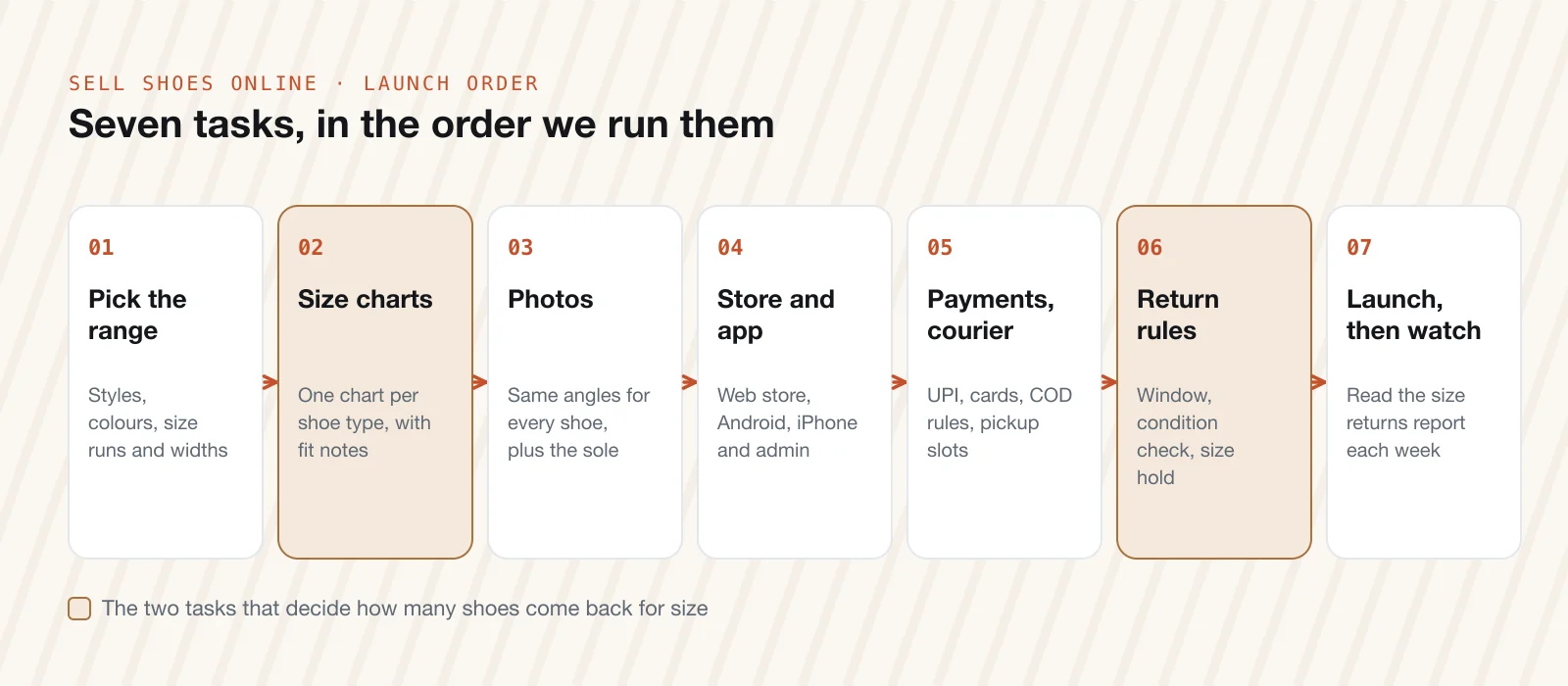
People ask how to start an online footwear business as if the website is step one. It is step four. The work before it decides how many pairs come back. Here is the order we follow with shoe brands.
- Pick your range. List the styles, colours, size runs and widths you will sell. Start with what you can restock in every size.
- Fix your size charts. Make one chart per shoe type, with UK, EU and US sizes and foot length. Write a fit note for each shoe.
- Shoot photos the same way. Use the same angles for every shoe: side, front, back, sole and from above. Add close-ups of stitching and lining.
- Build the store and app. A web store, an Android and iPhone app, and an admin panel for your team. We cover this part below.
- Set up payments and courier. UPI, cards and wallets, cash on delivery rules by pincode, and pickup slots for returns.
- Write your return and exchange rules. The number of days, the condition check at pickup, and whether you hold the new size.
- Launch, then watch the size returns. Read the report each week. Fix the fit note or chart for any shoe that keeps coming back.
Tax comes into step 5. Shoes fall under HSN chapter 64 for GST. Your store should keep the HSN code on each product and print it on the invoice. The GST portal has registration and e-invoice details. Check the rate for each type of shoe with your CA.
Which sizes come back and why
Size returns are not random. They follow a pattern, and your store can show it to you. These are the reasons we see shoe owners deal with most.
- The sizes you sell most. The middle of the size run sells most, so it also comes back most in count.
- Half sizes. A buyer who is a UK 8.5 picks 8 or 9 and guesses. One of them is often wrong.
- Brand to brand. A UK 8 in one brand is a UK 8.5 in another. Buyers trust their old brand's size.
- Width. Wide feet in a narrow shoe feel "too small", even when the length is right.
- Shoe type. Formal shoes and boots fit tighter. Sandals and slides come back less for size.
- Kids' shoes. Parents buy a size up for growth, then find the shoe slips at the heel.
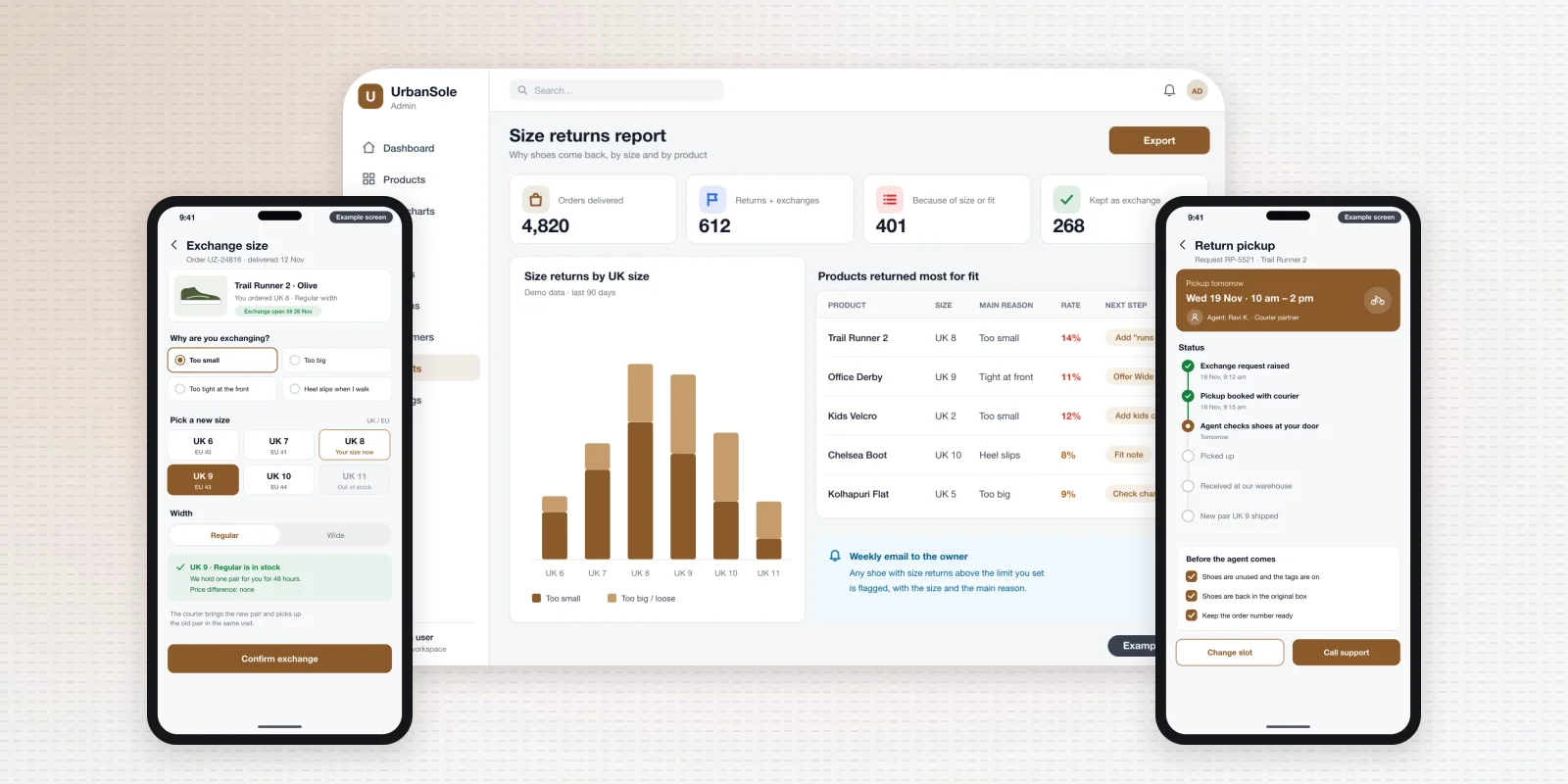
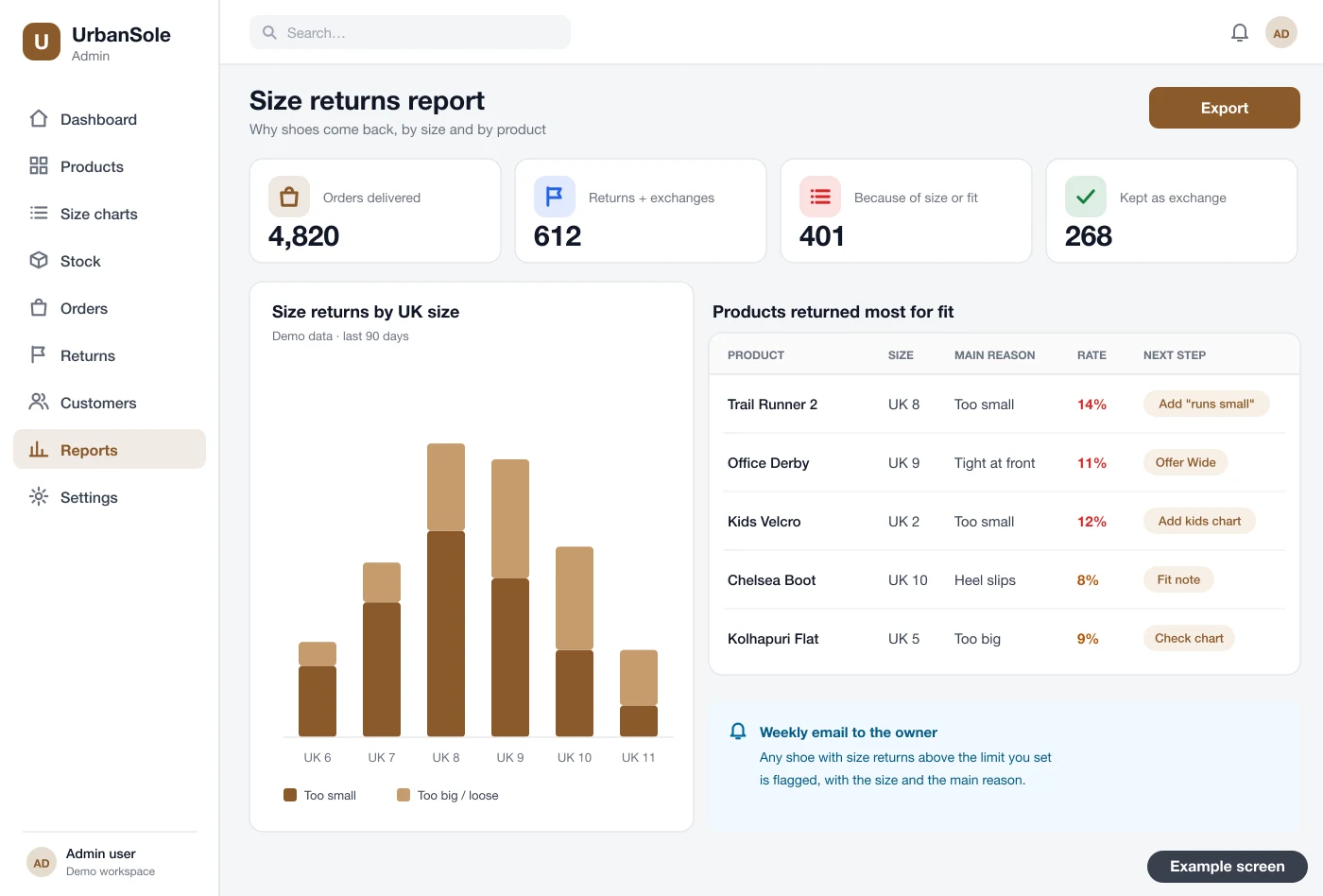
Your own store can record the reason for each return. The buyer picks it from a list: too small, too big, tight at the front, heel slips. A report then shows which shoe and which size comes back. You change the fit note, add a wide fit, or fix the chart. That is how size returns fall over time.
Marketplaces vs your own footwear store vs both
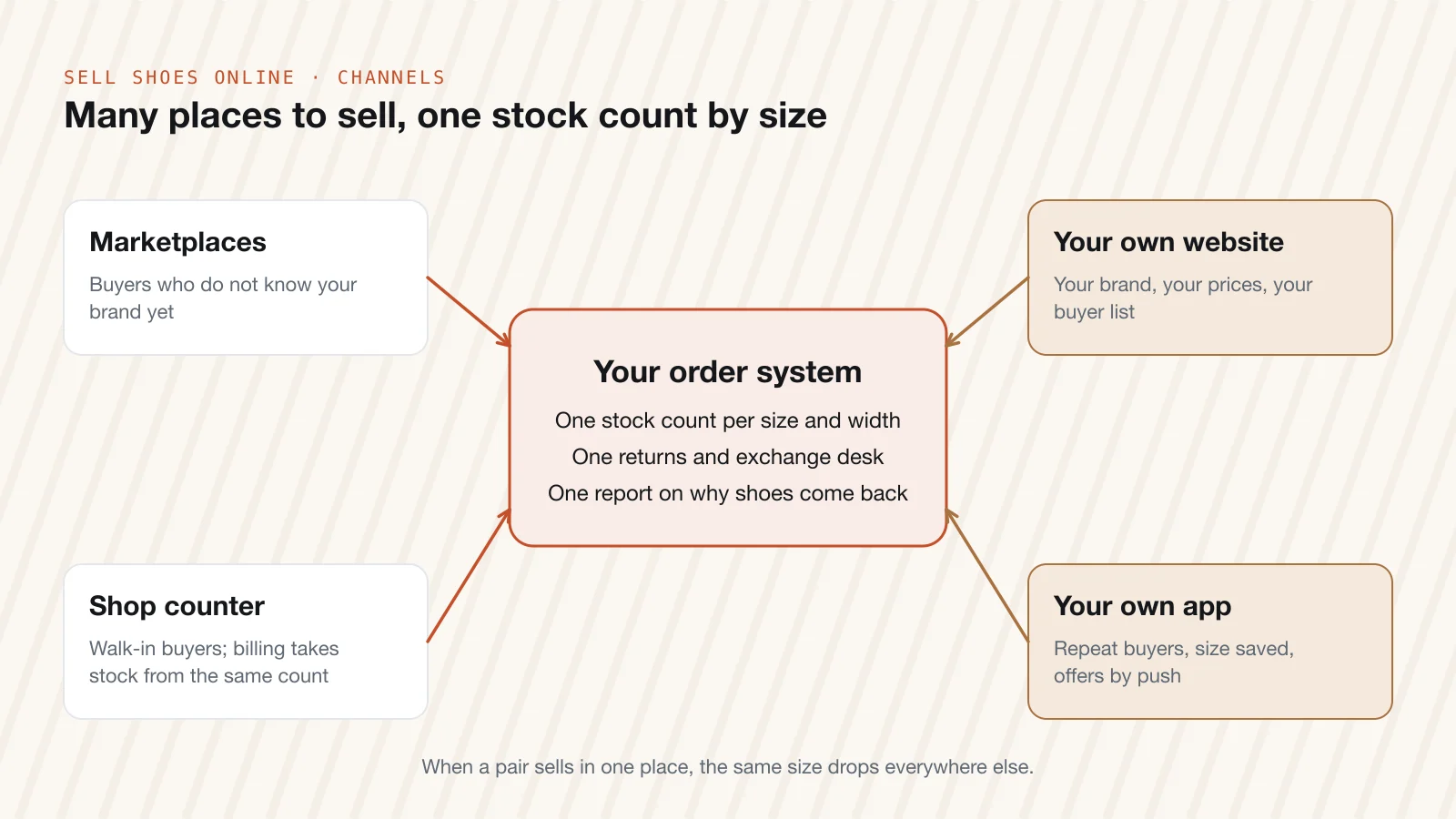
Marketplaces bring buyers who have never heard of you. Your own store keeps the buyers who come back. Most shoe brands that grow use both. The table shows what each route suits. We also build multi-vendor marketplaces, if you plan to let other shoe sellers list on your site.
| What you care about | Marketplaces only | Your own store and app only | Both |
|---|---|---|---|
| Getting first buyers | Buyers already search there | You bring them through ads, search and social | Marketplaces bring them; your store keeps them |
| Buyer name and phone | Kept by the marketplace | Yours | Yours for store orders |
| Return and exchange rules | Set by the marketplace | Set by you | Theirs on their orders, yours on yours |
| Your brand on the page | Inside their page design | Your design on every page | Both |
| Cost pattern | Fee on each sale, plus shipping charges | Build once, then hosting and support | Both patterns |
| Stock count | One panel per marketplace | One admin | Needs one stock count that feeds every channel |
The last row is where many shoe sellers get stuck. A pair sells on a marketplace, but your website still shows it. With shoes the problem is bigger, because each size is separate stock. We build inventory management software that keeps one count for every channel.
What your own footwear store needs on day one
A general store template treats a shoe like a T-shirt with sizes. A footwear store needs more. We build these screens into your store before launch. They work on the web and in the Android and iPhone apps.
Checkout
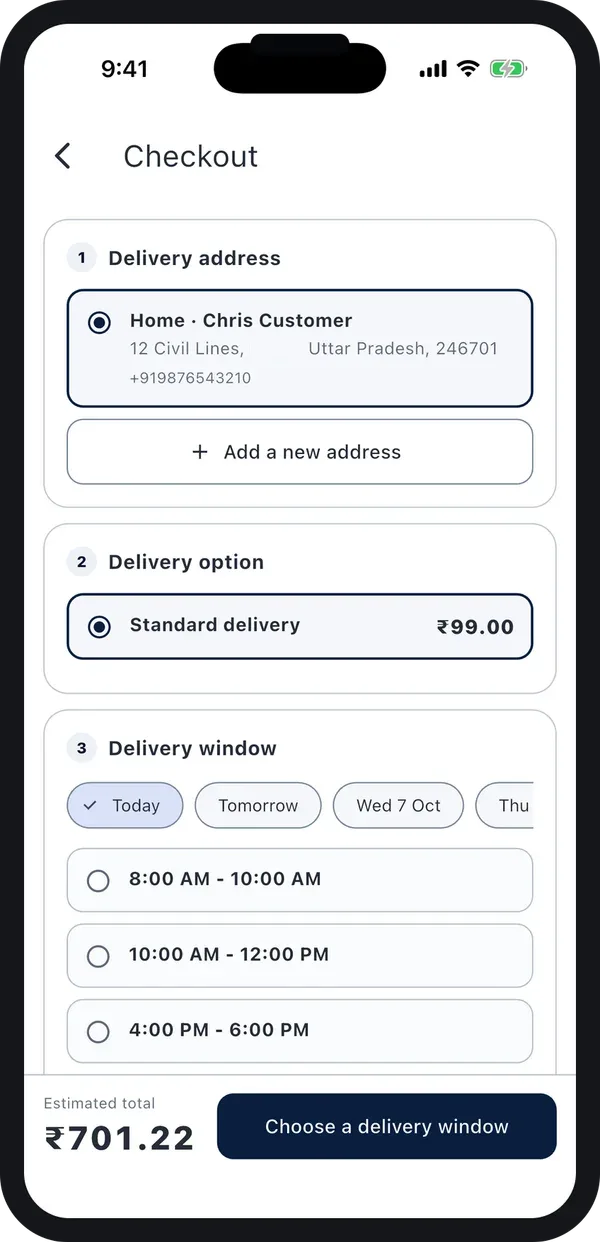
Address, delivery option and slot. For shoes we add cash on delivery rules by pincode.
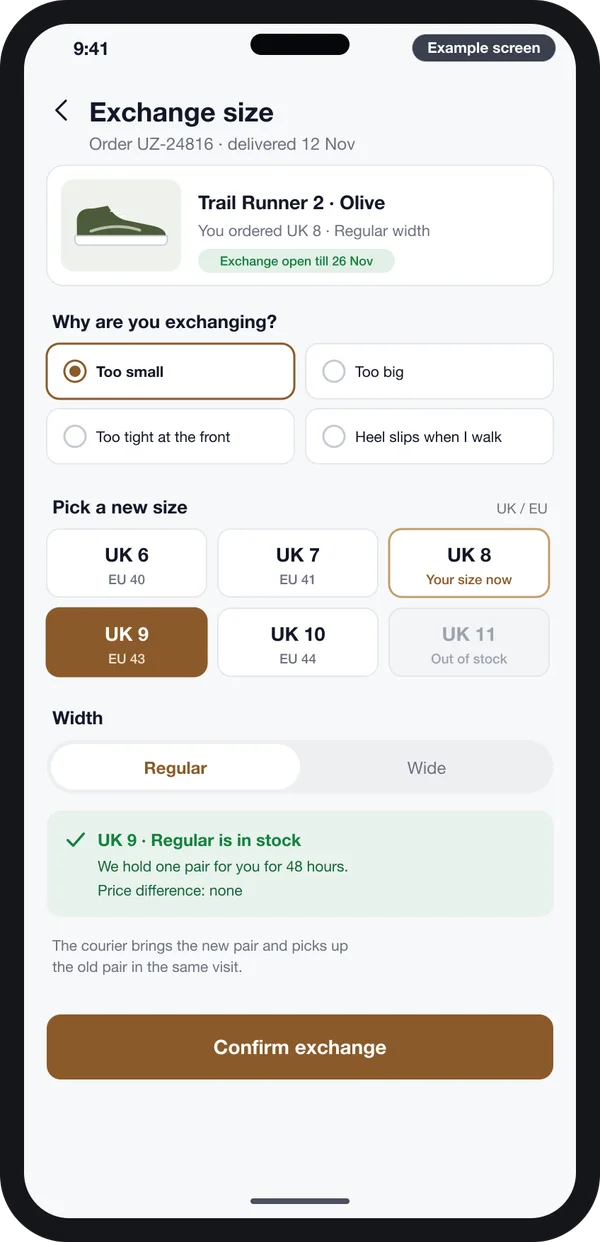
Size exchange
The buyer picks a reason and a new size. The store checks stock and holds the pair.
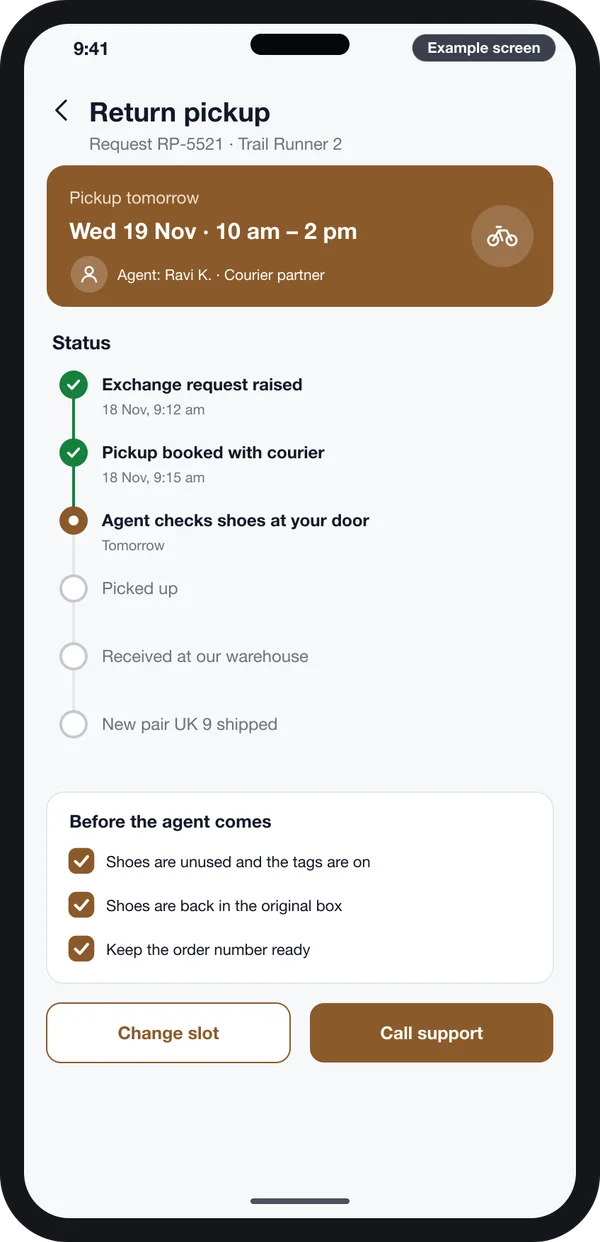
Pickup tracking
The buyer sees the pickup slot, each status step and what to keep ready.
The checkout is from a store app we built. The other two are example screens.
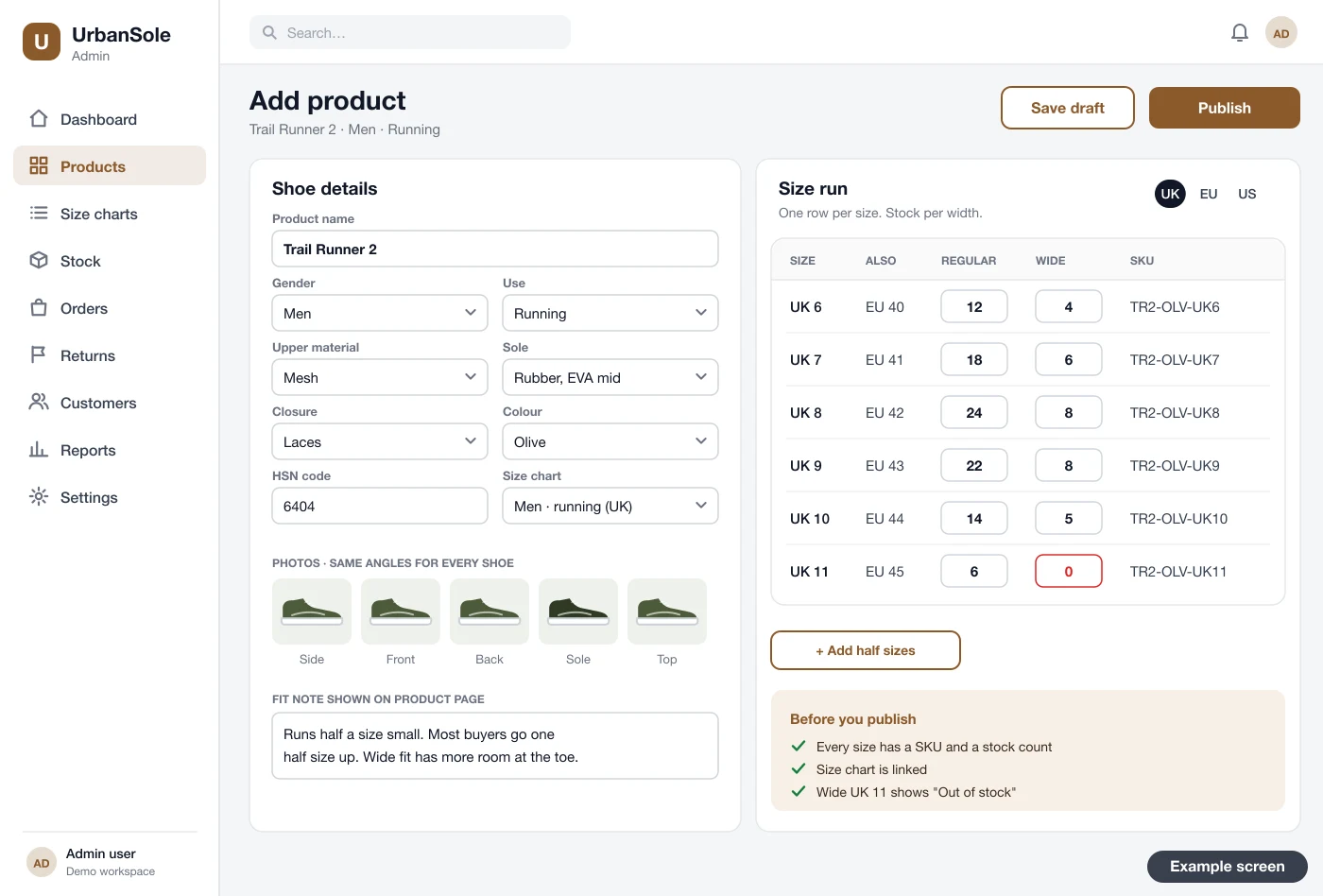
Behind these screens sits the admin panel. Your team adds each shoe once, with one row per size. Each row holds the stock for regular and wide fit and its own SKU. The size chart and fit note link to the product. They show on the page and in the exchange screen.
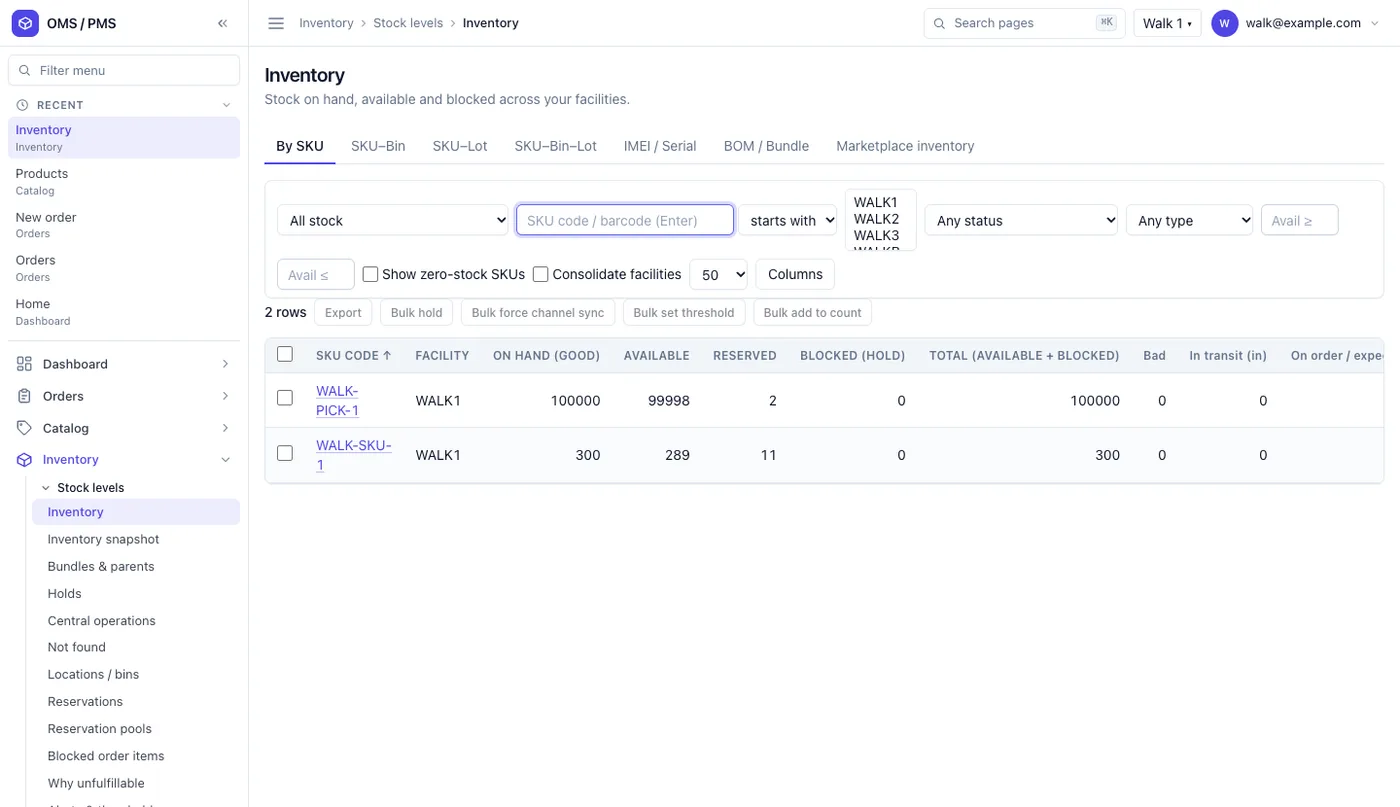
Stock then shows at SKU level, for each warehouse or shop. This screen is from an order and stock system we built. For a shoe store, each SKU is one style, colour, size and width.
Two more things belong on day one. First, product data that Google can read. Google's guide to product structured data lists fields such as size, colour and price. We add these to every shoe page. Second, pages that work for every buyer, including those who use screen readers. We follow the WCAG accessibility guidelines for contrast, labels and keyboard use.
Reverse pickup and exchanges
A refund ends the sale. An exchange keeps it. So in a shoe store, the exchange flow matters as much as checkout. Here is how we build it, step by step.
- The buyer asks for an exchange. They open the order, pick a reason and a new size and width.
- The store checks stock. If the new size is in stock, it holds one pair for a set time, such as 48 hours.
- The store books a pickup. It sends the request to your courier and shows the slot to the buyer.
- The agent checks the shoes. Unused, tags on, in the box. The rules you set show on the agent's list.
- The new pair ships. For prepaid orders you can ship it first, or in the same visit. For cash orders you may wait for the pickup.
- If the size is gone, the store offers store credit or a refund, as your rules say.
You set every rule in the admin. That covers the number of days, exchanges per order and final-sale items. The rules then show on the product page, so buyers see them before they pay. The courier part connects to the courier you already use. We have built courier and pickup software before, so the pickup status flows back into the order.
Worked example: a shoe brand going online, week by week
This is an example to show the order of work. The brand and numbers of styles are made up. Time depends on your range and your data.
- Week 1: range and charts. A Jaipur maker of leather sandals and casual shoes picks 40 styles. They write one size chart for men and one for women.
- Week 2: screens. We show clickable screens of the store, the size picker and the exchange flow. The owner changes the filters and the fit note wording.
- Weeks 3 to 5: build. We change our ready store into theirs. Size runs, widths, exchange rules and the size returns report go in.
- Week 5: products. We import their Excel sheet of styles and stock. Their team shoots photos at the same five angles.
- Week 6: test. Their staff place orders, ask for exchanges and book pickups with the courier. We fix what they find.
- Week 7: launch. The store and apps go live under their brand. The marketplace listings keep running alongside.
- Weeks 8 onward: watch. The owner reads the size returns report each week. Two sandals get a "runs large" note.
For a nearby field, see how we built an ethnic-wear store. It has filters and cash on delivery.
Our service
How we build your own footwear store and app
We start from our ready-made store and change it to your shoes, your sizes and your rules. You own what we build.
- Understand your business. We map how you work: your range, size charts, channels, courier and return rules.
- Design the screens. You click through example screens and change them before we write code.
- Build the store and apps. A web store, Android and iPhone apps from one Flutter code base, and an admin for your team.
- Move your products. We import your styles, sizes and stock from Excel or your old store.
- Test with your team. Your staff run real orders, exchanges and pickups. We fix what they find.
- Launch and support. The store goes live under your brand, on your server or ours. Optional support covers changes as you grow.
Our work in retail and ecommerce software covers stores, apps, stock systems and courier links. You can see other products we have built, too.
Cost to build a footwear store: what decides it
Every shoe business is different, so we do not publish a fixed price. These things decide the cost:
- How many styles, size systems and widths you sell.
- Whether you need Android and iPhone apps, or only a web store.
- How detailed your exchange and return rules are.
- Which courier, payment and billing systems we connect.
- Whether you sell on marketplaces too, and need one stock count for all.
- Whether you also sell wholesale to shops, with their own prices.
- How much product data we import, and in what shape it is.
- Where it is hosted: your server or ours.
| Monthly store plan | Your own footwear store, built for you | |
|---|---|---|
| Start | Quick to open | A few weeks to build |
| Cost over years | Pay every month, plus add-on apps | One build cost, then optional support |
| Size runs, widths and size exchange | Through add-on apps, if available | Built in, the way you work |
| Your brand on the apps | Web only, or extra cost for an app | Web, Android and iPhone |
| Data and source code | Stay with the vendor | Yours |
Comparing hosted builders first? Read our guides on Shopify alternatives in India and ecommerce CMS options for 2026. Then share your range and channels with us, and we will send a written quote after one call.
Mistakes to avoid when you start selling footwear online
These cost shoe sellers the most in the first months.
- Listing a style before every size has stock. Buyers who find their size missing leave.
- Using one size chart for all shoes. Sneakers, formals and sandals fit differently.
- No fit note. One line, such as "runs half a size small", stops many returns.
- Refunds only, with no size exchange. You lose a sale you could have kept.
- Separate stock counts for each channel. The same pair sells twice.
- Skipping the quality rules. The government has issued BIS quality control orders that cover many kinds of footwear. Check which apply to your shoes with your lawyer or the BIS office.
Selling to shops as well as buyers? Ask us about a white-label store with B2B wholesale. Contact us to talk it through.
FAQs
How long does it take to build?
It depends on your range, apps and data import. A web store with apps from our ready base often takes a few weeks. We give you a plan with dates after one call.
Do I own the source code, data and brand?
Yes. Your name and logo are on the store and apps. We hand over the full source code. Your data stays on your server or one we host for you.
Can you move my products from Shopify/WooCommerce or Excel?
Yes. We import styles, sizes, stock, photos and buyers from Shopify, WooCommerce or an Excel sheet. We check the size runs and SKUs after the import.
Can it work on Android, iPhone and web?
Yes. We build the web store and the Android and iPhone apps. They share one admin, one stock count and one order list.
How is customer and payment data kept safe?
Payments go through a payment gateway, so card details do not sit on your server. We add role-based staff access, HTTPS and daily backups.
Do I need GST to sell footwear online?
Marketplaces usually ask for a GSTIN before you list. For your own store, it depends on your turnover and where you sell. Check the GST portal and ask your CA.
Can I sell on marketplaces and my own store together?
Yes. We connect your store to one stock count, so a pair sold anywhere drops from every channel. Marketplace orders can flow into the same admin.
Related guides
Written by
Aditi
Building software at PRS India.