Mobile-App
Practice management mobile application | Clinic Application
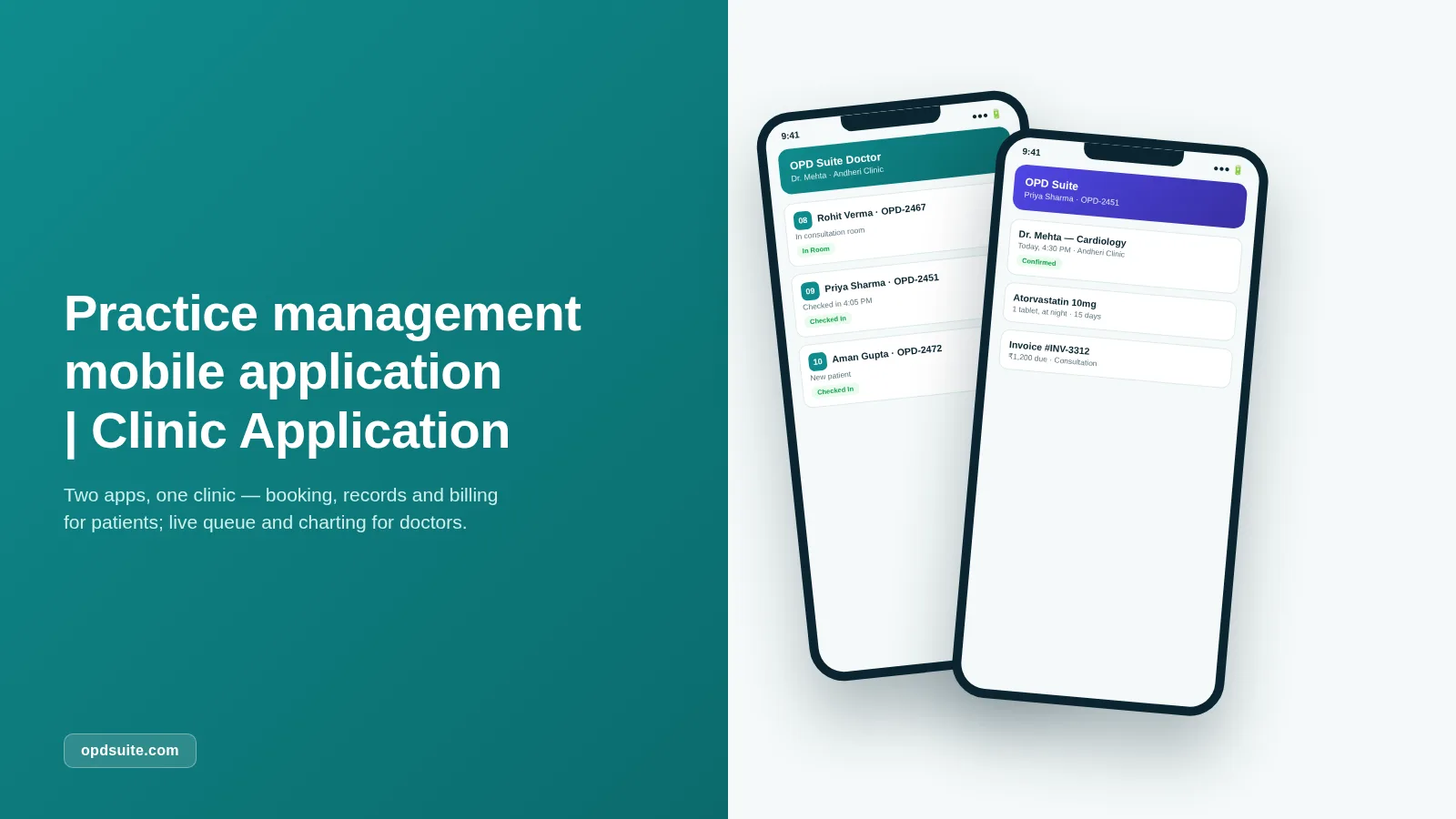
OPD Suite comes with two apps made for the job. A patient app is for booking, records and billing. A doctor app is for the live queue, patient charts and e-prescribing.

Written by PRS Admin
Reviewed by the PRS India software & mobile app development team
Updated on 10 min read
Written from production. Our articles draw on products we run live and the client work behind them, and are revised as the systems they describe evolve.
Patients now expect to book a doctor the way they book everything else: from a phone, in under a minute. Front-desk calls and walk-in queues feel like a hassle, not service.
Doctors face the opposite problem. The queue, the patient's history and the prescription pad all live at one desktop, in one room. When a doctor goes on a ward round or to a second clinic, that access is gone.
A practice management mobile application fixes both sides at once. OPD Suite comes with two apps made for the job, one for patients and one for doctors. So the clinic runs from a phone, not just a front desk.
Two apps, one clinic
OPD Suite's tagline is simple: run the clinic, not the paperwork. The two mobile apps are where that promise becomes something patients and doctors hold in their hands every day.
The patient app, also called OPD Suite, puts everything about a patient's clinic in one place. As the product puts it: "Book with the right doctor, keep every prescription and report in one place, and know exactly what's owed."
No more calling to book, going in for reports, or waiting for a reminder about bills.
The doctor app, OPD Suite Doctor, is built for a doctor who moves around: between the OPD, the ward and a second clinic, without losing the queue or the chart.
Live check-in updates, full patient history and e-prescribing go with the doctor. They do not stay stuck on the front-desk screen.
Both apps connect to the same OPD Suite backend used by reception and billing, so nothing needs to be typed again or matched between a phone and a desktop.
Consider a typical Saturday afternoon. A patient books a 4:30 PM slot with a cardiologist from the app during a lunch break — no call, no hold music.
The doctor, in the middle of a round at a second location, checks the live queue from a phone and sees the patient has already checked in.
Between two consultations, the doctor opens the chart, reviews the last visit's notes, and writes a fresh prescription before the patient even sits down.
After the visit, the patient gets the prescription and the invoice in the same app used to book — and pays it before leaving the building. Nobody made a phone call, handled a paper file, or visited a separate billing counter.
The patient app — book, track, pay
The patient app is built around the moments a patient needs a clinic on their phone: booking a visit, checking a record, reading a prescription, or paying a bill.
Multi-doctor, multi-location booking. Search every doctor and every clinic location on the account, filter by speciality, and book the next free slot without a phone call.
Medical records access. Full visit history and clinical reports stay in the app. No more searching old paper folders before a follow-up.
Prescription viewing. Every prescription a doctor writes shows up in the app at once, with dosage and duration, ready to show a pharmacist or look at again.
Bill tracking and payment. Every invoice (consultation, lab, pharmacy) is listed with a clear paid or due status, and patients can pay straight from the app.
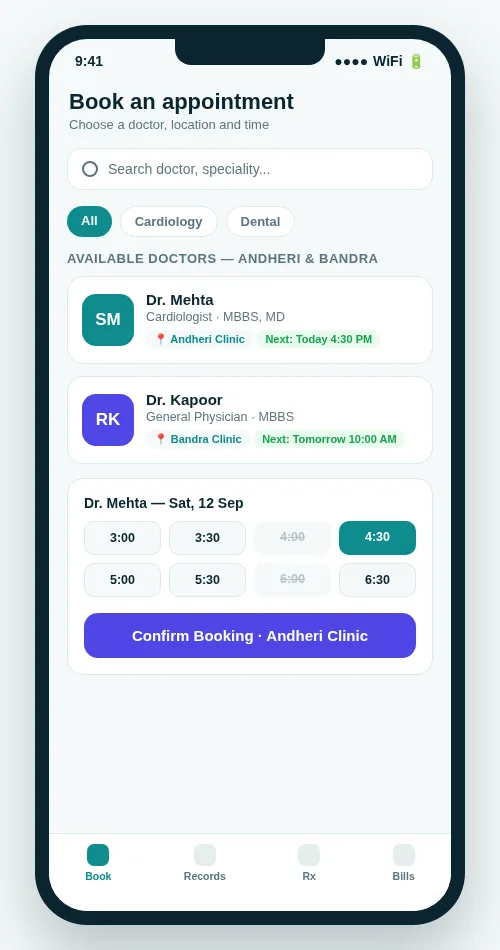 Book across doctors and locations, and see open slots before you commit.
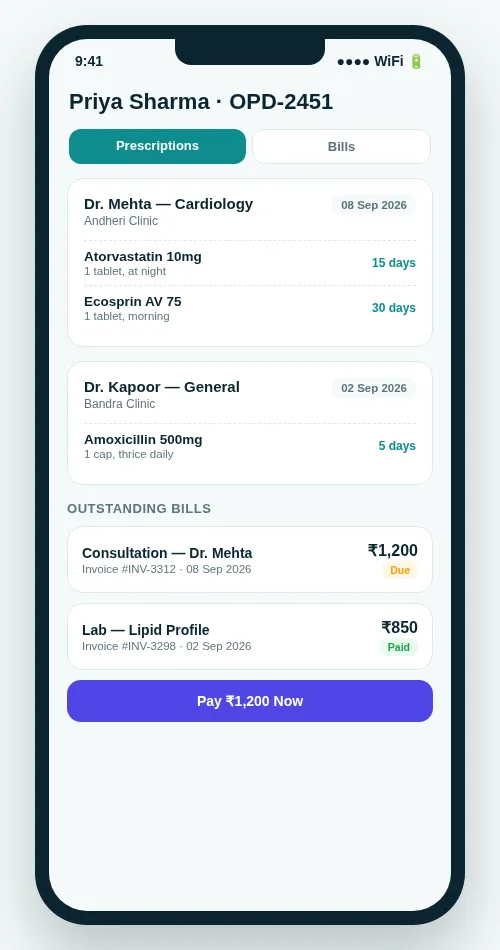 Prescriptions and bills in one screen, with a direct pay option.
None of this replaces the web-based patient portal. It works alongside it. The app is the easy way for patients who would rather tap than log in from a browser.
For a practice with many locations, this matters more than it sounds. A patient who usually visits the Andheri clinic can just as easily book the Bandra branch from the same app. The login and the record are the same, and neither front desk needs a call to check for a free slot.
The doctor app — the clinic in your pocket
OPD Suite Doctor is built for the minutes between patients: checking who's next, opening a chart, and finishing a consultation before walking into the next room.
Live queue management. Live patient check-in updates mean a doctor always knows who has arrived, who's waiting, and who's already in the room, without calling the front desk.
Patient chart on the go. Full history, vitals and past visits are available from a phone, in a ward, in a second clinic, or between locations.
Consultation documentation. Notes are saved against the visit as the consultation happens, not written from memory later at a desktop.
E-prescribing from the phone. A prescription can be written and signed between patients. It reaches the patient's own app straight away, with dosage and duration.
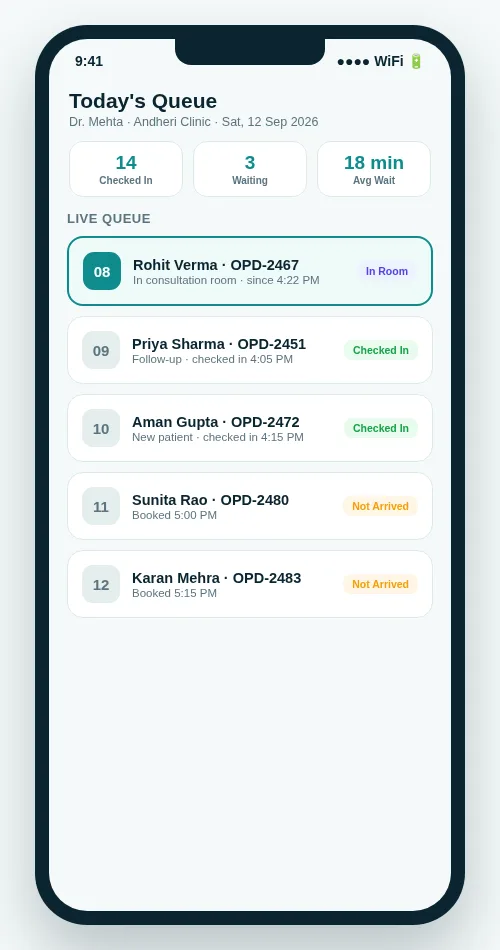 The live queue — who's checked in, who's waiting, who's in the room.
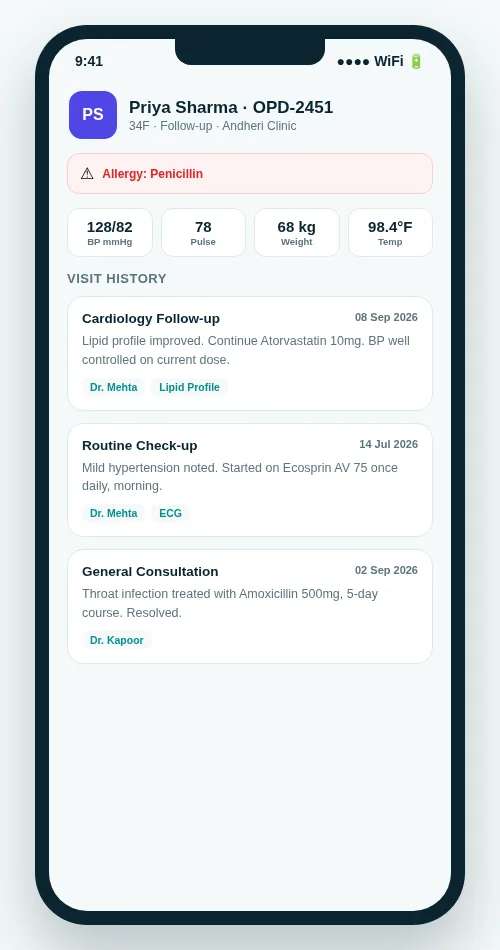 Vitals, allergy flags and visit history, available away from the desk.
E-prescribing gets its own screen for a reason. A prescription written between two patients still needs proper dosage and duration, not a scribble on a pad.
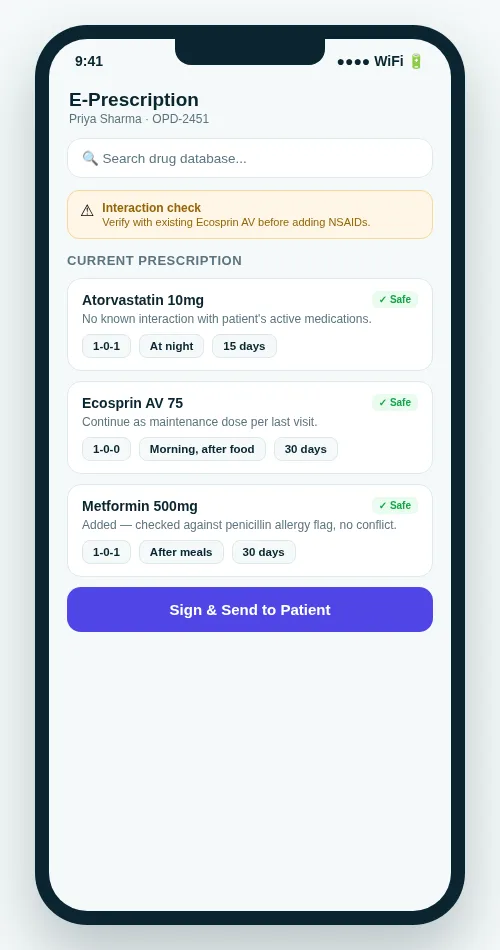 E-prescribing from the doctor app, right before signing.
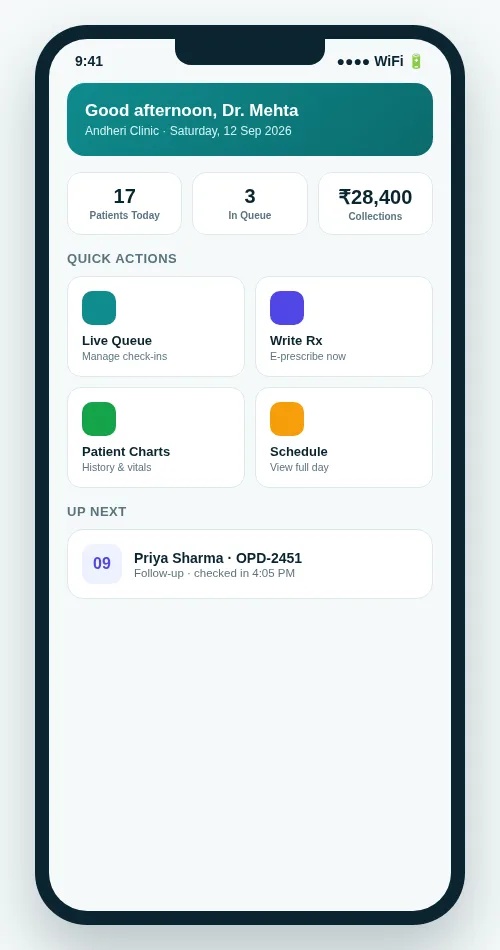 A doctor's day at a glance — patients, queue and collections.
Like the patient app, this is optional. Every one of these actions is also available from the web-based doctor console. The app just keeps them within reach when a doctor isn't sitting at a desktop.
For doctors who split time between a hospital ward and a private clinic, or between two clinic branches, that difference is the whole point. The queue and the chart follow the doctor, not the desk.
Download and availability
Here's where things stand today:
Android — available now. Both apps come as a direct APK download for Android 7.0 and above. They are not yet on the Play Store. That listing is in progress.
iOS — coming soon. Both apps are built and are waiting for TestFlight and App Store setup. Clinics that want early access on iPhone can contact OPD Suite directly.
Plan access. Mobile app access is included in the Multi-speciality plan. On the Starter or Clinic plans, it's available as an add-on.
No app required. Every feature in both apps also works on the web. The mobile apps are an easy extra, not a must for running your clinic on OPD Suite.
Full pricing for all three plans — Starter, Clinic and Multi-speciality — is on the OPD Suite pricing page, along with the 3-month free trial that applies to every tier.
Patient app, doctor app and web: what each one does
Both apps work with the same clinic record. This table shows who uses what. For a wider view of clinic software, read our guide to must-have clinic software features.
| Task | Patient app | Doctor app | Web panels |
|---|---|---|---|
| Book a visit across doctors and locations | Yes | Not its job | Yes |
| See the live queue | Own queue number | Yes | Yes |
| Open the patient chart and vitals | Own history only | Yes | Yes |
| Write and send an e-prescription | Not its job | Yes | Yes |
| View own prescriptions and visit history | Yes | Not its job | Yes |
| See bills and pay | Yes | Not its job | Yes |
| Works without installing anything | Needs the app | Needs the app | Yes |
A day with both apps: a worked example
Say a clinic has two branches and two doctors. Here is one day, step by step.
A patient opens the patient app in the evening. She picks a doctor, sees the open slots at the nearer branch, and books one. Nobody at the front desk makes a call.
Next morning she checks in. The doctor sees her in the live queue on the doctor app, even while he is in the ward.
He opens her chart on his phone, sees her history and vitals, and saves the notes during the visit.
He writes the e-prescription between patients. It shows up in her app at once.
Later she sees the bill in the same app as due, and pays from there.
The front desk handled none of these steps by phone. Staff could keep helping the patients in front of them.
What drives the cost of a clinic mobile app
Clinic apps are usually priced in one of three ways. You can build your own app for a one-time cost. You can buy a software plan every month. Or you can use a product that bundles the apps into a plan. OPD Suite uses the plan way, so you do not pay to build anything.
The plan you pick. Mobile app access is included in the Multi-speciality plan. On the Starter or Clinic plans, it is an add-on.
Patients pay nothing. The patient app is free to download and use. Only the clinic pays for OPD Suite.
No store step on Android yet. Both apps come as a direct APK download, so there is no Play Store listing to wait for.
The web works without apps. Every feature also runs in a browser, so you can start on the web and add the apps later.
For current rates, see the OPD Suite pricing page.
FAQ
Is the OPD Suite mobile app free to use?
App access is included in the Multi-speciality plan. On the Starter and Clinic plans, it's available as an add-on. See pricing for current rates and the 3-month free trial.
Is there an iPhone app?
Yes, it's built. Both the patient and doctor apps are waiting for TestFlight and App Store setup. Contact OPD Suite for early access before the public release.
Do I have to use the app, or can I run the clinic from a browser?
The app is optional. Every feature (booking, records, prescriptions, billing, the doctor queue and charting) is also available from the web-based panels.
Can a doctor use the app across more than one clinic location?
Yes. Both the patient and doctor apps work across every location on the account. So practices with many branches see one connected queue and one connected patient record, not a separate one for each branch.
How do I get the Android app right now?
It's a direct APK download for Android 7.0 and above, because the Play Store listing is still in progress. Visit the OPD Suite mobile app page for the current download link.
Can patients pay their bills in the app?
Yes. Every invoice shows a paid or due status. Patients can pay straight from the app.
Is the patient app free for patients?
Yes. Patients can download and use the app at no cost. Only the clinic pays for OPD Suite.
Does the doctor app warn about drug interactions?
No. OPD Suite does not check drug interactions. The doctor app lets a doctor write and send the prescription, and the doctor decides what is safe.
See it on your own phone
A clinic that runs from a phone — for patients booking a visit and doctors managing a queue — is not a future upgrade. On Android, it's available today on OPD Suite.
Get the OPD Suite mobile apps or start your 3-month free trial at opdsuite.com.
Related reading: the top clinic management software compared, must-have clinic software features, managing a clinic online and patient engagement apps. Building your own? See our healthcare software and mobile app development work, or the Sanjeevan Health case study.
Have questions about this? Write to us at admin@prsindia.in.
Related guides
Written by
PRS Admin
Building software at PRS India.