Mobile-App
10 Must-Have Features for Clinic Management Software
A simple checklist to judge any clinic software. These 10 features show the difference between a real system and a fancy spreadsheet.

Written from production. Our articles draw on products we run live and the client work behind them, and are revised as the systems they describe evolve.
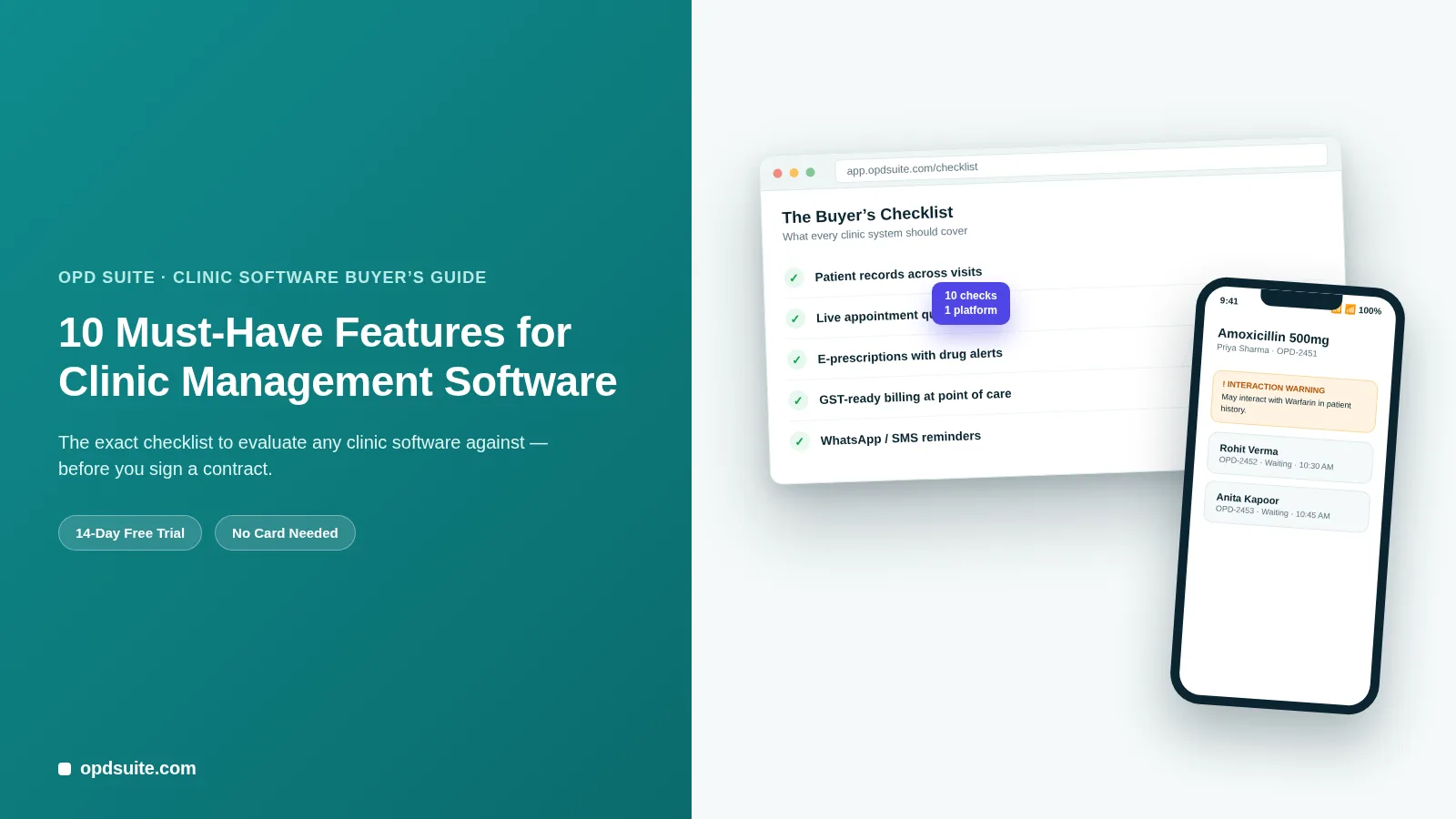
Every clinic software vendor promises the same thing: "run your whole clinic in one app." Most of them can't back it up.
The real test isn't the demo call. It's what happens six months in — when your front desk is juggling tools that don't talk to each other, and doctors are still writing on paper because the "e-prescription module" turned out to be a text box.
This is a buyer's checklist, and one thing you should know: OPD Suite, the example we use throughout, is our own product.
Below are 10 features any clinic management software must have to really replace your paperwork, not just move it onto a screen.
We'll show how OPD Suite implements each one, but the checklist works regardless of which vendor you're evaluating.
Why feature-shopping the wrong way costs you later
Clinic software is hard to leave once you start. Once patient data, billing history and staff habits are tied to one system, moving out is costly and disruptive.
Feature lists leave things out. "Billing" might mean a GST-compliant invoice system, or it might only mean a spreadsheet download.
Demos show only the easy path. A 20-minute walkthrough never shows what happens when a lab result must join a consultation note three weeks later.
Modules added later are usually poor. Teleconsultation or WhatsApp reminders added on later are usually clumsier and cost more than features built into the main product.
Use the 10 items below to ask better questions before you sign anything.
1. Patient records that follow the patient, not the visit
A lot of "clinic software" still treats every visit as a fresh start. That's the single biggest tell of a system that won't scale with you.
One record per patient, not per visit — vitals, history, prescriptions and lab results should all sit under one patient ID for every appointment.
Searchable visit history — a doctor should see "viral fever in June, routine checkup in August" in two seconds, not by opening three files.
Works the same across locations — if a patient visits your second branch, the record must be there too.
How OPD Suite does it: the Patient Records module keeps one running chart per patient. Vitals, visit history and current prescriptions are on one screen, shared across every location on the account.
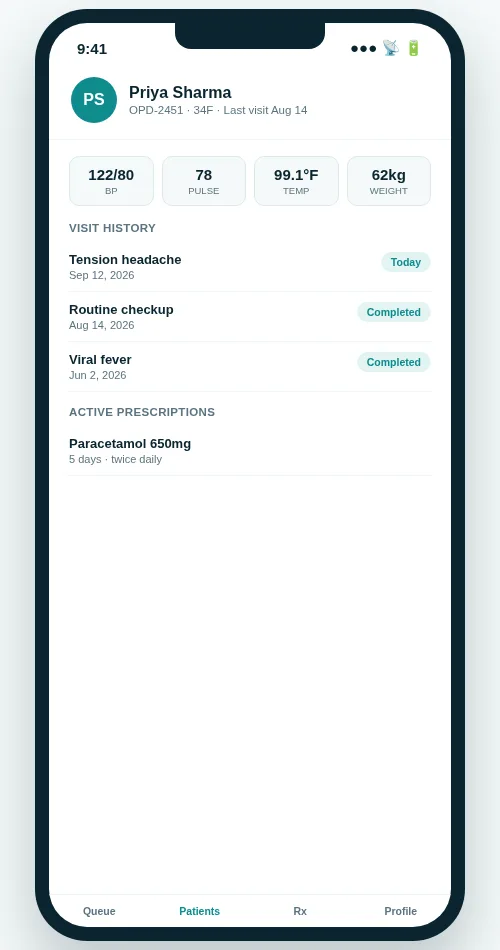 One running patient record across visits, not a new file every time.
2. Appointment scheduling with a live queue, not just a calendar
Booking a slot is the easy 20% of managing appointments. The hard part is what happens in the waiting room.
Real-time queue status — front desk, doctor and patient should all see who's waiting, who's with the doctor, and who's done.
Wait-time visibility — an average-wait number that changes through the day, not a fixed "please wait" sign.
No double-booking across doctors or rooms — very important the moment you have more than one doctor or location.
How OPD Suite does it: the Appointments & Queue module shows booked, waiting and completed counts live. Each patient has a status that any staff member can update from the front desk.
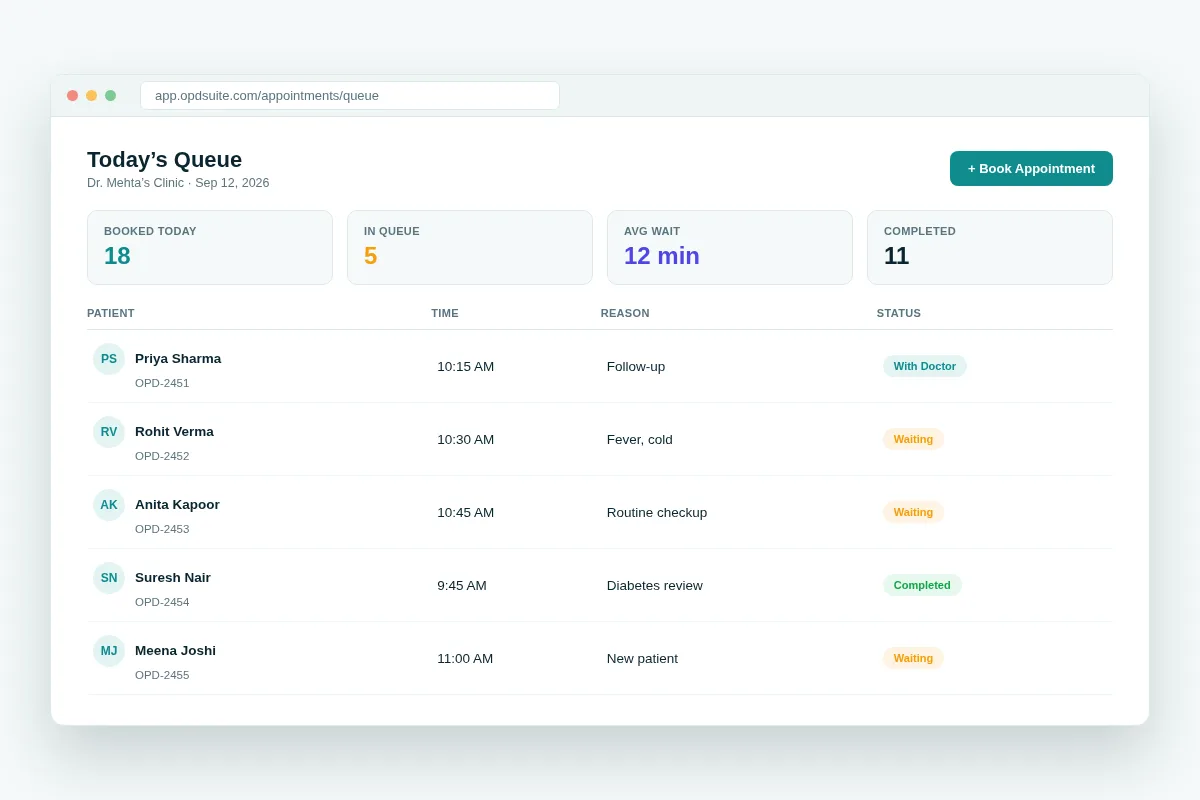 A live queue view, not just a fixed appointment calendar.
3. E-prescriptions with drug interaction checking
An e-prescription that's just a digital version of handwriting is a missed opportunity. The real value is the safety check underneath it.
Automatic interaction warnings — flagging a new drug against what's already in the patient's active or recent prescriptions.
Structured dosage and frequency — not a free-text box that a pharmacist has to work out.
One tap to the patient — sent straight to their app or phone, not a printout that gets lost.
How OPD Suite does it: the E-Prescriptions module prescribes from a set drug list. Dosage, frequency and duration are real fields, not free text. OPD Suite does not check drug interactions, so the prescribing doctor must check the patient's own history. Ask any vendor to show its interaction check live on a real patient record, not on a slide.
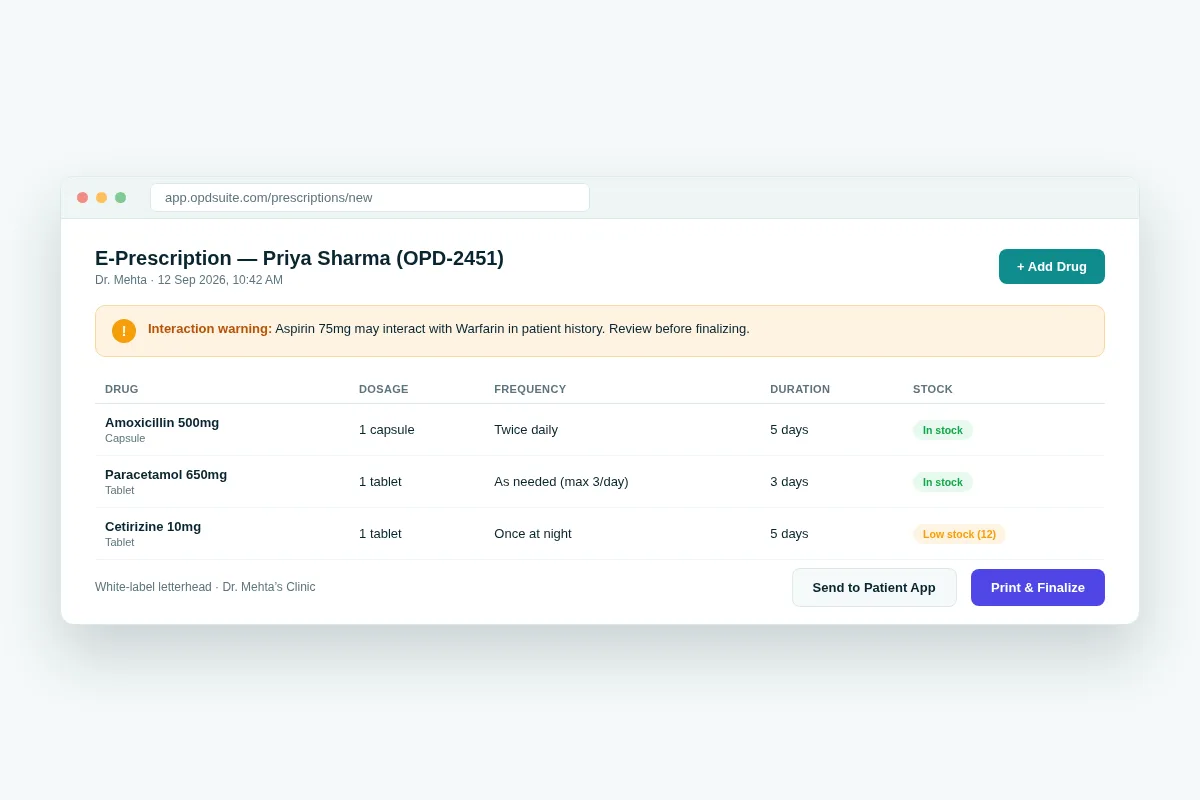 Dosage, frequency and stock status as clear fields while prescribing.
4. GST-compliant billing at the point of service
Billing is where clinics quietly lose money and face legal risk. It must be right the first time, not fixed at month-end.
GST-ready invoices by default — CGST/SGST split, GSTIN on the letterhead, no tax sums by hand.
Consultation, pharmacy and lab charges on one invoice — a patient shouldn't get three separate bills for one visit.
Insurance/TPA claim details built in — so a claim number is on the bill, not in a separate spreadsheet.
How OPD Suite does it: the Billing & GST/Payments module makes one itemized, tax-correct invoice per visit, with TPA and insurance claim fields included.
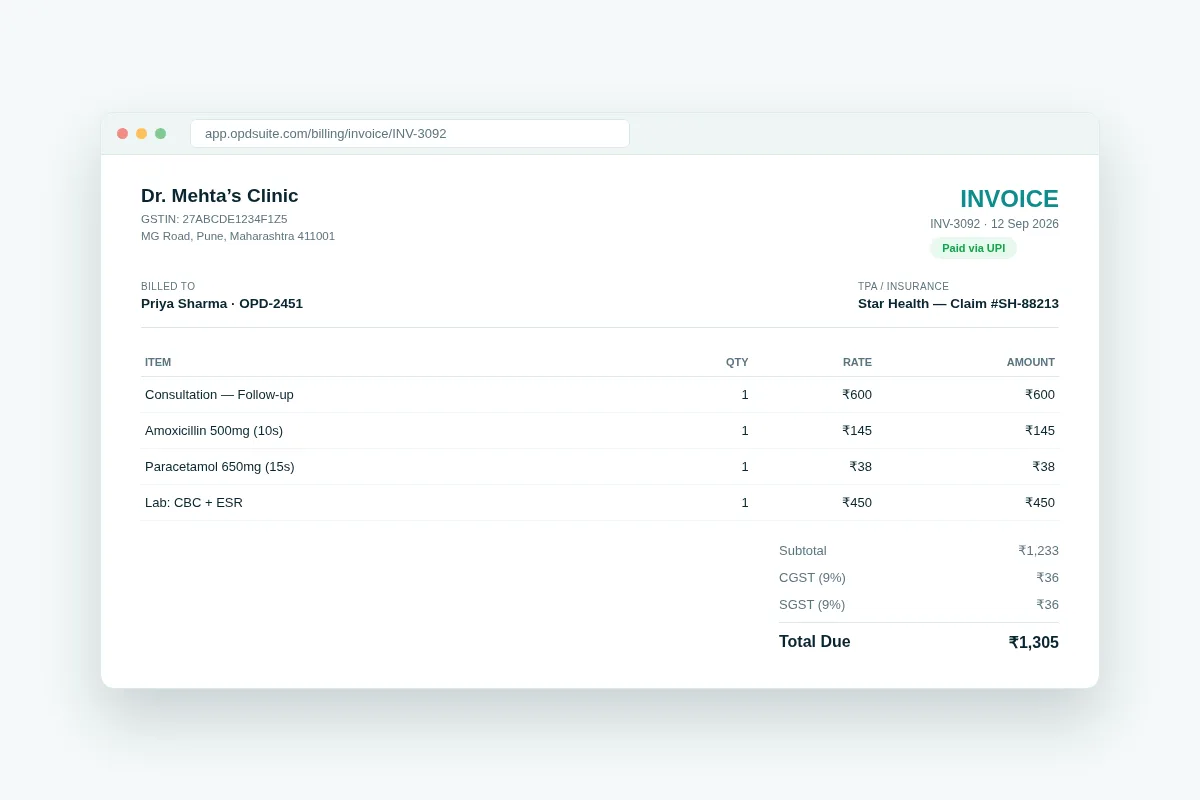 Consultation, pharmacy and lab charges on one GST-ready invoice.
5. Pharmacy and stock tracking tied to dispensing
If your pharmacy stock isn't connected to what doctors are actually prescribing, you're managing inventory blind.
Stock levels visible during prescribing — a doctor should see "low stock" before writing a drug the pharmacy doesn't have.
Automatic deduction on dispensing — not a count by hand at closing time.
Reorder alerts — before a commonly used drug runs out completely.
How OPD Suite does it: Pharmacy & Stock is connected directly to the E-Prescriptions module. The dispensing counter opens already filled in from the prescription. Batches that expire first are picked first. Stock goes down automatically as each item is given out. There are low-stock and near-expiry views to help with reordering.
6. Lab orders and results inside the consultation record
A lab result that lives in a separate portal or a PDF emailed to the front desk is a lab result the doctor won't see in time.
Order labs from the consultation screen — no separate system, no typing the patient's details again.
Results land back on the same patient record — automatically, not as a file someone has to save by hand.
Historical results alongside current ones — so a doctor can compare today's CBC with last month's.
How OPD Suite does it: Lab Orders & Results connects to the same patient chart as consultations and prescriptions. Order, track and review results without leaving the record.
7. Teleconsultation that isn't a bolted-on video call
Video consults became a basic need after 2020. The question now is whether teleconsultation uses the same record, billing and prescription steps as an in-person visit.
Same patient record for online and in-person visits — a teleconsult shouldn't create a second, disconnected file.
E-prescription and billing work the same way — a video visit should end with the same invoice and prescription steps as a walk-in.
No separate app or login for the doctor — teleconsultation inside the same dashboard they already use.
How OPD Suite does it: the Teleconsultation module runs on the same patient record, prescription and billing engine as an in-clinic visit — there's no separate "online" workflow to maintain.
8. Automated WhatsApp and SMS reminders to cut no-shows
No-shows are one of the easiest ways a clinic loses money to fix, and reminders are the cheapest fix, if they really reach patients.
WhatsApp and SMS, not just app notifications — most patients don't have your app installed, but most already use WhatsApp.
Automatic, not manual — started by the appointment itself, not by a staff member remembering to send one.
Two-way where possible — a patient can confirm or cancel by replying, not just get a one-way alert.
How OPD Suite does it: the WhatsApp/SMS/Email reminders module sends automatic appointment reminders with a reply-to-confirm option, straight from the appointment record.
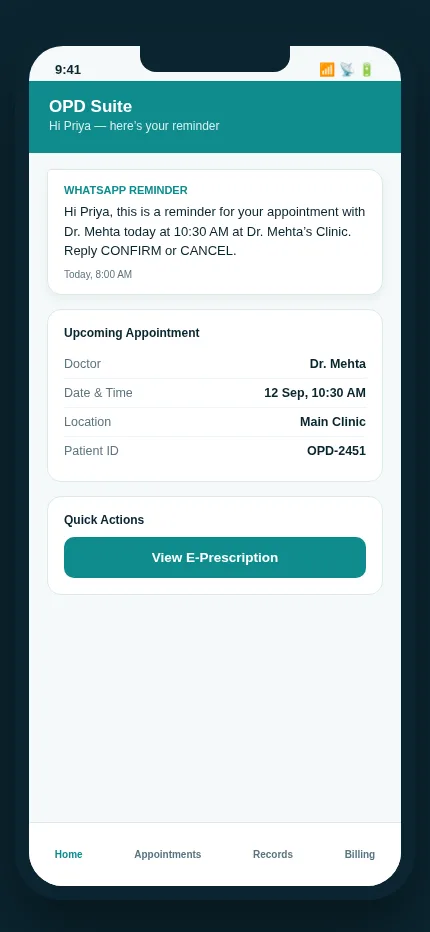 An automatic WhatsApp reminder, with a reply-to-confirm option built in.
9. Patient self-service: online booking and a patient portal
Every call your front desk takes to book, reschedule or ask "what did the doctor say" is a call they can't spend on something else.
Public booking with no login — a patient should be able to pick a doctor, a date and a slot from a link, with no app to install.
A patient portal or app — for viewing prescriptions, past visits and invoices without calling in.
Real-time slot availability — so patients aren't booking a slot the front desk already gave away.
How OPD Suite does it: Public Online Booking lets anyone book a real slot with no account, and the OPD Suite patient app gives patients their own portal for prescriptions, appointments and bills.
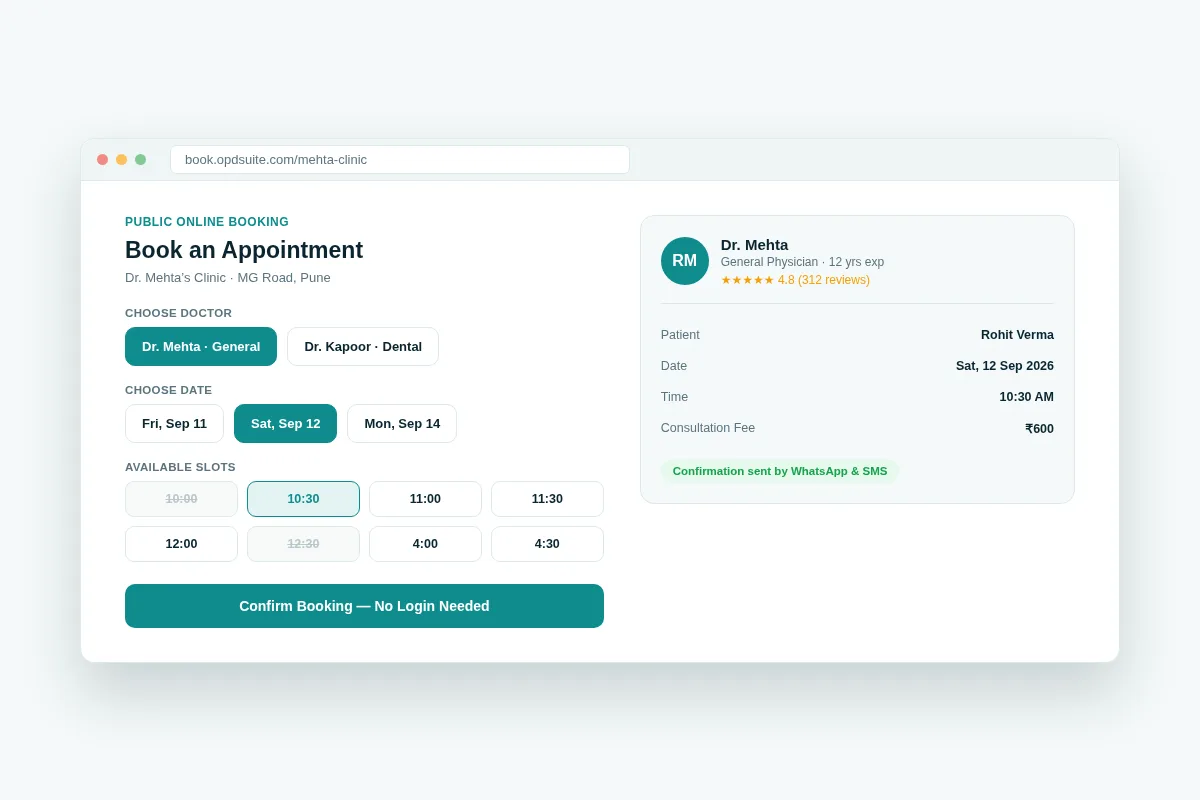 Public booking with no login — pick a doctor, a date and a slot.
10. Reports and analytics for clinic performance
Without reports, a clinic runs on guesswork. You need numbers on revenue, patient volume and doctor workload to make good decisions.
Revenue and patient-volume trends — by day, week or month, not just one running total.
Per-doctor and per-location breakdowns — essential the moment you're running more than one of either.
Can be downloaded, not just viewed — for your accountant, your investors or your own records.
How OPD Suite does it: the Reports & Analytics module adds up revenue, patient counts and doctor-wise performance across every location on the account.
Bonus: ABDM and ABHA compliance (India-specific, and increasingly non-negotiable)
This isn't one of the core 10, but if you're running a clinic in India, it's worth asking about directly. ABDM (Ayushman Bharat Digital Mission) and ABHA-linked health records are moving from optional to expected. This is true especially for clinics that work with insurers, hospitals or government schemes.
Ask whether the vendor supports ABDM/ABHA today, or has a dated plan for it.
A system with no plan for this will need a costly rebuild later.
OPD Suite has a module for this. ABHA creation, checking and linking, patient consent capture and FHIR R4 record building all come as a separate ABDM module on the Multi-speciality tier. It is built to run against ABDM's sandbox gateway. Going live on ABDM is not a simple switch for any vendor. It needs milestone certification with the National Health Authority. So ask any vendor which of the two they are actually on.
Red flags to avoid when evaluating any clinic software
Beyond the 10 features, watch for these warning signs when you compare vendors. They apply to any vendor, not one in particular:
Vendor lock-in with no data export. If you can't get a clean export of your patient data on request, you don't own your data.
No real mobile access. A "mobile-friendly website" is not the same as a real doctor or patient app.
Hidden per-message or per-SMS costs. Reminder features that look free in the demo but charge per message can quietly become your biggest cost.
Per-user pricing that punishes growth. Adding a second doctor shouldn't mean a disproportionate price jump.
No free trial. A vendor who trusts its product lets you use it for real before you pay.
Quick recap: the 10-feature checklist
| Feature | Why it matters | OPD Suite tier where included |
|---|---|---|
| Patient records across visits | One chart per patient, not per visit | Starter and above |
| Appointments & live queue | Live wait-time view, no double-booking | Starter and above |
| E-prescriptions from a structured drug master | Dosage and frequency as real fields, not free text a pharmacist has to work out | Starter and above |
| GST-compliant billing | Tax-correct invoices, no sums by hand | Starter and above |
| Pharmacy & stock tracking | Stock visibility tied to what's actually prescribed | Clinic and above |
| Lab orders & results | Results land on the record automatically | Clinic and above |
| Teleconsultation | Same record, billing and prescription flow online or in person | Clinic and above |
| WhatsApp/SMS reminders | Cuts no-shows with reminders patients actually see | Clinic and above |
| Online booking & patient portal | Fewer calls for the front desk to handle | Clinic and above |
| Reports & analytics | Decisions based on data instead of guesswork | Clinic and above |
See the full breakdown on the OPD Suite pricing page — Starter is ₹999/month for a single doctor. Clinic is ₹2,499/month and is the most-picked tier. Multi-speciality is ₹5,999/month for unlimited doctors and staff across up to 10 locations.
Frequently asked questions
What's the single most important feature to check first?
Patient records that persist across visits. If that's siloed per-visit, every other feature — billing history, prescription history, reporting — inherits the same problem.
Do I need teleconsultation if my clinic is fully in-person today?
Not urgently, but check that the vendor offers it on the same record and billing system before you need it. Adding it later as a separate tool is worse than having it unused for now.
Is WhatsApp reminder really worth paying for separately?
For most clinics, it is one of the best-value features on this list. One no-show stopped can often pay for the feature for the month.
How long does it take to switch from spreadsheets or an older system?
With OPD Suite, most single-location clinics are up and running within days using the 14-day free trial. No credit card is needed to start.
Does ABDM/ABHA support cost extra?
With OPD Suite, ABDM & ABHA is part of the Multi-speciality tier and not a separately priced add-on. Whichever vendor you look at, check two things, not one. Check which tier it is in. Also check whether the link runs against ABDM's sandbox or a certified live gateway.
Have questions about this? Write to us at aditi@prsindia.in.
Related reading: top 10 clinic management software in 2026, the best software to manage a clinic online, practice management mobile apps for clinics and appointment and patient engagement software.
Run the clinic, not the paperwork
See how OPD Suite covers this checklist: patient records, live queue, e-prescriptions, GST billing, pharmacy, lab, teleconsult, reminders, patient portal and reports, all in one platform.
Start your 14-day free trial at opdsuite.com — no credit card required.
Written by
Aditi
Building software at PRS India.