What Is the Role of Dark Store in Any Quick-Commerce Business Like Zepto/Blinkit?
What a dark store is, the seven jobs it does for quick delivery apps like Zepto and Blinkit, and the apps that run one.
Written from production. Our articles draw on products we run live and the client work behind them, and are revised as the systems they describe evolve.
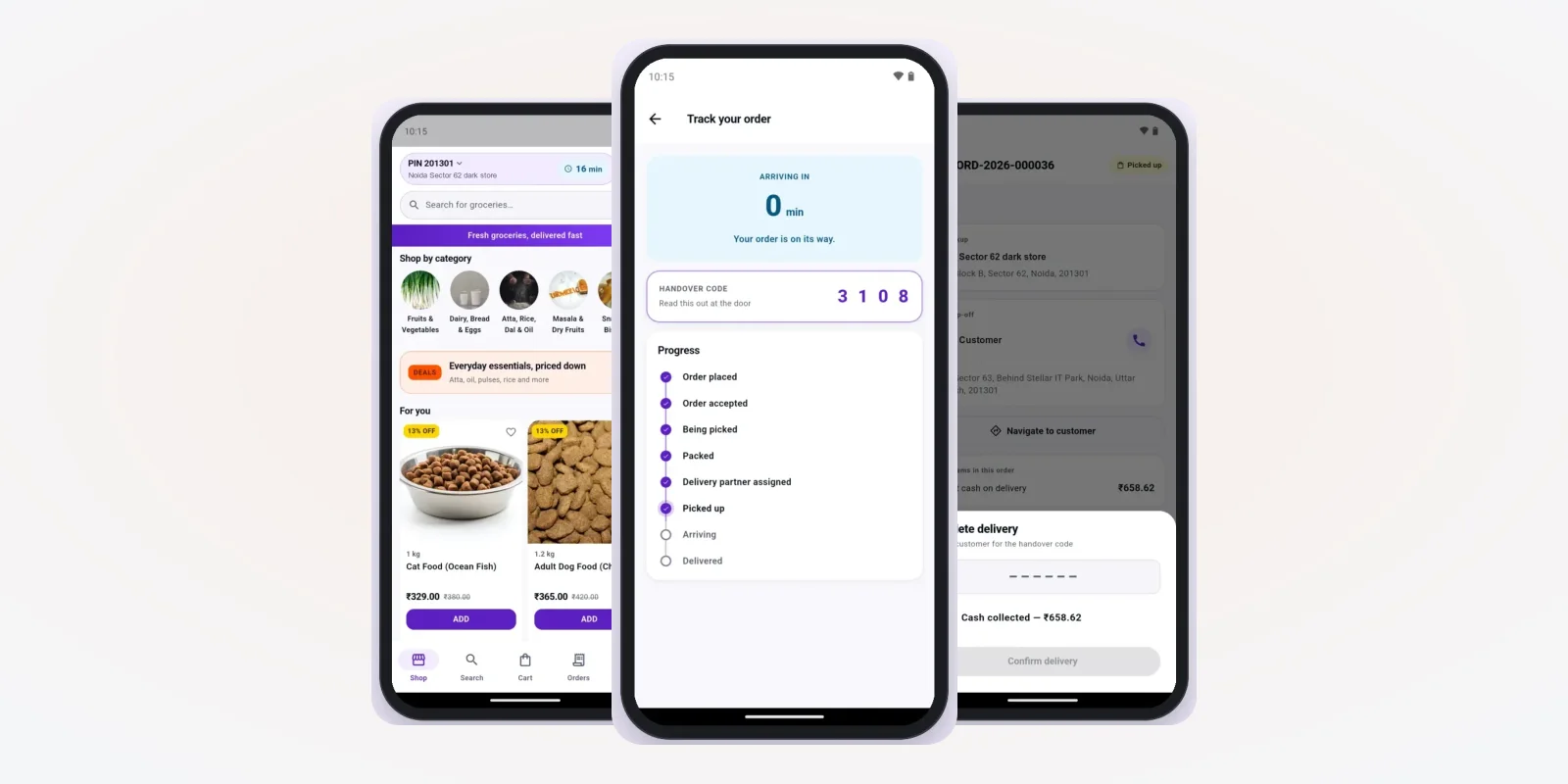
You open Zepto or Blinkit, add milk and bread, and the bag reaches your door in a few minutes. No shop on your street packed it. It came from a dark store. The dark store meaning is simple: a small store that serves only online orders. Its role is bigger. It is the reason a quick delivery promise can be kept at all.
This guide explains what a dark store is and the jobs it does inside a quick commerce business. It shows the screens that run one, with real examples from a grocery app we built. If you want your own quick delivery brand, PRS India offers mobile app development for the customer, store and rider apps, plus the web admin.
Key takeaways
- A dark store is a closed store near customers. It takes only app orders. Nobody walks in to shop.
- In quick commerce, the dark store does seven jobs: hold stock close, show the right items, pick, check, pack, hand over and report.
- The delivery time depends more on the store than on the rider. A slow pick cannot be saved on the road.
- Each store needs its own stock count, its own delivery area and its own food licence.
- Software tells every person in the store what to do next. Without it, a dark store is just a crowded godown.
Dark store meaning: what is a dark store?
A dark store is a store that is "dark" to shoppers. The shutter is open for staff and riders only. There is no billing counter, no trolley and no display for walk-in buyers. Racks are set out for fast picking, not for browsing.
In Hindi, people often ask "dark store kya hota hai". The short answer: it is a small godown inside the city that packs app orders for nearby homes. It is usually in a lane or a basement, close to many flats and offices.
Three things make it different from a normal shop:
- Only online orders. Every item on the rack waits for an app order.
- A fixed area. It serves a few pin codes around it, not the whole city.
- Run by screens. Staff follow an app that tells them which rack to go to and what to pack.
Why quick commerce cannot work without dark stores
A quick delivery promise has three parts: the time to accept the order, the time to pick and pack, and the time on the road. A big warehouse outside the city makes the road part too long. A normal shop makes the picking part too slow, because staff also serve walk-in buyers.
A dark store fixes both. It sits close to customers, so the ride is short. It does nothing but pack orders, so the pick is short too. That is why apps like Zepto, Blinkit and Swiggy Instamart open many small stores instead of a few large ones.
Our guide on starting a 10-minute grocery delivery business covers the demand side: area, orders per day and launch steps. This guide stays inside the store.
The role
The role of a dark store in quick commerce: 7 jobs
Every order passes through these jobs. Each one needs a screen that tells staff what to do.
- Hold stock close to buyers. The store keeps the items people order most in its area. A store near offices stocks snacks and drinks. A store near homes stocks milk, atta and vegetables.
- Decide what the customer sees. The app shows only what this store has on its racks. If the last packet is gone, the item turns "out of stock" for that area.
- Pick the order. A picker gets a list sorted by rack. One walk through the aisles fills the basket.
- Check the order. Each item is checked against the list. Wrong size or wrong flavour is caught here, not at the customer's door.
- Pack and hand over. The bag is sealed and given to a rider who is already waiting at the door.
- Take back cash and returns. Riders return cash and refused items. The store counts both at the end of each shift.
- Report the numbers. Pick time, missing items and stock counts go to the head office every day.
Dark store vs warehouse vs kirana shop
| Dark store | Warehouse | Kirana shop | |
|---|---|---|---|
| Who comes in | Staff and riders only | Staff and trucks | Walk-in buyers |
| Location | Inside the city, near homes | Outside the city | On the street |
| Area served | A few pin codes | Many stores or a whole region | The street and nearby lanes |
| Order size | Small baskets, many orders | Big loads for stores | Counter sales, some phone orders |
| Racks set for | Fast picking | Bulk storage | Display and browsing |
| Software needed | Store app, rider app, customer app, admin | Inventory and dispatch system | Billing or POS |
Many chains run all three. The warehouse fills the dark stores. The dark stores serve app orders. The shops keep serving walk-in buyers through their POS and billing software. The trick is to keep one stock count across all of them. Our post on inventory management software development explains how that link works.
One order through a dark store, screen by screen
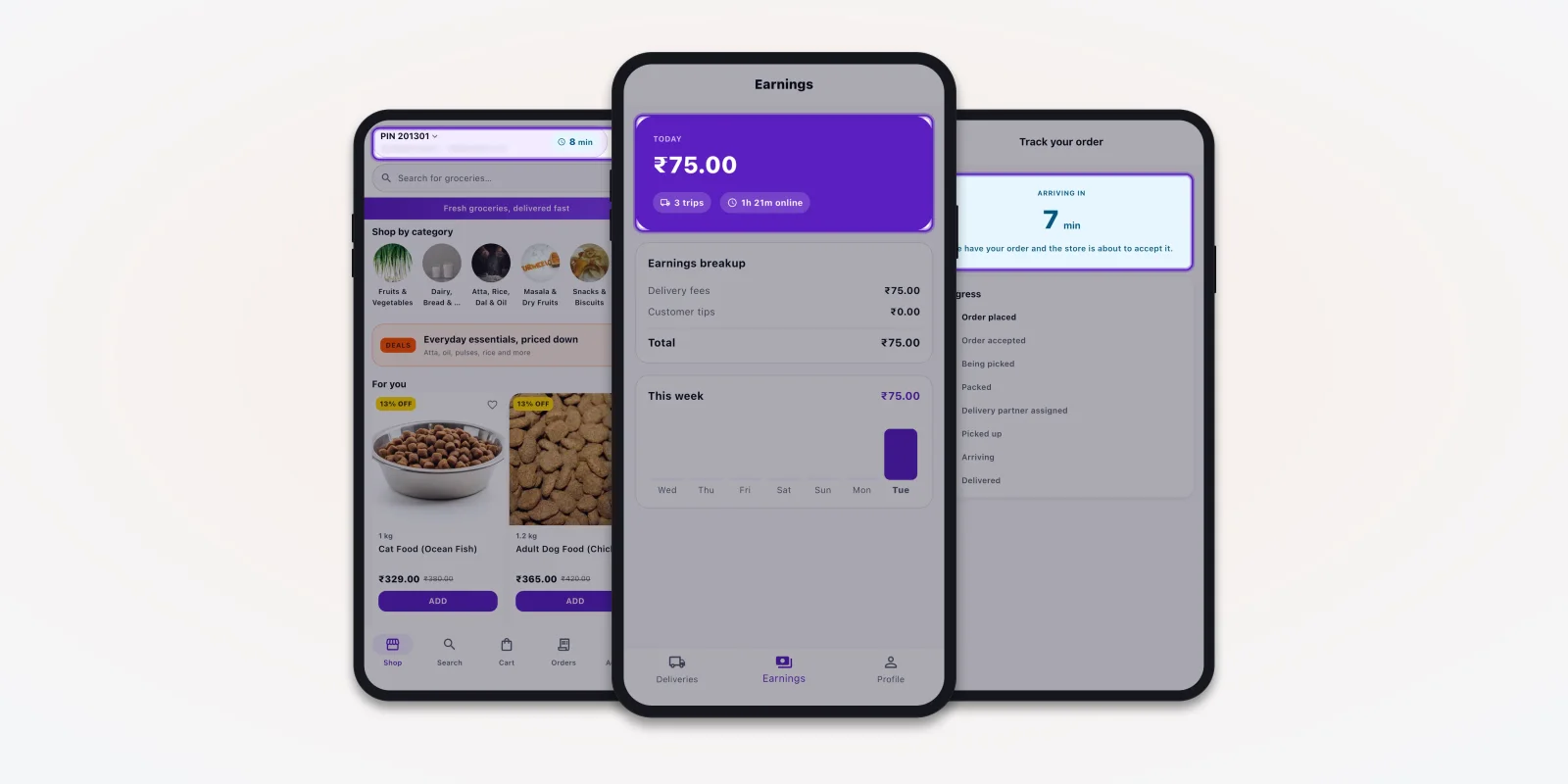
Here is how one order moves in the grocery app we built. The customer sees only the end of the work. Most of it happens inside the store.
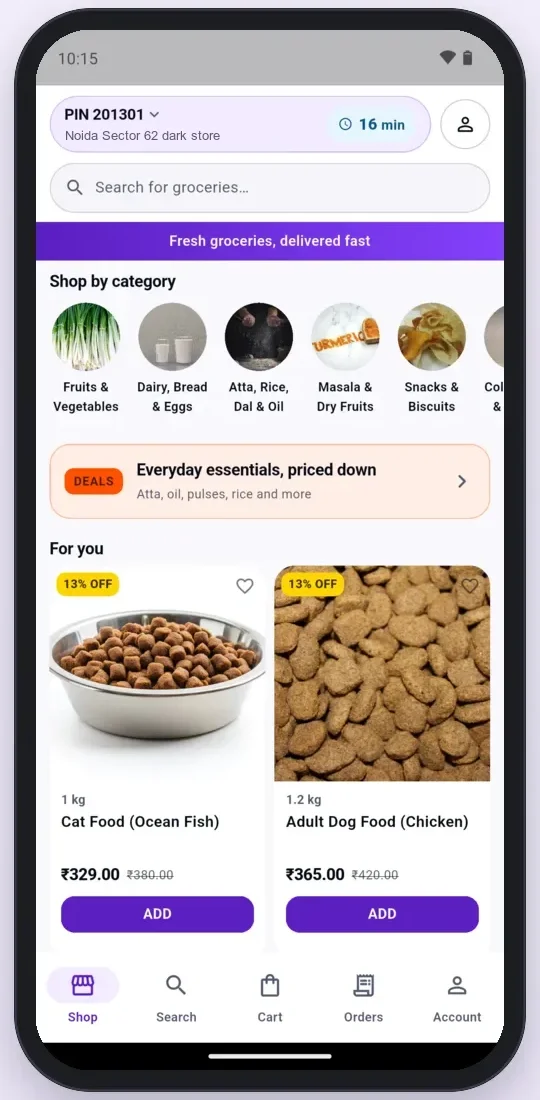
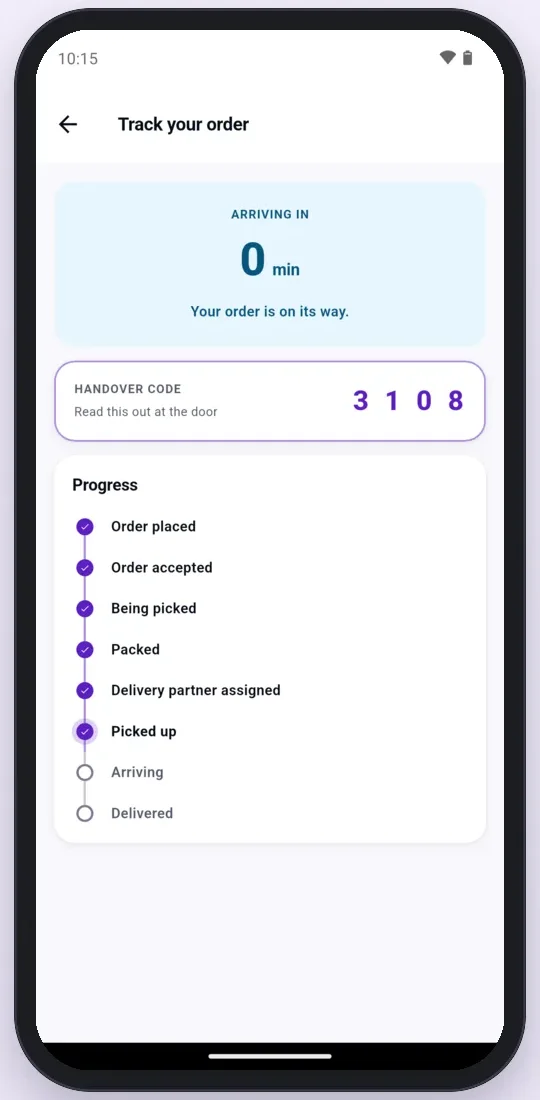
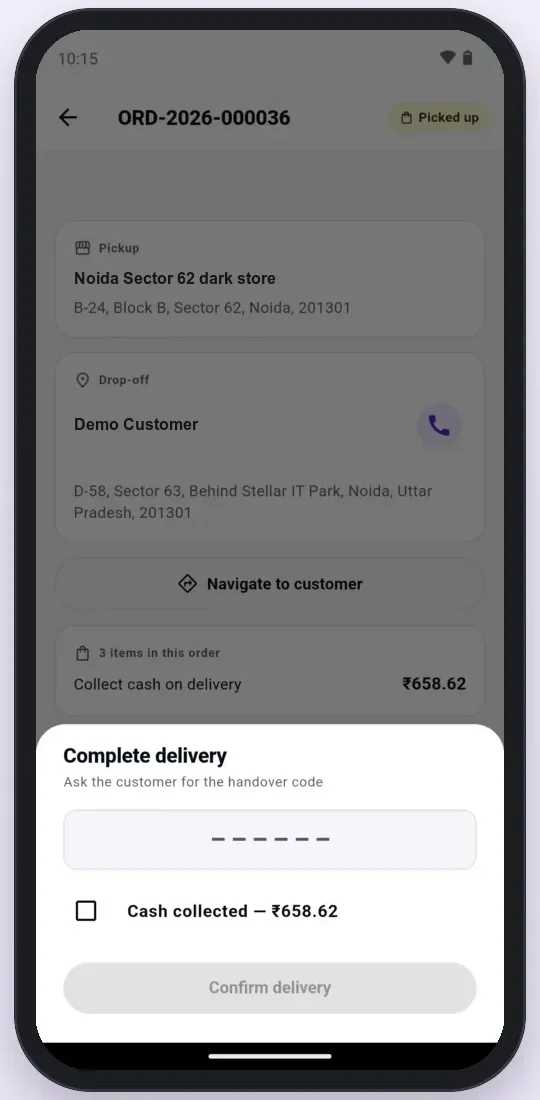
Screens from a grocery delivery app we built. Demo data.
Look at the tracking steps. "Being picked", "Packed" and "Delivery partner assigned" are all dark store jobs. The customer watches them move. If the store is slow, the customer sees it before the rider even starts. You can see the full set of screens on our grocery delivery app page.
The software that runs a dark store
A dark store team works from three screens: the head office admin, the store's own stock page, and the pick list. We build the store and admin screens as a web application that runs on a desktop or a tablet at the packing table.
1. Head office: one list of all dark stores
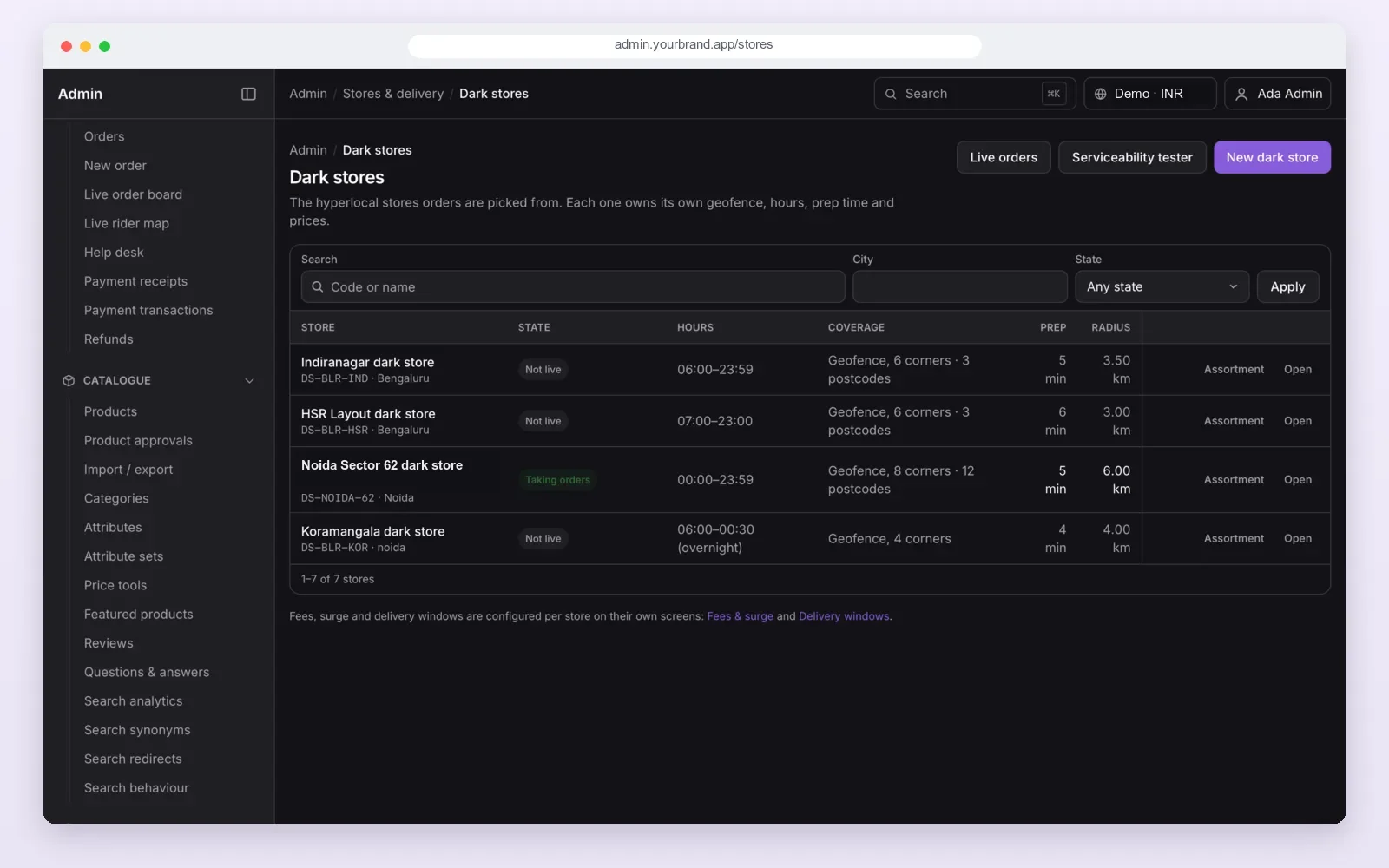
Head office opens a new store, draws its delivery area on the map and sets its hours. A store stays "not live" until its racks are ready. Then it starts taking orders for its own pin codes only. A store that opens past midnight can keep night hours, while others close at 11.
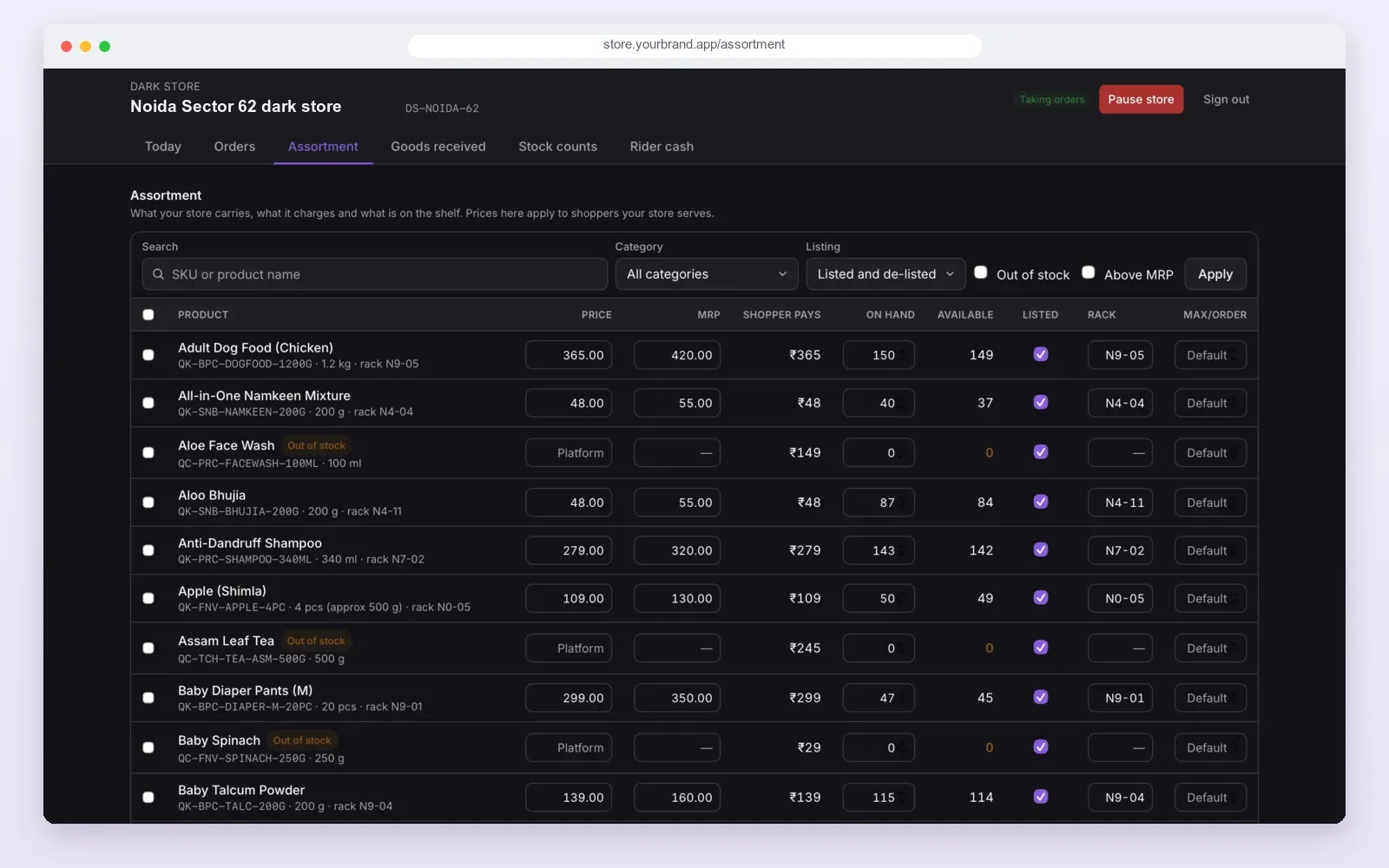
2. Store stock: what this store has on its racks
Each store keeps its own list of products. It shows the price, the MRP, the stock on hand and the rack number. When stock hits zero, the item is marked "out of stock" in the app for that store's area.
Goods received and stock counts have their own tabs. So the count in the app matches the rack, shift after shift.
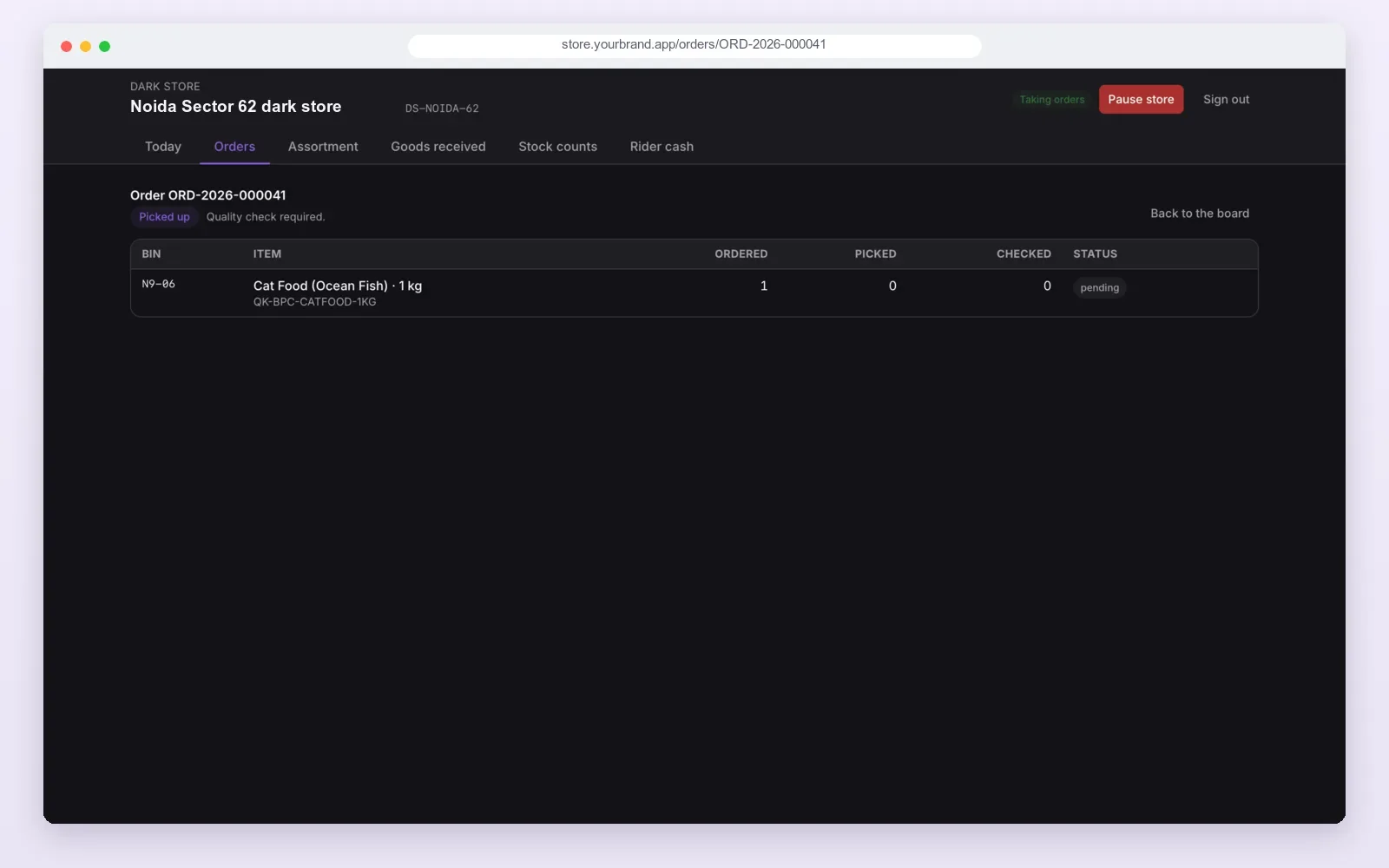
3. Pick list: one order, rack by rack
The picker opens the order and sees each item with its bin number. They pick, then a second person checks. The screen keeps three counts: ordered, picked and checked.
An order cannot move to "packed" until all three match. That one rule stops most wrong-item complaints.
We build the customer and rider apps with Flutter, so one code base runs on Android and iPhone. The store and admin screens run in any browser.
Rules every dark store must follow
Food licence for each store. A dark store that keeps food items is a food business premises. FSSAI licences and registrations are given per premises, so each store needs its own. You apply on the FSSAI FoSCoS portal. Source: Food Safety and Standards Authority of India.
Customer data needs care too. Names, phone numbers and addresses are personal data under the Digital Personal Data Protection Act, 2023. In a well-built app, the picker sees only the items. The rider sees only the address of the order in hand.
Some sellers also list their store on the Open Network for Digital Commerce (ONDC) to get orders from other buyer apps. The dark store then serves both its own app and the network from one stock count.
Rules change. Check licence type and data duties with FSSAI or a consultant before you open.
The problem
Where dark stores go wrong
- The app sells what the rack does not have. Stock is counted once a week on paper. Orders go out half-filled and refunds pile up.
- Pickers walk the whole store. The list is in the order the customer added items, not in rack order.
- Nobody checks the basket. A 1 kg pack goes out instead of 500 g. The customer calls support.
- Riders wait at the door. The store does not know a rider is two minutes away, so it starts packing late.
- Cash goes missing. Cash on delivery is not matched to orders at shift end.
- The area is too big. One store tries to serve far pin codes. Every far order breaks the time promise.
Each of these is a software gap, not a staff problem. The store app has to close it.
Worked example: a supermarket chain opens its first dark store
A supermarket with four shops in one city wants its own quick delivery app. It does not want to depend on other apps for orders. Here is how the first dark store would go live.
- Pick the spot. The owner picks a ground-floor space near three busy pin codes, away from the main shops.
- Choose the range. From shop sales, the team picks the items that sell daily. Slow items stay in the shops.
- Set up the store in the admin. Head office adds the store, draws its delivery area, sets hours and prep time.
- Load the racks. Every product gets a rack number. Goods received are entered in the store app, so stock is right from day one.
- Test with staff. The team places test orders from their own phones. Pickers learn the pick list. Riders learn the handover code.
- Go live. The store turns "live". Customers in those three pin codes now see this store's stock and delivery time.
- Watch the numbers. After two weeks, the owner checks pick time, missing items and orders per day before opening store two.
Our service
How we build your own dark store apps
We do not sell a fixed app. We build your own, under your brand, and you get the source code. Our development process runs in six steps:
- Understand your store. We walk through your racks, your range, your areas and your staff roles.
- Clickable screens. You see the customer, store, rider and admin screens before we write code. Our UI and UX design team keeps them clear for busy pickers.
- Build. We set up the ready-made base and change it to your process, brand and payment methods.
- Test with your team. Your pickers and riders use the apps on real orders before launch.
- Launch under your brand. We publish the apps on Google Play and the App Store in your name, and set up your server with our cloud and DevOps team.
- Support. We stay on for fixes, new stores and new features.
For a wider look at the customer side, see our guide to white label grocery delivery app development.
Dark store app development cost: what decides it
We do not publish prices, because no two dark store setups are the same. These are the things that decide your budget:
- How many apps. Customer app only, or also store, rider and admin.
- How many stores. One store, or many stores with their own areas and stock.
- Picking depth. A plain list, or rack order, barcode scans and a second check.
- Links to other systems. Your shop billing, your warehouse, payment gateways, ONDC.
- Payments. UPI, cards, wallets and cash on delivery with rider cash tally.
- Languages and platforms. Android only, or also iPhone and tablets.
| Your own build (with PRS India) | A monthly-plan app | |
|---|---|---|
| Brand on the app | Yours | Often shared with the vendor |
| Source code | Handed to you | Stays with the vendor |
| Store rules | Made to your racks and process | Fixed by the vendor |
| Customer data | On your server | On the vendor's server |
| Payment | One build cost, then support if you want it | Monthly fee for as long as you use it |
Whoever builds it, make sure it can
- Show each customer only the stock of the store that serves their pin code
- Give pickers a list sorted by rack, with bin numbers
- Block "packed" until picked and checked counts match
- Pause one store without stopping the others
- Match rider cash to orders at the end of each shift
- Keep goods received and stock counts in the same system as orders
- Hide customer phone and address from staff who do not need them
- Hand you the source code and run on your own server
To compare this with a full quick commerce launch plan, read how to launch a 10-minute delivery app like Blinkit, Zepto or Instamart.
FAQ
What is the meaning of dark store?
A dark store is a small store that takes only online orders. Shoppers do not walk in. Staff pick and pack orders, and riders deliver them to nearby pin codes.
What is the role of a dark store in quick commerce?
It keeps stock close to buyers, shows the right items in the app, picks, checks and packs orders, and hands them to riders. It also returns cash and reports daily numbers.
Why do Zepto and Blinkit use dark stores?
Fast delivery needs a short ride and a short pick. A dark store near homes, used only for app orders, gives both.
Is a dark store the same as a warehouse?
No. A warehouse is large and outside the city and sends big loads to stores. A dark store is small, inside the city, and packs single customer orders.
Does each dark store need an FSSAI licence?
Yes, if it keeps food items. FSSAI licences and registrations are given per premises, so each store needs its own. Check the right type with FSSAI or a consultant.
How long does it take to build dark store apps?
It depends on how many apps, stores and links you need. After one call, we share a plan with dates for each part.
Will I own the apps and the source code?
Yes. We build the apps under your brand and hand over the source code. Your order and customer data stay on your server.
Can PRS India build dark store software for my business?
Yes. We build the customer app, dark store app, rider app and web admin. Contact us to plan your dark store apps.
Related guides
Written by
Aditi
Building software at PRS India.