Mobile-App
How to Start a 10-Minute Grocery Delivery Business
A founder's guide to starting a 10-minute grocery delivery business in India. It covers dark stores, costs, rules and how to pick a tech partner.

Written from production. Our articles draw on products we run live and the client work behind them, and are revised as the systems they describe evolve.
Ten-minute grocery delivery is now a normal thing in Indian cities. Blinkit, Zepto and Swiggy Instamart have taught millions of people to order milk, medicine or snacks and get them in minutes. They have built very large companies doing this.
You do not need their money to start. This business is local. One small store can serve the homes within two to three kilometres of it. What a big player does in another part of the city does not matter. A well-run local store can win on service and on knowing its customers.
This guide shows what you need to start: the ground work, the licences, the money, and the software. For the software we show QuickKart, our ready-made app set. We show one feature at a time: what the customer does in the app, what the rider does, and what the store and owner get.
How the 10-minute grocery model works
Quick commerce is not a small supermarket. It is also not a normal online shop with a faster courier. It makes money in a different way. It depends on three things: small stores in the area, a short delivery distance, and people who order often.
A dark store is a small warehouse that shoppers never walk into. It is usually 1,000 to 3,000 square feet. It keeps the 1,500 to 3,000 products people buy most: groceries, packaged food, personal care and home items. It sits inside the area it serves. It is not on a highway or in an industrial zone. The reason is simple. A rider must reach any home in that area in minutes. Pick the place for delivery reach, not for cheap rent.
The profit on one order is small. It is often smaller than what a kirana store makes, once you count delivery, packing and the free-delivery offers that win new customers. What makes it work is that people order often, because ordering is so easy. A supermarket shopper buys one big basket about once a month. A quick commerce customer buys many small baskets, several times a week, for the same home. That high number of orders is what makes a dark store profitable. So store location and delivery distance matter more here than in most shops.
To see this from the app side, read how to set up a quick commerce app like Blinkit, Zepto and Instamart.
What you need before the first order
Before any app, this is a business of running a store well. Get these right first:
- A dark store in each area. A small, easy-to-reach space (best under 3,000 sq ft) inside the 2-3 km area you want to serve. It needs easy access for two-wheelers and room for a fridge or two.
- Your first stock. Direct deals with local distributors, FMCG stockists and wholesale markets for your first 1,500-2,000 products. Focus on things people buy often: milk and dairy, fruit and vegetables, snacks and home needs.
- Riders. A trained group of riders for each store, enough for your busiest hours, with clear rules for picking, packing and handover times.
- Local marketing. Society WhatsApp groups, local influencers and launch offers. These help people in your first few pincodes start ordering from you before you grow.
- Licences. An FSSAI licence before you sell any packaged or fresh food. And a correct label on every product (MRP, net quantity, maker’s details), as the Legal Metrology rules require.
The software: three apps and an admin panel, ready for your brand
The software is where many first-time founders lose months and money. Some build the wrong thing. Others launch with a generic delivery app. It cannot do what fast delivery needs. It cannot check if an address is covered, show a true delivery time, hand orders to riders, and show every charge before the customer pays.
QuickKart does all of this as one set. You buy the source code once and put your own brand on it. It is not a monthly subscription. Here is what is in the box:
/store plus an Android app for the store floor: live order board, give orders to riders, products and prices, a pause switch, delivery time slots.Try it on your own phone
Both apps are on the App Store and connect to our demo server. The Android files are on the APK download page. Install the customer app. Type the demo pincode below to reach the Noida Sector 62 demo store. Sign up with an email and place a cash-on-delivery test order. The web shop is at quick.prsindia.in.
201301Noida Sector 62Cash on deliveryThe admin makes rider and store accounts. You cannot sign up for them yourself. For the rider app and the dashboard, you need a login from us. Ask us for a demo and we will set one up and run an order with you.
The customer app: from pincode to doorstep
The customer app starts with one question: do you deliver to me, and how fast? After that, everything from browsing to the code at the door is built to make a small order feel easy. Each feature below is shown on the screen where it lives.
Feature 1Does the app deliver to me, and how soon?
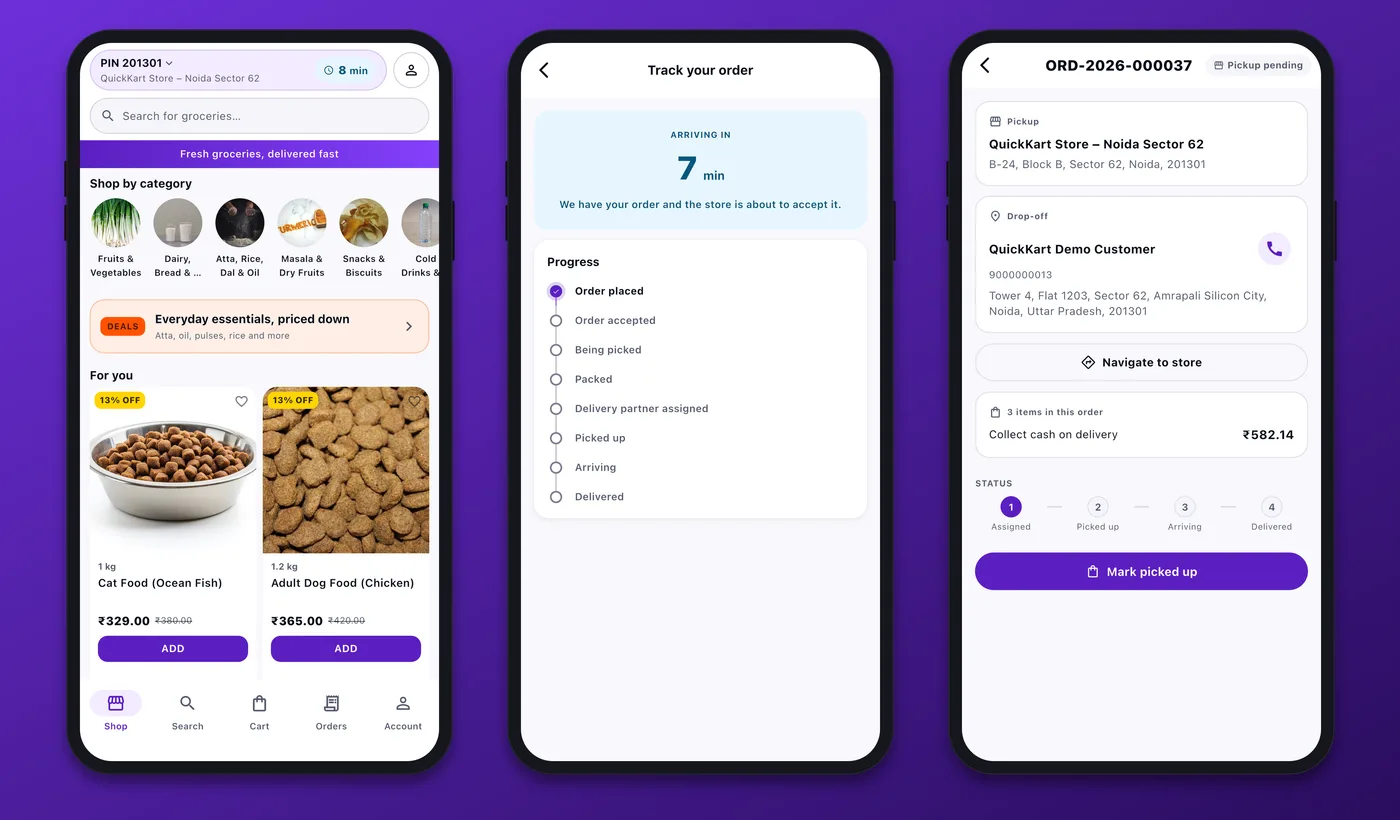
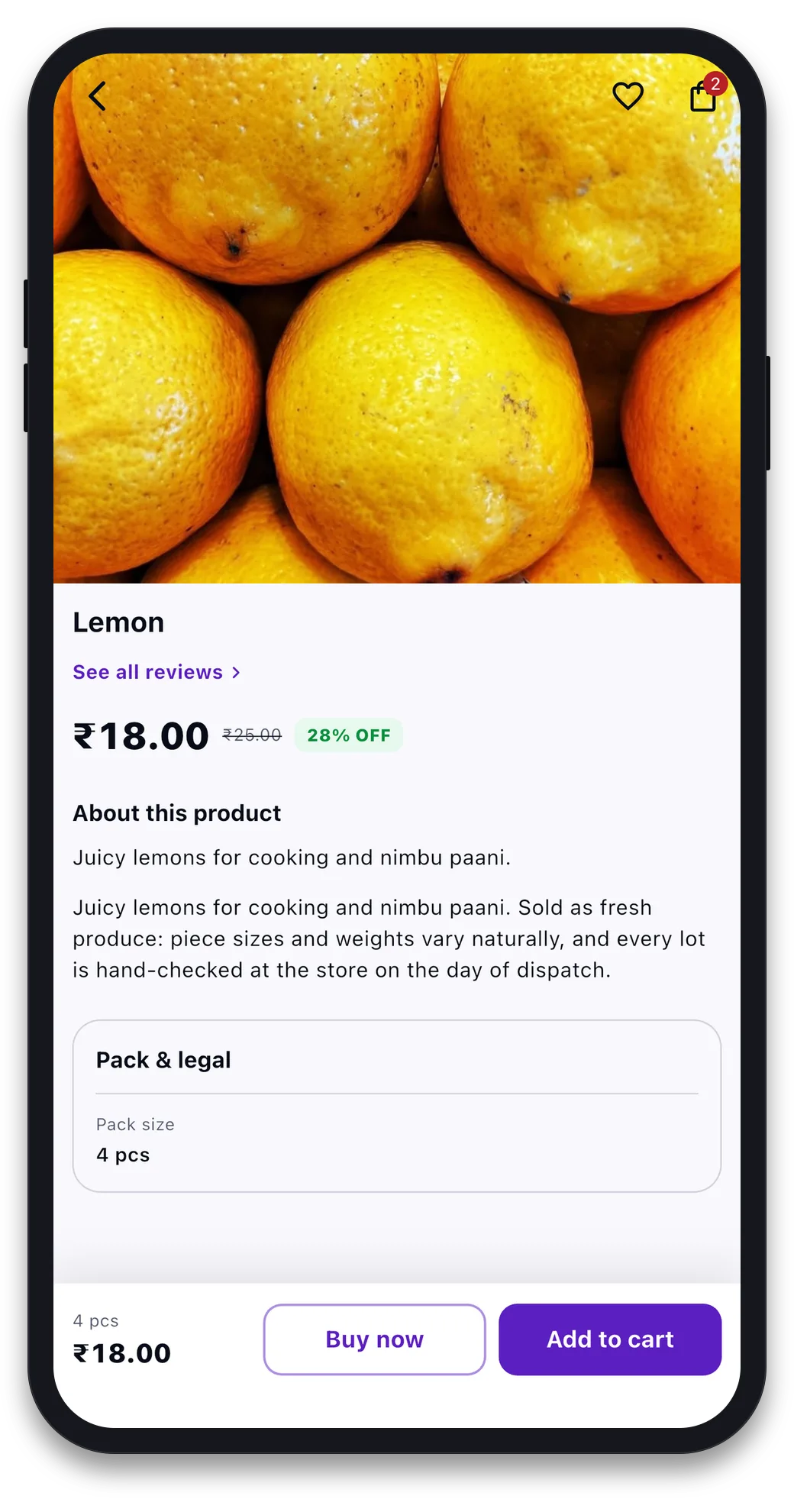
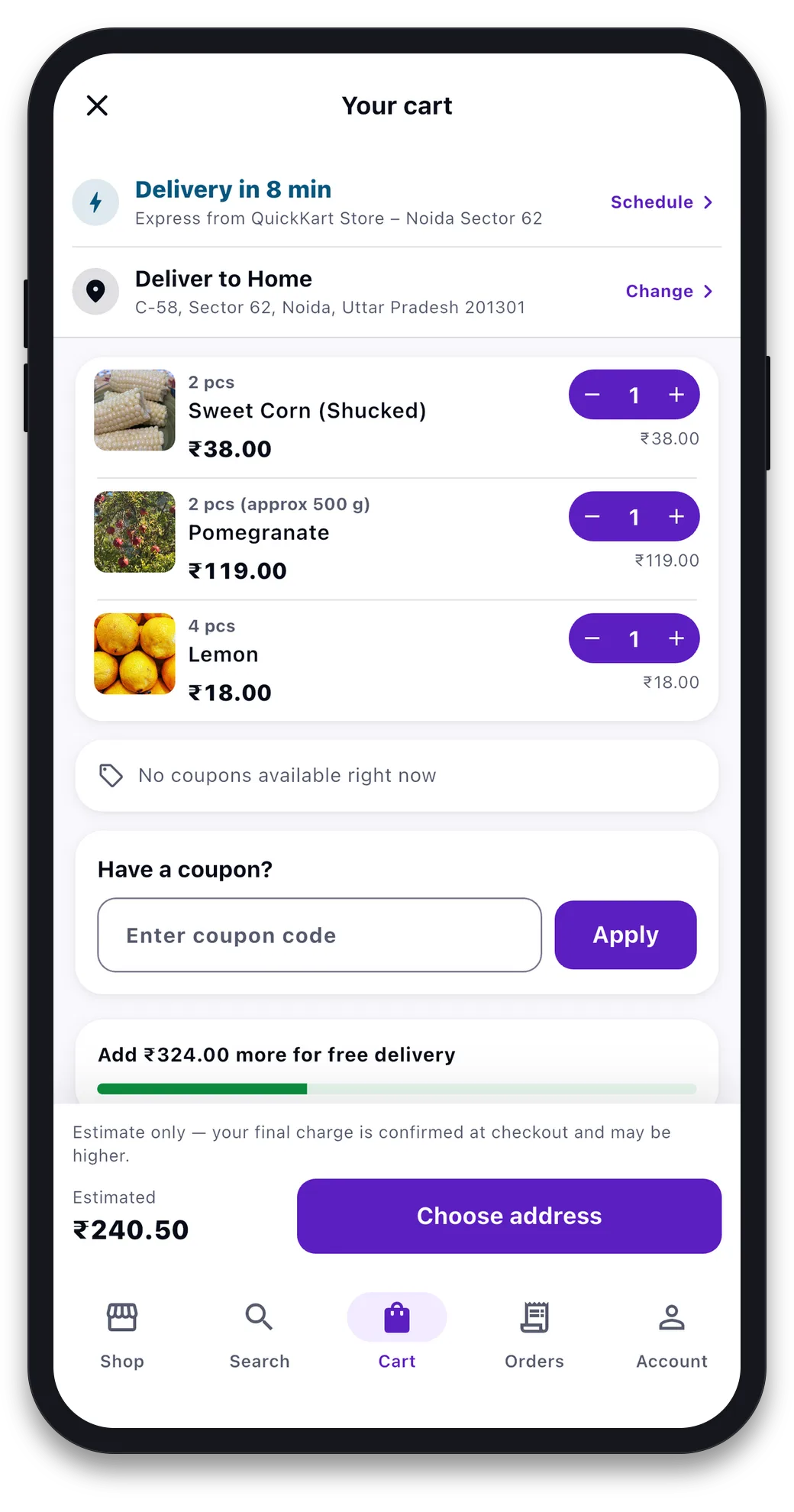
The app opens by asking where you are. It uses your GPS or a pincode you type. It checks this against every live store’s map area and pincode list. Then it tells you which store will serve you and how soon, right now. The “8 min” at the top is that answer. It is worked out for that store from how busy it is. The app never makes up a time. If a store is closed or paused, the app says so instead of showing a time.
You can browse, search and fill a cart before you sign in. When you sign in, your cart comes with you.
Feature 2Browse, search, filter and sort
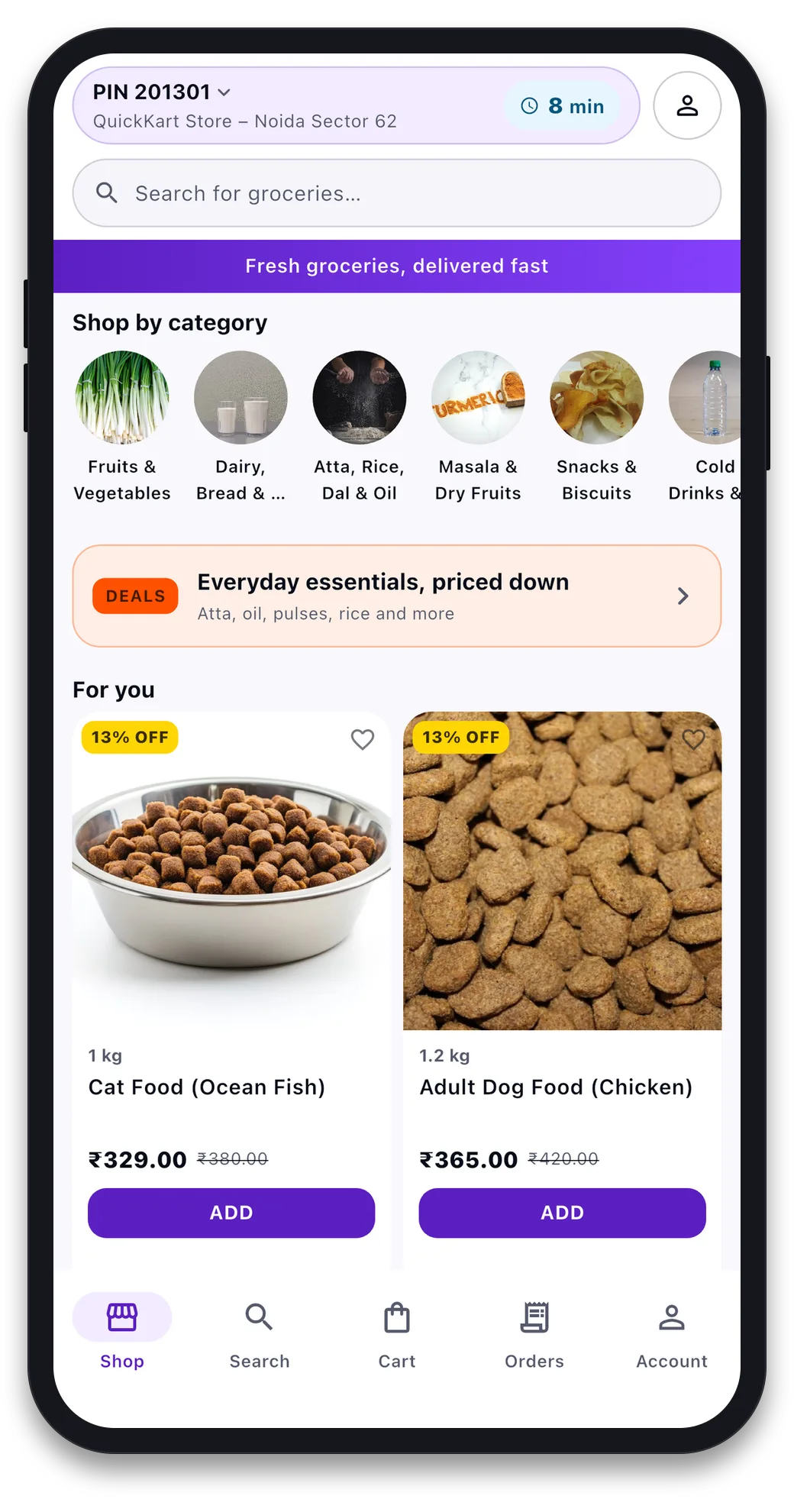
Category pages show the pack size, the price, the MRP and the discount, a heart to save the item, and an Add button on every card. Search shows suggestions as you type and remembers what you searched before. You can filter results and sort by relevance, price, newest or rating. Items that are out of stock are marked, not hidden. So there are no surprises at checkout.
Feature 3A product page with the details the law asks for
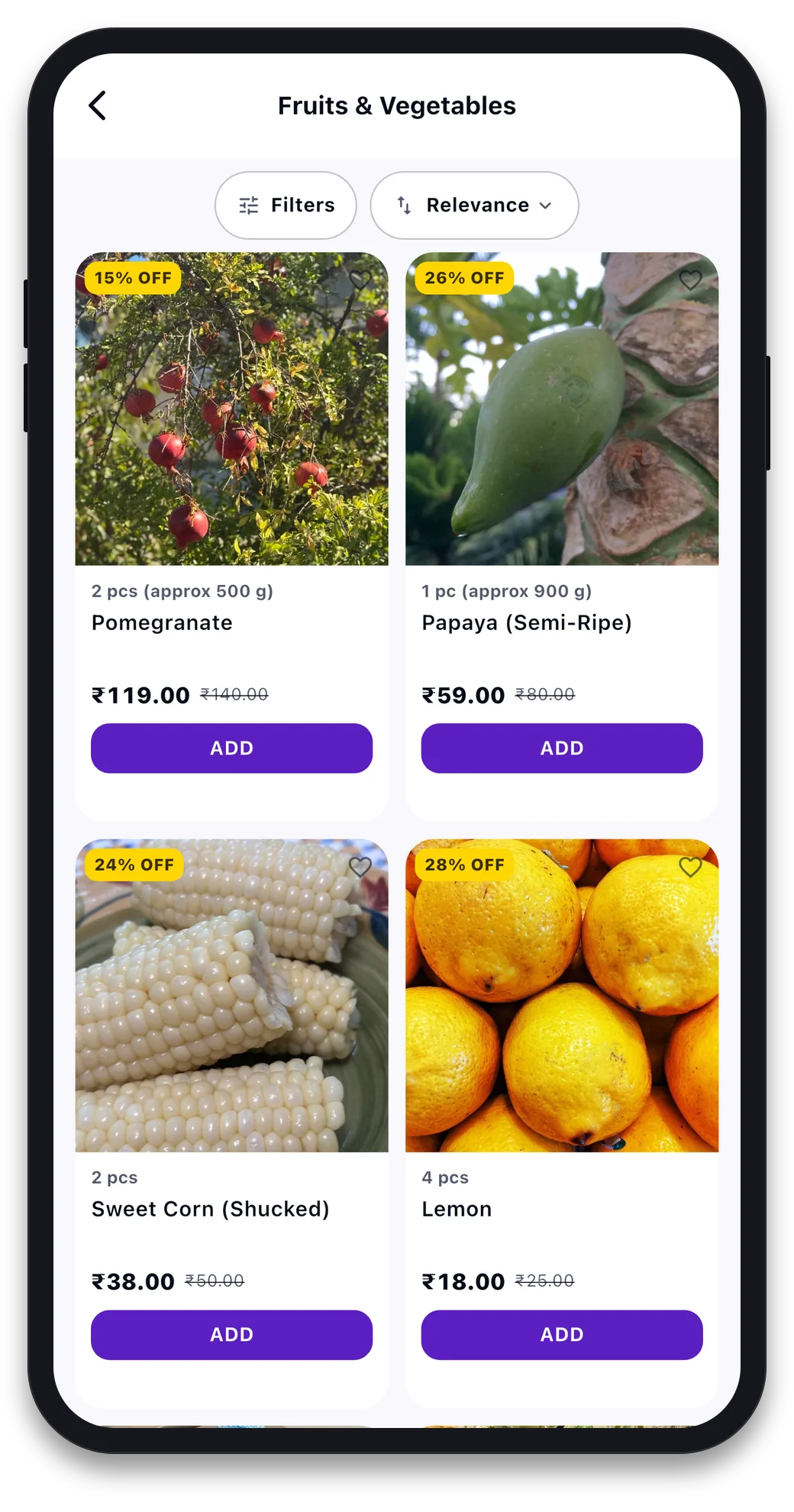
Each product page has photos, pack options, the price and MRP with the saving, a short description, customer reviews, and a questions-and-answers section. Below that is a “Pack & legal” box. It shows the pack size and the details Indian grocery rules require. These fields are part of the product data, not an extra. Buy now and Add to cart stay fixed at the bottom.
Feature 4Cart, coupons and the free-delivery bar
The cart shows the fast delivery time for your store, with a Schedule option next to it. It shows your address with a Change link, plus and minus buttons on every item, and a coupon box that lists the coupons you can use. A bar shows how much more to add for free delivery. The total at the bottom is marked as an estimate. Checkout confirms the final amount. You can also add a tip for the rider and a small donation.
If the store owner has turned on delivery time slots, you can ask for a later slot instead of fast delivery. Your request goes to the store with the order.
Feature 5Checkout with a bill you can read
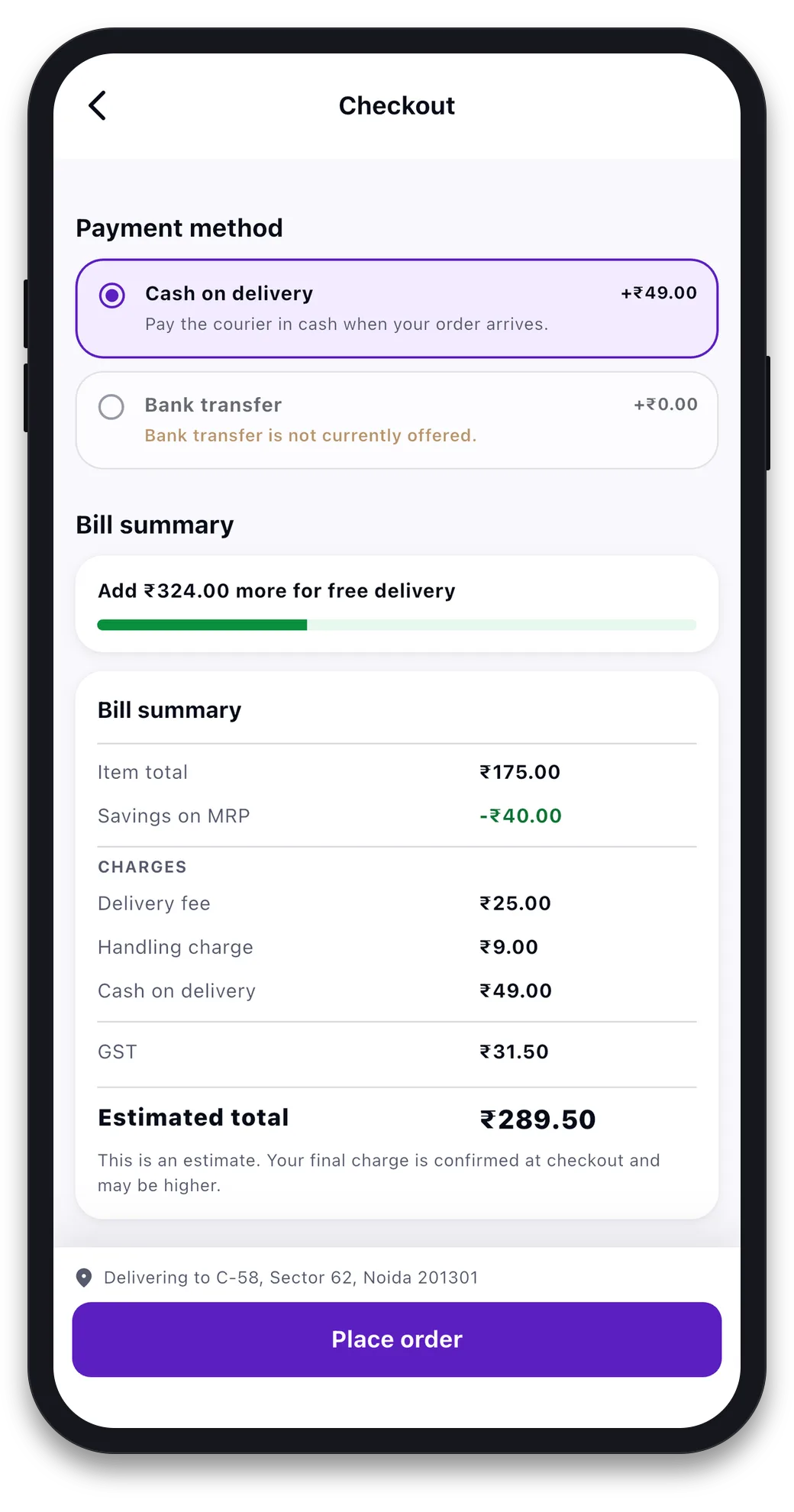
Checkout shows the payment options the store offers. The apps come with cash on delivery and bank transfer. Then it shows the bill: item total, savings on MRP, delivery fee, handling charge, cash-on-delivery charge and GST, each on its own line, then the total. There is no “other charges” line. Each charge comes from a named rule in the admin panel. The customer reads that rule’s name.
Saved addresses have Home and Work labels and a default. A six-digit pincode check stops you saving an address the store cannot reach.
Feature 6Live tracking, the handover code and past orders
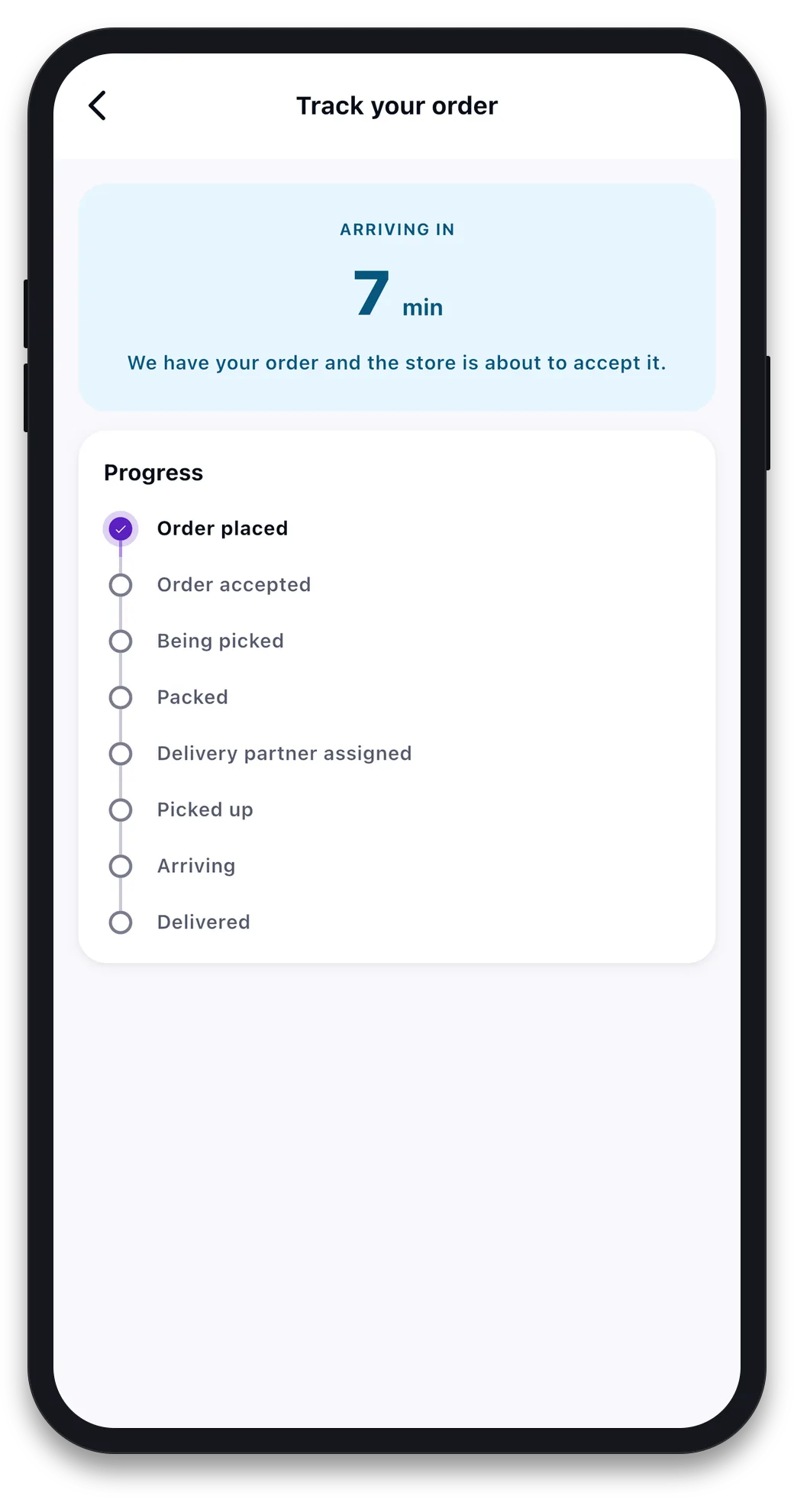
After you order, you see an eight-step tracker: Order placed, Order accepted, Being picked, Packed, Delivery partner assigned, Picked up, Arriving, Delivered. The live time is at the top with a message from the store. Once a rider is on the way, you see the rider on a map and the code to say at the door.
Past orders can be ordered again with one tap, or cancelled while the store still allows it. The account area has edit profile, push alerts when your order moves, a help form that reaches the store owner, store credit and reward points where used, and delete account, which the app stores now require.
The rider app: assigned, picked up, arriving, delivered
Riders do not sign up on their own. The admin makes each rider account, sets the password and adds the rider to one or more stores. So only people you have checked ever see an order. The app is kept small on purpose: an online switch, today’s deliveries, one delivery at a time, and earnings. Here it is, one feature at a time.
Feature 1Sign in with the account the admin made
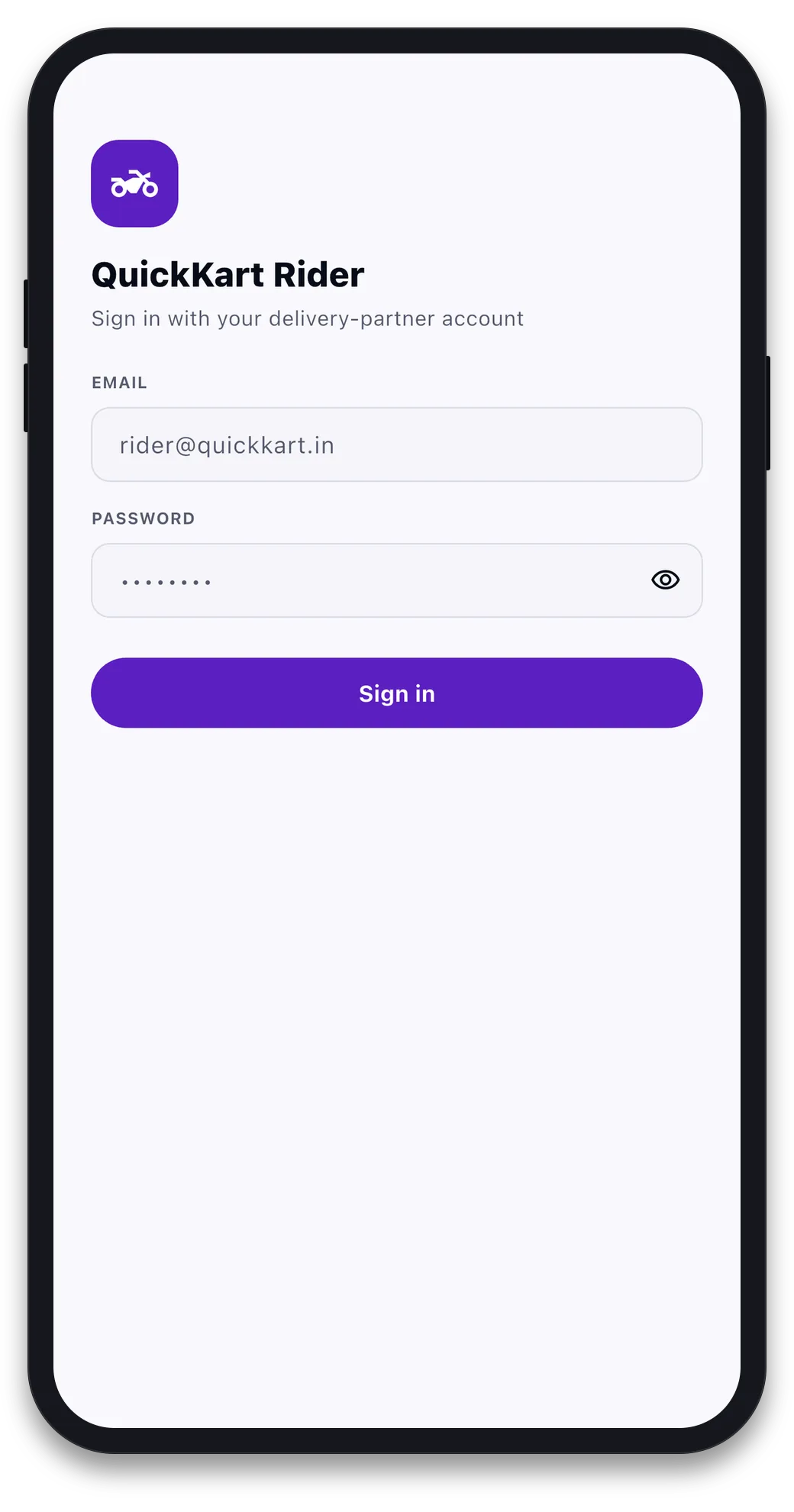
The rider signs in with the email and password the admin gave them. There is no public signup and no OTP to wait for. This keeps the rider list in the owner’s control. A rider who leaves can be switched off from the admin panel the same day.
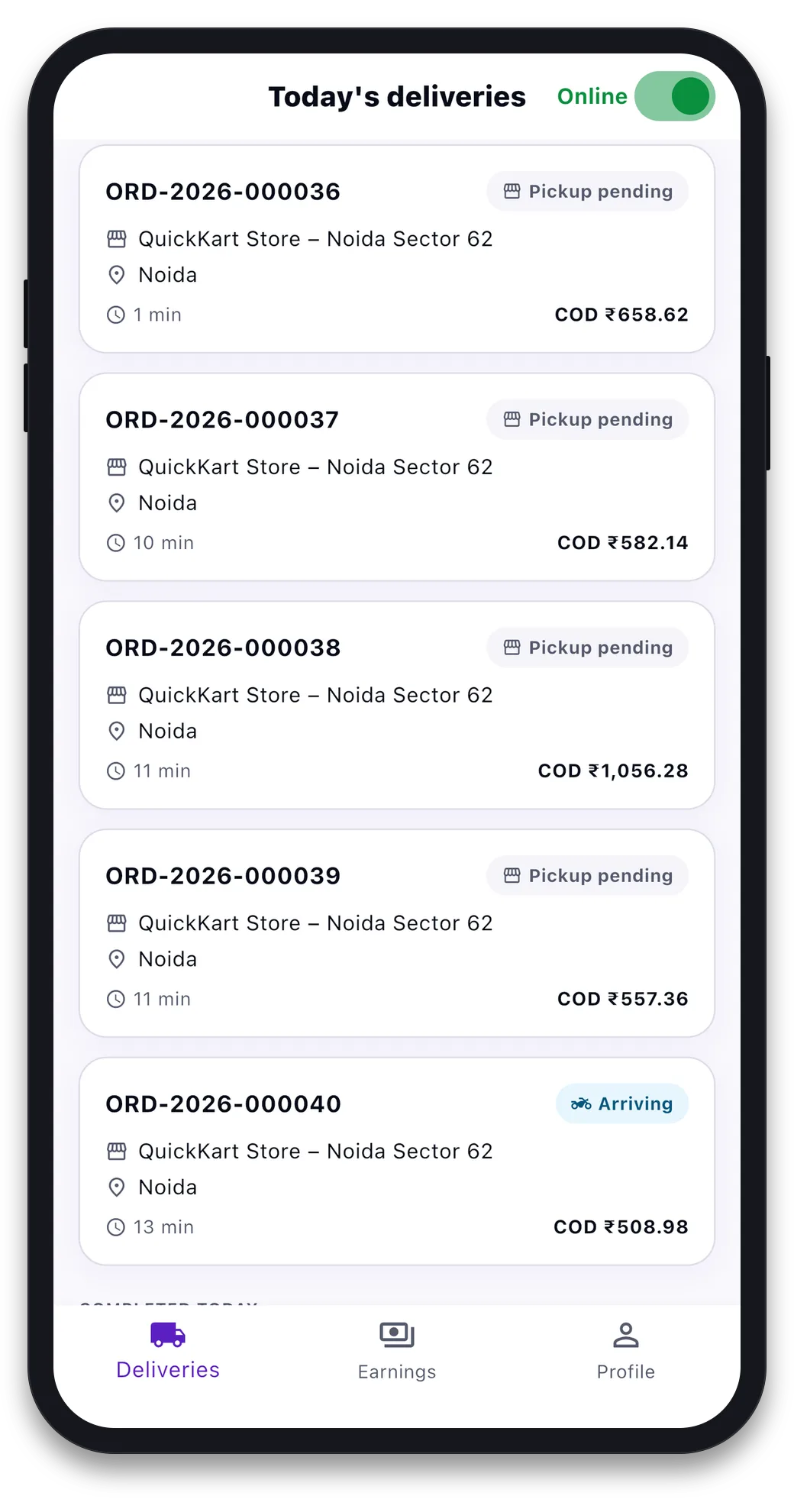
Feature 2Online switch and today’s deliveries
The Online switch tells the store which riders can take work. Going offline stops new orders coming in, but keeps the orders already in hand. Below it, today’s deliveries show the store, the drop-off area, a countdown to each order’s promised time (it says “running late” once the time passes), and the cash to collect. The store gives a packed order to a rider from its board, and the list refreshes itself while the app is open and online.
Feature 3Pickup, drop-off, directions and call
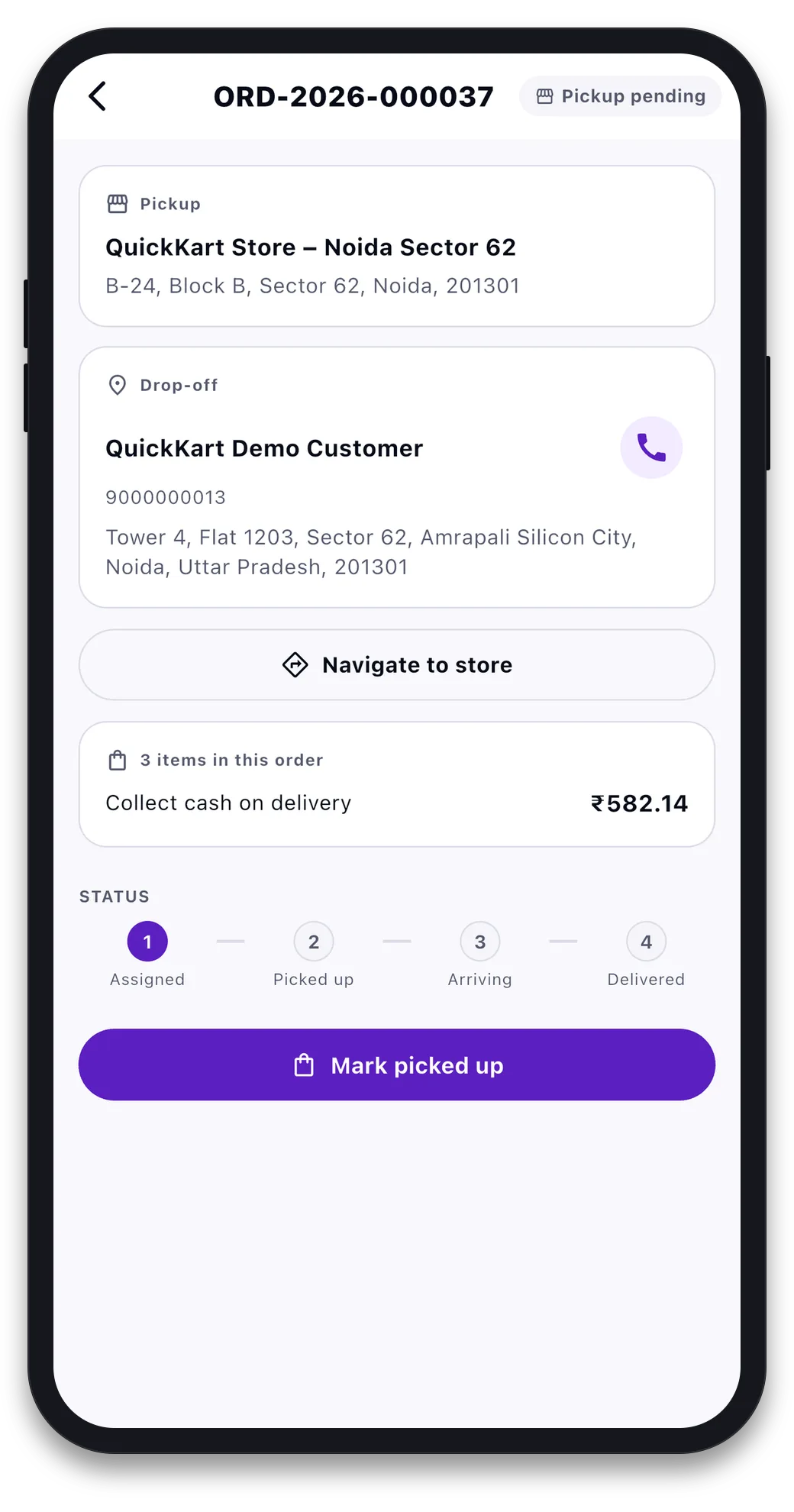
Each delivery opens on a card with the pickup store and the customer. “Navigate to store” and, after pickup, “Navigate to customer” open Google Maps with the address filled in. The call button dials the customer. The number of items and the cash to collect are on the same screen. A four-step bar shows where the order is: Assigned, Picked up, Arriving, Delivered.
Feature 4Handover code and cash check
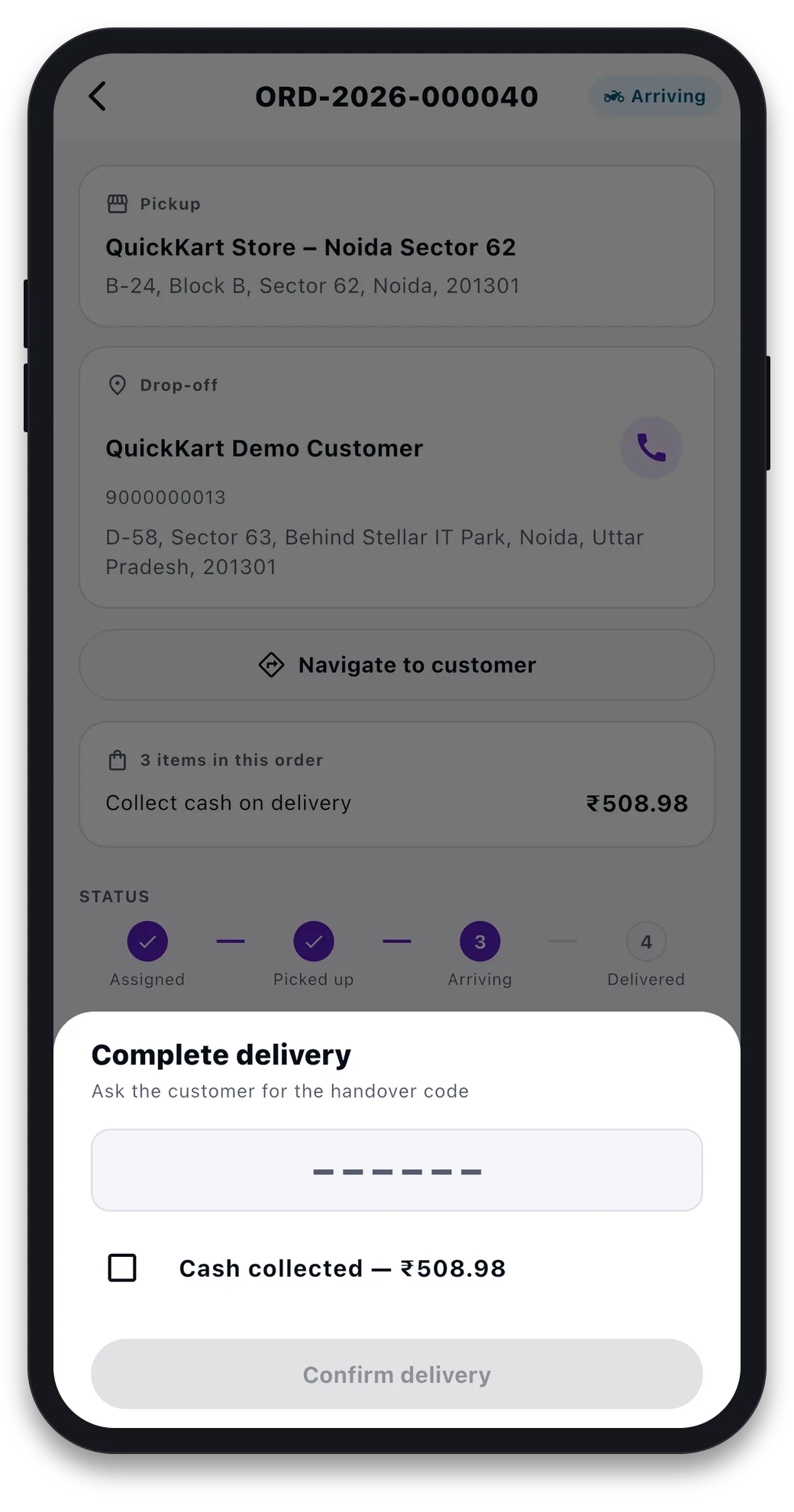
Picked up, Arriving and Delivered are three taps, in that order. The server will not allow a step out of order. If the owner has turned on the handover code, the rider must type the four-digit code the customer sees in their app before marking Delivered. Five wrong tries lock the order. For cash orders the rider also ticks that the cash was collected. During a delivery, the app sends the rider’s location to the server. That is what the customer sees on their map.
Feature 5Earnings, today and this week
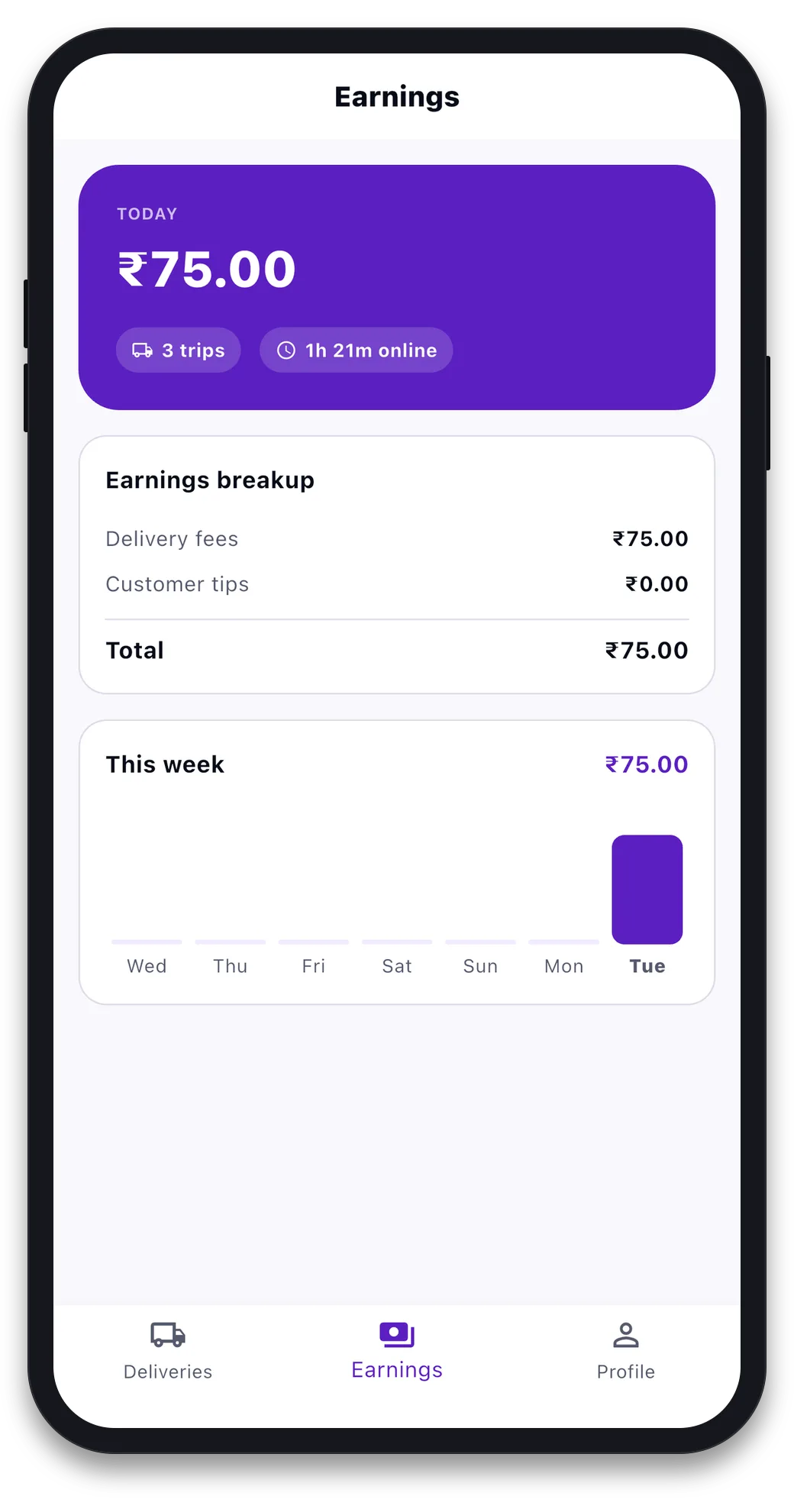
The earnings screen shows today’s total, the number of trips, and hours online. It splits the total into delivery fees and customer tips, and shows a seven-day chart. The numbers come from the fee lines on the orders the rider delivered, so they match what the owner sees.
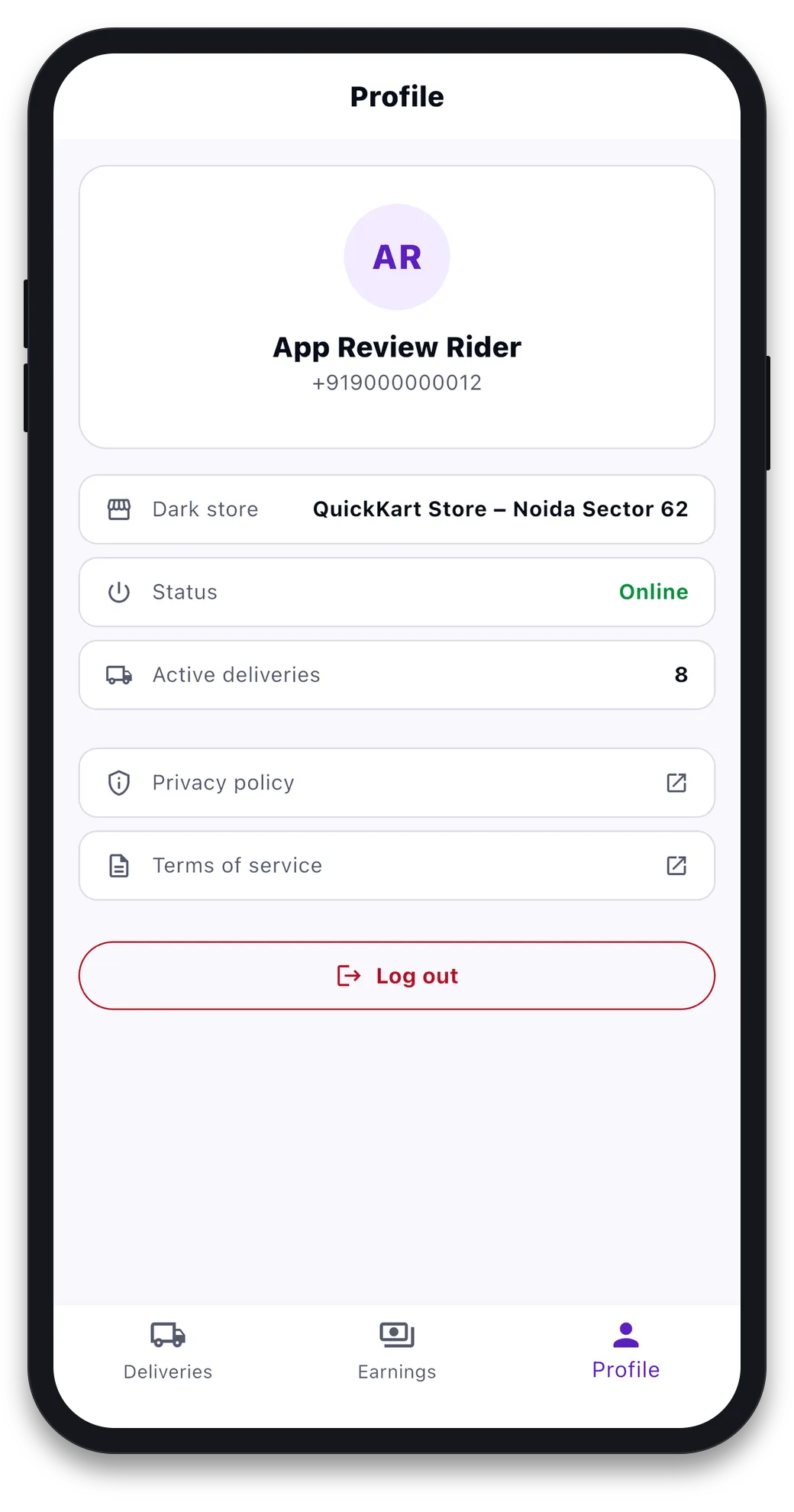
Feature 6Profile and status at a glance
The profile shows the rider’s home store, online status and number of active deliveries, with links to the privacy policy and terms, and a log-out button. A rider the admin has switched off sees a notice here, instead of just getting no work.
The store dashboard and Store app: running the floor
Each dark store gets its own login that sees only that store. The same tools come as a web page for the desk and an Android app for the floor: a live order board, giving orders to riders, the product list with prices and stock, delivery slots, and a pause switch for when the store cannot take more.
- Live order board. Columns for Placed, Accepted, Picking, Packed, Assigned, Picked up and Arriving, sorted by promised time. Each card shows how old it is and the minutes left. It turns orange with two minutes left and red once the time has passed. The board refreshes every fifteen seconds.
- Giving orders to riders. On a Packed order, pick from the riders who are online and active, with the least busy first. Change or remove the rider if plans change. The server will not accept a rider who is offline or switched off.
- Products and prices. Every product the store sells, with price, MRP, what the customer pays, stock on hand and available, a listed switch, rack location and a limit per order. All changes save together. A price above MRP is not allowed.
- Pause with a reason. Weather, too busy, out of stock, no riders, maintenance or other, with a note and an auto-resume time. A paused store stops taking new orders at once. Orders already placed are not affected.
- Store health at a glance. The current delivery time, open orders, late orders, out-of-stock products and free riders, refreshed every thirty seconds.
- Delivery slots. The Android app shows the day’s slots and how many are booked.
The admin panel: every store from one screen
The admin panel is where the owner sets up the business: stores and their map areas, the delivery-time settings, charges, riders, products, and everything else a shop back office needs.
The panel also has everything a normal online shop needs: categories you can drag to reorder, customers with groups, blocking, wallet changes and login history, price rules and coupons, banners, sliders and pages, newsletters and email templates, search synonyms and redirects, sitemap and SEO checks, stock sources with changes, transfers and a log, tax classes, rates and rules with the India GST add-on, reports for sales, orders, customers, products, stock, tax and coupons with CSV export, languages, currencies and themes.
Area checks, delivery time and clear charges
Three parts of the backend do most of the work. They make a quick commerce app feel fast and fair.
Area checks. Each store has a map area drawn in the admin panel, a list of pincodes, opening hours, a packing time, a limit of orders per slot and a maximum delivery distance. When a customer opens the app, their location or pincode is checked against all of this. The check also looks at whether the store is open or paused right now. It happens before the app shows a single price. Every check is saved. So the area checker can show you which pincodes asked and were refused in the last thirty days. That is your map for where to open next.
Delivery time. The time a customer sees is the sum of several steps: the store’s packing time, how many orders are waiting, travel distance at a set rider speed, extra wait only when every rider is busy, and a small buffer so the promise can be kept. The store page shows this sum live. So when the time goes up to sixteen minutes, you can see which step moved. Nothing in the product has “10 minutes” written into the code.
Charges. Delivery, handling, peak-time, small-order and cash-on-delivery charges are rules, not code. They can be flat, a percentage, by distance or by order size, for all stores or for one, with a time window for peak-time charges. Each rule you turn on becomes one named line on the bill. The name you type is exactly what the customer reads before paying. This keeps the bill in line with India’s Consumer Protection (E-Commerce) Rules on showing charges. It is also why there is no “other charges” line anywhere in the app.
Two more checks protect the order itself: a handover code, made for each order and shown in the customer’s app, which the rider must type before marking the order delivered. You can turn it off in settings, and late flags that mark any open order past its time in red on every board.
What is ready, and what you connect
The three mobile apps are built in Flutter. The web shop and admin panel are Next.js. The backend is NestJS on Prisma and PostgreSQL, with Redis for caching and queues. Quick commerce is a module on top of a general online-shop core. So you can turn area checks, charges, delivery slots and OTP sign-in on or off from the admin panel. No new release is needed. You get the full source code for every part with a one-time licence and host it yourself.
Because you host it, a few services are yours to connect. Here is the clear list:
- Payments. Cash on delivery works out of the box, with the cash-on-delivery charge rule. Bank transfer is built in, with a receipt approval queue for the admin. Razorpay is built into the backend and web shop. It turns on when you add your keys. The mobile apps’ checkout comes with cash on delivery and bank transfer.
- Maps. The map-area editor in the admin panel and the rider map in the customer app use Ola Maps and need your Ola Maps key. Rider directions open Google Maps on the phone and need nothing.
- Sign-in. Email and password work right away. Phone OTP sign-in is built into the customer app and the backend, with limits per phone and per IP. Connect the SMS service of your choice to send the codes.
- Alerts. Order-status push alerts to customers go through Firebase Cloud Messaging with your Firebase project. Email needs your SMTP or email service.
We list these plainly on purpose. A founder who finds a missing key in week one is fine. One who finds it the night before launch is not. Everything above is a setting, not a build.
Real costs and time to launch
Every city and market is priced differently. Treat the numbers below as rough ranges to plan with, not quotes:
- Dark-store setup (per store). Lease deposit, racks, fridges and basic fit-out: rough range ₹8-20 lakh.
- First stock. Filling 1,500+ products for the first time: rough range ₹10-25 lakh per store.
- Software. Ready-made source code versus building your own: rough range ₹3-15 lakh one-time for a ready-made platform, versus ₹40 lakh-1 crore-plus and 6-12 months to build from scratch.
- Marketing and launch. Winning customers in your first pincodes: rough range ₹3-8 lakh for a launch quarter.
On time, the ground work (finding a store, your first stock deals, hiring riders, getting the FSSAI licence and labels right) takes most founders 6-10 weeks. The software time is the one thing fully in your control. Build from scratch and you wait months before your first test order. License a ready-made platform and that step shrinks to setting up stores, charges and your brand.
Your edge in this business is on the ground: the store location you found, the suppliers you know, the area you understand better than any outside investor. None of that comes from writing checkout code. Every week spent on it is a week a local rival can take your first customers. To see the whole platform before you decide, get in touch for a demo of the customer app, rider app, store dashboard and admin panel.
Common questions
How much money do you need to start a 10-minute grocery delivery business?
For one dark store, counting setup, first stock, software and a launch quarter of marketing, plan for a rough range of ₹25-60 lakh. It depends on the city and the store size. A ready-made platform like QuickKart, instead of your own build, is the biggest way to keep that number low. It removes months of engineering cost.
Do you need an FSSAI licence to run a quick commerce grocery business?
Yes. Any business that sells packaged or fresh food needs an FSSAI licence before it can sell those items, and that covers most of a grocery list. Every product also needs a correct label with MRP, net quantity and the maker’s details, as the Legal Metrology rules require. This is not paperwork to do later. Put it on your pre-launch list next to the store and the stock.
Can you start in one area and grow later?
Yes, and that is the best way. The dark-store model works on a tight 2-3 km delivery area. One store can show whether your operations, product mix and local demand work. Do this before you spend on a second one. QuickKart supports any number of stores from one admin panel. Each store has its own map area, pincodes, hours, packing time, product list and prices. So growing means adding a store record and a rider list, not rebuilding anything.
How long does it take to go from decision to first delivery?
With the ground work and the software running side by side, most founders go from decision to first live delivery in 8-12 weeks. The ground work (store lease, stock deals, hiring riders, FSSAI approval) is usually the longer part. A ready-made platform removes almost all of the software wait. The apps and admin panel are already set up and branded.
Can I try QuickKart before buying?
Yes. The customer app and the rider app are live on the App Store and connect to our demo server. The Android files are on the APK download page at quick.prsindia.in/mobile-app. Type pincode 201301 to reach the Noida Sector 62 demo store, sign up with an email and place a cash-on-delivery test order. Rider and store logins are made by the admin, so ask us for a demo to see the rider app, the store dashboard and the admin panel with a live order.
Do I get the full source code?
Yes. QuickKart is sold as a one-time source-code licence, not a subscription. You get the customer app, rider app and store app in Flutter, the Next.js web shop and admin panel, and the NestJS backend. You host it yourself, put your own brand on it, and pay no fee per order.
Which payment methods do the apps support?
The mobile apps come with cash on delivery, with a charge you can set, and bank transfer with a receipt approval queue for the admin. Razorpay is built into the backend and the web shop and turns on when you add your Razorpay keys.
How is the delivery time worked out?
For each store, from live data: the store’s packing time, how many orders are waiting, travel distance at a set rider speed, extra wait only when every rider is busy, and a small buffer. The admin panel shows this sum for each store, and the customer app shows the result. Nothing in the platform has a fixed number of minutes written into it.
Read next
Written by
Aditi
Building software at PRS India.