Grocery Delivery App Development: 25 Features to Check
How to evaluate quick commerce and grocery delivery software in 25 points, and how our own ready-made app scores on each one.

Written from production. Our articles draw on products we run live and the client work behind them, and are revised as the systems they describe evolve.
You are about to pay for a grocery delivery app. Three companies have shown you demos. All three look alike: a green home screen, a cart, a rider on a map. The real gaps show up only after launch, when an order is late, an item is missing, or a rider comes back with cash.
This guide gives you 25 points to check before you sign. Use it for any quick commerce software, any grocery delivery app script and any custom build. We end by scoring our own ready-made grocery delivery app on the same 25 points, with the gaps written down. PRS India offers mobile app development for the customer, store and rider apps, and builds the web admin too.
Key takeaways
- A grocery delivery app is four pieces of software: customer app, dark store app, rider app and web admin. Check all four, not just the customer app.
- Score each point 2 (works in the demo), 1 (part works) or 0 (missing). The top score is 50.
- Ask to see each point working with a test order. Slides and feature lists do not count.
- Most late orders start inside the store, not on the road. Check the store screens with the most care.
- Our own app scores 46 out of 50. Online payments, live tracking, SMS set-up and the GST tax bill still need work. It passes 4 of the 7 demo tests.
Quick commerce software: what it must do
Quick commerce means small orders delivered in minutes from a store close to the buyer. People also call it 10-minute delivery, instant delivery or q-commerce. The software behind it does four jobs at once.
- Take the order. The customer app shows only what the nearest store has, and takes payment.
- Pack the order. The dark store app tells staff what to pick and when the bag is ready.
- Deliver the order. The rider app shows the pickup, the drop and the cash to collect.
- Run the business. The web admin sets stores, areas, prices, fees, offers and reports.
If one piece is weak, the whole promise breaks. A fast customer app cannot hide a slow pick list. Our guide on the role of a dark store in quick commerce explains why the store matters so much.
How to use this 25-point checklist
- Ask for a test login on all four parts. Customer, store, rider and admin. If a vendor shows only the customer app, write 0 for the rest.
- Place one real test order. Follow it from the cart to the door. Watch each screen change.
- Score each point. 2 = you saw it work. 1 = it is there but needs set-up or has a gap. 0 = missing or "coming soon".
- Write the gaps down. Each 1 or 0 is extra work. Ask who pays for it and how long it takes.
One rule: score only what you saw working. "We can add it" is a 0 until it is in your written scope.
Points 1 to 8
Customer app: 8 points to check
This is the part your buyers see. It must tell the truth about stock, time and money.
- 1. Pin code check. The app reads the pin code or location and picks the nearest store. Outside the area, it says so before the cart.
- 2. Stock of that one store. The app shows only items the chosen store has. When the last packet goes, the item shows "out of stock" by itself.
- 3. Search, categories and product page. Search finds "atta" and "aata". Each product shows pack size, MRP and the selling price.
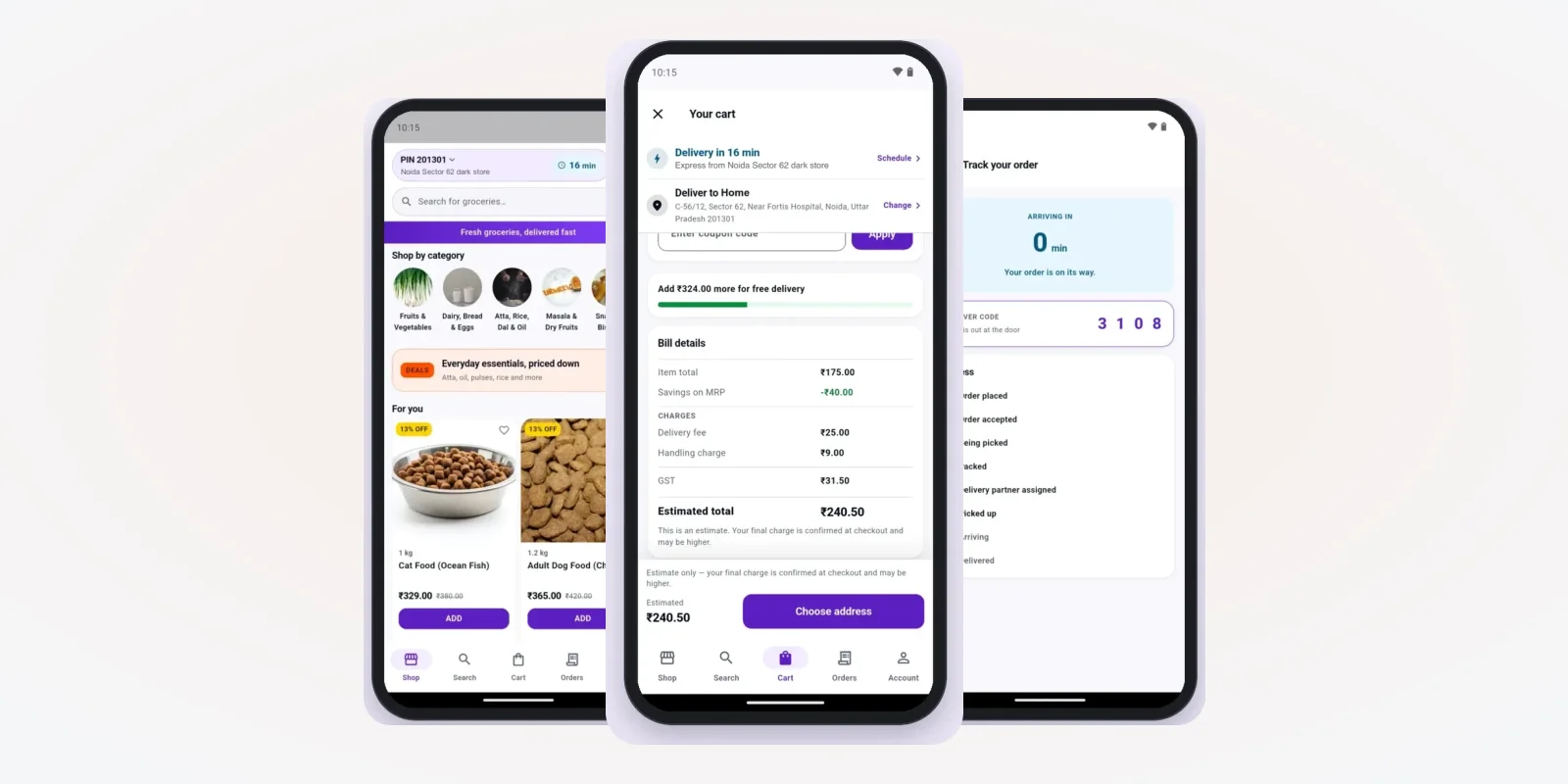
- 4. Cart rules. Minimum order, delivery fee, handling fee and small-cart fee. Each fee shows on the bill with its own name.
- 5. Payments. UPI, cards and wallets through a payment gateway, plus cash on delivery. Check that a failed payment does not create a paid order.
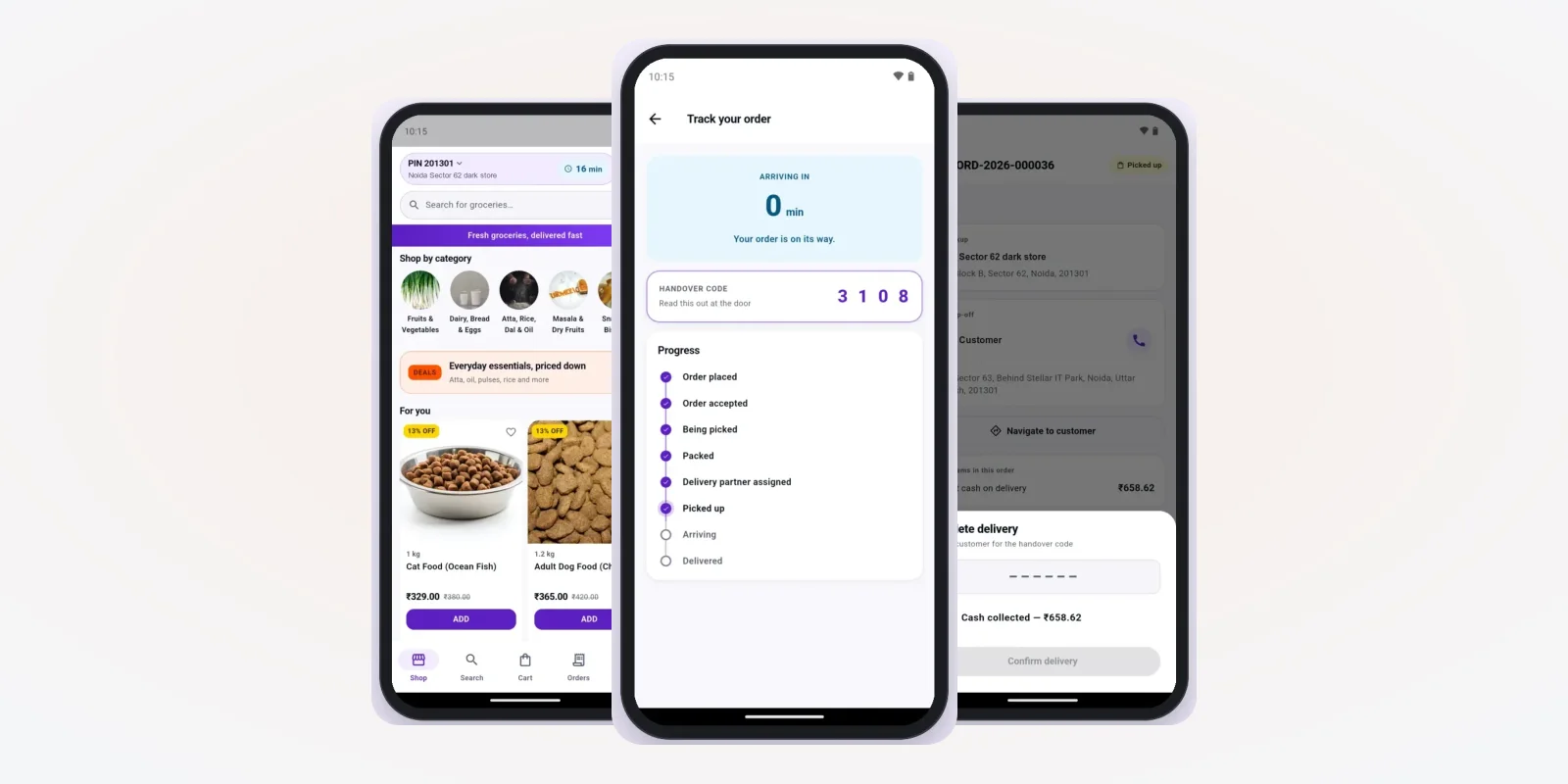
- 6. Order tracking. Steps like accepted, being picked, packed, rider assigned and picked up. Each step should come from a real tap in the store or rider app.
- 7. Coupons and offers. A coupon code, a first-order offer and a limit on how many times one person can use it.
- 8. Order history, cancel and refund. The customer can cancel before packing. The refund reaches the wallet or the bank, and the app shows where it went.
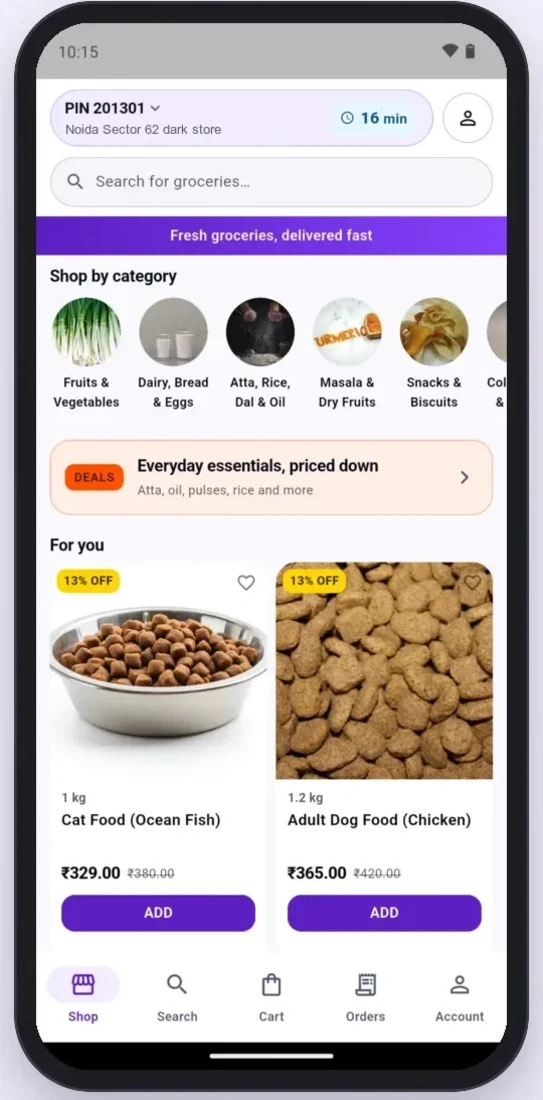
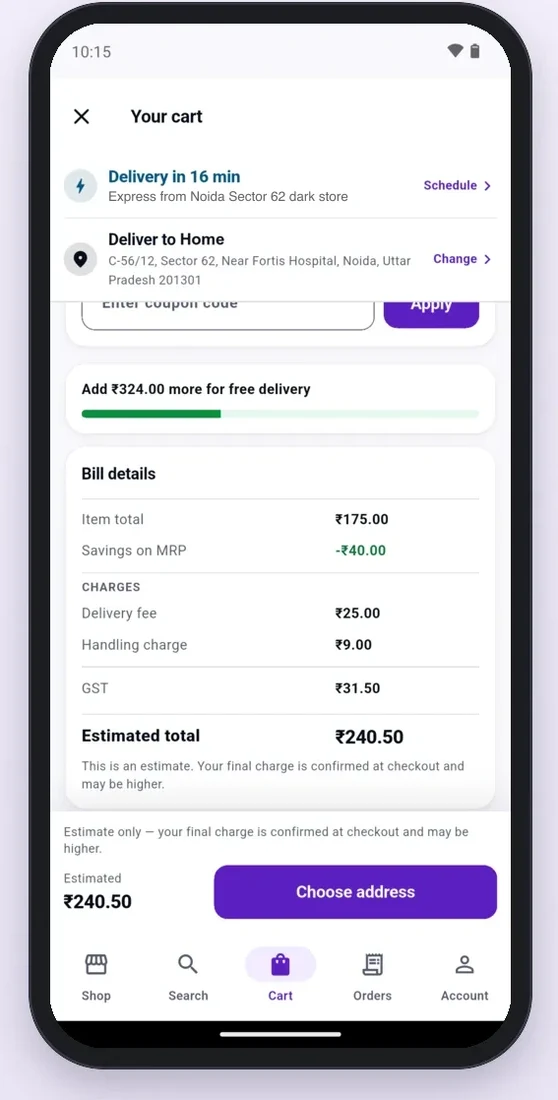
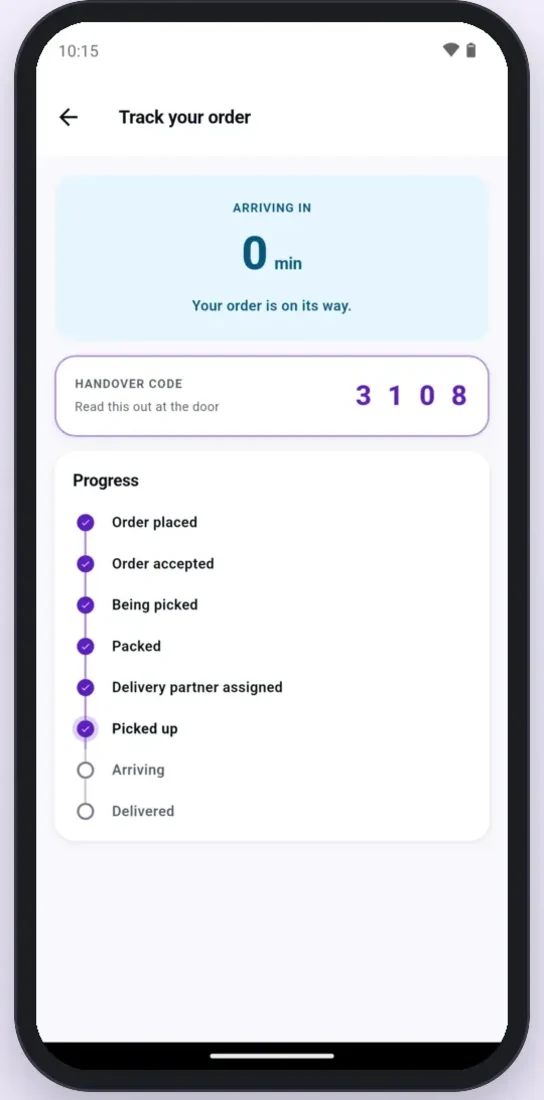
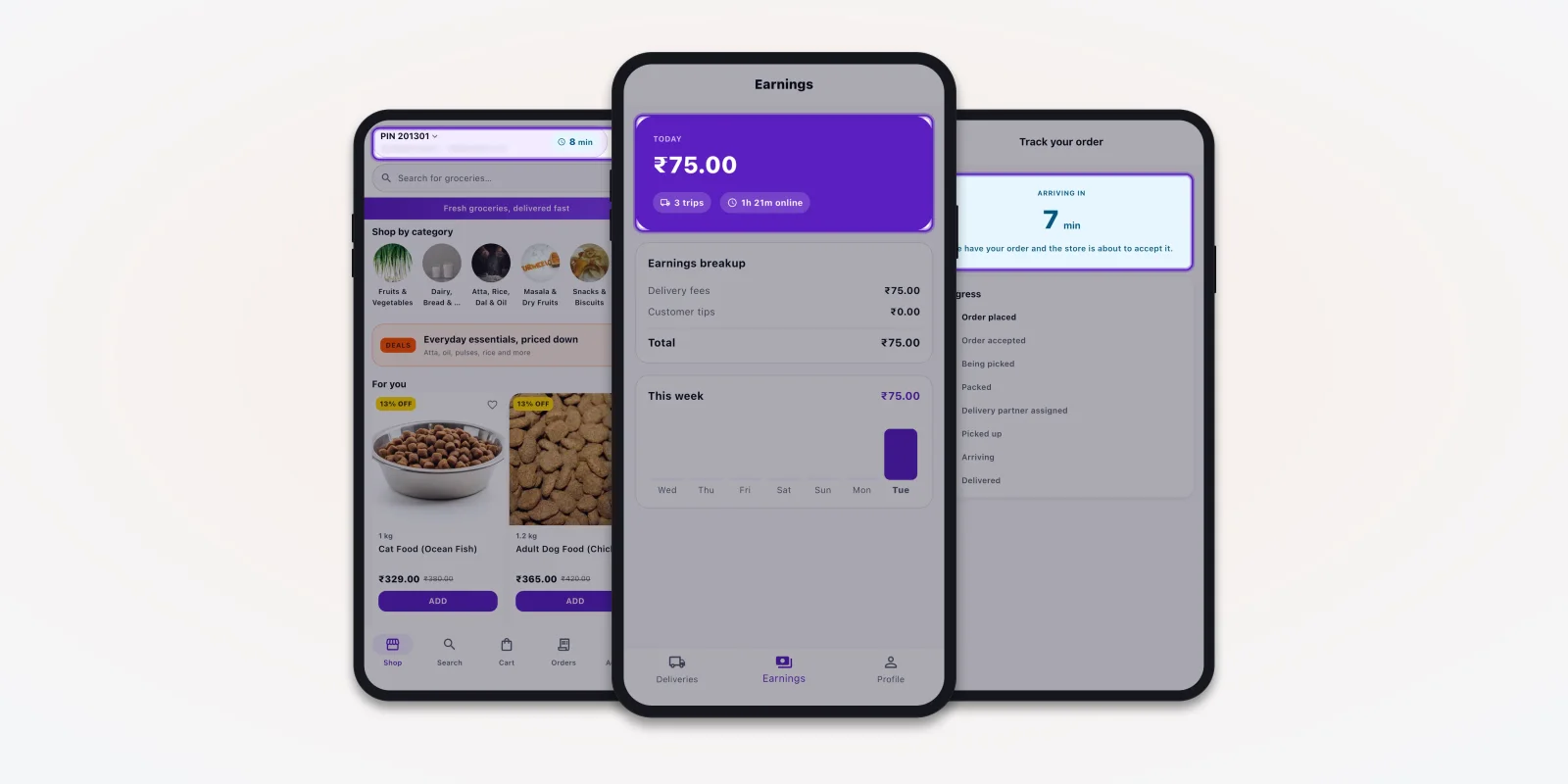
Screens from a grocery delivery app we built. Demo data.
Point 4 matters more than it looks. India's Department of Consumer Affairs runs the e-commerce rules that ask sellers to show the total price and all charges before the buyer pays. A bill that hides a fee inside "other charges" is a risk for you, not only the buyer. We design these screens with our UI and UX design team so each charge is clear.
Points 9 to 14
Dark store app: 6 points to check
Most vendors rush this part of the demo. Slow down here.
- 9. Order board. New, accepted, picking, checking and packed columns. Late orders stand out.
- 10. Pick list in rack order. The list follows the walk through the racks, not the order the customer added items.
- 11. Missing item and swap. The picker marks an item missing, offers a swap, and the customer says yes or no in the app. The money for a missing item goes back.
- 12. Store stock and range. Each store sets its own items, prices, rack numbers and stock counts. Goods received and stock counts update the numbers.
- 13. Pause and slots. The manager can pause new orders for 15 minutes when the store is full. Slots have a limit on orders per hour.
- 14. Rider assignment. Manual, automatic to the nearest available rider, or both. The screen shows which riders are online.
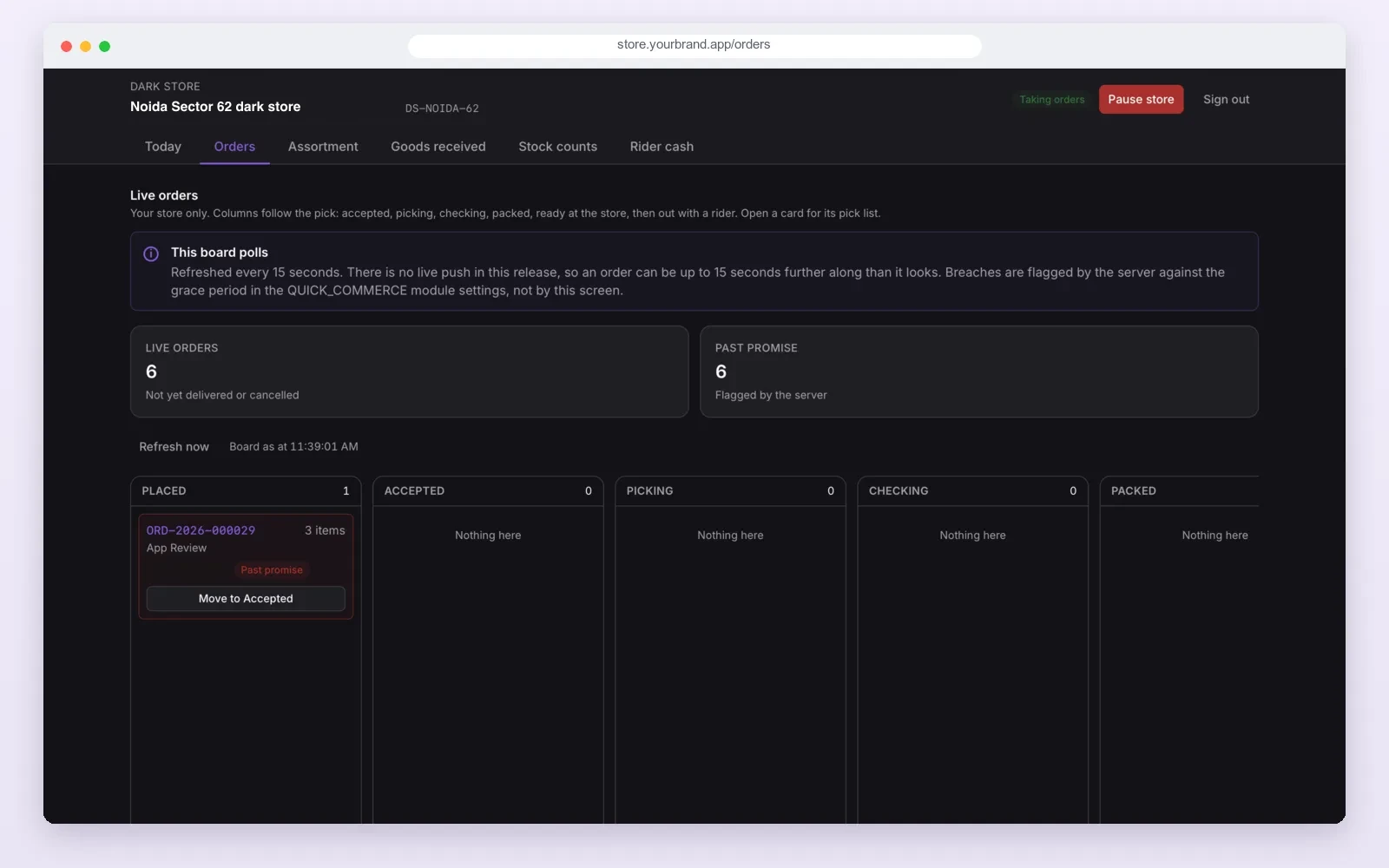
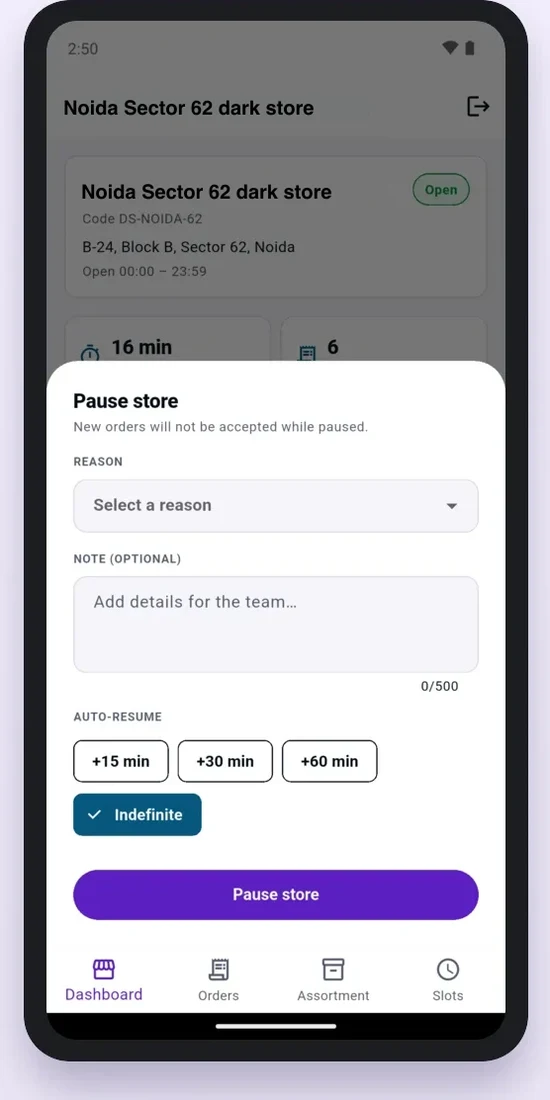
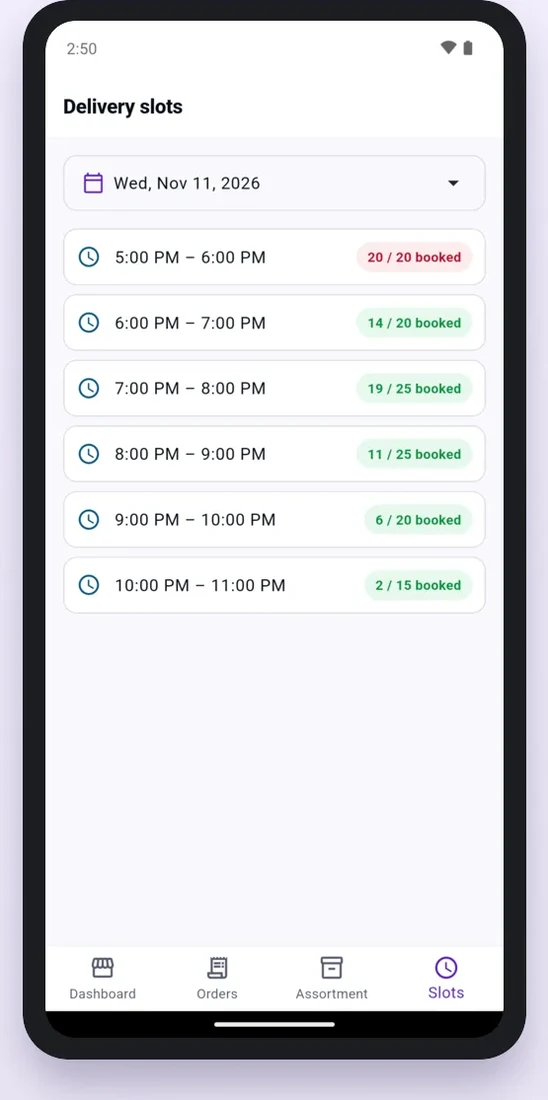
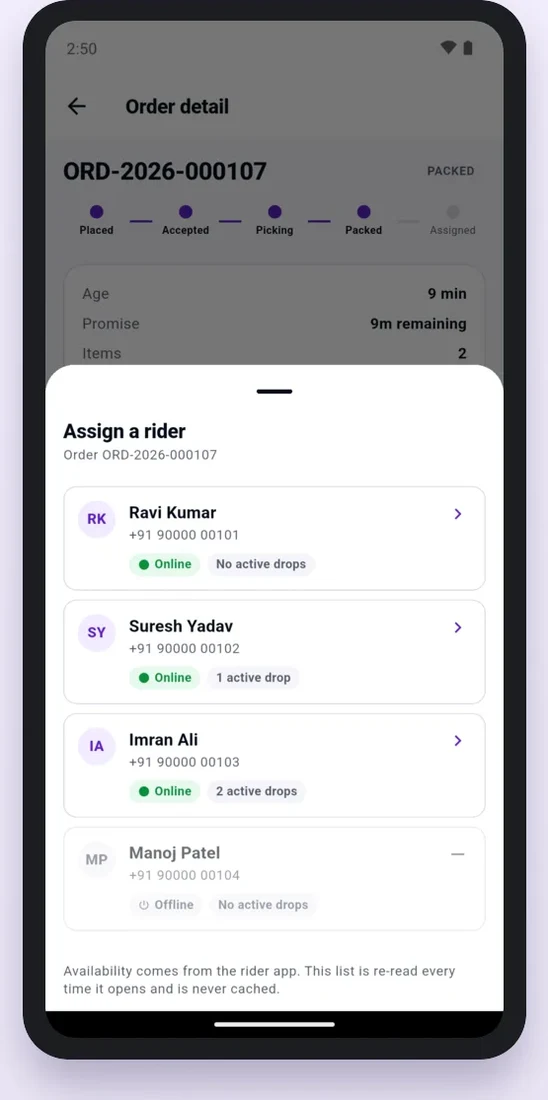
Each dark store that sells food needs its own food licence or registration from FSSAI. Ask whether the admin can store each store's licence number and print it on the bill. If you run many stores, the stock link between the warehouse and the stores also matters. Our post on inventory management software development covers that link.
Points 15 to 19
Rider app: 5 points to check
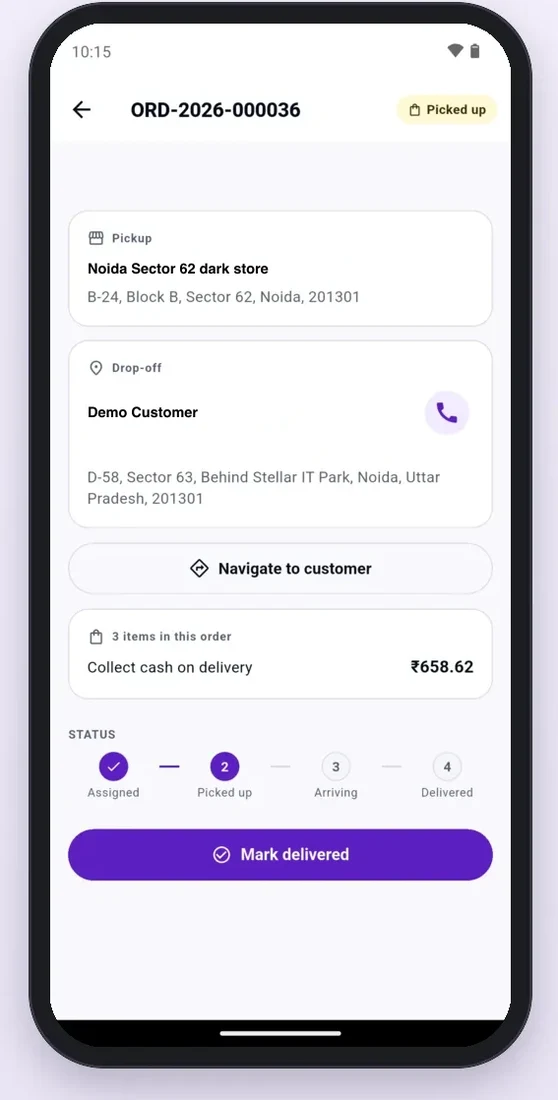
- 15. Online switch and delivery list. The rider goes online and sees today's deliveries with their status.
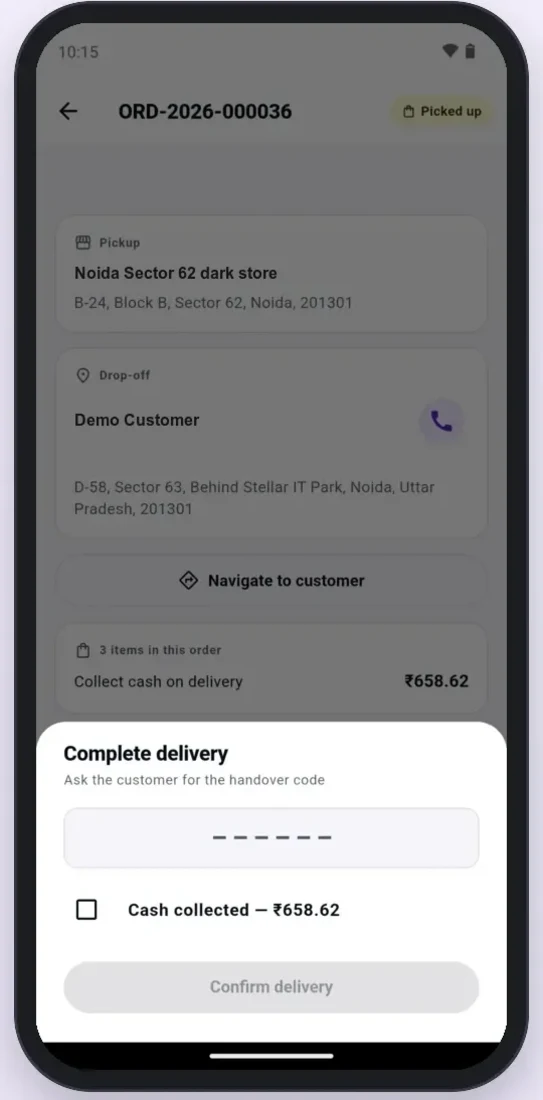
- 16. Pickup, drop and map. Store address, customer address, a call button and one tap to open directions.
- 17. Handover code. The customer reads a code at the door. Without it, the order cannot be marked delivered.
- 18. Cash on delivery. The app shows the cash to collect. The store sees the cash each rider holds and takes it back at shift end.
- 19. Rider earnings. Pay per delivery, tips and weekly totals, so riders do not dispute their pay.
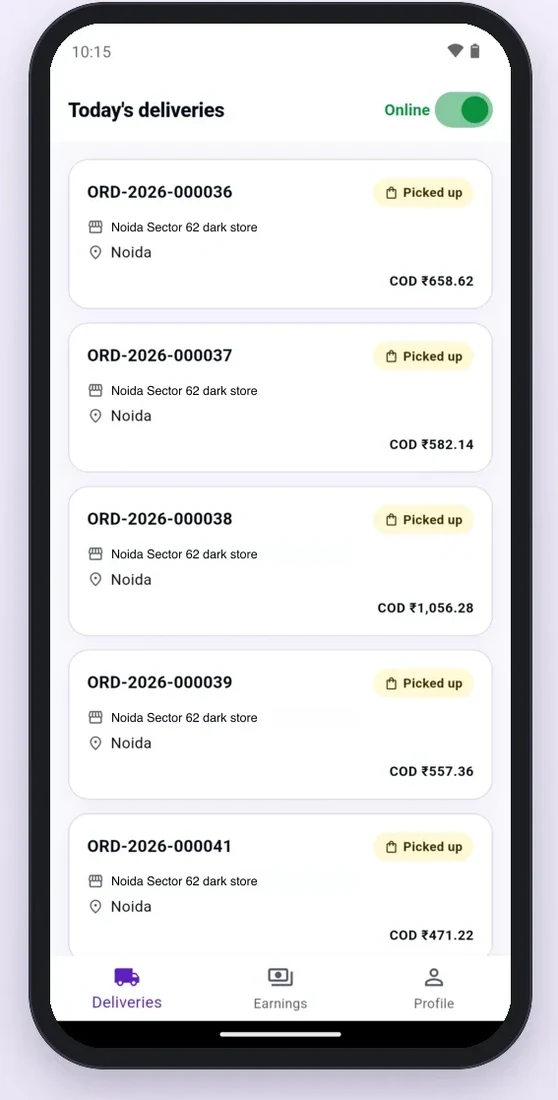
Points 20 to 23
Web admin: 4 points to check
- 20. Many stores and areas. Add a new dark store with its own map area, pin codes, hours and prep time, without a developer.
- 21. Product upload in bulk. Upload hundreds of products from an Excel or CSV file, with images, MRP and pack size.
- 22. Fees, offers and settings. Change the delivery fee, the small-cart fee or an offer from the admin, and test it on a sample cart first.
- 23. Reports. Sales, orders, tax and rider reports, by store and by date, with an Excel download.
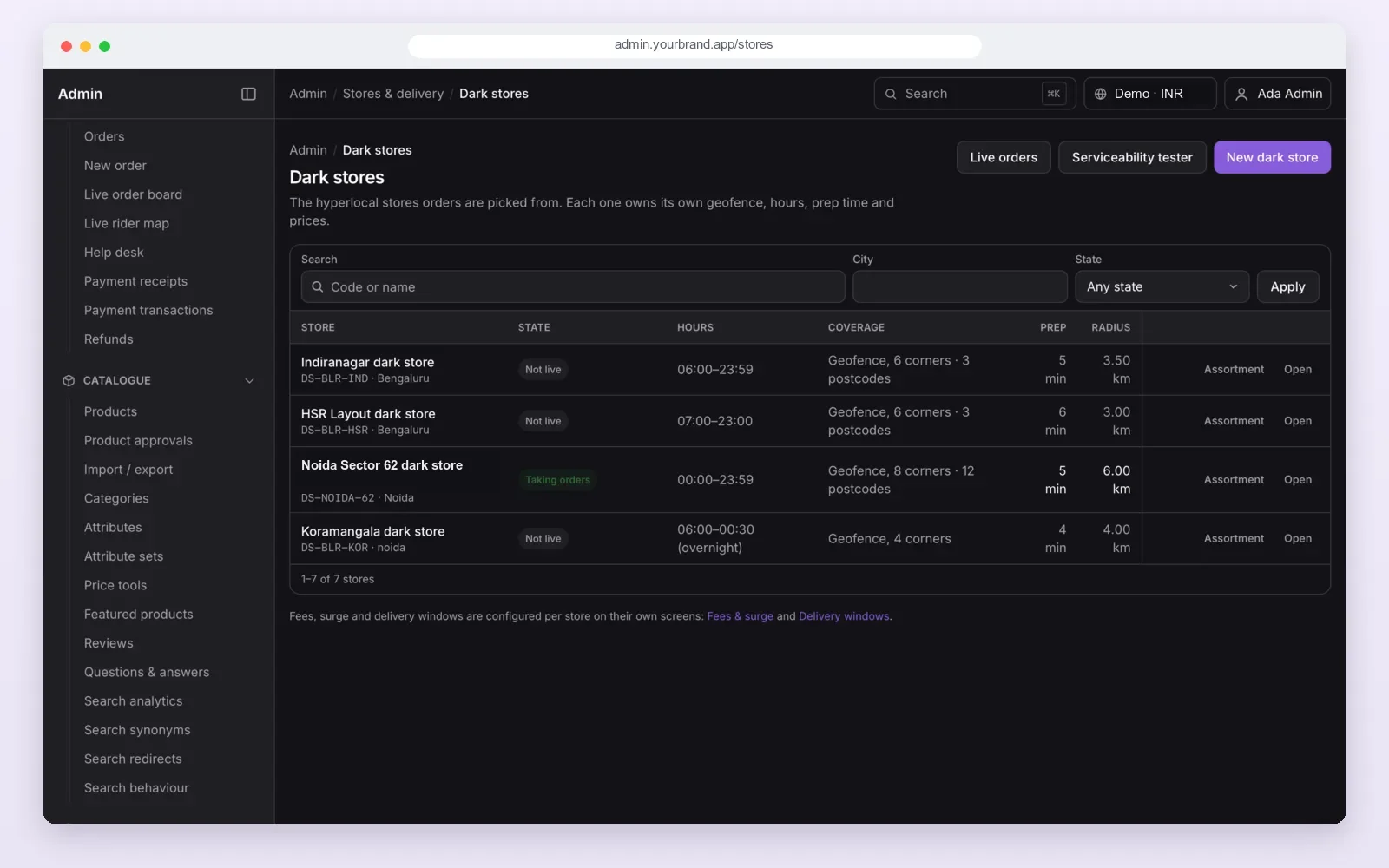
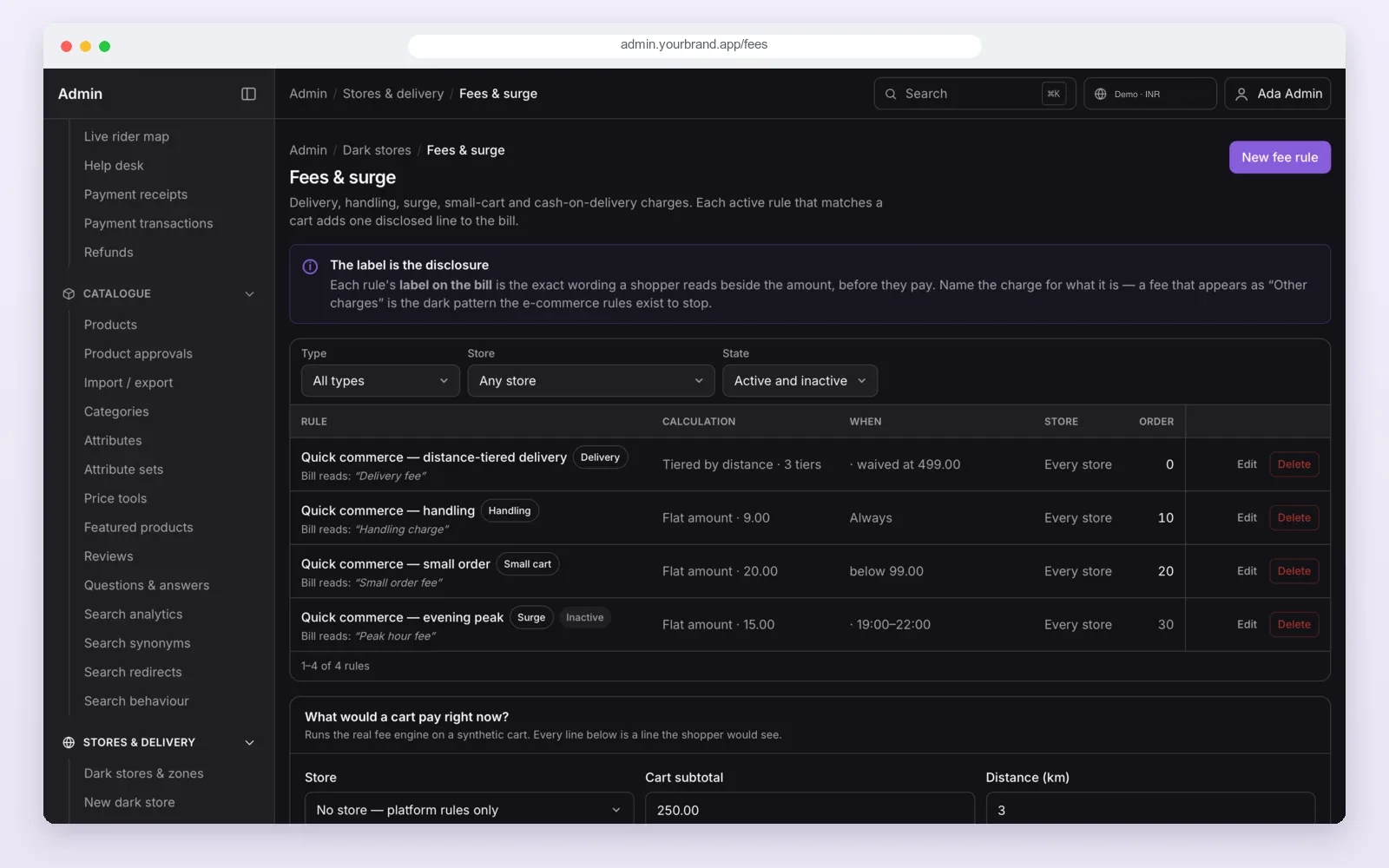
We build the admin and the store dashboard as a web application that runs on a desktop or a tablet at the packing table. For a chain that also sells in shops, see our retail and ecommerce software work.
Points 24 and 25
Messages and tax bill: 2 points to check
- 24. OTP, push and SMS that really send. Log in with a new phone number during the demo. If the OTP is a fixed code like 1234, the SMS link is not set up yet.
- 25. GST tax invoice. The bill shows the seller's GSTIN, the HSN code and CGST, SGST or IGST for each item. A bill with one "GST" line is not enough for a registered business.
Your order and phone data falls under India's data protection law. The Ministry of Electronics and IT publishes the framework. Ask where the data is stored, who can see it, and whether you can export it.
Score sheet: how to add it up
| Total score (out of 50) | What it means | What to do |
|---|---|---|
| 45 to 50 | All four apps work end to end | Check the gaps, then set up under your brand |
| 35 to 44 | The base works, some parts need work | Put every gap in the written scope with a date |
| 20 to 34 | Customer app only, or a theme with a few screens | Expect a long build; ask for a custom quote |
| Below 20 | A demo, not a product | Do not sign on this demo |
Red flags in a demo: the store and rider apps are "on the roadmap"; every phone number logs in with the same OTP; the cart shows one "total" with no fee lines; the admin cannot add a new store; the vendor will not give you the source code.
7 live demo tests to ask any vendor to run
The 25 points tell you what is there. These 7 tests tell you if it holds up on a busy day. Ask the vendor to run them on a test system while you watch. Bring your own pin codes.
| Test | What to ask for | A good result |
|---|---|---|
| 1. Right store picked | Place orders from two addresses served by different stores | Each order goes to the store that serves that address |
| 2. Last unit sold once | Set stock to 1. Two buyers press buy together | One order goes through. The other is told it is out of stock |
| 3. Out-of-stock fallback | Empty one item in the nearest store and order it | The order is served from another store, or the buyer is told clearly |
| 4. Nearest rider assigned | Place an order with three riders at different distances | The nearest available rider gets the offer first |
| 5. Rider goes offline | Switch off a rider's phone after assignment | The order moves to another rider without staff stepping in |
| 6. Two stores kept apart | Pause one store, change a price in the other | The other store is untouched |
| 7. 100 orders at once | Send 100 orders in one minute | No lost orders, no double stock, screens keep working |
Do not accept "it will work" as an answer. Ask for the run, and ask for the result in writing.
Our own score
Our ready-made grocery delivery app: honest scores on all 25 points
We checked our own app against this list in the code, not the sales page. It scores 46 out of 50: 21 points work, and 4 points work in part. Here is each one.
| # | Point | Score | What we found |
|---|---|---|---|
| 1 | Pin code check | 2 | Pin code and map area; the nearest store wins |
| 2 | Stock of one store | 2 | Stock is held per store and locked while a cart checks out |
| 3 | Search and product page | 2 | Search, categories and product pages |
| 4 | Cart rules | 2 | Minimum order, delivery, handling and small-cart fees, each on its own line |
| 5 | Payments | 1 | Cash on delivery works. Razorpay is in the server code but not yet in the customer app; we connect it during set-up |
| 6 | Order tracking | 1 | All steps work, but the app checks for updates every few seconds instead of live push |
| 7 | Coupons and offers | 2 | Coupons, cart rules and use limits |
| 8 | Cancel and refund | 2 | Cancel window and refund to the wallet |
| 9 | Order board | 2 | Web board and store app |
| 10 | Pick list | 2 | Sorted in rack walk order |
| 11 | Missing item and swap | 2 | Mark missing, offer a swap, customer approves, money back to the wallet |
| 12 | Store stock and range | 2 | Per-store range, prices, racks, goods received and stock counts |
| 13 | Pause and slots | 2 | Pause with auto-resume; slots with a limit |
| 14 | Rider assignment | 2 | Manual, automatic or both |
| 15 | Online switch and list | 2 | Online switch and today's deliveries |
| 16 | Pickup, drop and map | 2 | Opens Google Maps directions. No in-app map yet |
| 17 | Handover code | 2 | Customer code with a try limit. No delivery photo |
| 18 | Cash on delivery | 2 | Cash per rider, cash limit and store cash page |
| 19 | Rider earnings | 2 | Pay rules, bonuses and weekly payouts |
| 20 | Many stores and areas | 2 | Map area, radius and pin codes per store |
| 21 | Bulk product upload | 2 | CSV and Excel import with a template |
| 22 | Fees, offers, settings | 2 | Fee rules with a sample-cart tester |
| 23 | Reports | 2 | Sales, orders, tax and store reports with Excel download |
| 24 | OTP, push and SMS | 1 | Push and email are built. The SMS link needs your Indian SMS provider connected |
| 25 | GST tax invoice | 1 | Bills are made for every order with GST rates, but HSN and CGST/SGST split are not printed yet |
Two more facts you should know. The customer and rider apps run on Android, and their iPhone versions are part of set-up. The store app is Android only today, and the store web dashboard works on any device. All four gaps above are part of our set-up work for a new client, and we write them into your scope with dates. You can see the screens on our grocery delivery app page.
Our app on the 7 demo tests
| Test | Result today |
|---|---|
| 1. Right store picked | Pass. The store is chosen by delivery area, pin code or radius |
| 2. Last unit sold once | Pass. Two buyers cannot both get the last unit |
| 3. Out-of-stock fallback | Not built yet. An item out of stock in one store is not served from a second store |
| 4. Nearest rider assigned | Pass. The order is offered to the nearest available rider, with a time limit |
| 5. Rider goes offline | By hand today. Your admin moves the order to another rider |
| 6. Two stores kept apart | Pass. Each store has its own stock, prices and orders |
| 7. 100 orders at once | No published load test yet, so we do not quote a number |
So our app passes 4 of the 7 tests today. We tell you this now so there are no surprises on demo day.
Custom build vs ready-made base vs monthly app
| Custom build from zero | Ready-made base, your brand | Monthly app plan | |
|---|---|---|---|
| Time to launch | Longest | Shorter; set-up and changes only | Shortest |
| Your brand on the stores | Yes | Yes | Often shared or limited |
| Source code | Yours | Yours | Stays with the vendor |
| Order and customer data | On your server | On your server | On the vendor's server |
| Changes to fit your stores | Any | Any | Only what the plan allows |
| Ongoing fee | Hosting and support only | Hosting and support only | Monthly fee for as long as you use it |
Our white label grocery delivery app guide explains what changes when we put the base under your brand.
Worked example: a supermarket with three branches scores two vendors
- The need. A supermarket in Lucknow wants delivery from its three branches within 30 minutes.
- Vendor A. Shows a polished customer app. The store and rider apps are "in progress". Score: 15 on points 1 to 8, 0 on points 9 to 19, 6 on points 20 to 25. Total 21.
- Vendor B. Gives logins to all four parts. One test order goes from cart to door. Two points score 1. Total 46.
- The gaps. The owner asks Vendor B to put online payments and the GST bill into the written scope with dates.
- The choice. Vendor B, with the gaps fixed before launch. Vendor A would have needed a long build for the store and rider sides.
Our service
How we build your own grocery delivery app
- Understand your stores. Areas, store sizes, products, delivery time, payment mix and rider model.
- Show clickable screens. Your brand on the customer, store and rider apps before any build work.
- Build and fill the gaps. We set up the base, connect your payment gateway and SMS provider, and add what your stores need. The apps use Flutter for Android and iPhone.
- Test with your team. Real test orders with your pickers and riders in one store first.
- Launch under your brand. Your name on Google Play and the App Store, your server, your data. Our cloud and DevOps team sets up hosting.
- Support and grow. New stores, new areas and new features as you grow. Our development process page shows each stage.
Grocery delivery app development cost: what decides it
We do not publish a price, because the scope changes it a lot. These are the things that decide your budget:
| Factor | Lower budget | Higher budget |
|---|---|---|
| Starting point | Ready-made base under your brand | Custom build from zero |
| Stores | One city, a few stores | Many cities, many stores |
| Apps | Android only | Android, iPhone and a store tablet app |
| Payments | One gateway plus cash | Many gateways, wallets and subscriptions |
| Links to other systems | None | Your ERP, POS or accounting software |
| Delivery model | Your own riders | Own riders plus third-party delivery partners |
FAQ
What features should a grocery delivery app have?
It needs a customer app, a dark store app, a rider app and a web admin. The 25 points in this guide cover the features each one needs, from the pin code check to the GST bill.
How do I evaluate quick commerce software before buying?
Get test logins for all four parts, place one real test order, and score each of the 25 points 2, 1 or 0. Score only what you saw working. Then ask the vendor to run the 7 live demo tests while you watch.
Is a grocery delivery app script enough to start?
Only if it has working store and rider apps. Many scripts have only a customer app and an admin. Score the script on this list before you buy it.
How long does it take to build a grocery delivery app?
From a ready-made base, the time goes on set-up, your brand and the gaps you need filled. A custom build from zero takes much longer. We give you a dated plan after one call.
Will I own the source code and the data?
Yes. When PRS India builds your grocery delivery app, your brand, your order data and the source code are yours.
Can PRS India build a grocery delivery app for my stores?
Yes. We build the customer app, dark store app, rider app and web admin under your brand, for Android, iPhone and web.
Is my customer data safe?
The apps run on your own server. Store staff, riders and admins each have their own login and see only their own screens.
Related guides
Written by
Aditi
Building software at PRS India.