Restaurant Online Ordering System Development Cost
What decides the cost of your own restaurant ordering system: apps, outlets, menu rules, delivery and linked services.

Written from production. Our articles draw on products we run live and the client work behind them, and are revised as the systems they describe evolve.
Many restaurant owners ask one question before anything else: what will my own ordering system cost? The honest answer is that it depends on what you put in it. A menu website with pickup is one job. A customer app, a rider app and a kitchen screen is a much bigger one.
This guide breaks a restaurant online ordering system into its parts. It shows what each part does, which choices raise the budget, and which ones you can leave for later. PRS India builds these systems for restaurants as your own Android and iPhone ordering app, under your brand. We do not publish fixed prices, but we explain every factor so you can plan.
Key takeaways
- The cost comes from the parts you choose. These are the guest app, website, admin panel, kitchen screen, partner app and rider app.
- Delivery with your own riders adds the most work. Pickup and dine-in orders cost less to build.
- Each outside service you connect, like payments, SMS, maps or your billing counter, adds build and test time.
- A first version with only the needed parts lets you start sooner and add more later.
- When we build it for you, the brand, the customer list and the source code are yours.
What a restaurant online ordering system includes
An online ordering system for restaurant use is a set of screens that take an order and carry it to the kitchen. The guest picks dishes, pays, and gets updates. The kitchen sees the order and marks it ready. The owner sees every order and the day's sales.
The guest side can be an app, a website, or both. Many owners start with a website because guests do not need to install anything. Our team builds these as fast ordering websites that work on any phone, then adds the app when repeat guests ask for it.
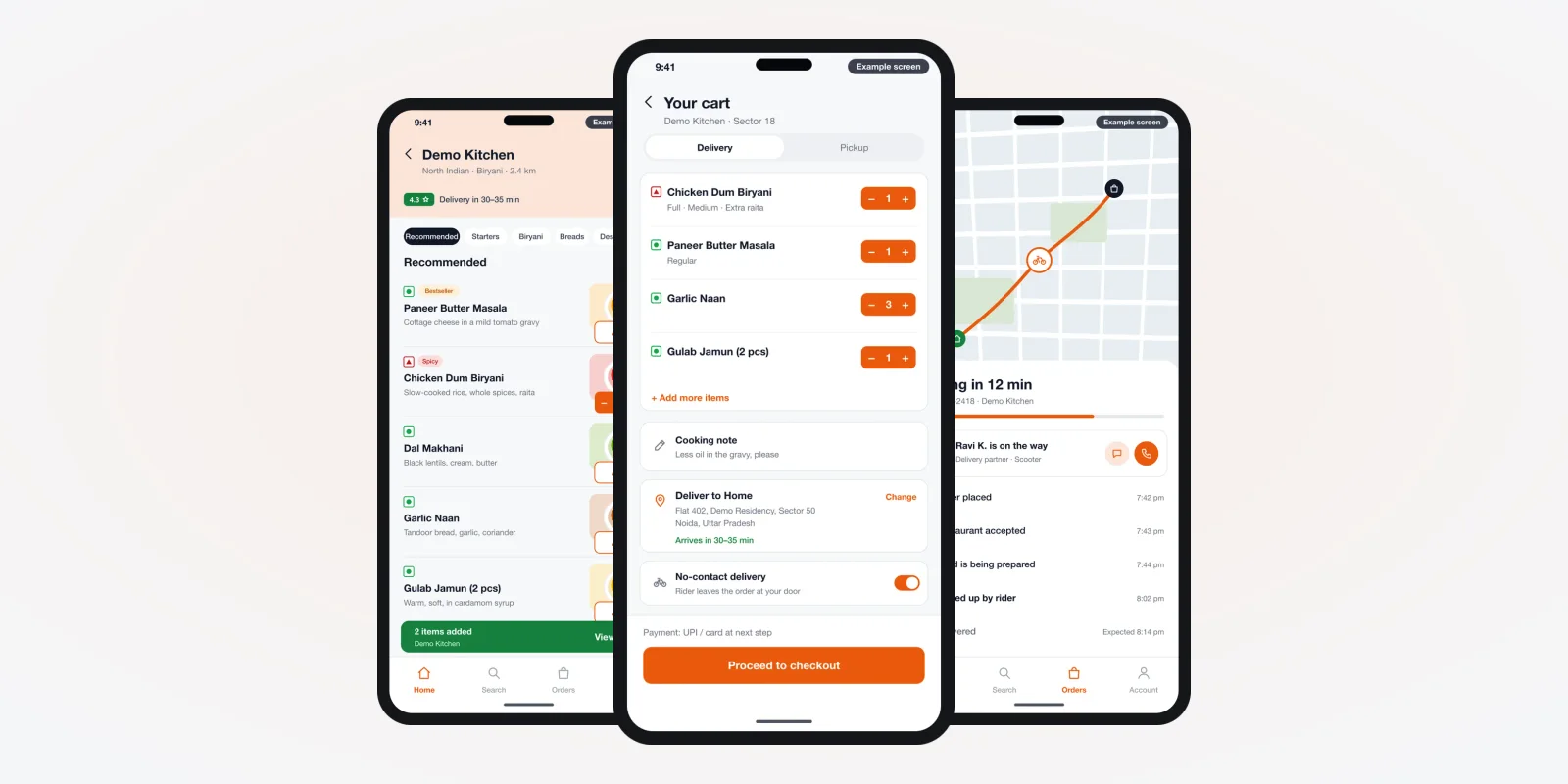
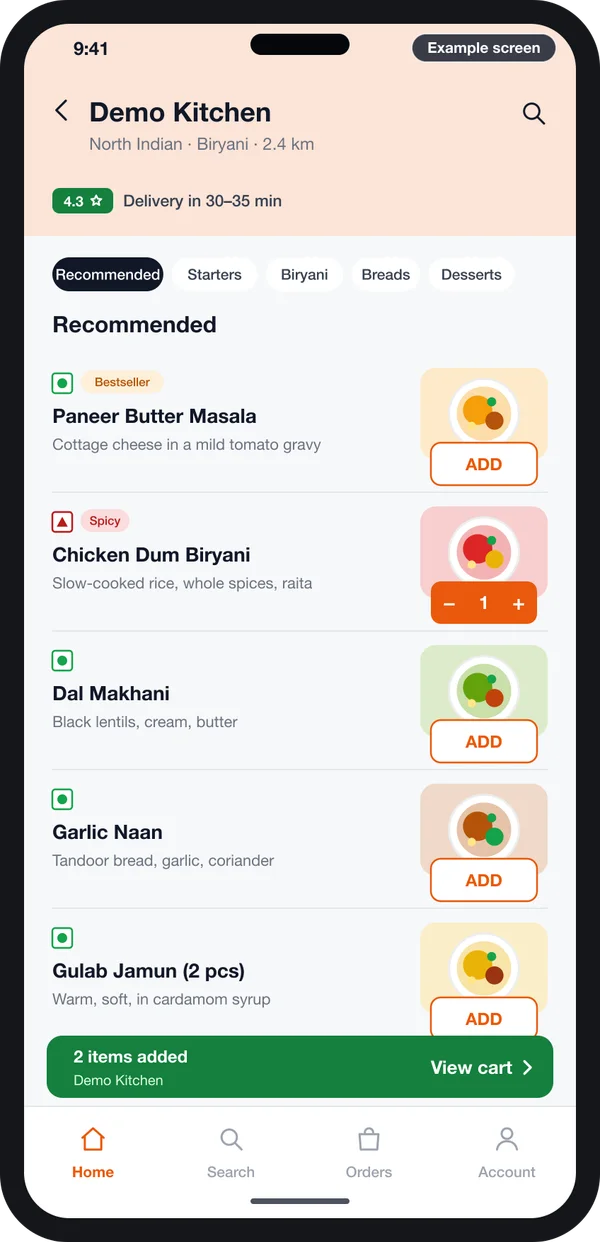
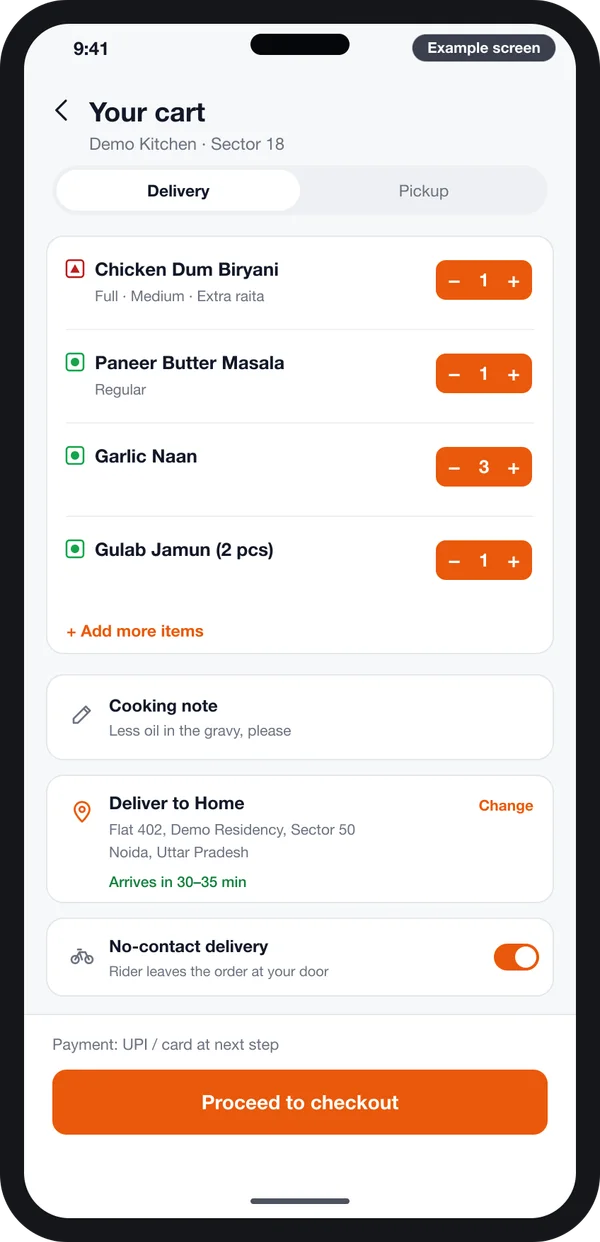
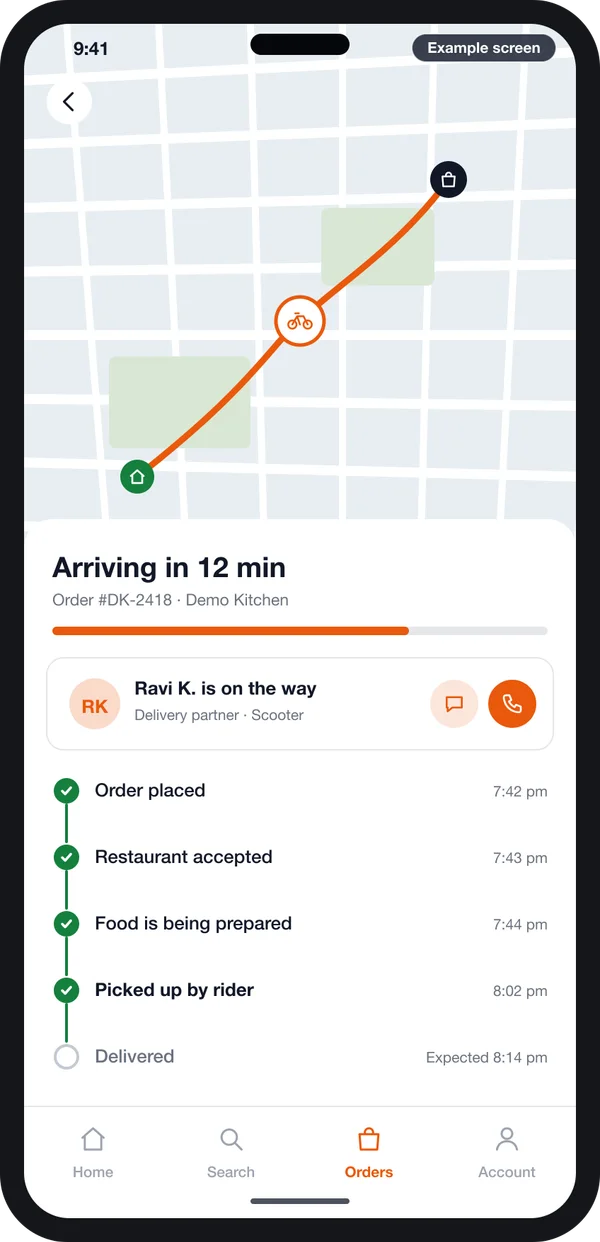
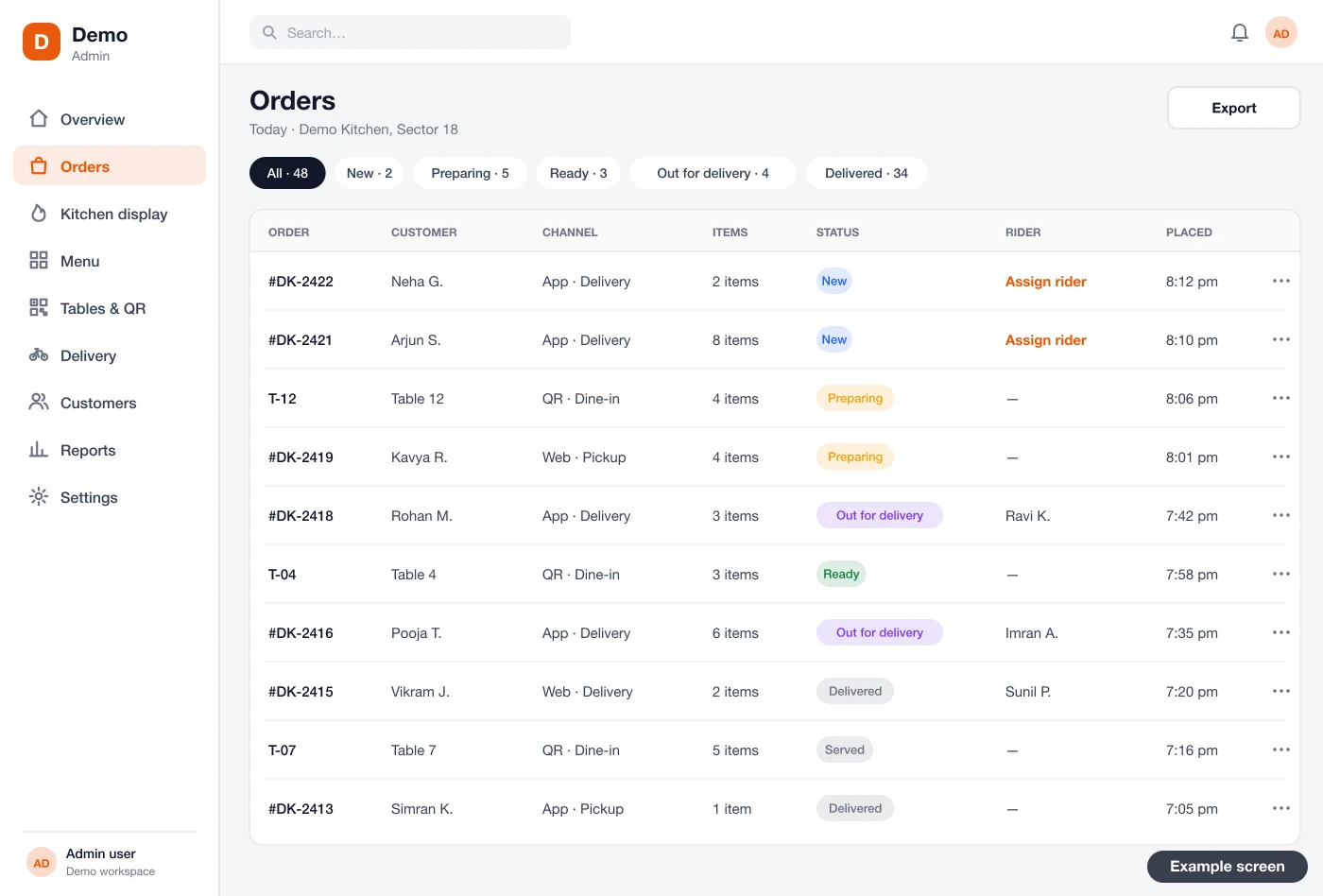
The screens in this guide are example designs we drew for a restaurant ordering system, with demo data. They are not a live product.
The problem
Why owners look at the cost of their own system
Most owners start asking about cost after a year on delivery apps.
- Commission on every order. Delivery apps take a share of each bill. It grows as your orders grow.
- No guest contact. The app keeps the guest's number. You cannot call or message a regular yourself.
- Discounts you did not plan. Offers to stay visible in the app list cut into each bill.
- Two menu prices. Many owners raise app prices to cover the cut, and regulars notice.
- Payout delays. Money from app orders comes in batches, after deductions you must check line by line.
- No say in the screens. You cannot change how your menu, photos or offers look.
The parts that make up the cost
Think of the system as separate pieces. Each piece you add means more screens, more testing and more upkeep. Hotels that run a restaurant often add room orders too, which we cover in our hotel and hospitality software work. Here is what each one does.
1. Customer ordering app or website
This is what the guest sees. It holds the menu, the cart, payment and order status. The number of screens is about the same for an app and a website. Building both adds more work, because each is tested on its own.
2. Admin panel for the owner and manager
The admin panel is where you run the business. You see live orders, change the menu, set delivery areas and read sales reports. A one-outlet panel is smaller. A panel for many outlets needs roles, outlet filters and reports for each branch. We usually build it as a web panel on Laravel, so your staff open it in any browser.
3. Kitchen display or order alert
The kitchen needs to see new orders fast. The cheaper path is a sound alert and a printed slip. A kitchen screen costs more but shows tickets by station, with a timer on each one. If you already run billing software, we check whether it can take orders from your app.
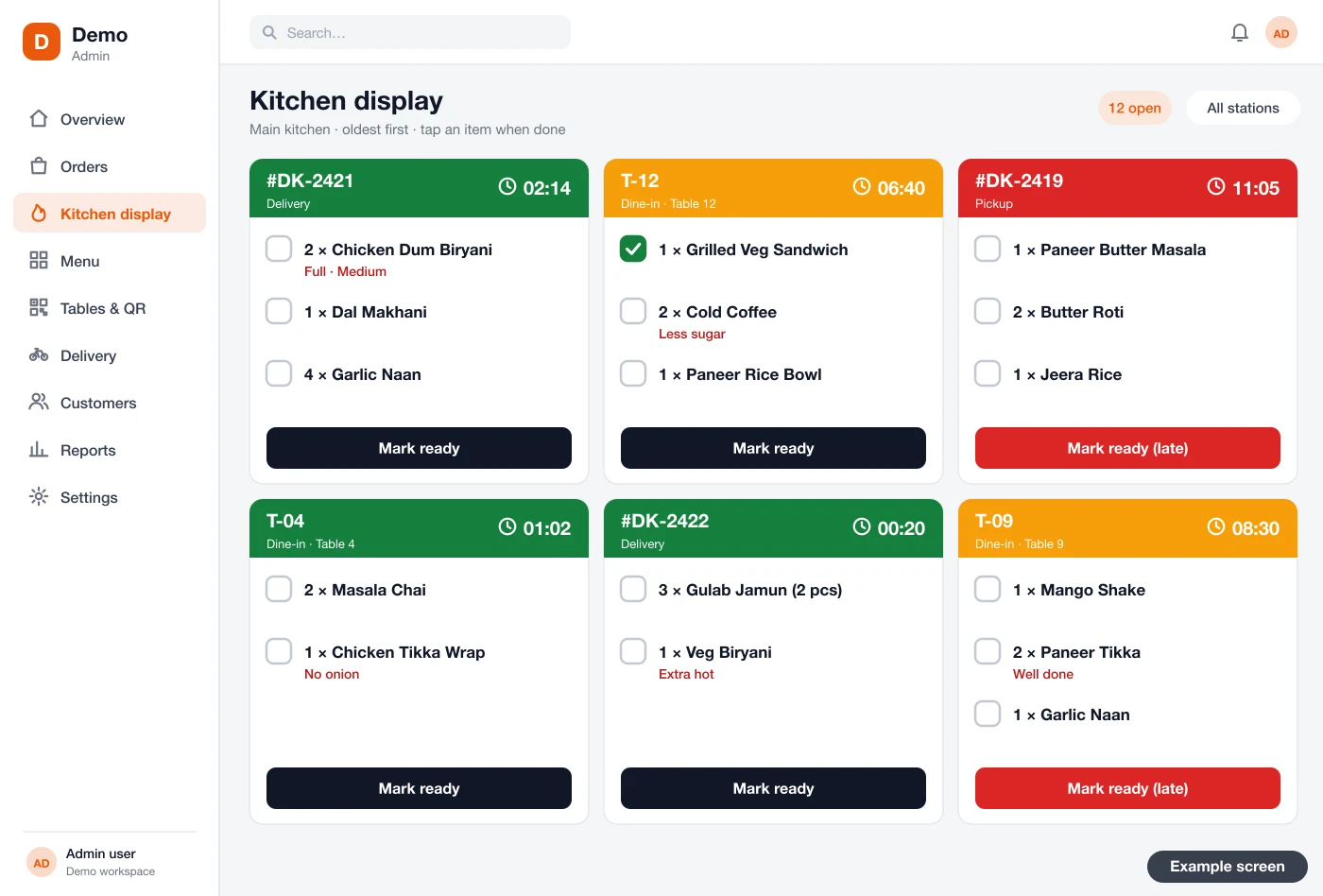
4. Restaurant partner app
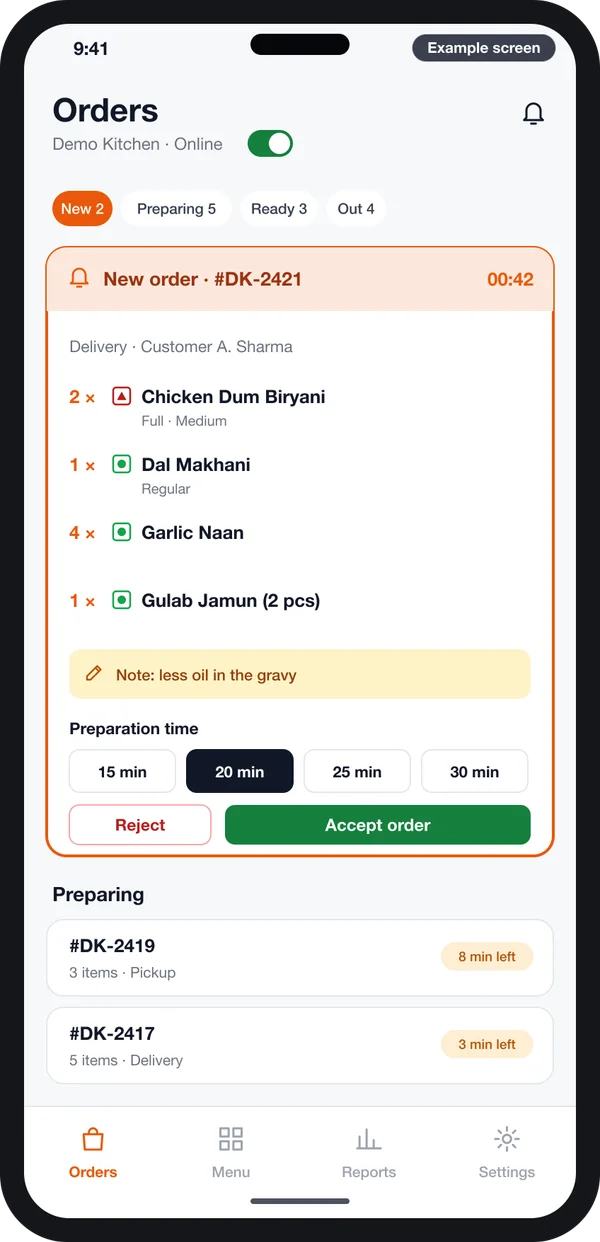
A small phone app for the manager on the floor. It rings for each new order. The manager picks a prep time, then accepts or rejects. This app is needed when the manager is not always at a desk.
5. Rider app and delivery
This is the biggest cost item. Your own riders need an app for pickup, the guest's address, a map and "delivered" proof. The admin needs rider assignment and delivery zones. If you only do pickup, or you book a delivery partner per order, this part gets much smaller. Rider screens work much like those in our guide on starting a quick grocery delivery business.
6. Dish options and add-ons
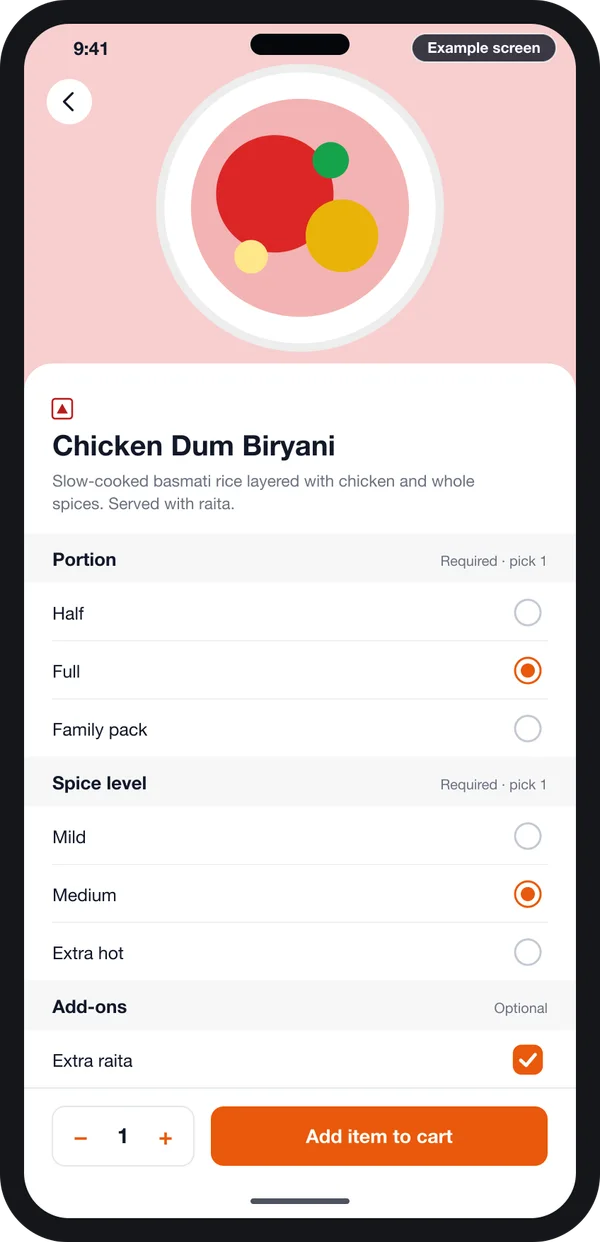
A plain menu is quick to build. Real menus are not plain. Half and full plates, spice level, extra cheese and combo meals all need option rules. Each rule must also show in the cart, the kitchen ticket and the bill.
The more option types your menu has, the more screens and tests it needs. Tell us your menu early, so the quote is right.
7. Outside services you connect
Every link to another service adds work. Common ones are a payment gateway, SMS or WhatsApp alerts, maps, a delivery partner and your billing counter. Each one needs setup, error handling and testing.
Some services also charge you per use. Those fees go to that service, not to us, so plan for them apart from the build.
Rules that change the build. These facts shape what your system must store and show. Check each one with your CA or lawyer before launch.
- Every food business needs an FSSAI licence or registration, applied for on the FoSCoS portal. Source: FSSAI FoSCoS.
- Since 1 January 2022, the delivery app pays the GST on restaurant orders placed through it. This comes from section 9(5) of the CGST Act. On your own app, your restaurant charges and pays it. Source: CBIC, GST Acts.
- Selling online means showing your refund terms and a contact for complaints. Source: Consumer Protection (E-Commerce) Rules, 2020.
- Guest names, phone numbers and addresses are personal data. Source: Digital Personal Data Protection Act, 2023.
Source links are next to each point. Rules can change, so read the latest text on each official site.
Own ordering system vs delivery app listing
Most restaurants keep both. The delivery apps bring new guests. Your own system serves the regulars without a cut on each order. You can see apps we have built for other trades to judge how such a system looks. The table shows where each one differs.
| What you get | Delivery app listing | Your own ordering system |
|---|---|---|
| Cost on each order | Commission on every bill | No commission; only payment and SMS fees |
| Guest phone numbers | Kept by the app | Yours |
| Menu prices and offers | Shaped by app rules | Set by you |
| New guests from search inside the app | Yes | No; you bring them by ads, QR and word of mouth |
| Look of the menu and screens | Same as every other listing | Your brand, your photos |
| First cost | Low | A one-time build cost |
Worked example: planning the budget for two outlets
Here is how one restaurant owner might plan a build. The details are an example, not a real client.
- List the orders. A biryani restaurant has two outlets. Most orders are delivery. Weekend lunch also has many pickups.
- Pick the first parts. The owner chooses an ordering website, an Android and iPhone app, and one admin panel for both outlets.
- Choose delivery. The restaurant has four riders. So a rider app and zones are in the first version.
- Hold back extras. A kitchen screen and loyalty points go to phase two. The kitchen keeps printed slips for now.
- List connections. One payment gateway, SMS alerts and maps. The billing counter link waits until phase two.
- Get a quote. We send a written quote for phase one and a rough note for phase two. The owner sees both before signing.
Our service
How we build your own restaurant online ordering system
Your menu, your outlets, your way of serving.
- Understand your orders. We go through how orders reach your kitchen today, outlet by outlet.
- Draw the screens. You click through screen designs first, like the examples here, and change them before coding.
- Build the apps. One Flutter codebase gives the Android and iPhone apps, plus the website and admin panel.
- Test on real orders. Your staff place and cook test orders. We fix what they find.
- Launch under your name. Your brand on the stores and your data on a server set up in your account.
- Support and add. We add phase-two parts when you are ready.
Restaurant online ordering system development cost: what decides it
We send a written quote after one call, because two restaurants rarely need the same parts. These are the things that move the budget up or down:
- Which parts you need: website, app, admin panel, kitchen screen, partner app, rider app.
- How many outlets, and whether each outlet has its own menu and prices.
- How many dish options, combos and offer types your menu uses.
- Which services you connect, such as payments, SMS, maps or your restaurant billing counter.
- Whether you want guest accounts, saved addresses and order history.
- Delivery: own riders, a delivery partner, or pickup only.
| Monthly ordering plan | Custom system built for you | |
|---|---|---|
| Getting started | Fast, with a small first payment | Some weeks to build |
| Payment over time | Every month, sometimes per order | One build cost, then optional support |
| Your menu rules and outlets | Fit into the plan's fixed screens | Built the way you serve |
| Brand on the app store | Often the plan's name or a shared app | Your own app listing |
| Guest data and source code | Stay with the plan's company | Yours |
If you want to compare, ask every developer for the same list of parts. Then you compare like with like. Our online ordering and payment builds always start with that list.
Whoever builds your ordering system, make sure it can:
- Turn a dish off in one tap when it runs out
- Show half, full, spice and add-on choices on the kitchen ticket
- Take delivery, pickup and table orders in one list
- Set delivery areas and a minimum order per outlet
- Show your FSSAI number and GST details on the bill
- Let you export your guest list and orders any time
- Run under your own name on the app stores
FAQ
How much does a restaurant online ordering system cost?
It depends on the parts you choose, the number of outlets, your menu rules and how you deliver. We do not publish fixed prices. After one call, we send a written quote for the parts you need.
How long does it take to build?
A website with pickup and delivery takes less time than a full set with a rider app. After the first call, we share a plan with dates for each part. You see clickable screens before coding starts.
Will I own the app and the source code?
Yes. We build it under your brand and hand over the source code. The guest list and order data stay in your account.
Can I start with a website and add an app later?
Yes. Many restaurants do this. We plan the admin panel so the app can join later without a rebuild.
Do I still need to stay on delivery apps?
That is your choice. Most restaurants keep their listing for new guests. They move regular guests to their own app or website.
Will it work on Android and iPhone?
Yes. We build the guest app for both, and the website works in any phone browser. The admin panel opens on a computer or tablet.
How is guest data kept safe?
We limit who can see phone numbers and addresses. We keep a log of who changed what. The system runs on your own server account. Guest data falls under the Digital Personal Data Protection Act, 2023. Check your notice and consent text with a lawyer.
Can it connect to my billing software?
Often yes, if your billing software allows outside orders to come in. We check this in the first call. If it does not, we can show app orders on a separate kitchen screen.
Can PRS India build an online ordering system for my restaurant?
Yes. We build the guest app, website, admin panel and staff apps for your restaurant, under your brand. Talk to our team about your menu and outlets.
Related guides
Written by
Aditi
Building software at PRS India.