Business of Software
Pest Control Software Development Company in India
What pest control software in India must do, how to pick a development company, and how we build your own admin, technician app and booking site.

Written from production. Our articles draw on products we run live and the client work behind them, and are revised as the systems they describe evolve.
A pest control business runs on visits. A termite job today. A cockroach follow-up in two weeks. Four AMC visits a year for a restaurant. A re-treatment if the customer calls inside the warranty. Miss one, and the customer remembers.
Most firms track this in a register, a diary and a few WhatsApp groups. That works for twenty customers, not two hundred. This is why owners look for a pest control software development company in India: someone to build software around their own jobs. We build your own pest control software, with a web admin, a technician app and a booking site, under your brand. This guide shows what it must do and how to choose who builds it.
Key takeaways
- Pest control software is built around visits, not sales: one-time jobs, AMC visits and warranty re-treatments.
- The technician app matters most. Service reports, photos and chemicals used must be filled at the site.
- Commercial clients, such as restaurants and food units, often ask for visit records during audits.
- Decide your model first: your own technicians only, or a network of partner vendors.
- Choose a development company that shows you real screens and hands over the source code.
What pest control software does
Pest control software keeps every customer, property, contract and visit in one place. It plans the visits, sends the technician, collects the service report and reminds you about the next visit.
It differs from general field service software in a few ways. Each job has a pest type, a treatment and chemicals used. Many contracts are AMCs with set visits through the year. Many jobs carry a warranty period, with a repeat treatment if the pest returns. The software must know all of this.
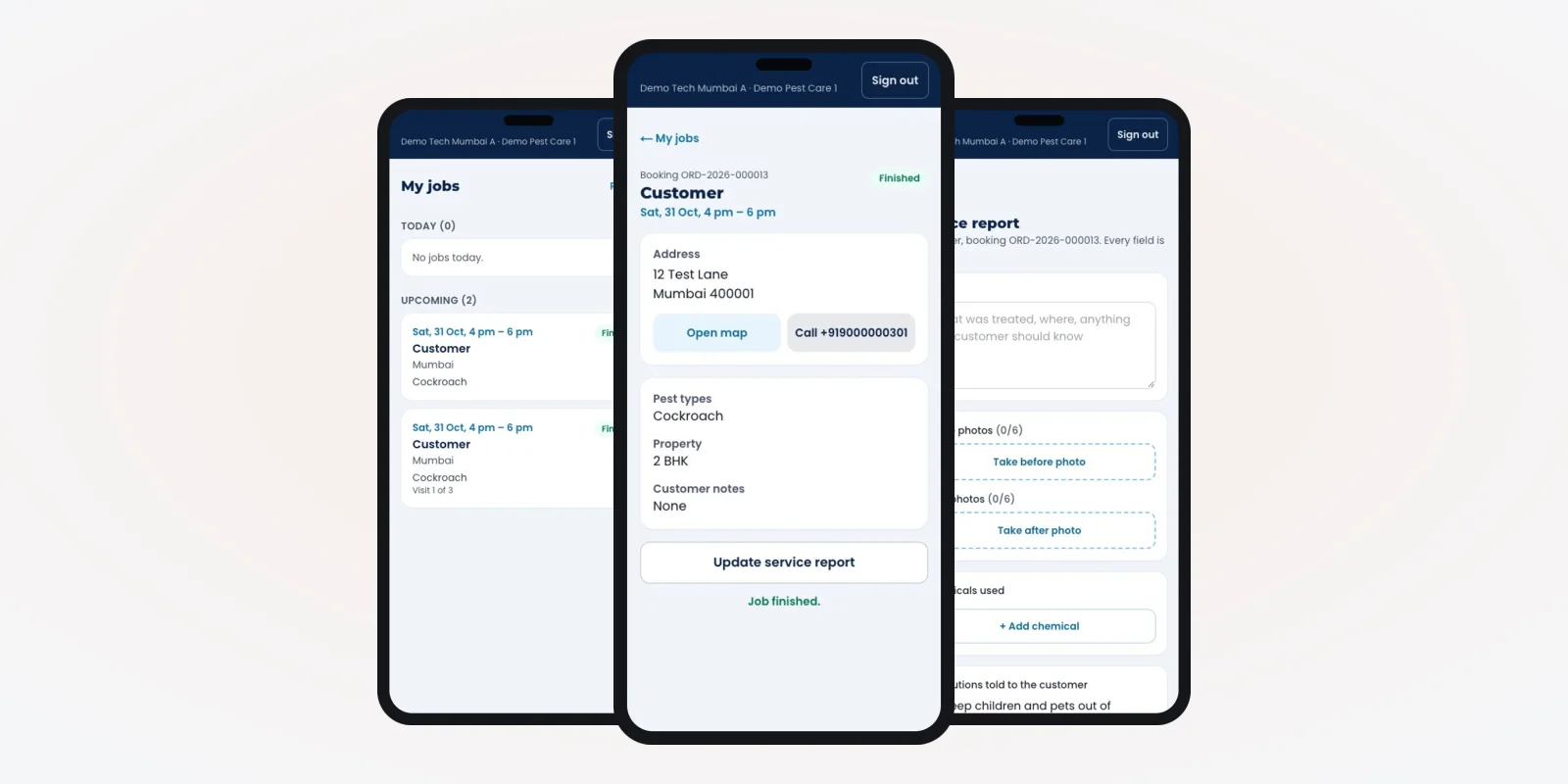
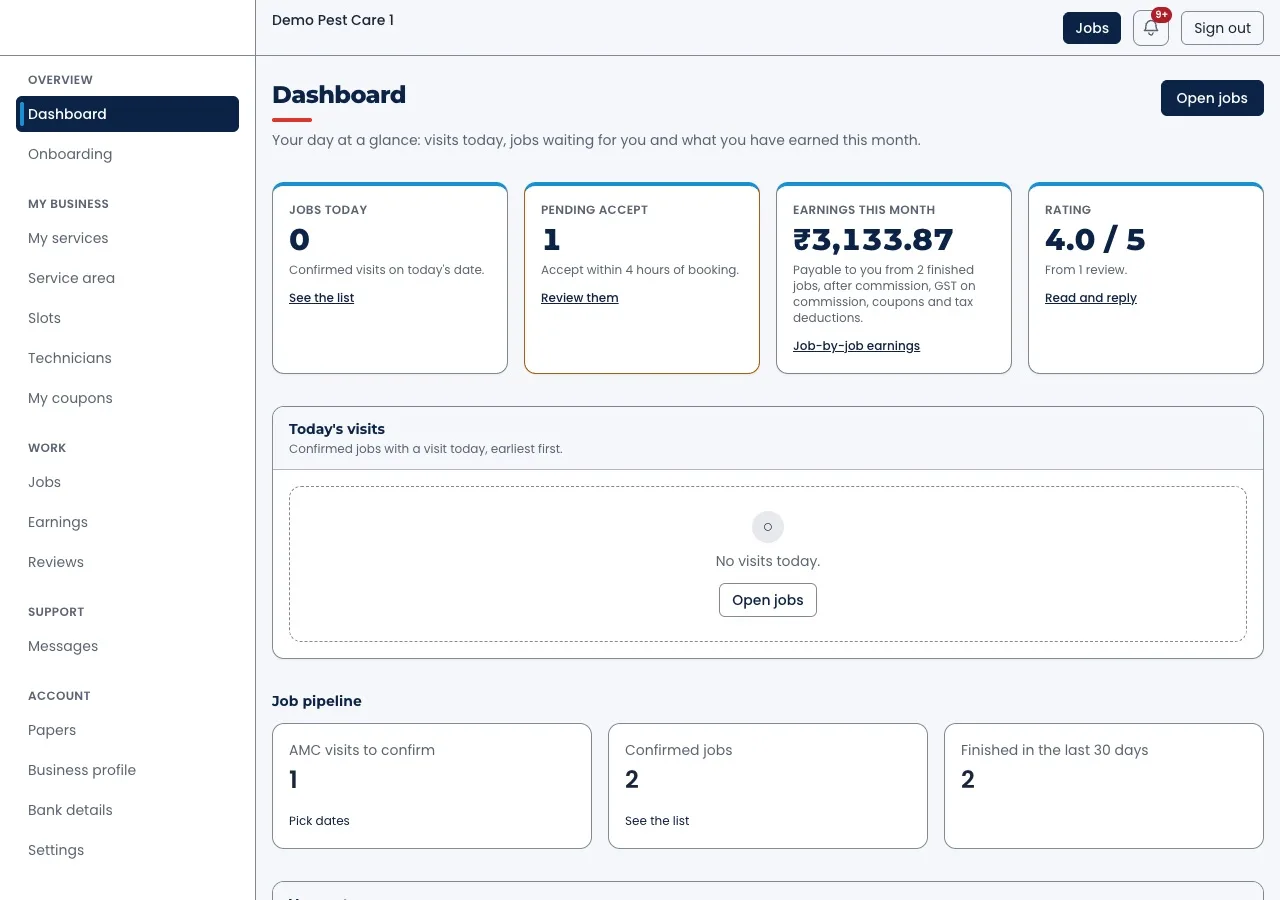
The screens in this guide are from a pest control booking platform we built, filled with demo data.
The problem
Where pest control firms lose customers
Six gaps we see again and again in pest control businesses run on paper and phones.
- Missed AMC visits. The second or third visit of a yearly contract is not in anyone's diary.
- No report at the site. The technician writes notes later, or never. The customer has no proof of what was done.
- Chemicals not logged. Nobody can say which chemical went into which home on which day.
- Warranty calls lost. A customer calls for re-treatment, but nobody can find the first job's date.
- Technician day unplanned. Jobs are handed out by phone each morning, with long trips across the city.
- Renewals forgotten. AMCs end quietly. Nobody calls the customer a month before.
Who uses pest control software
Four groups use it, each in their own screen.
- Office and owner: take bookings, plan visits, approve vendors, follow up payments and renewals.
- Technicians: see today's jobs, reach the address, fill the service report.
- Customers: book a visit, track the job and download the report.
- Partner vendors: if you run a network, they accept jobs and manage their own crews.
The technician app
This is where most of the value sits. If the technician app is slow or confusing, the reports stay empty. We usually build it in Flutter, for Android and iPhone from one codebase.
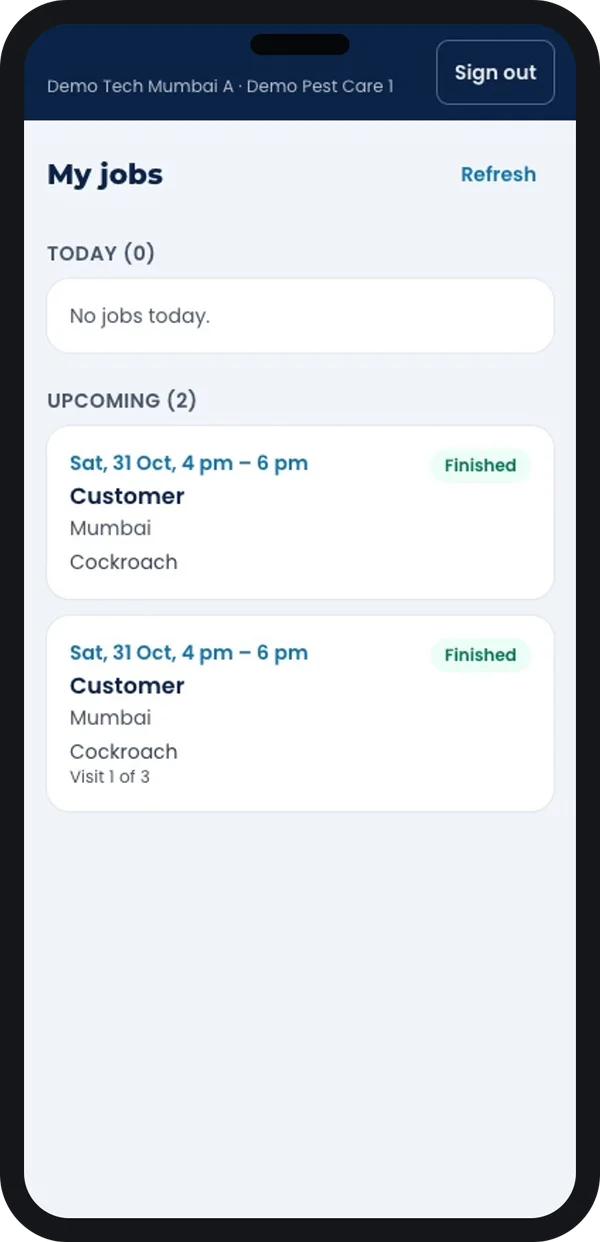
Today's jobs
Each job shows the slot, area, pest type and status.
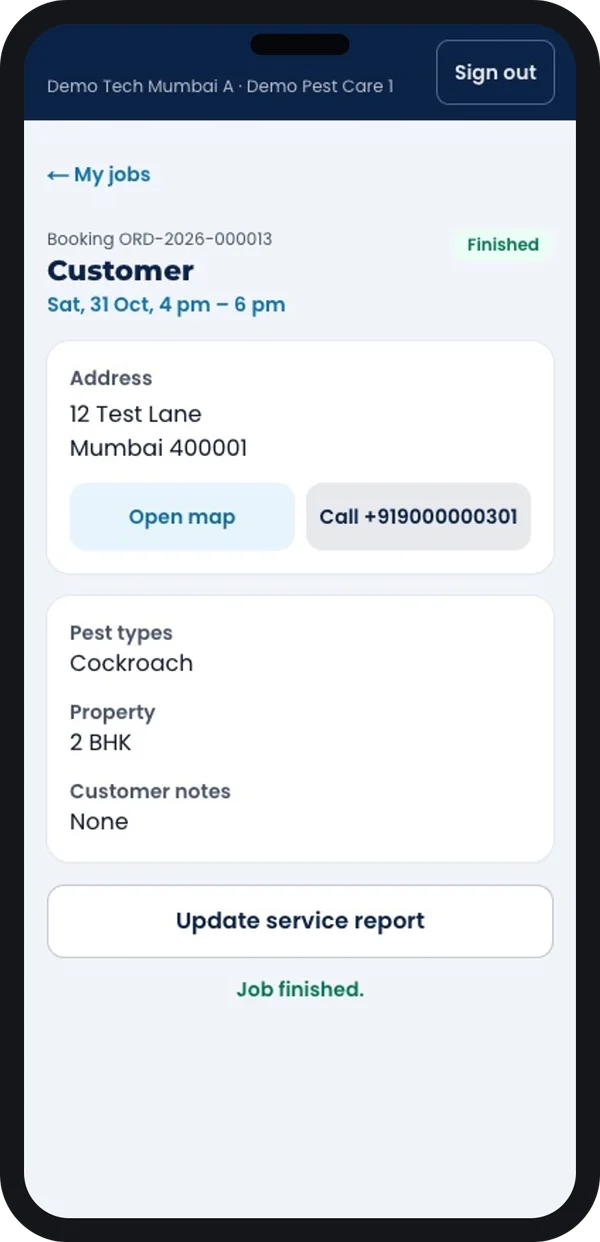
Job details
Address with map and call buttons, property size and notes from the office.
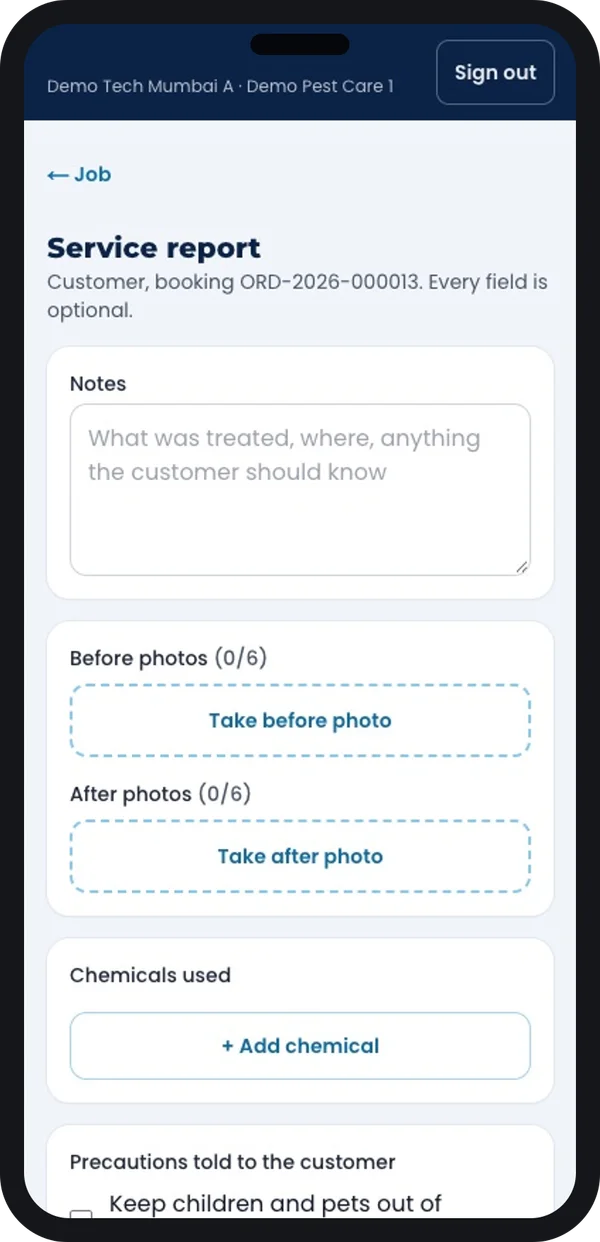
Service report
Before and after photos, chemicals used and the safety checklist, filled at the site.
Screens from a pest control platform we built, demo data.
Chemicals and licences have rules. In India, insecticides are covered by the Insecticides Act, 1968 and the Insecticides Rules, 1971. Products must be registered with the Central Insecticides Board and Registration Committee. Commercial pest control work needs a licence from the state. Source: Directorate of Plant Protection, Quarantine and Storage. Check the current rules with your state agriculture department. Your software can store licence numbers and expiry dates, and log chemicals per job.
Must-have features in pest control software
1. Bookings and job status
A booking becomes a job with clear steps: booked, accepted, technician assigned, on the way, finished. The customer sees the same steps and gets the report and warranty details at the end.
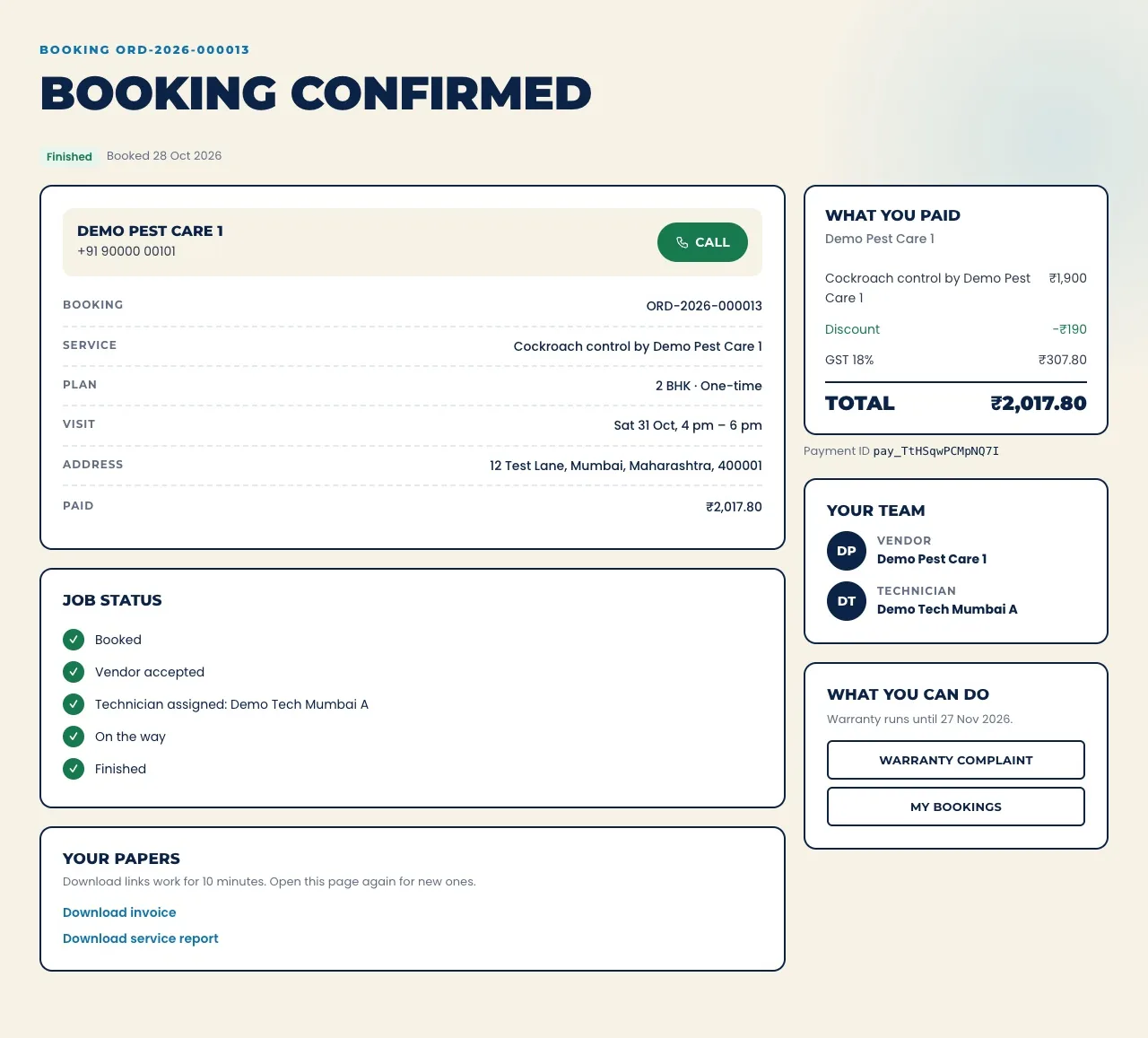
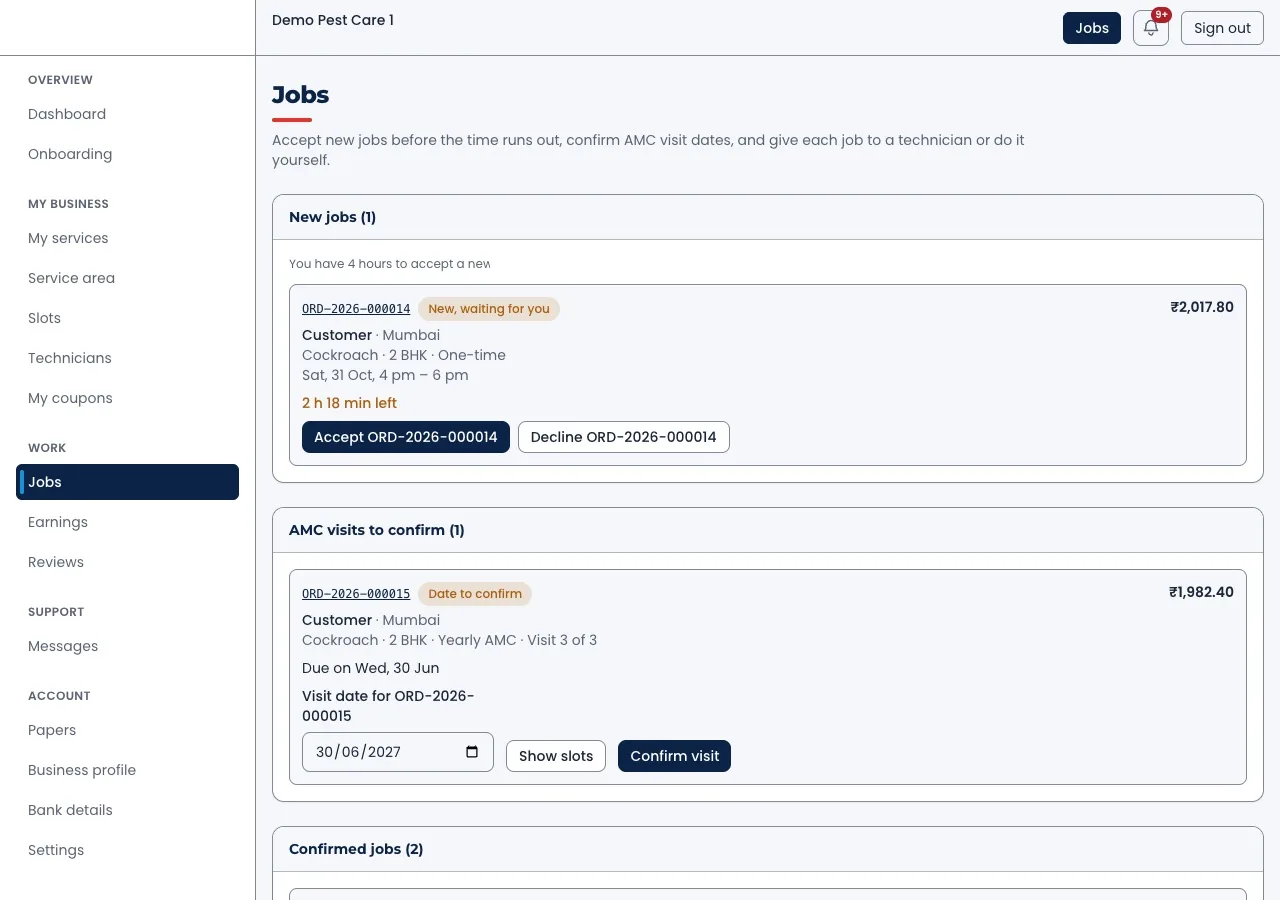
2. AMC contracts with planned visits
When an AMC is sold, the software creates all its visits for the year. Each visit needs a confirmed date. Visits not confirmed by a set day show up in a list for the office.
3. Accept jobs on time
New jobs wait for acceptance with a timer. If nobody accepts in time, the job goes back to the office or to another vendor.
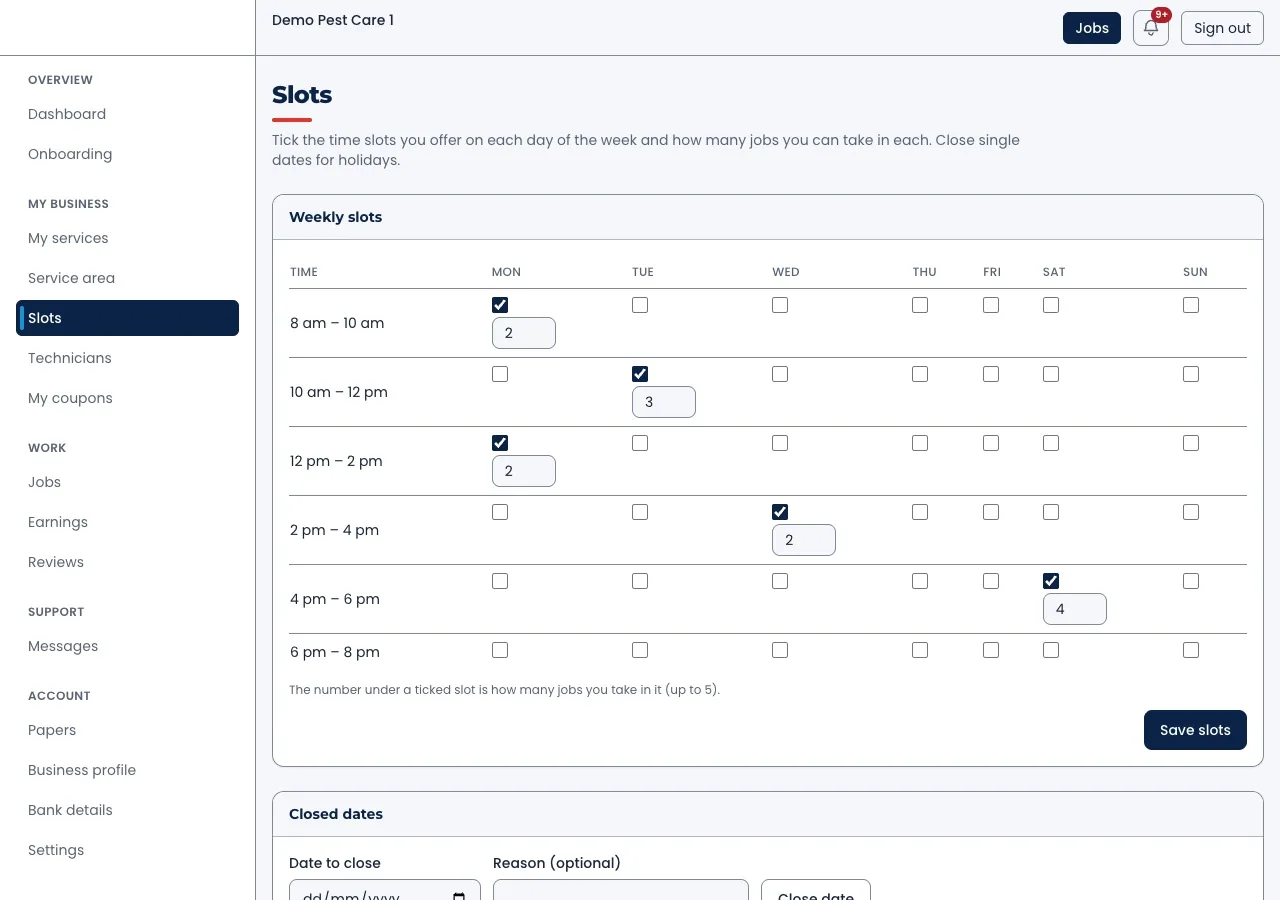
4. Slots and crew capacity
Each day has time slots. For each slot, you set how many jobs your crews can take. Holidays and closed dates block bookings. This stops the office from promising visits nobody can make.
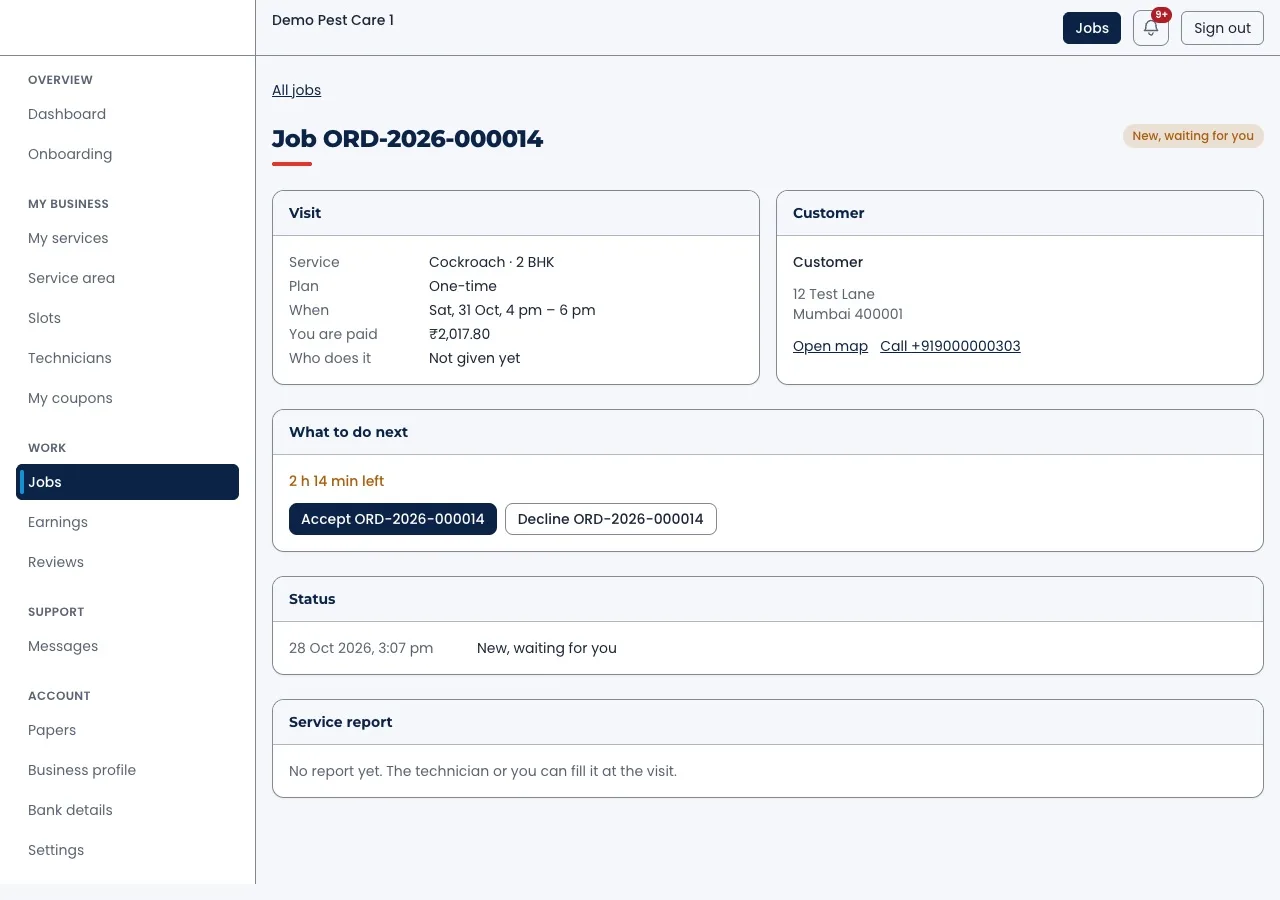
5. One job, all details
The job page holds the visit, the address with map and call links, the time left to accept and the service report once filled.
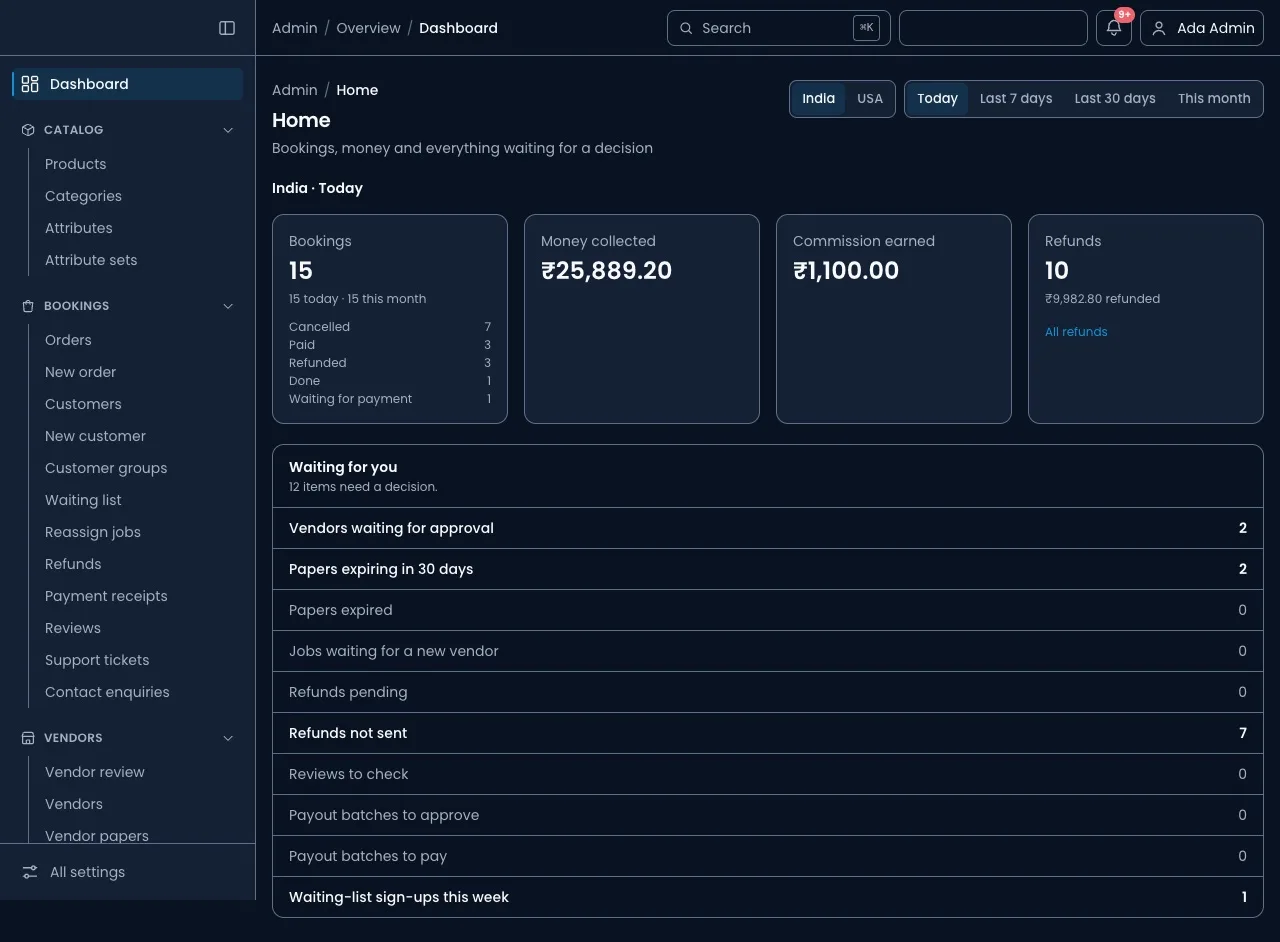
6. Owner and admin dashboards
The owner sees bookings, money collected and refunds for the day. A "waiting for you" list shows vendors to approve, papers about to expire, refunds and payouts. If you run a vendor network, this works like a service marketplace admin.
7. Renewals and follow-ups
A month before an AMC ends, the software reminds the customer and the sales person. Leads from calls and the website sit in one list. This part behaves like a small CRM built for service renewals.
8. Records for commercial clients
FSSAI's hygiene rules for licensed food businesses include pest control. Source: FSSAI. So restaurants, hotels and food units often ask their pest control firm for visit records. Your software should print a visit history per site, with dates, chemicals and technician names.
9. Technician attendance and pay
Check-in at the first job, jobs done per day and travel all feed into pay. If you also need payroll, see our guide to HRMS software for small businesses.
How to choose a pest control software development company in India
Many companies can write code. Fewer understand visits, AMCs and warranties. Ask these questions before you sign:
- Can you show real screens? Ask for screens of a technician app and an admin they built, not only a sales deck.
- Will I get the source code? It should be written in the contract.
- Whose server holds my data? It should be yours, or one you can move away from.
- How do you handle AMC visits and warranties? A clear answer shows they understand the business.
- Can the technician app work with weak signal? Basements and godowns often have none.
- What happens after launch? Ask about support, fixes and adding new features.
You can see projects we have delivered and read how we work before you call us.
Custom pest control software vs a ready-made app
| What you need | Diary and WhatsApp | Ready-made field service app | Your own pest control software |
|---|---|---|---|
| AMC visits created for the year | No | Sometimes | Yes |
| Chemicals logged per job | No | Rarely | Yes |
| Warranty and re-treatment tracking | Hard | Rarely | Yes |
| Partner vendor panel | No | No | If you need it |
| Your brand on apps and reports | No | No | Yes |
| Data and source code | Scattered | With the vendor | Yours |
Worked example: a Pune firm with 12 technicians
A Pune pest control firm serves homes and 40 restaurants. The details are examples.
- Monday, booking. A home customer books a termite treatment on the website for Thursday morning.
- Tuesday, planning. The office assigns the job. The technician sees it in the app with the address and notes.
- Thursday, the visit. The technician checks in, treats the home and fills the report with photos and chemicals.
- Same day, report. The customer downloads the report and warranty from the booking page.
- Each quarter, restaurants. AMC visits are already planned. Each restaurant gets its visit record for its audit file.
- Month 11, renewal. The software reminds the sales person to call each restaurant before its AMC ends.
Our service
How we build your own pest control software
Built around your services, contracts and team.
- Understand your jobs. We list your services, AMC plans, warranties, chemicals and team roles.
- Show the screens. You click through the admin, technician app and booking site first.
- Build the apps. A web admin on Laravel, a technician app for Android and iPhone, and a booking site.
- Test with your technicians. Your team uses it on real jobs for a few weeks. We fix what they find.
- Launch under your brand. Your name on the apps and reports, your data on your own server.
- Support and grow. New services, new cities and partner vendors as you grow.
Pest control software development cost: what decides it
We do not publish a fixed price. These things decide the budget:
- Which apps you need: admin, technician app, customer booking site, vendor panel.
- Your model: own technicians only, or a network of partner vendors.
- Online payments, payouts to vendors, and GST bills that follow the rules on the GST portal.
- SMS or WhatsApp reminders and report sharing.
- Whether you plan to sell the software to other pest control firms as a SaaS product.
| Monthly field service plan | Your own pest control software | |
|---|---|---|
| Start | Within days, small first payment | A few weeks to build |
| Cost over years | Every month, for every technician | One build cost, then optional support |
| AMC, warranty and chemical logs | Usually generic | Built the way you work |
| Your brand | No | Yes |
| Data and source code | With the vendor | Yours |
Tell us your services, team size and model. We send a written quote after one call.
Whoever builds your pest control software, make sure it can:
- Create all AMC visits for the year when a contract is sold
- Let technicians fill reports with photos and chemicals at the site
- Track warranty periods and re-treatment visits
- Set jobs per time slot and block closed dates
- Store licence numbers and alert you before they expire
- Print a visit history per site for commercial clients
- Remind you before each AMC ends
- Export all your data whenever you want
FAQ
What should pest control software in India do?
It should follow your real work: one-time jobs, AMC visits, warranties, chemicals and service reports. Generic field service apps often miss these. That is why many firms get software built for them.
How long does it take to build pest control software?
It depends on the apps and your model. After one call, we share a plan with dates for each part. You see clickable screens before we write code.
Will I own the software and its source code?
Yes. We build it under your brand and hand over the source code. Your customer and job data stays on your own server.
Which platforms do you build for?
The admin runs in a web browser. The technician app runs on Android and iPhone. The customer booking site works on phones and computers.
Is customer data safe in pest control software?
It should be. The software stores names, phones, addresses and home photos. We limit access by role and keep logs. The Digital Personal Data Protection Act, 2023 applies to this data.
Can the technician app work without internet?
Yes, if it is built for it. The app saves the report on the phone and sends it when the signal returns.
Can the software handle partner vendors as well as my own team?
Yes. A vendor panel lets partners accept jobs, set their slots and see their payouts, while you keep the customer.
Can PRS India build pest control software for my company?
Yes. We build the web admin, technician app, booking site and vendor panel around your services. Book a consultation and we will show you screens for your business.
Related guides
Written by
Aditi
Building software at PRS India.