Pest Control Booking App Development: Features and Cost
We build your own pest control booking app: pest and home size, slots, payment, technician visits, service reports and AMC, under your brand.

Written by Babita Kumari, Business Developer
Reviewed by the PRS India software & mobile app development team
13 min read
Written from production. Our articles draw on products we run live and the client work behind them, and are revised as the systems they describe evolve.
Most pest control bookings still start with a phone call. The customer asks the price, the office writes the address in a notebook, and someone promises a time. Then the technician calls to find the flat. The customer calls to ask when he will come. After the visit, nobody sends a report. Three months later, the second AMC visit is missed.
A pest control booking app puts all of this on the customer's phone and on your office screen. The customer picks the pest, the home size and a time slot. Your team accepts the job, sends a technician and closes it with photos. You can build your own booking app under your brand. You do not have to list on someone else's app. This guide covers the features to build, the screens involved and what decides the cost.
Key takeaways
- A pest control booking app has three users: the customer, your office and the technician. Each needs its own screens.
- Booking depends on two inputs most apps ignore: the pest type and the size of the property.
- Slots must have a limit, so your team is never booked for more jobs than it can do.
- AMC bookings are not one job. The app must create every visit of the contract and remind both sides.
- When you build your own app, the customer list, the brand and the source code stay with you.
What a pest control booking app does
A booking app replaces the phone-and-notebook routine with one shared record. The customer creates the booking. Your office sees it at once. The technician gets it on his phone with the address and the pest details.
A pest control booking is different from a salon or a cab booking. The job length changes with the pest and the home. A cockroach treatment in a 1 BHK is short. A termite job in a bungalow can take most of a day. The app must ask the right questions before it offers a time slot.
It also has to handle what happens after the visit. Many pest jobs carry a service warranty. If the pests come back, the customer should complain from the same booking. They should not start again from zero.
The problem
Why phone bookings fail pest control companies
These are the gaps we hear about most from pest control owners.
- Calls missed after hours. Many customers look for pest control at night, when they see the cockroach. Nobody answers the office phone.
- Double booking. Two staff members promise the same 4 pm slot to two homes in different areas.
- Wrong job details. The technician arrives with gel for cockroaches. The real problem is bed bugs.
- No proof of work. The customer says nothing was sprayed in the kitchen. There are no photos to show.
- AMC visits forgotten. The second and third visits of a yearly contract live in one person's memory.
- Warranty calls lost. A repeat complaint comes on WhatsApp and is never linked to the first job.
The three apps inside one booking system
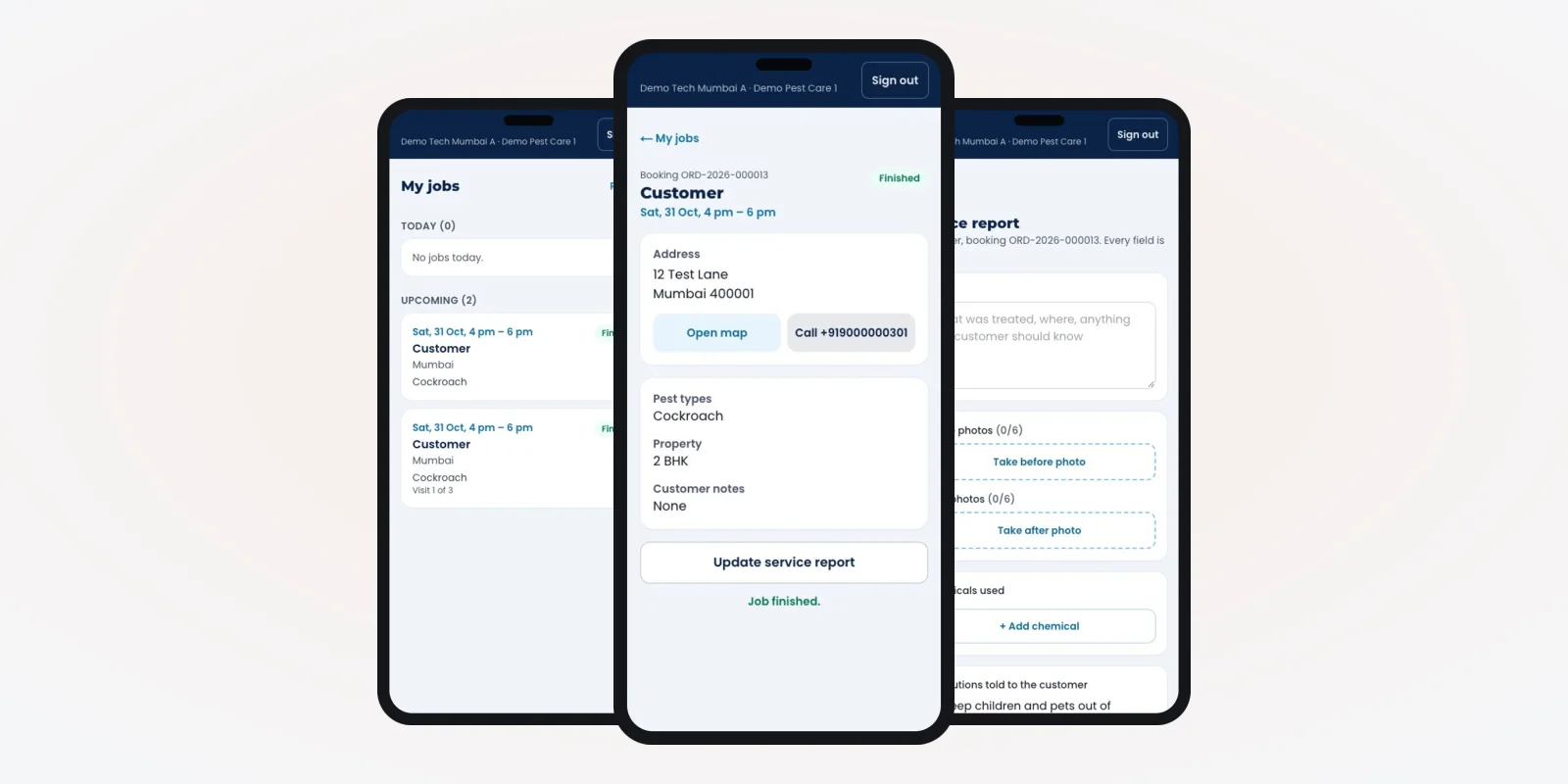
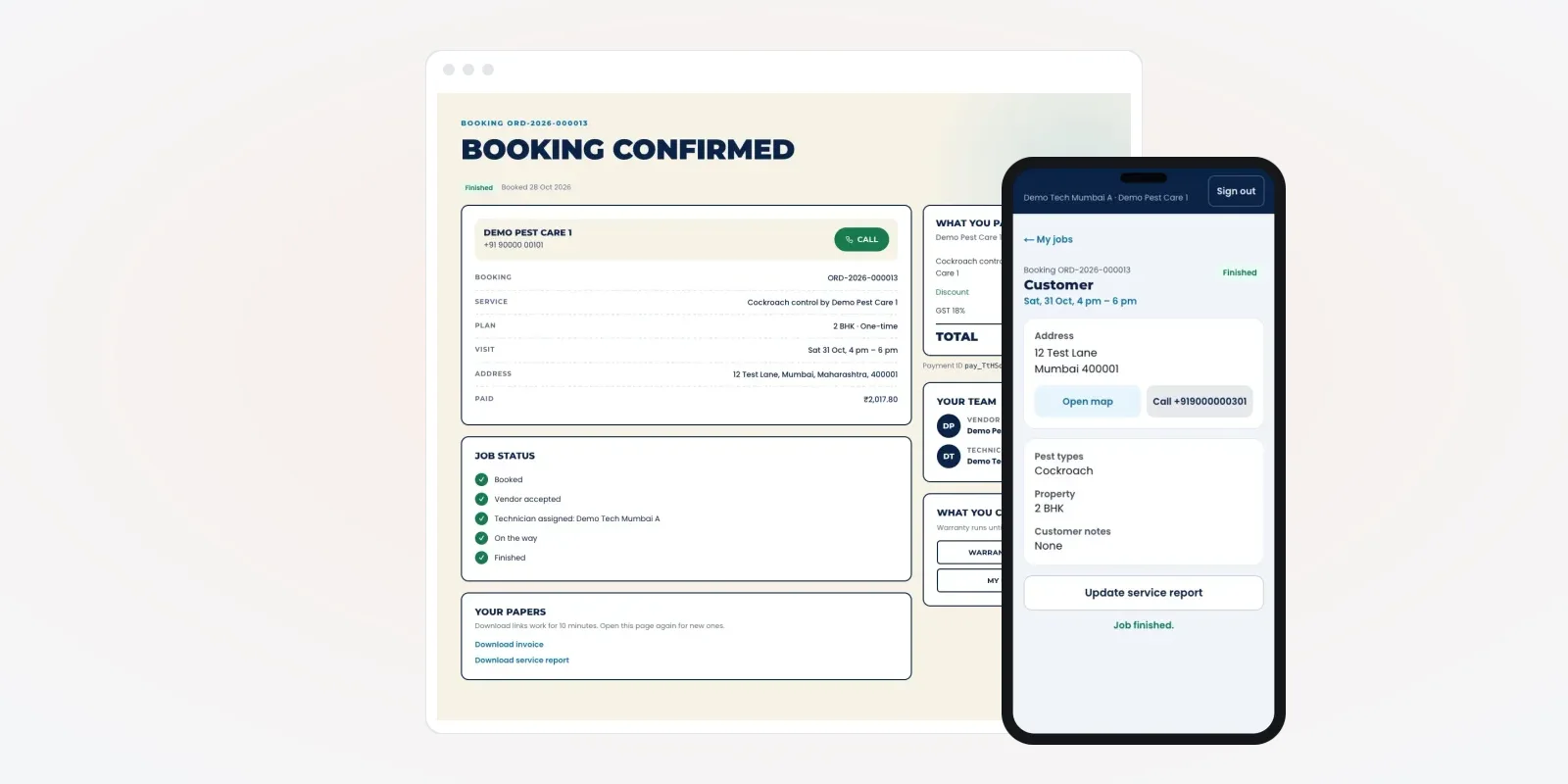
A booking app is really three apps that share one database. The screens in this guide come from a pest control platform we built, shown with demo data.
- Customer app or website. Choose the pest, the home size and a slot. Pay. Track the visit. Download the report and the invoice.
- Office or vendor panel. Accept jobs, set slots, give jobs to technicians and confirm AMC dates.
- Technician app. See the day's jobs, open the map, call the customer and fill the service report.
Customer booking features
1. Pest type, property size and area
The first screen asks three things. Which pest: cockroach, termite, bed bugs, mosquito, rodent or general. What kind of property: home or commercial, and its size, such as 2 BHK. And the pincode, so the app only shows slots where your team actually works.
2. One-time job or yearly AMC
The customer chooses a single treatment or a yearly contract. For an AMC, the app creates all the visits at once, with a due date for each. Your office then confirms each date nearer the time. Our case studies show other software we have built for service businesses.
3. Slot picker with real limits
The customer sees only slots that still have room. Your office sets how many jobs each slot can take, so a busy Saturday fills up and closes by itself.
4. Online payment and GST invoice
The customer pays online or chooses to pay after the visit, if you allow it. The app makes a tax invoice with your GSTIN, which the customer can download later. GST registration and invoice rules are on the official GST portal.
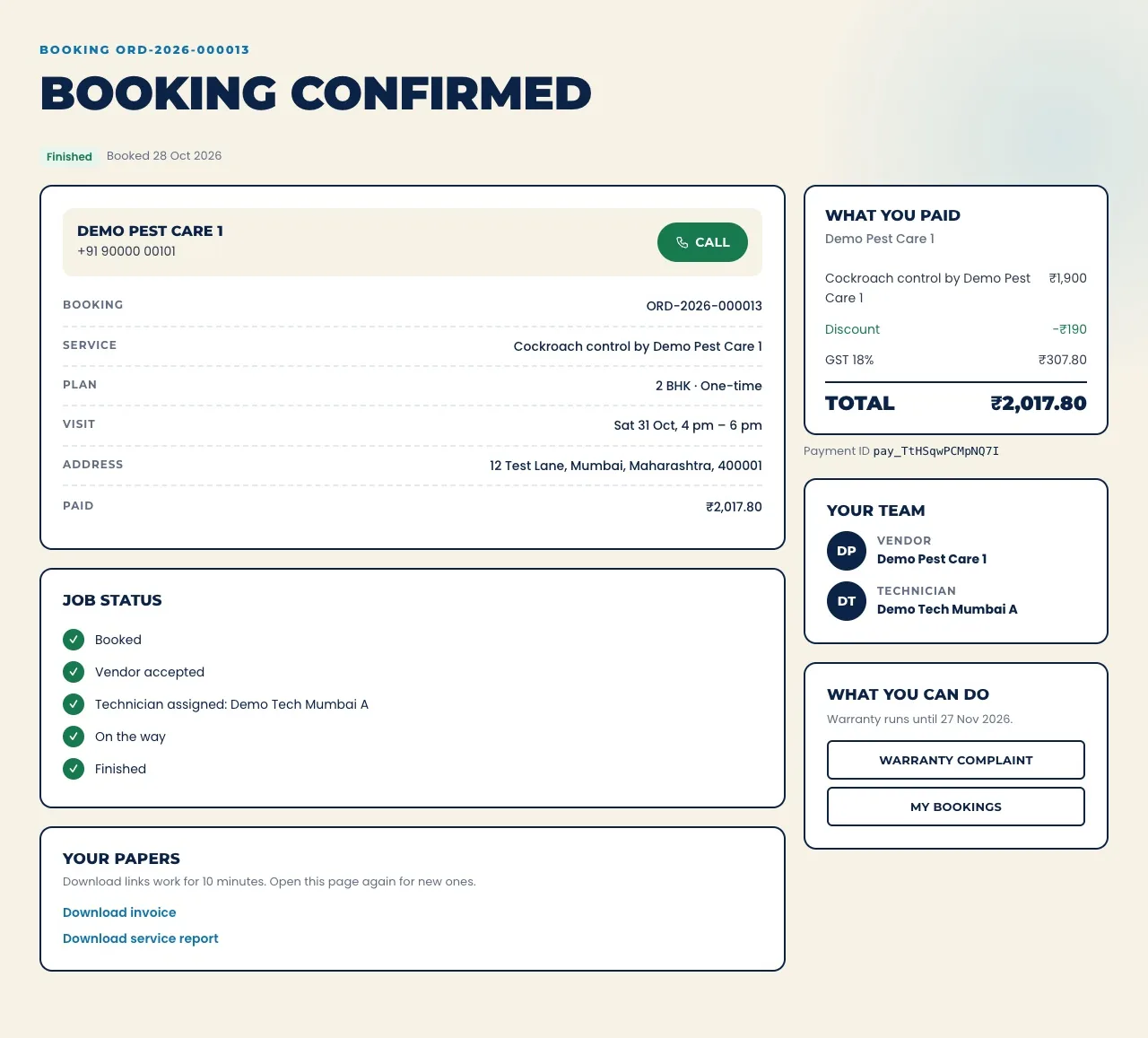
5. Live job status
After booking, the customer sees five steps: booked, accepted, technician assigned, on the way and finished. Each step can also go out as an SMS or app alert. This alone cuts most "when will he come?" calls.
6. Service report, warranty and review
When the job closes, the customer gets the service report with photos and the chemicals used. The same record feeds your customer records and repeat-service reminders. If the pests come back within the warranty days, they raise a complaint on the same booking. They can also rate the visit.
Office and vendor panel features
Your office works from a web panel built for the booking flow. It shows what needs action now, not a long list of everything.
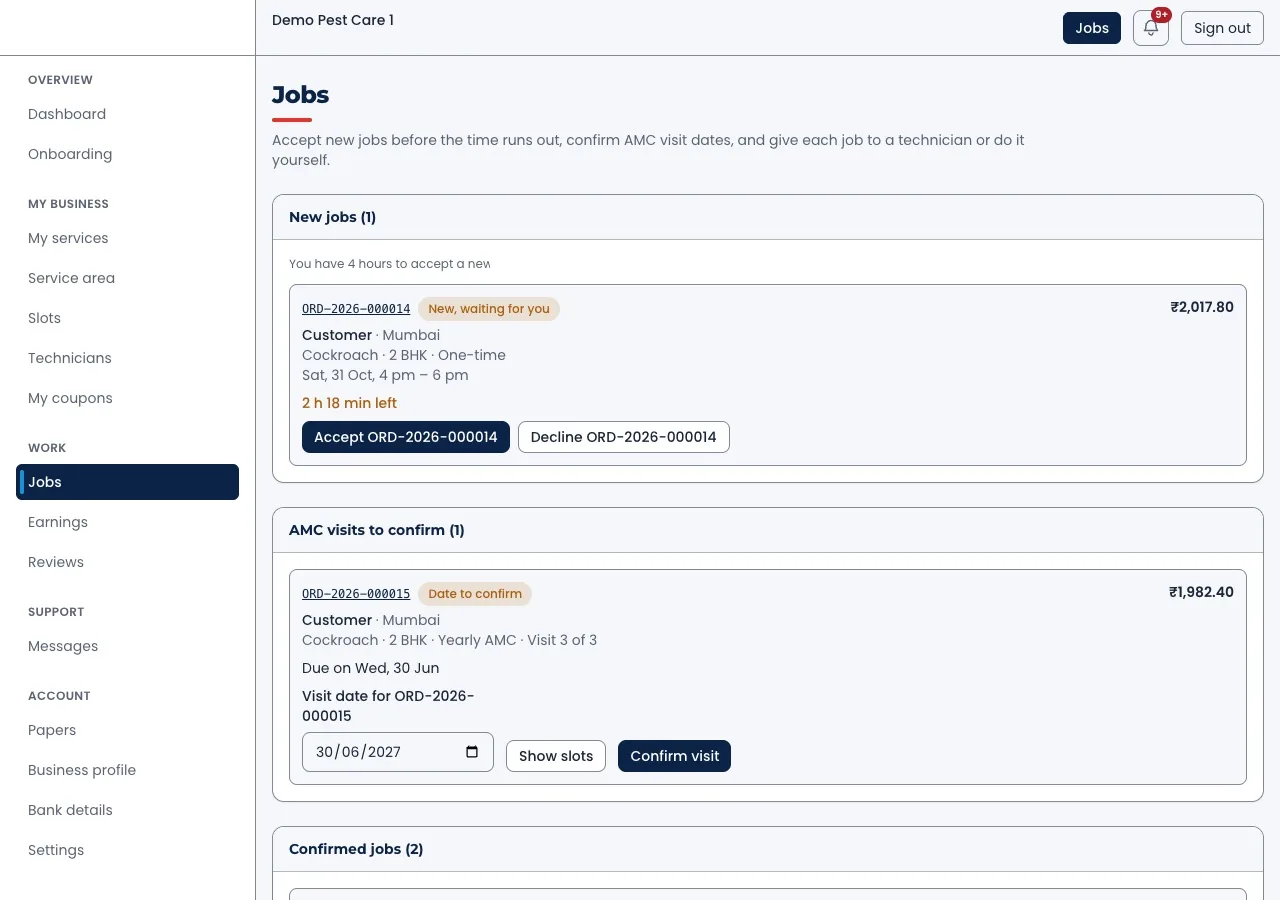
Accept or decline before time runs out
New bookings arrive with a countdown. If the office does not accept in time, the booking can move to another branch or partner. AMC visits that need a date sit in their own list.
Each job shows the pest, the home size, the slot and the amount, with Accept and Decline buttons.
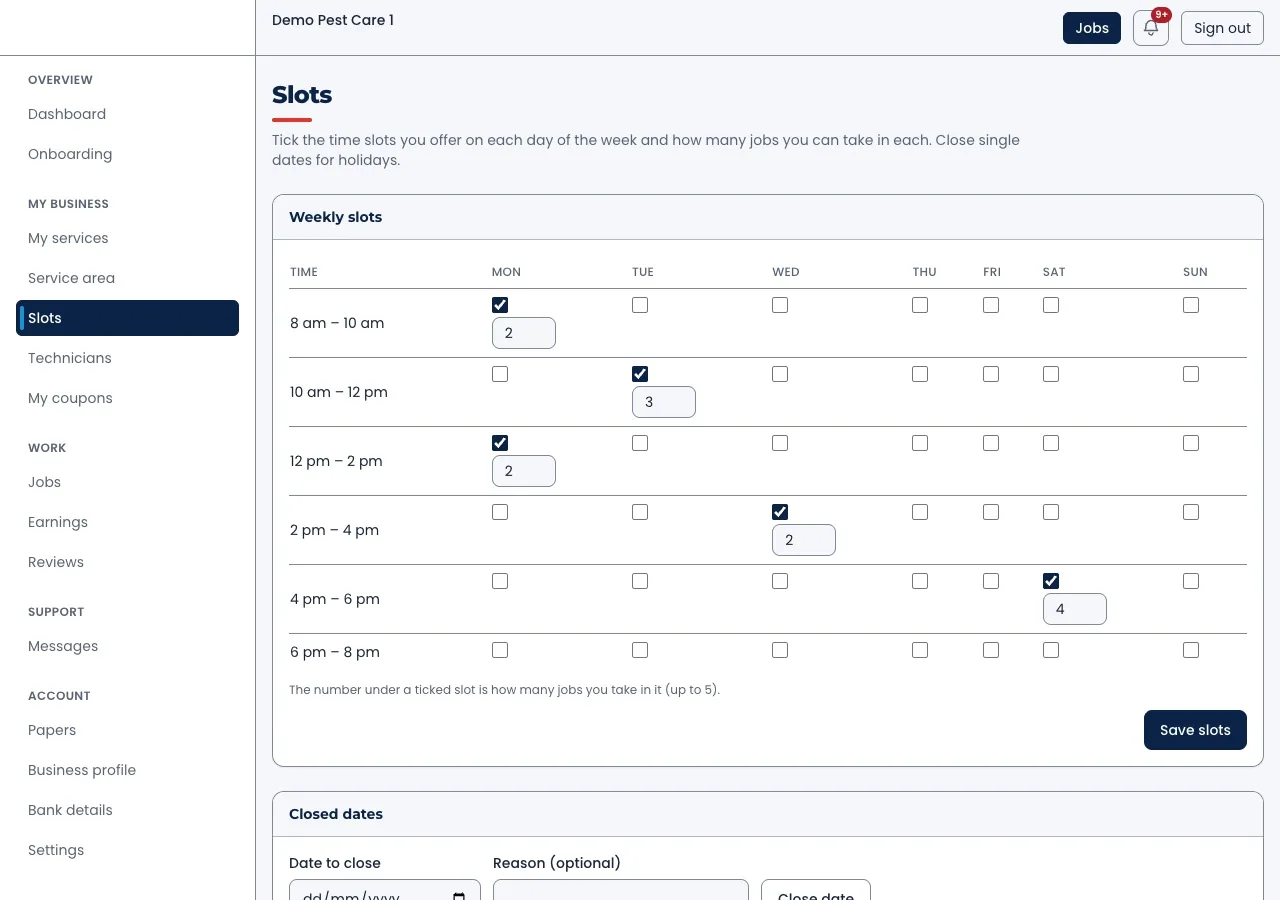
Weekly slots and closed dates
The office ticks which time slots it offers on each day. Under each ticked slot, it sets how many jobs fit. Holidays and stock days are closed with one entry, so customers cannot book them.
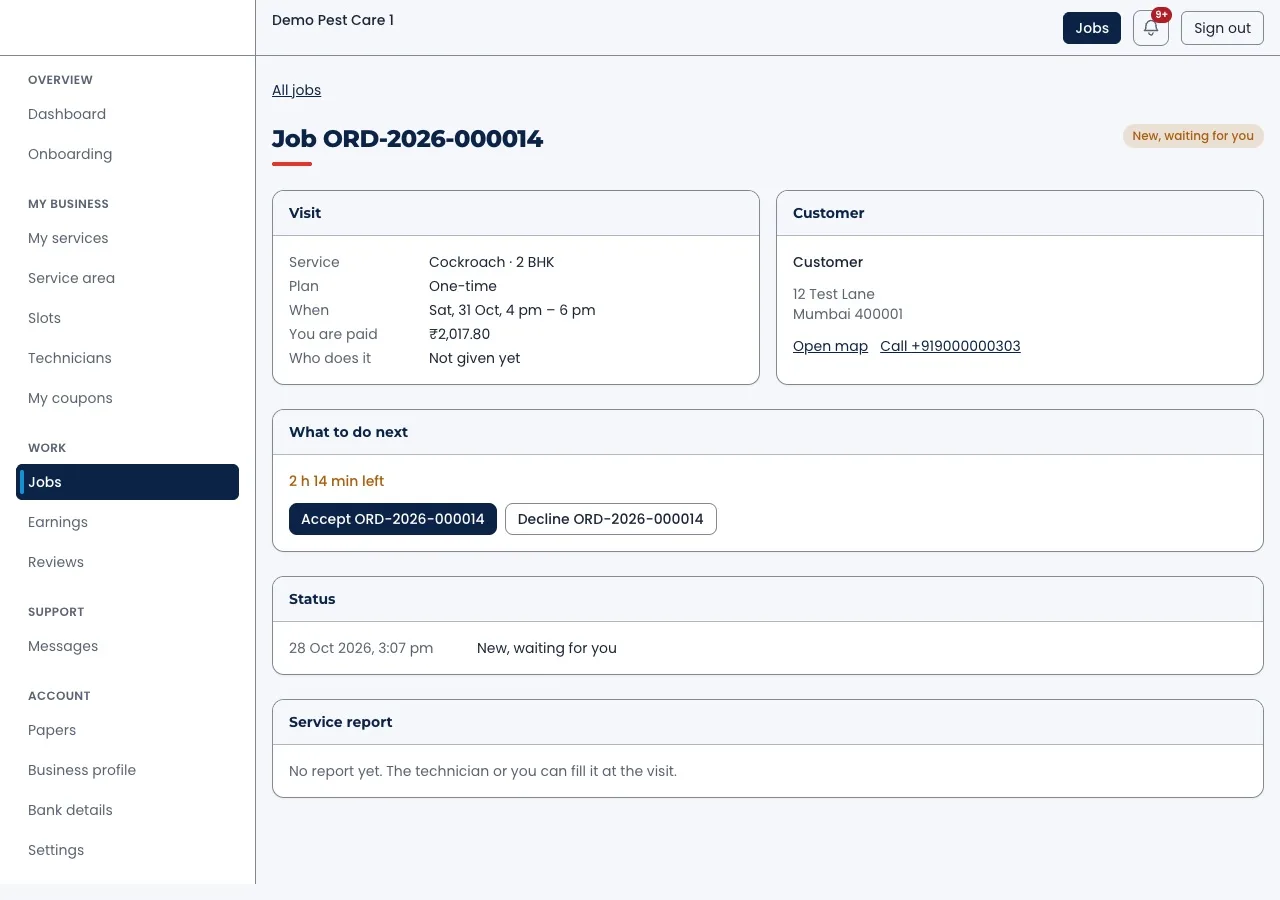
Job detail with the customer's address
Each job page shows the visit, the customer, the next action and the status history. The office can call the customer or open the address on a map from the same page.
Technician app features
Technicians need very few screens. They need the address, the pest and a way to prove the work. We build this as an Android and iPhone app from one Flutter codebase, so both phones get the same features.
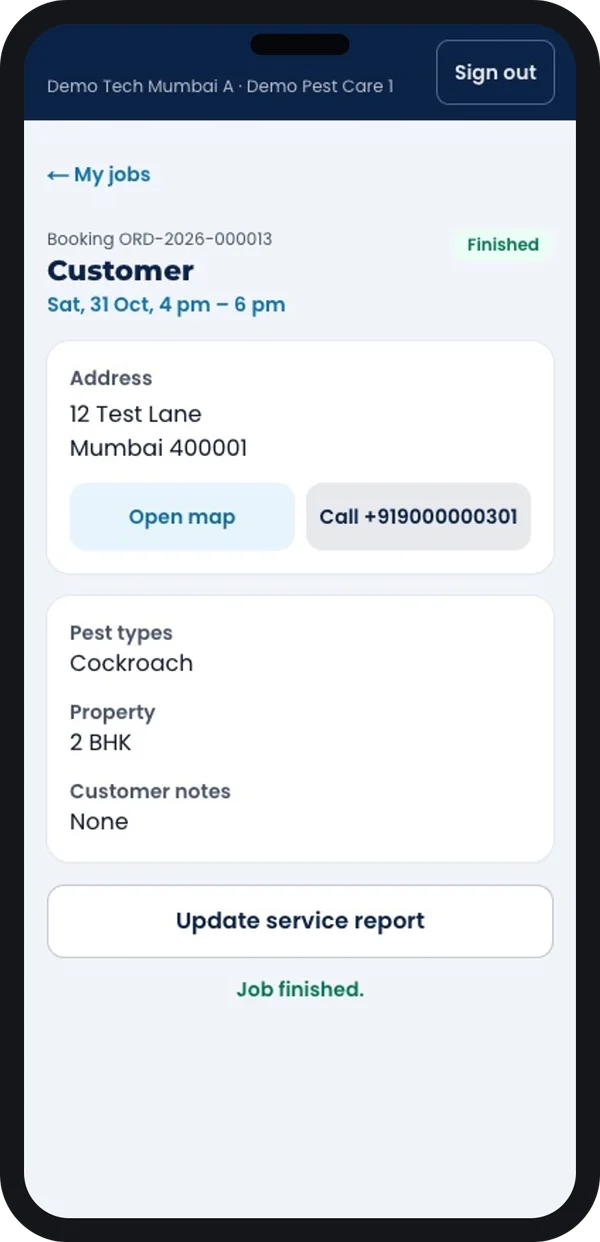
Job details
Address, map, call button, pest type, home size and the customer's notes.
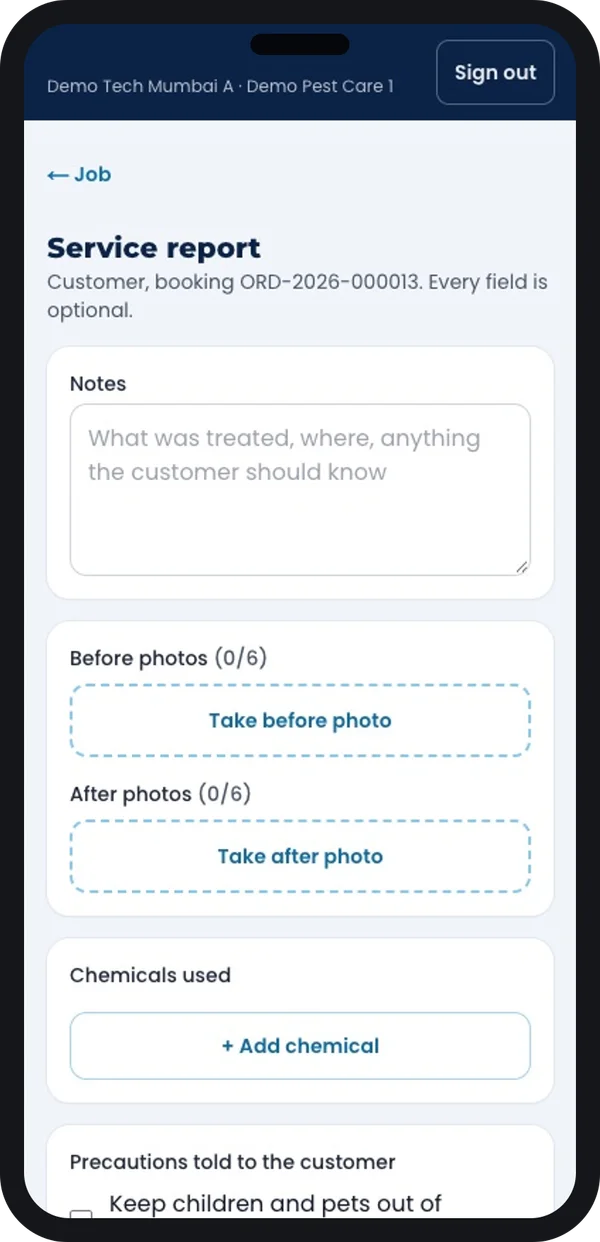
Service report
Before and after photos, chemicals used and the safety steps told to the customer.
The chemicals field matters. Insecticides sold in India must be registered under the Insecticides Act, 1968. The Central Insecticides Board and Registration Committee handles this. Source: Directorate of Plant Protection, Quarantine and Storage. A record of what was used, and where, helps you answer customer questions later. Check your own licence duties with the state agriculture department or a lawyer.
Owner dashboard and admin
Do you run more than one branch, or take bookings for partner firms? Then you need an admin panel above the office panels. It shows bookings, money collected, refunds and a "waiting for you" list.
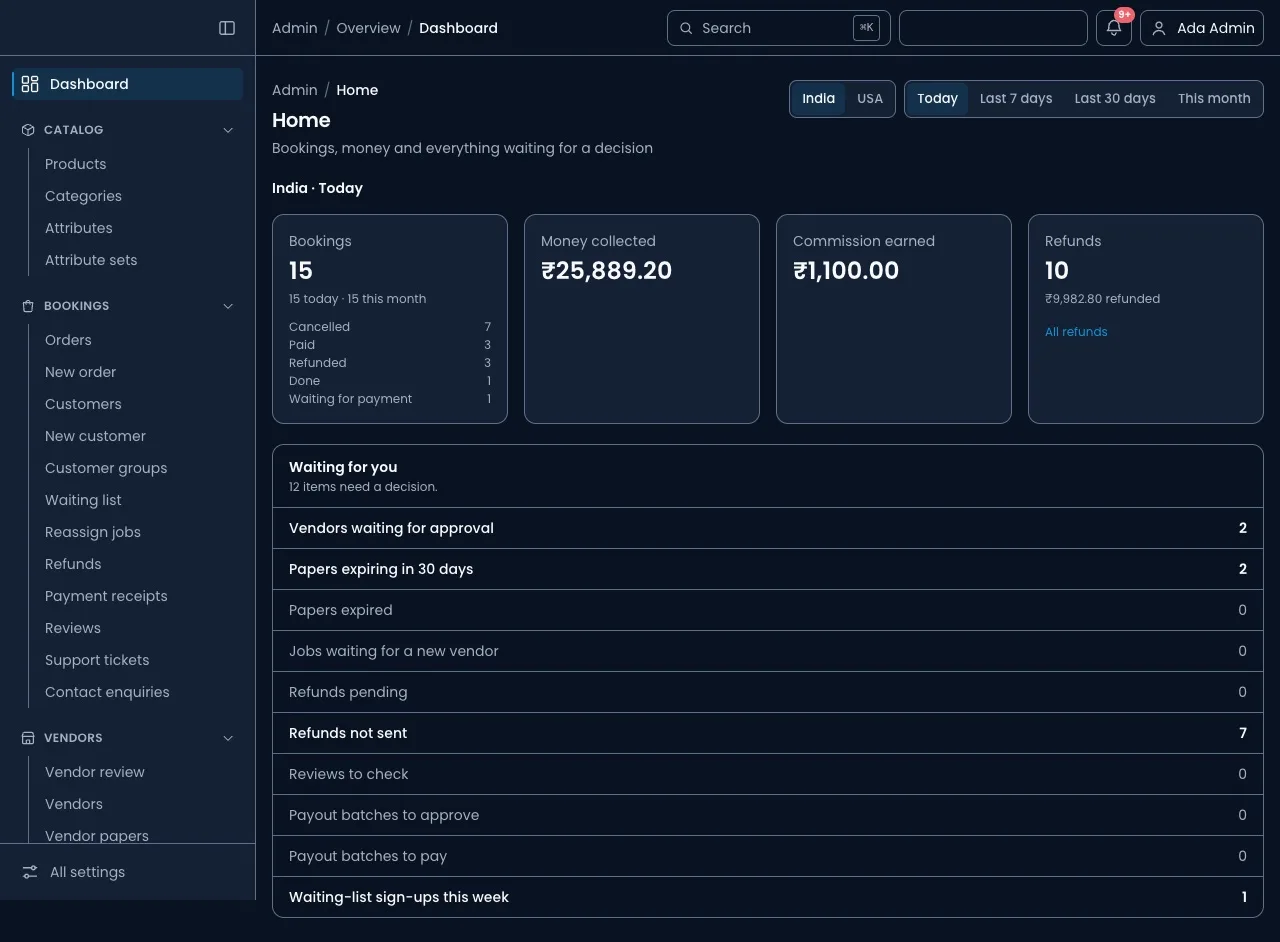
This is also where you approve partner firms, check their papers and send their payouts. Do you plan to run a booking platform for many pest control firms? Read about our multi-vendor marketplace development work.
Booking app vs phone and WhatsApp vs a listing app
| What you need | Phone and WhatsApp | Listing on a home services app | Your own booking app |
|---|---|---|---|
| Bookings at night and on holidays | No | Yes | Yes |
| Slots that close when full | No | Their rules | Your rules |
| Your brand on the app and invoice | Yes | No | Yes |
| Customer phone numbers stay with you | Yes | Often hidden | Yes |
| AMC visits created and reminded | No | Sometimes | Yes |
| Service report with photos | Photos in chats | Their format | Your format |
| Warranty complaint linked to the first job | No | Sometimes | Yes |
Worked example: a termite AMC booked at night
Here is one booking from start to finish. The names, times and areas are examples.
- 10:40 pm, booking. A customer in a 3 BHK sees termite marks on a door frame. She picks termite, home, 3 BHK and a yearly AMC. She chooses Saturday, 10 am to 12 pm, and pays online.
- 10:41 pm, AMC visits created. The app creates the first visit and the follow-up visits with due dates. The customer gets a confirmation.
- Next morning, accept. The office sees the new job with its countdown and accepts it. It gives the job to a technician who works in that pincode.
- Saturday, the visit. The technician opens the address on the map, calls on arrival and treats the frames. He adds before and after photos, the chemical used and the safety steps.
- Saturday, job closed. The customer gets the report and the invoice. She rates the visit.
- Weeks later, next visit. The office confirms a date for the follow-up visit. The customer gets a reminder two days before.
- If termites return. She taps "Warranty complaint" on the same booking. The office sees the full history and sends the same technician.
Our service
How we build your pest control booking app
Your pests, your service areas, your plans and your brand.
- Map your services. We list your pests, plans, home sizes, areas and warranty rules in one or two calls.
- Design clickable screens. You try the booking flow on screens first and ask for changes before any code is written.
- Build the three apps. Customer app, office panel and technician app, with a Laravel backend that keeps one record per booking.
- Connect payments and messages. Payment gateway, SMS or WhatsApp alerts and GST invoices, set to your accounts.
- Test with real jobs. Your office and two or three technicians use it on live bookings. We fix what they find.
- Launch under your brand. Your name on the Play Store and App Store, with hosting on your own cloud account.
Pest control booking app development cost: what decides it
We do not publish a fixed price. No two pest control businesses book jobs the same way. The cost depends on these points:
- Number of apps. Customer app only, or customer, office and technician apps together.
- Platforms. Android only, or Android, iPhone and a booking website.
- Plans and rules. One-time jobs only, or AMC contracts, warranty days and repeat visits.
- One company or many. A single firm, or a platform where many firms take bookings and get payouts.
- Connections. Payment gateway, SMS, WhatsApp, maps and your accounting software.
| Monthly booking software plan | Custom booking app built for you | |
|---|---|---|
| Start | Quick sign-up | A few weeks to design and build |
| Cost over the years | Pay every month, often per user | One build cost, then optional support |
| Pest type and home size in the booking | Often a generic form | Built around your services |
| Your brand in the app stores | Rarely | Yes |
| Data and source code | Stay with the vendor | Yours |
Whoever builds your booking app, make sure it can:
- Ask for pest type, property type and size before showing slots
- Show only pincodes your team covers
- Limit how many jobs each slot can take
- Create every AMC visit and remind both sides
- Save before and after photos and chemicals used on the job
- Link warranty complaints to the original booking
- Make GST invoices with your details
- Export your customers and bookings whenever you want
FAQ
How long does it take to build a pest control booking app?
It depends on how many apps you need and how many rules your plans have. After one call, we share a plan with dates for each part, starting with clickable screens.
Will I own the booking app and its source code?
Yes. We build it under your brand and hand over the source code. Your customer list and bookings stay on your server.
Which platforms will the app run on?
We build the customer and technician apps for Android and iPhone, and the office panel for the web. A booking page for your website can use the same system.
Can customers book an AMC in the app?
Yes. The app creates every visit of the contract with a due date. Your office confirms each date, and the customer gets a reminder before each visit.
Is customer data safe in a pest control booking app?
It should be. Phone numbers and home addresses are personal data under the Digital Personal Data Protection Act, 2023. The app must limit who sees them and keep a record of consent. We build these controls in.
Can the technician app work in places with weak network?
Yes, if it is built for it. The app can save the service report and photos on the phone and send them when the network returns.
Can I run a booking app for many pest control firms?
Yes. That is a marketplace. It needs vendor sign-up, paper checks, slot rules for each firm and payouts. We have built this kind of platform, and our SaaS development work covers the billing side.
Can PRS India build a pest control booking app for my company?
Yes. We build the customer app, office panel and technician app around your own pests, plans and areas. Book a consultation and we will show you screens for your process.
Related guides
Written by
Babita Kumari · Business Developer
Business Developer at PRS India. Talks with business owners about the app or software they want, and helps them work out the scope, cost and launch steps before any code is written.