Helpdesk Software Development for Small Business
We build helpdesk software for small teams: one ticket queue, due times, saved replies, a help centre and reports, under your own brand.

Written from production. Our articles draw on products we run live and the client work behind them, and are revised as the systems they describe evolve.
A small business usually starts support with one shared email inbox and a WhatsApp number. Three people read the same messages. Two of them reply to the same customer. A refund request sits unread for four days because everyone thought someone else had it. Nobody can say how many complaints came in last month.
Helpdesk software for small business fixes this with one rule. Every message becomes a ticket with one owner and a due time. You do not need a large enterprise tool for that. You can get a helpdesk built as your own web app. It can be sized for a team of two to ten people. This guide covers what a small team needs, what it can skip, and how we build it.
Key takeaways
- A helpdesk turns emails, chats and form messages into tickets, each with one owner.
- Small teams need few features: a shared queue, saved replies, due times, a customer list and a help page.
- A help centre with answers to common questions cuts repeat tickets before they reach your team.
- Online sellers in India have complaint rules to follow. A helpdesk keeps the dates as proof.
- Your own helpdesk has no per-agent fee and keeps customer data in your hands.
What is helpdesk software?
Helpdesk software is a shared work list for customer questions. Each email, chat or form message becomes a ticket. A ticket has a number, a status, an owner, a due time and the full conversation.
The customer still gets a normal email reply. Behind it, your team sees who is handling what and what is late. When a customer writes again, the reply joins the same ticket, so nobody starts from zero.
A day in a shared inbox
Here is a normal day for a five-person online shop without a helpdesk.
- 9 am. Forty new emails. Two staff start reading at once. They both answer the same "where is my order" mail.
- 11 am. A customer writes on WhatsApp about a wrong size. The message stays on one person's phone.
- 2 pm. The owner asks how many refund requests are open. Nobody knows without counting.
- 5 pm. A complaint from Monday is found under newer mail. The customer has already left a bad review.
None of this is a staff problem. It is a tool problem. An inbox shows messages, not work. See our case studies for other software we have built.
The problem
What small support teams lose without a helpdesk
Six gaps that grow as orders grow.
- Double replies. Two people answer one customer, sometimes with different answers.
- Lost messages. Chats on personal phones never reach the shared record.
- No due times. Nothing tells you a customer has waited two days.
- Same answers typed again. Staff write "how to return" fifty times a week.
- No history. When a customer writes again, nobody sees the last problem.
- No numbers. The owner cannot see volume, reply time or the most common issue.
Helpdesk features a small business needs
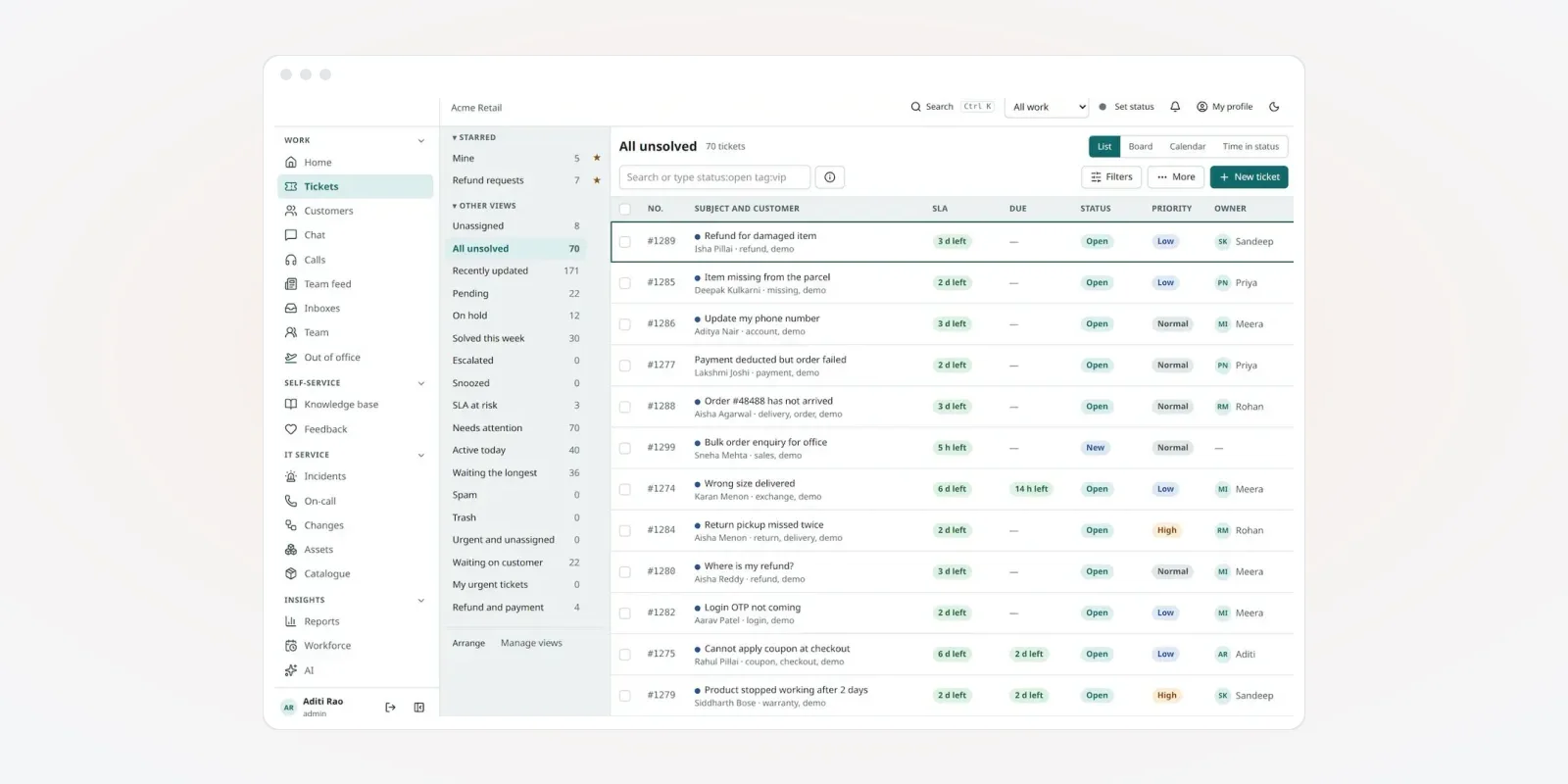
These screens are from a helpdesk platform we built, shown with a demo retail shop and demo customers.
1. One queue for every channel
Email, the contact form on your site and chat all land in one list. Saved views split it: mine, unassigned, waiting on customer, refund requests. Each row shows the time left before the ticket is late.
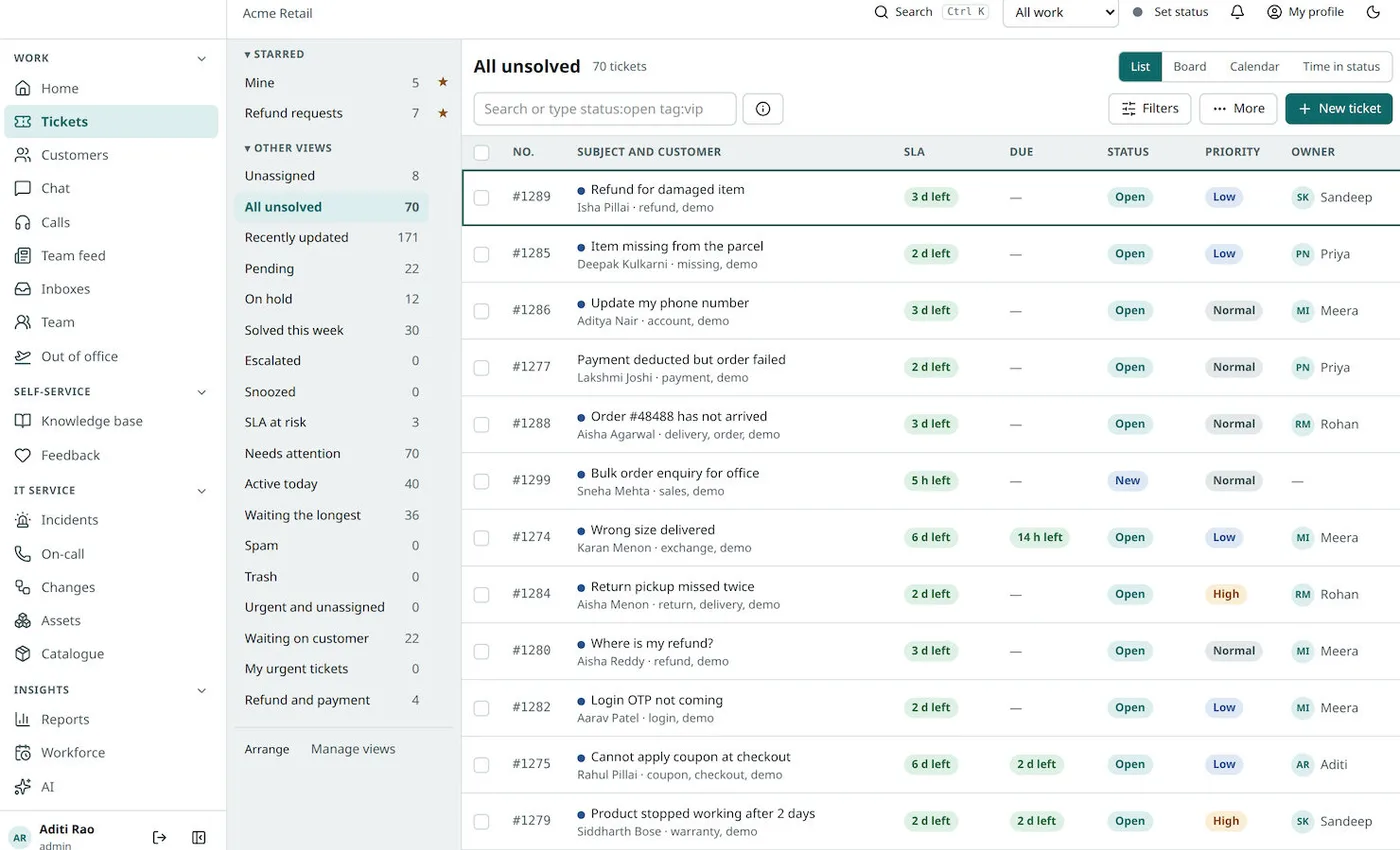
For a small team, the most useful views are short: unassigned, mine and late. You can add more as the team grows.
2. The ticket page
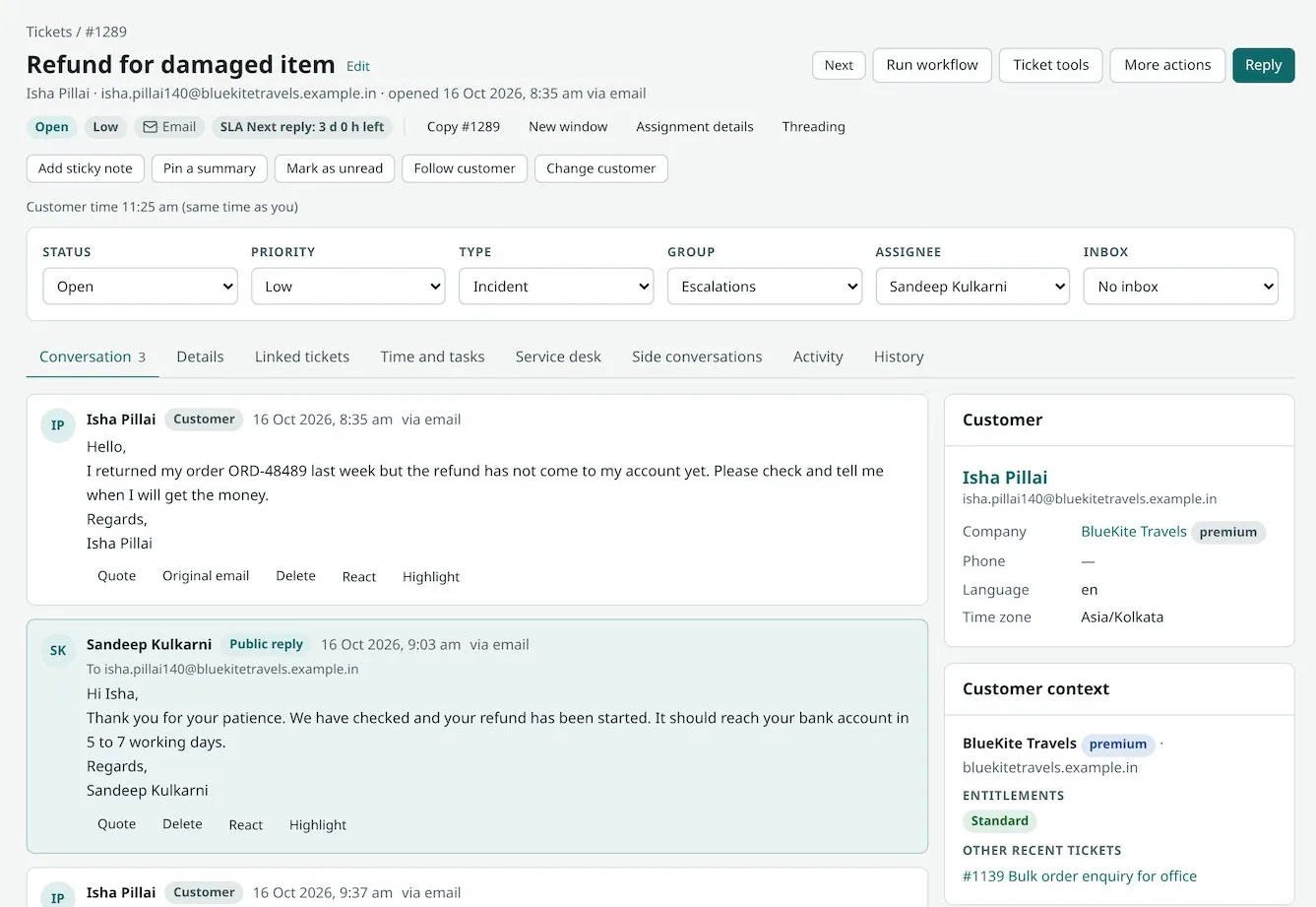
Open a ticket and you see the whole conversation, the status, the priority and who owns it. The side panel shows the customer and their other recent tickets. If you sell online, we can also show the customer's orders from your Shopify or WooCommerce store on this page.
3. Customer list with history
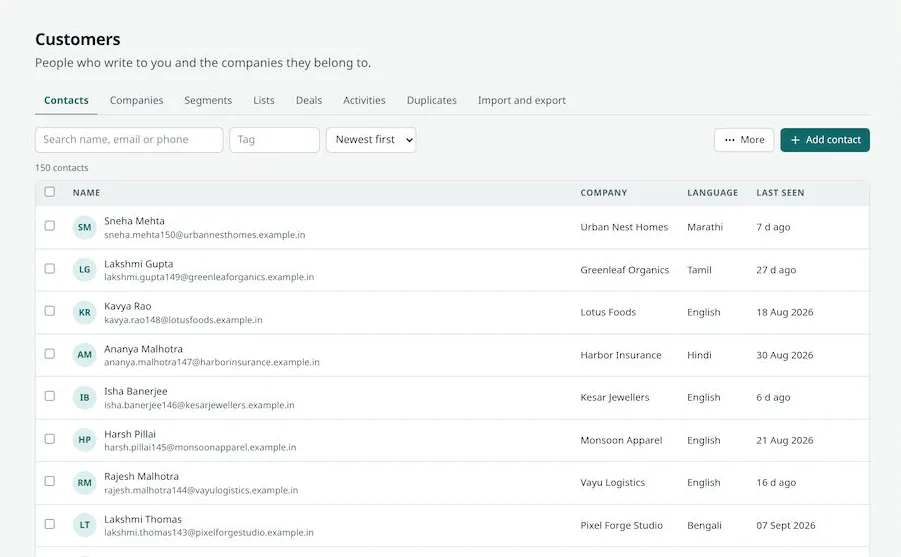
Every person who writes in is saved once, with their company, language and last contact. Click a name to see every past ticket. This list can later feed a small CRM if you need sales follow-ups too.
4. A help centre that answers the common questions
Most small businesses get the same ten questions. Where is my order? How do I return? When will I get my refund? A help centre answers these on your website, under your brand. Customers search first and raise a ticket only if they need a person.
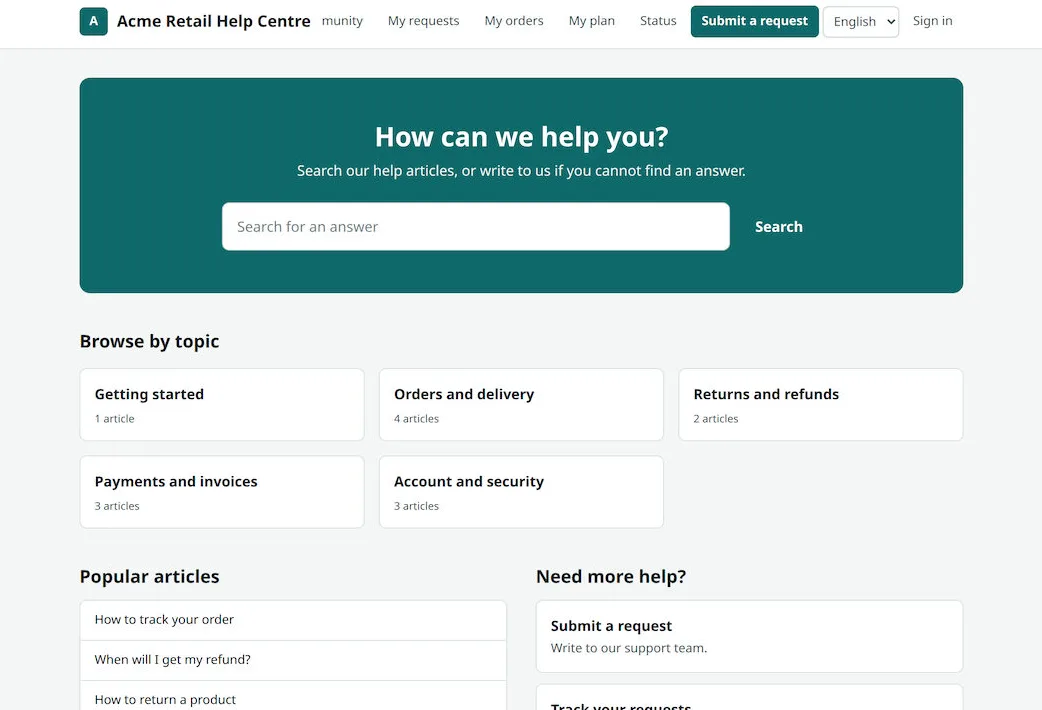
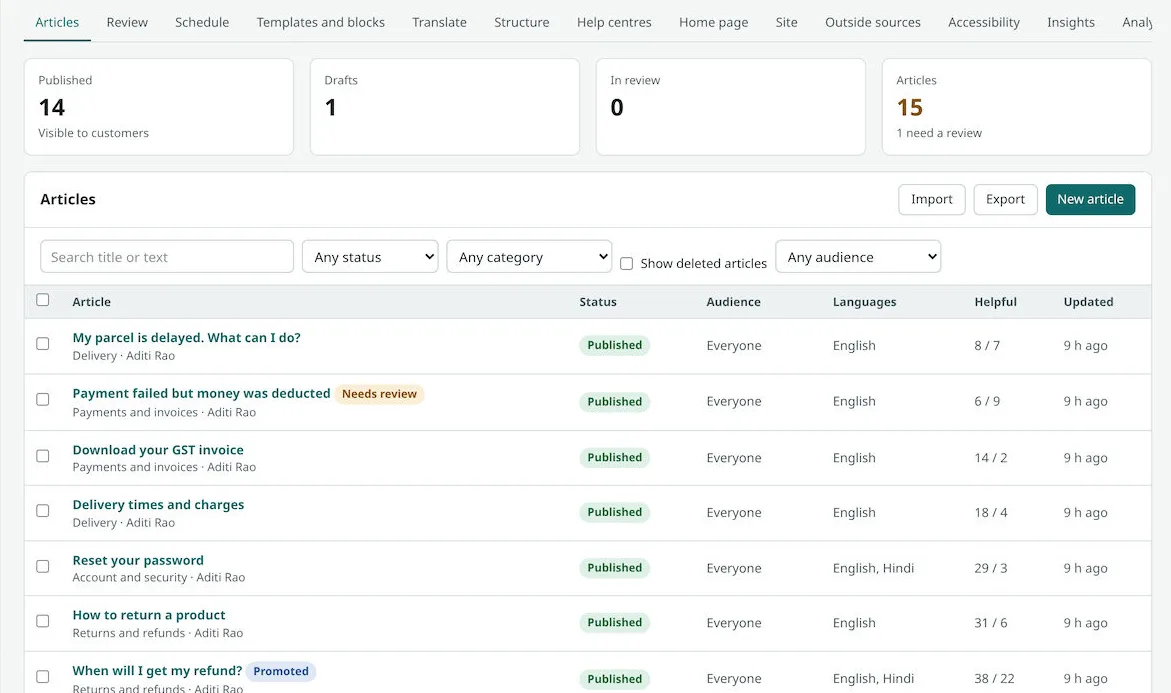
Articles can be in English and Hindi, or any language your customers use. The "helpful" votes show which answers need rewriting. The help centre should also work for people who use screen readers, as set out in W3C's accessibility guidelines.
5. Simple automation
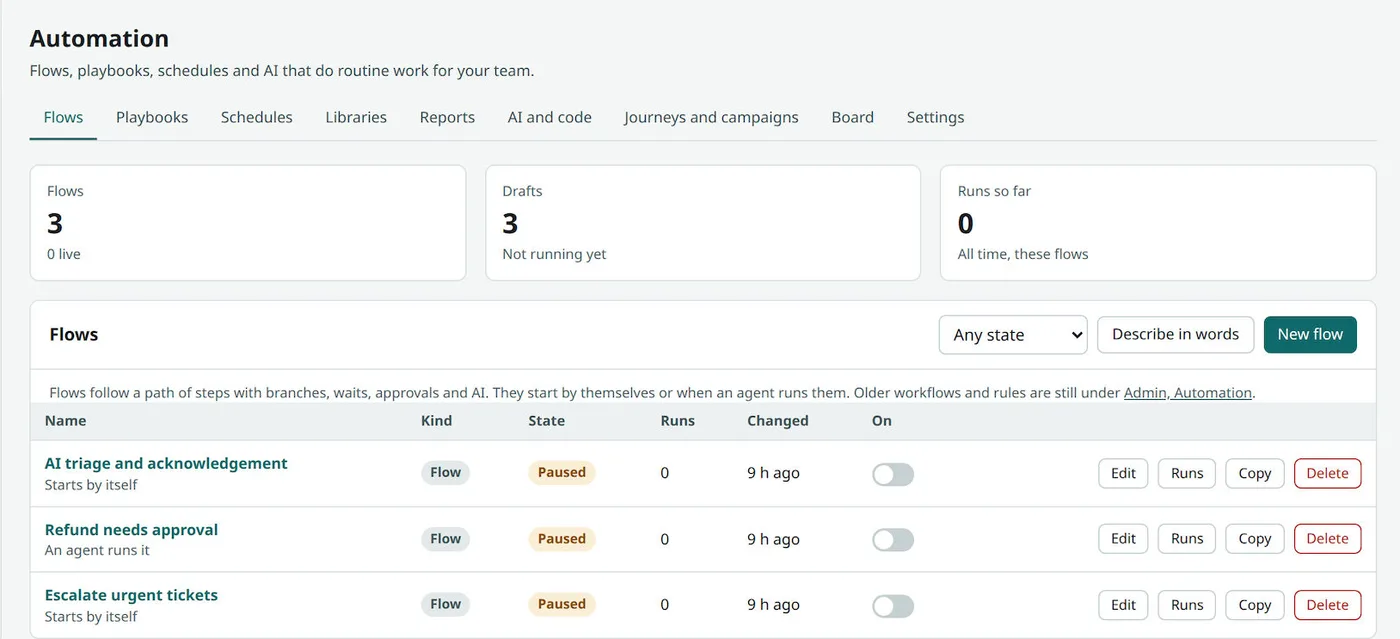
Small teams need only a few rules. Send an acknowledgement with the ticket number. Give refund tickets to the person who handles refunds. Raise the priority when a ticket is close to late. We can add AI that sorts tickets and drafts replies later, once you have enough tickets to learn from.
6. Reports the owner reads
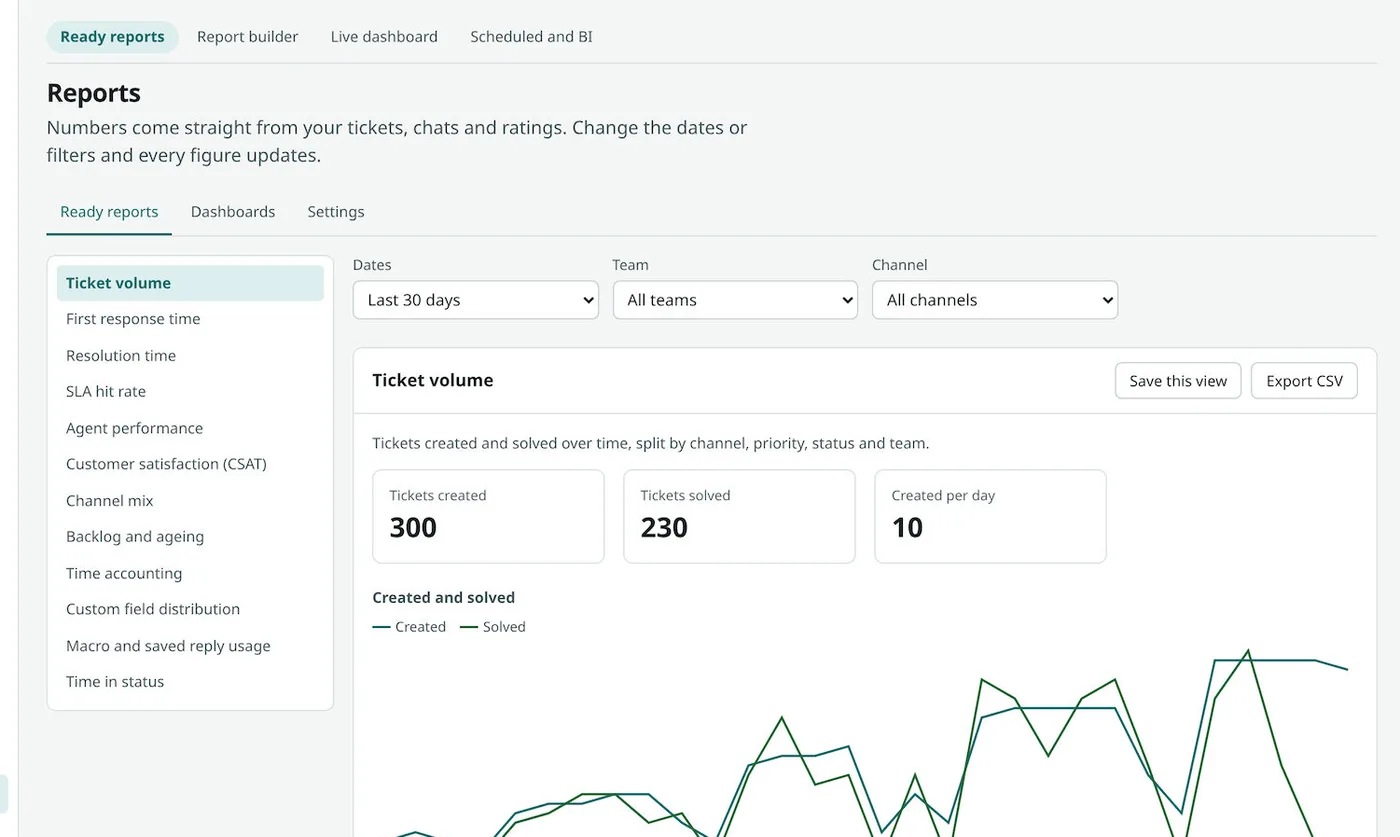
Tickets created and solved, first reply time and the most common issues. Filter by date, staff or channel. Export to a sheet for your accountant or partner.
Complaint rules for online sellers in India
If you sell online in India, complaint handling is not only good service. The Consumer Protection (E-Commerce) Rules, 2020 ask e-commerce entities to name a grievance officer. That officer must acknowledge a complaint within 48 hours and resolve it within one month. Source: Department of Consumer Affairs.
A helpdesk keeps the date of every complaint, every reply and the close date. You can set a due time on each complaint ticket to match these limits. Check with a lawyer which rules apply to your business.
What a small business can skip
Large helpdesks carry features a team of five will not touch. Leaving them out keeps the build short and the screens clear.
- Incidents and on-call rotas. Needed by IT teams, not by a shop.
- Asset lists. Useful for IT support firms that track laptops.
- Many brands. One brand is enough until you open a second store.
- Seat types and complex roles. Two roles, owner and agent, cover most small teams.
Own helpdesk vs shared inbox vs monthly helpdesk plan
| What a small team needs | Shared inbox and WhatsApp | Monthly helpdesk plan | Your own helpdesk |
|---|---|---|---|
| One owner per message | No | Yes | Yes |
| Due times and late alerts | No | Yes | Yes |
| Orders from your store on the ticket | No | With add-ons | Built in |
| Help centre under your brand | No | Often on higher plans | Yes |
| Cost as the team grows | None | Rises per agent | No charge per agent |
| Customer data and code | Spread across phones | With the vendor | Yours |
Worked example: a wrong-size complaint
One complaint through a small shop's helpdesk. The shop, names and times are examples.
- Monday 8:10 pm. A customer writes through the website form: wrong size delivered. The helpdesk creates a ticket and emails her the number.
- 8:10 pm. A rule tags it "exchange" and gives it to the staff member who handles returns. The due time is set for the next day.
- Tuesday 10 am. The staff member opens the ticket. The side panel shows her order and a past ticket about late delivery.
- 10:05 am. He sends a saved reply with the exchange steps and a pickup date. The ticket moves to "waiting on customer".
- Wednesday. She replies with a photo. The message joins the same ticket. The pickup is booked.
- Friday. The new size is delivered. The ticket is closed and she gets a short rating request.
- Month end. The owner sees "wrong size" as the most common issue in the report and fixes the size chart on the product page.
Our service
How we build your helpdesk software
Sized for your team today, ready for more agents later.
- List your channels and questions. We look at your inbox, chats and the questions you get most.
- Design the screens. You click through the queue, ticket and help centre before any code.
- Build the helpdesk. A React web app with your email, website form and store connected.
- Write the first articles. We load your ten most asked answers into the help centre with your team.
- Go live. Your support email points to the helpdesk. Hosting sits on your own cloud account.
- Grow it. Add chat, phone apps for agents or AI replies when you need them.
Helpdesk software development cost for small business: what decides it
We do not publish a fixed price. A small helpdesk costs far less to build than an enterprise service desk. The quote depends on:
- Channels. Email and web form only, or chat and messaging apps too.
- Store or software links. Showing orders from your online store or data from your own app.
- Help centre. One language or several, and how many articles we help set up.
- Automation. A few fixed rules, or AI sorting and draft replies.
- Apps. Web only, or an Android and iPhone app for agents.
| Monthly helpdesk plan | Your own helpdesk | |
|---|---|---|
| Start | Same day | A few weeks to build |
| Cost over the years | Per agent, every month | One build cost, then optional support |
| Fits your store and process | Through settings and add-ons | Built for them |
| Brand on the help centre | Depends on the plan | Always yours |
| Data and source code | Stay with the vendor | Yours |
Whoever builds your helpdesk, make sure it can:
- Turn every email, form and chat message into a ticket
- Give each ticket one owner and a due time
- Keep replies from the same customer on one ticket
- Save replies your team uses often
- Run a help centre under your brand
- Keep complaint dates for your records
- Show reports on volume and reply time
- Export all tickets and customers at any time
FAQ
What is the right helpdesk software for a small business?
Pick one that covers your channels, gives each ticket one owner and due time, and runs a help centre. Skip IT features like incidents and assets if you do not need them.
How long does it take to build a helpdesk for a small team?
It depends on channels, links to your store and the help centre. After one call, we share a plan with dates, starting with clickable screens.
Will I own the helpdesk and its source code?
Yes. We build it under your brand and hand over the source code. Your tickets and customer data stay on your server.
Can the helpdesk take WhatsApp messages?
Yes, through the WhatsApp Business Platform. Messages then become tickets like emails do. Meta's own rules and charges for the platform apply.
Is customer data safe in the helpdesk?
It should be. Customer names, phones and messages are personal data under the Digital Personal Data Protection Act, 2023. We build in staff logins, access limits, audit logs and backups.
Can agents work from a phone?
Yes. The web app works in a phone browser. We can also build Android and iPhone apps for agents.
Can I add more agents later?
Yes. Your own helpdesk has no charge per agent. You add staff logins as the team grows.
Can PRS India build helpdesk software for my small business?
Yes. We build helpdesk and IT ticketing software sized for small teams, with your brand on the help centre. Talk to our team about your support inbox.
Related guides
Written by
Aditi
Building software at PRS India.