Business of Software
White Label Helpdesk Software Development: Service Desk
We build white label helpdesk and service desk software: branded help centres, client spaces, SLA queues, incidents and reports, under your brand.

Written from production. Our articles draw on products we run live and the client work behind them, and are revised as the systems they describe evolve.
An IT support company handles tickets for twenty client firms. Each client wants its own help page, its own email address and its own reports. The support team logs in to one tool, but the clients should never see that tool's name. That is the job of a white label helpdesk.
Some firms rent a helpdesk and pay to remove the vendor's logo. Others build their own white label helpdesk platform. Then the brand, the client data and the code are theirs. This guide explains what white label helpdesk software must do, what a service desk adds, and how we build one for you.
Key takeaways
- White label means your brand on every screen, email and help page your clients see.
- There are two models: one branded helpdesk for your own customers, or one platform that serves many client firms.
- A service desk adds IT work to a helpdesk: incidents, on-call, changes, assets and a request catalogue.
- Each client firm needs its own space: brand, agents, rules, reports and data kept apart.
- When you own the platform, you set the plans you sell to your clients.
What is white label helpdesk software?
Helpdesk software is a web application that turns customer emails, chats and calls into tickets. Each ticket has an owner, a status and a due time. White label helpdesk software is the same system, but it carries your name instead of the maker's.
In practice, white label covers more than a logo. The help centre address, email sender and login page all show your brand. So do the colours and the words in alerts. For a firm that offers white label helpdesk support to clients, every client can have its own version of these too.
Two models of white label helpdesk
| Model 1: your own branded helpdesk | Model 2: helpdesk platform for many clients | |
|---|---|---|
| Who raises tickets | Your own customers | Customers of each client firm |
| Brands | One | One per client, plus yours |
| Data | One workspace | Kept apart for each client |
| Billing | Not needed | Plans and invoices for each client |
| Typical buyer | Ecommerce, SaaS, service firms | MSPs, IT support and outsourcing firms |
Model 2 is a SaaS product in its own right. It needs sign-up, plans, limits per client and separate data. We plan it as a multi-client platform from day one. Adding this later is slow. Our case studies show other platforms we have built.
What a white label service desk adds
A helpdesk answers questions. A white label service desk also runs IT work for clients. It adds incidents, on-call rotas, change requests, an asset list and a catalogue of things staff can request.
Many IT firms follow a standard way of running these steps. ISO/IEC 20000-1 is the international standard for IT service management. Source: ISO/IEC 20000-1 at ISO. A service desk does not make you certified. It does keep the records an audit asks for.
The problem
Why renting a helpdesk fails support firms
What IT support and outsourcing firms run into with rented tools.
- The vendor's name leaks. It shows in emails, the help centre footer or the login page.
- Seats add up. Every agent working for every client is a paid seat every month.
- Clients mixed together. Views, reports and rules for twenty clients sit in one workspace.
- No client billing. The tool cannot bill your clients for the support you give them.
- Client data abroad. Some clients ask where their data is stored. You cannot choose.
- Fixed features. A client needs a field or a step the tool does not offer. You cannot add it.
Features of a white label helpdesk
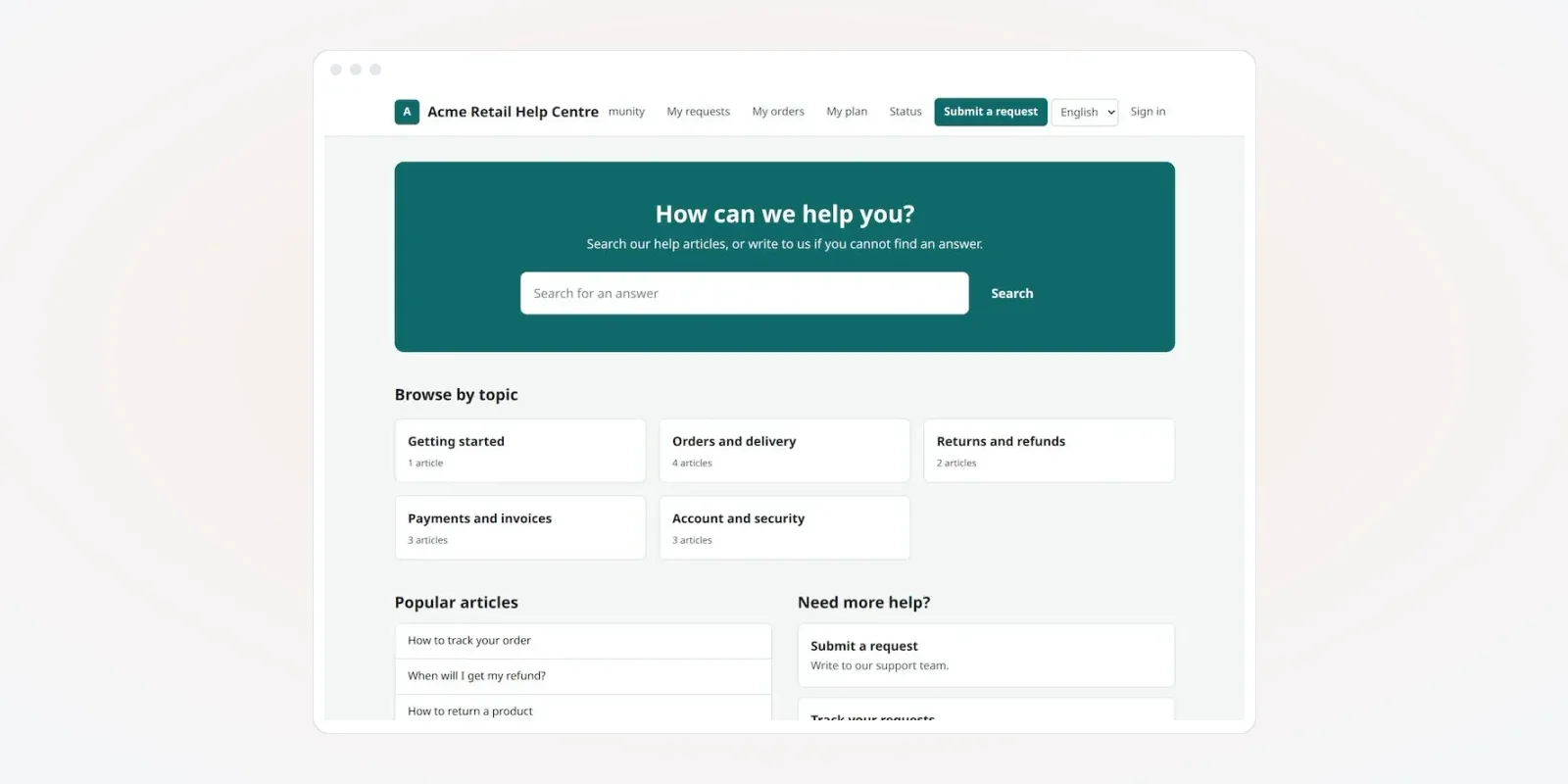
These screens are from a helpdesk and IT ticketing platform we built. They show demo companies and demo data.
1. A branded help centre for each client
Each client gets its own help centre: its name, its colours, its articles and its request form. Customers search answers, raise a request and track it, without seeing your platform's name.
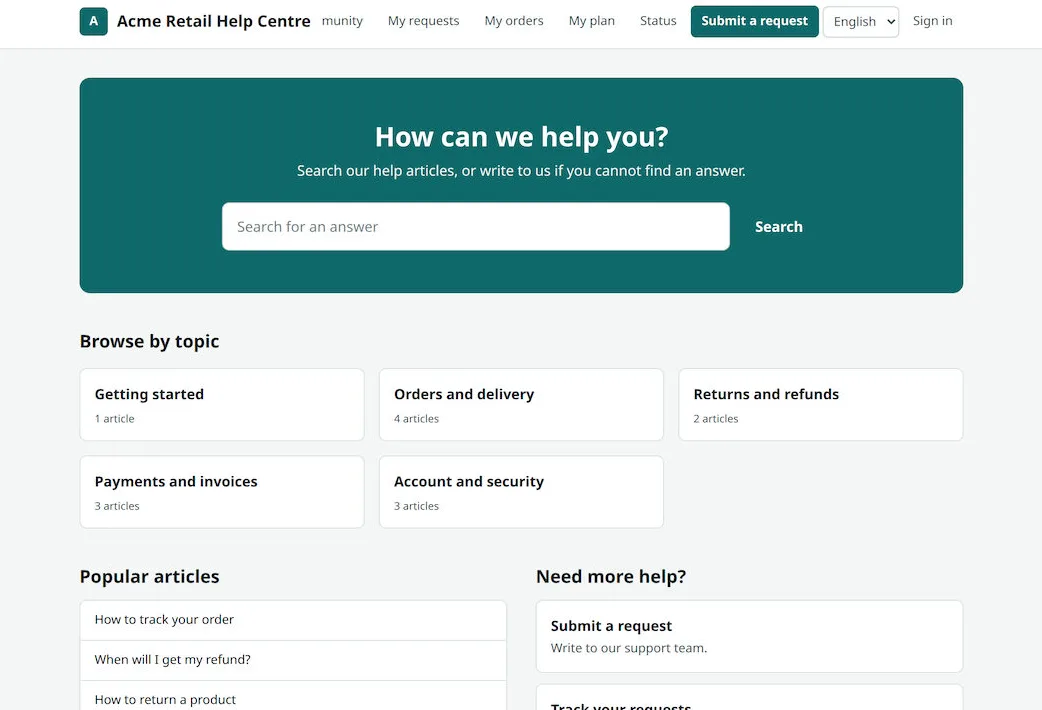
The help centre should meet web access rules, so people using screen readers can raise tickets too. The common guide is W3C's Web Content Accessibility Guidelines.
2. Ticket queue with SLA timers
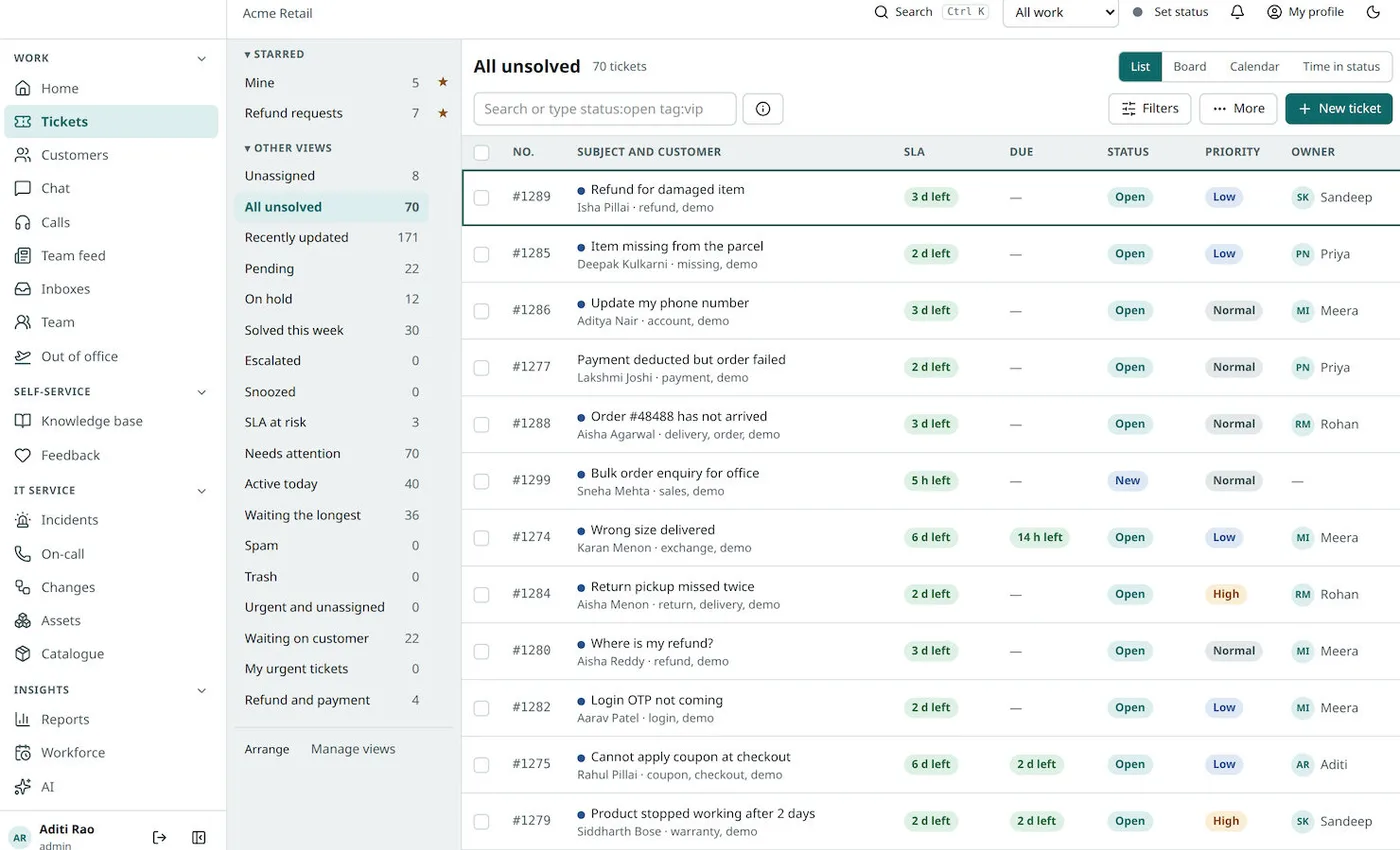
Agents work from saved views: mine, unassigned, SLA at risk, waiting on customer. Each ticket shows the time left before its SLA is broken. In Model 2, an agent can switch between clients, or see all clients they serve.
3. One ticket, full context
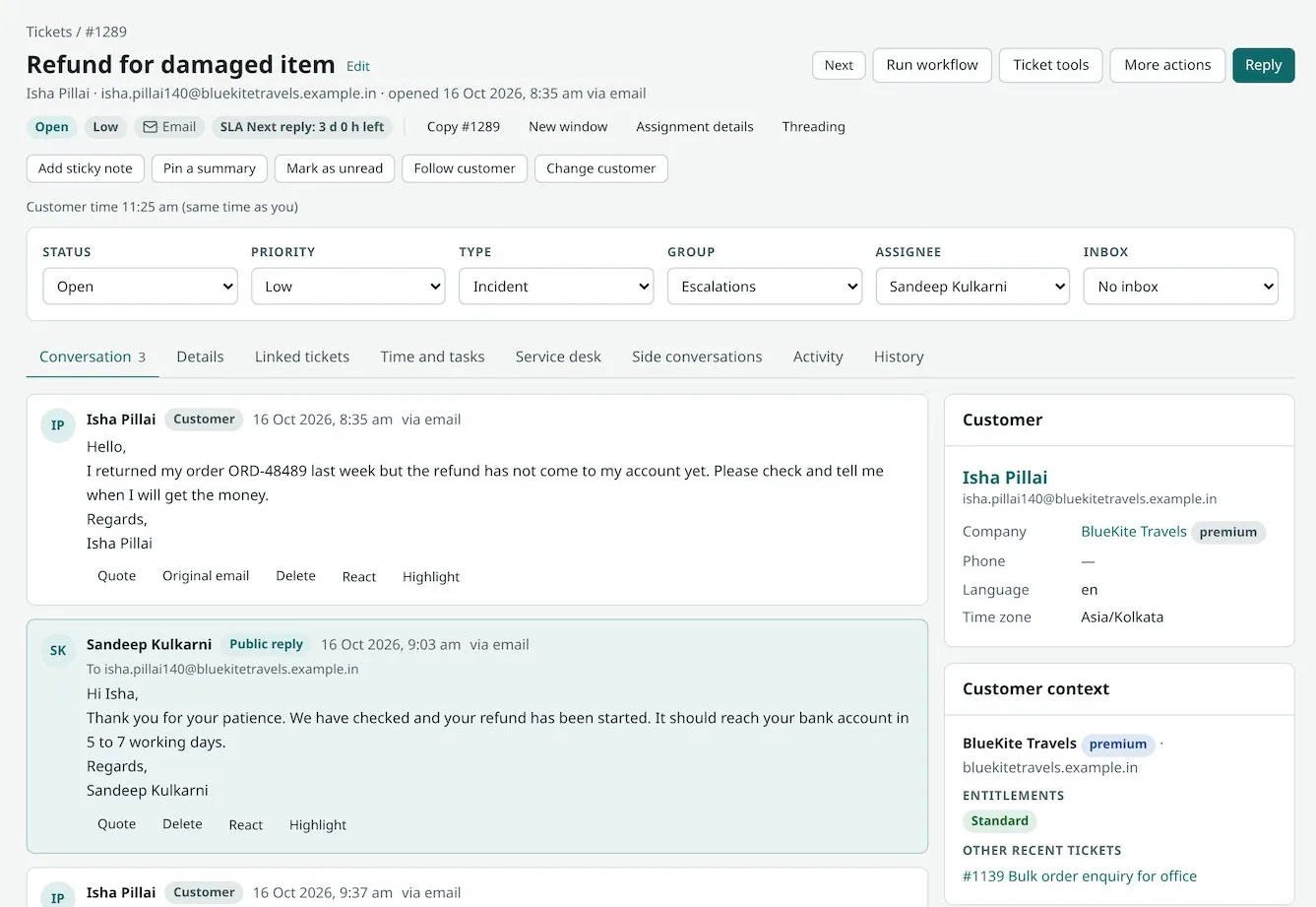
The ticket page shows status, priority, type, group and owner. The conversation sits in the middle. The right side shows the customer's company, its plan and its other recent tickets.
4. Incidents and on-call for IT clients
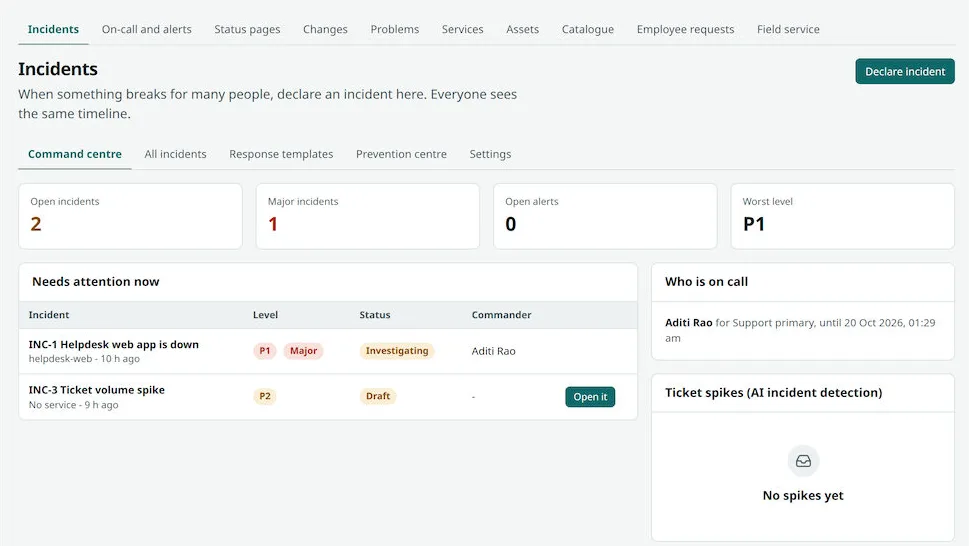
When a client's system goes down for many users, agents declare an incident. Everyone sees one timeline, the person on call and the current level. Ticket spikes can also raise an alert.
Cyber incidents have a reporting clock in India. CERT-In's directions of April 2022 cover service providers and other bodies. They must report certain cyber incidents within 6 hours of noticing them. Source: CERT-In directions under section 70B. Check what applies to you and your clients with a lawyer.
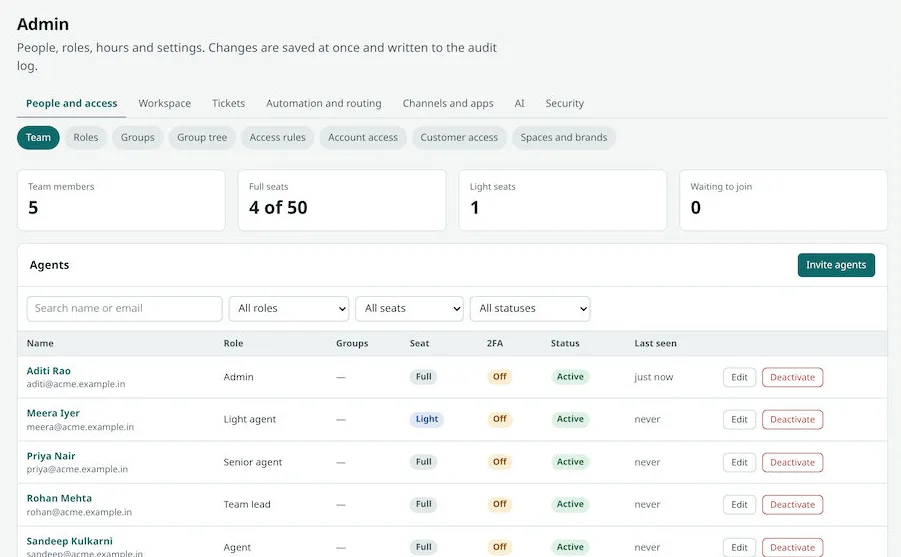
5. Agents, roles and brands
The admin console controls who works on what. Roles, groups, access rules and "spaces and brands" decide which agent sees which client. Changes are written to an audit log.
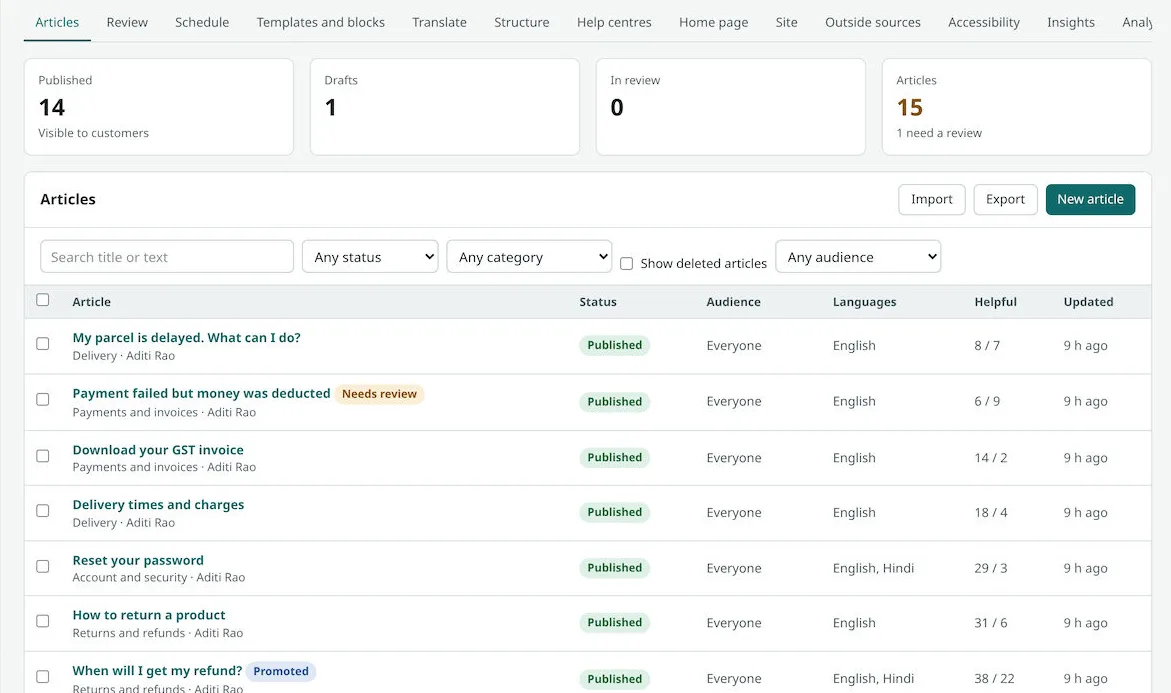
6. Knowledge base, automation and reports
Each client can have its own articles in more than one language. Automation flows sort new tickets, ask for approval and escalate urgent ones. Reports show volume, first response time and SLA hit rate for each client.
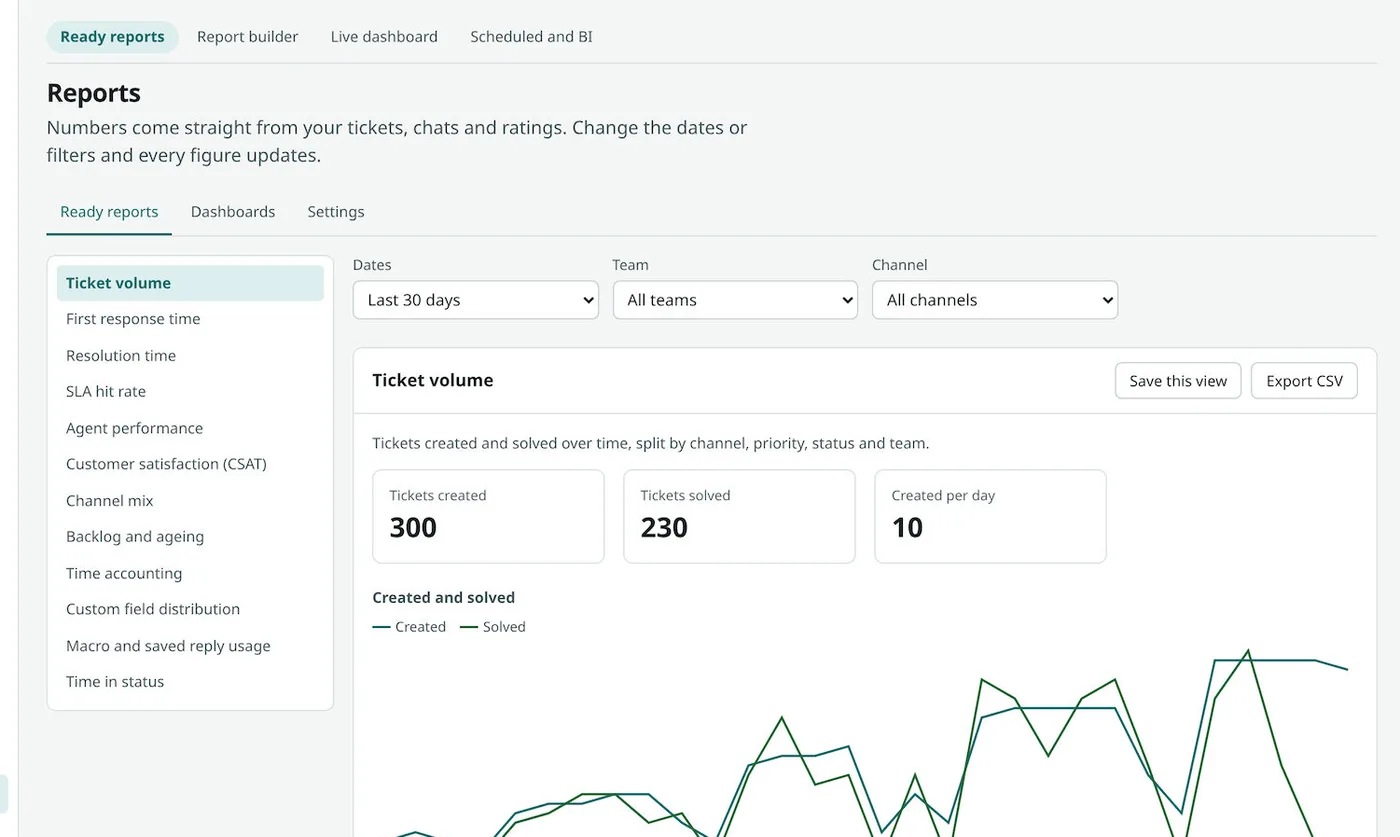
Monthly reports per client matter most in Model 2. They are what your client reads before renewing your support contract. Our AI development work can add ticket sorting and draft replies as well.
Own platform vs rented helpdesk vs open source
| What a support firm needs | Rented helpdesk with logo removed | Open-source helpdesk, self-run | Your own white label platform |
|---|---|---|---|
| Your brand everywhere | Partly, often at extra cost | Yes, with work | Yes |
| Separate space for each client | Limited | Rarely built in | Yes |
| Bill your clients from the platform | No | No | Yes, if built |
| Choose where data is stored | Vendor's choice | Yes | Yes |
| Add client-specific fields and steps | Within limits | Needs developers | Yes |
| Cost as agents grow | Rises per seat | Server and upkeep | No charge per seat |
Worked example: adding a new client to the platform
An IT support firm signs a new client, a chain of clinics. Clinics often run healthcare software that needs fast IT help. The names and steps are examples.
- Day 1, new space. The admin creates a space for the clinic chain. It sets the logo, colours, help centre address and support email.
- Day 1, agents. Three existing agents are given access to the new space. One is set as team lead for it.
- Day 2, rules. SLA targets from the contract go in: urgent tickets answered within the agreed time. An escalation flow alerts the lead.
- Day 3, articles. Ten common answers are copied from the firm's library and edited for the clinic chain.
- Day 4, assets. The clinic's laptops and printers are imported into the asset list, linked to each branch.
- Day 5, live. Clinic staff raise tickets from their own help centre. They never see the platform's name.
- Month end. The firm sends the clinic chain its report and an invoice from the same platform.
Our service
How we build your white label helpdesk
Your brand first, then each client's brand inside it.
- Map your service. We list your clients, channels, SLAs and service desk needs and pick Model 1 or Model 2.
- Design the screens. You click through the agent, admin and help centre screens before we build.
- Build the platform. A Next.js web app on a Node.js backend, with client data kept apart.
- Connect channels. Email, web forms, chat and phone logs, set up for each client brand.
- Test with a pilot client. One client goes live first. We fix what agents and customers find.
- Launch and host. On your own cloud account, in the region your clients need.
White label helpdesk development cost: what decides it
We do not publish a fixed price. The cost depends on the model and on these points:
- Model 1 or Model 2. One brand, or many client spaces with billing.
- Channels. Email and web form only, or chat, phone and messaging apps too.
- Service desk parts. Incidents, on-call, changes, assets and a request catalogue each add scope.
- Automation and AI. Rule-based flows, or AI sorting and draft replies.
- Logins and links. Single sign-on, your CRM and billing tools.
| Rented helpdesk, white label add-on | Your own white label helpdesk | |
|---|---|---|
| Start | Days | A few weeks for the first version |
| Cost over the years | Per seat, every month | One build cost, then optional support |
| Separate client spaces and billing | Limited or none | Built for your model |
| Your clients see | Your logo, sometimes the vendor's | Only your brand or theirs |
| Data and source code | Stay with the vendor | Yours |
Whoever builds your white label helpdesk, make sure it can:
- Show only your brand, or your client's, on every screen and email
- Keep each client's tickets, articles and reports apart
- Give agents access to some clients and not others
- Track SLA time left on every ticket
- Run incidents and on-call for IT clients
- Write admin changes to an audit log
- Store data in the region your clients ask for
- Export each client's data on request
FAQ
What is a white label helpdesk?
It is helpdesk software that carries your brand instead of the maker's. Your clients see your name on the help centre, emails and login pages.
What is the difference between a white label helpdesk and a white label service desk?
A helpdesk handles questions and requests. A service desk adds IT work such as incidents, on-call, changes, assets and a request catalogue.
How long does it take to build a white label helpdesk?
It depends on the model, the channels and the service desk parts. After one call, we share a plan with dates, starting with clickable screens.
Will I own the platform and its source code?
Yes. We build it under your brand and hand over the source code. You decide where it is hosted.
Can each client have its own brand and help centre?
Yes, in a multi-client build. Each client space has its own logo, colours, address, articles and support email.
Is client data kept separate and safe?
It should be. Each client's data must sit in its own space with strict access rules. Personal data also falls under the Digital Personal Data Protection Act, 2023. We build access control, audit logs and backups in.
Can agents use the helpdesk on a phone?
Yes. The web app works on phone browsers. We can also build an Android and iPhone app for agents who reply on the move.
Can PRS India build a white label helpdesk for my company?
Yes. We build helpdesk and IT ticketing platforms with client spaces, branded help centres and service desk modules. Book a consultation to see screens for your model.
Related guides
Written by
Aditi
Building software at PRS India.