Attendance App Development for Employees with GPS Location
We build your own GPS attendance app: staff check in at the right place, HR sees who is in, late or away, on web and phone.

Written by Prabhjot Kaur, Product Manager
Reviewed by the PRS India software & mobile app development team
11 min read
Written from production. Our articles draw on products we run live and the client work behind them, and are revised as the systems they describe evolve.
Your sales rep says he reached the client at 10. Your site supervisor signs the register for a worker who left at lunch. Your branch staff punch in for each other. A paper register or a punch machine cannot stop any of this. It only records what someone writes or taps.
An attendance app for employees with GPS location checks two things at once: the time and the place. Staff mark attendance on their own phone, and the app saves where they were. PRS India builds your own Android and iPhone attendance app. It comes with a web panel for HR, under your brand. This guide covers what to build and the choices you must make first.
Key takeaways
- A GPS attendance app saves the time and the location of every check-in and check-out.
- A geofence is a circle around your office or site. Check-ins outside it can be blocked or flagged.
- Phone GPS is not exact, so set a sensible radius and allow corrections with approval.
- Field staff and office staff need different rules. The app should let you switch the geofence off for some people.
- Location is personal data. Take consent and save location only at check-in, unless you have a clear reason.
How a GPS attendance app works
The idea is short. Each office, shop or site gets a point on the map and a radius in metres. That circle is called a geofence. When a worker taps "Check in", the app reads the phone's location. The server then checks if the point falls inside the circle.
- Worker taps Check in. The app reads GPS and, if you want, takes a selfie.
- Server checks the place. Inside the circle, the check-in is saved. Outside, it is blocked or marked for review.
- Server checks the time. It compares the time with office start and grace minutes, and marks the worker late if needed.
- HR sees it live. The web panel and the manager's phone show who is present, on break, out or absent.
- Check out closes the day. Hours worked and overtime are worked out from the two times.
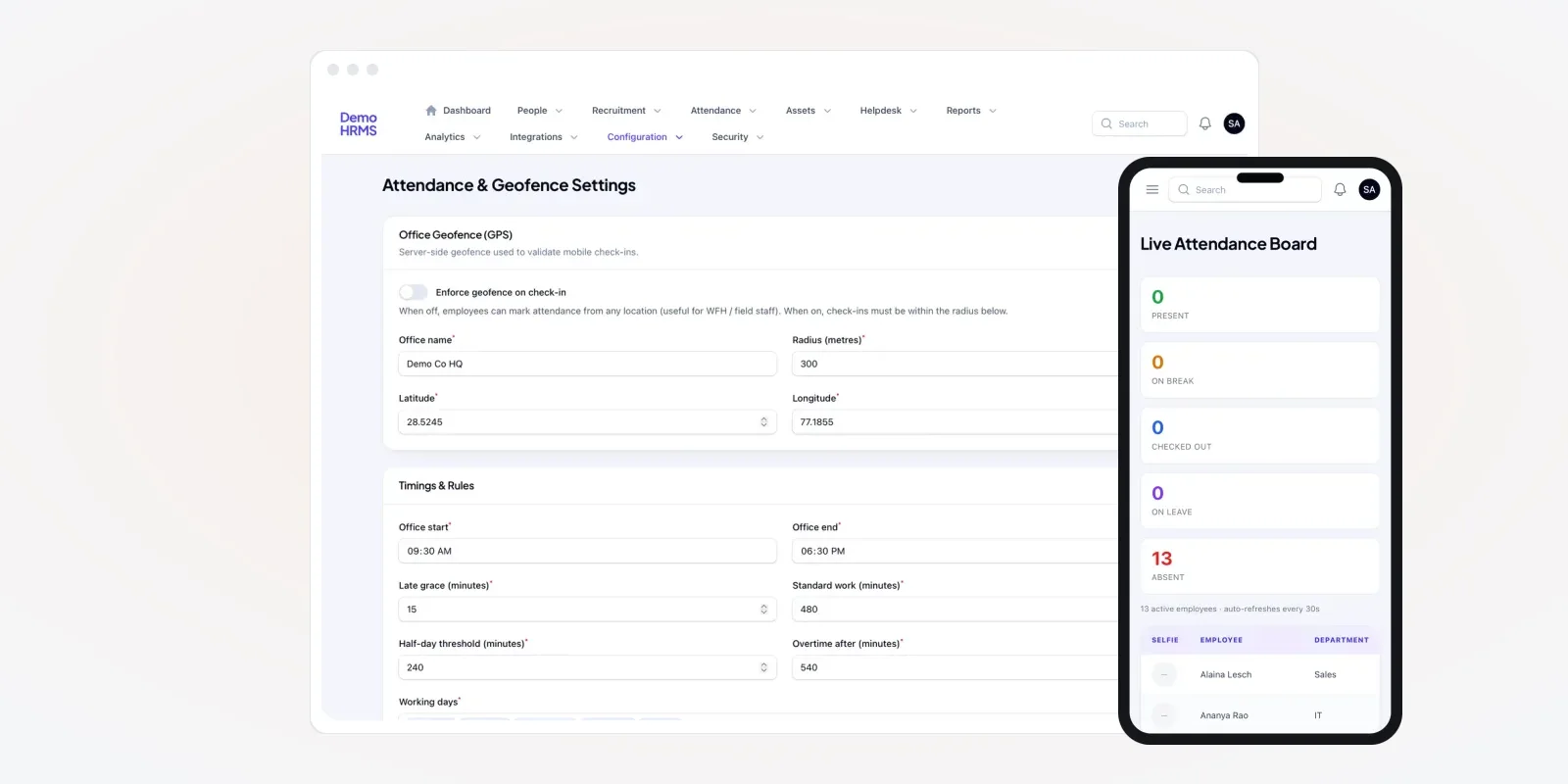
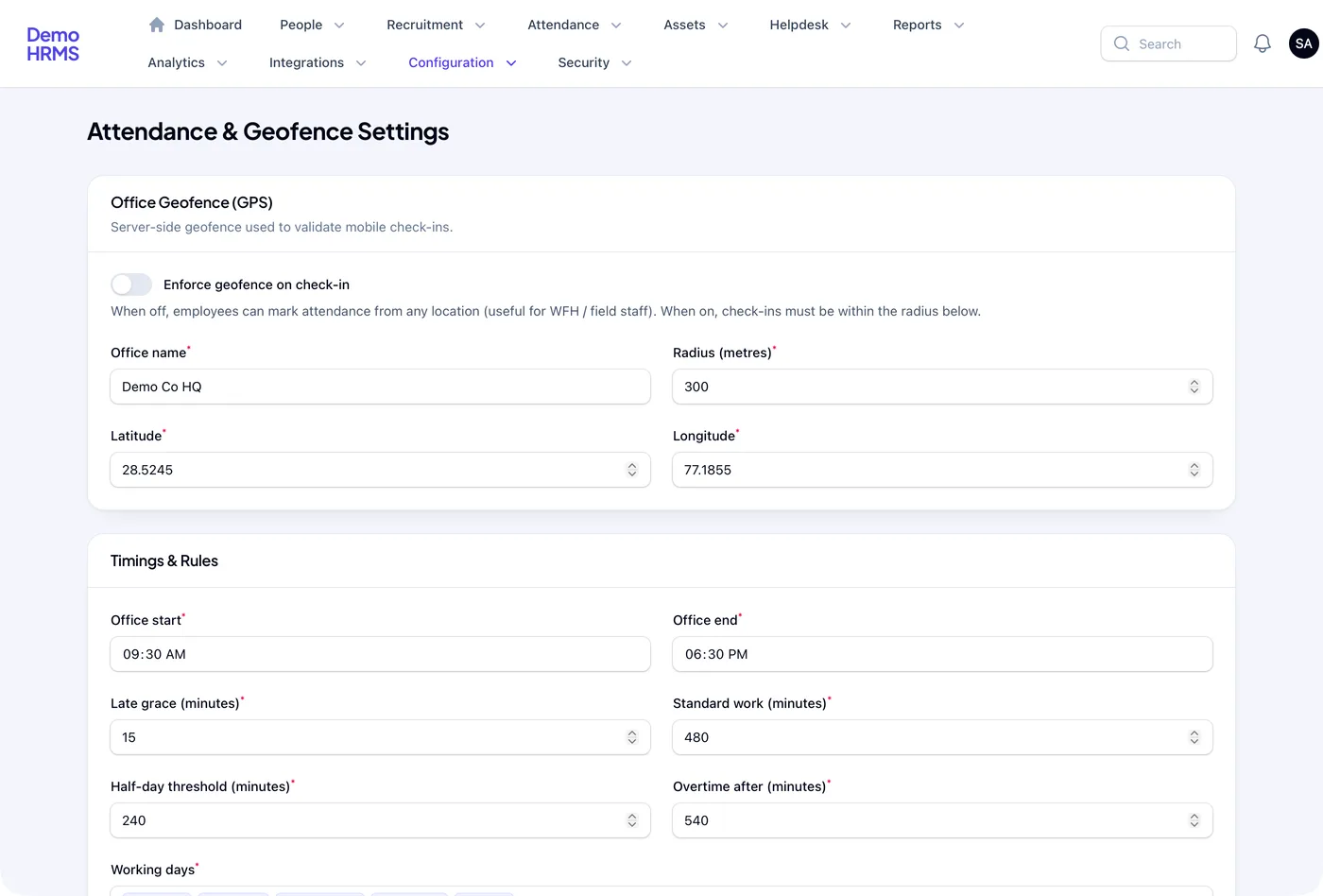
Doing the place check on the server matters. If only the phone checks, a tampered phone can lie. The settings screen below says this in plain words: a server-side geofence is used to validate mobile check-ins.
The problem
Where attendance goes wrong without location
Most attendance disputes come from five gaps.
- Proxy marking. One worker signs or punches for a friend who is not there.
- Field staff on trust. Sales and service staff report their own start time. Nobody can check it.
- Many sites, one machine. A biometric device sits at the head office. Workers at other sites have nothing.
- Month-end fights. HR adds up registers by hand. Staff dispute late marks with no proof either way.
- Late news. A manager learns at noon that half the team never came.
How exact is phone GPS?
This is the question owners ask first. The answer shapes your radius setting. GPS from space is accurate to a few metres in open sky. Inside buildings, between tall blocks or in basements, a phone can be off by much more.
Source: GPS.gov, GPS performance standard (signal-in-space figures; a phone's own fix is often less exact).
So a 20-metre circle around a small shop will reject honest staff on cloudy days. A 300-metre circle around a big factory is often fine. We suggest you start wide, watch the flagged check-ins for two weeks, then tighten. The app should let HR change the radius any time, without a new app version.
Who uses the attendance app
Three groups use it, and each needs a different screen. The mix differs by trade. A construction firm with many sites has supervisors on foot. A courier or delivery company has riders who never visit the office.
Managers on the move
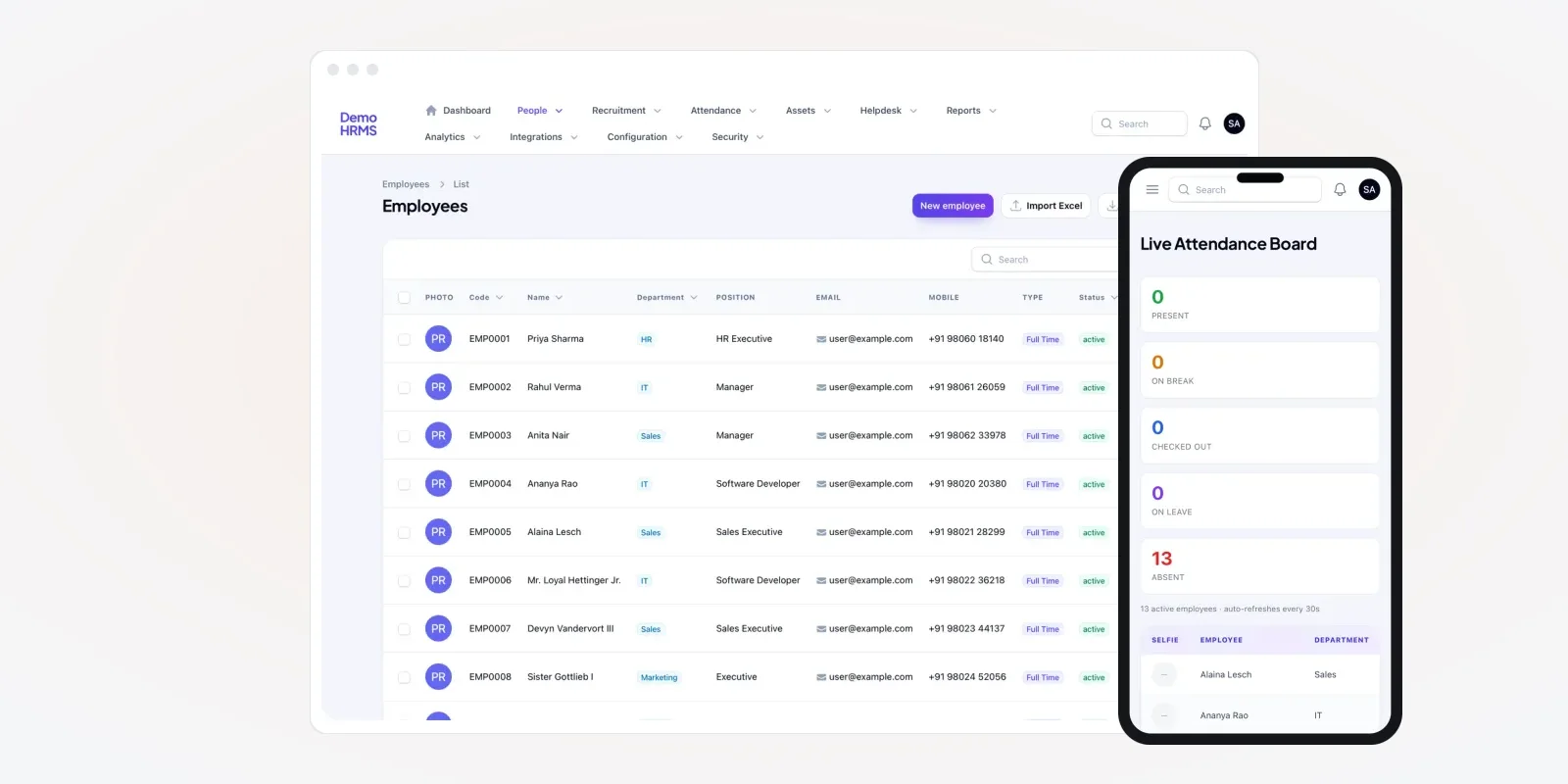
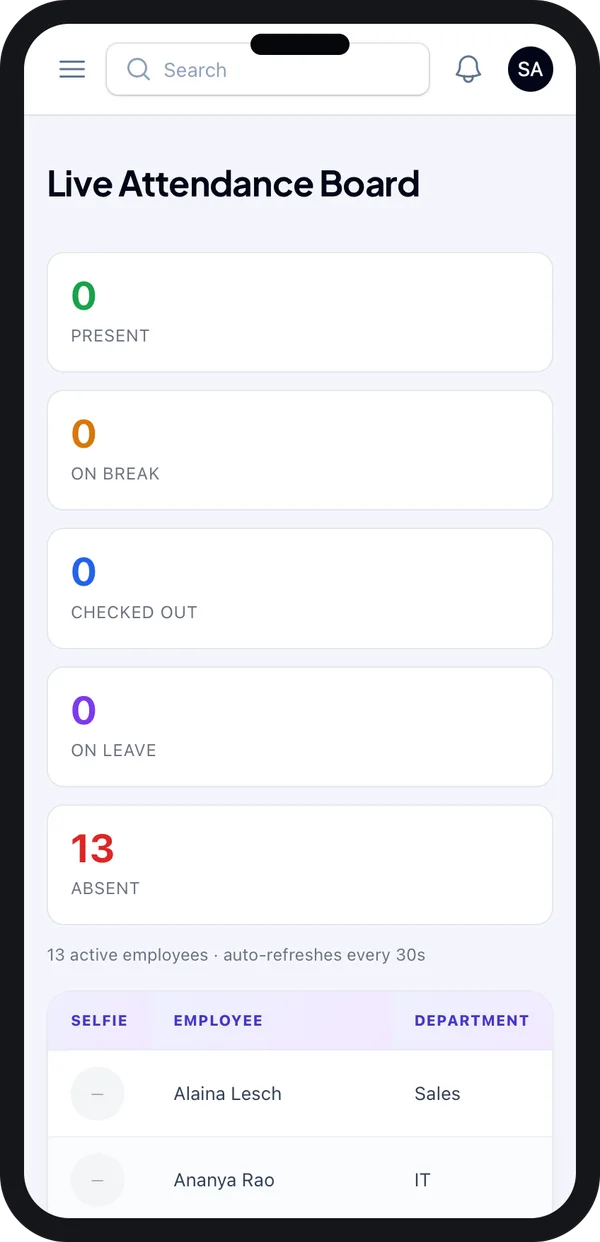
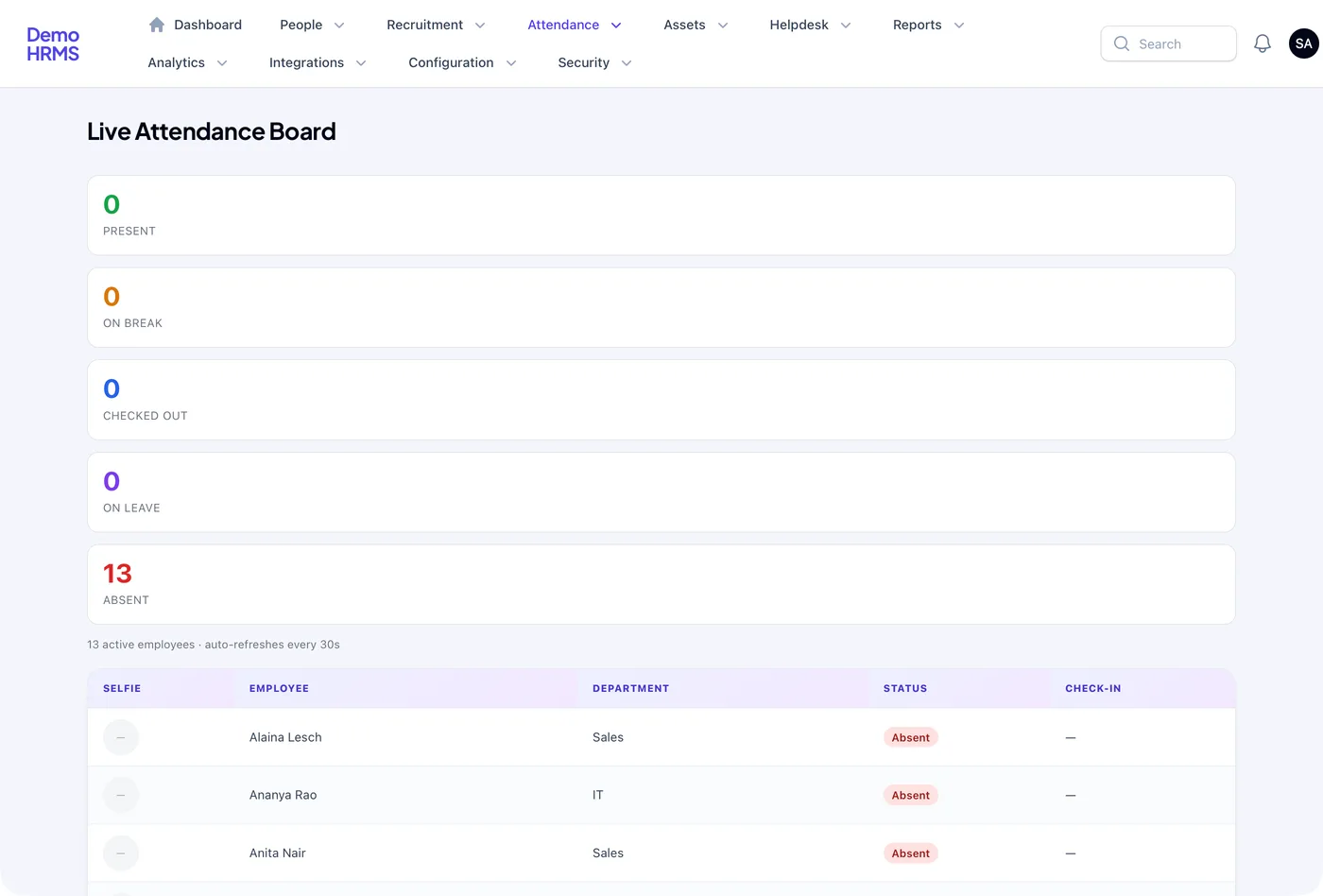
Branch and site managers want one answer each morning: who is in? The live board on the phone shows present, on break, checked out, on leave and absent counts. It refreshes on its own.
Staff
Workers see a large check-in button, their own history and any late marks. They can raise a correction if the app missed a check-in.
HR and owners
HR works in the web panel: daily log, corrections, reports and settings. Owners look at reports and trends.
Must-have features in a GPS attendance app
1. Geofence on or off, per group
Office staff should check in only at the office. Field sales and work-from-home staff cannot. The settings screen has a switch for this. When it is off, staff can mark attendance from any place, and the location is still saved. We can build this per branch or per employee group.
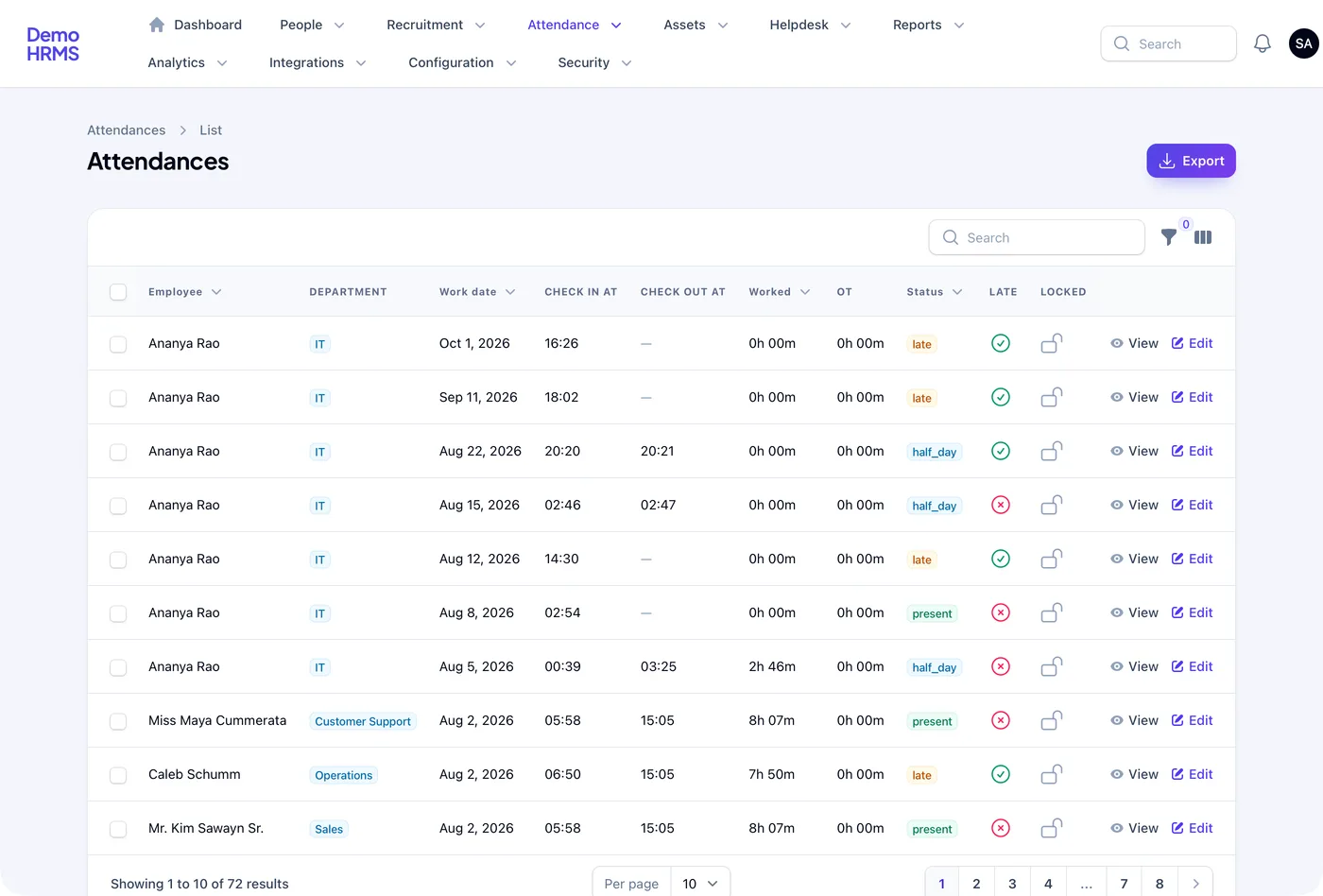
2. Daily attendance log
Every check-in becomes a row: date, check-in time, check-out time, hours worked, overtime, status and a late flag. A lock column stops edits once a month is closed.
This log is also your proof. Indian labour laws ask employers to keep attendance and wage records. The rules now sit in the four labour codes on the Ministry of Labour site. Check with your adviser which registers apply to you.
3. Live attendance board
The same board as the phone, on a big screen for HR. It counts present, on break, checked out, on leave and absent staff in real time.
4. Corrections with approval
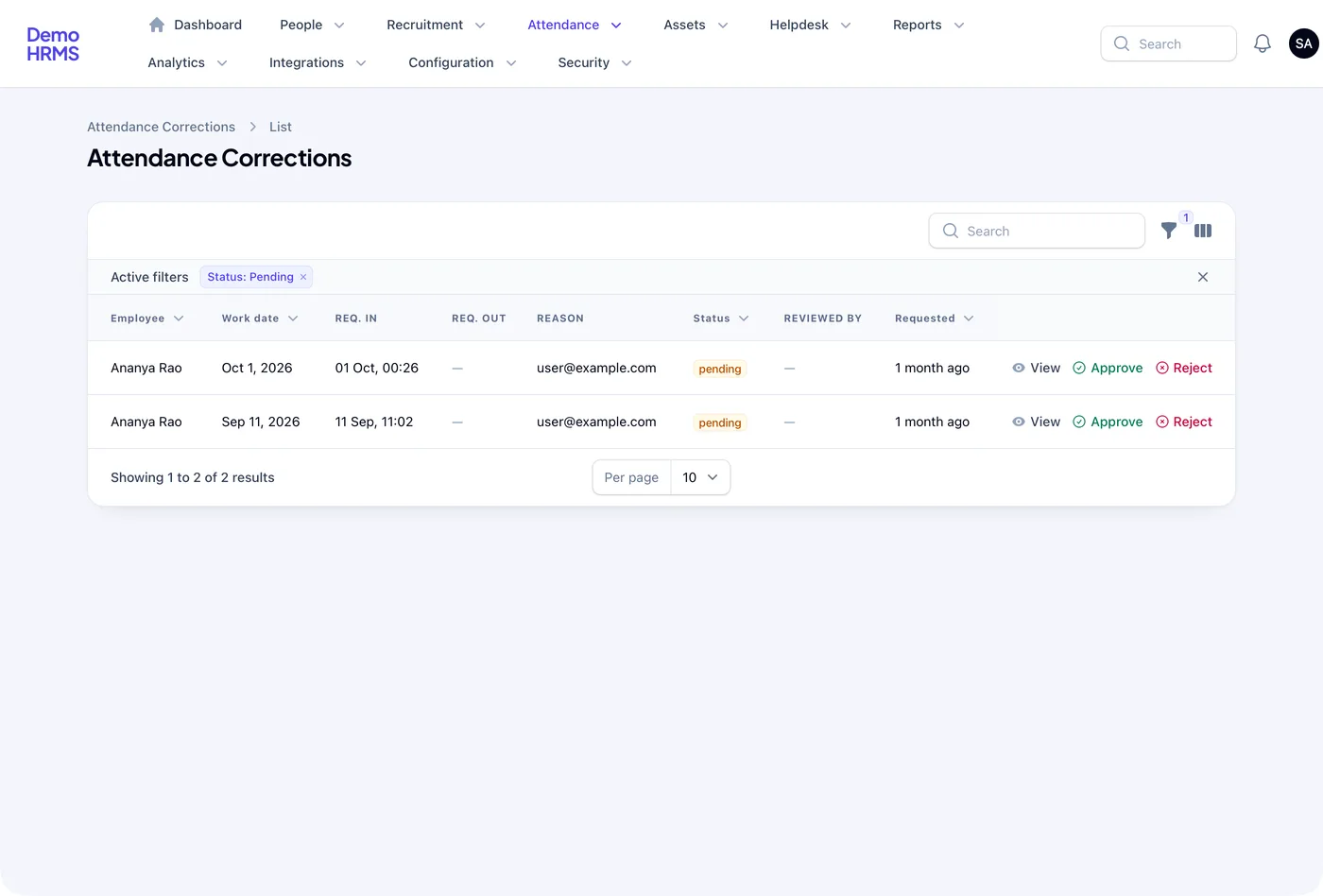
GPS will sometimes fail. A phone may be off, or the signal weak. Staff then ask for a correction with the right time and a reason. HR approves or rejects it, and the system keeps a record of who decided.
5. Late arrival report
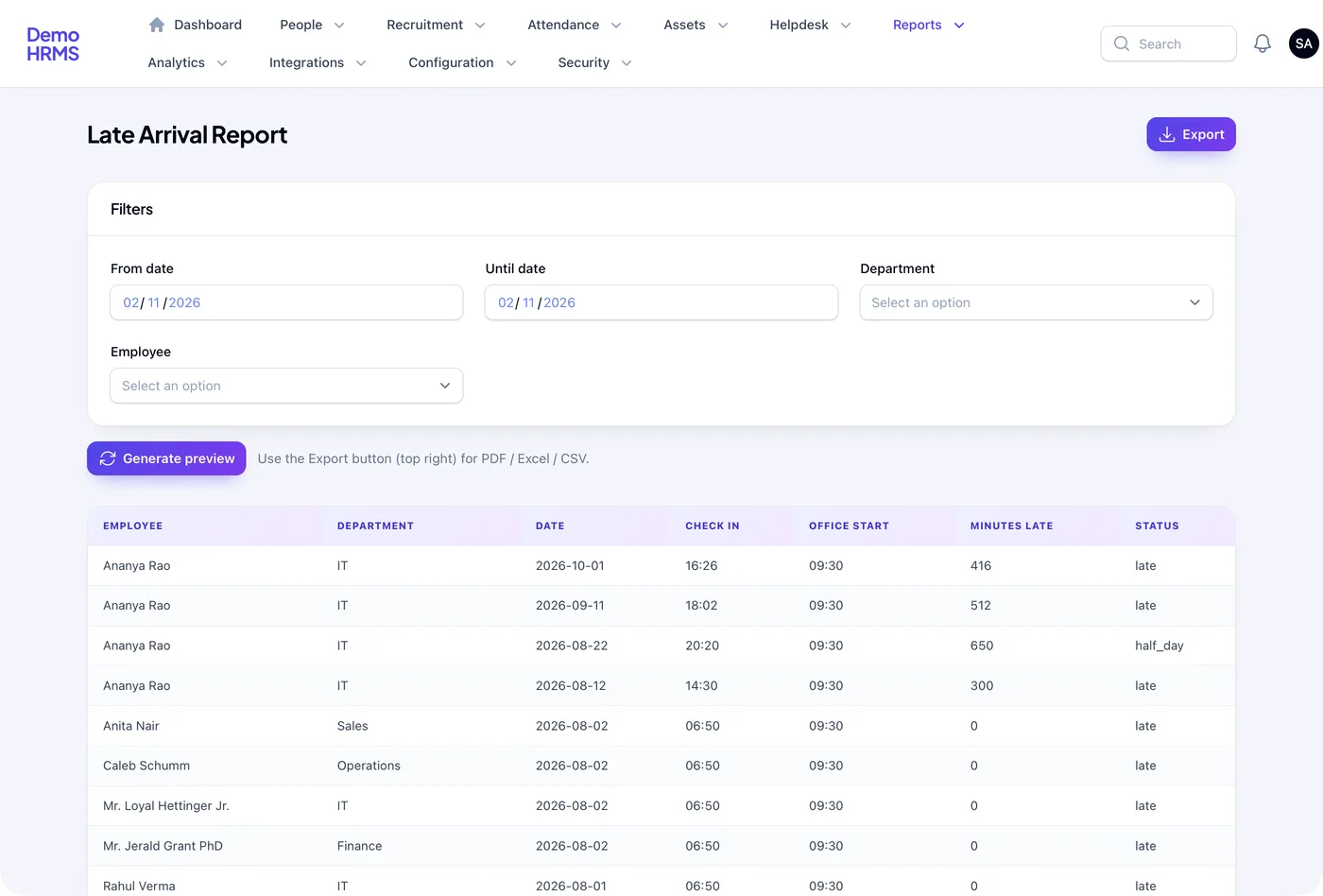
The late report compares each check-in with the office start time and shows the minutes late. It ends the month-end argument, because the proof is on screen.
6. Reports you can export
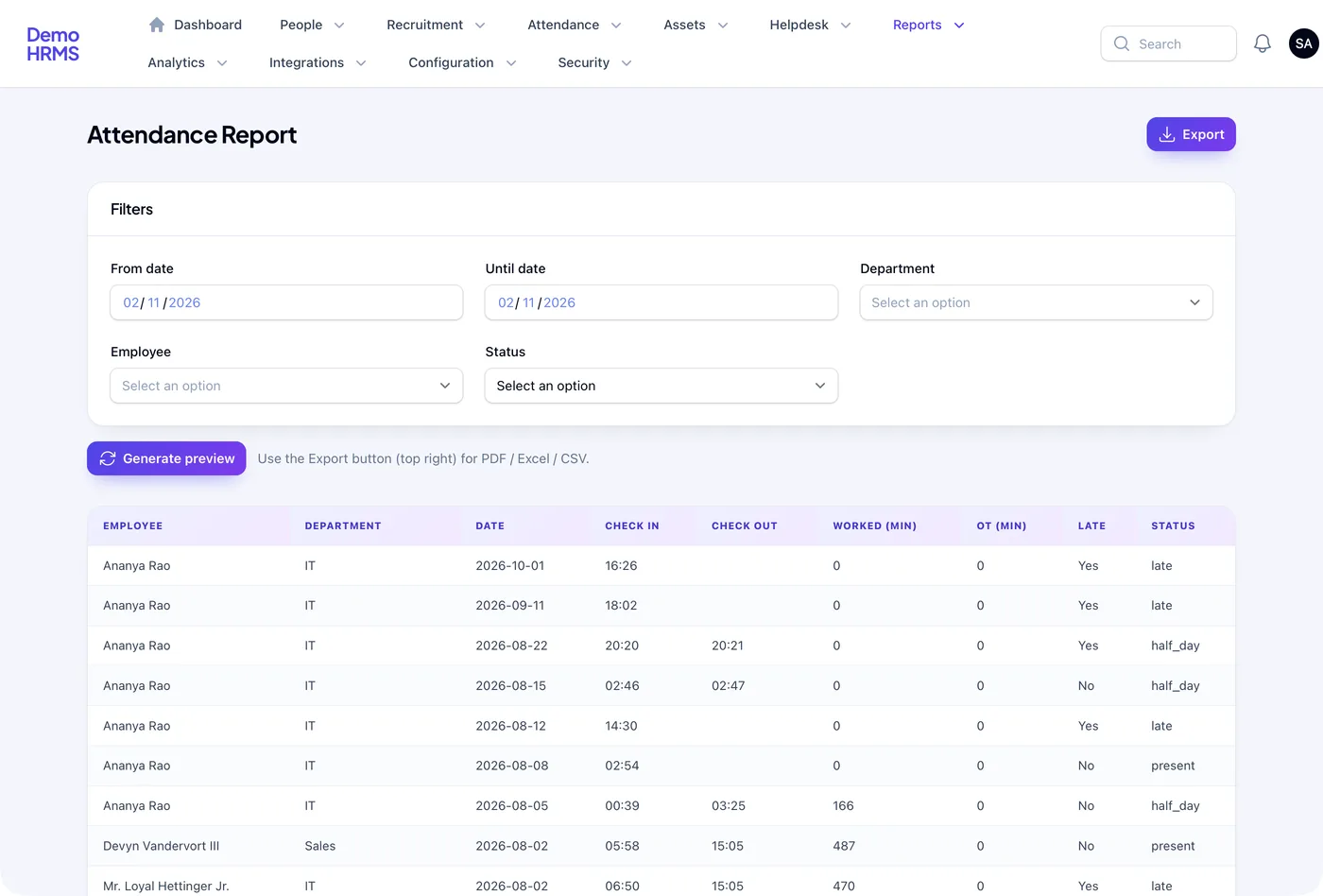
Filter by date, department or person. Export to PDF, Excel or CSV for payroll or audits. Want to compare packaged tools first? See our list of attendance management software in India.
7. Extras we can add
We can also add a fake-location check and offline check-in that syncs later. Many sites per company and visit logs for field staff are other options. These are choices, not must-haves. Add them when your teams need them.
Location is personal data. Under the Digital Personal Data Protection Act, 2023, you should tell staff what you collect and why. Saving location only at check-in and check-out is safer than tracking all day. Check your policy with a lawyer before launch.
GPS app vs biometric machine vs register
| What you need | Paper register | Biometric machine | GPS attendance app |
|---|---|---|---|
| Stops proxy marking | No | Yes, at that device | Yes, with selfie and location |
| Works for field staff | No | No | Yes |
| Many sites without new hardware | Yes, but no checks | One device per site | Yes, staff use their phone |
| Live view of who is in | No | Sometimes | Yes |
| Late and overtime worked out | By hand | Often | Yes |
| Correction with approval trail | No | Rarely | Yes |
Many firms keep biometric machines at the head office and use the app everywhere else. We can pull machine punches into the same log, so HR sees one list.
Worked example: a pharma sales team
Here is how one sales team might use the app. The company and the times are examples.
- Set up. HR adds the zonal office with a 300-metre radius. The field team's geofence is switched off.
- 8:55 AM. Office staff check in inside the circle. The board shows them as present.
- 9:40 AM. A medical rep checks in from his first clinic visit. The location is saved, not blocked.
- 9:50 AM. One office worker checks in after the grace minutes. The log marks her late.
- Next day. A rep's phone died before check-out. He raises a correction. His manager approves it.
- Month end. HR locks the month and exports the report for salary.
Our service
How we build your own GPS attendance app
Your sites, your shift rules, your brand on the app.
- Map your teams. We list your sites, shifts, teams and rules in one or two calls.
- Design the screens. You click through the check-in and HR screens first and ask for changes.
- Build the app. We use Flutter for one Android and iPhone app, with location and camera access.
- Build the HR panel. A web panel for logs, corrections, reports and settings, built on Laravel.
- Pilot at one site. One branch uses it for two weeks. We tune the radius and rules with you.
- Launch under your brand. The app goes on the stores in your name. Data stays on a server you own.
GPS attendance app development cost: what decides it
We do not quote a fixed price for every company. The budget depends on a few things. How many sites and shift types you have. Whether you need selfies, offline mode or a fake-location check. Whether it must link to biometric machines or your payroll. And whether it is a stand-alone app or part of a full HRMS with leave and staff records.
| Monthly attendance app plan | Your own GPS attendance app | |
|---|---|---|
| Start | Quick sign-up | A few weeks to build |
| Cost as staff grow | Pay per employee, every month | One build cost, then optional support |
| Your rules for each site | Within the plan's limits | Built the way you work |
| App name and logo | Vendor's app | Your app |
| Location data | On the vendor's servers | On your server |
Share your sites, shifts and staff count. We send a written quote after one call.
Whoever builds your GPS attendance app, make sure it can:
- Check the location on the server, not only on the phone
- Let HR set the office point and radius without a new app version
- Switch the geofence off for field or home staff
- Mark late, half day and overtime from your own rules
- Take corrections with approval and keep the trail
- Lock a month so past records cannot change
- Export reports in PDF, Excel and CSV
FAQ
What is a GPS attendance app?
It is a phone app where staff check in and out. It saves the time and the location of each check-in. HR sees the records in a web panel.
How long does it take to build an attendance app with GPS?
It depends on your sites, rules and extras like selfie or offline mode. After one call, we share a plan with dates. You see clickable screens before we write code.
Can staff fake their location?
Some phones can run fake-location apps. We check the location on the server and can add a check for such apps. A selfie at check-in adds one more layer.
Does the app track staff all day?
Not unless you ask for it. Most firms save location only at check-in and check-out. That is kinder to staff and keeps less personal data.
What if GPS fails inside a building?
Set a wider radius for that site. If a check-in still fails, the worker raises a correction. HR approves or rejects it, and the record shows who decided.
Will I own the attendance app and its source code?
Yes. The app is published under your name, and we hand over the source code. The data sits on a server you control.
Is the attendance app for Android and iPhone?
Yes. We build one app that runs on both. HR and owners use a web panel in any browser.
Can PRS India build a GPS attendance app for my company?
Yes. We build the staff app and HR panel around your sites and shift rules. Book a consultation and we will show the screens for your teams.
Related guides
Written by
Prabhjot Kaur · Product Manager
Product Manager at PRS India. Turns what a client needs into a screen-by-screen plan for the app, and checks every release against that plan before it goes out.