Business of Software
White Label POS Software: Get It Built Under Your Brand
We build your own white label POS: till app, shop back office and reseller panel, under your brand, for Android, Windows and web.

Written from production. Our articles draw on products we run live and the client work behind them, and are revised as the systems they describe evolve.
A POS is the billing screen at the shop counter. Most shops rent one on a monthly plan from a software brand. But some businesses want to offer POS software under their own name. Think of a dealer of billing machines, a software reseller, or a franchise brand with many outlets. For them, white label POS software means a till app and back office that carry their own brand.
Renting another company's POS and adding your logo has limits. You cannot change how it works, and the shop data stays with that vendor. So some businesses get their own POS software built instead. This guide shows what a white label POS needs. It also shows how PRS India builds one, as a POS software development company.
Key takeaways
- White label POS means the till app, back office and receipts show your brand, not the developer's.
- If you sell POS to other shops, you need one panel to set up each shop, its tills and staff.
- The till must keep billing when the internet drops, and send the sales later.
- Staff roles and supervisor PINs stop most counter mistakes and misuse.
- When we build the POS for you, the brand, the shop data and the source code are yours.
What is white label POS software?
White label means one company builds the software and another company sells or uses it under its own brand. The buyer never sees the builder's name. With POS, that brand shows on the till login, the app icon, the printed receipt and the back office.
There are two ways to get it. You can rent a ready POS that lets you add a logo. Or you can have a POS built for you, which you then own and sell. The first is quick to start. The second gives you control over features, data and how you charge your own shops. Run for many shops, it works like any multi-shop software service. One system serves many shops. Each shop sees only its own data.
The three parts of a white label POS
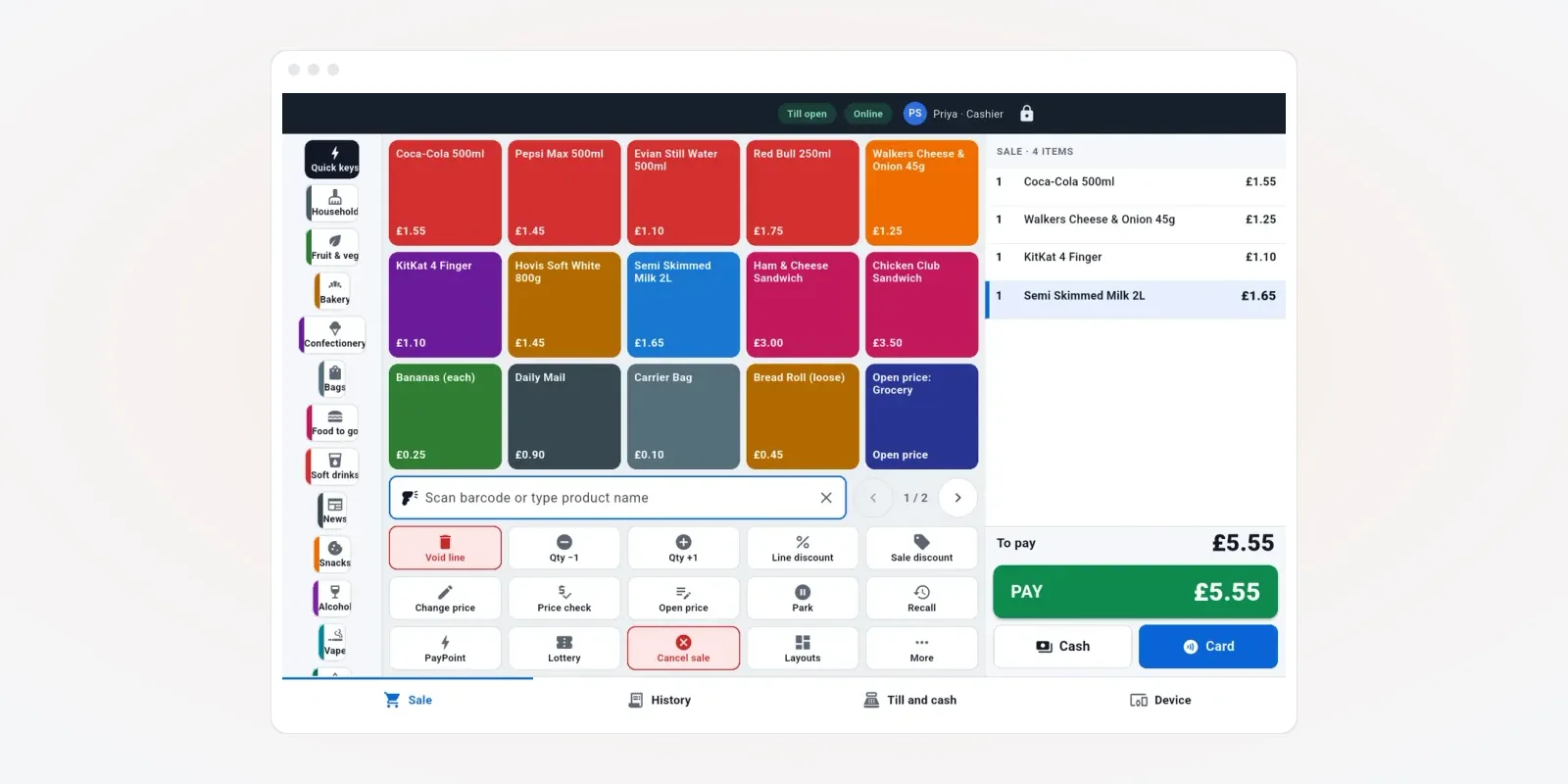
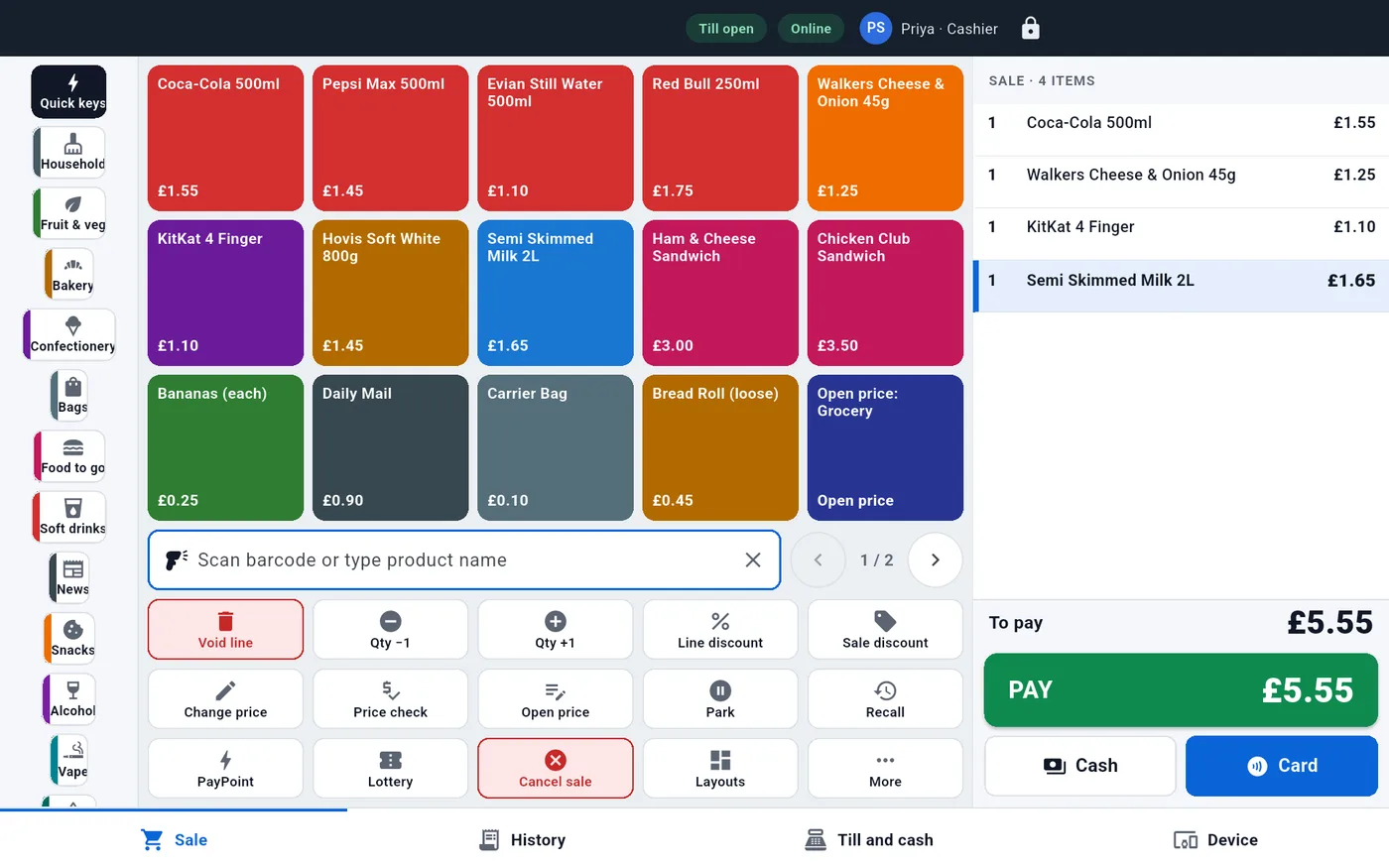
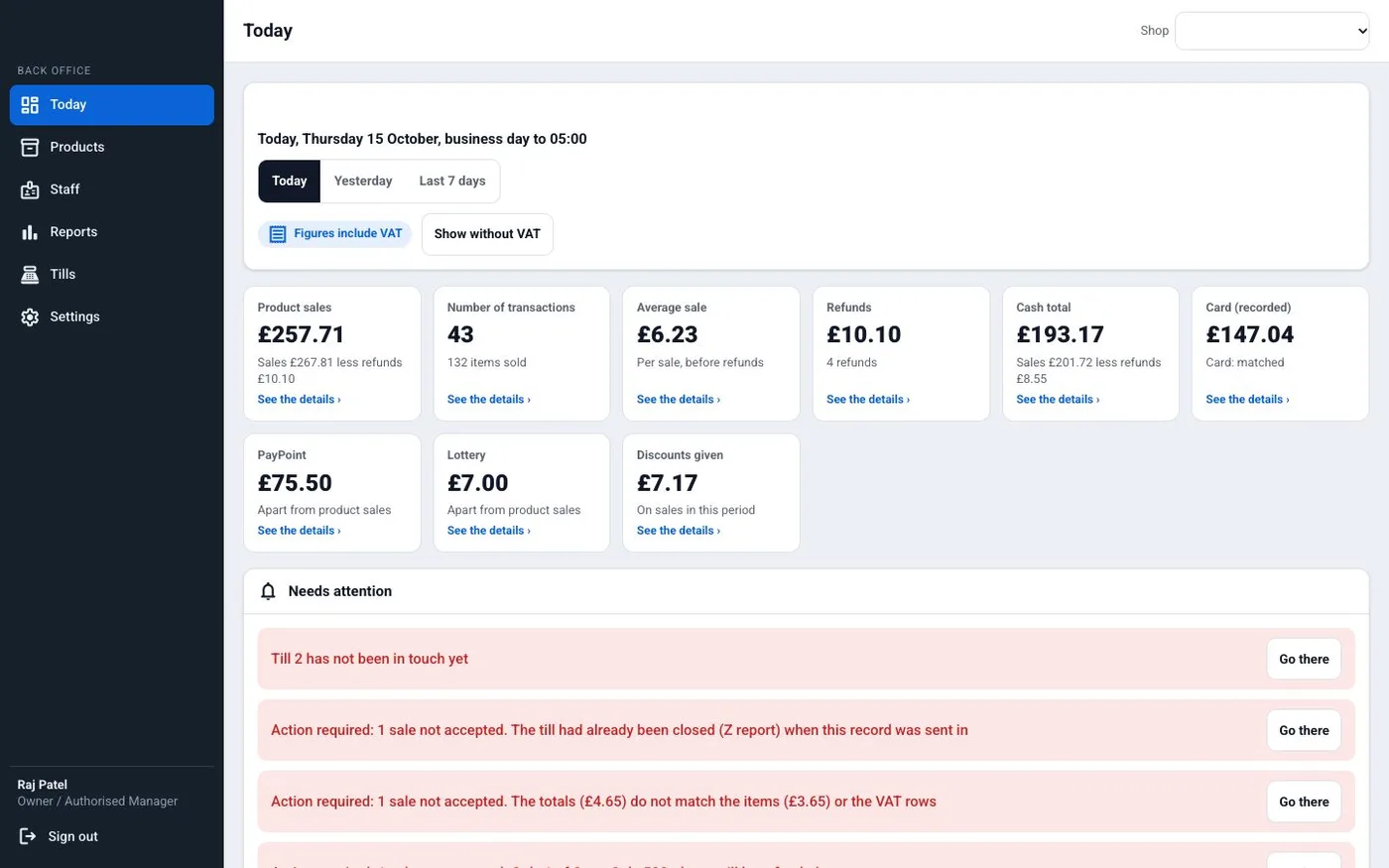
A POS is not one app. It has three parts, and each one has a different user. The screens in this guide are from a till and back-office app we designed, filled with demo data. That demo was made for a UK shop, so it shows VAT. For Indian shops we set it up for GST.
The till app (cashier)
The cashier logs in with a PIN, scans or taps products, and takes cash, card or UPI. It runs on an Android POS terminal or a Windows counter PC. This is the part your shops see all day, so your brand must sit here.
The back office (shop owner)
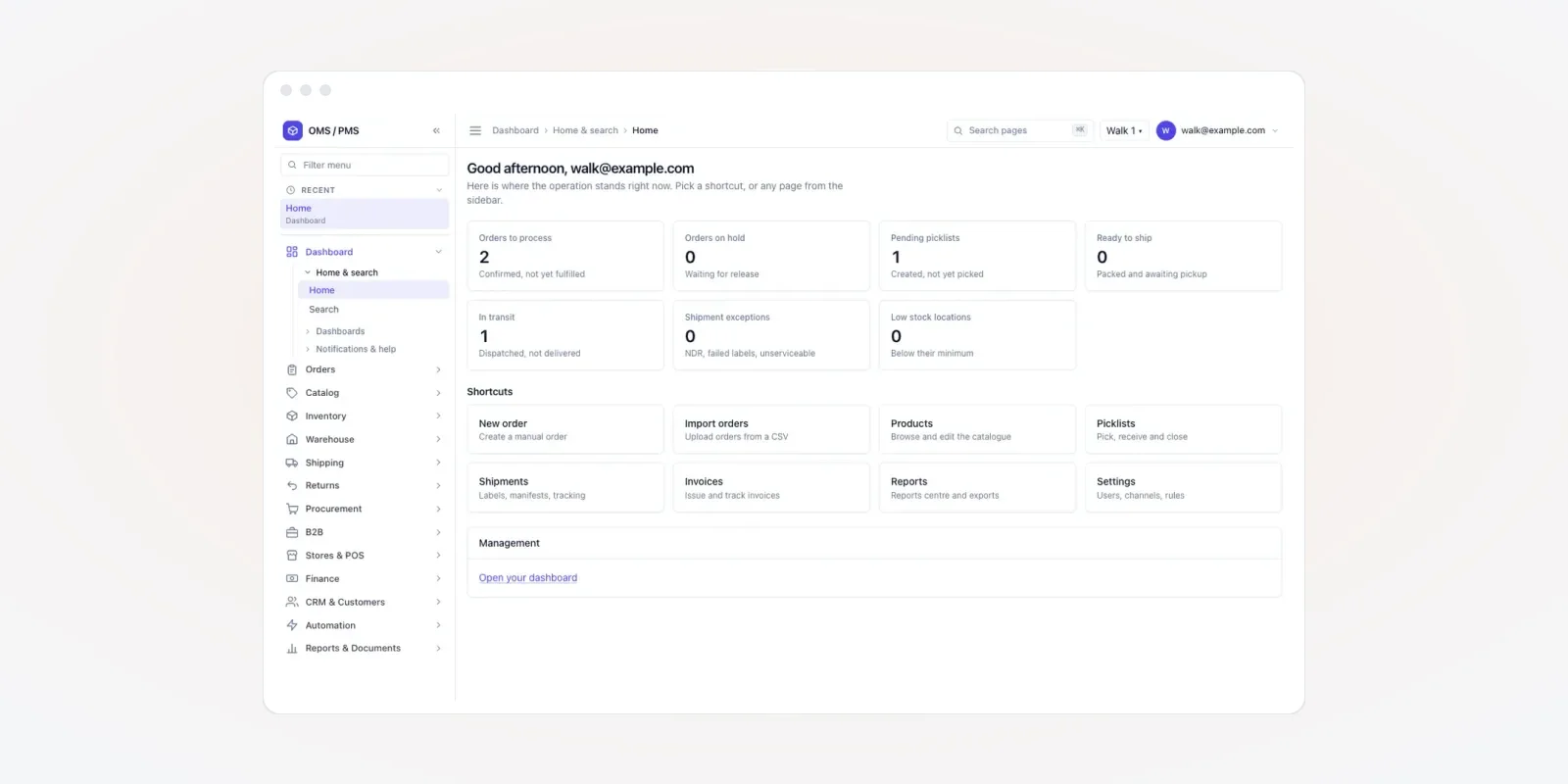
The owner sees today's sales, cash and card totals, refunds and discounts. Products, staff, reports and tills are managed here, in a web back office that opens in any browser.
The reseller panel (you)
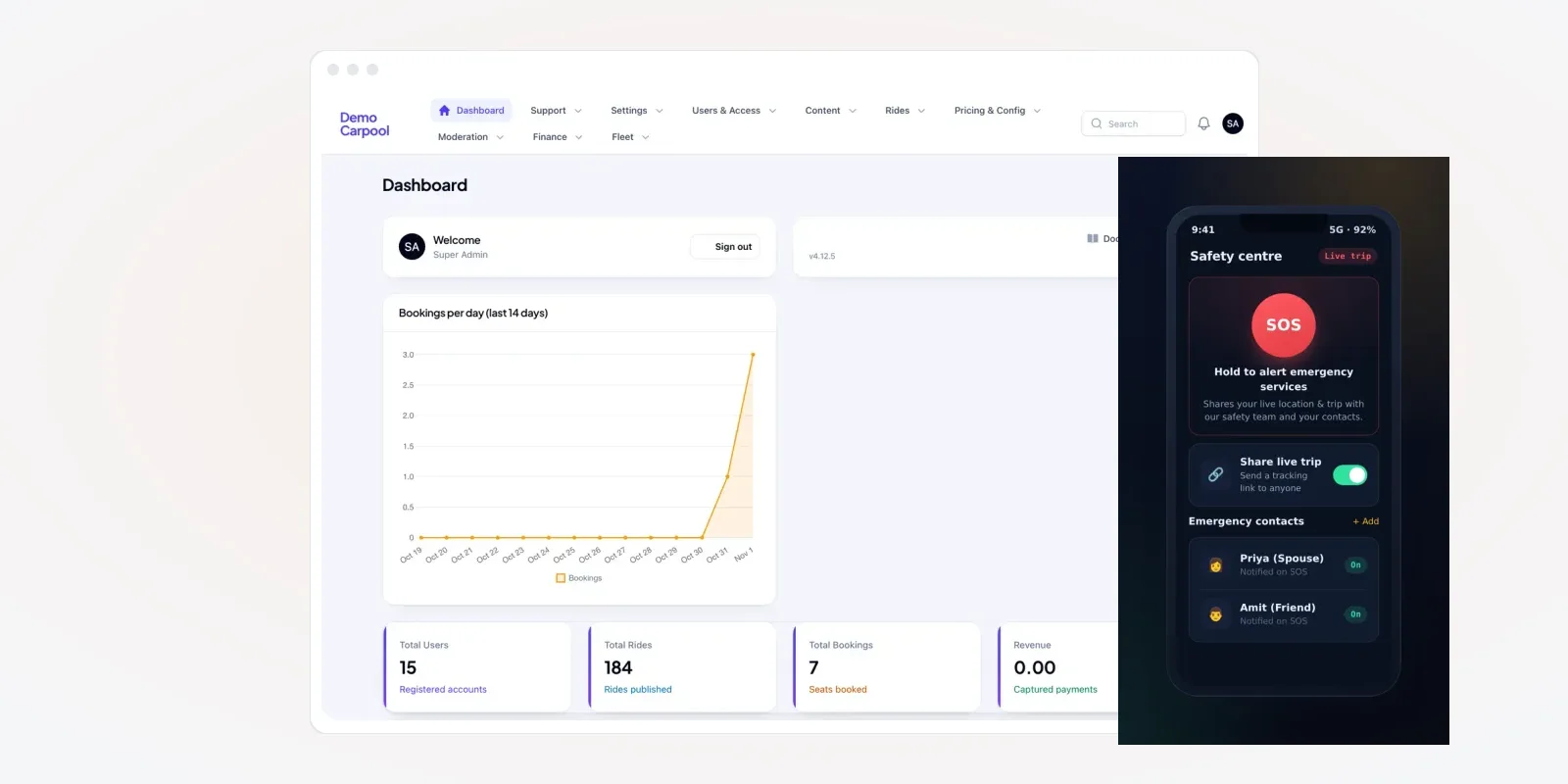
This is the part only a white label POS needs. You add a new shop, choose its plan, set its tax details and switch on its tills. You see which shops are active, which tills are offline and which app version each till runs. Your support team works from here.
The problem
Where rented, rebranded POS falls short
Businesses that rent a POS and add a logo often hit the same six limits.
- Logo only. Your logo shows, but the vendor's name still appears in help pages, emails or the app store.
- Fixed features. A shop asks for a weighing scale or a new receipt format. You must wait for the vendor, who may say no.
- Data with the vendor. Your shops' sales and customer lists sit on the vendor's server, under the vendor's rules.
- Cost per till keeps rising. You pay the vendor for every till you add, so growth eats your margin.
- Updates you do not control. The vendor changes a screen. Your shops call you, and you did not know it was coming.
- Shops can leave with the vendor. If the vendor sells to your shops directly, you lose them.
Features we can build into your white label POS
Below are features we can build for you. You choose which ones your shops need. The list suits retail shops, supermarkets and convenience stores, and we change it for cafes or pharmacies.
1. Your brand on every screen
We put your app name, icon, colours and login screen on the till. Receipts carry your shop's header and your support number. Emails and the app store listing use your name too.
2. Till status for every shop
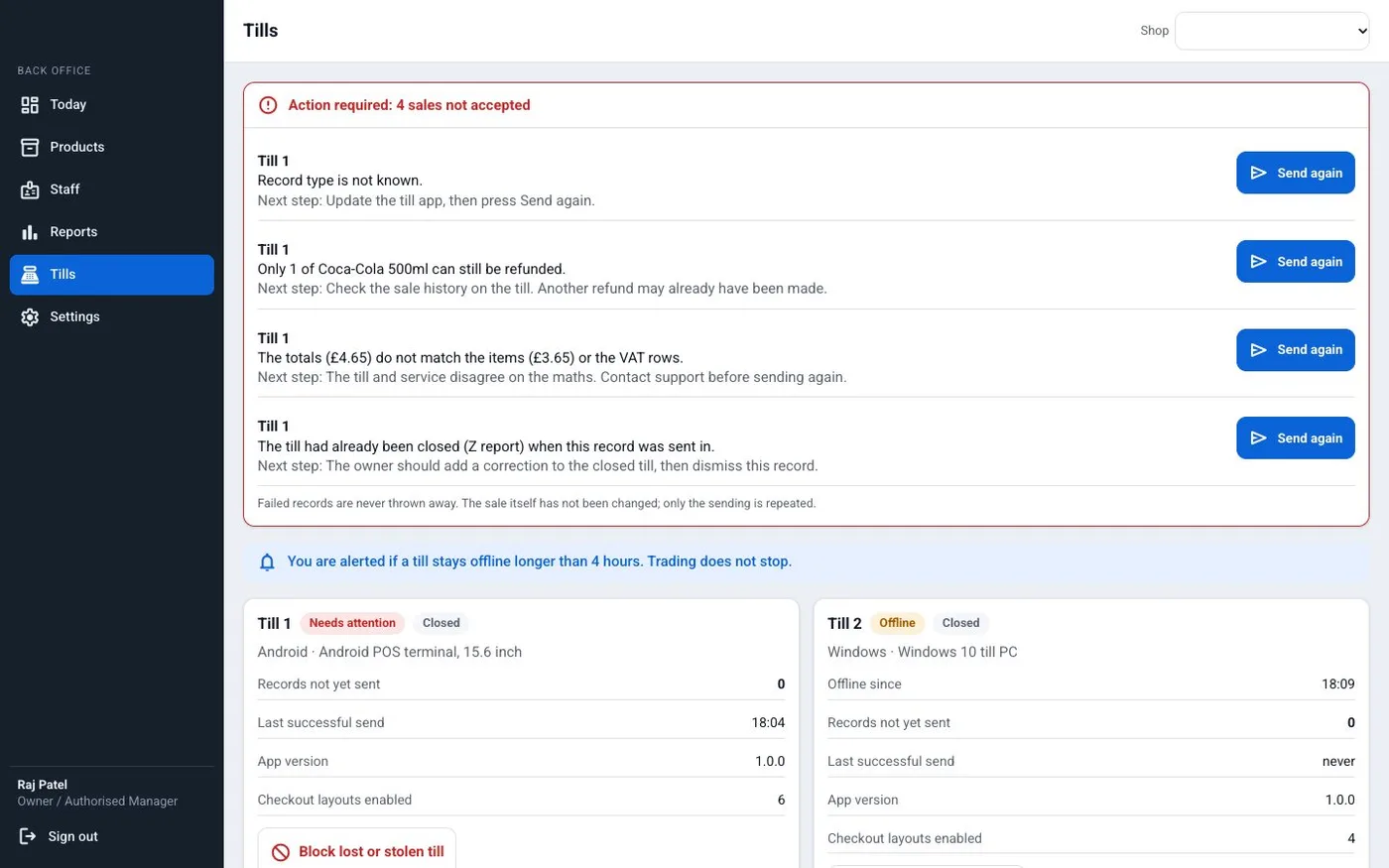
Your panel lists each till with its device type, last send time and app version. If a till stays offline too long, you get an alert. A lost or stolen till can be blocked from here in one step.
3. Billing that works without internet
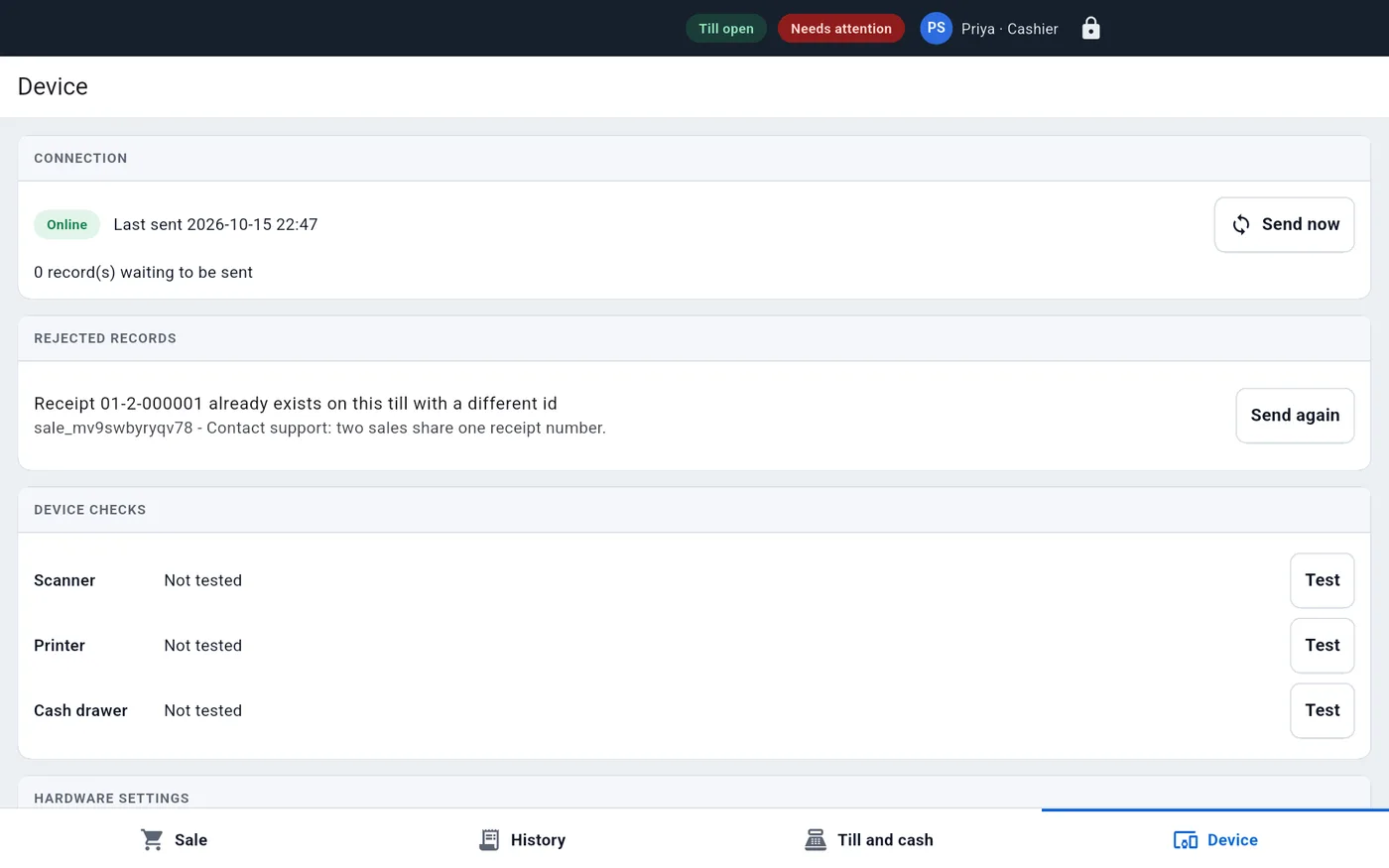
Shops in markets and basements lose signal. The till should keep billing and store each sale on the device. When the line is back, it sends the sales to the back office. Any sale the server rejects stays visible, with a Send again button, so nothing is lost.
The same screen tests the scanner, printer and cash drawer. Your support team can ask a shop to press Test before a long phone call.
4. Staff roles and supervisor approval
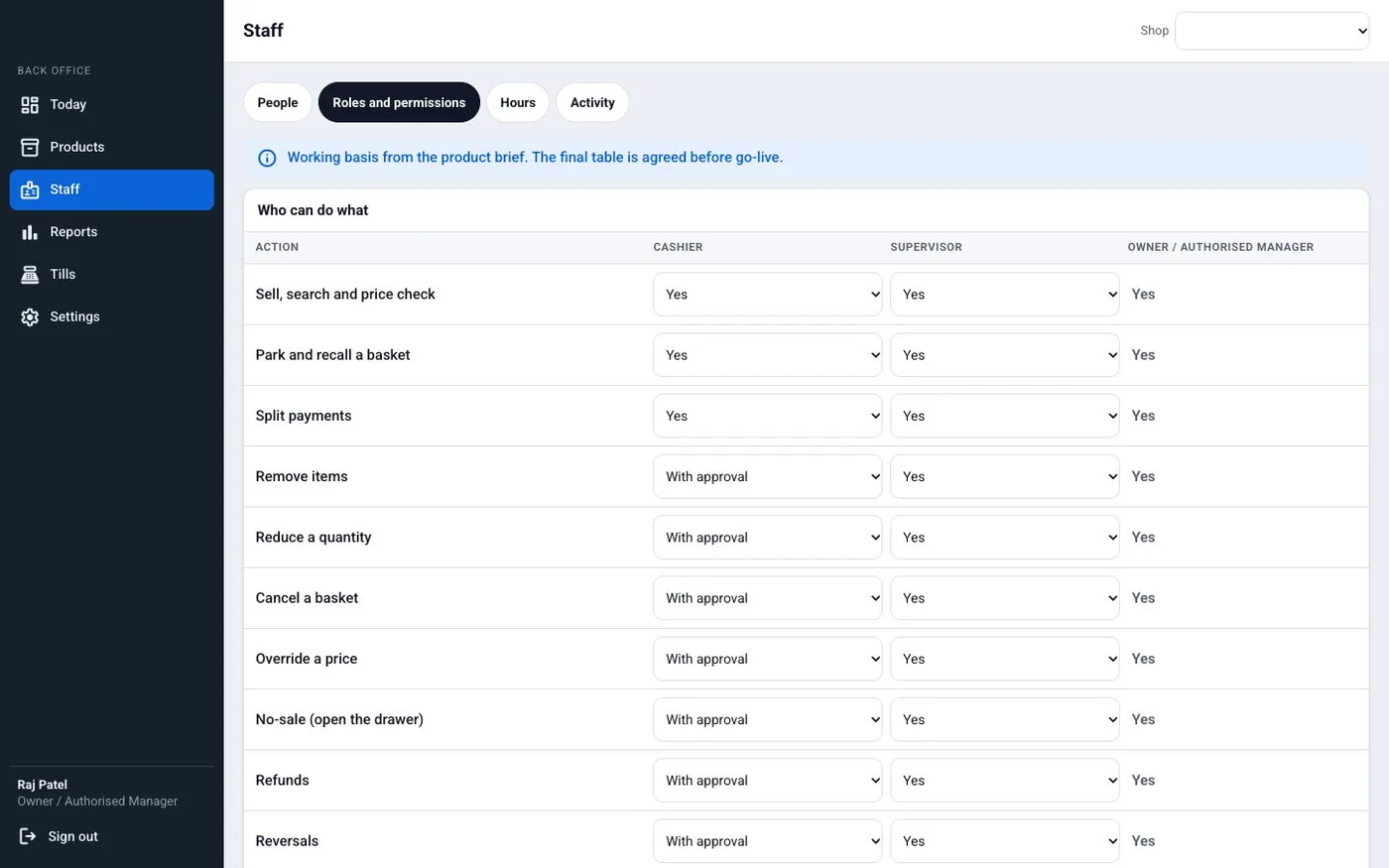
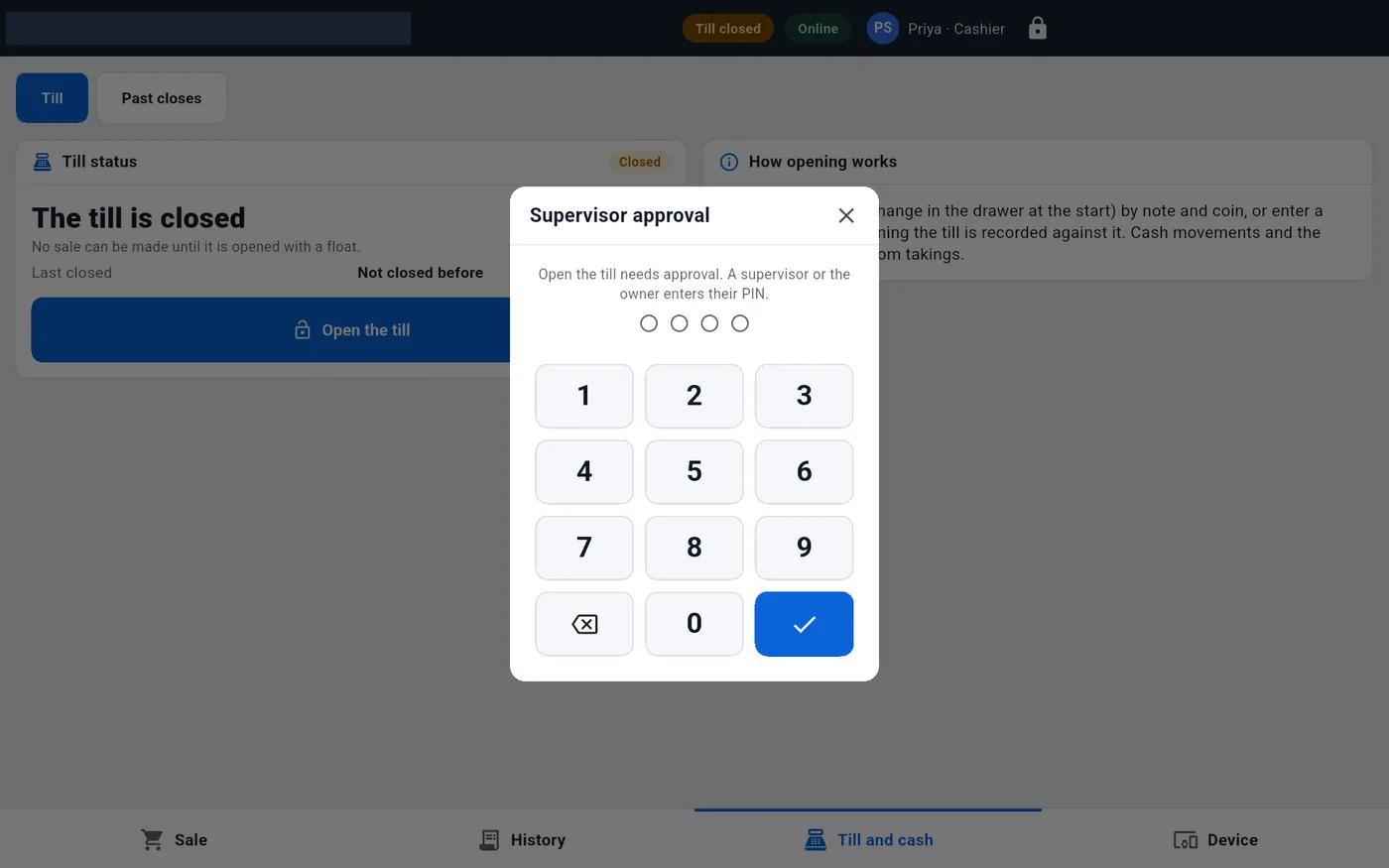
Not every cashier should give refunds or open the drawer. Each shop owner sets who can do what. Risky actions, such as a price override or a no-sale, ask for a supervisor PIN at the till.
5. Staff list with PIN reset
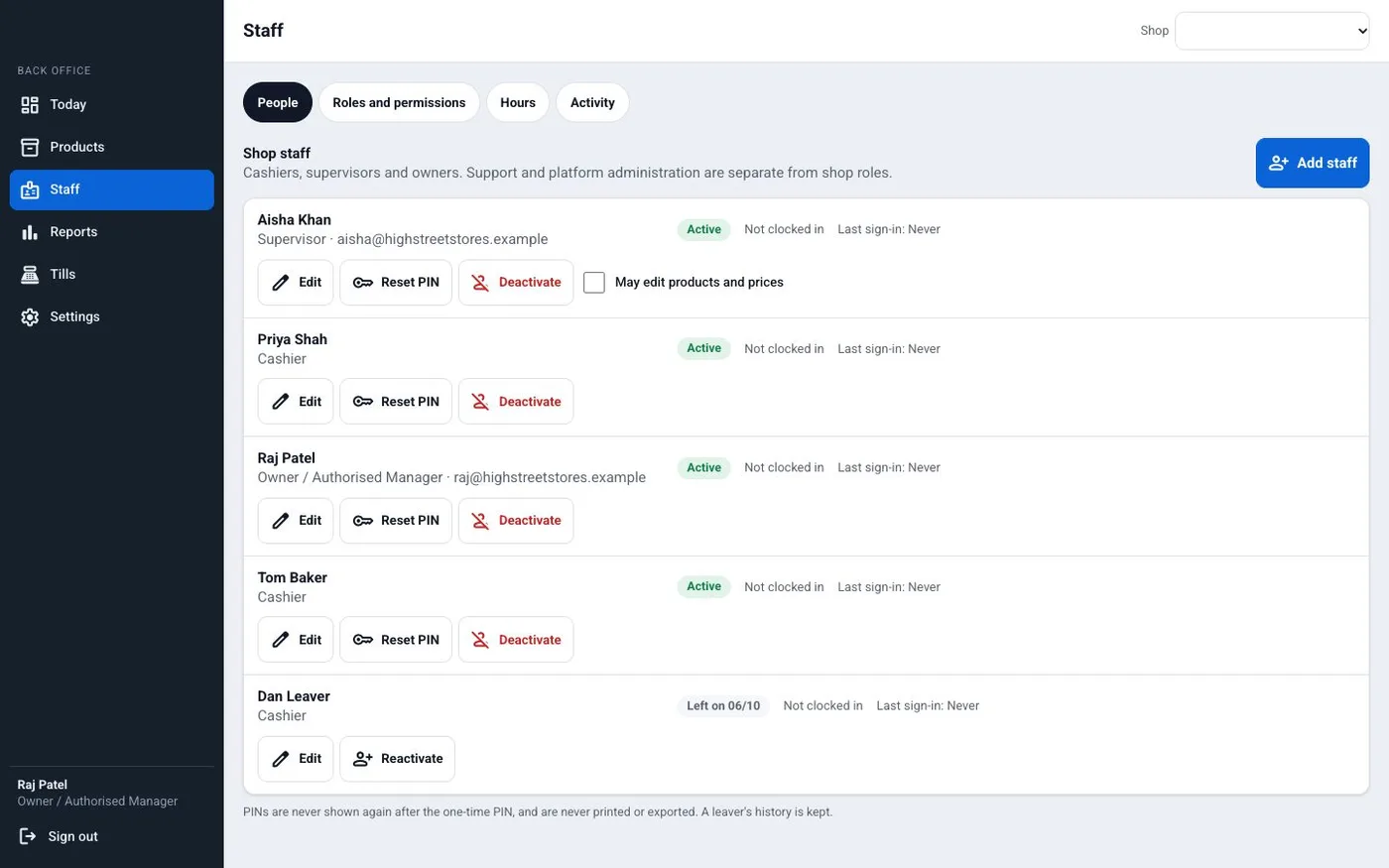
Shop owners add staff, give them a role and reset a forgotten PIN themselves. When someone leaves, the owner turns off their access. Your support team gets fewer calls for small jobs like these.
6. Tax, UPI and card set per shop
Each shop has its own GST number, tax rates and receipt text. The till can show a UPI QR for each bill and take card payments through the shop's bank terminal. Stock and accounts can link to an ERP or accounting system if your shops use one.
Indian rules your POS must follow
A white label POS sold in India carries tax and payment rules for every shop that uses it. Three points matter most.
- E-invoices for larger sellers. A business with yearly turnover above ₹5 crore must issue e-invoices for B2B sales, from 1 August 2023. Your POS should be able to send these B2B bills to the e-invoice system.
- Payment rules. Card and UPI payments in India are payment systems regulated by the Reserve Bank of India. Your till should link to a licensed payment partner, not hold card numbers itself.
- Personal data. Customer phone numbers and loyalty data come under the Digital Personal Data Protection Act, 2023.
Source: GST e-invoice system (turnover limit and start date); Reserve Bank of India (payment systems); MeitY data protection framework. Rules change, so check the latest notice and ask your tax adviser.
Rented POS vs white label POS built for you
| What you need | Ready POS, shop uses it as is | Rented POS with your logo | White label POS built for you |
|---|---|---|---|
| Your brand on till, receipt and app store | No | Partly | Yes |
| Panel to add and manage many shops | No | Sometimes | Yes |
| Add a feature a shop asks for | No | Only if the vendor agrees | Yes |
| You set what shops pay you | No | Within vendor limits | Yes |
| Shop data on your server | No | No | Yes |
| Source code | No | No | Yours |
Worked example: a dealer sets up a new shop
Here is how one new shop goes live on a white label POS. The dealer and shop are examples.
- Day 1, sign-up. A billing-machine dealer in Pune signs a new grocery shop. In the reseller panel, the dealer adds the shop, its GST number and its plan.
- Day 1, products. The shop's product list comes as a spreadsheet. The dealer imports it with barcodes, tax rates and departments.
- Day 2, staff. The owner adds two cashiers and one supervisor, each with a PIN and a role.
- Day 2, till. The dealer installs the till app on an Android terminal. The Device screen tests the scanner, printer and drawer.
- Day 3, first sales. The shop bills its first customers. Receipts show the shop's name and the dealer's support number.
- Day 9, signal drops. The internet fails for two hours. The till keeps billing and sends all sales when the line is back.
- Day 30, review. The dealer checks the panel: all tills online, latest app version, no failed sales. The owner checks the month's report.
Our service
How we build your own white label POS
We build the POS around how you sell to shops and support them.
- Understand your business. We map your shops, plans, support steps and hardware in one or two calls.
- Design the screens. You click through the till and panel screens first, in your colours, and ask for changes.
- Build the apps. The till app in Flutter for Android and Windows, and the back office and reseller panel on Laravel.
- Test in real shops. Two or three of your shops use it with real products and printers. We fix what they find.
- Launch under your brand. Your name on the apps and stores, with your data on your own server.
- Support and grow. We add features as your shops ask: weighing scales, loyalty, new payment partners.
White label POS development cost: what decides it
We do not publish a fixed price, because every reseller sells differently. The cost depends on five things. Which tills you support: Android, Windows or both. How deep offline billing goes. Which hardware you connect. Which payment partners you add. And how detailed your reseller panel must be.
| Rented white label plan | White label POS built for you | |
|---|---|---|
| Start | Quick | A few weeks to build |
| Cost over years | Pay the vendor for every till, every month | One build cost, then optional support |
| Features | What the vendor offers | What your shops need |
| Brand | Logo, with limits | Your brand everywhere |
| Data and source code | Stay with the vendor | Yours |
Share how many shops you plan to serve and which hardware they use. We send a written quote after one call.
Whoever builds your white label POS, make sure it can:
- Show only your brand on the till, receipts, emails and app store
- Keep each shop's data apart from every other shop
- Bill without internet and send sales later without losing any
- Show you every till's status, app version and last send time
- Block a lost or stolen till from your panel
- Ask for a supervisor PIN before refunds, price changes and no-sales
- Keep GST rates and receipt text as settings, not fixed in code
- Export each shop's data whenever you or the shop asks
FAQ
What is white label POS software?
It is POS software that you sell or use under your own brand. Your name shows on the till, receipts and back office. The company that built it stays hidden.
Can I sell a white label POS to other shops?
Yes, if it is built for many shops. Each shop gets its own data, staff and tills. You manage all of them from one reseller panel and set your own plans.
How long does it take to build a white label POS?
It depends on the tills, hardware and panel you need. After one call, we share a plan with dates for each part, starting with screens you can click through.
Will I own the POS software and its source code?
Yes. We build it under your brand and hand over the source code. The shop data stays on your server.
Which devices can the till app run on?
We build the till for Android POS terminals and Windows counter PCs. The back office and reseller panel open in any web browser.
Does the POS work without internet?
It should. The till stores each sale on the device and sends it when the internet returns. Sales the server rejects stay on screen until someone sends them again.
Is shop and customer data safe in a white label POS?
It should be. Each shop must see only its own data. Staff log in with their own PINs. Card numbers stay with the payment partner. Customer data comes under the Digital Personal Data Protection Act, 2023.
Can PRS India build a white label POS for my business?
Yes. Book a consultation and tell us how you sell to shops. We build the till app, back office and reseller panel under your brand. You can see our past work on the case studies page.
Related guides
Written by
Aditi
Building software at PRS India.