Construction Cost Control Software Development: Guide
We build your own construction cost control software: cost to complete, variations, notice warnings and payments. Web, Android and iPhone.

Written by Babita Kumari, Business Developer
Reviewed by the PRS India software & mobile app development team
13 min read
Written from production. Our articles draw on products we run live and the client work behind them, and are revised as the systems they describe evolve.
A contractor wins a job at a fair margin. Eighteen months later, the job closes at a loss. Nobody stole anything. The margin leaked away in small pieces. A change the client never signed. A notice sent two days late. A bill certified but not paid. A gang that took longer than planned. By the time the monthly report showed it, the money was gone.
Construction cost control software catches these leaks while they are still small. It compares what you planned, what you have ordered and what you have spent, every week. It warns the right person before a deadline passes. Many contractors now get construction software built around their own contracts instead of bending a general accounts package. This guide explains what cost control software must do, and how PRS India builds it for you.
Key takeaways
- Cost control is not a monthly report. It is a weekly loop: budget, commit, spend, forecast, warn, act.
- Most margin is lost through contract events: unsigned changes, missed notices and late payments.
- Count every order once. Split it into actual, accrued, prepaid and open, so cost is never added twice.
- Only approved variations should count as revenue. Pending and disputed ones belong in a separate line.
- When we build it for you, the rules, the data and the source code are yours.
What is construction cost control software?
It is software that tracks the money on each project against the budget. It tells you early where the final margin is heading. A plain cost report tells you what you spent. Cost control software also shows what you will spend to finish. It shows what you can still recover from the client.
It works on four numbers per cost code. The budget. The cost to date. The cost already committed in orders and subcontracts. And the estimate to complete. Add the last three and you get the cost at completion. Compare that with secured revenue and you see the forecast margin, month by month.
It sits between your accounts package and your site. Accounts know what was paid. The site knows what was built. Cost control joins the two, which is why it often grows into a full ERP for a contracting business.
The problem
Where contractors lose margin
The same six leaks show up on most projects.
- Work without a signed change. The site does extra work on a verbal instruction. The variation is never priced or approved.
- Missed notice deadlines. The contract sets a time limit to notify a claim. Miss it and the right to extra time or money can be lost.
- Certified but not paid. The client certifies a bill and then pays late. Your cash goes negative while the report looks fine.
- Cost counted twice. An order is counted when placed and again when invoiced. The report shows a loss that is not real, or hides one that is.
- Labour output falls. A gang produces less per day than planned. Nobody sees it until the trade is half done.
- Retention and bonds forgotten. Retention is held past its release date. A bank guarantee expires without anyone noticing.
Who uses cost control software on a project
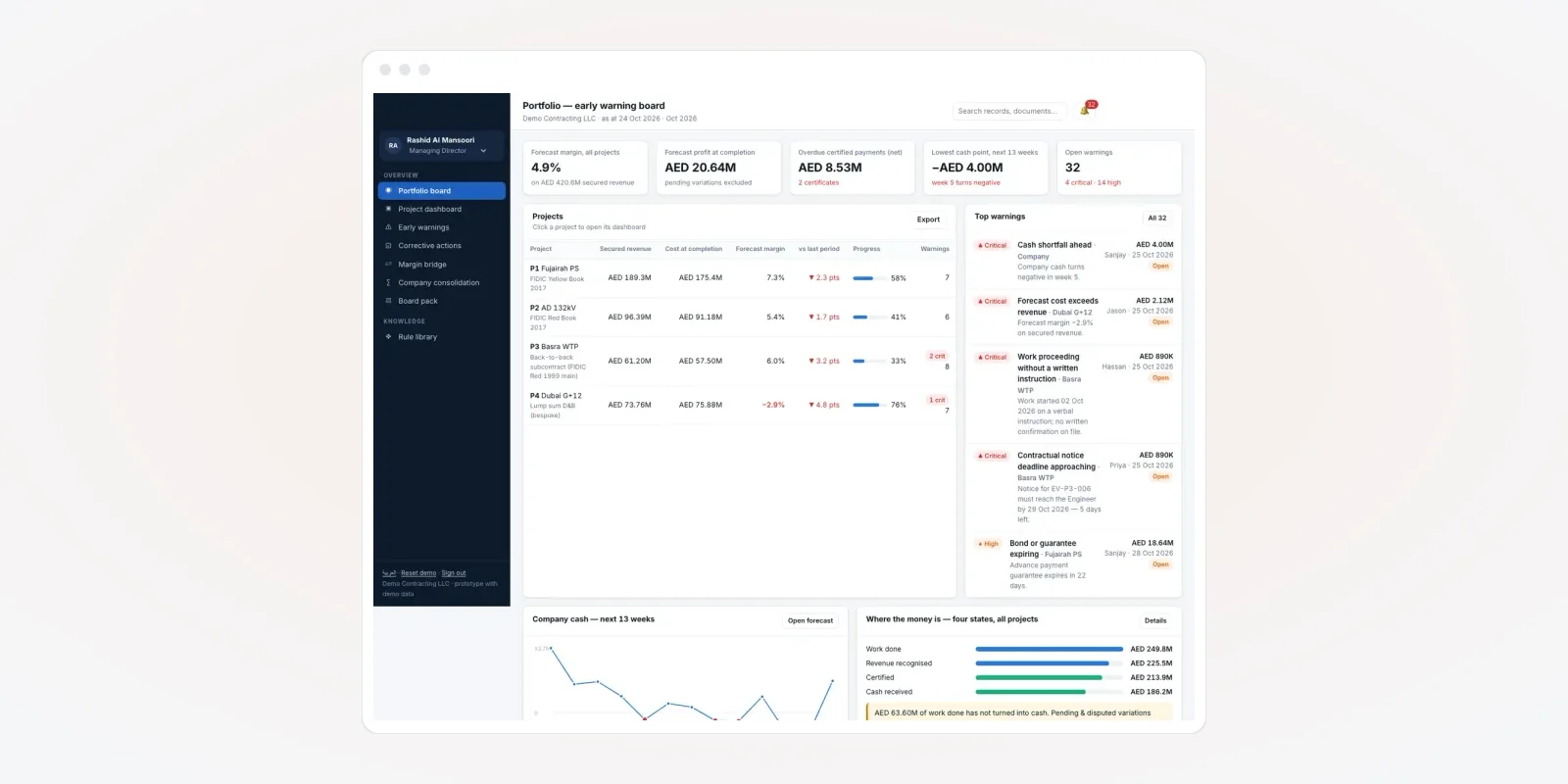
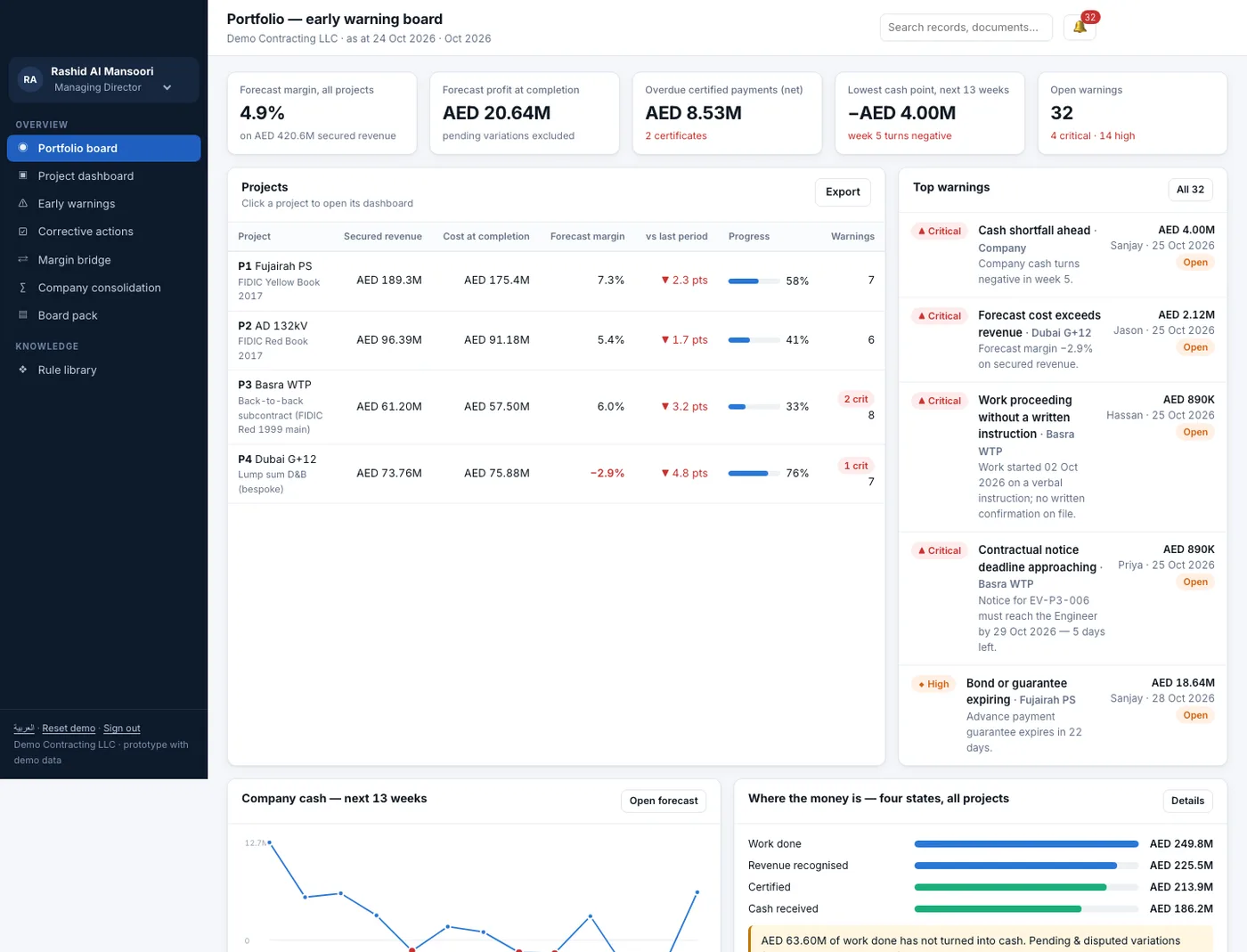
Four roles open it every week. Builders who also sell flats add a sales side, which we cover in real estate software. Each one needs a different view. The screens in this guide are from a contractor cost-risk app we designed, shown with demo projects and demo data.
- Managing director. Sees all projects on one board: forecast margin, overdue payments, the lowest cash point ahead and open warnings.
- Commercial manager or QS. Runs the cost report, the variation register and payment applications.
- Project manager. Owns the warnings on the project and records the action taken.
- Finance. Records money received, tracks retention and bonds, and plans cash.
Must-have features in construction cost control software
1. Early warnings with a clear owner and due date
This is the feature that pays for the system. You write rules once. For example: "warn when a notice deadline is 7 days away", or "warn when cost per unit rises 15% above plan". The software checks every project against the rules each day.
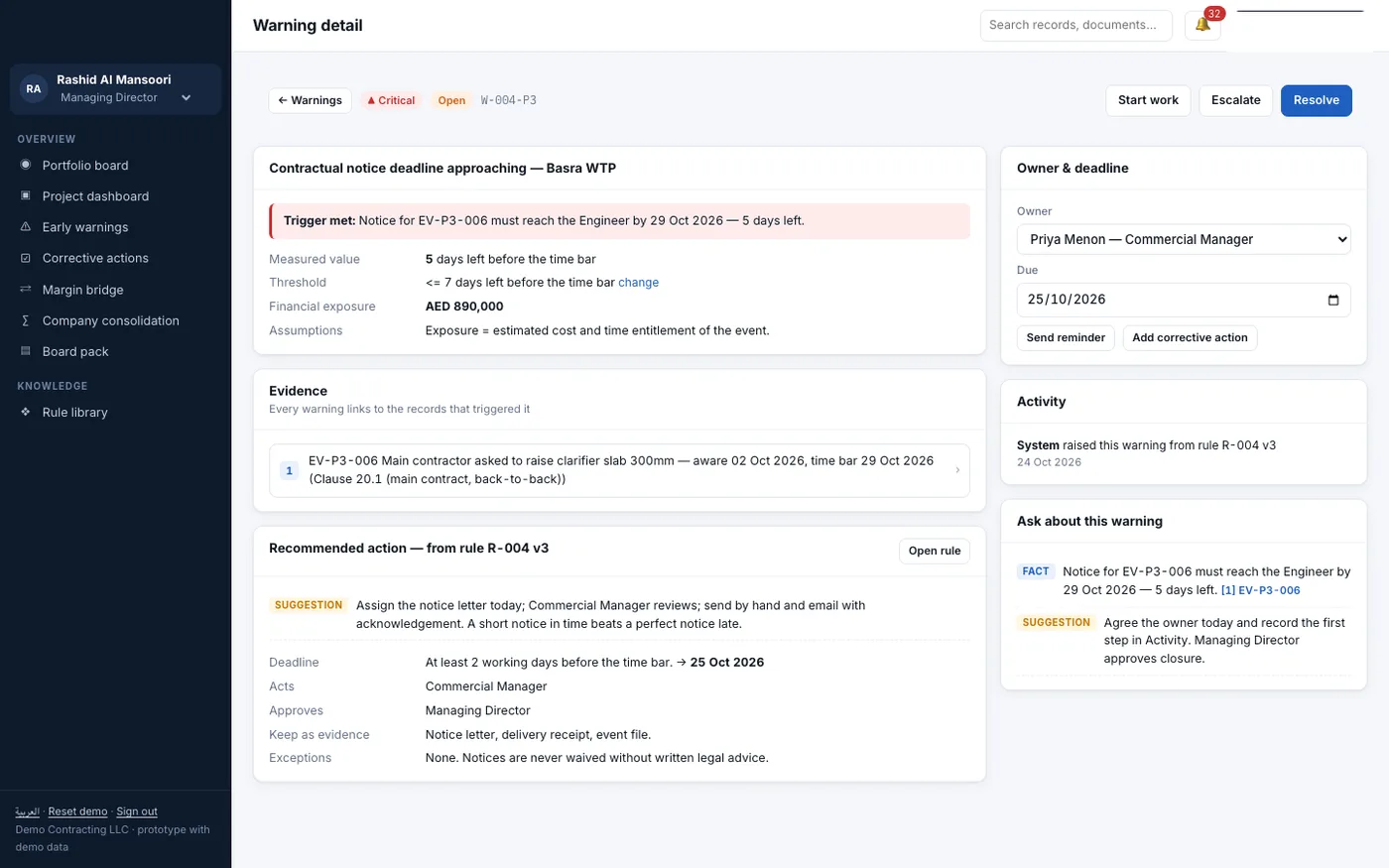
Each warning shows what triggered it, the money at stake, the evidence and a suggested action. It has one owner and one due date. The owner can escalate it, act on it or close it, and every step is logged.
The suggested action can come from your own rule book. Or it can come from an AI helper we train on your past warnings. Either way, a person makes the final call.
2. A cost report that never counts a cost twice
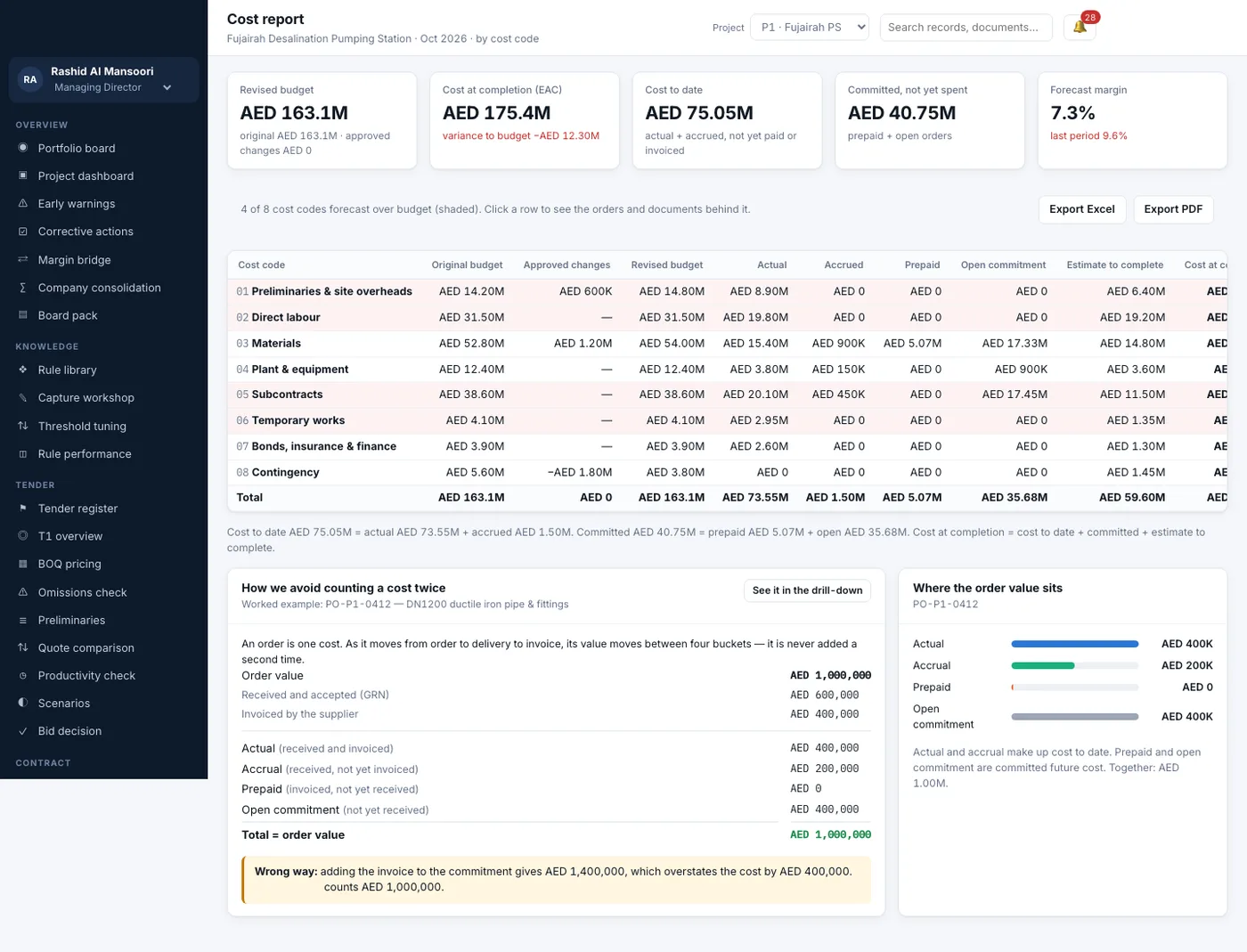
Every order moves through four buckets: open, prepaid, accrued and actual. It moves as goods arrive and invoices come in. The order value is split across the buckets, never added twice. So cost to date and committed cost stay honest.
The report then shows each cost code's budget, approved changes and revised budget. Next to them sit cost to date, committed cost and estimate to complete. Codes heading over budget are shaded, and a click opens the orders behind them.
3. A variation register that keeps revenue honest
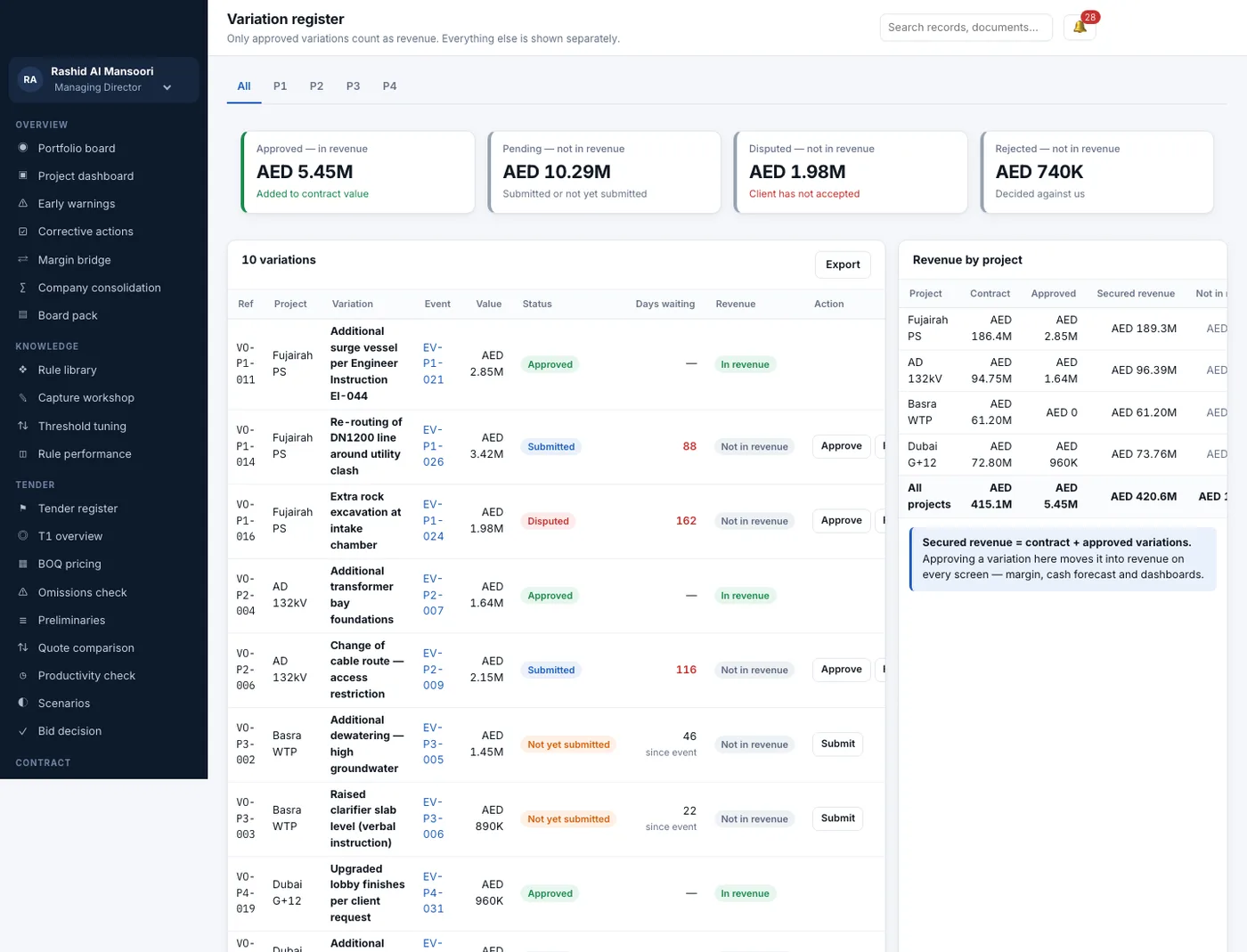
Variations are changes to the contract work. Only approved ones should count as revenue. Pending, disputed and rejected ones are shown apart, with the number of days each has waited. The commercial team sees which ones to chase first.
4. A contract risk register tied to clauses
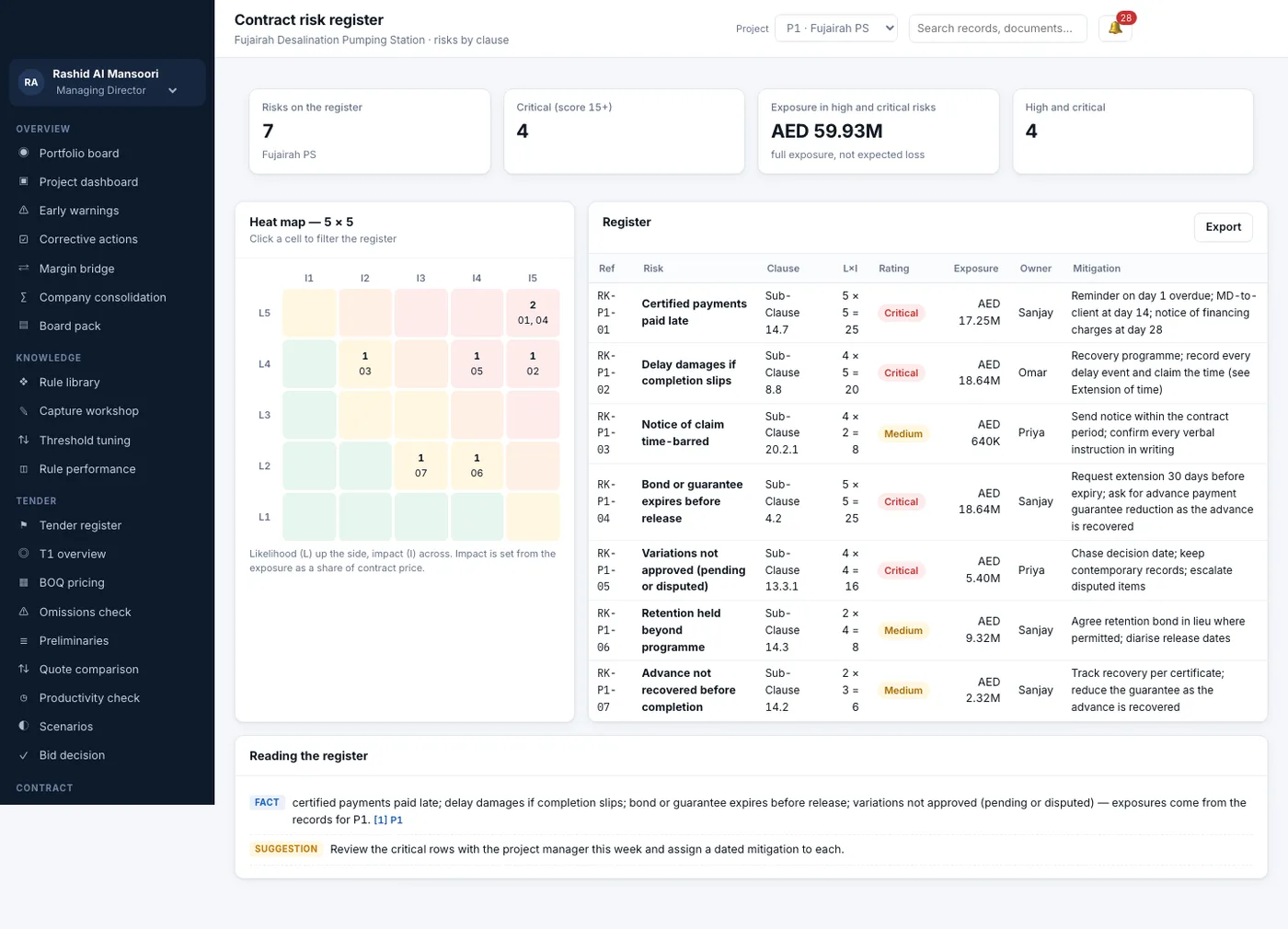
Each risk is linked to a contract clause. It has a likelihood and impact score, the money at stake, an owner and a plan. A 5 by 5 heat map shows where the big risks sit. Clicking a cell filters the list.
5. Payment applications from applied to paid
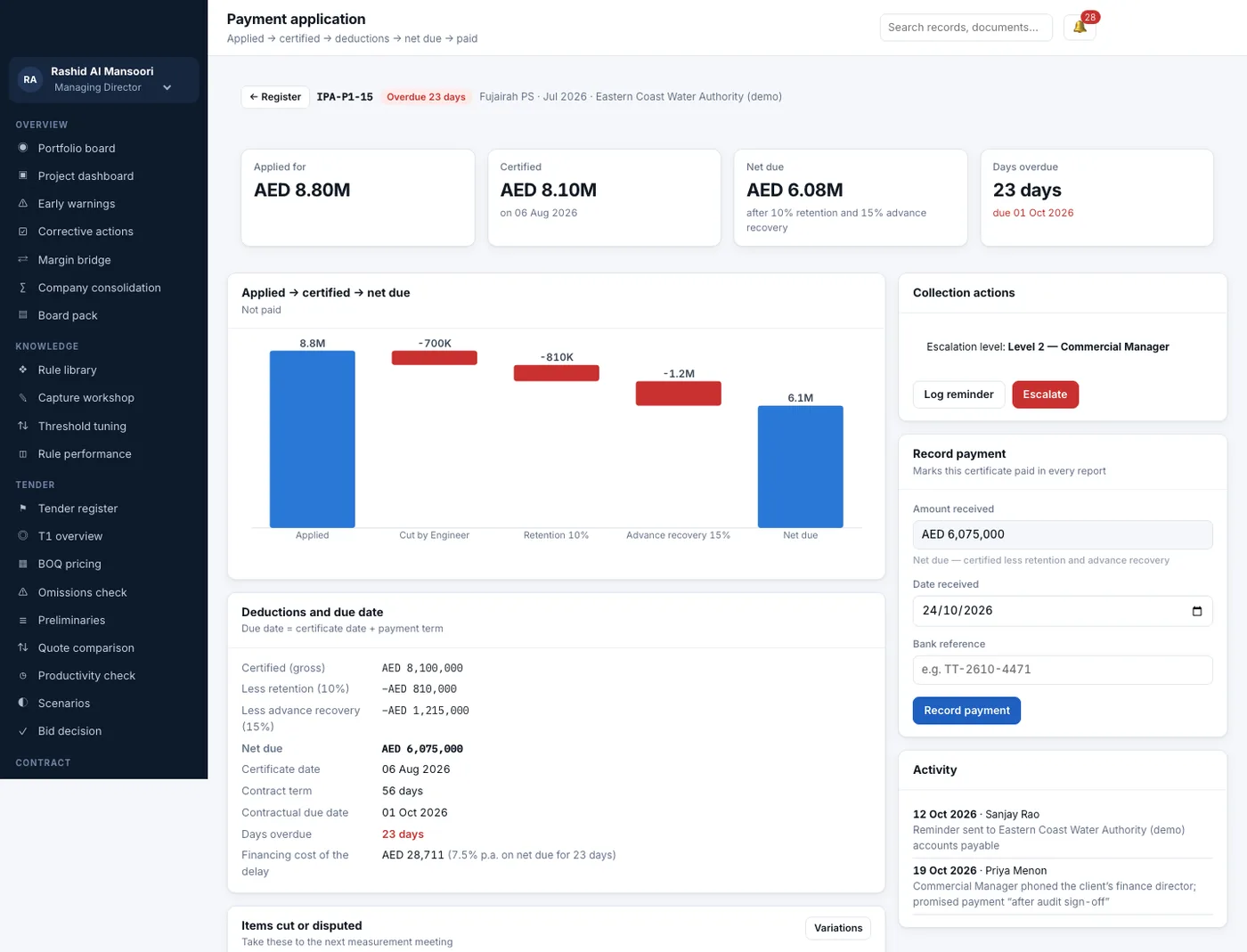
Each running bill is tracked through four steps: applied, certified, net due and paid. The software shows what the client's engineer cut and what was held back. It also shows how many days the payment is late. It also logs every reminder and call, so the chase has a record.
6. Site entries from a phone
Daily output, labour hours, material received and site instructions should be entered on site, not typed up a week later. We build an Android and iPhone app for site engineers that works on weak signal and syncs when the network is back.
Facts every contractor should know
Cost and time overruns are common enough that the Government of India tracks them. The Ministry of Statistics and Programme Implementation monitors large central infrastructure projects and reports their time and cost overruns. Source: MoSPI, Infrastructure and Project Monitoring Division.
Notice periods matter. Under the FIDIC 2017 contract forms, a contractor must notify a claim within 28 days of becoming aware of the event. Late notice can cost the claim. Source: FIDIC, the International Federation of Consulting Engineers. Indian government works follow their own manuals, such as the CPWD Works Manual. These set rules for extra items and deviations. If you mostly build for public bodies, see how we approach software for government work.
Your contract decides the rules. Notice periods, retention, advance recovery and payment terms differ by contract. The software should hold them as settings for each project. Check your contract terms with a lawyer or contracts expert. Check tax on contractor payments on the Income Tax Department portal.
Cost control software vs spreadsheets vs accounting software
| What you need | Spreadsheets | Accounting software | Cost control software |
|---|---|---|---|
| Budget vs cost by cost code | Manual, often late | Partly | Yes, weekly |
| Committed cost from open orders | Hard | No | Yes |
| Forecast cost and margin at completion | Manual | No | Yes |
| Variations by status | Separate sheet | No | Yes |
| Notice deadline warnings | No | No | Yes |
| Certified vs applied vs paid | Manual | Paid only | Yes |
| Risk register linked to clauses | Separate file | No | Yes |
Worked example: a missed notice caught in time
Here is how cost control software can save a claim on a water treatment job. The project and dates are examples.
- Day 1, verbal instruction. The client's engineer asks the site to raise a slab level. The site engineer logs it in the app as an event, with a photo.
- Day 1, clock starts. The software reads the notice period from the project settings. It sets the time-bar date and a warning date 7 days before it.
- Day 21, warning raised. No notice has been sent yet. A critical warning goes to the commercial manager, with the event and the money at stake.
- Day 22, action. The commercial manager sends the notice and attaches the letter and delivery receipt. The warning closes with evidence.
- Day 30, variation logged. The change goes into the variation register as "submitted". It is not counted as revenue yet.
- Day 75, approved. The client approves the variation. It moves into revenue, and the forecast margin updates on every screen.
Our service
How we build your own construction cost control software
Built around your contracts, cost codes and approval chain.
- Understand your jobs. We map your cost codes, contract types, approvals and reports with your commercial team.
- Write the rules. We turn your warning rules into settings: thresholds, owners and due dates per rule.
- Design the screens. You click through the board, cost report and registers first, filled with one of your own projects.
- Build the apps. A web application for office and head office, built on Laravel, plus the site app.
- Bring in your data. We load budgets, orders and bills from your current sheets and accounts, and check totals with your team.
- Launch and support. It runs on your own server or cloud account. We add rules and reports as you grow.
Construction cost control software development cost: what decides it
We do not publish a fixed price, because each contractor works differently. The cost depends on how many modules you need: cost report, variations, risk, payments, cash, tender. It also depends on the number of warning rules and whether you need a site app. Links to your accounts package, and several companies or currencies, add to the work. If you plan to offer it to other contractors later, we build it as multi-company SaaS software from the start.
| Monthly construction software plan | Custom cost control software, built for you | |
|---|---|---|
| Start | Quick to sign up | A few weeks to design and build |
| Cost over time | A fee every month, often per user | One build cost, then optional support |
| Your contract rules and notice periods | Fixed by the vendor | Set by you, per project |
| Your cost codes and approval chain | Mapped to theirs | Yours as they are |
| Data and source code | Stay with the vendor | Yours |
Share your cost codes, a sample cost report and how many projects you run. We will send a written quote after one call.
Whoever builds your cost control software, make sure it can:
- Show budget, cost to date, committed cost and cost to complete per cost code
- Split each order into actual, accrued, prepaid and open, without double counting
- Count only approved variations as revenue
- Warn before notice deadlines, with an owner and a due date
- Track each bill from applied to certified to paid
- Hold contract terms as settings for each project
- Take site entries from a phone, even on weak signal
- Export your data, and hand you the source code
FAQ
What is construction cost control software?
It is software that tracks each project's budget, cost to date, committed cost and cost to complete. It forecasts the final margin and warns you early when a project is drifting.
How is cost control different from cost tracking?
Cost tracking records what you spent. Cost control also forecasts the cost to finish and compares it with secured revenue. It raises warnings so someone acts in time.
How long does it take to build construction cost control software?
It depends on the modules and rules you need. After one call, we share a plan with dates for each part. You see clickable screens with your own project first.
Will I own the software and its source code?
Yes. We build it under your company name and hand over the source code. Your project data stays on your own server or cloud account.
Which platforms does it run on?
The office and head office use a web app in any browser. Site engineers use an Android or iPhone app for daily entries and photos.
Can it connect to our accounting software?
Yes, in most cases. We link to your accounts package to read paid invoices and payments. That keeps the cost report in step with your books.
Is our project and contract data safe?
We set access by role, so each person sees only their projects and screens. Every change is logged with the user and time, and data is backed up on your own server.
Can it handle government contracts and private contracts?
Yes. Each project holds its own contract terms: notice periods, retention, advance recovery and payment days. So a public works job and a private building job can follow different rules.
Can PRS India build cost control software for my construction company?
Yes. We build your own cost control software: a web app for the office and a site app for engineers, around your contracts and cost codes. Book a consultation and we will show you screens for one of your projects.
Related guides
Written by
Babita Kumari · Business Developer
Business Developer at PRS India. Talks with business owners about the app or software they want, and helps them work out the scope, cost and launch steps before any code is written.