Desktop App Development: Build an iPhone Remote for Mac
We build the iPhone app and the Mac desktop helper that let your team control a Mac from a phone, under your brand.
Written from production. Our articles draw on products we run live and the client work behind them, and are revised as the systems they describe evolve.
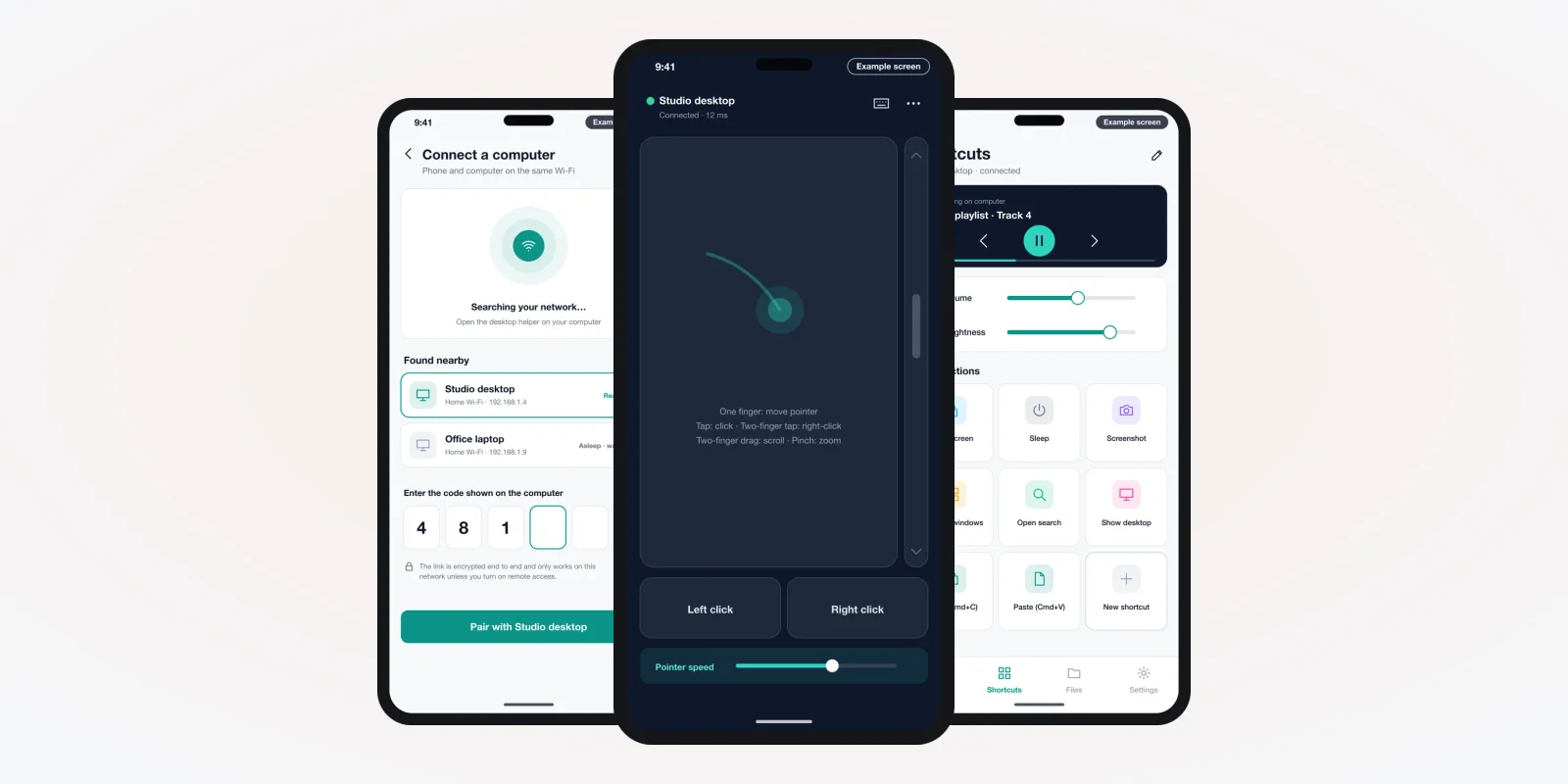
Many teams want to control a Mac from across the room. A trainer runs slides from a phone. A studio plays music on a Mac mini behind the counter. A shop owner wants to wake the shop computer without walking to it. Each case needs two apps that talk to each other: an iPhone app and a small helper on the Mac.
That helper is a real piece of desktop app development. It must ask macOS for permission. Then it moves the mouse, types keys and sends the screen to the phone. This guide explains how the two apps work. It also shows how PRS India can build your own iPhone remote for Mac, under your brand.
Key takeaways
- An iPhone remote for Mac is two apps: a phone app you hold and a desktop helper that runs on the Mac.
- The desktop helper does the hard work. It needs macOS permissions for screen recording and accessibility.
- A helper shared outside the Mac App Store should carry a Developer ID and be notarized by Apple.
- We build in pairing with a short code. We also encrypt the link on your local network.
- A custom build is yours: your name on both apps, your rules for connection access, and the source code.
What an iPhone remote for Mac is
Think of it as a TV remote, but for a computer. You open an app on your iPhone. It finds your Mac on the same Wi-Fi. You pair once with a code. After that, your phone can act as a trackpad or a keyboard. It can show shortcut buttons or the Mac screen.
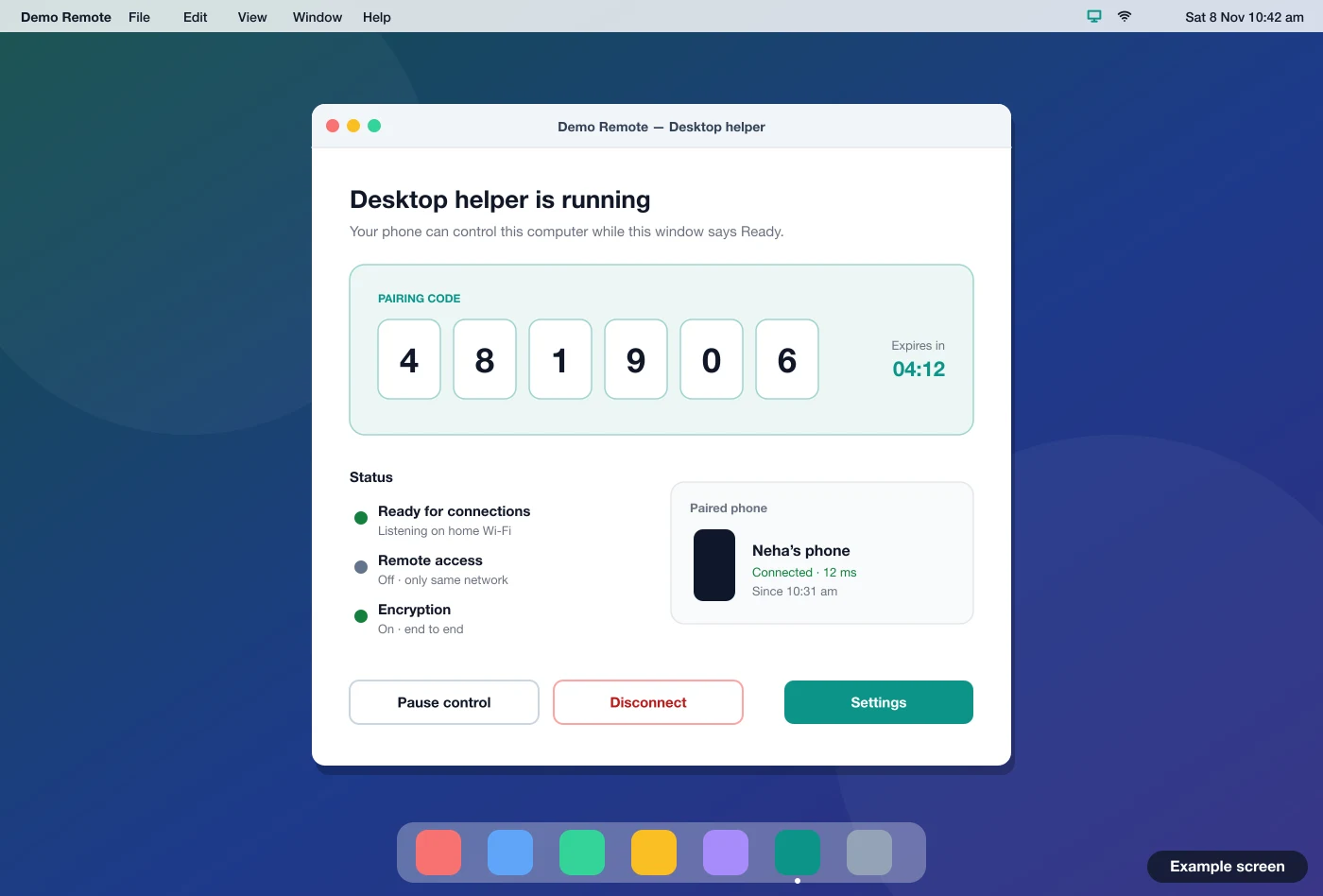
The phone app is only half of it. The Mac needs its own program that listens for the phone and acts on what it sends. We call this the desktop helper. It sits in the menu bar and shows who is connected. It turns each tap on the phone into a click or key press.
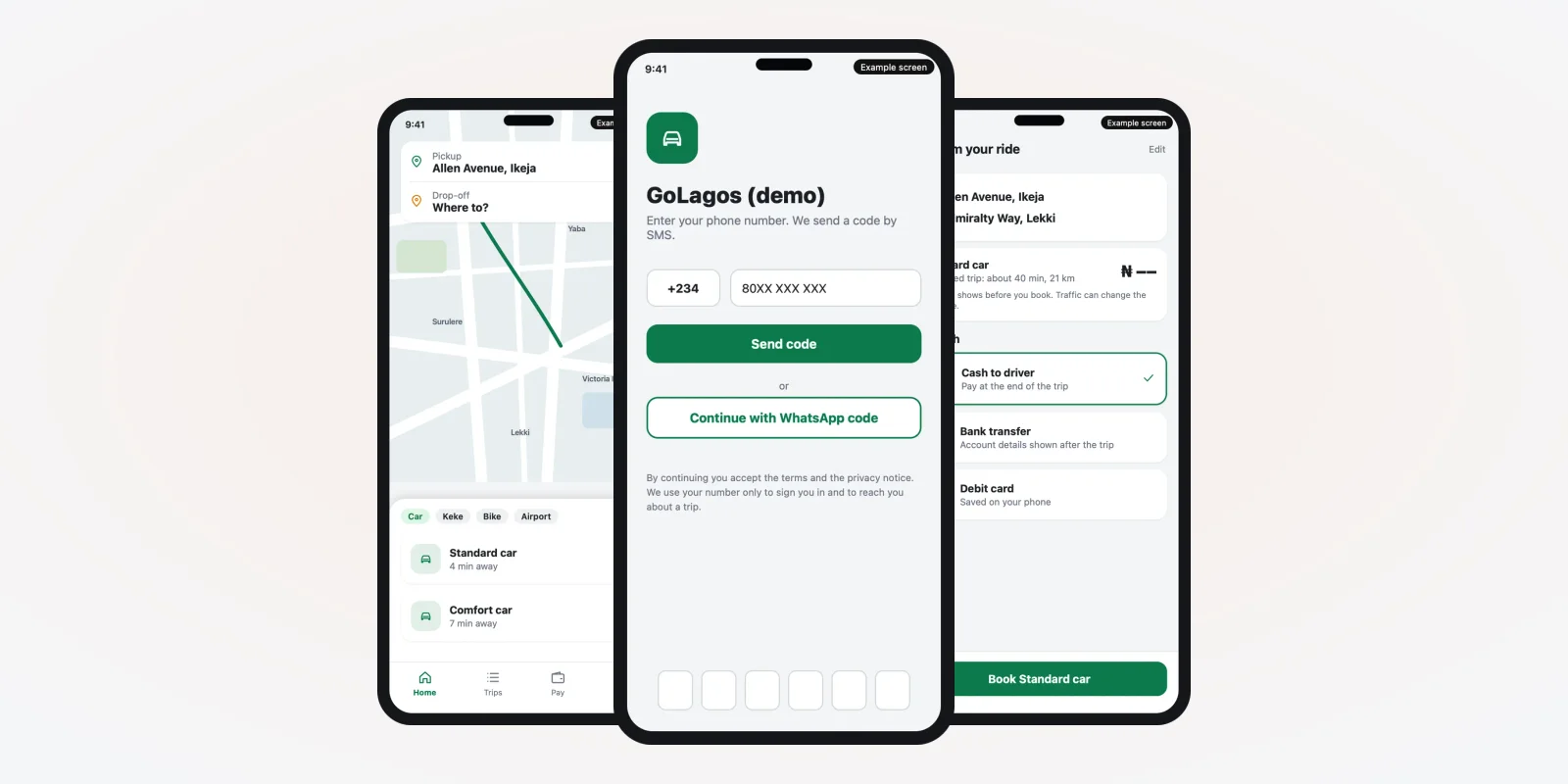
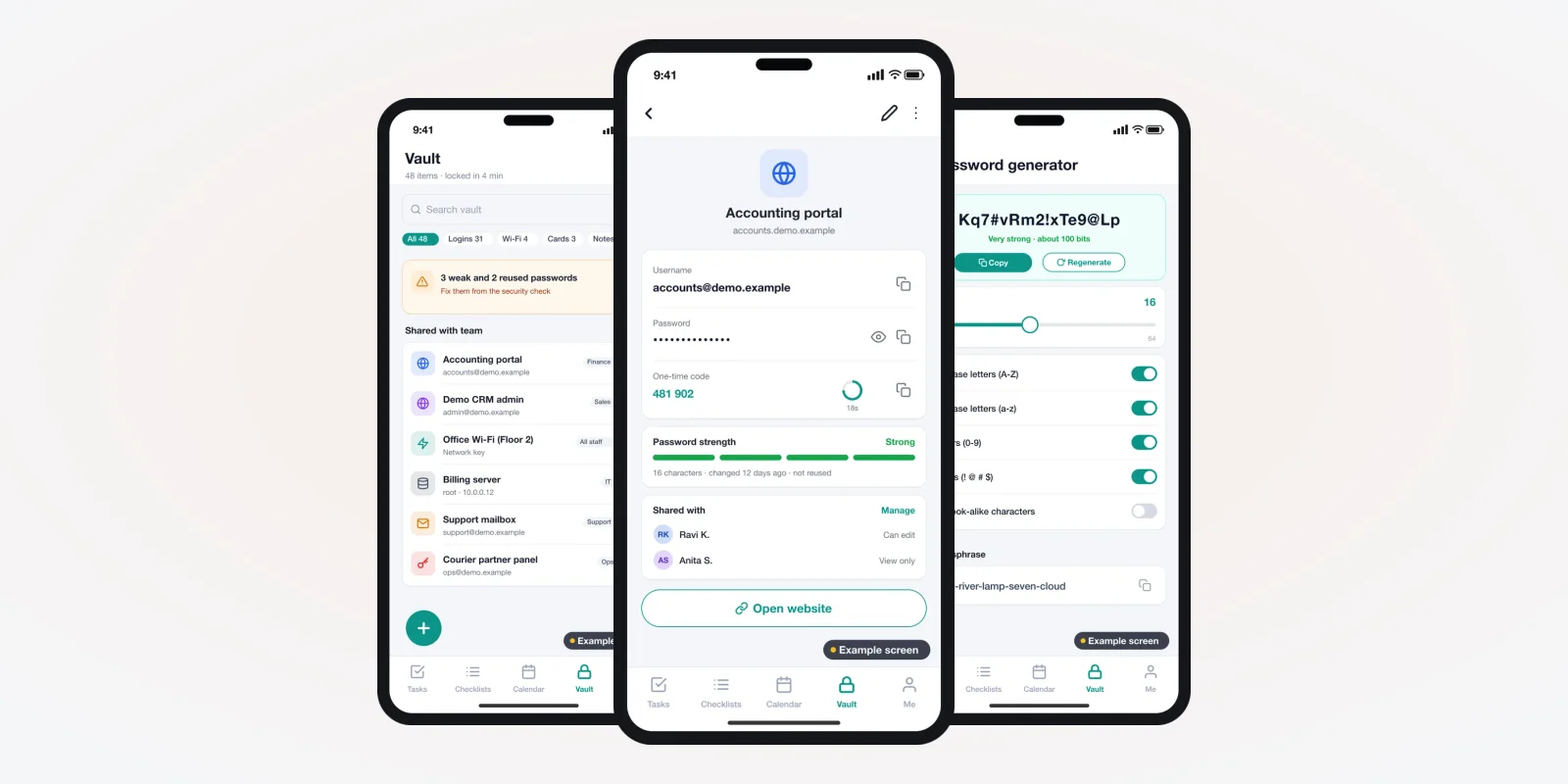
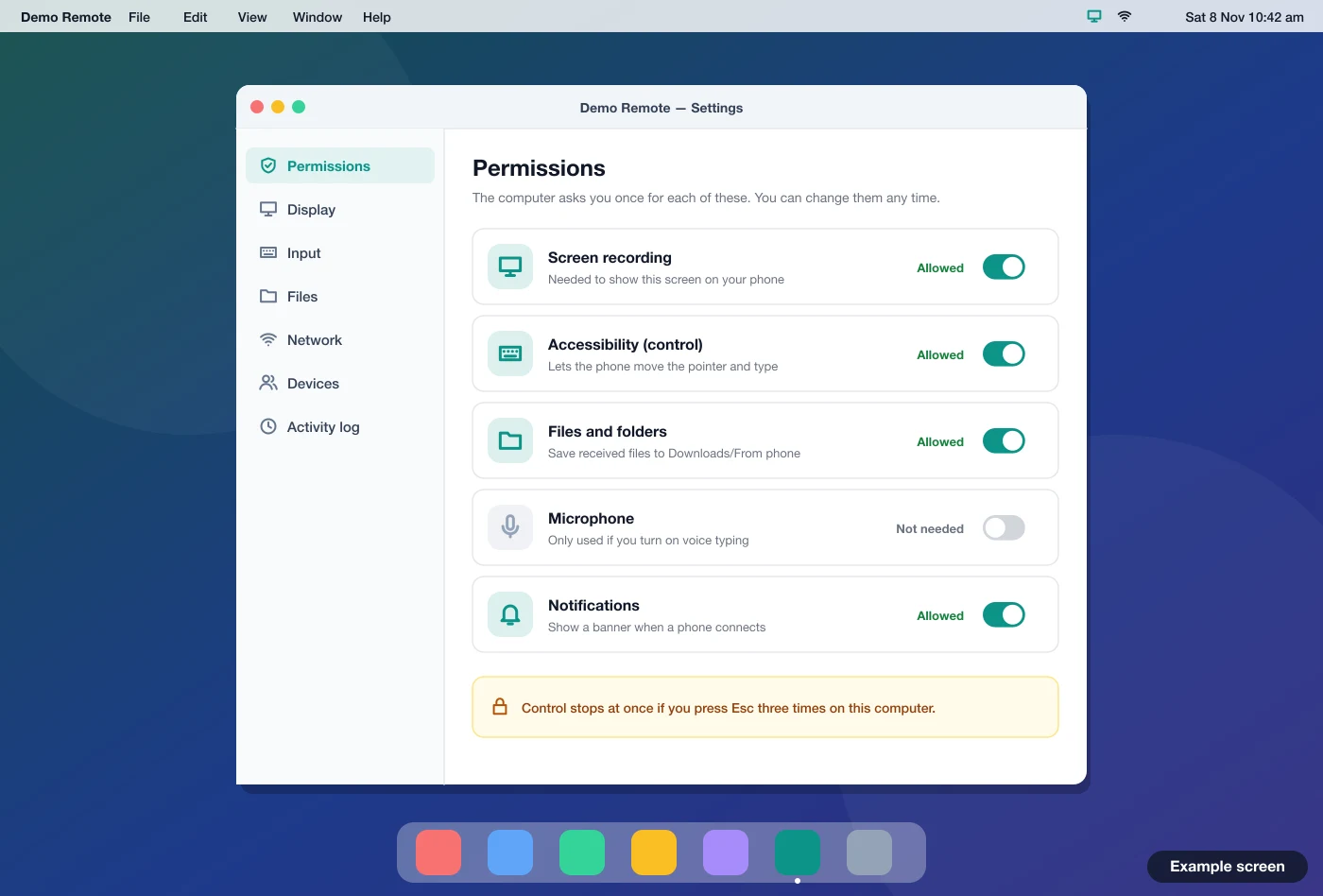
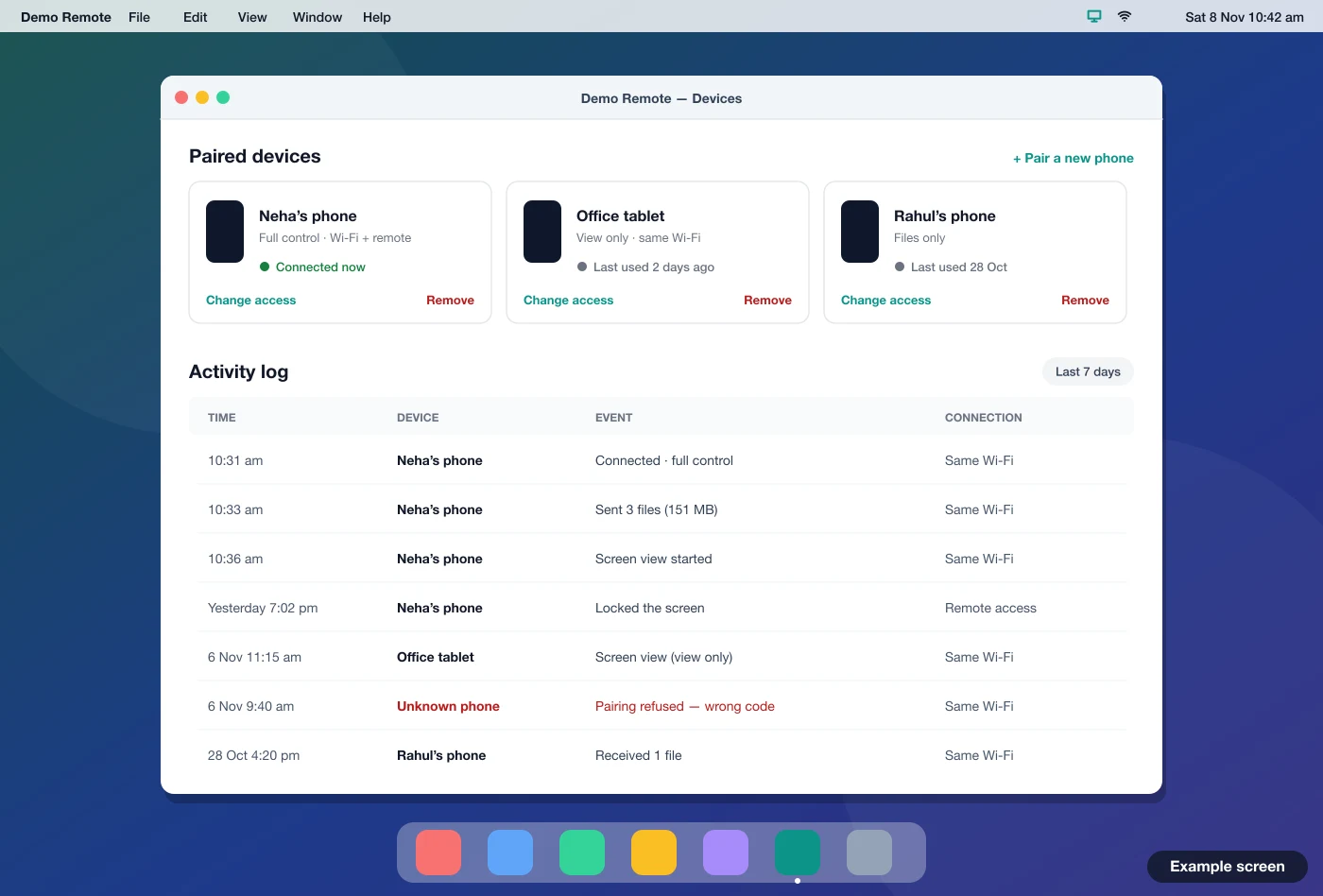
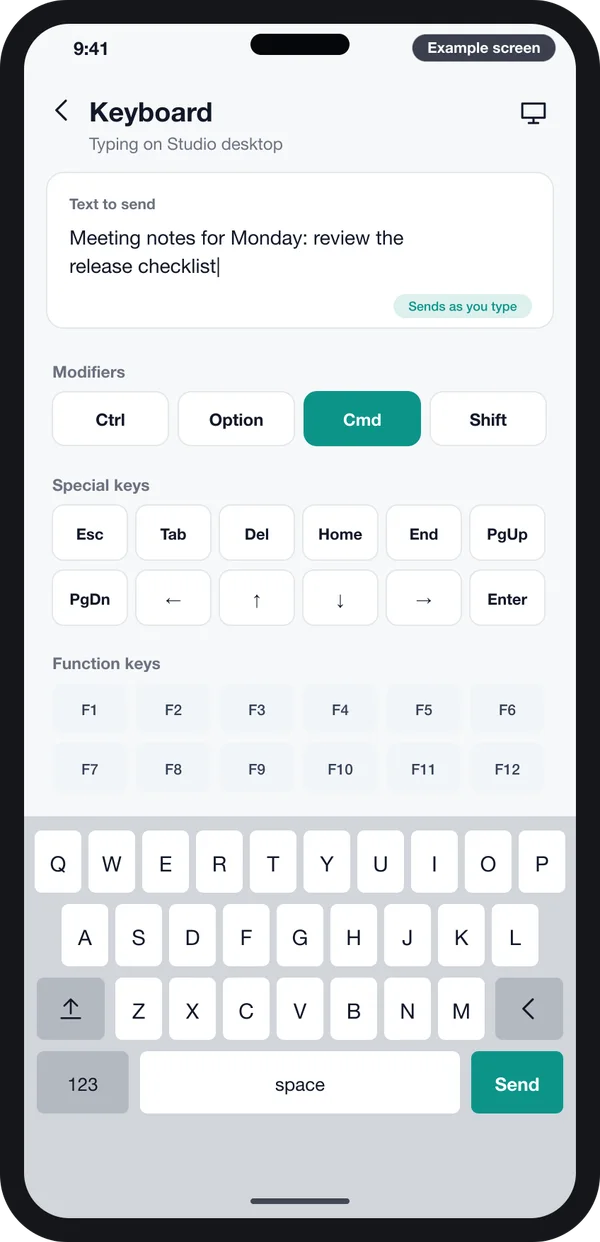
All screens in this guide are example designs we drew for this kind of product. They use demo data. They are not a live app.
The problem
Why ready-made remote apps fall short
Teams that try shop-bought remote apps often hit the same walls.
- Too many buttons. A general remote shows every feature. Your staff need five buttons, not fifty.
- No control over who connects. You cannot decide which phones may pair, or for how long.
- Someone else's name. If you sell a product with a Mac in it, the remote shows another company's brand.
- No link to your own system. The remote cannot press your app's buttons or read your app's status.
- No record of use. There is no log of which phone did what, and when.
- Monthly fees per device. Costs grow with each Mac you add, year after year.
What the desktop helper does on the Mac
Most of the engineering sits on the desktop side. The helper has five jobs. Each one maps to a part of macOS that Apple controls with its own rules.
1. Ask for the right permissions
macOS does not let any app move the mouse or read the screen. The person at the Mac must allow it in System Settings. Apple's docs describe a check that tells an app whether the user has allowed it accessibility access. Without that trust, key presses and clicks from the phone do nothing.
Seeing the screen is a separate permission. Apple's ScreenCaptureKit page says an app must request screen recording permission before it captures anything. Our helper shows a clear settings page, so the user knows which switch does what.
2. Show a pairing code and accept the phone
When the helper starts, it shows a six-digit code. The person with the phone types it in. Only then does the Mac accept commands from that phone. We make the code expire after a short time. You can also limit how many phones may pair.
3. Turn taps into clicks and key presses
The phone sends small messages: move left, click, type "a", press Command and Tab. The helper turns each message into a real event on the Mac. This needs care. A slow or jumpy pointer makes the whole product feel broken.
4. Send the screen to the phone
If you want a live view, the helper captures the screen, shrinks it and streams it to the phone. Lower quality on slow Wi-Fi, sharper on fast Wi-Fi. This part uses the most battery and network, so we only switch it on when needed.
5. Keep a list of phones and a log
The helper remembers each paired phone. It can give one phone full control and another only media keys. It keeps a log of each session, so an office manager can see who used which Mac.
What the iPhone app does
The phone side is where your users spend their time. So each screen should match one job. We usually build four or five modes and let you hide the ones your users do not need. Your phone app can be built for iPhone only, or for iPhone and Android from one code base.
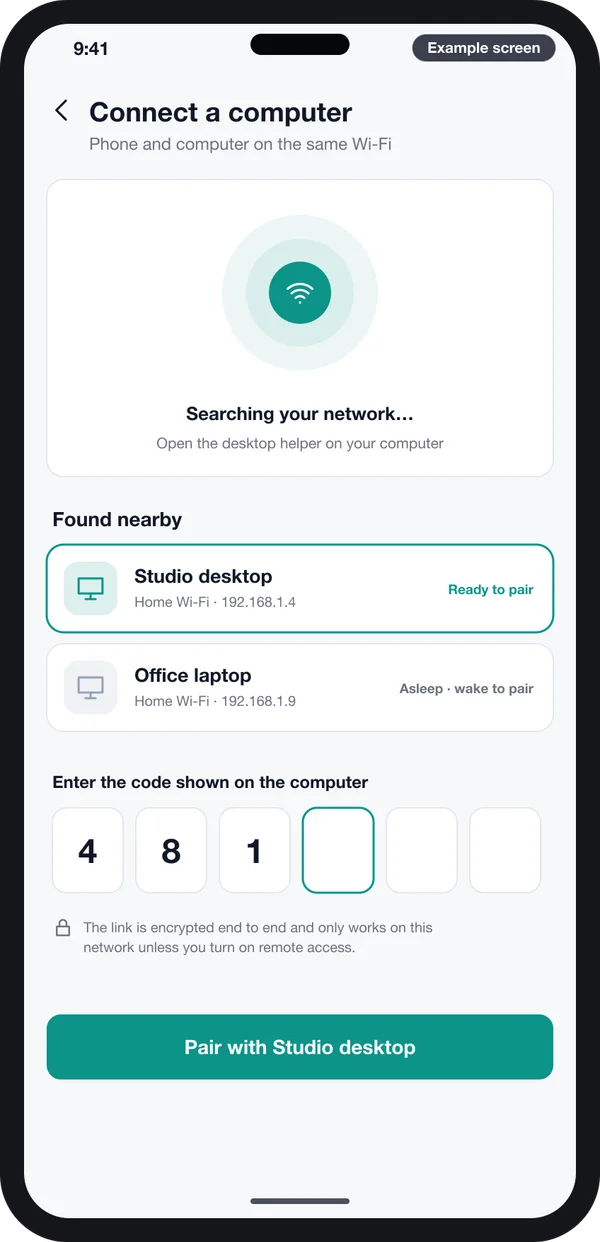
Find and pair
Lists Macs on the same Wi-Fi. The user picks one and types the code shown on the Mac.
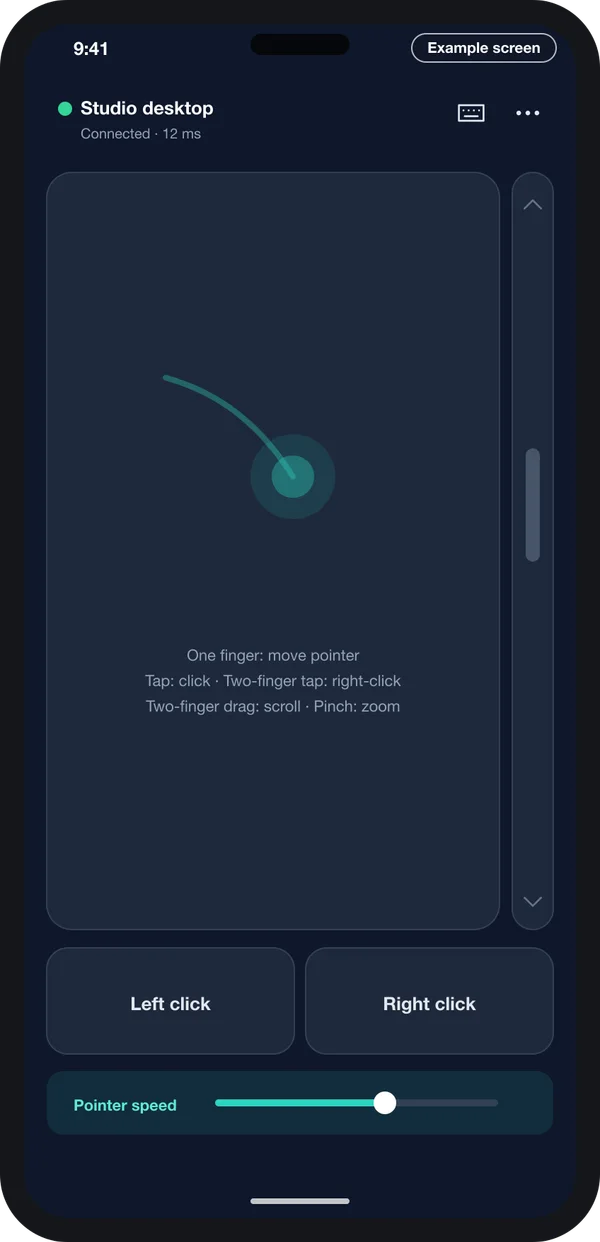
Trackpad
Move the pointer with one finger. Two fingers scroll. Big click buttons sit at the bottom.
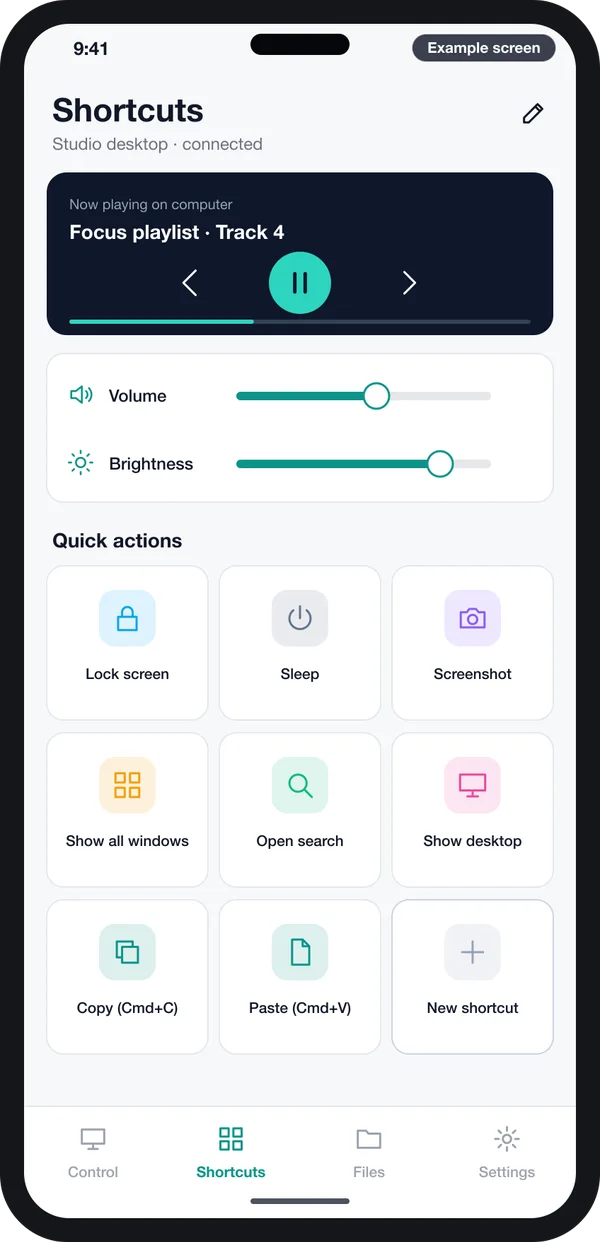
Shortcuts
One tap for play, volume, lock or a custom key combo set by you.
Example designs we drew for an iPhone remote for Mac, with demo data.
Finding the Mac on Wi-Fi uses Apple's local network features. Since iOS 14, the iPhone asks the user before an app talks to devices on the local network. The same check came to the Mac in macOS 15, says Apple's technote on local network privacy. We write the message the user sees, so they know why the app is asking.
About brand names. iPhone, Mac and macOS are trademarks of Apple Inc. PRS India is not part of Apple, and Apple does not back our work. We build apps that follow Apple's public developer rules.
Signing and notarizing the Mac helper
A desktop helper is often shared as a download from your website, not through the Mac App Store. In that case, two Apple steps matter. They decide whether the user sees a calm first-launch message or a scary warning.
- Sign with a Developer ID. Apple's Developer ID page says Gatekeeper checks for this certificate on apps from outside the Mac App Store.
- Send it for notarization. Apple's notary service is an automated scan for harmful content and signing issues. It is not App Review.
- Staple the ticket. If the scan passes, Apple gives a ticket. Gatekeeper uses it when the user first opens the app.
Source: Apple Developer, "Notarizing macOS software before distribution".
The Developer ID belongs to your company's Apple Developer account. We add the signing steps to your build pipeline. Each new version is then signed and notarized the same way. If you also want a Windows helper, we sign that installer for Windows too.
Custom remote vs ready-made remote app
| What you need | Ready-made remote app | Your own custom remote |
|---|---|---|
| Only the buttons your staff use | No, every feature is shown | Yes, you choose the screens |
| Your name and logo on both apps | No | Yes |
| Rules for which phones may pair | Basic or none | Yes, set by you |
| Buttons that run your own software | No | Yes |
| Log of who used which Mac | Rarely | Yes |
| Windows helper with the same phone app | Sometimes, different app | Yes, one phone app for both |
| Source code | Stays with the vendor | Yours |
Worked example: a training room Mac
Here is how a training centre might use its own remote. The names and steps are examples.
- Set up. IT installs the signed helper on the Mac mini behind the projector. They allow screen recording and accessibility once.
- Pair the trainer. The trainer opens the phone app, picks "Room 2 Mac" and types the six-digit code from the screen.
- Start the class. A shortcut tile opens the day's slides. Another tile turns the volume up for a video.
- Answer a question. The trainer uses the trackpad mode to open a web page and the keyboard mode to type a search.
- Share a file. A student photo of a whiteboard goes from the phone to the Mac with the file transfer screen.
- End the day. The trainer taps "Lock". The helper log shows the session, and the pairing ends at the time IT set.
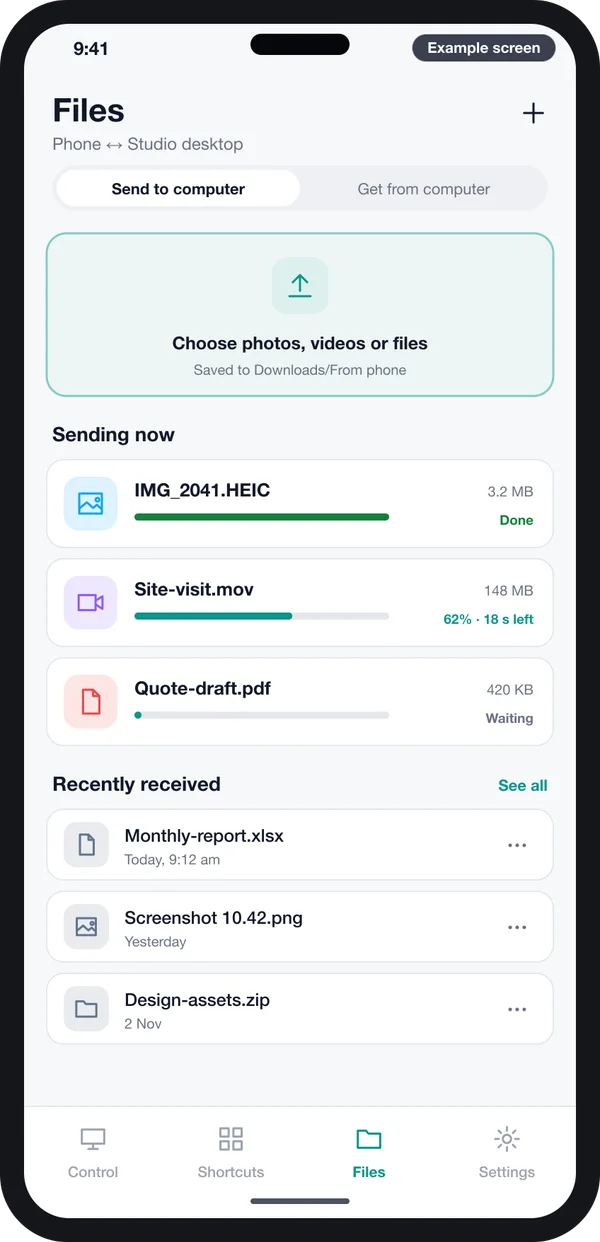
Schools and coaching centres often add this to their other classroom tools. We have built software for education teams. So we can fit the remote to how your rooms are run.
Our service
How we build your own iPhone remote for Mac
Two apps that work as one, built around your use case.
- Understand your use. We list what the phone must control, who will use it and on which Macs or PCs.
- Design the screens. You click through phone and desktop screens like the ones above before we write code.
- Build the desktop helper. A native Mac helper, plus a Windows helper if you need one, with pairing and permissions.
- Build the phone app. iPhone first, Android on request. React Native or Flutter, picked for your team.
- Test on real machines. We test on the Mac models and macOS versions you use, across both busy and quiet Wi-Fi.
- Sign, launch and support. Your Developer ID, your App Store listing, your update server, and ongoing fixes.
Desktop app development cost: what decides it
We do not publish a fixed price, because no two remotes are the same. The cost depends on a few clear things:
- How many modes the phone app has: trackpad, keyboard, shortcuts, screen view, file transfer.
- Whether you need Mac only, or Mac and Windows helpers.
- Whether the remote must work only on the same Wi-Fi, or also over the internet through a relay server.
- Whether many customers will use it as a product, with accounts and a web admin to manage devices.
- Links to your own software, so phone buttons can run actions inside it.
| Monthly remote app plan | Custom remote built for you | |
|---|---|---|
| Start | Install today | A few weeks to design and build |
| Cost over years | Pay per device, every month | One build cost, then optional support |
| Screens and buttons | Fixed by the vendor | Chosen by you |
| Your brand | No | Yes, on phone and desktop |
| Data and source code | Stay with the vendor | Yours |
Do you plan to sell the remote to many users? Then the build looks more like a SaaS product with accounts and plans. Tell us your use case and we will send a written quote after one call.
Whoever builds your iPhone remote for Mac, make sure it can:
- Pair each phone with a short code that expires
- Encrypt every message between the phone and the Mac
- Explain each macOS permission in plain words before asking
- Let you remove a paired phone from the Mac at any time
- Keep a log of sessions on each Mac
- Ship a helper signed with your Developer ID and notarized
- Work on the macOS versions your team uses today
- Hand over the full source code of both apps
FAQ
What is desktop app development?
It means building a program that runs on a computer, such as a Mac or Windows PC. It does not run in a browser. A remote helper is one example. It runs on the Mac and acts on commands from your phone.
Do I need two apps to control a Mac from an iPhone?
Yes. The iPhone app sends the commands. A small desktop helper on the Mac receives them. It moves the mouse, types keys or sends the screen back.
How long does it take to build an iPhone remote for Mac?
It depends on how many modes and computers you need. After one call, we share a plan with dates for each part. You see clickable screens first.
Will I own the apps and the source code?
Yes. Both apps carry your name and logo. We hand over the source code, and the Developer ID and App Store account are yours.
Which macOS permissions does the desktop helper need?
To click and type, it needs accessibility access. To show the screen on the phone, it needs screen recording access. The user turns these on once in System Settings.
Is it safe to let a phone control my Mac?
It should be built to be safe. We build pairing codes and an encrypted link on your local network. We add a list of allowed phones and a session log. You can remove any phone at any time.
Can the same phone app control a Windows PC?
Yes, if we build a Windows helper too. The phone app stays the same. Only the desktop helper changes for each system.
Does the Mac helper need to be on the Mac App Store?
No. Many helpers are shared as a download from your own site. In that case, Apple asks you to sign it with a Developer ID and send it for notarization.
Can PRS India build a remote control app for my Macs?
Yes. Talk to our team about your remote. We build the iPhone app, the Mac helper and a Windows helper if needed. You can also see other products we have built and read our case studies.
Related guides
Written by
Aditi
Building software at PRS India.